
Python específico para robots#
Introducción#
El robot VR Rover incluye un sistema de transmisión, un sensor de distancia y acciones exclusivas del Rover Rescue Playground.
Todos los métodos VEXcode VR estándar están disponibles para su uso en el entorno de pruebas Rover Rescue. A continuación se muestra una lista de todos los métodos específicos del entorno de pruebas disponibles:
Sistema de transmisión: Mueva y supervise el VR Rover.
Comportamiento
drive- Moves the VR Rover forward or reverse forever.drive_for- Moves the VR Rover forward or reverse for a specific distance.turn- Turns the VR Rover left or right forever.turn_for- Turns the VR Rover left or right for a specific number of degrees.turn_to_heading- Turns the VR Rover to face a specific heading from -359 to 359 degrees.drive_to- Drives the VR Rover straight toward the selected object.turn_to- Turns the VR Rover to face the selected object.go_to- Turns and drives the VR Rover to the selected object.stop- Stops the VR Rover’s movement.
Mutadores
set_heading– Changes the VR Rover’s current heading to a new heading.set_timeout- Sets how much time the VR Rover will try to finish a movement.set_drive_velocity– Tells the VR Rover how fast to drive.set_turn_velocity– Tells the VR Rover how fast to turn.
Obtenidos
Consola: Imprime en la consola y monitoriza los valores.
Imprimir
brain.print— Displays text, numbers, or variable values in the Console.brain.new_line— Moves the Console cursor to the start of the next row.brain.set_print_color— Sets the color used for text printed in the Console.brain.clear— Clears all rows from the Console.
Monitor
monitor_variable— Adds one or more predefined variables to the Monitor tab.monitor_sensor— Adds one or more sensor values to the Monitor tab.
Detección: Detecta objetos cercanos con el sensor de distancia del rover.
Distancia
found_object- Returns whether the Distance Sensor detects an object.get_distance- Returns the distance to the nearest detected object.
Acciones: Interactúa con los recursos, los enemigos y los sistemas de IA integrados del vehículo explorador.
Comportamiento
pickup- Picks up minerals.drop- Drops minerals.use- Uses minerals to restore energy.absorb_radiation- Absorbs radiation from an enemy.standby- Puts the VR Rover into standby mode until a battery threshold is reached.
Obtenidos
angle- Returns the direction to an object in degrees.get_distance- Returns the distance to an object in millimeters or inches.location- Returns the X or Y coordinate of an object in millimeters or inches.battery- Returns the VR Rover’s battery level.minerals_stored- Returns how many minerals the VR Rover is carrying.storage_capacity- Returns the VR Rover’s carrying capacity.level- Returns the VR Rover’s current level.exp- Returns the VR Rover’s current experience points.enemy_level- Returns the level of the closest detected enemy.enemy_radiation- Returns the radiation of the closest detected enemy.detects- Returns whether the VR Rover detects minerals or enemies in its detect radius.sees- Returns whether the VR Rover sees an object in its vision range.under_attack- Returns whether the VR Rover is currently under attack.
Llamadas de retorno
on_under_attack- Runs a callback when the VR Rover is attacked.on_level_up- Runs a callback when the VR Rover levels up.
Los ejemplos de esta página utilizan la posición de inicio predeterminada del Playground.
Tren de transmisión#
El sistema de propulsión controla cómo se desplaza y gira el VR Rover. Este sistema puede avanzar o retroceder, girar a la izquierda o a la derecha, cambiar de dirección y dirigirse hacia minerales, enemigos o la base.
Comportamiento#
conducir#
drive moves the VR Rover forward or reverse forever. The VR Rover will continue to move until it is given another action, like turning or stopping.
Usage:
drivetrain.drive(direction)
Parámetros |
Descripción |
|---|---|
|
The direction the VR Rover moves: |
def main():
    drivetrain.drive(FORWARD)
    wait(2, SECONDS)
    drivetrain.stop()

# VR threads — Do not delete
vr_thread(main)
impulso_por#
drive_for moves the VR Rover forward or reverse for a specific distance. The project will wait until the VR Rover is done moving before the next line of code runs.
Usage:
drivetrain.drive_for(direction, distance, units, wait=True)
Parámetros |
Descripción |
|---|---|
|
The direction the VR Rover moves: |
|
The distance the VR Rover drives. This can be an |
|
The distance unit: |
|
Optional. |
def main():
    drivetrain.drive_for(FORWARD, 200, MM)

# VR threads — Do not delete
vr_thread(main)
doblar#
turn turns the VR Rover left or right forever. The VR Rover will continue to turn until it is given another action, like driving or stopping.
Usage:
drivetrain.turn(direction)
Parámetros |
Descripción |
|---|---|
|
The direction the VR Rover turns: |
def main():
    drivetrain.turn(RIGHT)
    wait(2, SECONDS)
    drivetrain.stop()

# VR threads — Do not delete
vr_thread(main)
turno_para#
turn_for turns the VR Rover left or right for a specific number of degrees. The turn is relative to the current position of the VR Rover. The project will wait until the VR Rover is done turning before the next line of code runs.
Usage:
drivetrain.turn_for(direction, angle, units, wait=True)
Parámetros |
Descripción |
|---|---|
|
The direction the VR Rover turns: |
|
The number of degrees the VR Rover turns. This can be an |
|
The rotation unit: |
|
Optional. |
def main():
    drivetrain.turn_for(RIGHT, 90, DEGREES)

# VR threads — Do not delete
vr_thread(main)
girar_hacia_rumbo#
A heading is the direction the VR Rover is facing, measured in degrees. turn_to_heading turns the VR Rover to face a specific heading from -359 to 359 degrees. The VR Rover will turn the shortest direction to reach the target heading.
La orientación inicial del VR Rover es de 0 grados.
El proyecto esperará a que el VR Rover termine de girar antes de ejecutar la siguiente línea de código.
Usage:
drivetrain.turn_to_heading(heading, units, wait=True)
Parámetros |
Descripción |
|---|---|
|
The direction the VR Rover should face, in degrees. This can be an |
|
The heading unit: |
|
Optional. |
def main():
    drivetrain.turn_to_heading(90, DEGREES)

# VR threads — Do not delete
vr_thread(main)
conducir_a#
drive_to drives the VR Rover straight toward the selected object.
Usage:
drivetrain.drive_to(object, wait=True)
Parámetros |
Descripción |
|---|---|
|
Which object the VR Rover will drive to:
|
|
Optional. |
If a mineral or enemy is not detected in the VR Rover’s visual range when drive_to is called, the VR Rover will not drive. The base can always be targeted.
Si el VR Rover detecta varios minerales o varios enemigos, se dirigirá hacia la opción más cercana.
def main():
    drivetrain.drive_to(MINERALS)

# VR threads — Do not delete
vr_thread(main)
girar_a#
turn_to turns the VR Rover to face the selected object.
Usage:
drivetrain.turn_to(object, wait=True)
Parámetros |
Descripción |
|---|---|
|
Which object the VR Rover will turn toward:
|
|
Optional.
|
If a mineral or enemy is not detected in the VR Rover’s visual range when turn_to is called, the VR Rover will not turn. The base can always be targeted.
Si el VR Rover detecta varios minerales o varios enemigos, girará hacia la opción más cercana.
def main():
    drivetrain.turn_to(MINERALS)

# VR threads — Do not delete
vr_thread(main)
ir a#
go_to turns and drives the VR Rover to the selected object.
Usage:
drivetrain.go_to(object, wait=True)
Parámetros |
Descripción |
|---|---|
|
Which object the VR Rover will turn and drive to:
|
|
Optional. |
If a mineral or enemy is not detected in the VR Rover’s visual range when go_to is called, the VR Rover will not drive. The base can always be targeted.
Si el VR Rover detecta varios minerales o varios enemigos, se moverá a la opción más cercana.
def main():
    drivetrain.go_to(MINERALS)

# VR threads — Do not delete
vr_thread(main)
detener#
stop stops the VR Rover’s movement.
Usage:
drivetrain.stop()
Parámetros |
Descripción |
|---|---|
Este método no tiene parámetros. |
def main():
    drivetrain.drive(FORWARD)
    wait(2, SECONDS)
    drivetrain.stop()

# VR threads — Do not delete
vr_thread(main)
Mutadores#
establecer_encabezado#
A heading is the direction the VR Rover is facing, measured in degrees. set_heading changes the VR Rover’s current heading to a new heading value.
Por ejemplo, si el VR Rover ha girado para mirar hacia la derecha, al establecer la orientación a 0 grados, esa posición mirando hacia la derecha se convierte en la nueva posición de 0 grados. Entonces, el VR Rover puede girar a otras posiciones en función de esa nueva orientación.
Usage:
drivetrain.set_heading(heading, units)
Parámetros |
Descripción |
|---|---|
|
The heading value, in degrees, to set for the VR Rover. This can be an |
|
The heading unit: |
def main():
    drivetrain.set_heading(0, DEGREES)

# VR threads — Do not delete
vr_thread(main)
establecer_tiempo_de_espera#
set_timeout sets how much time the VR Rover will try to finish a movement. If the VR Rover cannot finish in that time, it will stop trying and move on to the next line of code. This keeps the VR Rover from getting stuck on a movement.
Usage:
drivetrain.set_timeout(value, units)
Parámetros |
Descripción |
|---|---|
|
The amount of time the VR Rover can try to finish a movement. This can be a positive |
|
The time unit: |
def main():
    drivetrain.set_timeout(1, SECONDS)

# VR threads — Do not delete
vr_thread(main)
establecer_velocidad_de_conducción#
set_drive_velocity tells the VR Rover how fast to drive. A higher percentage makes the VR Rover drive faster and a lower percentage makes the VR Rover drive slower.
Cada proyecto comienza con el VR Rover circulando por defecto al 50% de su velocidad máxima.
Nota: Una mayor velocidad hace que el VR Rover se desplace más rápido, pero puede ser menos preciso. Una menor velocidad hace que el VR Rover se desplace más despacio, pero puede ser más preciso.
Usage:
drivetrain.set_drive_velocity(velocity, units)
Parámetros |
Descripción |
|---|---|
|
The velocity to drive with from 0% to 100%. This can be an |
|
The velocity unit: |
def main():
    drivetrain.set_drive_velocity(50, PERCENT)

# VR threads — Do not delete
vr_thread(main)
establecer_velocidad_de_giro#
set_turn_velocity tells the VR Rover how fast to turn. A higher percentage makes the VR Rover turn faster and a lower percentage makes the VR Rover turn slower.
Cada proyecto comienza con el VR Rover girando al 50% de su velocidad por defecto.
Nota: Una mayor velocidad hace que el VR Rover gire más rápido, pero puede ser menos preciso. Una menor velocidad hace que el VR Rover gire más despacio, pero puede ser más preciso.
Usage:
drivetrain.set_turn_velocity(velocity, units)
Parámetros |
Descripción |
|---|---|
|
The velocity to turn with from 0% to 100%. This can be an |
|
The velocity unit: |
def main():
    drivetrain.set_turn_velocity(50, PERCENT)

# VR threads — Do not delete
vr_thread(main)
Getters#
título#
A heading is the direction the VR Rover is facing, measured in degrees. heading returns the VR Rover’s current heading from 0 to 359.99 degrees.
La orientación inicial del VR Rover es de 0 grados.
Usage:
drivetrain.heading(units)
Parámetros |
Descripción |
|---|---|
|
The heading unit: |
def main():
    brain.screen.print(drivetrain.heading(DEGREES))

# VR threads — Do not delete
vr_thread(main)
está_hecho#
is_done returns whether the VR Rover is finished moving, as a Boolean value. This can be used to control the timing of other behaviors based on the VR Rover’s movement.
True— The VR Rover is finished moving.False— The VR Rover is still moving.
This method works together with Drivetrain methods that have the wait parameter, such as drive_for, turn_for, turn_to_heading, drive_to, turn_to, and go_to.
Usage:
drivetrain.is_done()
Parámetros |
Descripción |
|---|---|
Este método no tiene parámetros. |
def main():
    drivetrain.drive_for(FORWARD, 200, MM, wait=False)
    wait(0.1, SECONDS)
    if drivetrain.is_done():
        brain.screen.print("Drive complete")

# VR threads — Do not delete
vr_thread(main)
se está moviendo#
is_moving returns whether the VR Rover is moving, as a Boolean value. This can be used to control the timing of other behaviors based on the VR Rover’s movement.
True— The VR Rover is moving.False— The VR Rover is not moving.
Usage:
drivetrain.is_moving()
Parámetros |
Descripción |
|---|---|
Este método no tiene parámetros. |
def main():
    drivetrain.drive_for(FORWARD, 200, MM, wait=False)
    wait(0.1, SECONDS)
    if drivetrain.is_moving():
        brain.screen.print("Still moving")

# VR threads — Do not delete
vr_thread(main)
Consola#
La consola muestra texto, números y valores de variables mientras se ejecuta un proyecto. Los métodos de la consola también permiten mover el cursor a una nueva fila, cambiar el color del texto impreso, borrar la consola y agregar variables o valores de sensores a la pestaña Monitor.
Imprimir#
cerebro.imprimir#
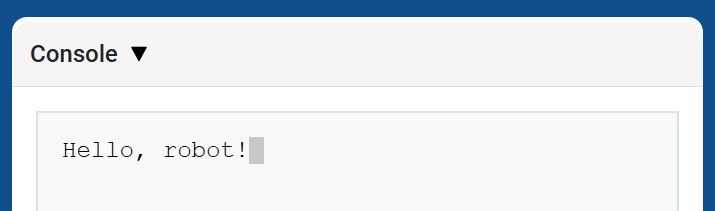
brain.print displays text, numbers, or variable values in the Console using the current cursor position.
Use brain.new_line when you want the next printed value to start on a new row.
Usage:
brain.print(value)
Parámetros |
Descripción |
|---|---|
|
El texto, número o valor de variable que se mostrará en la consola. |
def main():
    # Display a message in the Console
    brain.print("Hello, rover!")

# VR threads — Do not delete
vr_thread(main)
cerebro.nueva_línea#
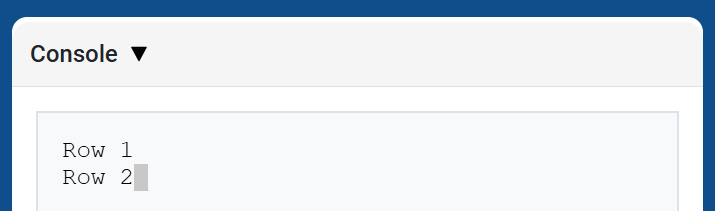
brain.new_line moves the cursor to column 1 on the next row in the Console. The next value printed will appear on that row.
Usage:
brain.new_line()
Parámetros |
Descripción |
|---|---|
Este método no tiene parámetros. |
def main():
    # Print on two rows
    brain.print("Row 1")
    brain.new_line()
    brain.print("Row 2")

# VR threads — Do not delete
vr_thread(main)
cerebro.establecer_color_de_impresión#
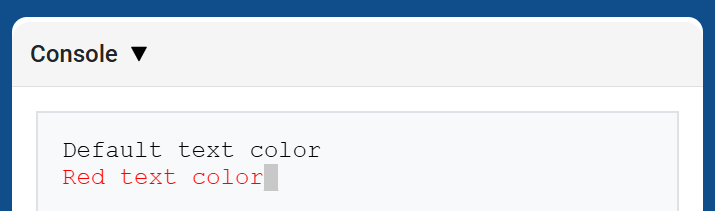
brain.set_print_color sets the color used for text printed in the Console after this method is used. At the start of a project, the Console text color is set to BLACK.
Usage:
brain.set_print_color(color)
Parámetros |
Descripción |
|---|---|
|
The color to use for text printed in the Console:
|
def main():
    # Print text in different colors
    brain.print("Default text color")
    brain.new_line()
    brain.set_print_color(RED)
    brain.print("Red text color")

# VR threads — Do not delete
vr_thread(main)
cerebro.claro#
brain.clear clears all rows from the Console and moves the cursor back to Row 1.
Usage:
brain.clear()
Parámetros |
Descripción |
|---|---|
Este método no tiene parámetros. |
def main():
    # Display text, then clear it after two seconds
    brain.print("This will disappear...")
    wait(2, SECONDS)
    brain.clear()

# VR threads — Do not delete
vr_thread(main)
Monitor#
variable_de_monitor#
monitor_variable adds one or more predefined variables to the Monitor tab in VEXcode. This lets you watch a variable’s value change while a project is running.
Variables must be global for monitor_variable to monitor them successfully. Provide each variable name as a string.
Usage:
monitor_variable(“variable”)
monitor_variable(“variable1”, “variable2”)
Parámetros |
Descripción |
|---|---|
|
El nombre de una variable global predefinida que se desea monitorizar, especificado como una cadena de texto. Para monitorizar más de una variable, separe cada nombre con una coma. |
def main():
    # Monitor the amount of loops
    global loops
    monitor_variable("loops")

    # Drive forward 3 times
    for loops in range(3):
        drivetrain.drive_for(FORWARD, 200, MM)

# VR threads — Do not delete
vr_thread(main)
sensor_de_monitor#
monitor_sensor adds one or more sensor values to the Monitor tab in VEXcode. This lets you watch sensor values change while a project is running.
Proporcione cada valor del sensor como una cadena de texto.
Usage:
monitor_sensor(“sensor”)
monitor_sensor(“sensor1”, “sensor2”)
Parámetros |
Descripción |
|---|---|
|
The sensor value to monitor, given as a string. To monitor more than one sensor value, separate each sensor value with a comma. Supported sensor identifiers include:
|
def main():
    # Monitor the rover's battery
    monitor_sensor("rover.battery")
    drivetrain.drive_for(FORWARD, 200, MM)

# VR threads — Do not delete
vr_thread(main)
Detección#
Distancia#
objeto_encontrado#
found_object returns whether the Distance Sensor detects an object.
Usage:
distance.found_object()
Parámetros |
Descripción |
|---|---|
Este método no tiene parámetros. |
def main():
    if distance.found_object():
        brain.screen.print("Object detected")

# VR threads — Do not delete
vr_thread(main)
obtener_distancia#
get_distance returns the distance to the nearest detected object from the Distance Sensor.
Usage:
distance.get_distance(units)
Parámetros |
Descripción |
|---|---|
|
The distance unit: |
def main():
    brain.screen.print(distance.get_distance(MM))

# VR threads — Do not delete
vr_thread(main)
Comportamiento#
Comportamiento#
levantar#
pickup picks up minerals.
Usage:
rover.pickup(object)
Parámetros |
Descripción |
|---|---|
|
The object the VR Rover can pick up:
|
def main():
    rover.pickup(MINERALS)

# VR threads — Do not delete
vr_thread(main)
gota#
drop drops carried minerals.
Usage:
rover.drop(object)
Parámetros |
Descripción |
|---|---|
|
The object the VR Rover can drop:
|
def main():
    rover.drop(MINERALS)

# VR threads — Do not delete
vr_thread(main)
usar#
use uses minerals to restore energy. Minerals must be on the ground to be used.
Usage:
rover.use(object)
Parámetros |
Descripción |
|---|---|
|
The object the VR Rover can use:
|
def main():
    rover.use(MINERALS)

# VR threads — Do not delete
vr_thread(main)
absorber_radiación#
absorb_radiation absorbs radiation from an enemy.
Usage:
rover.absorb_radiation(object)
Parámetros |
Descripción |
|---|---|
|
The object the VR Rover can absorb radiation from:
|
def main():
    rover.absorb_radiation(ENEMY)

# VR threads — Do not delete
vr_thread(main)
apoyar#
standby puts the VR Rover into standby mode until the specified battery threshold is reached.
Usage:
rover.standby(percent)
Parámetros |
Descripción |
|---|---|
|
The battery threshold that causes the VR Rover to exit standby mode, from |
Si el umbral seleccionado es igual o superior al nivel actual de la batería, el VR Rover no entrará en modo de espera.
def main():
    rover.standby(50)

# VR threads — Do not delete
vr_thread(main)
Getters#
ángulo#
angle returns the direction in degrees to the selected object.
Usage:
rover.angle(object)
Parámetros |
Descripción |
|---|---|
|
The object to report the direction of:
|
Para detectar minerales y enemigos, el objeto debe estar a menos de 1000 mm y dentro del campo de visión del VR Rover. La base siempre puede ser reportada.
def main():
    brain.screen.print(rover.angle(MINERALS))

# VR threads — Do not delete
vr_thread(main)
obtener_distancia#
get_distance returns the distance from the VR Rover to the selected object.
Usage:
rover.get_distance(object, units=MM)
Parámetros |
Descripción |
|---|---|
|
The object to report distance to:
|
|
Optional. The unit used to report the distance: |
Para detectar minerales y enemigos, el objeto debe estar a menos de 1000 mm y dentro del campo de visión del VR Rover. La base siempre puede ser reportada.
For obstacles and hazards, the method reports the visible object distance. If none is in view, it returns 1000 mm or 39.37 inches.
def main():
    brain.screen.print(rover.get_distance(MINERALS, MM))

# VR threads — Do not delete
vr_thread(main)
ubicación#
location returns the X or Y coordinate location of the selected object.
Usage:
rover.location(object, axis, units)
Parámetros |
Descripción |
|---|---|
|
The object to report the location of:
|
|
Which coordinate to return:
|
|
The unit used to report the location: |
Para detectar minerales y enemigos, el objeto debe estar a menos de 1000 mm y dentro del campo de visión del VR Rover. La base siempre puede ser reportada.
def main():
    brain.screen.print(rover.location(MINERALS, X, MM))

# VR threads — Do not delete
vr_thread(main)
batería#
battery returns the current battery level of the VR Rover.
Usage:
rover.battery()
Parámetros |
Descripción |
|---|---|
Este método no tiene parámetros. |
def main():
    brain.screen.print(rover.battery())

# VR threads — Do not delete
vr_thread(main)
minerales_almacenados#
minerals_stored returns the current amount of minerals the VR Rover has in storage.
Usage:
rover.minerals_stored()
Parámetros |
Descripción |
|---|---|
Este método no tiene parámetros. |
def main():
    brain.screen.print(rover.minerals_stored())

# VR threads — Do not delete
vr_thread(main)
capacidad_de_almacenamiento#
storage_capacity returns the carrying capacity of the VR Rover.
Usage:
rover.storage_capacity()
Parámetros |
Descripción |
|---|---|
Este método no tiene parámetros. |
def main():
    brain.screen.print(rover.storage_capacity())

# VR threads — Do not delete
vr_thread(main)
nivel#
level returns the current level of the VR Rover.
Usage:
rover.level()
Parámetros |
Descripción |
|---|---|
Este método no tiene parámetros. |
def main():
    brain.screen.print(rover.level())

# VR threads — Do not delete
vr_thread(main)
exp#
exp returns the number of Experience Points the VR Rover has at the current level.
Usage:
rover.exp()
Parámetros |
Descripción |
|---|---|
Este método no tiene parámetros. |
def main():
    brain.screen.print(rover.exp())

# VR threads — Do not delete
vr_thread(main)
nivel_enemigo#
enemy_level returns the level of the closest enemy detected by the VR Rover.
Usage:
rover.enemy_level()
Parámetros |
Descripción |
|---|---|
Este método no tiene parámetros. |
When no enemy is detected within the rover’s detect radius, this method returns 0.
def main():
    brain.screen.print(rover.enemy_level())

# VR threads — Do not delete
vr_thread(main)
radiación enemiga#
enemy_radiation returns the radiation of the closest enemy detected by the VR Rover.
Usage:
rover.enemy_radiation()
Parámetros |
Descripción |
|---|---|
Este método no tiene parámetros. |
When no enemy is detected within the rover’s detect radius, this method returns 0.
def main():
    brain.screen.print(rover.enemy_radiation())

# VR threads — Do not delete
vr_thread(main)
detecta#
detects returns whether the VR Rover detects minerals or enemies in its detect radius.
Usage:
rover.detects(object)
Parámetros |
Descripción |
|---|---|
|
The object to detect:
|
El radio de detección del VR Rover es de 800 mm.
def main():
    if rover.detects(MINERALS):
        brain.screen.print("Minerals detected")

# VR threads — Do not delete
vr_thread(main)
ve#
sees returns whether the VR Rover sees the selected object in its vision range.
Usage:
rover.sees(object)
Parámetros |
Descripción |
|---|---|
|
The object to see:
|
El VR Rover puede detectar objetos a una distancia de hasta 1000 mm y dentro de su campo de visión de 40 grados.
def main():
    if rover.sees(MINERALS):
        brain.screen.print("Minerals in view")

# VR threads — Do not delete
vr_thread(main)
bajo ataque#
under_attack returns whether the VR Rover is currently under attack from an enemy.
Usage:
rover.under_attack()
Parámetros |
Descripción |
|---|---|
Este método no tiene parámetros. |
def main():
    if rover.under_attack():
        brain.screen.print("The rover is under attack!")

# VR threads — Do not delete
vr_thread(main)
Devoluciones de llamada#
bajo ataque#
on_under_attack registers a callback function that runs when the VR Rover takes damage from an enemy.
Usage:
rover.on_under_attack(callback)
Parámetros |
Descripción |
|---|---|
|
La función que se ejecutará cuando el VR Rover esté bajo ataque. |
def under_attack():
    brain.screen.print("The rover is under attack!")

def main():
    rover.on_under_attack(under_attack)
    wait(0.15, SECONDS)

# VR threads — Do not delete
vr_thread(main)
al subir de nivel#
on_level_up registers a callback function that runs when the VR Rover moves from one level to the next.
Usage:
rover.on_level_up(callback)
Parámetros |
Descripción |
|---|---|
|
La función que se ejecutará cuando el VR Rover suba de nivel. |
def level_up():
    brain.screen.print("The rover leveled up!")

def main():
    rover.on_level_up(level_up)
    wait(0.15, SECONDS)

# VR threads — Do not delete
vr_thread(main)