
机器人专用 Python#
介绍#
VR 漫游车机器人包括驱动系统、距离传感器和 漫游车救援 游乐场特有的动作。
所有标准的 VEXcode VR 方法均可在 Rover Rescue Playground 中使用。以下是所有 Playground 特有的可用方法列表:
动力系统 - 移动和监控虚拟现实漫游车。
操作
drive- Moves the VR Rover forward or reverse forever.drive_for- Moves the VR Rover forward or reverse for a specific distance.turn- Turns the VR Rover left or right forever.turn_for- Turns the VR Rover left or right for a specific number of degrees.turn_to_heading- Turns the VR Rover to face a specific heading from -359 to 359 degrees.drive_to- Drives the VR Rover straight toward the selected object.turn_to- Turns the VR Rover to face the selected object.go_to- Turns and drives the VR Rover to the selected object.stop- Stops the VR Rover’s movement.
变异因子
set_heading– Changes the VR Rover’s current heading to a new heading.set_timeout- Sets how much time the VR Rover will try to finish a movement.set_drive_velocity– Tells the VR Rover how fast to drive.set_turn_velocity– Tells the VR Rover how fast to turn.
Getters
控制台 – 将信息打印到控制台并监控数值。
打印
brain.print— Displays text, numbers, or variable values in the Console.brain.new_line— Moves the Console cursor to the start of the next row.brain.set_print_color— Sets the color used for text printed in the Console.brain.clear— Clears all rows from the Console.
监视器
monitor_variable— Adds one or more predefined variables to the Monitor tab.monitor_sensor— Adds one or more sensor values to the Monitor tab.
感知 - 使用探测车的距离传感器探测附近物体。
距离
found_object- Returns whether the Distance Sensor detects an object.get_distance- Returns the distance to the nearest detected object.
操作 - 与探测车的资源、敌人和内置人工智能系统进行互动。
操作
pickup- Picks up minerals.drop- Drops minerals.use- Uses minerals to restore energy.absorb_radiation- Absorbs radiation from an enemy.standby- Puts the VR Rover into standby mode until a battery threshold is reached.
Getters
angle- Returns the direction to an object in degrees.get_distance- Returns the distance to an object in millimeters or inches.location- Returns the X or Y coordinate of an object in millimeters or inches.battery- Returns the VR Rover’s battery level.minerals_stored- Returns how many minerals the VR Rover is carrying.storage_capacity- Returns the VR Rover’s carrying capacity.level- Returns the VR Rover’s current level.exp- Returns the VR Rover’s current experience points.enemy_level- Returns the level of the closest detected enemy.enemy_radiation- Returns the radiation of the closest detected enemy.detects- Returns whether the VR Rover detects minerals or enemies in its detect radius.sees- Returns whether the VR Rover sees an object in its vision range.under_attack- Returns whether the VR Rover is currently under attack.
回调函数
on_under_attack- Runs a callback when the VR Rover is attacked.on_level_up- Runs a callback when the VR Rover levels up.
本页示例使用 Playground 的默认起始位置。
传动系统#
动力系统控制着虚拟现实漫游车的行驶和转向。动力系统可以前进或后退、左转或右转、转向指定方向,并朝着矿物、敌人或基地方向行驶。
行动#
驾驶#
drive moves the VR Rover forward or reverse forever. The VR Rover will continue to move until it is given another action, like turning or stopping.
Usage:
drivetrain.drive(direction)
参数 |
描述 |
|---|---|
|
The direction the VR Rover moves: |
def main():
    drivetrain.drive(FORWARD)
    wait(2, SECONDS)
    drivetrain.stop()

# VR threads — Do not delete
vr_thread(main)
驱动#
drive_for moves the VR Rover forward or reverse for a specific distance. The project will wait until the VR Rover is done moving before the next line of code runs.
Usage:
drivetrain.drive_for(direction, distance, units, wait=True)
参数 |
描述 |
|---|---|
|
The direction the VR Rover moves: |
|
The distance the VR Rover drives. This can be an |
|
The distance unit: |
|
Optional. |
def main():
    drivetrain.drive_for(FORWARD, 200, MM)

# VR threads — Do not delete
vr_thread(main)
转动#
turn turns the VR Rover left or right forever. The VR Rover will continue to turn until it is given another action, like driving or stopping.
Usage:
drivetrain.turn(direction)
参数 |
描述 |
|---|---|
|
The direction the VR Rover turns: |
def main():
    drivetrain.turn(RIGHT)
    wait(2, SECONDS)
    drivetrain.stop()

# VR threads — Do not delete
vr_thread(main)
转弯#
turn_for turns the VR Rover left or right for a specific number of degrees. The turn is relative to the current position of the VR Rover. The project will wait until the VR Rover is done turning before the next line of code runs.
Usage:
drivetrain.turn_for(direction, angle, units, wait=True)
参数 |
描述 |
|---|---|
|
The direction the VR Rover turns: |
|
The number of degrees the VR Rover turns. This can be an |
|
The rotation unit: |
|
Optional. |
def main():
    drivetrain.turn_for(RIGHT, 90, DEGREES)

# VR threads — Do not delete
vr_thread(main)
转向航向#
A heading is the direction the VR Rover is facing, measured in degrees. turn_to_heading turns the VR Rover to face a specific heading from -359 to 359 degrees. The VR Rover will turn the shortest direction to reach the target heading.
VR探测车的初始航向为0度。
该项目将等待虚拟现实漫游车完成转向后,才会运行下一行代码。
Usage:
drivetrain.turn_to_heading(heading, units, wait=True)
参数 |
描述 |
|---|---|
|
The direction the VR Rover should face, in degrees. This can be an |
|
The heading unit: |
|
Optional. |
def main():
    drivetrain.turn_to_heading(90, DEGREES)

# VR threads — Do not delete
vr_thread(main)
驱动到#
drive_to drives the VR Rover straight toward the selected object.
Usage:
drivetrain.drive_to(object, wait=True)
参数 |
描述 |
|---|---|
|
Which object the VR Rover will drive to:
|
|
Optional. |
If a mineral or enemy is not detected in the VR Rover’s visual range when drive_to is called, the VR Rover will not drive. The base can always be targeted.
如果虚拟现实探测车探测到多个矿物或多个敌人,它将向距离最近的目标驶去。
def main():
    drivetrain.drive_to(MINERALS)

# VR threads — Do not delete
vr_thread(main)
转向#
turn_to turns the VR Rover to face the selected object.
Usage:
drivetrain.turn_to(object, wait=True)
参数 |
描述 |
|---|---|
|
Which object the VR Rover will turn toward:
|
|
Optional.
|
If a mineral or enemy is not detected in the VR Rover’s visual range when turn_to is called, the VR Rover will not turn. The base can always be targeted.
如果虚拟现实探测车探测到多个矿物或多个敌人,它将转向距离最近的目标。
def main():
    drivetrain.turn_to(MINERALS)

# VR threads — Do not delete
vr_thread(main)
跳转到#
go_to turns and drives the VR Rover to the selected object.
Usage:
drivetrain.go_to(object, wait=True)
参数 |
描述 |
|---|---|
|
Which object the VR Rover will turn and drive to:
|
|
Optional. |
If a mineral or enemy is not detected in the VR Rover’s visual range when go_to is called, the VR Rover will not drive. The base can always be targeted.
如果虚拟现实探测车探测到多个矿物或多个敌人,它将移动到距离较近的地点。
def main():
    drivetrain.go_to(MINERALS)

# VR threads — Do not delete
vr_thread(main)
停止#
stop stops the VR Rover’s movement.
Usage:
drivetrain.stop()
参数 |
描述 |
|---|---|
此方法没有参数。 |
def main():
    drivetrain.drive(FORWARD)
    wait(2, SECONDS)
    drivetrain.stop()

# VR threads — Do not delete
vr_thread(main)
变异体#
设置标题#
A heading is the direction the VR Rover is facing, measured in degrees. set_heading changes the VR Rover’s current heading to a new heading value.
例如,如果虚拟现实漫游车已转向右侧,将航向设置为 0 度,则该右侧位置将成为新的 0 度。然后,虚拟现实漫游车可以根据新的航向转向其他位置。
Usage:
drivetrain.set_heading(heading, units)
参数 |
描述 |
|---|---|
|
The heading value, in degrees, to set for the VR Rover. This can be an |
|
The heading unit: |
def main():
    drivetrain.set_heading(0, DEGREES)

# VR threads — Do not delete
vr_thread(main)
设置超时#
set_timeout sets how much time the VR Rover will try to finish a movement. If the VR Rover cannot finish in that time, it will stop trying and move on to the next line of code. This keeps the VR Rover from getting stuck on a movement.
Usage:
drivetrain.set_timeout(value, units)
参数 |
描述 |
|---|---|
|
The amount of time the VR Rover can try to finish a movement. This can be a positive |
|
The time unit: |
def main():
    drivetrain.set_timeout(1, SECONDS)

# VR threads — Do not delete
vr_thread(main)
设置驱动速度#
set_drive_velocity tells the VR Rover how fast to drive. A higher percentage makes the VR Rover drive faster and a lower percentage makes the VR Rover drive slower.
每个项目开始时,VR Rover 默认以 50% 的速度行驶。
**注意:**速度越高,VR探测车行驶速度越快,但精度可能越低;速度越低,VR探测车行驶速度越慢,但精度可能越高。
Usage:
drivetrain.set_drive_velocity(velocity, units)
参数 |
描述 |
|---|---|
|
The velocity to drive with from 0% to 100%. This can be an |
|
The velocity unit: |
def main():
    drivetrain.set_drive_velocity(50, PERCENT)

# VR threads — Do not delete
vr_thread(main)
设置转弯速度#
set_turn_velocity tells the VR Rover how fast to turn. A higher percentage makes the VR Rover turn faster and a lower percentage makes the VR Rover turn slower.
每个项目开始时,VR Rover 默认以 50% 的速度转弯。
**注意:**速度越高,VR漫游车的转弯速度越快,但精度可能越低;速度越低,VR漫游车的转弯速度越慢,但精度可能越高。
Usage:
drivetrain.set_turn_velocity(velocity, units)
参数 |
描述 |
|---|---|
|
The velocity to turn with from 0% to 100%. This can be an |
|
The velocity unit: |
def main():
    drivetrain.set_turn_velocity(50, PERCENT)

# VR threads — Do not delete
vr_thread(main)
获取器#
标题#
A heading is the direction the VR Rover is facing, measured in degrees. heading returns the VR Rover’s current heading from 0 to 359.99 degrees.
VR探测车的初始航向为0度。
Usage:
drivetrain.heading(units)
参数 |
描述 |
|---|---|
|
The heading unit: |
def main():
    brain.screen.print(drivetrain.heading(DEGREES))

# VR threads — Do not delete
vr_thread(main)
已完成#
is_done returns whether the VR Rover is finished moving, as a Boolean value. This can be used to control the timing of other behaviors based on the VR Rover’s movement.
True— The VR Rover is finished moving.False— The VR Rover is still moving.
This method works together with Drivetrain methods that have the wait parameter, such as drive_for, turn_for, turn_to_heading, drive_to, turn_to, and go_to.
Usage:
drivetrain.is_done()
参数 |
描述 |
|---|---|
此方法没有参数。 |
def main():
    drivetrain.drive_for(FORWARD, 200, MM, wait=False)
    wait(0.1, SECONDS)
    if drivetrain.is_done():
        brain.screen.print("Drive complete")

# VR threads — Do not delete
vr_thread(main)
正在移动#
is_moving returns whether the VR Rover is moving, as a Boolean value. This can be used to control the timing of other behaviors based on the VR Rover’s movement.
True— The VR Rover is moving.False— The VR Rover is not moving.
Usage:
drivetrain.is_moving()
参数 |
描述 |
|---|---|
此方法没有参数。 |
def main():
    drivetrain.drive_for(FORWARD, 200, MM, wait=False)
    wait(0.1, SECONDS)
    if drivetrain.is_moving():
        brain.screen.print("Still moving")

# VR threads — Do not delete
vr_thread(main)
安慰#
项目运行时,控制台会显示文本、数字和变量值。控制台方法还可以将光标移动到新行、设置更改颜色后打印的文本颜色、清除控制台以及向“监视器”选项卡添加变量或传感器值。
打印#
大脑打印#
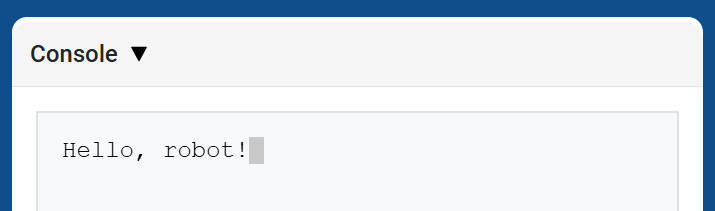
brain.print displays text, numbers, or variable values in the Console using the current cursor position.
Use brain.new_line when you want the next printed value to start on a new row.
Usage:
brain.print(value)
参数 |
描述 |
|---|---|
|
要在控制台中显示的文本、数字或变量值。 |
def main():
    # Display a message in the Console
    brain.print("Hello, rover!")

# VR threads — Do not delete
vr_thread(main)
大脑.新行#
brain.new_line moves the cursor to column 1 on the next row in the Console. The next value printed will appear on that row.
Usage:
brain.new_line()
参数 |
描述 |
|---|---|
此方法没有参数。 |
def main():
    # Print on two rows
    brain.print("Row 1")
    brain.new_line()
    brain.print("Row 2")

# VR threads — Do not delete
vr_thread(main)

brain.set_print_color#
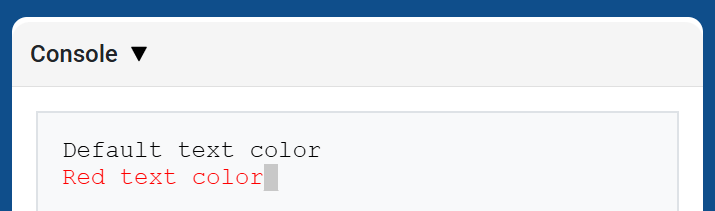
brain.set_print_color sets the color used for text printed in the Console after this method is used. At the start of a project, the Console text color is set to BLACK.
Usage:
brain.set_print_color(color)
参数 |
描述 |
|---|---|
|
The color to use for text printed in the Console:
|
def main():
    # Print text in different colors
    brain.print("Default text color")
    brain.new_line()
    brain.set_print_color(RED)
    brain.print("Red text color")

# VR threads — Do not delete
vr_thread(main)
脑清#
brain.clear clears all rows from the Console and moves the cursor back to Row 1.
Usage:
brain.clear()
参数 |
描述 |
|---|---|
此方法没有参数。 |
def main():
    # Display text, then clear it after two seconds
    brain.print("This will disappear...")
    wait(2, SECONDS)
    brain.clear()

# VR threads — Do not delete
vr_thread(main)
监视器#
监控变量#
monitor_variable adds one or more predefined variables to the Monitor tab in VEXcode. This lets you watch a variable’s value change while a project is running.
Variables must be global for monitor_variable to monitor them successfully. Provide each variable name as a string.
Usage:
monitor_variable(“variable”)
monitor_variable(“variable1”, “variable2”)
参数 |
描述 |
|---|---|
|
要监控的预定义全局变量的名称,以字符串形式给出。要监控多个变量,请用逗号分隔每个变量名。 |
def main():
    # Monitor the amount of loops
    global loops
    monitor_variable("loops")

    # Drive forward 3 times
    for loops in range(3):
        drivetrain.drive_for(FORWARD, 200, MM)

# VR threads — Do not delete
vr_thread(main)
监控传感器#
monitor_sensor adds one or more sensor values to the Monitor tab in VEXcode. This lets you watch sensor values change while a project is running.
请以字符串形式提供每个传感器的值。
Usage:
monitor_sensor(“sensor”)
monitor_sensor(“sensor1”, “sensor2”)
参数 |
描述 |
|---|---|
|
The sensor value to monitor, given as a string. To monitor more than one sensor value, separate each sensor value with a comma. Supported sensor identifiers include:
|
def main():
    # Monitor the rover's battery
    monitor_sensor("rover.battery")
    drivetrain.drive_for(FORWARD, 200, MM)

# VR threads — Do not delete
vr_thread(main)
传感#
距离#
找到的对象#
found_object returns whether the Distance Sensor detects an object.
Usage:
distance.found_object()
参数 |
描述 |
|---|---|
此方法没有参数。 |
def main():
    if distance.found_object():
        brain.screen.print("Object detected")

# VR threads — Do not delete
vr_thread(main)
获取距离#
get_distance returns the distance to the nearest detected object from the Distance Sensor.
Usage:
distance.get_distance(units)
参数 |
描述 |
|---|---|
|
The distance unit: |
def main():
    brain.screen.print(distance.get_distance(MM))

# VR threads — Do not delete
vr_thread(main)
行动#
行动#
捡起#
pickup picks up minerals.
Usage:
rover.pickup(object)
参数 |
描述 |
|---|---|
|
The object the VR Rover can pick up:
|
def main():
    rover.pickup(MINERALS)

# VR threads — Do not delete
vr_thread(main)
降低#
drop drops carried minerals.
Usage:
rover.drop(object)
参数 |
描述 |
|---|---|
|
The object the VR Rover can drop:
|
def main():
    rover.drop(MINERALS)

# VR threads — Do not delete
vr_thread(main)
使用#
use uses minerals to restore energy. Minerals must be on the ground to be used.
Usage:
rover.use(object)
参数 |
描述 |
|---|---|
|
The object the VR Rover can use:
|
def main():
    rover.use(MINERALS)

# VR threads — Do not delete
vr_thread(main)
吸收辐射#
absorb_radiation absorbs radiation from an enemy.
Usage:
rover.absorb_radiation(object)
参数 |
描述 |
|---|---|
|
The object the VR Rover can absorb radiation from:
|
def main():
    rover.absorb_radiation(ENEMY)

# VR threads — Do not delete
vr_thread(main)
支持#
standby puts the VR Rover into standby mode until the specified battery threshold is reached.
Usage:
rover.standby(percent)
参数 |
描述 |
|---|---|
|
The battery threshold that causes the VR Rover to exit standby mode, from |
如果选定的阈值等于或高于当前电池电量,VR Rover 将不会进入待机模式。
def main():
    rover.standby(50)

# VR threads — Do not delete
vr_thread(main)
获取器#
角度#
angle returns the direction in degrees to the selected object.
Usage:
rover.angle(object)
参数 |
描述 |
|---|---|
|
The object to report the direction of:
|
对于矿物和敌方目标,目标必须位于虚拟现实探测车的视野范围内,且距离在 1000 毫米以内。基地位置始终可以报告。
def main():
    brain.screen.print(rover.angle(MINERALS))

# VR threads — Do not delete
vr_thread(main)
获取距离#
get_distance returns the distance from the VR Rover to the selected object.
Usage:
rover.get_distance(object, units=MM)
参数 |
描述 |
|---|---|
|
The object to report distance to:
|
|
Optional. The unit used to report the distance: |
对于矿物和敌方目标,目标必须位于虚拟现实探测车的视野范围内,且距离在 1000 毫米以内。基地位置始终可以报告。
For obstacles and hazards, the method reports the visible object distance. If none is in view, it returns 1000 mm or 39.37 inches.
def main():
    brain.screen.print(rover.get_distance(MINERALS, MM))

# VR threads — Do not delete
vr_thread(main)
地点#
location returns the X or Y coordinate location of the selected object.
Usage:
rover.location(object, axis, units)
参数 |
描述 |
|---|---|
|
The object to report the location of:
|
|
Which coordinate to return:
|
|
The unit used to report the location: |
对于矿物和敌方目标,目标必须位于虚拟现实探测车的视野范围内,且距离在 1000 毫米以内。基地位置始终可以报告。
def main():
    brain.screen.print(rover.location(MINERALS, X, MM))

# VR threads — Do not delete
vr_thread(main)
电池#
battery returns the current battery level of the VR Rover.
Usage:
rover.battery()
参数 |
描述 |
|---|---|
此方法没有参数。 |
def main():
    brain.screen.print(rover.battery())

# VR threads — Do not delete
vr_thread(main)
储存的矿物#
minerals_stored returns the current amount of minerals the VR Rover has in storage.
Usage:
rover.minerals_stored()
参数 |
描述 |
|---|---|
此方法没有参数。 |
def main():
    brain.screen.print(rover.minerals_stored())

# VR threads — Do not delete
vr_thread(main)
存储容量#
storage_capacity returns the carrying capacity of the VR Rover.
Usage:
rover.storage_capacity()
参数 |
描述 |
|---|---|
此方法没有参数。 |
def main():
    brain.screen.print(rover.storage_capacity())

# VR threads — Do not delete
vr_thread(main)
等级#
level returns the current level of the VR Rover.
Usage:
rover.level()
参数 |
描述 |
|---|---|
此方法没有参数。 |
def main():
    brain.screen.print(rover.level())

# VR threads — Do not delete
vr_thread(main)
经验#
exp returns the number of Experience Points the VR Rover has at the current level.
Usage:
rover.exp()
参数 |
描述 |
|---|---|
此方法没有参数。 |
def main():
    brain.screen.print(rover.exp())

# VR threads — Do not delete
vr_thread(main)
敌方等级#
enemy_level returns the level of the closest enemy detected by the VR Rover.
Usage:
rover.enemy_level()
参数 |
描述 |
|---|---|
此方法没有参数。 |
When no enemy is detected within the rover’s detect radius, this method returns 0.
def main():
    brain.screen.print(rover.enemy_level())

# VR threads — Do not delete
vr_thread(main)
敌方辐射#
enemy_radiation returns the radiation of the closest enemy detected by the VR Rover.
Usage:
rover.enemy_radiation()
参数 |
描述 |
|---|---|
此方法没有参数。 |
When no enemy is detected within the rover’s detect radius, this method returns 0.
def main():
    brain.screen.print(rover.enemy_radiation())

# VR threads — Do not delete
vr_thread(main)
检测#
detects returns whether the VR Rover detects minerals or enemies in its detect radius.
Usage:
rover.detects(object)
参数 |
描述 |
|---|---|
|
The object to detect:
|
VR Rover的探测半径为800毫米。
def main():
    if rover.detects(MINERALS):
        brain.screen.print("Minerals detected")

# VR threads — Do not delete
vr_thread(main)
看到#
sees returns whether the VR Rover sees the selected object in its vision range.
Usage:
rover.sees(object)
参数 |
描述 |
|---|---|
|
The object to see:
|
VR Rover 可以看到 1000 毫米范围内、40 度视野内的物体。
def main():
    if rover.sees(MINERALS):
        brain.screen.print("Minerals in view")

# VR threads — Do not delete
vr_thread(main)
遭受攻击#
under_attack returns whether the VR Rover is currently under attack from an enemy.
Usage:
rover.under_attack()
参数 |
描述 |
|---|---|
此方法没有参数。 |
def main():
    if rover.under_attack():
        brain.screen.print("The rover is under attack!")

# VR threads — Do not delete
vr_thread(main)
回调函数#
遭受攻击#
on_under_attack registers a callback function that runs when the VR Rover takes damage from an enemy.
Usage:
rover.on_under_attack(callback)
参数 |
描述 |
|---|---|
|
VR Rover 遭受攻击时要运行的函数。 |
def under_attack():
    brain.screen.print("The rover is under attack!")

def main():
    rover.on_under_attack(under_attack)
    wait(0.15, SECONDS)

# VR threads — Do not delete
vr_thread(main)
升级#
on_level_up registers a callback function that runs when the VR Rover moves from one level to the next.
Usage:
rover.on_level_up(callback)
参数 |
描述 |
|---|---|
|
VR Rover升级时要运行的函数。 |
def level_up():
    brain.screen.print("The rover leveled up!")

def main():
    rover.on_level_up(level_up)
    wait(0.15, SECONDS)

# VR threads — Do not delete
vr_thread(main)