
慣性#
導入#
VEX AIMコーディングロボットには慣性センサーが内蔵されています。このセンサーは、ロボットの動きや旋回状態を測定します。
慣性センサーは、この目的のために2つの部分を使用します。ジャイロスコープは、ロボットの進行方向、回転、ヨー、ロール、ピッチ、旋回速度などの回転を測定します。加速度計は、加速、減速、衝突時の急停止など、動きの変化を測定します。
慣性計測方式は、旋回位置の追跡、加速度の測定、衝突の検出、方位角や回転角の値のリセット、センサーの校正などに使用できます。
以下にすべてのメソッドの一覧を示します。
方向設定 — ロボットの向き、旋回、傾斜角度を取得およびリセットします。
get_rotation— ロボットがどれだけ回転したかを返します。get_heading— ロボットが向いている方向を0度から359.99度の範囲で返します。get_yaw— ロボットのヨー角を返します。get_roll— ロボットのロール角度を返します。get_pitch— ロボットのピッチ角を返します。reset_rotation— ロボットの現在の回転を0度にリセットします。reset_heading— ロボットの現在の進行方向を0度にリセットします。set_heading— ロボットの現在の進行方向を新しい進行方向の値に設定します。
衝突検知 ― 衝突を検出します。
crashed— クラッシュが検出されたときに実行される関数を登録します。set_crash_sensitivity— 衝突検出の衝撃に対する感度を設定します。
動作 ― 加速度と旋回速度を測定する。
get_acceleration— 選択した軸上でロボットがどれだけ速く加速または減速しているかを返します。get_turn_rate— ロボットが選択した軸を中心に回転する速度を返します。
キャリブレーション — センサーのキャリブレーションを管理します。
calibrate— 慣性センサーを校正します。is_calibrating— 慣性センサーが現在キャリブレーション中かどうかを返します。
オリエンテーション#
get_rotation#
回転とは、ロボットがどれだけ回転したかを示す度数です。方位とは異なり、回転は359.99度を超えて増加したり、0度未満に減少したりします。プロジェクトの開始時には、回転の値は0度に設定されます。get_rotation ロボットの現在の回転を浮動小数点数として返します。
右に回すと回転角度が大きくなり、左に回すと回転角度が小さくなります。例えば、右に2回転すると720度回転します。0度から左に1回転すると-360度回転します。
Usage:
robot.inertial.get_rotation()
パラメータ |
説明 |
|---|---|
このメソッドにはパラメータがありません。 |
# Display the robot's rotation as it rotates
while True:
    robot.screen.clear_screen()
    robot.screen.set_cursor(1, 1)
    robot.screen.print(f"Rotation: {robot.inertial.get_rotation():.2f}")
    wait(50, MSEC)
get_heading#
方位とは、ロボットが向いている方向のことで、0度から359.99度までの角度で表されます。get_heading get_heading は、ロボットの現在の方位を浮動小数点数として返します。
開始時の方位は0度です。ロボットが359.99度を超えて旋回すると、方位は0度に戻ります。
Usage:
robot.inertial.get_heading()
パラメータ |
説明 |
|---|---|
このメソッドにはパラメータがありません。 |
# Turn right until the heading reaches 90 degrees
robot.turn(RIGHT)
while robot.inertial.get_heading() < 90:
    wait(50, MSEC)
robot.stop_all_movement()
# Display the robot's heading as it is rotated by hand
while True:
    robot.screen.clear_screen()
    robot.screen.set_cursor(1, 1)
    robot.screen.print(f"Heading: {robot.inertial.get_heading()} degrees")
    wait(50, MSEC)
get_yaw#
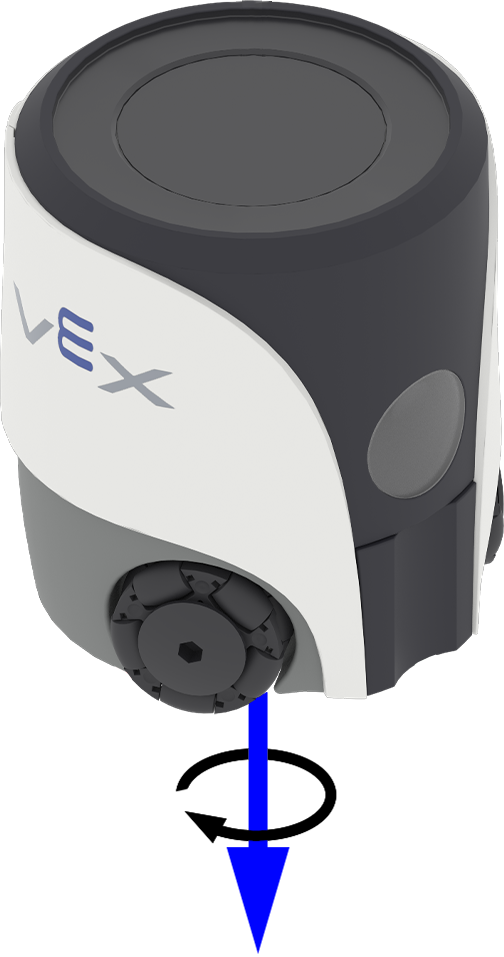
ヨーは、ロボットが垂直軸を中心に左右に回転する方向を表します。 get_yaw は、ロボットのヨー角を -180.00 度から 180.00 度の範囲で float 型として返します。
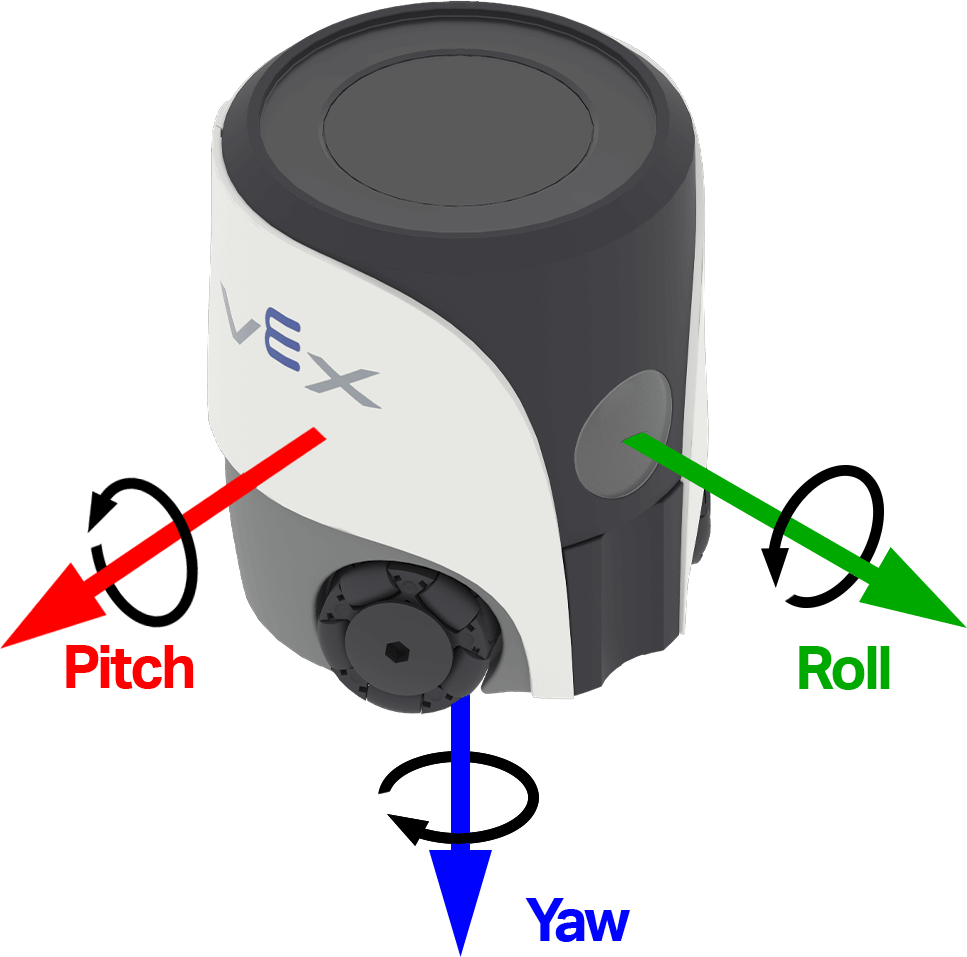
下の図は、矢印を用いてヨー角の正の回転方向を示しています。
Usage:
robot.inertial.get_yaw()
パラメータ |
説明 |
|---|---|
このメソッドにはパラメータがありません。 |
# Display the robot's yaw angle as it is rotated by hand
while True:
    robot.screen.clear_screen()
    robot.screen.set_cursor(1, 1)
    robot.screen.print(robot.inertial.get_yaw())
    wait(50, MSEC)
get_roll#
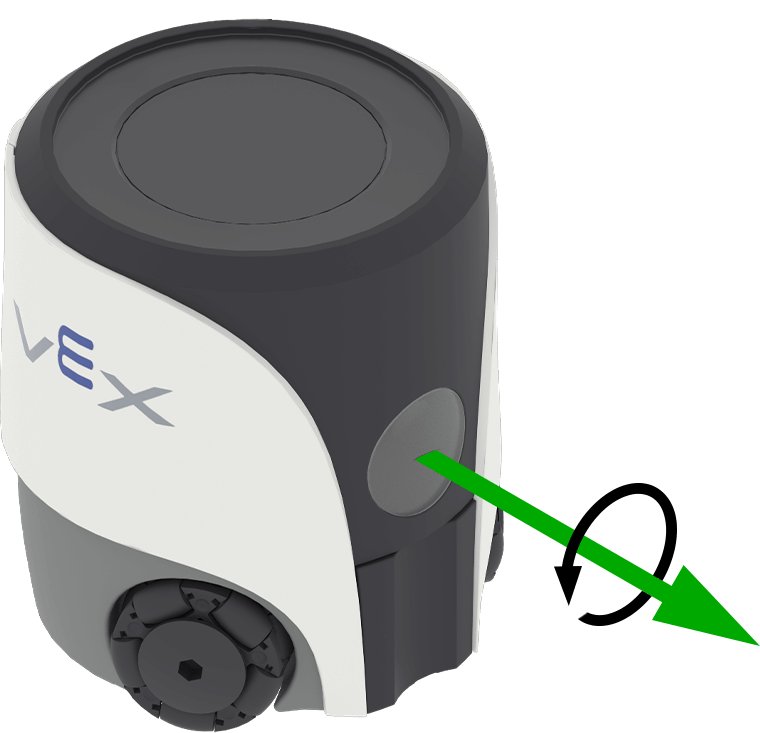
Roll は、ロボットが左右に傾くことを表します。0 get_roll は ロボットのロール角度を -180.00 ~ 180.00 度の範囲で float 型として返します。
下の図は、矢印を用いてロールの正の回転方向を示しています。
Usage:
robot.inertial.get_roll()
パラメータ |
説明 |
|---|---|
このメソッドにはパラメータがありません。 |
# Display the robot's roll angle as it is tilted by hand
while True:
    robot.screen.clear_screen()
    robot.screen.set_cursor(1, 1)
    robot.screen.print(robot.inertial.get_roll())
    wait(50, MSEC)
get_pitch#
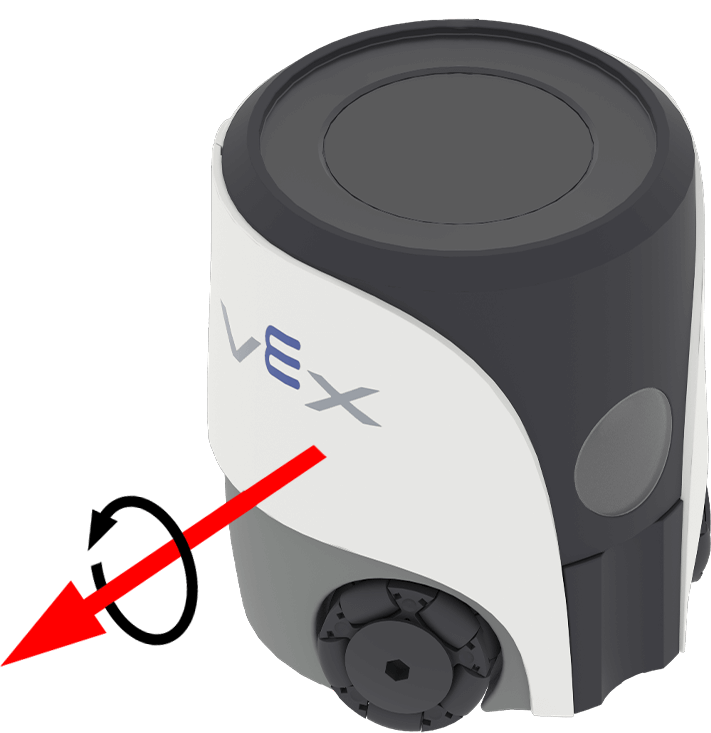
ピッチは、ロボットが前後に傾いている状態を表します。0 get_pitch は ロボットのピッチ角を -90.00 ~ 90.00 度の範囲で float 型として返します。
下の図は、矢印を用いてピッチの正の回転方向を示しています。
Usage:
robot.inertial.get_pitch()
パラメータ |
説明 |
|---|---|
このメソッドにはパラメータがありません。 |
# Display the robot's pitch angle as it is tilted by hand
while True:
    robot.screen.clear_screen()
    robot.screen.set_cursor(1, 1)
    robot.screen.print(robot.inertial.get_pitch())
    wait(50, MSEC)
reset_rotation#
reset_rotation は、ロボットの現在の回転を 0 度にリセットします。
この方法を用いると、ロボットは新しい0度の回転値から今後の旋回を追跡する。
Usage:
robot.inertial.reset_rotation()
パラメータ |
説明 |
|---|---|
このメソッドにはパラメータがありません。 |
# Reset the robot's rotation if it exceeds 180 degrees
while True:
    if robot.inertial.get_rotation() >= 180:
        robot.inertial.reset_rotation()

    robot.screen.clear_screen()
    robot.screen.set_cursor(1, 1)
    robot.screen.print(f"Rotation: {robot.inertial.get_rotation():.2f}")

    wait(50, MSEC)
reset_heading#
reset_heading は、ロボットの現在の進行方向を 0 度にリセットします。
この方法を用いると、ロボットの現在の方向が新たな0度の進行方向となる。
Usage:
robot.inertial.reset_heading()
パラメータ |
説明 |
|---|---|
このメソッドにはパラメータがありません。 |
# Turn the robot around using a new 90 degree heading
robot.turn_to(90)
wait(1, SECONDS)
robot.inertial.reset_heading()
robot.turn_to(90)
set_heading#
方位とは、ロボットが向いている方向のことで、0度から359.99度までの角度で表されます set_heading は、ロボットの現在の方位を新しい方位値に変更します。
例えば、ロボットが右を向いた場合、方位を0度に設定すると、その右向きの位置が新たな0度になります。そして、ロボットはその新たな方向に基づいて他の方位を追跡することができます。
Usage:
robot.inertial.set_heading(heading)
パラメータ |
説明 |
|---|---|
|
ロボットに設定する方位角の値(度)。0~359.99の範囲の値を指定できます。 |
# Turn the robot to 90 degrees using its new heading
robot.inertial.set_heading(45)
robot.turn_to(90)
クラッシュ#
crashed#
crashed ロボットが突然の衝撃や衝突を検出したときに呼び出される関数を登録します。
使用法:
robot.inertial.crashed(callback, arg)
パラメータ |
説明 |
|---|---|
|
衝突が検出されたときに実行されるように事前に定義された 関数。 |
|
オプション。コールバック関数に渡す引数を含むタプル。詳細については、パラメーター付き関数の使用を参照してください。 |
# Define what happens when a crash occurs
def crash_detected():
    # Stop all movement and indicate a crash occurred
    robot.screen.print("Crash detected")
    robot.stop_all_movement()

robot.inertial.crashed(crash_detected)

# Drive forward until crash
robot.move_at(0, 100)
set_crash_sensitivity#
set_crash_sensitivity は、ロボットが衝突を検知するために必要な急加速の度合いを調整します。
Usage:
robot.inertial.set_crash_sensitivity(sensitivity)
パラメータ |
説明 |
|---|---|
|
The crash sensitivity:
|
def crashed_callback():
    robot.stop_all_movement()
    robot.sound.play(CRASH)

# system event handlers
robot.inertial.crashed(crashed_callback)
# add 15ms delay to make sure events are registered correctly.
wait(15, MSEC)

# Detect a crash at a slow velocity.
robot.set_move_velocity(35, PERCENT)
robot.inertial.set_crash_sensitivity(HIGH)
robot.move_at(0)
モーション#
get_acceleration#
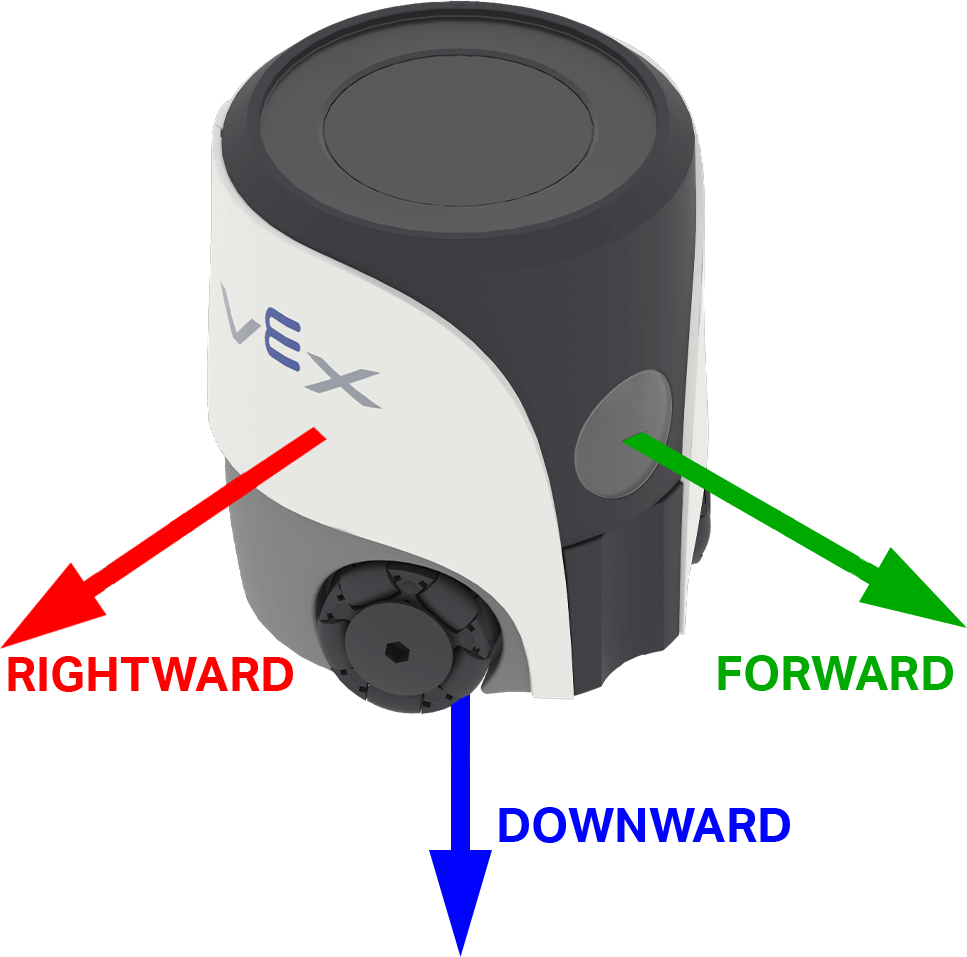
加速度とは、ロボットが加速または減速する速さのことです。 get_acceleration 、選択した軸におけるロボットの加速度を -4.00 G から 4.00 G の範囲で float 型として返します。
G は加速度を測定するために使用される単位です。1Gは、静止しているときに重力によって感じる加速度に相当します。
The value can be positive or negative depending on the direction of acceleration on the selected axis. On AIM, the axis options are named for directions on the robot: FORWARD, RIGHTWARD, and DOWNWARD.
使用法:
robot.inertial.get_acceleration(type)
パラメータ |
説明 |
|---|---|
|
加速度を測定する軸:
|
# Display the acceleration as the robot begins to move
robot.screen.set_cursor(4,1)
sitting_accel = robot.inertial.get_acceleration(RIGHTWARD)
robot.screen.print(f"Resting: {sitting_accel:.2f}")
wait(0.5, SECONDS)
robot.screen.next_row()

robot.move_at(90, 100)
wait(0.1, SECONDS)

robot.screen.print(f"Startup: {robot.inertial.get_acceleration(RIGHTWARD):.2f}")
get_turn_rate#
旋回速度は、ロボットが回転する速さを表します。get_turn_rate get_turn_rate は、ロボットの旋回速度を1秒あたりの度数 \(dps\) で浮動小数点数として返します。範囲は -1000.00 から 1000.00 dps です。
値は、ロボットが選択された軸を中心に回転する方向に応じて、正または負の値をとります。下の図では、矢印を使用して、ロール、ピッチ、ヨーの正の回転方向を示しています。
Usage:
robot.inertial.get_turn_rate(axis)
パラメータ |
説明 |
|---|---|
|
Which orientation to return:
|
# Display the gyro rate as the robot is rotated by hand
while True:
    robot.screen.clear_screen()
    robot.screen.set_cursor(1, 1)
    robot.screen.print(robot.inertial.get_turn_rate(YAW))
    wait(50, MSEC)
較正#
キャリブレーションは、慣性センサーが旋回を正確に測定できるようにするために、2秒間にわたってセンサーのノイズとドリフトを測定および補正します。この間、ロボットは安定した表面上で完全に静止している必要があります。キャリブレーション中に動くと、不正確な結果が生じる可能性があります。
VEXロボットは起動時に自動的にキャリブレーションを試み、動きが検出されなくなるまで待機します。しかし、起動中にロボットが運ばれたり移動されたりすると、センサーが正しくキャリブレーションされないか、誤ったキャリブレーション結果になる可能性があります。
プロジェクトで正確な方位が重要な場合、または一貫性のある再現可能な旋回が必要な場合は、コードの冒頭で calibrate 呼び出すと役立ちます。キャリブレーション中はロボットの画面に「キャリブレーション中…」などのメッセージを表示し、その後「キャリブレーション完了」に更新して、この間ロボットを静止させておく必要があることを(ロボットを使用するすべての人にも)知らせるのが良いでしょう。
calibrate#
calibrate ジャイロのキャリブレーションを行います。キャリブレーションは、慣性センサーが2秒間にわたってセンサーノイズとドリフトを測定して補正することで、旋回を正確に測定するのに役立ちます。この間、ロボットは安定した表面上で完全に静止している必要があります。キャリブレーション中に動くと、不正確な結果が生じる可能性があります。
VEXロボットは起動時に自動的にキャリブレーションを試み、動きが検出されなくなるまで待機します。しかし、起動中にロボットが運ばれたり移動されたりすると、センサーが正しくキャリブレーションされないか、誤ったキャリブレーション結果になる可能性があります。
Usage:
robot.inertial.calibrate()
パラメータ |
説明 |
|---|---|
このメソッドにはパラメータがありません。 |
# Calibrate the gyro before moving
robot.inertial.calibrate()
robot.screen.show_emoji(THINKING)
wait(2, SECONDS)
robot.screen.show_emoji(PROUD)
robot.move_for(50, 90)
is_calibrating#
is_calibrating は慣性センサーがキャリブレーション中かどうかを示すブール値を返します。
True— 慣性センサーが校正中です。False— 慣性センサーが校正されていません。
Usage:
robot.inertial.is_calibrating()
パラメータ |
説明 |
|---|---|
このメソッドにはパラメータがありません。 |
# Move after the calibration is completed
robot.inertial.calibrate()
while robot.inertial.is_calibrating():
    robot.screen.show_emoji(THINKING)
    wait(50, MSEC)
robot.screen.show_emoji(PROUD)
robot.move_for(50, 90)