
慣性#
介紹#
VEX AIM 編程機器人內建慣性感測器。此感測器用於測量機器人的運動和轉向情況。
慣性感測器由兩部分組成。陀螺儀測量轉向參數,例如機器人的航向、旋轉、偏航、橫滾、俯仰和轉彎速率。加速度計測量運動變化,例如加速、減速或在碰撞過程中突然停止。
慣性方法可用於追蹤轉彎、測量加速度、偵測碰撞、重置航向或旋轉值以及校準感測器。
以下是所有方法的清單:
方向調整 — 取得並重設機器人的朝向、轉向或傾斜方向。
get_rotation— 返回機器人旋轉了多遠。get_heading— 返回機器人面向的方向,範圍從 0 到 359.99 度。get_yaw— 返回機器人的偏航角。get_roll— 傳回機器人的滾動角度。get_pitch— 返回機器人的俯仰角。reset_rotation— 將機器人的目前旋轉角度重設為 0 度。reset_heading— 將機器人的目前航向重設為 0 度。set_heading— 將機器人的目前航向設定為新的航向值。
碰撞檢測-檢測碰撞。
crashed— 註冊一個在偵測到崩潰時要執行的函數。set_crash_sensitivity— 設定碰撞偵測對撞擊的敏感度。
運動——測量加速度和轉彎速度。
get_acceleration— 返回機器人在選定軸上加速或減速的速度。get_turn_rate— 傳回機器人繞選定軸旋轉的速度。
校準 — 管理感測器校準。
calibrate— 校正慣性感測器。is_calibrating— 返回慣性感測器目前是否正在校準。
方向#
get_rotation#
旋轉角度是指機器人轉動的程度,以度為單位。與航向角不同,旋轉角度可以超過 359.99 度,也可以低於 0 度。在專案開始時,旋轉角度值設定為 0 度。 get_rotation get_rotation 值為浮點數。
向右轉動會增加旋轉角度,向左轉動會減少旋轉角度。例如,向右轉動兩圈將旋轉 720 度。從 0 度向左轉一圈將旋轉 -360 度。
用法:
robot.inertial.get_rotation()
參數 |
描述 |
|---|---|
此方法沒有參數。 |
# Display the robot's rotation as it rotates
while True:
    robot.screen.clear_screen()
    robot.screen.set_cursor(1, 1)
    robot.screen.print(f"Rotation: {robot.inertial.get_rotation():.2f}")
    wait(50, MSEC)
get_heading#
航向是指機器人面向的方向,以度為單位,範圍從 0 到 359.99。0 get_heading 返回機器人的目前航向(浮點數)。
初始航向角為0度。如果機器人轉彎超過359.99度,航向角將回落至0度。
用法:
robot.inertial.get_heading()
參數 |
描述 |
|---|---|
此方法沒有參數。 |
# Turn right until the heading reaches 90 degrees
robot.turn(RIGHT)
while robot.inertial.get_heading() < 90:
    wait(50, MSEC)
robot.stop_all_movement()
# Display the robot's heading as it is rotated by hand
while True:
    robot.screen.clear_screen()
    robot.screen.set_cursor(1, 1)
    robot.screen.print(f"Heading: {robot.inertial.get_heading()} degrees")
    wait(50, MSEC)
get_yaw#
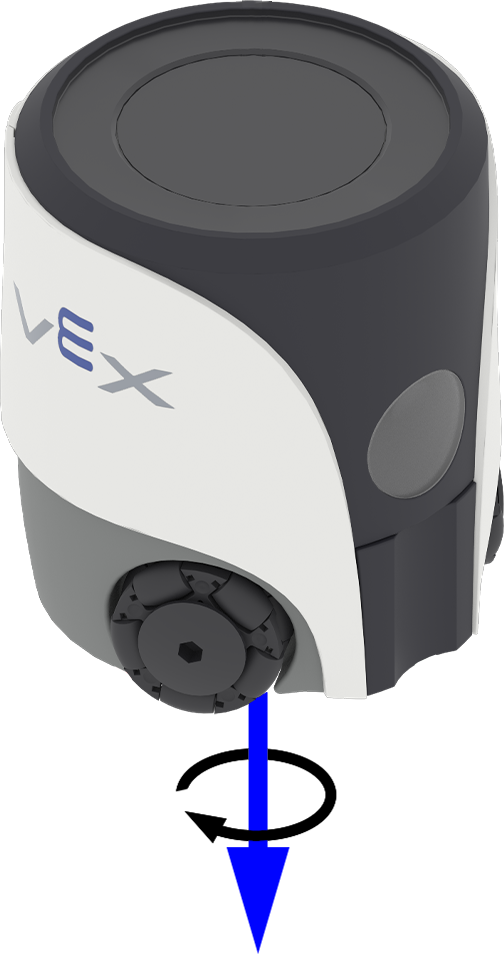
Yaw 描述機器人繞著其垂直軸向左或向右轉。 0 get_yaw 返回機器人的偏航角,範圍為 -180.00 到 180.00 度,以浮點數形式表示。
下圖使用箭頭表示偏航的正旋轉方向。
用法:
robot.inertial.get_yaw()
參數 |
描述 |
|---|---|
此方法沒有參數。 |
# Display the robot's yaw angle as it is rotated by hand
while True:
    robot.screen.clear_screen()
    robot.screen.set_cursor(1, 1)
    robot.screen.print(robot.inertial.get_yaw())
    wait(50, MSEC)
get_roll#
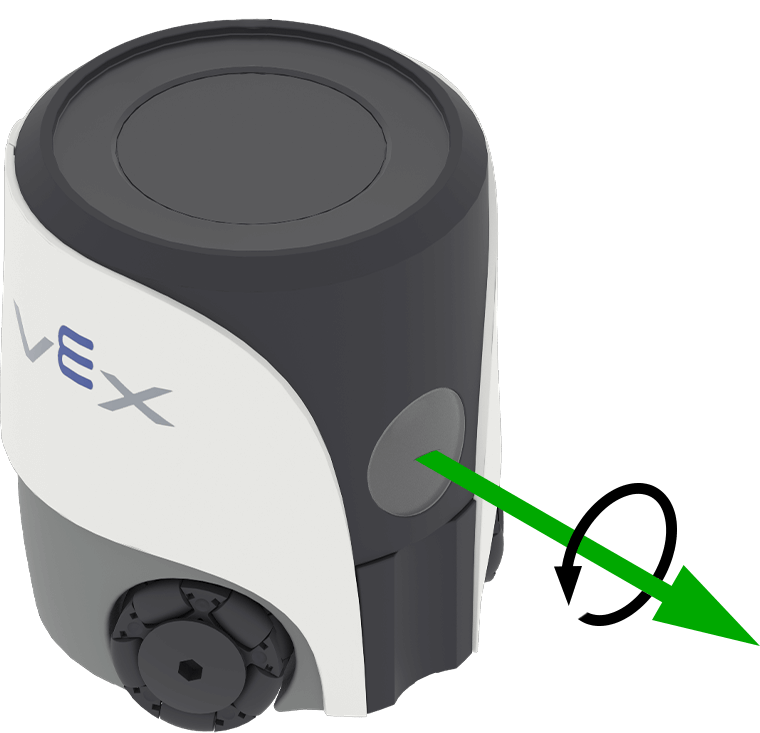
Roll 描述機器人左右傾斜的情況。 0 get_roll 傳回機器人的橫滾角度,範圍為 -180.00 到 180.00 度,以浮點數表示。
下圖使用箭頭表示滾動的正旋轉方向。
用法:
robot.inertial.get_roll()
參數 |
描述 |
|---|---|
此方法沒有參數。 |
# Display the robot's roll angle as it is tilted by hand
while True:
    robot.screen.clear_screen()
    robot.screen.set_cursor(1, 1)
    robot.screen.print(robot.inertial.get_roll())
    wait(50, MSEC)
get_pitch#
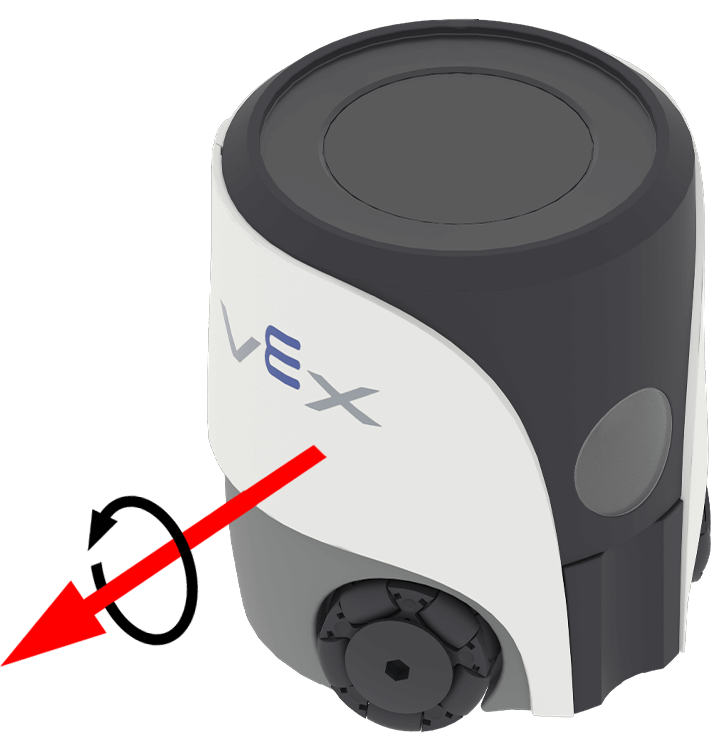
俯仰角描述機器人向前或向後傾斜的情況。 0 get_pitch 返回機器人的俯仰角,範圍為 -90.00 到 90.00 度,以浮點數表示。
下圖使用箭頭表示俯仰角的正旋轉方向。
用法:
robot.inertial.get_pitch()
參數 |
描述 |
|---|---|
此方法沒有參數。 |
# Display the robot's pitch angle as it is tilted by hand
while True:
    robot.screen.clear_screen()
    robot.screen.set_cursor(1, 1)
    robot.screen.print(robot.inertial.get_pitch())
    wait(50, MSEC)
reset_rotation#
reset_rotation 將機器人的目前旋轉角度重設為 0 度。
使用該方法後,機器人將從新的 0 度旋轉值開始追蹤未來的轉彎。
用法:
robot.inertial.reset_rotation()
參數 |
描述 |
|---|---|
此方法沒有參數。 |
# Reset the robot's rotation if it exceeds 180 degrees
while True:
    if robot.inertial.get_rotation() >= 180:
        robot.inertial.reset_rotation()

    robot.screen.clear_screen()
    robot.screen.set_cursor(1, 1)
    robot.screen.print(f"Rotation: {robot.inertial.get_rotation():.2f}")

    wait(50, MSEC)
reset_heading#
reset_heading 將機器人的目前航向重設為 0 度。
使用此方法後,機器人的當前方向將變為新的 0 度航向。
用法:
robot.inertial.reset_heading()
參數 |
描述 |
|---|---|
此方法沒有參數。 |
# Turn the robot around using a new 90 degree heading
robot.turn_to(90)
wait(1, SECONDS)
robot.inertial.reset_heading()
robot.turn_to(90)
set_heading#
航向是指機器人面向的方向,以度為單位,範圍從 0 到 359.99。 set_heading 將機器人的目前航向變更為新的航向值。
例如,如果機器人轉向右側,將航向設定為 0 度,則該右側位置將成為新的 0 度方向。然後,機器人可以根據這個新的方向追蹤其他航向。
用法:
robot.inertial.set_heading(heading)
參數 |
描述 |
|---|---|
|
機器人航向角值,以度為單位。取值範圍為 0 到 359.99。 |
# Turn the robot to 90 degrees using its new heading
robot.inertial.set_heading(45)
robot.turn_to(90)
碰撞#
crashed#
crashed 註冊一個函數,當機器人偵測到突然的衝擊或碰撞時要呼叫函數。
用法:
robot.inertial.crashed(callback, arg)
參數 |
描述 |
|---|---|
|
先前定義的當偵測到碰撞時要執行的函數。 |
|
可選。包含要傳遞給回呼函數的參數的元組。有關更多信息,請參閱使用帶參數的函數。 |
# Define what happens when a crash occurs
def crash_detected():
    # Stop all movement and indicate a crash occurred
    robot.screen.print("Crash detected")
    robot.stop_all_movement()

robot.inertial.crashed(crash_detected)

# Drive forward until crash
robot.move_at(0, 100)
set_crash_sensitivity#
set_crash_sensitivity 調整機器人偵測到碰撞所需的突然加速度。
用法:
robot.inertial.set_crash_sensitivity(sensitivity)
參數 |
描述 |
|---|---|
|
碰撞灵敏度:
|
def crashed_callback():
    robot.stop_all_movement()
    robot.sound.play(CRASH)

# system event handlers
robot.inertial.crashed(crashed_callback)
# add 15ms delay to make sure events are registered correctly.
wait(15, MSEC)

# Detect a crash at a slow velocity.
robot.set_move_velocity(35, PERCENT)
robot.inertial.set_crash_sensitivity(HIGH)
robot.move_at(0)
運動#
get_acceleration#
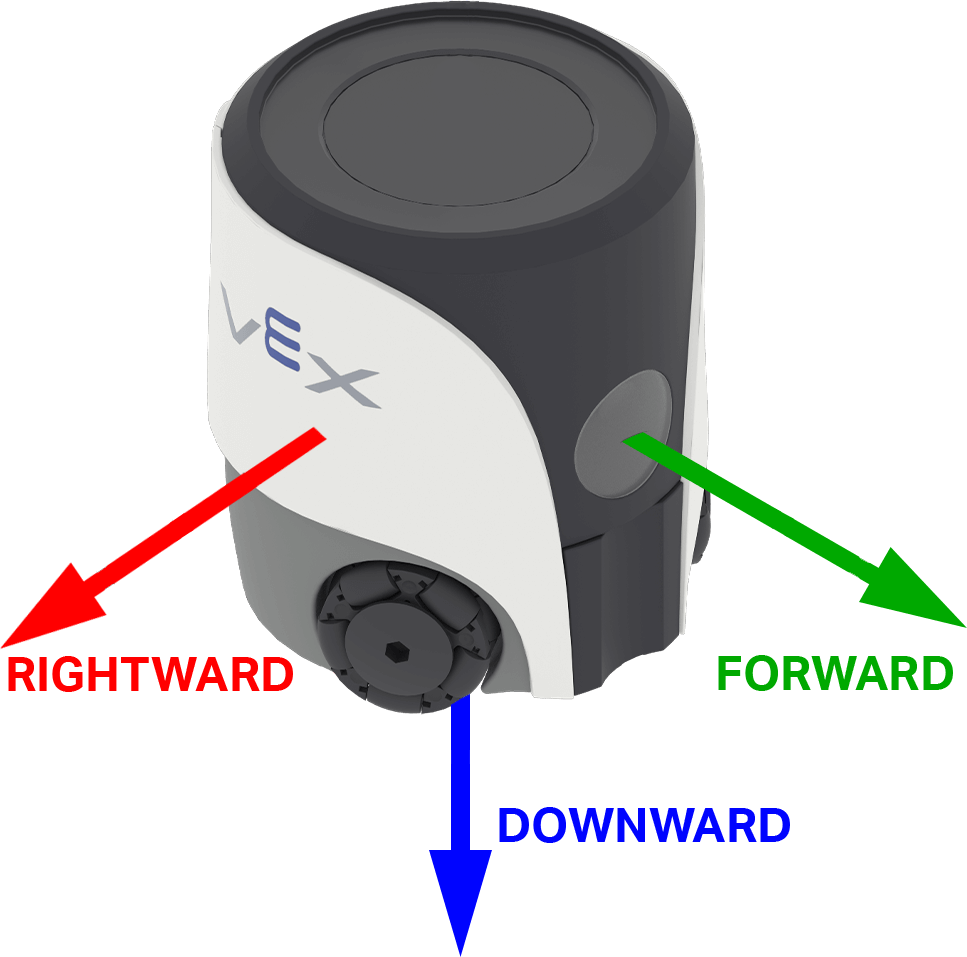
加速度是指機器人加速或減速 快慢。 <code>get_acceleration</code> 傳回機器人在所選軸上的加速度,範圍從 -4.00 G 到 4.00 G,數值為浮點數。
G 相當於你靜止坐著時感受到的重力加速度。
該值可以是正數或負數,這取決於所選軸上的加速度方向。在 AIM 中,軸選項以機器人上的方向命名: FORWARD RIGHTWARD下行 DOWNWARD
用法:
robot.inertial.get_acceleration(type)
參數 |
描述 |
|---|---|
|
测量加速度的轴:
|
# Display the acceleration as the robot begins to move
robot.screen.set_cursor(4,1)
sitting_accel = robot.inertial.get_acceleration(RIGHTWARD)
robot.screen.print(f"Resting: {sitting_accel:.2f}")
wait(0.5, SECONDS)
robot.screen.next_row()

robot.move_at(90, 100)
wait(0.1, SECONDS)

robot.screen.print(f"Startup: {robot.inertial.get_acceleration(RIGHTWARD):.2f}")
get_turn_rate#
轉彎速率是指機器人旋轉的速度。 0 get_turn_rate 傳回機器人的轉彎速率,單位為度/秒 \(dps\),數值範圍為 -1000.00 到 1000.00 dps。
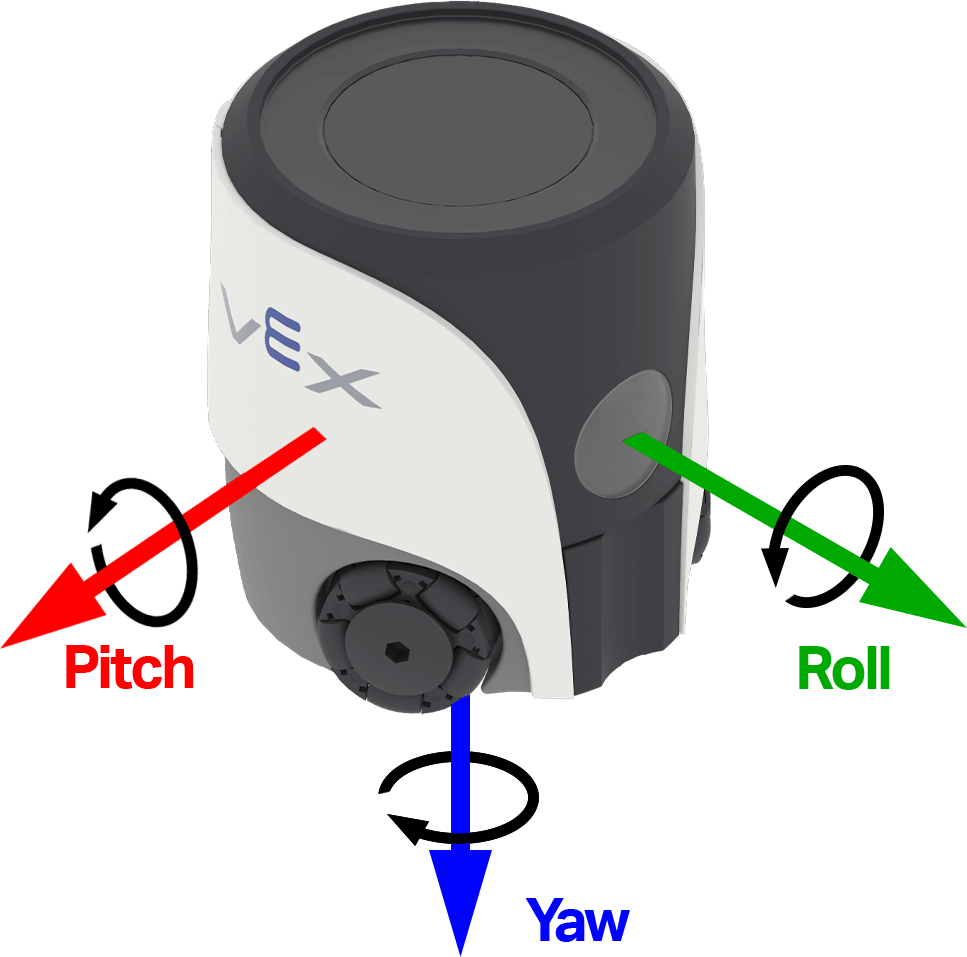
該值可以是正數也可以是負數,這取決於機器人繞所選軸的旋轉方向。下圖使用箭頭表示橫滾、俯仰和偏航的正旋轉方向。
用法:
robot.inertial.get_turn_rate(axis)
參數 |
描述 |
|---|---|
|
要恢復哪個方向:
|
# Display the gyro rate as the robot is rotated by hand
while True:
    robot.screen.clear_screen()
    robot.screen.set_cursor(1, 1)
    robot.screen.print(robot.inertial.get_turn_rate(YAW))
    wait(50, MSEC)
校準#
校準過程透過測量和補償感測器雜訊和漂移,幫助慣性感測器準確測量轉彎角度,校準週期為2秒。在此期間,機器人必須保持靜止在穩定的表面上。校準過程中的任何移動都可能導致結果不準確。
VEX 機器人啟動時會嘗試自動校準,直到偵測到無動作為止。但是,如果在啟動過程中機器人被搬運或移動,感測器可能無法正確校準或校準結果不準確。
如果你的專案非常依賴精確的航向控制,或需要穩定且可重複的轉向,那麼在程式碼開頭呼叫 calibrate 會很有幫助。最佳實踐是在校準過程中在機器人螢幕上顯示類似“正在校準…”的訊息,然後在校準完成後將其更新為“校準完成”,以提醒你(以及其他使用機器人的人員)在此期間機器人必須保持靜止。
calibrate#
calibrate 校準陀螺儀。校準透過測量和補償感測器雜訊和漂移,幫助慣性感測器在 2 秒內準確測量轉彎。在此期間,機器人必須完全靜止在穩定的表面上。校準期間的移動會導致結果不準確。
VEX 機器人啟動時會嘗試自動校準,直到偵測到無動作為止。但是,如果在啟動過程中機器人被搬運或移動,感測器可能無法正確校準或校準結果不準確。
用法:
robot.inertial.calibrate()
參數 |
描述 |
|---|---|
此方法沒有參數。 |
# Calibrate the gyro before moving
robot.inertial.calibrate()
robot.screen.show_emoji(THINKING)
wait(2, SECONDS)
robot.screen.show_emoji(PROUD)
robot.move_for(50, 90)
is_calibrating#
is_calibrating 傳回一個布林值,指示慣性感測器是否正在校準。
True— 慣性感測器正在校準。False— 慣性感測器未進行校準。
用法:
robot.inertial.is_calibrating()
參數 |
描述 |
|---|---|
此方法沒有參數。 |
# Move after the calibration is completed
robot.inertial.calibrate()
while robot.inertial.is_calibrating():
    robot.screen.show_emoji(THINKING)
    wait(50, MSEC)
robot.screen.show_emoji(PROUD)
robot.move_for(50, 90)