
Sensor óptico#
Introducción#
El Sensor Óptico V5 detecta el color, el brillo y la presencia de objetos cercanos mediante una combinación de un sensor de color RGB y un sensor de proximidad. También puede usar su LED integrado para iluminar objetos y lograr una detección más precisa.
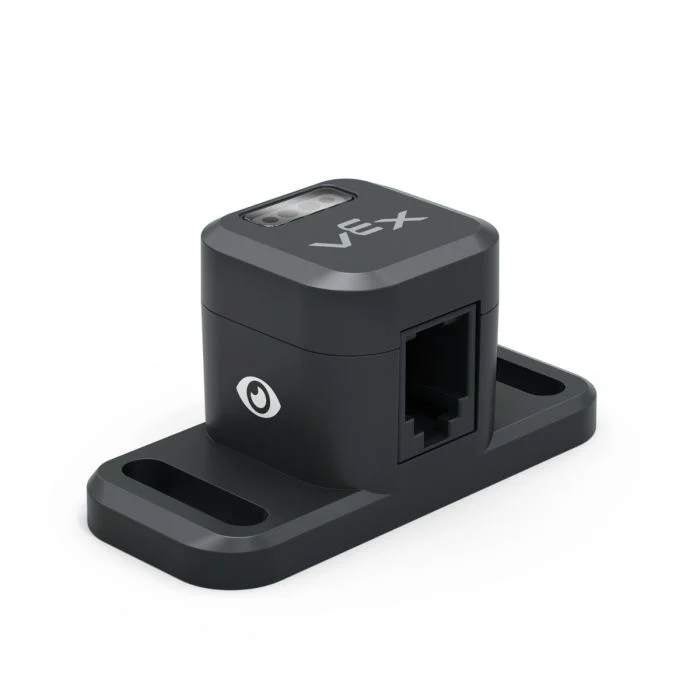
A continuación se muestra una lista de bloques disponibles:
Establecer luz óptica – Enciende o apaga el LED del sensor óptico.
establecer potencia de luz óptica – Establece el nivel de potencia del LED del sensor óptico.
Objeto detectado por el sensor óptico – Informa si el sensor está detectando un objeto dentro del alcance.
Detección óptica de color – Informa si el sensor óptico detecta un color específico.
Brillo óptico – Informa el brillo detectado por el sensor óptico.
Tono óptico – Informa el tono detectado por el sensor óptico.
cuando óptico – Ejecuta la pila de bloques adjunta cuando el sensor óptico detecta o pierde un objeto.
Establecer luz óptica#
El bloque configurar luz óptica enciende o apaga el LED del sensor óptico. Esto puede ayudar a aumentar la precisión del sensor al detectar colores.
establecer luz de [Optical1 v] [encendido v]
Parámetros |
Descripción |
|---|---|
dispositivo |
Qué sensor óptico utilizar, configurado en la ventana Dispositivos. |
estado |
Estado de la luz del sensor óptico: encendida o apagada. |
cuando inicie
[Turn on the sensor's LED.]
establecer luz de [Optical1 v] [encendido v]
Establecer potencia de luz óptica#
El bloque Ajustar potencia de la luz óptica ajusta el brillo del LED del sensor óptico. La luz ayuda al sensor óptico a detectar objetos y colores con mayor claridad.
Un porcentaje mayor hace que la luz sea más brillante. Un porcentaje menor hace que la luz sea más tenue.
Si la luz del sensor óptico está apagada, al ajustar la potencia de la luz por encima del 0% se encenderá la luz.
Si la luz del sensor óptico está encendida, al ajustar la potencia de la luz al 0%, esta se apagará.
establecer potencia de luz de [Optical1 v] a [50] %
Parámetros |
Descripción |
|---|---|
dispositivo |
Qué sensor óptico utilizar, configurado en la ventana Dispositivos. |
brillo |
El nivel de brillo al que se ajustará la luz del sensor óptico, de 0% a 100%. Utilice números enteros. |
cuando inicie
[Turn on the sensor's LED at half brightness.]
establecer potencia de luz de [Optical1 v] a [50] %
El sistema óptico detectó un objeto.#
El bloque booleano Objeto detectado por el sensor óptico indica si el sensor óptico detecta o no un objeto dentro del alcance.
Verdadero — El sensor óptico detecta un objeto.
Falso — El sensor óptico no detecta ningún objeto.
<¿[Optical1 v] encontró un objeto?>
Parámetros |
Descripción |
|---|---|
dispositivo |
Qué sensor óptico utilizar, configurado en la ventana Dispositivos. |
Ejemplo
cuando inicie
[Drive forward until an object is found.]
conducir [adelante v]
esperar hasta <¿[Optical1 v] encontró un objeto?>
detener conducción
El sistema óptico detecta el color.#
El bloque booleano Detección óptica de color indica si el sensor óptico detecta un color específico, basándose en el valor de tono detectado.
Verdadero – El sensor detecta el color especificado.
Falso – El sensor no detecta el color especificado.
Nota: El sensor óptico busca rangos de tonalidad que coincidan con el color especificado. Para detectar rangos de tonalidad específicos, consulte el bloque de informe Tonalidad óptica.
<¿[Optical1 v] detecta [rojo v]?>
Parámetros |
Descripción |
|---|---|
dispositivo |
Qué sensor óptico utilizar, configurado en la ventana Dispositivos. |
color |
¿Qué color buscar?:
|
Ejemplo
cuando inicie
[Drive forward until red is found.]
conducir [adelante v]
esperar hasta <¿[Optical1 v] detecta [rojo v]?>
detener conducción
Brillo óptico#
El bloque de indicadores de brillo óptico informa la cantidad de luz que se refleja de vuelta al sensor óptico, como un porcentaje del 0 % al 100 %.
Un porcentaje más alto significa que se refleja más luz de vuelta al sensor óptico. Un porcentaje más bajo significa que se refleja menos luz.
(brillo de [Optical1 v] en %)
Parámetros |
Descripción |
|---|---|
dispositivo |
Qué sensor óptico utilizar, configurado en la ventana Dispositivos. |
Tono óptico#
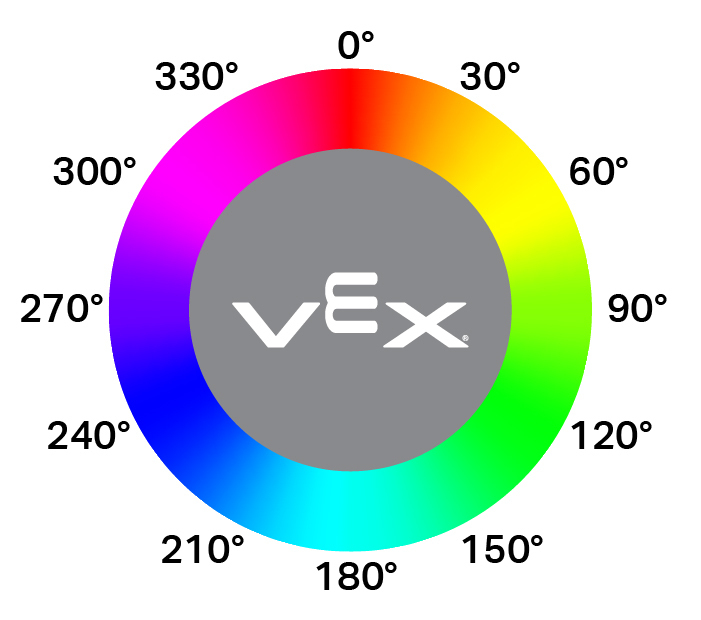
El bloque de informe de tono óptico informa el tono detectado por el sensor óptico como un número de 0 a 359 grados.
El matiz es una forma de describir el color utilizando números alrededor de una rueda de colores.
(tono de [Optical1 v] en grados)
Parámetros |
Descripción |
|---|---|
dispositivo |
Qué sensor óptico utilizar, configurado en la ventana Dispositivos. |
Ejemplo
cuando inicie
[Look for the color pink using hue.]
por siempre
limpiar pantalla
mover cursor a fila [1] columna [1] en pantalla
si <[300] [math_less_than v] (tono de [Optical1 v] en grados) [math_less_than v] [359]> entonces
imprimir [This is pink!] en pantalla ▶
si no
imprimir [No pink detected!] en pantalla ▶
Cuando óptico#
El bloque when Optical ejecuta la pila de bloques adjunta cada vez que el sensor óptico detecta o pierde un objeto.
cuando [Optical1 v] [detecta v] un objeto :: hat events
Parámetros |
Descripción |
|---|---|
dispositivo |
Qué sensor óptico utilizar, configurado en la ventana Dispositivos. |
estado |
Cuando se ejecute la pila de bloques adjunta: detecta se ejecuta cuando se detecta un objeto no detectado, mientras que pierde se ejecuta cuando un objeto detectado ya no se detecta. |