
Sensor GPS#
Introducción#
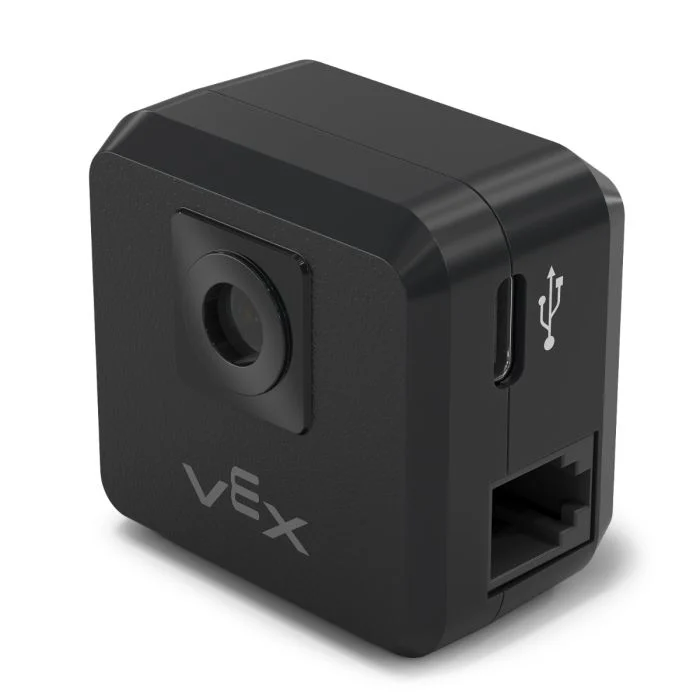
The gps class is used to control and access data from the V5 GPS (Game Positioning System™) Sensor. This sensor provides accurate position and orientation tracking for a robot on the VEX Field. It uses the GPS Field Code around the Field’s perimeter to calculate the robot’s X and Y coordinates and heading in real time.
El sensor GPS devuelve la posición del robot utilizando un punto de referencia calculado automáticamente a partir de los desplazamientos introducidos al configurar el sensor GPS en la ventana Dispositivos.
Para obtener más información sobre el sensor GPS, lea Uso del sensor GPS con VEX V5 en la biblioteca VEX.
El punto de referencia actúa como la posición (0, 0) del propio sensor GPS, donde todas las coordenadas, rumbos y movimientos devueltos por los métodos GPS son relativos a este punto configurado.
Constructores de clases#
1 — Creates a
gpsobject on the specified Smart Port using the default origin (0, 0).gps( int32_t index, double heading_offset = 0, turnType dir = right );
2 — Creates a
gpsobject on the specified Smart Port and defines a custom origin position.gps( int32_t index, double ox, double oy, distanceUnits units = mm, double heading_offset = 0, turnType dir = right );
Instructor de clase#
Destroys the gps object and releases associated resources.
~gps();
Parámetros#
Parámetro |
Tipo |
Descripción |
|---|---|---|
|
|
The Smart Port that the GPS Sensor is connected to, written as |
|
|
La coordenada X de la posición de origen. |
|
|
La coordenada Y de la posición de origen. |
|
|
The unit of measurement used for
|
|
|
Desfase rotacional del sensor GPS en grados, de 0,00 a 359,99. El valor predeterminado es 0. |
|
|
The direction that will return positive heading values:
|
Ejemplos#
// Create the gps instance
gps GPS1 = gps(
    PORT1,      // Smart Port 1
    180);       // heading_offset
// Create the gps instance
gps GPS1 = gps(
    PORT1,   // Smart Port 1
    50.00,   // ox
    100.00,  // oy
    mm,      // units
    180 );   // heading_offset
Funciones de los miembros#
The gps class includes the following member functions:
calibrate— Calibrates the GPS Sensor.setOrigin— Sets the origin position for the GPS coordinate system.setLocation— Sets the current location and heading of the GPS Sensor.xPosition— Returns the current X position.yPosition— Returns the current Y position.heading— Returns the current heading.acceleration— Returns linear acceleration along the specified axis.gyroRate— Returns the angular velocity for the specified axis.orientation— Returns the orientation for the specified axis.quality— Returns the current GPS signal quality.changed— Registers a callback function that runs when GPS data changes.
Before calling any gps member functions, a gps instance must be created, as shown below:
/* This constructor is required when using VS Code.
GPS Sensor configuration is generated automatically
in VEXcode using the Device Menu. Replace the values
as needed. */

// Create the gps instance in Smart Port 1
gps GPS1 = gps(PORT1);
Métodos de clase#
calibrate#
Calibra el sensor GPS. Esto establecerá la orientación configurada del GPS (según su desviación angular) como la orientación actual del sistema de transmisión.
El sensor GPS debe permanecer inmóvil durante el proceso de calibración.
Available Functionsvoid calibrate();
Esta función no requiere ningún parámetro.
Return ValuesEsta función no devuelve ningún valor.
Examples// Turn to face the lower Field wall using data from the GPS Sensor.
GPS1.calibrate();
Drivetrain.turnToHeading(180, degrees)
setOrigin#
Establece el origen del sistema de coordenadas GPS.
Available Functions1 — Establece el origen en la posición X e Y especificada.
void setOrigin(
  double        x,
  double        y,
  distanceUnits units = mm );
Parameters2 — Establece el origen en la posición actual del sensor.
void setOrigin();
Parámetro |
Tipo |
Descripción |
|---|---|---|
|
|
La coordenada X de la nueva posición de origen. |
|
|
La coordenada Y de la nueva posición de origen. |
|
|
The unit of measurement used for
|
Esta función no devuelve ningún valor.
NotessetLocation#
Establece la posición y el rumbo GPS actuales.
Available Functions1 — Establece la ubicación actual utilizando las unidades de distancia y rotación especificadas.
void setLocation(
  double        x,
  double        y,
  distanceUnits units = mm,
  double        angle = 0,
  rotationUnits units_r = degrees );
Parameters2 — Establece la ubicación actual usando milímetros y grados.
void setLocation( double x, double y, double angle );
Parámetro |
Tipo |
Descripción |
|---|---|---|
|
|
La coordenada X de la ubicación actual. |
|
|
La coordenada Y de la ubicación actual. |
|
|
The unit of measurement used for
|
|
|
El valor del encabezado para la ubicación actual. |
|
|
The unit of measurement used for
|
Esta función no devuelve ningún valor.
NotesxPosition#
Devuelve la posición X actual del sensor GPS.
Available Functionsdouble xPosition( distanceUnits units = distanceUnits::mm );
Parámetro |
Tipo |
Descripción |
|---|---|---|
|
|
The unit of measurement for the returned X position:
|
Returns a double representing the x positional offset from the origin in the specified units.
La posición X se mide en relación con el origen actual.
The origin may be changed using
setOrigin.
// Drive slowly towards the center of the Field
Drivetrain.setDriveVelocity(20.0, percent);
Drivetrain.drive(forward);
// Stop driving when the GPS returns an x position
// near the center of the Field
waitUntil((GPS1.xPosition(mm) < 0.0));
Drivetrain.stop();
yPosition#
Devuelve la posición Y actual del sensor GPS.
Available Functionsdouble yPosition( distanceUnits units = distanceUnits::mm );
Parámetro |
Tipo |
Descripción |
|---|---|---|
|
|
The unit of measurement for the returned Y position:
|
Returns a double representing the Y positional offset from the origin in the specified units.
La posición Y se mide en relación con el origen actual.
The origin may be changed using
setOrigin().
// Drive slowly towards the center of the Field
Drivetrain.setDriveVelocity(20.0, percent);
Drivetrain.drive(forward);
// Stop driving when the GPS reports an y position
// near the center of the Field
waitUntil((GPS1.yPosition(mm) < 0.0));
Drivetrain.stop();
heading#
Devuelve la orientación actual (ángulo de guiñada) del sensor GPS.
Available Functionsdouble heading( rotationUnits units = rotationUnits::deg );
Parámetro |
Tipo |
Descripción |
|---|---|---|
|
|
The unit of measurement for the returned heading value:
|
Returns a double representing the current heading in the specified units.
El valor del encabezado se ajusta entre 0 y 360 grados.
The positive rotation direction is determined by the
dirparameter specified during construction.
// Turn slowly to face the right wall
Drivetrain.setTurnVelocity(20.0, percent);
Drivetrain.turn(right);
// Stop turning when the GPS reports a heading
// greater than 90 degrees
waitUntil((GPS1.heading() > 90.0));
Drivetrain.stop();
acceleration#
Devuelve la aceleración lineal medida por el sensor GPS a lo largo del eje especificado.
Available Functionsdouble acceleration(
axisType axis );
Parámetro |
Tipo |
Descripción |
|---|---|---|
|
|
The axis for which acceleration will be returned:
|
Returns a double representing the acceleration along the specified axis in G (gravitational units).
Los valores de aceleración se expresan en unidades de G, donde 1 G equivale a la aceleración debida a la gravedad en la superficie terrestre.
gyroRate#
Devuelve la velocidad angular medida por el sensor GPS a lo largo del eje especificado.
Available Functionsdouble gyroRate(
axisType axis,
velocityUnits units );
Parámetro |
Tipo |
Descripción |
|---|---|---|
|
|
The axis for which angular velocity will be returned:
|
|
|
The unit of measurement for the returned angular velocity:
|
Returns a double representing the angular velocity along the specified axis in the selected units.
orientation#
Devuelve el ángulo de orientación del sensor GPS para el eje especificado.
Available Functionsdouble orientation(
orientationType axis,
rotationUnits units );
Parámetro |
Tipo |
Descripción |
|---|---|---|
|
|
The orientation axis to retrieve:
|
|
|
The unit of measurement for the returned orientation value:
|
Returns a double representing the orientation of the specified axis in the selected units.
quality#
Devuelve la calidad de la señal GPS percibida.
Available Functionsint32_t quality();
Esta función no requiere ningún parámetro.
Return ValuesReturns an int32_t representing the GPS signal quality as a percentage:
Valores posibles |
Descripción |
|---|---|
|
Todos los datos de posición y rumbo reportados por el sensor GPS son válidos. |
|
Los datos de posición ya no se calculan directamente a partir del código de campo GPS, sino que se estiman mediante métodos alternativos. |
|
Only heading values are valid. As time passes without sufficient scanning of the GPS Field Code, signal quality continues to decrease until |
changed#
Registra una función de devolución de llamada que se ejecuta cuando cambia el valor de la dirección GPS.
Available Functionsvoid changed(
void (* callback)(void) );
Parámetro |
Tipo |
Descripción |
|---|---|---|
|
|
A pointer to a function that will be called when the GPS heading value changes. The function must take no parameters and return |
Esta función no devuelve ningún valor.