
バンパースイッチ#
導入#
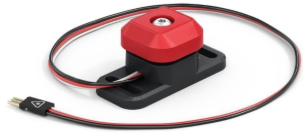
bumper クラスは、バンパースイッチと組み合わせて使用されます。バンパースイッチは、押されると回路が完成する機械式スイッチで、ロボットが押下と解放を検出できるようにします。
クラスコンストラクタ#
bumper(
  triport::port &port );
クラスデストラクタ#
bumper オブジェクトを破壊し、関連するリソースを解放します。
virtual ~bumper();
パラメータ#
パラメータ |
タイプ |
説明 |
|---|---|---|
|
|
バンパースイッチが接続されている3線式ポートは、 |
例#
// Create a bumper instance in Port A
bumper BumperA = bumper(Brain.ThreeWirePort.A);
メンバーの機能#
bumper クラスには、以下のメンバ関数が含まれています。
pressingを押している — バンパースイッチが押されているかどうかを返します。pressed— バンパースイッチが押されたときに呼び出される関数を登録します。released— バンパースイッチが離されたときに呼び出される関数を登録します。
bumper メンバー関数を呼び出す前に、以下に示すように bumper インスタンスを作成する必要があります。
/* This constructor is required when using VS Code.
Bumper Switch configuration is generated automatically
in VEXcode using the Device Menu. Replace the values
as needed. */

// Create a bumper instance in Port A
bumper BumperA = bumper(Brain.ThreeWirePort.A);
pressing#
バンパースイッチが現在押されているかどうかを返します。これは、ロボットが他の物体に衝突したかどうかを確認するために使用できます。
Available Functionsint32_t pressing();
この関数は引数を受け付けません。
Return Valuesバンパースイッチが押されているかどうかを示す int32_t を返します。
1— バンパースイッチが押されています。0— バンパースイッチが押されていません。
pressed#
バンパースイッチが押されたときに呼び出される関数を登録します。
Available Functionsvoid pressed( void (* callback)(void) );
パラメータ |
タイプ |
説明 |
|---|---|---|
|
|
バンパーが押されたときに呼び出される関数へのポインタ。 |
この関数は値を返しません。
Examplesコールバック関数を定義します(
int main()の外側)// Display a message when bumper is pressed void BumperPressed() { Brain.Screen.print("Bumper pressed"); }コールバックを登録する
int main()int main() { /* vexcodeInit() is only required when using VEXcode. Remove vexcodeInit() if compiling in VS Code. */ vexcodeInit(); // Run BumperPressed when the value of the Bumper Switch is pressed. BumperA.pressed(BumperPressed); }
released#
バンパースイッチが離されたときに呼び出される関数を登録します。
Available Functionsvoid released( void (* callback)(void) );
パラメータ |
タイプ |
説明 |
|---|---|---|
|
|
バンパーが解放されたときに呼び出される関数へのポインタ。 |
この関数は値を返しません。
Examplesコールバック関数を定義します(
int main()の外側)// Display a message when bumper is released void BumperReleased() { Brain.Screen.print("Bumper released"); }コールバックを登録する
int main()int main() { /* vexcodeInit() is only required when using VEXcode. Remove vexcodeInit() if compiling in VS Code. */ vexcodeInit(); // Run BumperReleased when the value of the Bumper Switch is released. BumperA.released(BumperReleased); }