
運動#
介紹#
VEX AIM 編碼機器人採用全向驅動系統,可前進、後退、左轉、右轉或以一定角度移動,並能獨立轉向。運動控制方法用於控制機器人的移動和轉向方式、移動速度以及其 x 軸和 y 軸位置的追蹤。
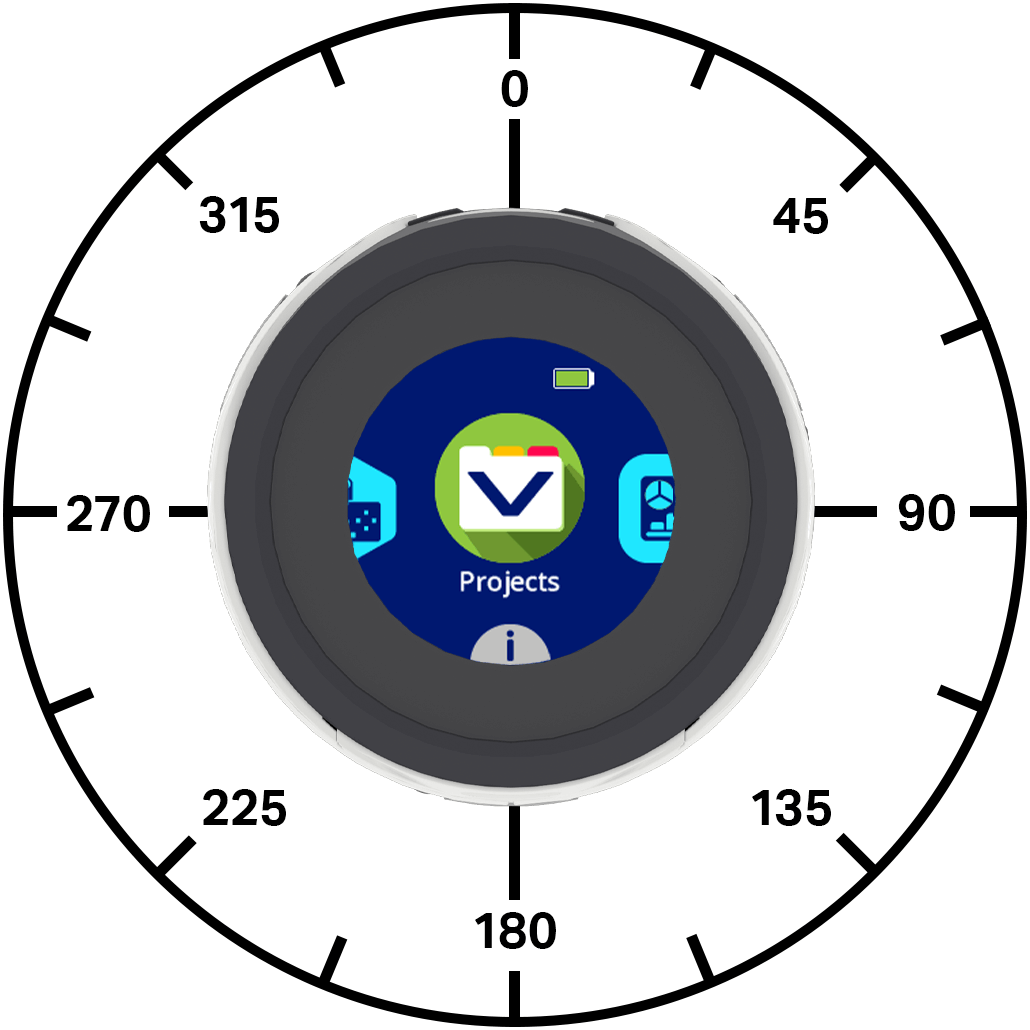
以下是可用方法清單:
動作-移動和轉向機器人。
move_at— 使機器人永遠以特定角度移動。move_for— 讓機器人以特定角度移動特定距離。move_with_vectors— 使用向量為基礎的 x、y 和旋轉值來移動機器人。turn— 讓機器人永遠向左或向右轉。turn_for— 使機器人向左或向右旋轉指定的度數。turn_to— 將機器人轉向特定方向。stop_all_movement— 停止機器人的所有動作。
變異器-設定機器人移動值。
set_move_velocity— 告訴機器人移動的速度。set_turn_velocity— 告訴機器人轉彎的速度。set_xy_position— 將機器人的目前 x 和 y 位置改為新值。
獲取器 — 返回機器人狀態和位置。
get_x_position— 傳回機器人的目前 x 座標。get_y_position— 傳回機器人的目前 y 座標。is_move_active— 傳回機器人是否正在移動。is_turn_active— 返回機器人是否正在轉彎。is_stopped— 返回機器人是否既不移動也不轉彎。
行動#
move_at#
move_at 會使機器人以特定角度持續移動。該角度相對於機器人的當前位置。機器人將持續移動,直到收到其他指令,例如改變移動角度、轉彎或停止。
用法:
robot.move_at(angle, velocity, units)
參數 |
描述 |
|---|---|
|
機器人移動的角度,以度為單位。該值可以是介於 -360 到 360 之間的整數或小數。 |
|
可選。移動速度,取值範圍為 0% 到 100%(使用 |
|
可選。速度單位: |
# Move right, then move forward and stop.
robot.move_at(90)
wait(1,SECONDS)
robot.move_at(0)
wait(1,SECONDS)
robot.stop_all_movement()
# Move right slowly, move in reverse quickly and stop.
robot.move_at(90, 25)
wait(2, SECONDS)
robot.move_at(180, 100, PERCENT)
wait(1, SECONDS)
robot.stop_all_movement()
# Move diagonally to the right and stop.
robot.move_at(45.33)
wait(1,SECONDS)
robot.stop_all_movement()
move_for#
move_for 指令使機器人以特定角度移動特定距離。該角度相對於機器人的當前位置。程式會等待機器人移動完畢後再執行下一行程式碼。
用法:
robot.move_for(distance, angle, velocity, units, wait)
參數 |
描述 |
|---|---|
|
機器人移動的距離,單位為毫米(mm)。可以是整數或浮點數(十進制數)。 |
|
機器人移動的角度,以度為單位。該值可以是介於 -360 到 360 之間的整數或小數。 |
|
可選。移動速度,取值範圍為 0% 到 100%(使用 |
|
可選。速度單位: |
|
可選 |
# Move right, then move forward.
robot.move_for(50, 90)
robot.move_for(100, 0)
# Move in reverse slowly, then move forward quickly.
robot.move_for(100, 180, 25)
robot.move_for(100, 0, 100, PERCENT)
# Drive forward and blink all LEDs red.
robot.move_for(100, 0, wait=False)
robot.led.on(ALL_LEDS, RED)
wait(0.5, SECONDS)
robot.led.on(ALL_LEDS, BLACK)
wait(0.5, SECONDS)
robot.led.on(ALL_LEDS, RED)
wait(0.5, SECONDS)
robot.led.on(ALL_LEDS, BLACK)
move_with_vectors#
向量是一種描述物體運動速度和方向的方法。 `move_with_vectors 使用基於向量的運動來控制機器人。機器人結合前進、後退和旋轉的速度值,以實現平滑的運動。機器人將持續使用該向量運動,直到收到其他指令,例如改變運動角度、轉彎或停止。
注意:此方法直接設定移動和轉向速度值,因此不使用 set_move_velocity 或 set_turn_velocity。
用法:
robot.move_with_vectors(forward, rightward, rotation)
參數 |
描述 |
|---|---|
|
機器人沿著y軸方向的速度,範圍從-100%到100%。負值使機器人後退,正值使機器人前進。 |
|
機器人沿著 x 軸的速度,範圍從 -100% 到 100%。負值使機器人向左移動,正值使機器人向右移動。 |
|
機器人的轉彎速度,範圍從-100%到100%。負值使機器人逆時針旋轉,正值使機器人順時針旋轉。 |
# Move at 15°
robot.move_with_vectors(48.3, 12.95, 0)
wait(2, SECONDS)
robot.stop_all_movement()
# Move at 45° while turning counterclockwise.
robot.move_with_vectors(50, 50, -30)
wait(2, SECONDS)
robot.stop_all_movement()
# Scaling movement using the controller joystick
while True:
    # Move forward (and backwards) slower than axis1 input
    forward   = controller.axis1.position() * 0.7

    # Move right (and left) faster than axis2 input
    rightward = controller.axis2.position() * 1.5

    robot.move_with_vectors(forward, rightward, 0)

    wait(5, MSEC)
turn#
turn 表示機器人將持續旋轉,直到收到其他指令,例如移動或停止。
用法:
robot.turn(direction, velocity, units)
參數 |
描述 |
|---|---|
|
機器人轉向的方向: |
|
可選。當使用 |
|
可選。速度單位: |
# Turn left, then stop.
robot.turn(LEFT)
wait(1, SECONDS)
robot.stop_all_movement()
# Turn left quickly, turn right slowly, then stop.
robot.turn(LEFT, 80)
wait(2, SECONDS)
robot.turn(RIGHT, 20, PERCENT)
wait(3, SECONDS)
robot.stop_all_movement()
turn_for#
turn_for 參數使機器人向左或向右旋轉指定角度。旋轉角度相對於機器人目前朝向的方向。程式會等待機器人完成旋轉後才執行下一行程式碼。
用法:
robot.turn_for(direction, angle, velocity, units, wait)
參數 |
描述 |
|---|---|
|
機器人轉向的方向: |
|
機器人旋轉的角度(以度為單位),範圍從 -360 度到 360 度。該值可以是整數或十進制數(浮點數)。 |
|
可選。當使用 |
|
可選。速度單位: |
|
可選 |
# Turn left, then turn around to the right.
robot.turn_for(LEFT, 90)
robot.turn_for(RIGHT, 180)
# Turn left quickly, then turn right slowly.
robot.turn_for(LEFT, 90, 100)
robot.turn_for(RIGHT, 180, 15, PERCENT)
# Turn right and blink all LEDs blue.
robot.turn_for(RIGHT, 180, wait=False)
robot.led.on(ALL_LEDS, BLUE)
wait(0.5, SECONDS)
robot.led.off(ALL_LEDS)
wait(0.5, SECONDS)
robot.led.on(ALL_LEDS, BLUE)
wait(0.5, SECONDS)
robot.led.off(ALL_LEDS)
turn_to#
航向角是指機器人朝向的方向,以度為單位。 0 turn_to 表示將機器人轉向指定的航向角。機器人會選擇到達目標航向角的最短路徑。
機器人的初始航向角為0度。
程式會等到機器人完成轉向後才執行下一行程式碼。
用法:
robot.turn_to(heading, velocity, units, wait)
參數 |
描述 |
|---|---|
|
機器人應面向的方向,範圍從 -360 度到 360 度。 |
|
可選。當使用 |
|
可選。速度單位: |
|
可選 |
# Turn to face each cardinal directions.
robot.turn_to(90)
wait(2, SECONDS)
robot.turn_to(180)
wait(2, SECONDS)
robot.turn_to(270)
wait(2, SECONDS)
robot.turn_to(0)
# Turn to face backward slowly, then face forward quickly.
robot.turn_to(180, 25)
wait(1, SECONDS)
robot.turn_to(0, 90, PERCENT)
# Turn around quickly and blink all LEDs green.
robot.turn_to(180, 100, wait=False)
robot.led.on(ALL_LEDS, GREEN)
wait(0.5, SECONDS)
robot.led.off(ALL_LEDS)
wait(0.5, SECONDS)
robot.led.on(ALL_LEDS, GREEN)
wait(0.5, SECONDS)
robot.led.off(ALL_LEDS)
stop_all_movement#
stop_all_movement 停止機器人的所有運動。
用法:
robot.stop_all_movement()
參數 |
描述 |
|---|---|
此方法沒有參數。 |
# Turn right, then stop moving
robot.turn(RIGHT)
wait(1, SECONDS)
robot.stop_all_movement()
變異體#
set_move_velocity#
set_move_velocity 告訴機器人移動的速度。百分比越高,機器人移動速度越快;百分比越低,機器人移動速度越慢。
每個專案開始時,機器人預設以 50% 的速度移動。
100% 的移動速度相當於每秒 200 毫米。
用法:
robot.set_move_velocity(velocity, units)
參數 |
描述 |
|---|---|
|
使用 |
|
可選。速度單位: |
# Move forward at the default velocity,
robot.set_move_velocity(50)
robot.move_for(100, 0)
wait(1, SECONDS)
# Move slower than the default velocity
robot.set_move_velocity(20)
robot.move_for(100, 0)
wait(1, SECONDS)
# Move faster than the default velocity
robot.set_move_velocity(100)
robot.move_for(100, 0)
set_turn_velocity#
set_turn_velocity 告訴機器人轉彎的速度。百分比越高,機器人轉彎越快;百分比越低,機器人轉彎越慢。
每個專案開始時,機器人預設以 50% 的速度(每秒 75 度)旋轉。
用法:
robot.set_turn_velocity(velocity, units)
參數 |
描述 |
|---|---|
|
使用 |
|
可選。速度單位: |
# Turn around at default velocity
robot.set_turn_velocity(50)
robot.turn_for(RIGHT, 180)
wait(1, SECONDS)
# Turn around slower than the default velocity
robot.set_turn_velocity(20)
robot.turn_for(RIGHT, 180)
wait(1, SECONDS)
# Turn around faster than the default velocity
robot.set_turn_velocity(100)
robot.turn_for(RIGHT, 180)
set_xy_position#
set_xy_position 將機器人的目前 x 和 y 位置變更為新值。
例如,如果機器人偏離了起始位置,將 x 和 y 都設為 0,則機器人的目前位置將變為新的 (0, 0) 位置。然後,機器人可以根據這個新值追蹤未來的位置。
用法:
robot.set_xy_position(x, y)
參數 |
描述 |
|---|---|
|
要設定的機器人 x 軸位置值,單位為毫米。可以是整數或十進制數(浮點數)。 |
|
要設定的機器人y軸位置值,單位為毫米。可以是整數或十進制數(浮點數)。 |
# Set the robot's current position
# Move forward and print the new coordinate
robot.set_xy_position(100, 50)
robot.move_for(150, 0)
robot.screen.print("X:", robot.get_x_position())
robot.screen.next_row()
robot.screen.print("Y:", robot.get_y_position())
獲取器#
get_x_position#
get_x_position 傳回機器人目前的 x 座標(以毫米為單位)。
在專案開始時,機器人的 x 位置設定為 0。當機器人向左或向右移動時,x 位置會發生變化,可以使用 set_xy_position 方法進行設定。
用法:
robot.get_x_position()
參數 |
描述 |
|---|---|
此方法沒有參數。 |
# Print the start and end x-value
# of the robot's position after moving
robot.screen.print("Start X:", robot.get_x_position())
robot.move_for(200, 90)
robot.screen.next_row()
robot.screen.print("End X:", robot.get_x_position())
get_y_position#
get_y_position 傳回機器人目前的 y 座標(以毫米為單位)。
在專案開始時,機器人的 y 位置設定為 0。當機器人向前或向後移動時,y 位置會發生變化,可以使用 set_xy_position 方法進行設定。
用法:
robot.get_y_position()
參數 |
描述 |
|---|---|
此方法沒有參數。 |
# Print the start and end y-value
# of the robot's position after moving
robot.screen.print("Start Y:", robot.get_y_position())
robot.move_for(200, 0)
robot.screen.next_row()
robot.screen.print("End Y:", robot.get_y_position())
is_move_active#
is_move_active 傳回機器人是否正在移動,傳回值為布林值。這可用於根據機器人的移動狀態控制其他行為的執行時間。
True— 機器人正在移動。False— 機器人沒有移動。
此方法與具有 wait 參數的 Motion 方法搭配使用,例如 move_for。
用法:
robot.is_move_active()
參數 |
描述 |
|---|---|
此方法沒有參數。 |
# Blink all the LEDs when the robot is moving.
robot.move_for(200, 0, wait=False)

while robot.is_move_active():
    robot.led.on(ALL_LEDS, ORANGE)
    wait(0.5, SECONDS)
    robot.led.on(ALL_LEDS, CYAN)
    wait(0.5, SECONDS)

robot.led.off(ALL_LEDS)
is_turn_active#
is_turn_active 回傳機器人是否正在轉向,回傳值為布林值。這可用於根據機器人的運動來控制其他行為的時機。
True— 機器人正在轉彎。False— 機器人沒有轉向。
此方法與具有 wait 參數的 Motion 方法搭配使用,例如 turn_for 和 turn_to。
用法:
robot.is_turn_active()
參數 |
描述 |
|---|---|
此方法沒有參數。 |
# Blink all the LEDs while the robot is turning
robot.turn_for(RIGHT, 180, wait=False)

while robot.is_turn_active():
    robot.led.on(ALL_LEDS, GREEN)
    wait(0.5, SECONDS)
    robot.led.on(ALL_LEDS, CYAN)
    wait(0.5, SECONDS)

robot.led.off(ALL_LEDS)
is_stopped#
is_stopped 返回機器人是否處於靜止狀態(布林值),表示機器人是否既不移動也不轉向。這可用於根據機器人的運動狀態控制其他行為的執行時機。
True— 機器人沒有移動或轉彎。False— 機器人正在移動或轉彎。
用法:
robot.is_stopped()
參數 |
描述 |
|---|---|
此方法沒有參數。 |
# Blink all the LEDs while the robot is moving or turning

def light_show():
    # Flash LEDs while the robot is moving or turning
    while not robot.is_stopped():
        robot.led.on(ALL_LEDS, GREEN)
        wait(.5, SECONDS)
        robot.led.on(ALL_LEDS, PURPLE)
        wait(.5, SECONDS)

    robot.led.off(ALL_LEDS)

robot.move_for(200, 0, wait=False)
light_show()

robot.turn_for(RIGHT, 180, wait=False)
light_show()