
人工智慧視覺#
介紹#
VEX AIM 編碼機器人的 AI 視覺感測器能夠偵測和追蹤物體、顏色以及 AprilTag ID。這使得機器人能夠分析周圍環境、追蹤物體並根據檢測到的視覺數據做出反應。
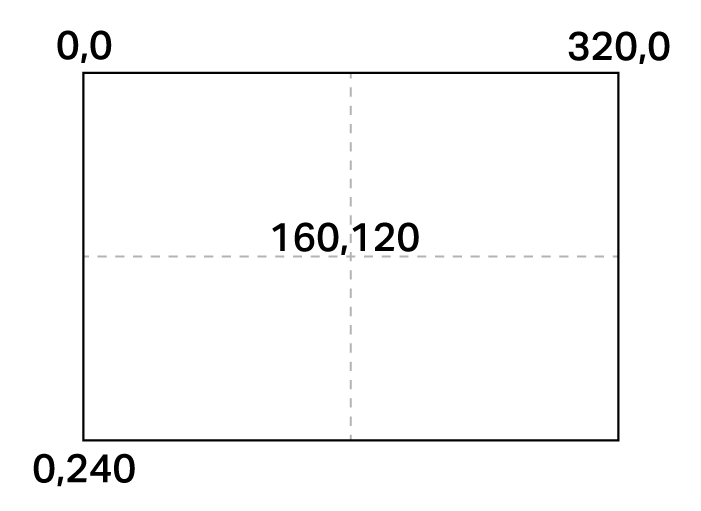
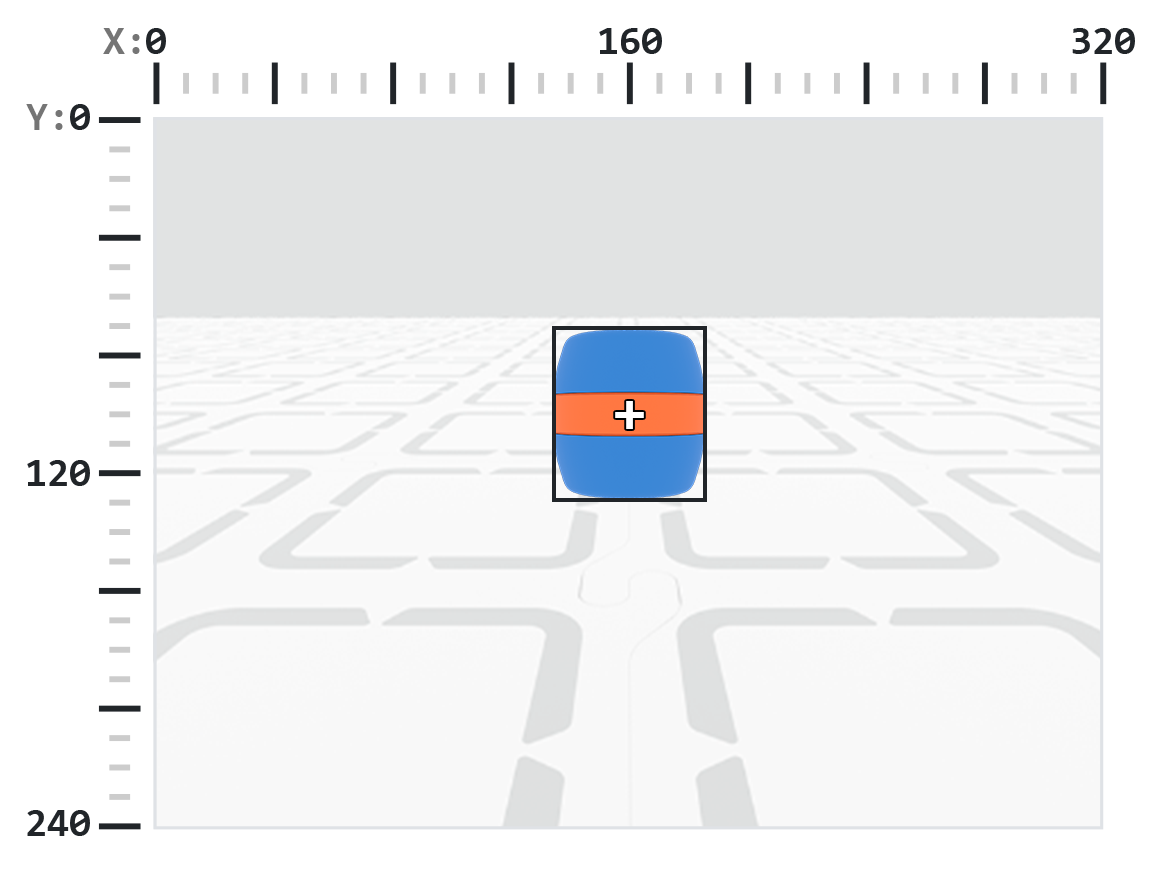
AI視覺感光元件的解析度為320×240像素。原點(0, 0)位於左上角,感測器中心位於(160, 120),如下圖所示:
以下是所有方法和屬性的清單:
操作-顯示或隱藏AI視覺攝影機畫面。
show_aivision— 在機器人螢幕上顯示 AI 視覺畫面。hide_aivision— 從螢幕上隱藏 AI Vision 畫面。tag_detection— 開啟或關閉 AprilTag ID 偵測。
獲取器 — 偵測機器人是否持有物體。
get_data— 傳回特定簽章偵測到的物件元組。has_sports_ball— 返回機器人是否擁有運動球。has_any_barrel— 返回機器人是否擁有任何類型的桶子。has_blue_barrel— 返回機器人是否擁有藍色桶子。has_orange_barrel— 返回機器人是否擁有橘色桶。
屬性 — 從 get_data 傳回的物件資料。
exists— 物件是否存在於目前偵測中,以布林值表示。width— 偵測到的物件的寬度。height— 偵測到的物體的高度。centerX— 物體中心的 X 座標。centerY— 物體中心的 Y 座標。bearing— 相對於機器人前端的水平角。rotation— 物體的方向。originX— 物件左上角的 X 座標。originY— 物體左上角的 Y 座標。id— 物件的分類或標籤 ID。score— AI 分類的信心分數。type— 傳回物件的類型(AI、標籤、顏色或程式碼)。
建構函數-定義顏色簽名和程式碼。
行動#
show_aivision#
show_aivision 將 AI 視覺感測器的即時資料流顯示在機器人螢幕上。即時資料流會覆蓋螢幕上的任何其他影像或文字。
注意:除非使用 hide_aivision 隱藏訊息流,否則螢幕不會顯示任何其他圖像或文字。
用法:
robot.screen.show_aivision()
參數 |
描述 |
|---|---|
此方法沒有參數。 |
# Watch the AI Vision Sensor detect AI Classifications
# and AprilTag IDs as you move the robot
robot.screen.show_aivision()
hide_aivision#
hide_aivision 從機器人螢幕上移除 AI 視覺感測器的即時資料流。
用法:
robot.screen.hide_aivision()
參數 |
描述 |
|---|---|
此方法沒有參數。 |
# View the AI Vision Sensor's feed for five seconds
robot.screen.show_aivision()
wait(5, SECONDS)
robot.screen.hide_aivision()
tag_detection#
tag_detection 啟用或停用 AprilTag ID 偵測,狀態為布林值。
此感測器可以偵測 Circle21h7 系列的 AprilTag ID 0 到 36。
用法:
robot.vision.tag_detection(state)
參數 |
描述 |
|---|---|
|
值為: |
robot.screen.set_font(PROP30)

# Cut off AprilTag ID detection after 5 seconds
while True:
    if timer.time(SECONDS) > 5:
        robot.vision.tag_detection(False)

    robot.screen.clear_screen()
    robot.screen.set_cursor(3, 1)
    apriltags = robot.vision.get_data(ALL_TAGS)

    if apriltags[0].exists:
        robot.screen.print("AprilTag ID detected!")
    else:
        robot.screen.print("Nothing detected!")

    wait(0.1, SECONDS)
獲取器#
get_data#
get_data 將來自 AI 視覺感測器幀的資料過濾為單一簽名——感測器可以識別的事物的保存描述,例如預訓練物件、AprilTag ID 或配置的顏色簽名或顏色代碼——並傳回一個 元組。
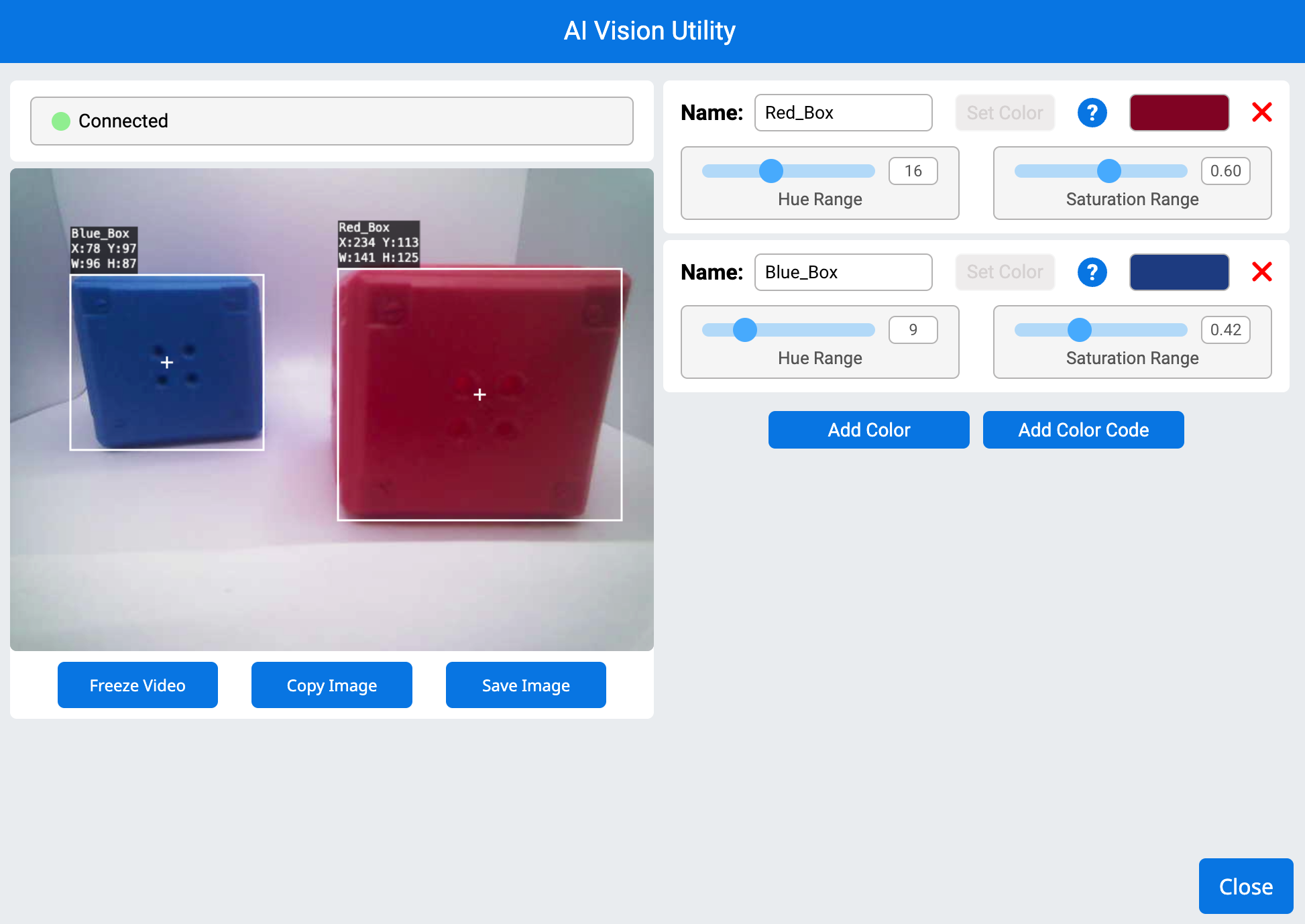
顏色簽名和顏色代碼必須先在AI視覺實用程式中進行配置,然後才能使用此方法。
该元组存储对象,按宽度从大到小排序,索引从0开始。每个对象的属性可以通过其索引访问。如果没有检测到匹配的对象,则返回空元组。
用法:
robot.vision.get_data(signature, count)
參數 |
描述 |
|---|---|
|
过滤数据集,仅包含给定特征的数据。可用的特征包括:
|
|
可選。設定可傳回物件的最大數量,範圍為 1 到 24(預設值:8)。 |
注意: 可以使用 AIM Printables 中列印的 AprilTag ID 來取得 AprilTag ID 5 到 37。
# Move forward if a sports ball is detected
while True:
    ball = robot.vision.get_data(SPORTS_BALL)
    if ball[0].exists:
        robot.move_for(10, 0)
    wait(50, MSEC)
注意: 返回的元组可以使用 Python 的 sorted 函数按任意属性排序,而不仅仅是按宽度。例如,按 AprilTag ID 排序:
# Print each detected AprilTag ID in ascending order by ID
while True:
    apriltags = sorted(robot.vision.get_data(ALL_TAGS), key=id)
    for tag in apriltags:
        print(tag.id)
    wait(1, SECONDS)
或改用高度排序:
# Print each detected AprilTag ID in ascending order by height
while True:
    apriltags_by_height = sorted(robot.vision.get_data(ALL_TAGS), key=lambda tag: tag.height)
    for tag in apriltags_by_height:
        print(tag.height)
    wait(1, SECONDS)
查看數據#
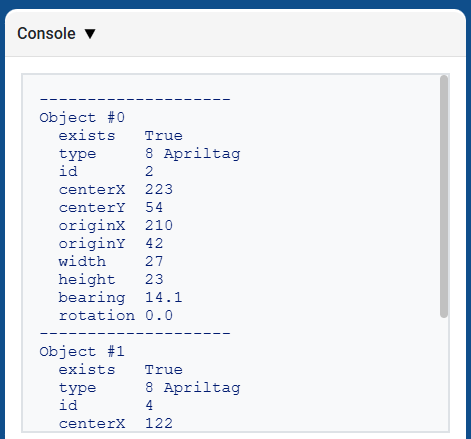
列印由 get_data 傳回的元組,將顯示所有偵測到的物件的所有屬性清單:
# Display properties of all detected AprilTag IDs
while True:
    vision_data = robot.vision.get_data(ALL_TAGS)

    if vision_data[0].exists:
        break

    wait(0.25, SECONDS)

print(vision_data)
人工智慧分類#
AIM AI視覺感測器可以檢測以下AI分類:
身分證號碼 |
人工智慧分類 |
簽名 |
|---|---|---|
0 |
球 |
|
1 |
藍桶 |
|
2 |
橘子桶 |
|
3 |
AIM機器人 |
|
顏色特徵#
顏色簽名是人工智慧視覺感測器可以識別的唯一顏色。這些簽名使感測器能夠根據物體的顏色來檢測和追蹤物體。配置顏色簽名後,感測器就可以在其視野範圍內識別具有該特定顏色的物體。顏色簽名與 get_data 結合使用,可即時處理和偵測彩色物體。
# Display if any objects match the Red_Box signature
while True:
    robot.screen.set_cursor(1, 1)
    robot.screen.clear_row(1)
    # Change to any configured Color Signature
    ai_objects = robot.vision.get_data(Red_Box)
    if ai_objects[0].exists:
        robot.screen.print("Color signature detected!")
顏色代碼#
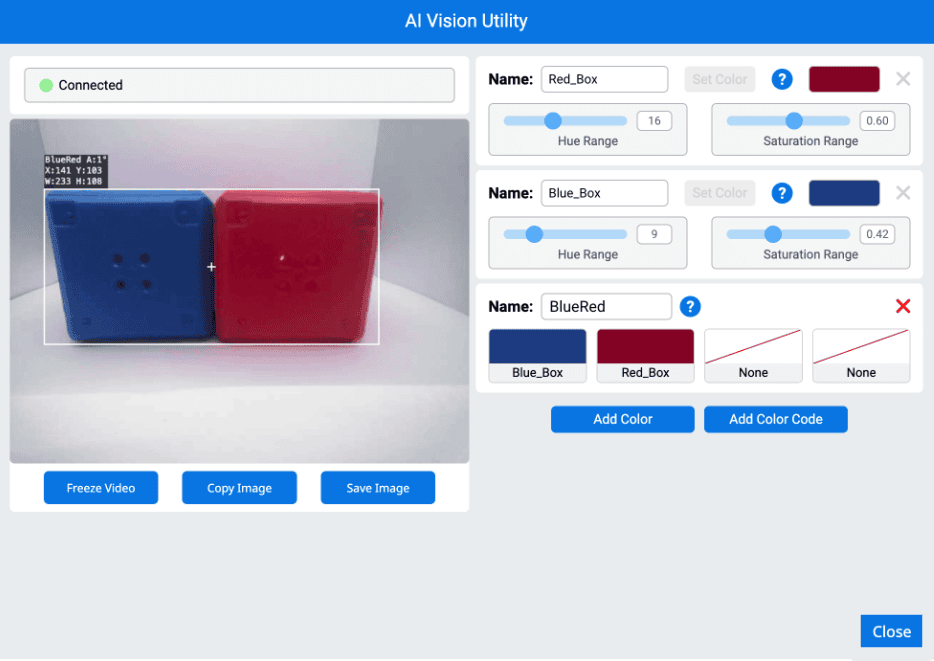
顏色編碼是一種由2到4種顏色符號依特定順序排列而成的結構化圖案。這些編碼使人工智慧視覺感測器能夠識別預先定義的顏色模式。顏色編碼可用於識別複雜物件或為自主導航建立獨特的標記。
# Display if any objects match the BlueRed code
while True:
    robot.screen.set_cursor(1, 1)
    robot.screen.clear_row(1)
    # Change to any configured Color Code
    ai_objects = robot.vision.get_data(BlueRed)
    if ai_objects[0].exists:
        robot.screen.print("Color code detected!")
has_sports_ball#
has_sports_ball 回傳一個布林值,指示機器人目前是否擁有運動球。
True— 機器人有一個運動球。False— 該機器人沒有運動球。
用法:
robot.has_sports_ball()
參數 |
描述 |
|---|---|
此方法沒有參數。 |
# Kick when the robot has a sports ball
while True:
    if robot.has_sports_ball():
        robot.kicker.kick(MEDIUM)

    wait(50, MSEC)
has_any_barrel#
has_any_barrel 傳回布林值,指示機器人目前是否擁有任何類型的桶子。
True— 機器人有一個桶子。False— 該機器人沒有桶子。
用法:
robot.has_any_barrel()
參數 |
描述 |
|---|---|
此方法沒有參數。 |
# Push a barrel away when detected
while True:
    if robot.has_any_barrel():
        robot.kicker.place()

    wait(50, MSEC)
has_blue_barrel#
has_blue_barrel 傳回布林值,指示機器人目前是否擁有藍色桶。
True— 機器人有一個藍色的桶子。False— 該機器人沒有藍色桶。
用法:
robot.has_blue_barrel()
參數 |
描述 |
|---|---|
此方法沒有參數。 |
# Push a blue barrel away when detected
while True:
    if robot.has_blue_barrel():
        robot.kicker.place()

    wait(50, MSEC)
has_orange_barrel#
has_orange_barrel 傳回布林值,指示機器人目前是否擁有橘色桶。
True— 機器人有一個橘色的桶子。False— 該機器人沒有橘色桶。
用法:
robot.has_orange_barrel()
參數 |
描述 |
|---|---|
此方法沒有參數。 |
# Push an orange barrel away when detected
while True:
    if robot.has_orange_barrel():
        robot.kicker.place()

    wait(50, MSEC)
特性#
使用 robot.vision.get_data 方法後,儲存在元組中的每個物件都包含十二個屬性。
除 .id、.score 和 .type 外,所有属性值均描述在调用 robot.vision.get_data 时检测到的物体的位置、大小、朝向或方位角。这些值以像素或度为单位,基于传感器 320×240 像素的分辨率。
.exists#
.exists 傳回一個布林值,指示索引是否存在於元組中。
True— 索引存在。False— 索引不存在。
# Check if at least two objects are detected
while True:
    robot.screen.clear_screen()
    robot.screen.set_cursor(1, 1)
    ai_objects = robot.vision.get_data(ALL_CARGO)

    if ai_objects[0].exists:
        if ai_objects[1].exists:
            robot.screen.print("At least 2")
        else:
            robot.screen.print("Less than 2")
    wait(0.1, SECONDS)
.width#
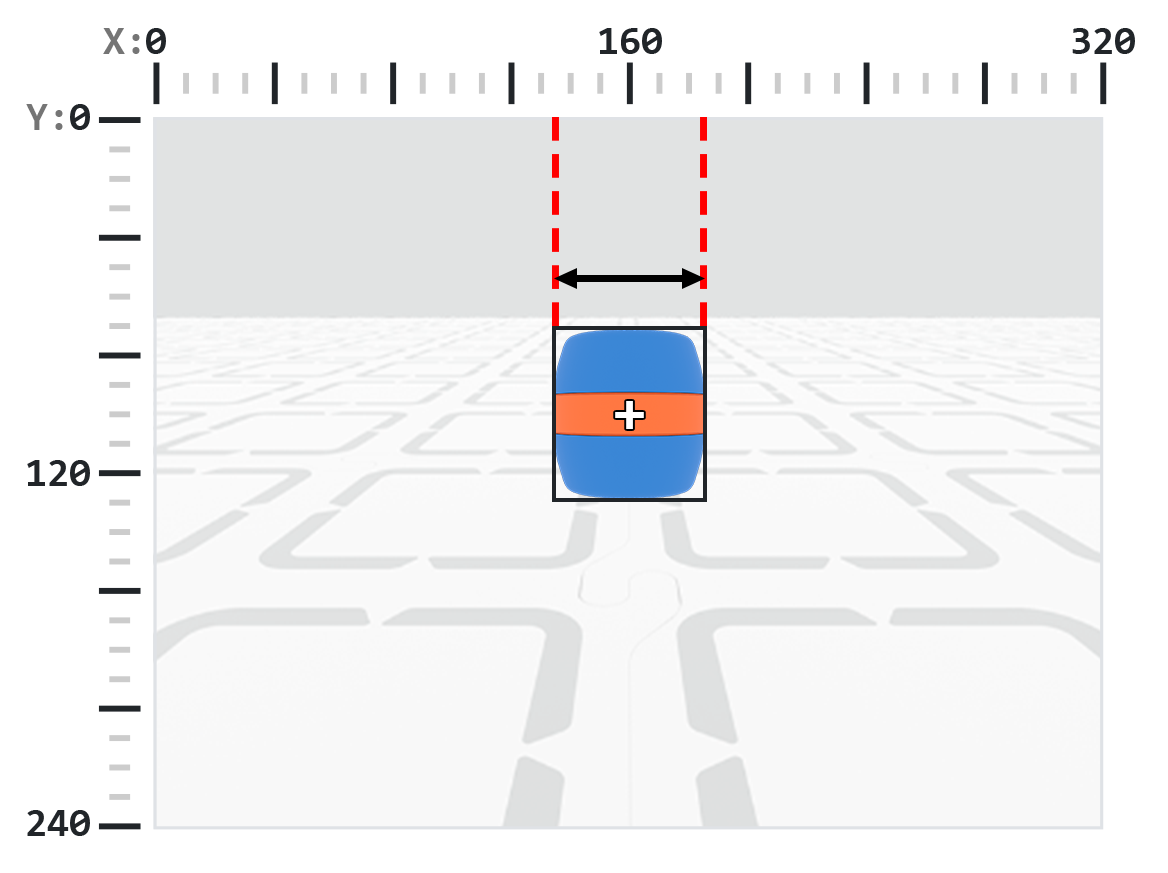
.width 傳回偵測到的物件在像素中的寬度,該值是 1 到 320 之間的整數。
註:像素值是相對於感測器座標係而言的。請參閱引言中的圖表以取得參考。
# Move towards a Blue Barrel until its width is
# larger than 100 pixels
while True:
    barrel = robot.vision.get_data(BLUE_BARREL)

    if barrel[0].exists:
        if barrel[0].width < 100:
            robot.move_at(0)
    else:
        robot.stop_all_movement()

    wait(50, MSEC)
.height#
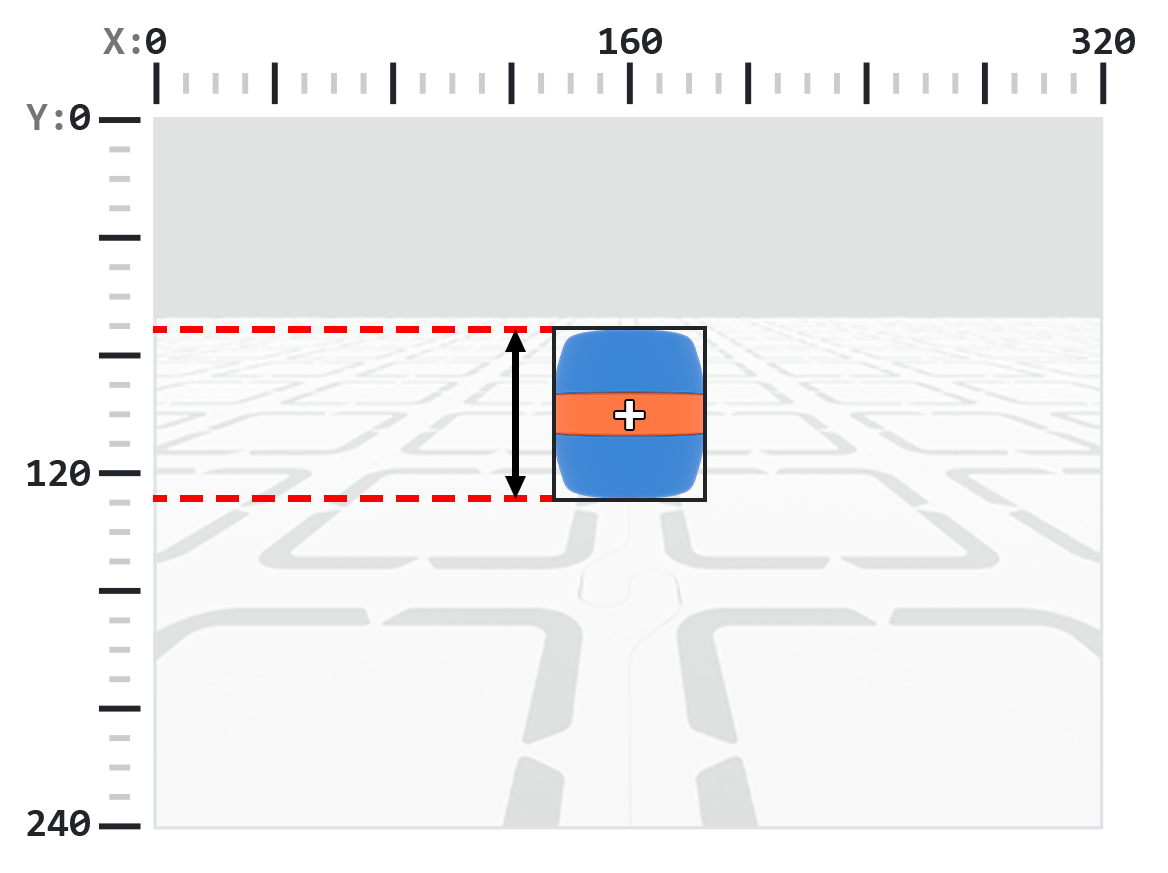
.height 傳回偵測到的物件的高度(以像素為單位),該值是 1 到 240 之間的整數。
註:像素值是相對於感測器座標係而言的。請參閱引言中的圖表以取得參考。
# Move towards a Blue Barrel until its height is
# larger than 100 pixels
while True:
    barrel = robot.vision.get_data(BLUE_BARREL)

    if barrel[0].exists:
        if barrel[0].height < 100:
            robot.move_at(0)
    else:
        robot.stop_all_movement()

    wait(50, MSEC)
.centerX#
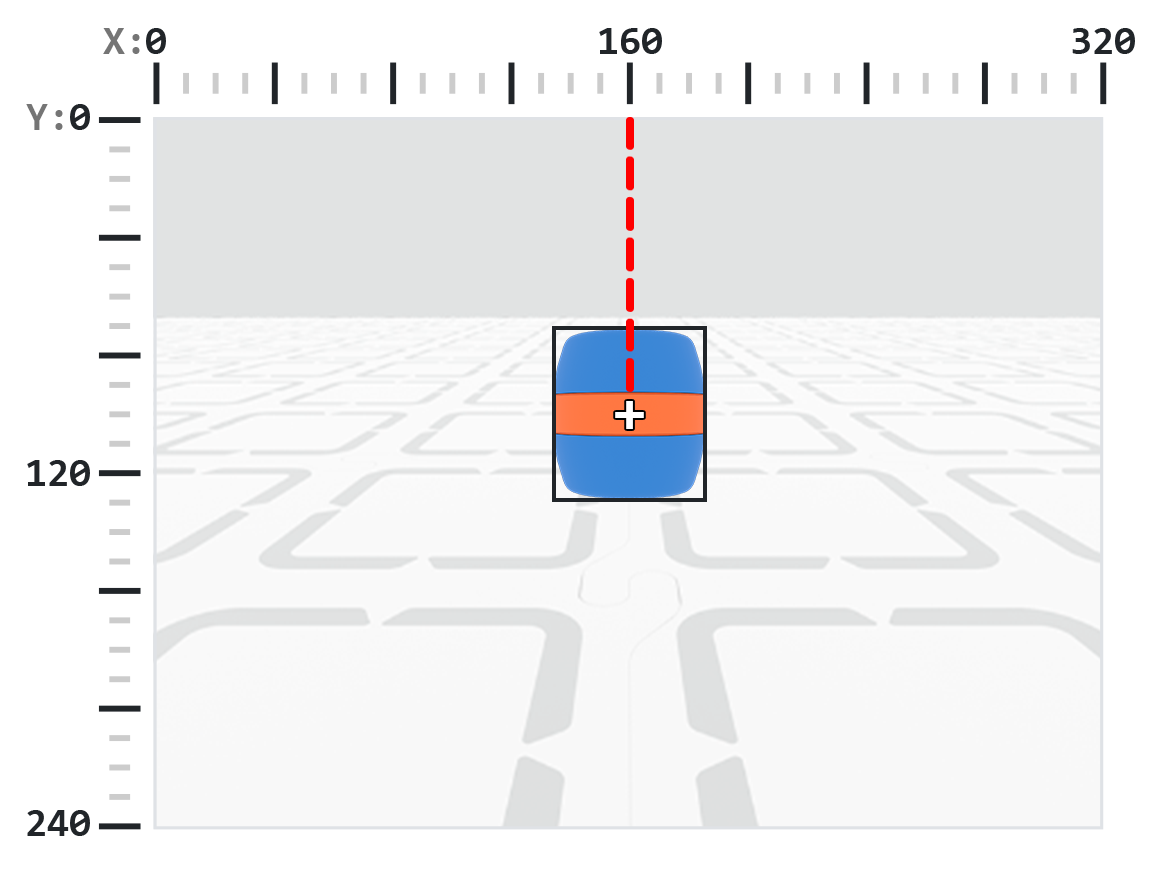
.centerX 傳回偵測到的物件中心的 x 座標(以像素為單位),該值是 0 到 320 之間的整數。
註:像素值是相對於感測器座標係而言的。請參閱引言中的圖表以取得參考。
# Turn slowly until a Blue Barrel is centered in
# front of the robot
robot.set_turn_velocity(30)
robot.turn(RIGHT)

while True:
    barrel = robot.vision.get_data(BLUE_BARREL)

    if barrel[0].exists:
        if 140 < barrel[0].centerX < 180:
            robot.stop_all_movement()

    wait(10,MSEC)
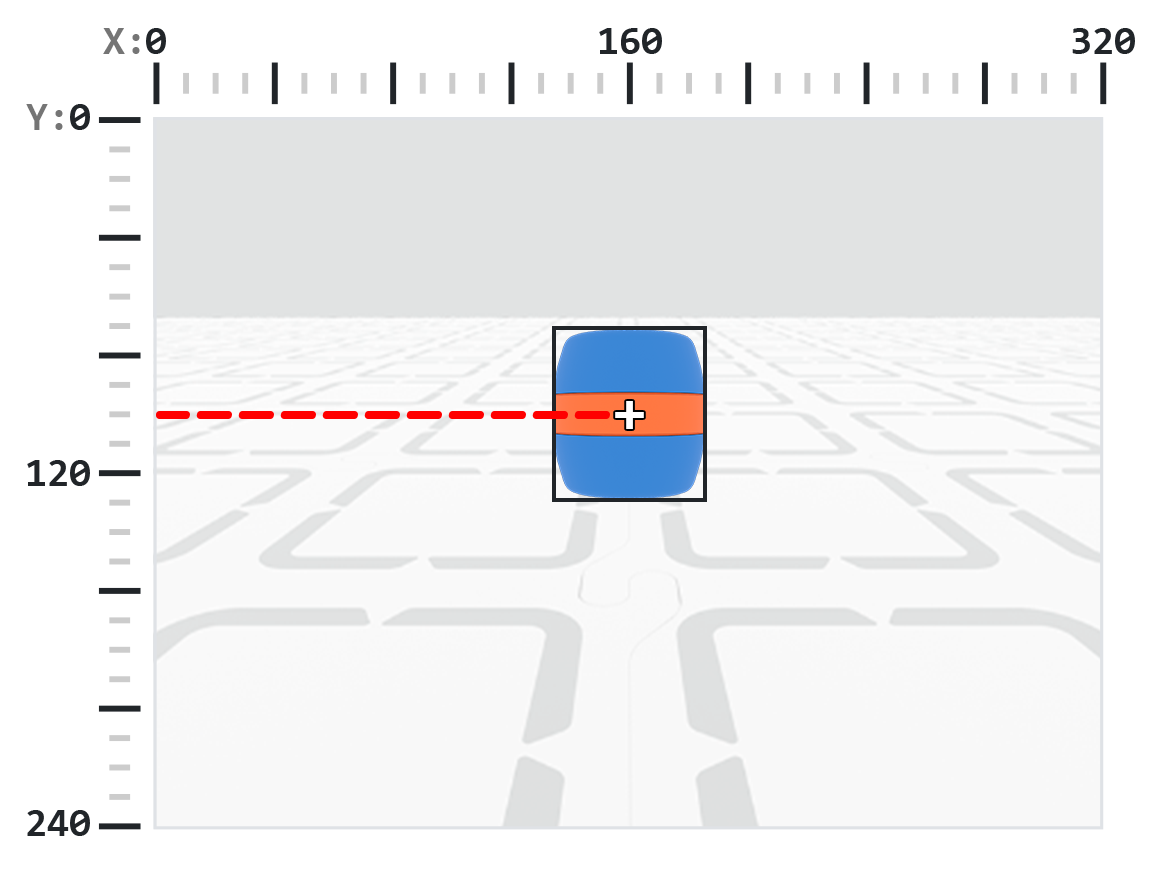
.centerY#
.centerY 傳回偵測到的物件中心的 y 座標(以像素為單位),該值是 0 到 240 之間的整數。
註:像素值是相對於感測器座標係而言的。請參閱引言中的圖表以取得參考。
# Move towards a Blue Barrel until its
# center y-coordinate is more than 140 pixels
while True:
    barrel = robot.vision.get_data(BLUE_BARREL)

    if barrel[0].exists:
        if barrel[0].centerY < 140:
            robot.move_at(0)
    else:
        robot.stop_all_movement()

    wait(50, MSEC)
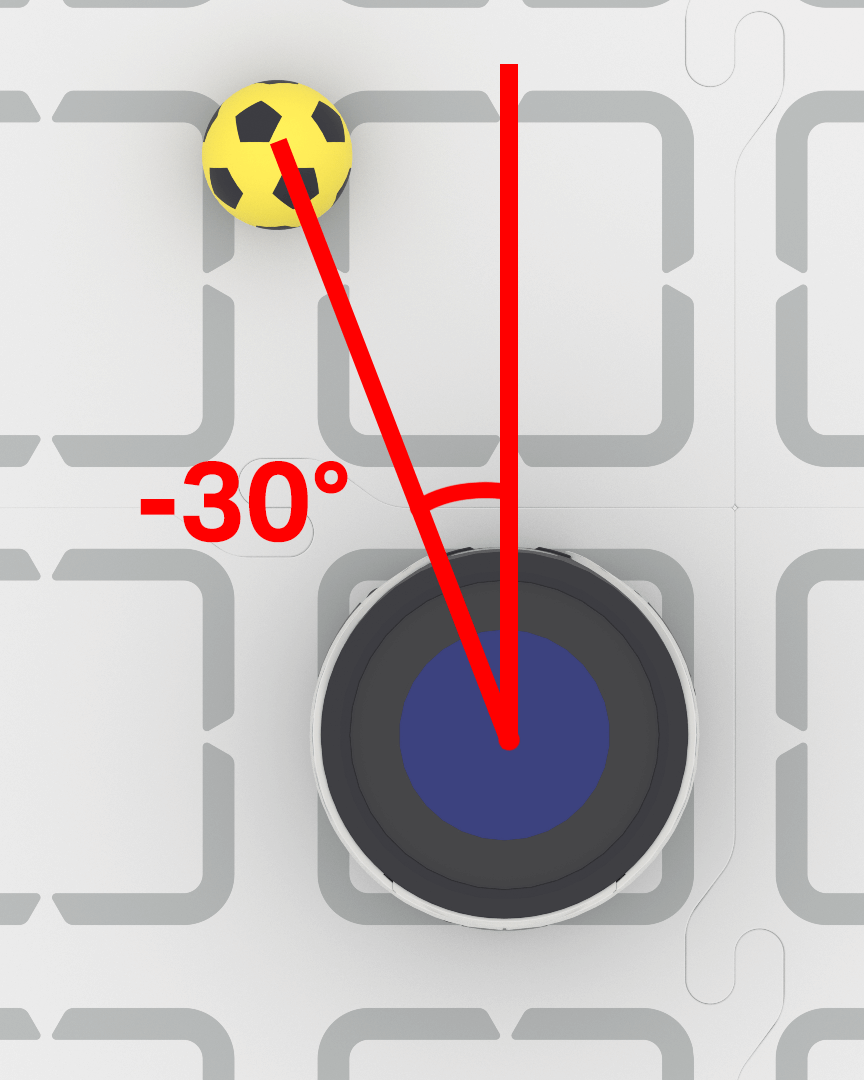
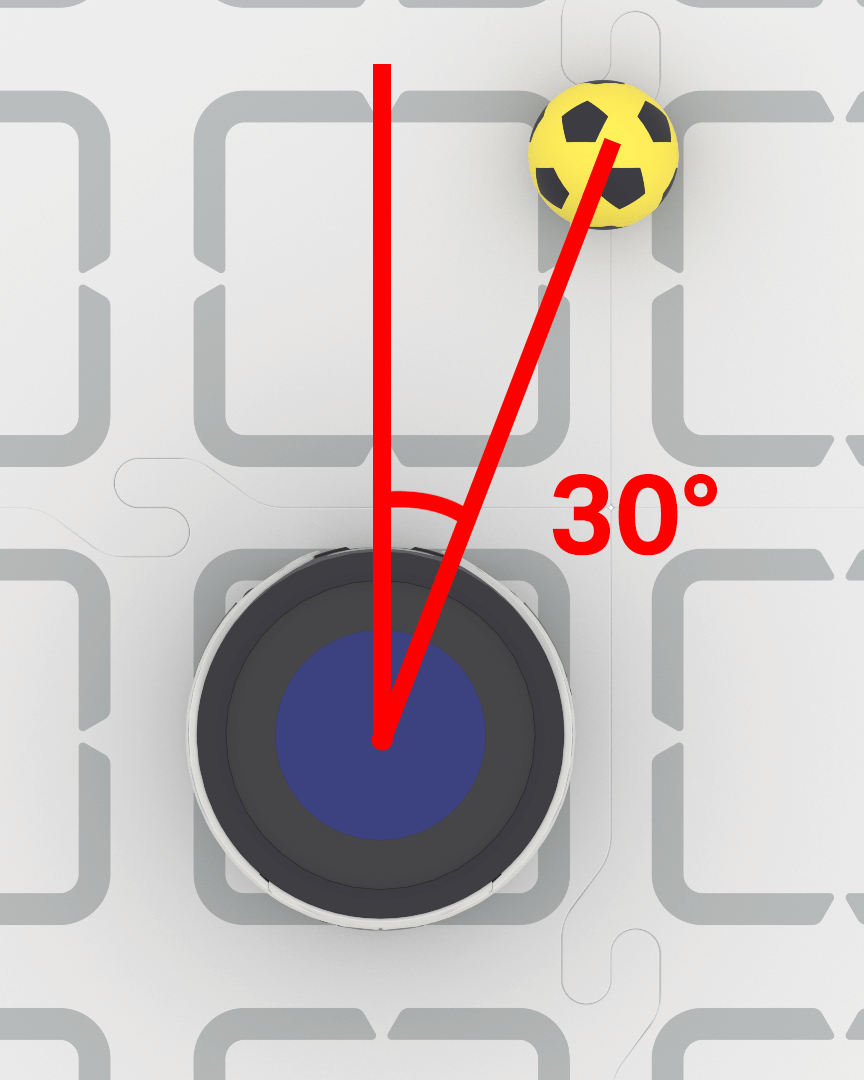
.bearing#
.bearing 回傳一個十進位 (float),表示物體位於 AI 視覺感測器視野中心左側或右側的距離,單位為度。值為 0 表示物體位於中心,正值表示物體位於右側,負值表示物體位於左側。
# Turn to keep the Blue Barrel directly in front
robot.set_turn_velocity(40)
while True:
    vision_data = robot.vision.get_data(BLUE_BARREL)

    if vision_data[0].exists:

        if vision_data[0].bearing > 5:
            robot.turn(RIGHT)
        elif vision_data[0].bearing < -5:
            robot.turn(LEFT)
        else:
            robot.stop_all_movement()

    else:
        robot.stop_all_movement()

    wait(0.1, SECONDS)
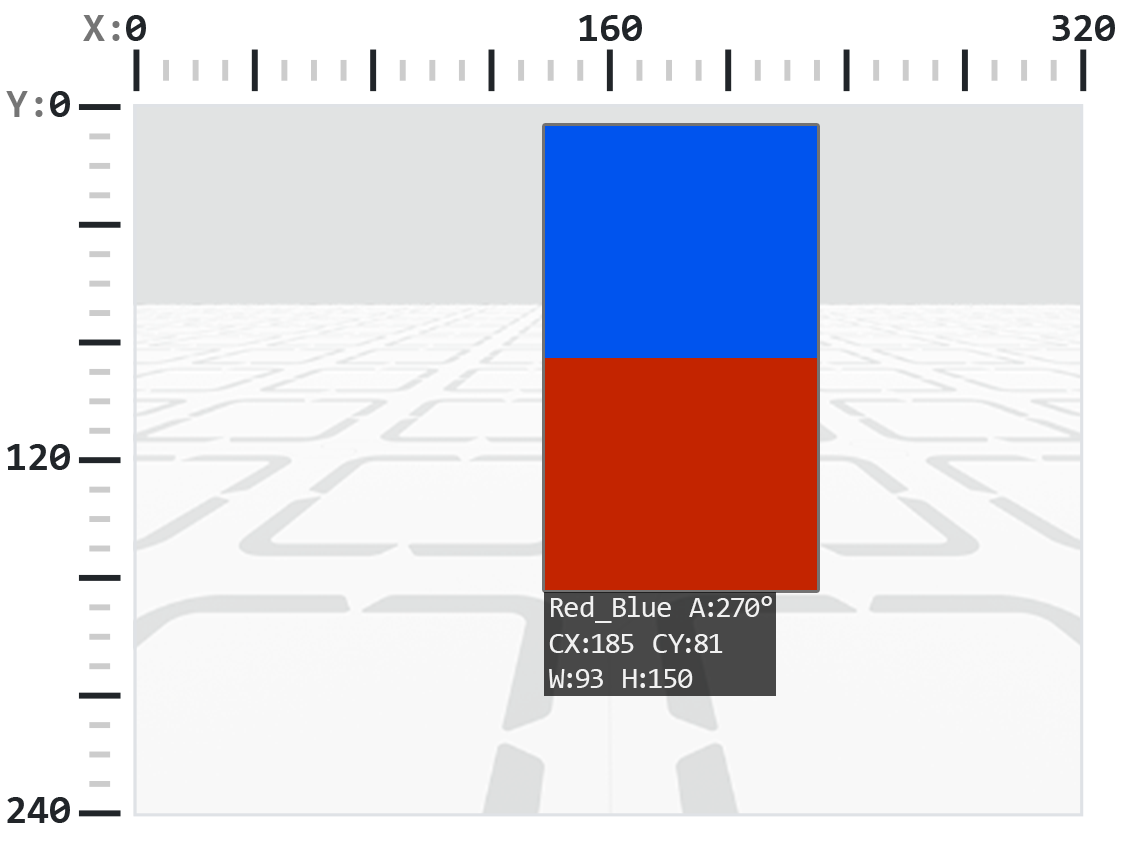
.rotation#
.rotation 返回物體在 AI 視覺感測器的視平面上的方向,以度為單位,範圍從 0 到 359。當顏色代碼中的顏色排列成水平線時(例如,紅-藍),角度為 0°。如果顏色旋轉,角度也會改變(例如,藍-紅排列則回傳 180°)。
下面的範例顏色代碼配置為左側為紅色,右側為藍色。
在這張圖中,將藍色放在紅色上面相當於將原始顏色代碼向右旋轉 270 度。
# Slide left or right depending on how a Color Code (BlueRed)
# is rotated on the vertical plane
while True:
    # Original Color Code is Red to the left, Blue to the right
    code = robot.vision.get_data(BlueRed)

    if code[0].exists:
        # Check if Color Code is now Red on top of Blue
        if 50 < code[0].rotation < 100 :
            robot.move_at(90)

        # Check if Color Code is now Blue on top of Red
        elif 270 < code[0].rotation < 330 :
            robot.move_at(270)

        else:
            robot.stop_all_movement()
    else:
        robot.stop_all_movement()

    wait(50, MSEC)
.originX#
.originX 傳回偵測到的物件邊界框左上角的 x 座標(以像素為單位),該值是 0 到 320 之間的整數。
註:像素值是相對於感測器座標係而言的。請參閱引言中的圖表以取得參考。
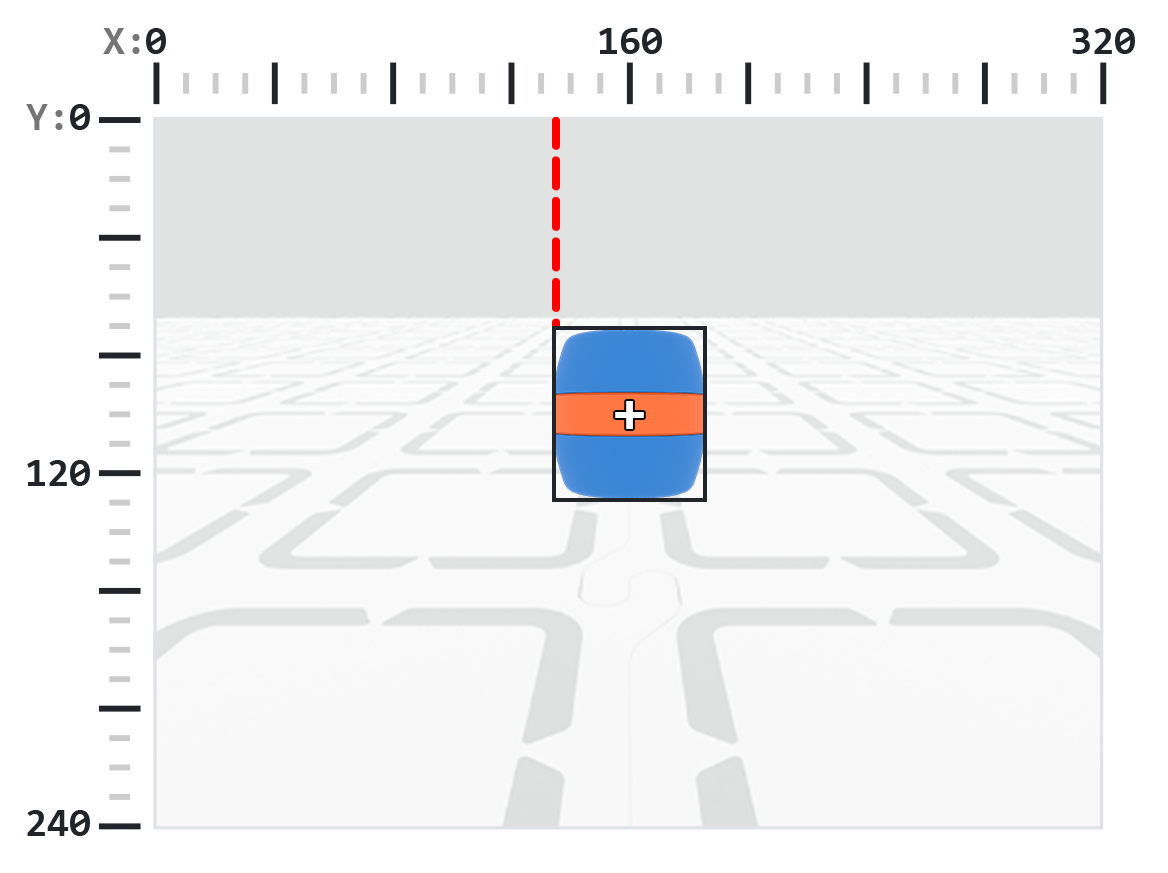
# Display if an Orange Barrel is to the
# left or the right
while True:
    robot.screen.clear_screen()
    robot.screen.set_cursor(1,1)

    orange_barrel = robot.vision.get_data(ORANGE_BARREL)

    if orange_barrel[0].exists:
        if orange_barrel[0].originX < 160:
            robot.screen.print("To the left!")
        else:
            robot.screen.print("To the right!")

    wait(50, MSEC)
.originY#
.originY 傳回偵測到的物件邊界框左上角的 y 座標(以像素為單位),該值是 0 到 240 之間的整數。
註:像素值是相對於感測器座標係而言的。請參閱引言中的圖表以取得參考。
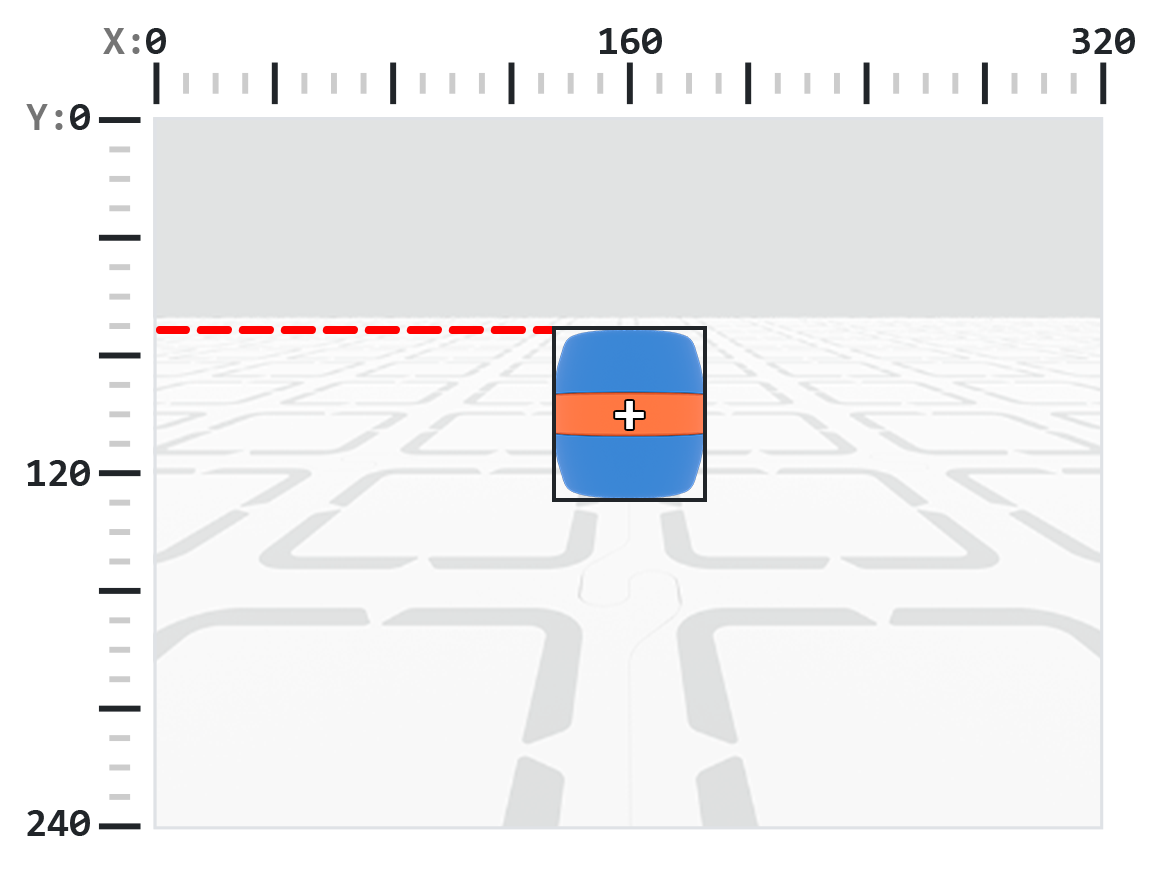
# Display if an Orange Barrel is close or far
# from the robot
while True:
    robot.screen.clear_screen()
    robot.screen.set_cursor(1, 1)

    orange_barrel = robot.vision.get_data(ORANGE_BARREL)

    if orange_barrel[0].exists:
        if orange_barrel[0].originY < 80:
            robot.screen.print("Far")
        else:
            robot.screen.print("Close")

    wait(50, MSEC)
.id#
.id 傳回偵測到的 AI 分類或 AprilTag ID 的 ID,以整數形式傳回。
對於 AprilTag ID, .id 屬性表示偵測到的 AprilTag ID 編號,範圍為 0 到 37。對於 AI 分類, .id 屬性對應於 AI 分類 部分中預先定義的 ID。
# Move forward when AprilTag ID 1 is detected
while True:
    apriltags = robot.vision.get_data(ALL_TAGS)

    if apriltags[0].exists:
        if apriltags[0].id == 1:
            robot.move_at(0)
    else:
        robot.stop_all_movement()

    wait(50, MSEC)
.score#
.score 傳回偵測到的 AI 分類的置信度分數,該分數為 1 到 100 之間的整數。
分數越低,表示感測器對偵測到的物體信心越低;分數越高,表示感測器對偵測到的物體信心越高。
# Look confident if an Orange Barrel is detected
while True:
    barrel = robot.vision.get_data(ORANGE_BARREL)

    if barrel[0].exists:
        if barrel[0].score > 95:
            robot.screen.show_emoji(CONFIDENT)
        else:
            robot.screen.hide_emoji()

    wait(50, MSEC)
.type#
.type 傳回一個整數,指示偵測到的物件類型。您可以使用類型編號或對應的命名常數來比較此值:
物件類型 |
包含對象 |
|---|---|
|
— 運動球 |
|
— AprilTag IDs |
|
— 顏色簽名 |
|
— 顏色代碼 |
# Display if an AprilTag ID or AI Classification
# is detected
while True:
    robot.screen.clear_screen()
    robot.screen.set_cursor(1, 1)
    vision_data = robot.vision.get_data(ALL_VISION)
    if vision_data[0].exists:
        if vision_data[0].type == AiVision.AI_OBJECT:
            robot.screen.print("AI Object!")
        elif vision_data[0].type == AiVision.TAG_OBJECT:
            robot.screen.print("AprilTag ID!")
    wait(0.1, SECONDS)
# Display a list of all detected objects
while True:
    robot.screen.clear_screen()
    robot.screen.set_cursor(1, 1)
    vision_data = robot.vision.get_data(ALL_VISION)

    if vision_data[0].exists:
        for obj in vision_data:
            if obj.type == AiVision.AI_OBJECT:
                robot.screen.print("- AI Object")
            elif obj.type == AiVision.TAG_OBJECT:
                robot.screen.print("- AprilTag ID")
            robot.screen.next_row()

    wait(0.1, SECONDS)
建構函數#
Creating a Color Signature#
新的颜色特征使用 Colordesc 构造函数创建,然后通过 color_description 方法注册到 AI 视觉仪。一个 Colordesc 对象定义了传感器最多 7 个可检测颜色特征中的 1 个,但必须通过 color_description 明确设置才能生效。
Colordesc 用法:
Colordesc(index, red, green, blue, hangle, hdsat)
範圍 |
描述 |
|---|---|
|
一個介於 1 到 7 之間的整數,表示顏色簽名索引。如果兩個顏色簽名使用相同的索引,則第二個顏色簽名將覆蓋第一個。 |
|
表示顏色中紅色分量的整數,取值範圍為 0 到 255。 |
|
表示顏色中綠色分量的整數,取值範圍為 0 到 255。 |
|
一個介於 0 到 255 之間的整數,表示顏色中藍色分量的數值。 |
|
一個介於 1 到 40 之間的浮點數,表示色調範圍(以度為單位)。 |
|
一個介於 0.10 到 1.00 之間的浮點數,表示飽和度範圍。 |
color_description 用法:
robot.vision.color_description(object)
範圍 |
描述 |
|---|---|
|
若要將 |
# Detect a red object
red_box = Colordesc(1, 207, 19, 25, 10.00, 0.20)
robot.vision.color_description(red_box)

while True:
    robot.screen.clear_screen()
    robot.screen.set_cursor(1, 1)

    red_boxes = robot.vision.get_data(red_box)

    if red_boxes[0].exists:
        robot.screen.print("Red detected!")
    else:
        robot.screen.print("No red detected.")

    wait(0.2, SECONDS)
Creating a Color Code#
新的颜色编码使用 Codedesc 构造函数创建,然后通过 code_description 方法激活。颜色编码将 2 到 4 个现有的 Colordesc 对象组合成一个 AI 视觉仪可以作为序列检测的单一标识符,但必须通过 code_description 显式设置才能生效。
Codedesc 用法:
Codedesc(index, c1, c2, c3, c4, c5)
範圍 |
描述 |
|---|---|
|
顏色代碼的索引,從 1 到 8。注意:如果建立兩個具有相同索引的 |
|
程式碼中的第一個 |
|
程式碼中的第二個 |
|
可選。第三個 |
|
可選。第四個 |
code_description 用法:
robot.vision.code_description(object)
範圍 |
描述 |
|---|---|
|
要註冊為可偵測顏色代碼的 |
# Create Color Signatures
red_box = Colordesc(1, 207, 19, 25, 10.00, 0.20)
purple_box = Colordesc(2, 98, 18, 227, 10.00, 0.20)

robot.vision.color_description(red_box)
robot.vision.color_description(purple_box)

# Detect a red_purple Color Code
red_purple = Codedesc(1, red_box, purple_box)
robot.vision.code_description(red_purple)

while True:
    robot.screen.clear_screen()
    robot.screen.set_cursor(1, 1)

    code_objects = robot.vision.get_data(red_purple)

    if code_objects[0].exists:
        robot.screen.print("Code detected!")
    else:
        robot.screen.print("No code detected.")

    wait(0.2, SECONDS)