
Bloques específicos para robots#
Introducción#
El robot 123 incluye un sistema de transmisión, un LED, un altavoz, un sensor ocular y un sensor giroscópico.
Todos los bloques VR VEXcode estándar están disponibles para su uso en el 123 Playspace Playground.
A continuación se muestra una lista de todos los bloques específicos para robots disponibles:
Sistema de transmisión: Mover y girar el robot.
Comportamiento
drive - Mueve el robot hacia adelante o hacia atrás indefinidamente.
conducir hasta - Mueve el robot hacia adelante o hacia atrás hasta que detecta un objeto, un choque o una línea.
drive for - Mueve el robot hacia adelante o hacia atrás una distancia específica.
giro - Gira el robot hacia la izquierda o hacia la derecha indefinidamente.
girar para - Gira el robot hacia la izquierda o hacia la derecha un número específico de grados.
girar rumbo - Gira el robot para que mire hacia un rumbo específico de -359 a 359 grados. El robot girará en la dirección más corta para alcanzar el rumbo objetivo.
detener conducción - Detiene el movimiento del robot.
Ajustes
establecer tiempo de espera de conducción - Establece cuántos segundos el robot intentará terminar un movimiento.
establecer rumbo de conducción - Cambia el rumbo actual del robot a un nuevo rumbo.
Valores
el movimiento ha terminado - Informa si el robot ha terminado de moverse.
dirección de conducción - Informa la dirección actual del robot de 0 a 359 grados.
Sonido: Reproduce los sonidos integrados a través del altavoz del robot 123.
reproducir sonido - Reproduce uno de los efectos de sonido incorporados del robot.
LED - Controla el LED central del robot 123.
brillo - Establece el color de la luz LED.
Acciones: Haz que el robot 123 realice comportamientos preestablecidos.
actuar - Representa diferentes emociones.
Detección: Lee los valores de los sensores del robot 123.
Giroscopio
choque detectado — Informa si el robot ha detectado un impacto repentino.
Ojo
el ojo encontró un objeto – Informa si el sensor ocular detecta o no un objeto dentro del alcance.
el ojo detecta color – Informa si el sensor ocular detecta un color específico.
tono del ojo – Informa el tono detectado por el sensor ocular.
objeto brillante para el ojo – Informa si el objeto detectado refleja mucha luz.
brillo ocular – Informa el brillo detectado por el sensor ocular.
Tren de transmisión#
El robot 123 tiene un sistema de tracción de dos ruedas que le permite desplazarse y girar. Los bloques del sistema de tracción controlan el movimiento del robot.
El sistema de transmisión puede medir la distancia de dos maneras: pasos y mm (milímetros). Un paso equivale a un cuadrado en un campo de 123.
Comportamiento#
conducir#
El bloque de accionamiento mueve el robot hacia adelante o hacia atrás indefinidamente. El robot seguirá moviéndose hasta que se le indique otra acción, como girar o detenerse.
conducir [adelante v]
Parámetros |
Descripción |
|---|---|
dirección |
La dirección en la que se mueve el robot: hacia adelante o hacia atrás. |
Ejemplo
cuando inicie
[Drive for 2 seconds.]
conducir [adelante v]
esperar (2) segundos
detener conducción
conducir hasta#
The drive until stack block moves the robot forward until the Eye Sensor detects an object, crash, or line.
avanzar hasta [objeto v]
Parámetros |
Descripción |
|---|---|
condición |
La condición que detiene al robot:
|
Ejemplo
cuando inicie
[Reverse after a crash.]
avanzar hasta [choque v]
conducir [marcha atrás v] por (1) [pasos v]
impulso para#
El bloque de la pila drive for mueve el robot hacia adelante o hacia atrás una distancia específica. El proyecto esperará a que el robot termine de moverse antes de ejecutar el siguiente bloque de la pila.
conducir [adelante v] por (1) [pasos v]
Parámetros |
Descripción |
|---|---|
dirección |
La dirección en la que se mueve el robot: hacia adelante o hacia atrás. |
distancia |
La distancia que recorre el robot. Puede ser un número entero o decimal. |
unidad |
La unidad de distancia: pasos o mm. |
Ejemplo
cuando inicie
[Drive back and forth.]
conducir [adelante v] por (3) [pasos v]
conducir [marcha atrás v] por (3) [pasos v]
doblar#
El bloque de pila girar hace girar al robot hacia la izquierda o hacia la derecha indefinidamente. El robot seguirá girando hasta que se le asigne otra acción, como conducir o detenerse.
girar [derecha v]
Parámetros |
Descripción |
|---|---|
dirección |
La dirección en la que gira el robot: izquierda o derecha. |
Ejemplo
cuando inicie
[Turn for 2 seconds.]
girar [derecha v]
esperar (2) segundos
detener conducción
girar para#
El bloque turn for hace girar el robot hacia la izquierda o hacia la derecha un número específico de grados. El giro es relativo a la posición actual del robot. El programa esperará a que el robot termine de girar antes de ejecutar el siguiente bloque.
girar [derecha v] por (90) grados
Parámetros |
Descripción |
|---|---|
dirección |
La dirección en la que gira el robot: izquierda o derecha. |
ángulo |
El número de grados que gira el robot. Puede ser un número entero o decimal. |
Ejemplo
cuando inicie
[Turn left, then turn around to the right.]
girar [izquierda v] por (90) grados
girar [derecha v] por (180) grados
girar hacia el encabezamiento#
El rumbo es la dirección hacia la que apunta el robot, medida en grados. El bloque girar a rumbo hace que el robot gire para apuntar a un rumbo específico, desde -359 hasta 359 grados. El robot girará en la dirección más corta para alcanzar el rumbo deseado.
La dirección inicial del robot es de 0 grados.
girar al rumbo (90) grados
Parámetros |
Descripción |
|---|---|
título |
La dirección hacia la que debe apuntar el robot, en grados. Puede ser un número entero o decimal entre -359 y 359. |
Ejemplo
cuando inicie
[Turn to face the cardinal directions.]
girar al rumbo (90) grados
esperar (2) segundos
girar al rumbo (180) grados
esperar (2) segundos
girar al rumbo (270) grados
esperar (2) segundos
girar al rumbo (0) grados
esperar (2) segundos
dejar de conducir#
El bloque de apilamiento detener conducción detiene el movimiento del robot.
detener conducción
Parámetros |
Descripción |
|---|---|
Este bloque no tiene parámetros. |
Ejemplo
cuando inicie
[Stop driving after 4 seconds.]
conducir [adelante v]
esperar [4] segundos
detener conducción
Ajustes#
establecer tiempo de espera de la unidad#
El bloque de pila set drive timeout establece cuántos segundos intentará el robot completar un movimiento. Si el robot no puede terminar en ese tiempo, dejará de intentarlo y pasará al siguiente bloque de la pila. Esto evita que el robot se quede atascado en un movimiento.
establecer tiempo límite de conducción a (1) segundos
Parámetros |
Descripción |
|---|---|
tiempo |
El número de segundos que el robot puede intentar para completar un movimiento. Puede ser un número entero o decimal. |
Ejemplo
cuando inicie
[Turn right after driving for 1 second.]
establecer tiempo límite de conducción a (1) segundos
conducir [adelante v] por (1000) [mm v]
girar [derecha v] por (90) grados
establecer dirección de conducción#
El rumbo es la dirección hacia la que apunta el robot, medida en grados. El bloque de pila establecer rumbo de conducción cambia el rumbo actual del robot a un nuevo valor.
Por ejemplo, si el robot ha girado para mirar hacia la derecha, al establecer la orientación a 0 grados, esa posición mirando hacia la derecha se convierte en la nueva posición de 0 grados. Entonces, el robot puede girar a otras posiciones en función de esa nueva orientación.
establecer rumbo de conducción a (0) grados
Parámetros |
Descripción |
|---|---|
título |
El valor de rumbo, en grados, que se debe configurar para el robot. Puede ser un número entero o decimal entre -359 y 359. |
Ejemplo
cuando inicie
[Face the new 0 degree heading.]
establecer rumbo de conducción a (90) grados
girar al rumbo (0) grados
Valores#
El viaje ha terminado.#
El bloque booleano drive is done indica si el robot ha terminado de moverse. Esto permite controlar la sincronización de otras acciones en función del movimiento del robot.
Verdadero — El robot ha terminado de moverse.
Falso — El robot sigue en movimiento.
Este bloque funciona junto con los siguientes bloques de tren motriz: conducir para, conducir hasta, girar para y girar hacia la dirección.
<¿conducción terminada?>
Parámetros |
Descripción |
|---|---|
Este bloque no tiene parámetros. |
Ejemplo
cuando inicie
[Glow blue after a crash.]
avanzar hasta [choque v]
por siempre
si <¿conducción terminada?> entonces
brillar [azul v]
si no
brillar [verde v]
dirección de conducción#
El rumbo es la dirección hacia la que apunta el robot, medida en grados. El bloque de informe rumbo de conducción informa el rumbo actual del robot, que oscila entre 0 y 359 grados.
La dirección inicial del robot es de 0 grados.
(rumbo de conducción en grados)
Parámetros |
Descripción |
|---|---|
Este bloque no tiene parámetros. |
Ejemplo
cuando inicie
[Display the heading after turning.]
girar [derecha v] por (450) grados
imprimir (rumbo de conducción en grados) ▶
Sonido#
reproducir sonido#
El bloque reproducir sonido reproduce uno de los sonidos incorporados del robot.
reproducir sonido [bocina v]
Parámetros |
Descripción |
|---|---|
sonido |
Uno de los sonidos integrados que se muestran a continuación. |
Nombre del sonido |
Reproducir sonido |
|---|---|
bocinazo |
|
timbre de la puerta |
|
chocar |
|
aleatorio |
Reproduce un sonido aleatorio de entre los 3 sonidos anteriores. |
Ejemplo
cuando inicie :: hat events
[Play the doorbell sound.]
reproducir sonido [timbre v]
CONDUJO#
brillo#
El bloque brillante determina el color de la luz LED.
brillar [verde v]
Parámetros |
Descripción |
|---|---|
color |
Color para configurar el LED:
|
Ejemplo
cuando inicie :: hat events
[Blink the LED light forever.]
por siempre
brillar [verde v]
esperar [0.5] segundos
brillar [apagado v]
esperar [0.5] segundos
Comportamiento#
acto#
El bloque act se utiliza para simular tristeza, alegría o locura haciendo que el robot 123 realice una secuencia de acciones de conducción, giro y emisión de sonidos.
actuar [triste v]
Parámetros |
Descripción |
|---|---|
emoción |
La emoción a representar.
|
cuando inicie :: hat events
[Act out a happy behavior.]
actuar [feliz v]
Detección#
El robot virtual 123 también tiene acceso a los bloques de detección estándar Cerebro y Tren motriz.
Giroscopio#
El robot 123 utiliza sensores giroscópicos para detectar impactos repentinos, como chocar contra una pared o un objeto.
se detectó un choque#
El bloque booleano detected crash informa si el robot ha detectado un impacto repentino, como golpear una pared u objeto con la suficiente fuerza como para cambiar rápidamente su movimiento.
Verdadero — Se ha detectado un fallo.
Falso — No se ha detectado ningún fallo.
<¿choque detectado?>
Parámetros |
Descripción |
|---|---|
Este bloque no tiene parámetros. |
Ejemplo
cuando inicie
[Back up after a crash.]
conducir [adelante v]
esperar hasta <¿choque detectado?>
conducir [marcha atrás v] por (200) [mm v]
Ojo#
El ojo encontró un objeto#
El bloque booleano eye found an object informa si el sensor ocular detecta o no un objeto dentro del alcance.
Verdadero — El sensor ocular detecta un objeto.
Falso — El sensor ocular no detecta ningún objeto.
<¿sensor encontró un objeto?>
Parámetros |
Descripción |
|---|---|
Este bloque no tiene parámetros. |
Ejemplo
cuando inicie
[Stop driving after detecting an object.]
establecer luz del sensor [encendido v]
conducir [adelante v]
esperar (0.1) segundos
esperar hasta <¿sensor encontró un objeto?>
detener conducción
El ojo detecta el color.#
El bloque booleano detección de color por el ojo informa si el sensor ocular detecta un color específico, basándose en el valor de tono detectado.
Verdadero – El sensor ocular detecta el color especificado.
Falso – El sensor ocular no detecta el color especificado.
Para comprobar el valor de tono exacto detectado por el sensor ocular, utilice el bloque de informe eye hue.
<¿sensor detecta [rojo v]?>
Parámetros |
Descripción |
|---|---|
color |
El color a detectar:
|
Ejemplo
cuando inicie
[Stop driving after detecting a green object.]
establecer luz del sensor [encendido v]
conducir [adelante v]
esperar (0.1) segundos
esperar hasta <¿sensor detecta [verde v]?>
detener conducción
color de ojos#
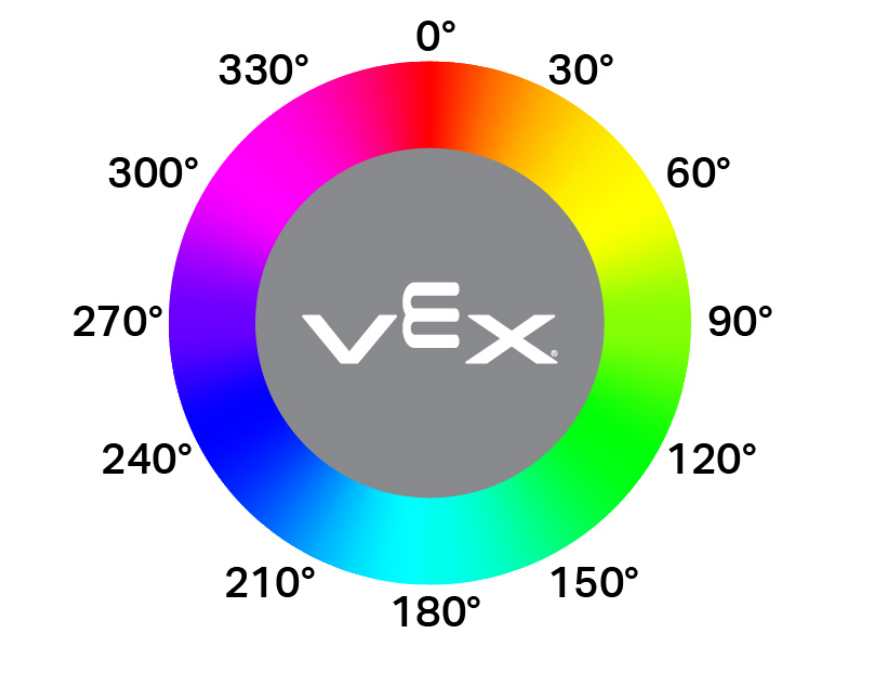
El bloque de informe tono ocular informa el tono detectado por el sensor ocular como un número de 0 a 359 grados.
El matiz es una forma de describir el color utilizando números alrededor de una rueda de colores.
(tono del sensor en grados)
Parámetros |
Descripción |
|---|---|
Este bloque no tiene parámetros. |
Ejemplo
cuando inicie
[Display if an object is pink.]
por siempre
limpiar todas las filas
si <[290] [math_less_than v] (tono del sensor en grados) [math_less_than v] [350]> entonces
imprimir [Pink!] ▶
esperar (0.1) segundos
si no
imprimir [Not pink!] ▶
esperar (0.1) segundos
objeto brillante para el ojo#
El bloque booleano objeto brillante para el ojo indica si el objeto detectado por el sensor ocular es brillante.
Se considera que un objeto es brillante cuando refleja más del 70 % de su brillo hacia el sensor ocular.
Verdadero — El objeto detectado refleja más del 70% de brillo.
Falso — El objeto detectado refleja un brillo del 70 % o menos.
Esto se puede utilizar antes de comprobar el color para asegurarse de que el objeto refleja suficiente luz para que el sensor ocular pueda detectar el color de forma fiable.
<¿objeto brillante detectado?>
Parámetros |
Descripción |
|---|---|
Este bloque no tiene parámetros. |
Ejemplo
cuando inicie
[Display whether a detected object is bright.]
establecer potencia de luz del sensor a (100) %
conducir [adelante v]
esperar hasta <¿sensor encontró un objeto?>
esperar (0.1) segundos
si <¿objeto brillante detectado?> entonces
imprimir [Bright object!] ▶
si no
imprimir [Object not bright.] ▶
brillo de los ojos#
El bloque de indicadores de brillo ocular informa sobre la cantidad de luz que se refleja de vuelta al sensor ocular, como un porcentaje del 0 % al 100 %.
Un porcentaje más alto significa que se refleja más luz hacia el sensor ocular. Un porcentaje más bajo significa que se refleja menos luz.
(brillo del sensor en %)
Parámetros |
Descripción |
|---|---|
Este bloque no tiene parámetros. |
Ejemplo
cuando inicie
[Display whether a detected object is bright.]
establecer potencia de luz del sensor a (100) %
conducir [adelante v]
esperar hasta <¿sensor encontró un objeto?>
esperar (0.1) segundos
si <(brillo del sensor en %) [math_less_than v] [70]> entonces
imprimir [Object not bright.] ▶
si no
imprimir [Bright object!] ▶