
机器人专用模块#
介绍#
123 机器人包含驱动系统、LED、扬声器、眼睛传感器和陀螺仪传感器。
所有标准 VEXcode VR 模块均可在 123 Playspace 游乐场中使用。
以下是所有可用的机器人专用模块列表:
驱动系统——控制机器人的移动和转向。
操作
设置
价值观
声音 - 通过 123 机器人的扬声器播放内置声音。
播放声音 - 播放机器人内置的音效之一。
LED - 控制 123 机器人的中央 LED 灯。
glow - 设置 LED 灯的颜色。
动作 - 让 123 机器人执行预设行为。
act - 表演不同的情绪。
传感 - 读取 123 机器人传感器的数值。
传动系统#
123 型机器人采用双轮驱动系统,使其能够行驶和转弯。驱动系统模块控制机器人的运动方式。
传动系统可以通过两种方式测量距离:步数和毫米。一步相当于123格子上的一个方格。
行动#
驾驶#
驱动 模块使机器人能够无限向前或向后移动。机器人将持续移动,直到收到其他指令,例如转向或停止。
驱动 [向前 v]
参数 |
描述 |
|---|---|
方向 |
机器人移动方向:前进或后退。 |
例子
当开始
[Drive for 2 seconds.]
驱动 [向前 v]
等待 (2) 秒
驱动停止
开车直到#
The drive until stack block moves the robot forward until the Eye Sensor detects an object, crash, or line.
前进直至 [对象 v]
参数 |
描述 |
|---|---|
状况 |
导致机器人停止的条件:
|
例子
当开始
[Reverse after a crash.]
前进直至 [撞毁 v]
驱动 [反 v] (1) [步数 v]
驱动#
驱动堆栈模块控制机器人前进或后退一段特定距离。程序会等待机器人完成移动后,才会运行堆栈中的下一个模块。
驱动 [向前 v] (1) [步数 v]
参数 |
描述 |
|---|---|
方向 |
机器人移动方向:前进或后退。 |
距离 |
机器人行驶的距离。可以是整数,也可以是小数。 |
单元 |
距离单位:步或毫米。 |
例子
当开始
[Drive back and forth.]
驱动 [向前 v] (3) [步数 v]
驱动 [反 v] (3) [步数 v]
转动#
转向 积木块会让机器人无限向左或向右转向。机器人会一直转向,直到收到其他动作指令,例如行驶或停止。
[右 v] 转
参数 |
描述 |
|---|---|
方向 |
机器人转向的方向:向左或向右。 |
例子
当开始
[Turn for 2 seconds.]
[右 v] 转
等待 (2) 秒
驱动停止
转向#
“转向”堆栈模块会使机器人向左或向右旋转指定的角度。旋转角度是相对于机器人的当前位置而言的。程序会等待机器人完成旋转后,才会运行堆栈中的下一个模块。
[右 v] 转 (90) 度
参数 |
描述 |
|---|---|
方向 |
机器人转向的方向:向左或向右。 |
角度 |
机器人旋转的角度数。可以是整数,也可以是小数。 |
例子
当开始
[Turn left, then turn around to the right.]
[左 v] 转 (90) 度
[右 v] 转 (180) 度
转向标题#
航向角是指机器人面向的方向,以度为单位。转向航向角 代码块可以将机器人转向 -359 度到 359 度之间的特定航向角。机器人会选择到达目标航向角的最短路径。
机器人的初始航向角为0度。
归位至 (90) 度
参数 |
描述 |
|---|---|
标题 |
机器人应面向的方向,以度为单位。该值可以是-359到359之间的整数或小数。 |
例子
当开始
[Turn to face the cardinal directions.]
归位至 (90) 度
等待 (2) 秒
归位至 (180) 度
等待 (2) 秒
归位至 (270) 度
等待 (2) 秒
归位至 (0) 度
等待 (2) 秒
停止驾驶#
停止驱动堆栈块会停止机器人的运动。
驱动停止
参数 |
描述 |
|---|---|
此代码块没有参数。 |
例子
当开始
[Stop driving after 4 seconds.]
驱动 [向前 v]
等待 [4] 秒
驱动停止
设置#
设置驱动超时#
设置驱动超时 代码块用于设置机器人尝试完成一次动作的秒数。如果机器人无法在规定时间内完成,它将停止尝试并执行代码块中的下一个。这样可以防止机器人卡在某个动作上。
设定驱动超时为 (1) 秒
参数 |
描述 |
|---|---|
时间 |
机器人尝试完成一次动作的秒数。该值可以是整数或小数。 |
例子
当开始
[Turn right after driving for 1 second.]
设定驱动超时为 (1) 秒
驱动 [向前 v] (1000) [毫米 v]
[右 v] 转 (90) 度
设置驱动航向#
航向角是指机器人朝向的方向,以度为单位。设置驱动航向堆栈块会将机器人的当前航向角更改为新的航向角值。
例如,如果机器人转向右侧,将航向设置为 0 度,则该右侧位置将成为新的 0 度航向。然后,机器人可以根据新的航向转向其他位置。
设定底盘归位至 (0) 度
参数 |
描述 |
|---|---|
标题 |
要设置的机器人航向角值,单位为度。该值可以是整数,也可以是介于 -359 到 359 之间的十进制数。 |
例子
当开始
[Face the new 0 degree heading.]
设定底盘归位至 (90) 度
归位至 (0) 度
价值观#
驾驶已完成#
“驱动完成”布尔模块用于报告机器人是否已停止移动。这可用于根据机器人的移动状态来控制其他行为的执行时间。
正确 — 机器人已停止移动。
错误 — 机器人仍在移动。
该模块与以下传动系统模块配合使用:驱动至、驱动至、转向 和 转向航向。
<驱动已结束?>
参数 |
描述 |
|---|---|
此代码块没有参数。 |
例子
当开始
[Glow blue after a crash.]
前进直至 [撞毁 v]
永久循环
如果 <驱动已结束?> 那么
发光 [蓝色 v]
否则
发光 [绿色 v]
行驶方向#
航向角是指机器人朝向的方向,以度为单位。驱动航向报告模块会报告机器人当前的航向角,范围从 0 度到 359 度。
机器人的初始航向角为0度。
(底盘归位角度值)
参数 |
描述 |
|---|---|
此代码块没有参数。 |
例子
当开始
[Display the heading after turning.]
[右 v] 转 (450) 度
打印 (底盘归位角度值) ▶
声音#
播放声音#
播放声音 模块会播放机器人内置的声音之一。
播放声音 [鸣笛 v]
参数 |
描述 |
|---|---|
声音 |
下面显示的是其中一种内置声音。 |
声音名称 |
播放声音 |
|---|---|
喇叭 |
|
门铃 |
|
碰撞 |
|
随机的 |
播放以上 3 种声音中的随机一种。 |
例子
当开始 :: hat events
[Play the doorbell sound.]
播放声音 [门铃 v]
引领#
辉光#
发光模块用于设置 LED 灯的颜色。
发光 [绿色 v]
参数 |
描述 |
|---|---|
颜色 |
LED灯颜色设置:
|
例子
当开始 :: hat events
[Blink the LED light forever.]
永久循环
发光 [绿色 v]
等待 [0.5] 秒
发光 [灭 v]
等待 [0.5] 秒
行动#
行为#
act 模块用于让 123 机器人执行一系列行驶、转弯和发声行为,从而表现悲伤、快乐或疯狂。
表现 [难过 v]
参数 |
描述 |
|---|---|
情感 |
要表现的情绪。0
|
当开始 :: hat events
[Act out a happy behavior.]
表现 [开心 v]
传感#
虚拟 123 机器人还可以访问标准的 大脑 和 驱动系统 传感模块。
陀螺仪#
123 机器人利用陀螺仪传感来检测突然的冲击,例如撞到墙壁或物体。
检测到崩溃#
检测到碰撞布尔模块报告机器人是否检测到突然的撞击,例如撞到墙壁或物体,其力度足以迅速改变其运动。
正确 — 检测到崩溃。
错误 — 未检测到崩溃。
<检测到碰撞?>
参数 |
描述 |
|---|---|
此代码块没有参数。 |
例子
当开始
[Back up after a crash.]
驱动 [向前 v]
等到 <检测到碰撞?>
驱动 [反 v] (200) [毫米 v]
眼睛#
眼睛发现了一个物体#
眼睛发现物体布尔模块报告眼睛传感器是否在范围内检测到物体。
正确 — 眼部传感器检测到物体。
错误 — 眼部传感器未检测到物体。
<辨色仪发现一个对象?>
参数 |
描述 |
|---|---|
此代码块没有参数。 |
例子
当开始
[Stop driving after detecting an object.]
设定辨色仪灯 [亮 v]
驱动 [向前 v]
等待 (0.1) 秒
等到 <辨色仪发现一个对象?>
驱动停止
眼睛能感知颜色#
眼睛检测颜色布尔模块根据检测到的色调值报告眼睛传感器是否检测到指定的颜色。
正确 – 眼睛传感器检测到了指定的颜色。
错误 – 眼睛传感器未检测到指定颜色。
要检查眼睛传感器检测到的确切色调值,请使用 眼睛色调 报告器模块。
<辨色仪测得 [红色 v]?>
参数 |
描述 |
|---|---|
颜色 |
待检测颜色:
|
例子
当开始
[Stop driving after detecting a green object.]
设定辨色仪灯 [亮 v]
驱动 [向前 v]
等待 (0.1) 秒
等到 <辨色仪测得 [绿色 v]?>
驱动停止
眼睛颜色#
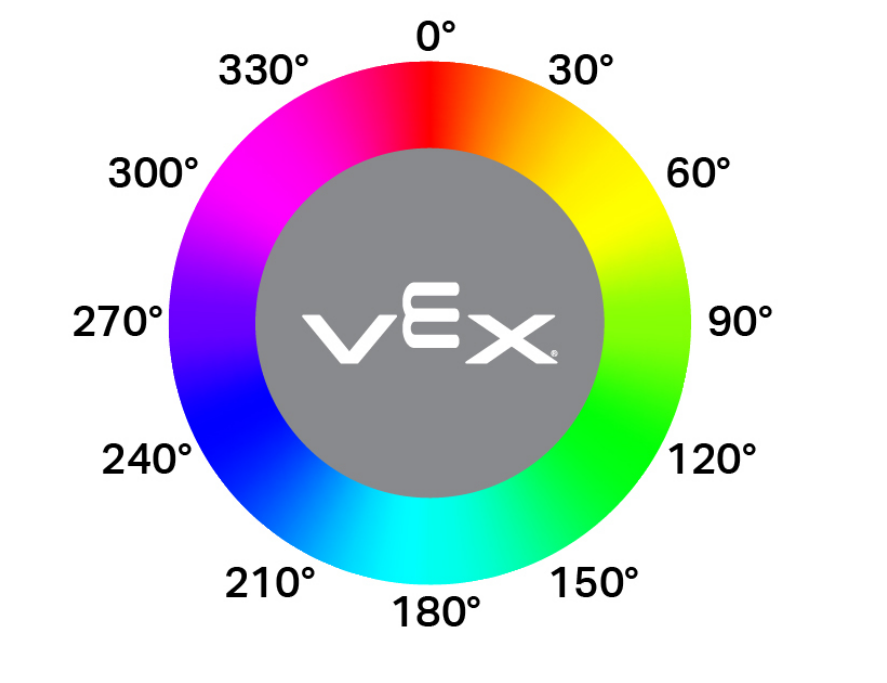
眼睛色调报告模块将眼睛传感器检测到的色调报告为 0 到 359 度之间的数字。
色相是用色轮上的数字来描述颜色的一种方法。
(辨色仪色度值)
参数 |
描述 |
|---|---|
此代码块没有参数。 |
例子
当开始
[Display if an object is pink.]
永久循环
清除所有行
如果 <[290] [math_less_than v] (辨色仪色度值) [math_less_than v] [350]> 那么
打印 [Pink!] ▶
等待 (0.1) 秒
否则
打印 [Not pink!] ▶
等待 (0.1) 秒
明亮的物体#
眼睛明亮物体布尔模块报告眼睛传感器检测到的物体是否明亮。
当物体反射回人眼传感器的亮度超过其亮度的 70% 时,该物体被认为是明亮的。
正确 — 检测到的物体反射超过 70% 的亮度。
错误 — 检测到的物体反射亮度低于 70%。
在检查颜色之前,可以使用此方法确保物体反射足够的光线,以便眼动传感器能够可靠地检测到颜色。
<看到明亮对象?>
参数 |
描述 |
|---|---|
此代码块没有参数。 |
例子
当开始
[Display whether a detected object is bright.]
设定辨色仪灯功率为 (100) %
驱动 [向前 v]
等到 <辨色仪发现一个对象?>
等待 (0.1) 秒
如果 <看到明亮对象?> 那么
打印 [Bright object!] ▶
否则
打印 [Object not bright.] ▶
眼睛亮度#
眼睛亮度报告模块会报告有多少光线反射回眼睛传感器,以 0% 到 100% 的百分比表示。
百分比越高,意味着反射回眼部传感器的光线越多;百分比越低,意味着反射回的光线越少。
(辨色仪亮度百分比)
参数 |
描述 |
|---|---|
此代码块没有参数。 |
例子
当开始
[Display whether a detected object is bright.]
设定辨色仪灯功率为 (100) %
驱动 [向前 v]
等到 <辨色仪发现一个对象?>
等待 (0.1) 秒
如果 <(辨色仪亮度百分比) [math_less_than v] [70]> 那么
打印 [Object not bright.] ▶
否则
打印 [Bright object!] ▶