
وحدة التحكم#
مقدمة#
يتميز جهاز التحكم بالطائرات بدون طيار VEX AIR بتصميم يحتوي على 12 زرًا وعصا تحكم مزدوجة. تتيح هذه المدخلات للطائرة بدون طيار اكتشاف ضغطات الأزرار وحركات عصا التحكم، مما يوفر تحكمًا تفاعليًا وسريع الاستجابة.
فيما يلي قائمة بجميع الطرق المتاحة:
أجهزة الاستقبال – قراءة حالة الزر، وعصا التحكم، والاتصال.
pressing– يتم إرجاع ما إذا كان يتم الضغط على زر معين حاليًا.position– تُرجع موضع عصا التحكم على طول محور محدد.is_drone_connected– تُرجع ما إذا كان جهاز التحكم متصلاً بالطائرة بدون طيار.get_battery_level– تُرجع مستوى بطارية وحدة التحكم.
الاستجابة للتغييرات في إدخال الأزرار أو عصا التحكم.
المحصلون#
pressing#
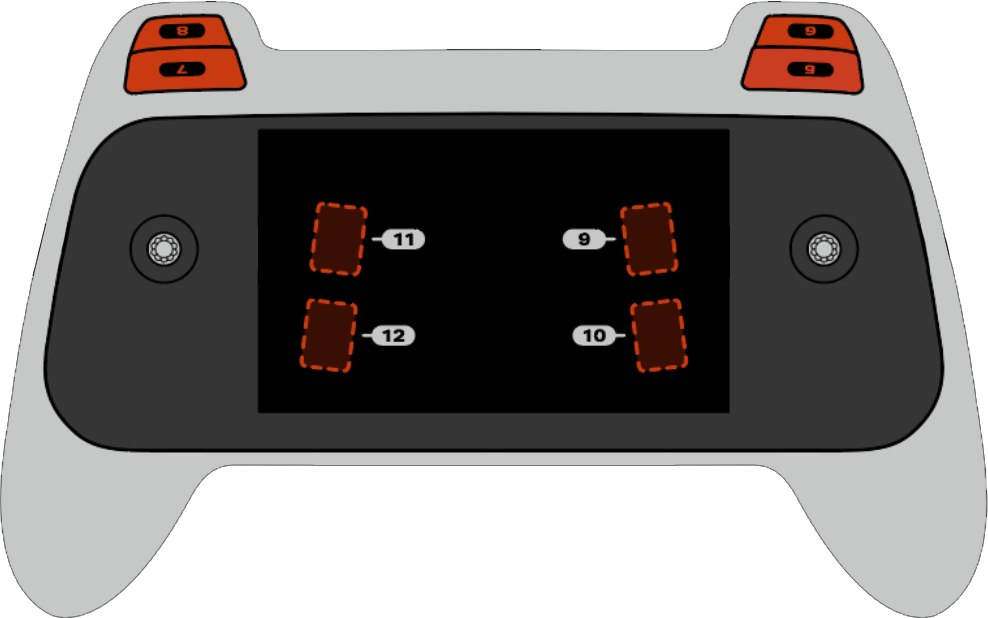
يؤدي الضغط على pressing تشير إلى ما إذا كان زر معين على وحدة التحكم مضغوطًا حاليًا. يجب استدعاء هذه الطريقة على كائن زر محدد، مثل button5 (انظر القائمة الكاملة لكائنات الأزرار أدناه).
True- يتم الضغط على الزر المحدد.False- الزر المحدد غير مضغوط.
طريقة الاستخدام:
يمكن استخدام أحد الأزرار الثمانية المتاحة، المرقمة من 5 إلى 12، مع هذه الطريقة، كما هو موضح أدناه:
زر |
يأمر |
|---|---|
|
|
|
|
|
|
|
|
|
|
|
|
|
|
|
|
حدود |
وصف |
|---|---|
لا تحتوي هذه الطريقة على أي معلمات. |
# Take a picture when button 5 is pressed.
drone.take_off(climb_to=500)
while True:
    # Fly using the controller sticks
    drone.move_with_vectors(
        forward=controller.axis4.position(),
        rightward=controller.axis3.position(),
        upward=controller.axis1.position(),
        rotation=controller.axis2.position()
    )

    # Capture an image from the forward camera when button 5 is pressed.
    if controller.button5.pressing():
        drone.camera.capture_image(FORWARD_CAMERA)

    wait(5, MSEC)
position#
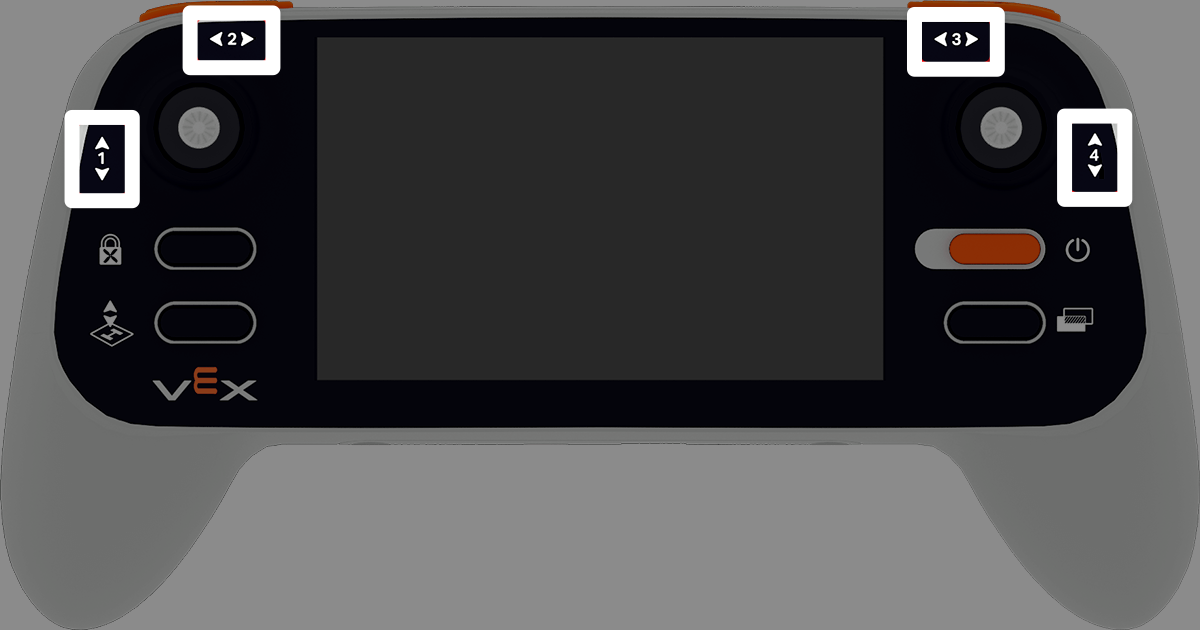
position تُرجع موضع المحور المحدد لعصا التحكم، كنسبة مئوية من -100% إلى 100%.
طريقة الاستخدام:
يمكن استخدام أحد المحاور الأربعة المتاحة مع هذه الطريقة، وهي مرقمة من 1 إلى 4.
محور |
يأمر |
|---|---|
|
|
|
|
|
|
|
|
حدود |
وصف |
|---|---|
لا تحتوي هذه الطريقة على أي معلمات. |
# Climb when the left joystick is moved up.
drone.take_off(climb_to=500)
while True:
    if controller.axis1.position() > 0:
        drone.climb(direction=UP, velocity=50)
    else:
        drone.hover()
    wait(5, MSEC)
is_drone_connected#
is_drone_connected تُرجع قيمة منطقية تشير إلى ما إذا كانت الطائرة بدون طيار متصلة أم لا.
True- الطائرة بدون طيار متصلة.False- الطائرة بدون طيار غير متصلة.
طريقة الاستخدام:
controller.is_drone_connected()
حدود |
وصف |
|---|---|
لا تحتوي هذه الطريقة على أي معلمات. |
# Print controller connection status on screen.
while True:
    if controller.is_drone_connected():
        controller.screen.clear_screen()
        controller.screen.set_cursor(1, 1)
        controller.screen.print("Controller connected")
    wait(0.5, SECONDS)
get_battery_level#
get_battery_level تُرجع مستوى بطارية وحدة التحكم، كنسبة مئوية من 0% إلى 100%.
طريقة الاستخدام:
controller.get_battery_level()
حدود |
وصف |
|---|---|
لا تحتوي هذه الطريقة على أي معلمات. |
# Show controller's battery level.
if controller.get_battery_level() > 50:
    controller.screen.print("Battery level ok")
else:
    controller.screen.print("Battery level low")
معاودة الاتصال#
pressed#
pressed runs a function when the specified button is pressed. Once it is used, the function will run automatically each time that button is pressed.
طريقة الاستخدام:
يمكن استخدام واحد من الأزرار الثمانية المتاحة مع هذه الطريقة، المرقمة من 5 إلى 12.
زر |
يأمر |
|---|---|
|
|
|
|
|
|
|
|
|
|
|
|
|
|
|
|
حدود |
وصف |
|---|---|
|
A previously defined function to run each time the specified button is pressed. |
|
Optional. A tuple containing arguments to pass to the callback function. See Using Events with Parameters for more information. |
# Take a picture when button 5 is pressed.
def take_picture():
    drone.camera.capture_image(FORWARD_CAMERA)

# Run take_picture each time button 5 is pressed.
controller.button5.pressed(take_picture)

# Fly using the controller sticks.
drone.take_off(climb_to=500)
while True:
    drone.move_with_vectors(
        forward=controller.axis4.position(),
        rightward=controller.axis3.position(),
        upward=controller.axis1.position(),
        rotation=controller.axis2.position()
    )
    wait(5, MSEC)
released#
released runs a function when the specified button is released. Once it is used, the function will run automatically each time that button is released.
طريقة الاستخدام:
يمكن استخدام واحد من الأزرار الثمانية المتاحة مع هذه الطريقة، المرقمة من 5 إلى 12.
زر |
يأمر |
|---|---|
|
|
|
|
|
|
|
|
|
|
|
|
|
|
|
|
حدود |
وصف |
|---|---|
|
A previously defined function to run each time the specified button is released. |
|
Optional. A tuple containing arguments to pass to the callback function. See Using Functions with Parameters for more information. |
# Take a picture when button 5 is released.
def take_picture():
    drone.camera.capture_image(FORWARD_CAMERA)

# Run take_picture each time button 5 is released.
controller.button5.released(take_picture)

# Fly using the controller sticks.
drone.take_off(climb_to=500)
while True:
    drone.move_with_vectors(
        forward=controller.axis4.position(),
        rightward=controller.axis3.position(),
        upward=controller.axis1.position(),
        rotation=controller.axis2.position()
    )
    wait(5, MSEC)
changed#
يُشغّل الأمر changed عند تغيير موضع عصا التحكم على طول المحور المحدد. وبمجرد استخدامه، سيتم تشغيل الوظيفة تلقائيًا في كل مرة يتغير فيها موضع عصا التحكم على طول ذلك المحور.
طريقة الاستخدام:
يمكن استخدام أحد المحاور الأربعة المتاحة مع هذه الطريقة، وهي مرقمة من 1 إلى 4.
محور |
يأمر |
|---|---|
|
|
|
|
|
|
|
|
حدود |
وصف |
|---|---|
|
A previously defined function to run each time the joystick’s position changes along the specified axis. |
|
Optional. A tuple containing arguments to pass to the callback function. See Using Functions with Parameters for more information. |
# Move forward when the left joystick moves.
def on_axis1_changed():
    drone.move_for(direction=0, distance=200, velocity=50, units=MM)

drone.take_off(climb_to=500)
controller.axis1.changed(on_axis1_changed)