
ตัวควบคุม#
การแนะนำ#
ตัวควบคุมโดรน VEX AIR มีปุ่มกด 12 ปุ่มและจอยสติ๊ก 2 อัน อินพุตเหล่านี้ช่วยให้โดรนตรวจจับการกดปุ่มและการเคลื่อนไหวของจอยสติ๊ก ทำให้สามารถควบคุมได้อย่างโต้ตอบและตอบสนองได้ดี
ด้านล่างนี้คือรายการวิธีการทั้งหมดที่มีให้เลือกใช้:
ตัวอ่านค่า – อ่านค่าปุ่มกด จอยสติ๊ก และสถานะการเชื่อมต่อ
pressing– ส่งกลับว่าปุ่มที่ระบุถูกกดอยู่หรือไม่position– ส่งคืนตำแหน่งของจอยสติ๊กตามแกนที่ระบุis_drone_connected– ส่งคืนว่าตัวควบคุมเชื่อมต่อกับโดรนหรือไม่get_battery_level– ส่งคืนระดับแบตเตอรี่ของตัวควบคุม
ฟังก์ชันเรียกกลับ – ตอบสนองต่อการเปลี่ยนแปลงของปุ่มกดหรือจอยสติ๊ก
ผู้รับ#
pressing#
การกด pressing ต้องเรียกใช้เมธอดนี้กับอ็อบเจ็กต์ปุ่มที่ระบุ เช่น button5 (ดูรายการอ็อบเจ็กต์ปุ่มทั้งหมดด้านล่าง)
True- กำลังกดปุ่มที่ระบุอยู่False- ไม่ได้กดปุ่มที่ระบุ
วิธีใช้:
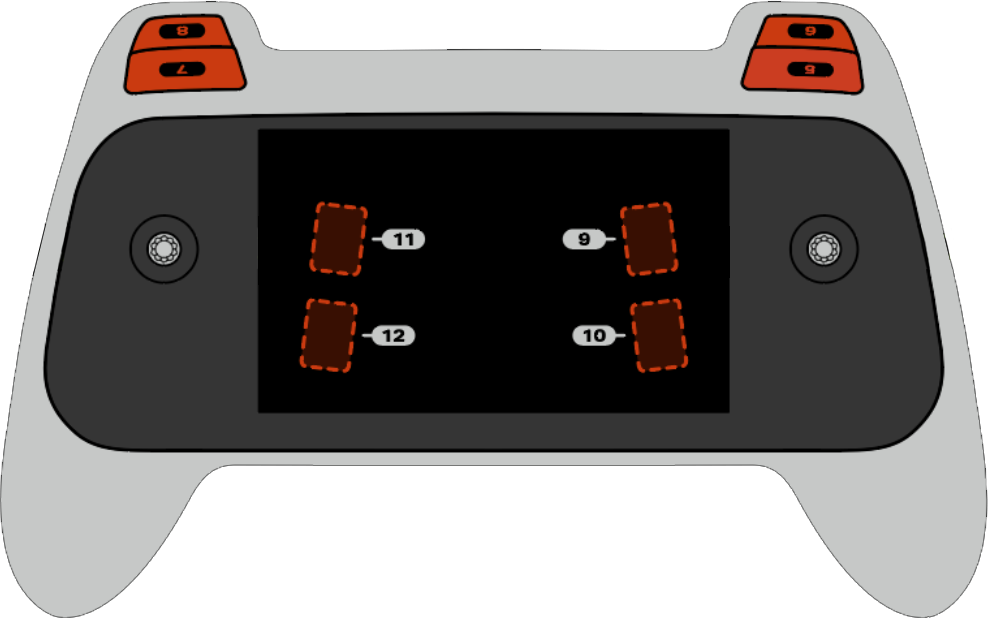
สามารถใช้ปุ่มใดปุ่มหนึ่งจากแปดปุ่มที่มีอยู่ ซึ่งมีหมายเลข 5 ถึง 12 กับวิธีการนี้ได้ ดังแสดงด้านล่าง:
ปุ่ม |
สั่งการ |
|---|---|
|
|
|
|
|
|
|
|
|
|
|
|
|
|
|
|
พารามิเตอร์ |
คำอธิบาย |
|---|---|
เมธอดนี้ไม่มีพารามิเตอร์ |
# Take a picture when button 5 is pressed.
drone.take_off(climb_to=500)
while True:
    # Fly using the controller sticks
    drone.move_with_vectors(
        forward=controller.axis4.position(),
        rightward=controller.axis3.position(),
        upward=controller.axis1.position(),
        rotation=controller.axis2.position()
    )

    # Capture an image from the forward camera when button 5 is pressed.
    if controller.button5.pressing():
        drone.camera.capture_image(FORWARD_CAMERA)

    wait(5, MSEC)
position#
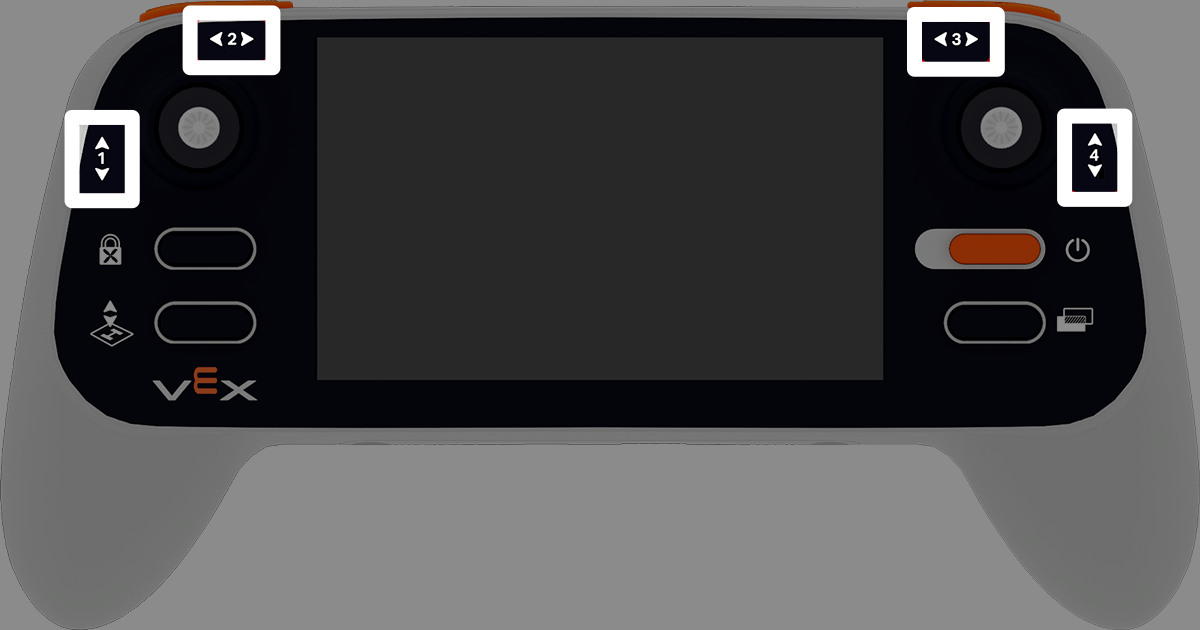
position จะส่งคืนค่าตำแหน่งของแกนที่ระบุของจอยสติ๊ก โดยแสดงเป็นเปอร์เซ็นต์ตั้งแต่ –100% ถึง 100%
วิธีใช้:
สามารถใช้แกนหนึ่งในสี่แกนที่มีอยู่กับวิธีการนี้ได้ โดยมีหมายเลขกำกับตั้งแต่ 1 ถึง 4
แกน |
สั่งการ |
|---|---|
|
|
|
|
|
|
|
|
พารามิเตอร์ |
คำอธิบาย |
|---|---|
เมธอดนี้ไม่มีพารามิเตอร์ |
# Climb when the left joystick is moved up.
drone.take_off(climb_to=500)
while True:
    if controller.axis1.position() > 0:
        drone.climb(direction=UP, velocity=50)
    else:
        drone.hover()
    wait(5, MSEC)
is_drone_connected#
is_drone_connected ส่งคืนค่าบูลีนที่ระบุว่าโดรนเชื่อมต่ออยู่หรือไม่
True- โดรนเชื่อมต่อแล้วFalse- โดรนไม่ได้เชื่อมต่อ
วิธีใช้:
controller.is_drone_connected()
พารามิเตอร์ |
คำอธิบาย |
|---|---|
เมธอดนี้ไม่มีพารามิเตอร์ |
# Print controller connection status on screen.
while True:
    if controller.is_drone_connected():
        controller.screen.clear_screen()
        controller.screen.set_cursor(1, 1)
        controller.screen.print("Controller connected")
    wait(0.5, SECONDS)
get_battery_level#
get_battery_level ส่งคืนระดับแบตเตอรี่ของคอนโทรลเลอร์เป็นเปอร์เซ็นต์ตั้งแต่ 0% ถึง 100%
วิธีใช้:
controller.get_battery_level()
พารามิเตอร์ |
คำอธิบาย |
|---|---|
เมธอดนี้ไม่มีพารามิเตอร์ |
# Show controller's battery level.
if controller.get_battery_level() > 50:
    controller.screen.print("Battery level ok")
else:
    controller.screen.print("Battery level low")
การเรียกกลับ#
pressed#
เมื่อกดปุ่มที่ระบุ pressed จะเรียกใช้ฟังก์ชัน เมื่อตั้งค่าแล้ว ฟังก์ชันจะทำงานโดยอัตโนมัติทุกครั้งที่กดปุ่มนั้น
วิธีใช้:
สามารถใช้ปุ่มหนึ่งในแปดปุ่มที่มีอยู่กับวิธีนี้ได้ โดยมีหมายเลขตั้งแต่ 5 ถึง 12
ปุ่ม |
สั่งการ |
|---|---|
|
|
|
|
|
|
|
|
|
|
|
|
|
|
|
|
พารามิเตอร์ |
คำอธิบาย |
|---|---|
|
A previously defined function to run each time the specified button is pressed. |
|
ตัวเลือกเสริม ทูเปิล ที่มีอาร์กิวเมนต์ที่จะส่งไปยังฟังก์ชันเรียกกลับ ดู การใช้เหตุการณ์กับพารามิเตอร์ สำหรับข้อมูลเพิ่มเติม |
# Take a picture when button 5 is pressed.
def take_picture():
    drone.camera.capture_image(FORWARD_CAMERA)

# Run take_picture each time button 5 is pressed.
controller.button5.pressed(take_picture)

# Fly using the controller sticks.
drone.take_off(climb_to=500)
while True:
    drone.move_with_vectors(
        forward=controller.axis4.position(),
        rightward=controller.axis3.position(),
        upward=controller.axis1.position(),
        rotation=controller.axis2.position()
    )
    wait(5, MSEC)
released#
released ฟังก์ชันจะทำงานเมื่อปล่อยปุ่มที่ระบุ เมื่อใช้งานแล้ว ฟังก์ชันจะทำงานโดยอัตโนมัติทุกครั้งที่ปล่อยปุ่มนั้น
วิธีใช้:
สามารถใช้ปุ่มหนึ่งในแปดปุ่มที่มีอยู่กับวิธีนี้ได้ โดยมีหมายเลขตั้งแต่ 5 ถึง 12
ปุ่ม |
สั่งการ |
|---|---|
|
|
|
|
|
|
|
|
|
|
|
|
|
|
|
|
พารามิเตอร์ |
คำอธิบาย |
|---|---|
|
A previously defined function to run each time the specified button is released. |
|
ตัวเลือกเสริม ทูเปิล ที่มีอาร์กิวเมนต์ที่จะส่งไปยังฟังก์ชันเรียกกลับ ดู การใช้ฟังก์ชันที่มีพารามิเตอร์ สำหรับข้อมูลเพิ่มเติม |
# Take a picture when button 5 is released.
def take_picture():
    drone.camera.capture_image(FORWARD_CAMERA)

# Run take_picture each time button 5 is released.
controller.button5.released(take_picture)

# Fly using the controller sticks.
drone.take_off(climb_to=500)
while True:
    drone.move_with_vectors(
        forward=controller.axis4.position(),
        rightward=controller.axis3.position(),
        upward=controller.axis1.position(),
        rotation=controller.axis2.position()
    )
    wait(5, MSEC)
changed#
changed ฟังก์ชันจะทำงานเมื่อตำแหน่งของจอยสติ๊กเปลี่ยนแปลงไปตามแกนที่ระบุ เมื่อใช้งานแล้ว ฟังก์ชันจะทำงานโดยอัตโนมัติทุกครั้งที่ตำแหน่งของจอยสติ๊กเปลี่ยนแปลงไปตามแกนนั้น
วิธีใช้:
สามารถใช้แกนหนึ่งในสี่แกนที่มีอยู่กับวิธีการนี้ได้ โดยมีหมายเลขกำกับตั้งแต่ 1 ถึง 4
แกน |
สั่งการ |
|---|---|
|
|
|
|
|
|
|
|
พารามิเตอร์ |
คำอธิบาย |
|---|---|
|
A previously defined function to run each time the joystick’s position changes along the specified axis. |
|
ตัวเลือกเสริม ทูเปิล ที่มีอาร์กิวเมนต์ที่จะส่งไปยังฟังก์ชันเรียกกลับ ดู การใช้ฟังก์ชันที่มีพารามิเตอร์ สำหรับข้อมูลเพิ่มเติม |
# Move forward when the left joystick moves.
def on_axis1_changed():
    drone.move_for(direction=0, distance=200, velocity=50, units=MM)

drone.take_off(climb_to=500)
controller.axis1.changed(on_axis1_changed)