
控制器#
介紹#
VEX AIR 無人機控制器採用 12 個按鈕佈局和兩個操縱桿。這些輸入使無人機能夠偵測按鈕按下和操縱桿移動,從而實現互動式和靈敏的控制。
以下是所有可用方法的清單:
Getters – 讀取按鈕、操縱桿和連接狀態。
pressing– 返回目前是否按下特定按鈕。position– 返回操縱桿沿著指定軸的位置。is_drone_connected– 返回控制器是否已連接到無人機。get_battery_level– 傳回控制器的電池電量。
回調-反應鈕或操縱桿輸入變化。
吸氣劑#
pressing#
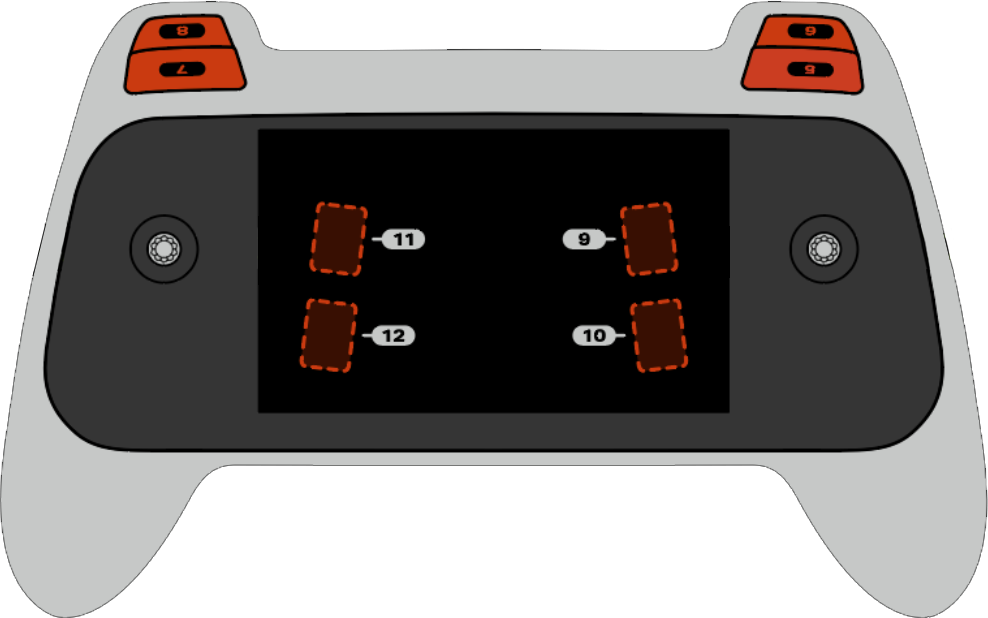
pressing 返回一個布林值,指示控制器上的特定按鈕目前是否被按下。此方法必須在特定的按鈕物件上調用,例如 button5 (請參閱下面的完整按鈕物件清單)。
True- 指定的按鈕正在被按下。False- 指定的按鈕未按下。
用法:
八個可用按鈕(編號 5 至 12)之一可用於此方法,如下所示:
按鈕 |
命令 |
|---|---|
|
|
|
|
|
|
|
|
|
|
|
|
|
|
|
|
參數 |
描述 |
|---|---|
此方法沒有參數。 |
# Take a picture when button 5 is pressed.
drone.take_off(climb_to=500)
while True:
    # Fly using the controller sticks
    drone.move_with_vectors(
        forward=controller.axis4.position(),
        rightward=controller.axis3.position(),
        upward=controller.axis1.position(),
        rotation=controller.axis2.position()
    )

    # Capture an image from the forward camera when button 5 is pressed.
    if controller.button5.pressing():
        drone.camera.capture_image(FORWARD_CAMERA)

    wait(5, MSEC)
position#
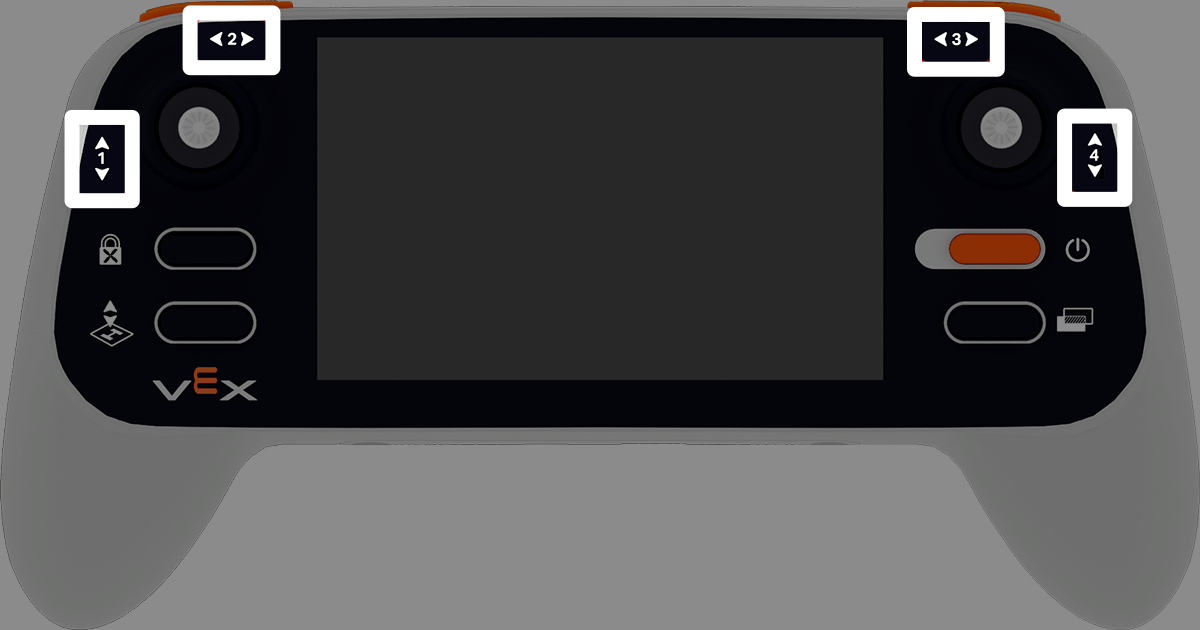
position 返回操縱桿指定軸的位置,以 -100% 到 100% 的百分比表示。
用法:
此方法可使用四個可用軸中的一個,編號為 1 至 4。
軸 |
命令 |
|---|---|
|
|
|
|
|
|
|
|
參數 |
描述 |
|---|---|
此方法沒有參數。 |
# Climb when the left joystick is moved up.
drone.take_off(climb_to=500)
while True:
    if controller.axis1.position() > 0:
        drone.climb(direction=UP, velocity=50)
    else:
        drone.hover()
    wait(5, MSEC)
is_drone_connected#
is_drone_connected 傳回一個布林值,指示無人機是否已連線。
True- 無人機已連接。False- 無人機未連接。
用法:
controller.is_drone_connected()
參數 |
描述 |
|---|---|
此方法沒有參數。 |
# Print controller connection status on screen.
while True:
    if controller.is_drone_connected():
        controller.screen.clear_screen()
        controller.screen.set_cursor(1, 1)
        controller.screen.print("Controller connected")
    wait(0.5, SECONDS)
get_battery_level#
get_battery_level 返回控制器的電池電量,以百分比表示,範圍從 0% 到 100%。
用法:
controller.get_battery_level()
參數 |
描述 |
|---|---|
此方法沒有參數。 |
# Show controller's battery level.
if controller.get_battery_level() > 50:
    controller.screen.print("Battery level ok")
else:
    controller.screen.print("Battery level low")
回調#
pressed#
pressed 會在按下指定按鈕時執行一個函數。一旦使用,每次按下該按鈕時,函數都會自動運行。
用法:
此方法可使用八個可用按鈕之一,編號為 5 至 12。
按鈕 |
命令 |
|---|---|
|
|
|
|
|
|
|
|
|
|
|
|
|
|
|
|
參數 |
描述 |
|---|---|
|
預先定義的 函數,每次按下指定的按鈕時執行。 |
|
# Take a picture when button 5 is pressed.
def take_picture():
    drone.camera.capture_image(FORWARD_CAMERA)

# Run take_picture each time button 5 is pressed.
controller.button5.pressed(take_picture)

# Fly using the controller sticks.
drone.take_off(climb_to=500)
while True:
    drone.move_with_vectors(
        forward=controller.axis4.position(),
        rightward=controller.axis3.position(),
        upward=controller.axis1.position(),
        rotation=controller.axis2.position()
    )
    wait(5, MSEC)
released#
released 當指定的按鈕被釋放時,會執行一個函數。一旦使用,每次釋放該按鈕時,函數都會自動運行。
用法:
此方法可使用八個可用按鈕之一,編號為 5 至 12。
按鈕 |
命令 |
|---|---|
|
|
|
|
|
|
|
|
|
|
|
|
|
|
|
|
參數 |
描述 |
|---|---|
|
預先定義的 函數,每次釋放指定的按鈕時執行。 |
|
# Take a picture when button 5 is released.
def take_picture():
    drone.camera.capture_image(FORWARD_CAMERA)

# Run take_picture each time button 5 is released.
controller.button5.released(take_picture)

# Fly using the controller sticks.
drone.take_off(climb_to=500)
while True:
    drone.move_with_vectors(
        forward=controller.axis4.position(),
        rightward=controller.axis3.position(),
        upward=controller.axis1.position(),
        rotation=controller.axis2.position()
    )
    wait(5, MSEC)
changed#
changed 當操縱桿的位置沿著指定軸發生變化時,會執行一個函數。一旦使用,函數將在每次操縱桿的位置沿該軸變化時自動運行。
用法:
此方法可使用四個可用軸中的一個,編號為 1 至 4。
軸 |
命令 |
|---|---|
|
|
|
|
|
|
|
|
參數 |
描述 |
|---|---|
|
預先定義的 函數,每次操縱桿的位置沿著指定軸變化時運行。 |
|
# Move forward when the left joystick moves.
def on_axis1_changed():
    drone.move_for(direction=0, distance=200, velocity=50, units=MM)

drone.take_off(climb_to=500)
controller.axis1.changed(on_axis1_changed)