
コントローラ#
導入#
VEX AIRドローンコントローラーは、12個のボタンと2つのジョイスティックを備えています。これらの入力により、ドローンはボタンの押下とジョイスティックの動きを検知し、インタラクティブで応答性の高い制御を実現します。
以下に、利用可能なメソッドの一覧を示します。
ゲッター – ボタン、ジョイスティック、および接続状態を読み取る。
pressingを押している – 特定のボタンが現在押されているかどうかを返します。position– 指定された軸に沿ったジョイスティックの位置を返します。is_drone_connected– コントローラーがドローンに接続されているかどうかを返します。get_battery_level– コントローラーのバッテリーレベルを返します。
コールバック – ボタンまたはジョイスティックの入力変更に応答します。
ゲッター#
pressing#
pressing 返され、コントローラー上の特定のボタンが現在押されているかどうかを示すブール値が返されます。このメソッドは、 button5 などの特定のボタンオブジェクトに対して呼び出す必要があります(ボタンオブジェクトの完全なリストは下記を参照)。
True- 指定されたボタンが押されています。False- 指定されたボタンが押されていません。
使用方法:
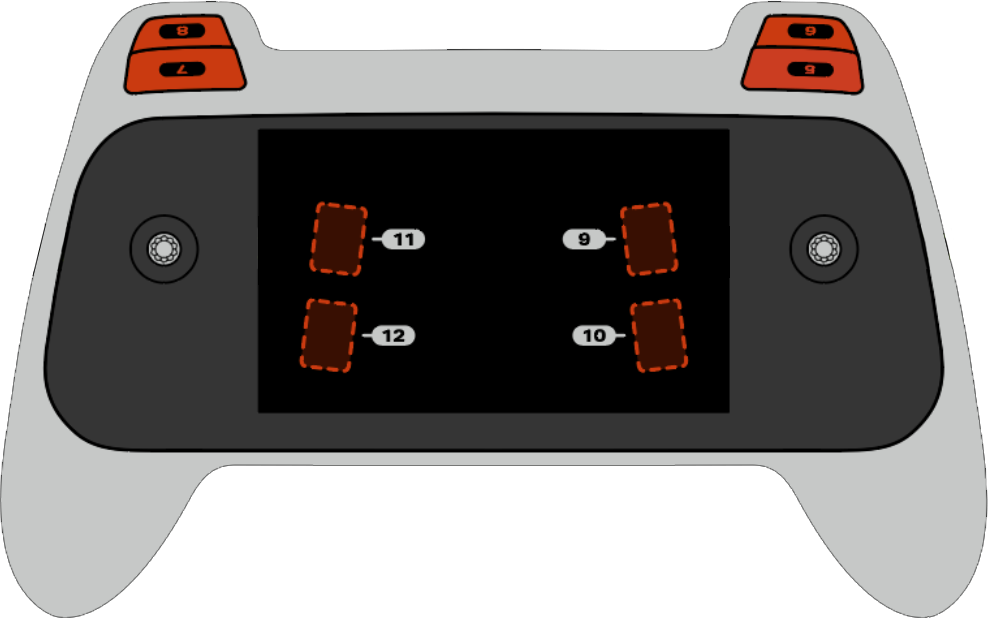
以下の図に示すように、5番から12番までの8つのボタンのうちの1つをこの方法で使用できます。
ボタン |
指示 |
|---|---|
|
|
|
|
|
|
|
|
|
|
|
|
|
|
|
|
パラメータ |
説明 |
|---|---|
このメソッドにはパラメータがありません。 |
# Take a picture when button 5 is pressed.
drone.take_off(climb_to=500)
while True:
    # Fly using the controller sticks
    drone.move_with_vectors(
        forward=controller.axis4.position(),
        rightward=controller.axis3.position(),
        upward=controller.axis1.position(),
        rotation=controller.axis2.position()
    )

    # Capture an image from the forward camera when button 5 is pressed.
    if controller.button5.pressing():
        drone.camera.capture_image(FORWARD_CAMERA)

    wait(5, MSEC)
position#
position は、ジョイスティックの指定された軸の位置を、-100% から 100% までのパーセンテージで返します。
使用法:
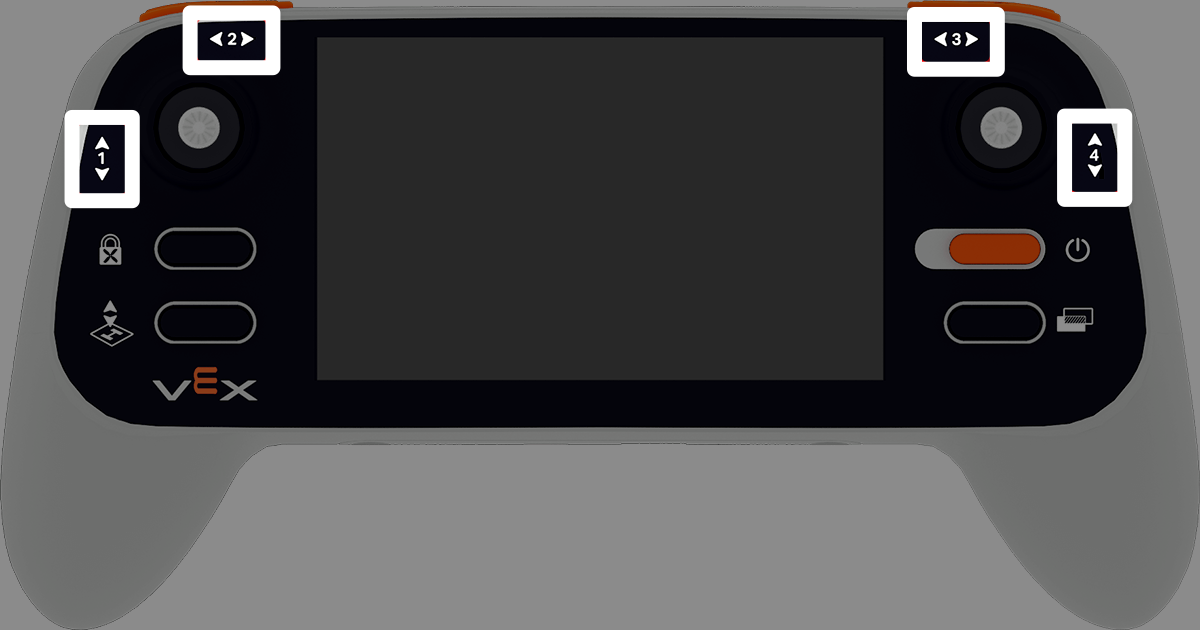
この方法では、1から4までの番号が振られた4つの軸のうちの1つを使用できます。
軸 |
指示 |
|---|---|
|
|
|
|
|
|
|
|
パラメータ |
説明 |
|---|---|
このメソッドにはパラメータがありません。 |
# Climb when the left joystick is moved up.
drone.take_off(climb_to=500)
while True:
    if controller.axis1.position() > 0:
        drone.climb(direction=UP, velocity=50)
    else:
        drone.hover()
    wait(5, MSEC)
is_drone_connected#
is_drone_connected ドローンが接続されているかどうかを示すブール値を返します。
True- ドローンが接続されています。False- ドローンが接続されていません。
使用法:
controller.is_drone_connected()
パラメータ |
説明 |
|---|---|
このメソッドにはパラメータがありません。 |
# Print controller connection status on screen.
while True:
    if controller.is_drone_connected():
        controller.screen.clear_screen()
        controller.screen.set_cursor(1, 1)
        controller.screen.print("Controller connected")
    wait(0.5, SECONDS)
get_battery_level#
get_battery_level は、コントローラーのバッテリーレベルを 0% から 100% までのパーセンテージで返します。
使用法:
controller.get_battery_level()
パラメータ |
説明 |
|---|---|
このメソッドにはパラメータがありません。 |
# Show controller's battery level.
if controller.get_battery_level() > 50:
    controller.screen.print("Battery level ok")
else:
    controller.screen.print("Battery level low")
コールバック#
pressed#
pressed 押されます。指定されたボタンが押されたときに関数を実行します。一度使用すると、そのボタンが押されるたびに関数が自動的に実行されます。
使用方法:
この方法では、5~12番の8つのボタンのうちの1つを使用できます。
ボタン |
指示 |
|---|---|
|
|
|
|
|
|
|
|
|
|
|
|
|
|
|
|
パラメータ |
説明 |
|---|---|
|
指定されたボタンが押されるたびに実行される、事前に定義された 関数。 |
|
Optional. A tuple containing arguments to pass to the callback function. See Using Events with Parameters for more information. |
# Take a picture when button 5 is pressed.
def take_picture():
    drone.camera.capture_image(FORWARD_CAMERA)

# Run take_picture each time button 5 is pressed.
controller.button5.pressed(take_picture)

# Fly using the controller sticks.
drone.take_off(climb_to=500)
while True:
    drone.move_with_vectors(
        forward=controller.axis4.position(),
        rightward=controller.axis3.position(),
        upward=controller.axis1.position(),
        rotation=controller.axis2.position()
    )
    wait(5, MSEC)
released#
released 指定されたボタンが離されたときに関数を実行します。一度使用すると、そのボタンが離されるたびに関数が自動的に実行されます。
使用方法:
この方法では、5~12番の8つのボタンのうちの1つを使用できます。
ボタン |
指示 |
|---|---|
|
|
|
|
|
|
|
|
|
|
|
|
|
|
|
|
パラメータ |
説明 |
|---|---|
|
指定されたボタンが離されるたびに実行される、事前に定義された 関数。 |
|
Optional. A tuple containing arguments to pass to the callback function. See Using Functions with Parameters for more information. |
# Take a picture when button 5 is released.
def take_picture():
    drone.camera.capture_image(FORWARD_CAMERA)

# Run take_picture each time button 5 is released.
controller.button5.released(take_picture)

# Fly using the controller sticks.
drone.take_off(climb_to=500)
while True:
    drone.move_with_vectors(
        forward=controller.axis4.position(),
        rightward=controller.axis3.position(),
        upward=controller.axis1.position(),
        rotation=controller.axis2.position()
    )
    wait(5, MSEC)
changed#
changed ジョイスティックの位置が指定された軸に沿って変化したときに関数を実行します。一度使用すると、ジョイスティックの位置がその軸に沿って変化するたびに、この関数が自動的に実行されます。
使用法:
この方法では、1から4までの番号が振られた4つの軸のうちの1つを使用できます。
軸 |
指示 |
|---|---|
|
|
|
|
|
|
|
|
パラメータ |
説明 |
|---|---|
|
指定された軸に沿ってジョイスティックの位置が変化するたびに実行される、事前に定義された 関数。 |
|
Optional. A tuple containing arguments to pass to the callback function. See Using Functions with Parameters for more information. |
# Move forward when the left joystick moves.
def on_axis1_changed():
    drone.move_for(direction=0, distance=200, velocity=50, units=MM)

drone.take_off(climb_to=500)
controller.axis1.changed(on_axis1_changed)