
제어 장치#
소개#
VEX AIR 드론 컨트롤러는 12개의 버튼과 두 개의 조이스틱을 갖추고 있습니다. 이러한 입력 장치를 통해 드론은 버튼 입력과 조이스틱 움직임을 감지하여 상호 작용적이고 반응성이 뛰어난 제어가 가능합니다.
아래는 사용 가능한 모든 방법의 목록입니다.
게터 – 버튼, 조이스틱 및 연결 상태를 읽습니다.
pressing누르기 – 특정 버튼이 현재 눌러지고 있는지 여부를 반환합니다.position– 지정된 축을 따라 조이스틱의 위치를 반환합니다.is_drone_connected– 컨트롤러가 드론에 연결되어 있는지 여부를 반환합니다.get_battery_level– 컨트롤러의 배터리 레벨을 반환합니다.
콜백 함수 – 버튼 또는 조이스틱 입력 변경에 응답합니다.
게터스#
pressing#
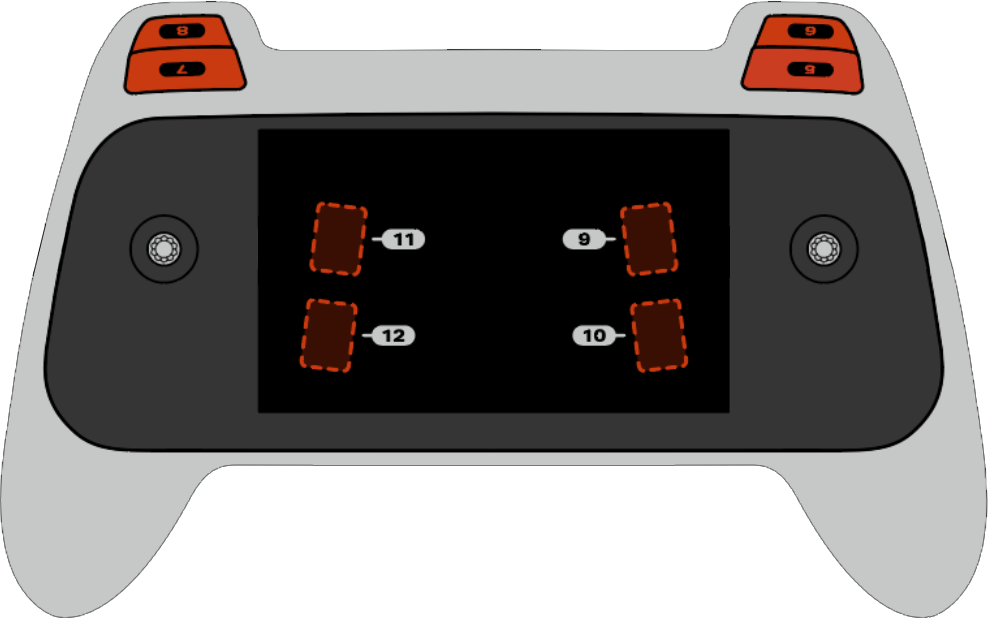
pressing 반환되는데, 이 메서드는 컨트롤러의 특정 버튼이 현재 눌러져 있는지 여부를 나타내는 부울 값을 반환합니다. 이 메서드는 button5 과 같은 특정 버튼 객체에서 호출해야 합니다(아래에 전체 버튼 객체 목록이 있습니다).
True- 지정된 버튼이 눌러지고 있습니다.False- 지정된 버튼이 눌리지 않았습니다.
사용법:
아래 그림과 같이 5번부터 12번까지 번호가 매겨진 8개의 버튼 중 하나를 이 방법과 함께 사용할 수 있습니다.
단추 |
명령 |
|---|---|
|
|
|
|
|
|
|
|
|
|
|
|
|
|
|
|
매개변수 |
설명 |
|---|---|
이 메서드에는 매개변수가 없습니다. |
# Take a picture when button 5 is pressed.
drone.take_off(climb_to=500)
while True:
    # Fly using the controller sticks
    drone.move_with_vectors(
        forward=controller.axis4.position(),
        rightward=controller.axis3.position(),
        upward=controller.axis1.position(),
        rotation=controller.axis2.position()
    )

    # Capture an image from the forward camera when button 5 is pressed.
    if controller.button5.pressing():
        drone.camera.capture_image(FORWARD_CAMERA)

    wait(5, MSEC)
position#
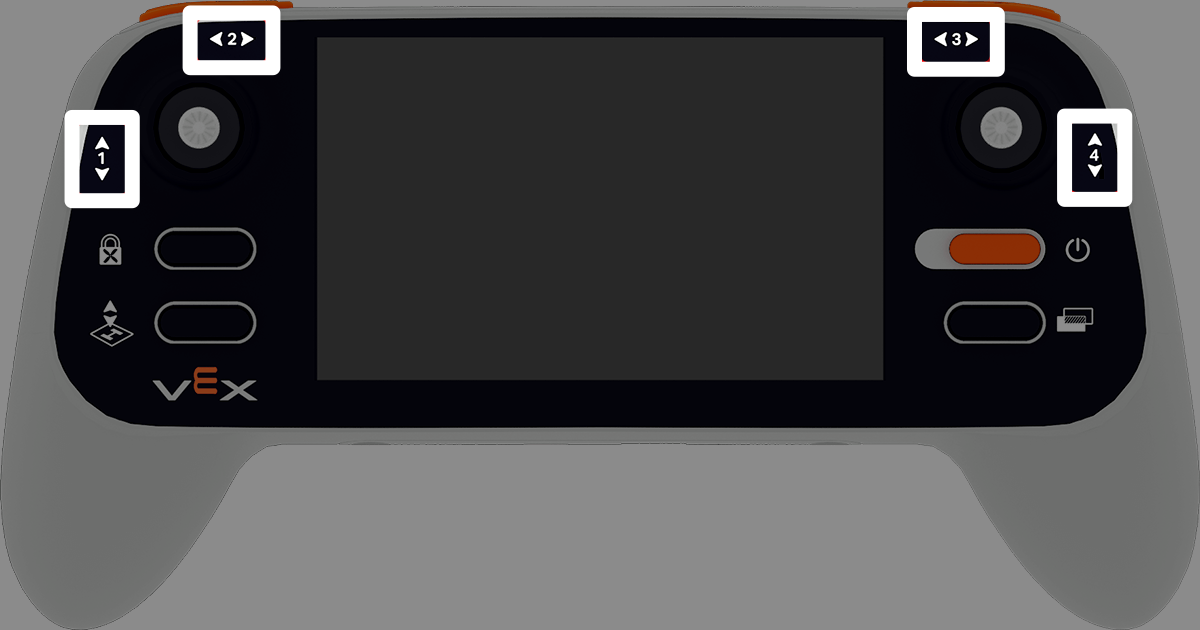
position 조이스틱의 지정된 축의 위치를 -100%에서 100%까지의 백분율로 반환합니다.
용법:
이 방법에서는 1부터 4까지 번호가 매겨진 네 개의 축 중 하나를 사용할 수 있습니다.
중심선 |
명령 |
|---|---|
|
|
|
|
|
|
|
|
매개변수 |
설명 |
|---|---|
이 메서드에는 매개변수가 없습니다. |
# Climb when the left joystick is moved up.
drone.take_off(climb_to=500)
while True:
    if controller.axis1.position() > 0:
        drone.climb(direction=UP, velocity=50)
    else:
        drone.hover()
    wait(5, MSEC)
is_drone_connected#
is_drone_connected 드론이 연결되었는지 여부를 나타내는 부울 값을 반환합니다.
True- 드론이 연결되었습니다.False- 드론이 연결되어 있지 않습니다.
용법:
controller.is_drone_connected()
매개변수 |
설명 |
|---|---|
이 메서드에는 매개변수가 없습니다. |
# Print controller connection status on screen.
while True:
    if controller.is_drone_connected():
        controller.screen.clear_screen()
        controller.screen.set_cursor(1, 1)
        controller.screen.print("Controller connected")
    wait(0.5, SECONDS)
get_battery_level#
get_battery_level 컨트롤러의 배터리 잔량을 0%에서 100%까지의 백분율로 반환합니다.
용법:
controller.get_battery_level()
매개변수 |
설명 |
|---|---|
이 메서드에는 매개변수가 없습니다. |
# Show controller's battery level.
if controller.get_battery_level() > 50:
    controller.screen.print("Battery level ok")
else:
    controller.screen.print("Battery level low")
콜백#
pressed#
pressed 지정된 버튼이 눌렸을 때 실행되는 함수입니다. 한 번 설정하면 해당 버튼이 눌릴 때마다 함수가 자동으로 실행됩니다.
사용법:
이 방법에는 5번부터 12번까지 번호가 매겨진 8개의 버튼 중 하나를 사용할 수 있습니다.
단추 |
명령 |
|---|---|
|
|
|
|
|
|
|
|
|
|
|
|
|
|
|
|
매개변수 |
설명 |
|---|---|
|
지정된 버튼이 눌릴 때마다 실행되도록 미리 정의된 함수. |
|
선택 사항입니다. 콜백 함수에 전달할 인수를 포함하는 튜플입니다. 자세한 내용은 매개변수가 있는 이벤트 사용을 참조하세요. |
# Take a picture when button 5 is pressed.
def take_picture():
    drone.camera.capture_image(FORWARD_CAMERA)

# Run take_picture each time button 5 is pressed.
controller.button5.pressed(take_picture)

# Fly using the controller sticks.
drone.take_off(climb_to=500)
while True:
    drone.move_with_vectors(
        forward=controller.axis4.position(),
        rightward=controller.axis3.position(),
        upward=controller.axis1.position(),
        rotation=controller.axis2.position()
    )
    wait(5, MSEC)
released#
released 지정된 버튼을 놓았을 때 실행되는 함수입니다. 한 번 설정하면 해당 버튼을 놓을 때마다 함수가 자동으로 실행됩니다.
사용법:
이 방법에는 5번부터 12번까지 번호가 매겨진 8개의 버튼 중 하나를 사용할 수 있습니다.
단추 |
명령 |
|---|---|
|
|
|
|
|
|
|
|
|
|
|
|
|
|
|
|
매개변수 |
설명 |
|---|---|
|
지정된 버튼이 해제될 때마다 실행되도록 이전에 정의된 함수. |
|
선택 사항입니다. 콜백 함수에 전달할 인수를 포함하는 튜플입니다. 자세한 내용은 매개변수가 있는 함수 사용을 참조하세요. |
# Take a picture when button 5 is released.
def take_picture():
    drone.camera.capture_image(FORWARD_CAMERA)

# Run take_picture each time button 5 is released.
controller.button5.released(take_picture)

# Fly using the controller sticks.
drone.take_off(climb_to=500)
while True:
    drone.move_with_vectors(
        forward=controller.axis4.position(),
        rightward=controller.axis3.position(),
        upward=controller.axis1.position(),
        rotation=controller.axis2.position()
    )
    wait(5, MSEC)
changed#
changed 지정된 축을 따라 조이스틱 위치가 변경될 때 함수를 실행합니다. 한 번 사용하면 해당 축을 따라 조이스틱 위치가 변경될 때마다 함수가 자동으로 실행됩니다.
용법:
이 방법에서는 1부터 4까지 번호가 매겨진 네 개의 축 중 하나를 사용할 수 있습니다.
중심선 |
명령 |
|---|---|
|
|
|
|
|
|
|
|
매개변수 |
설명 |
|---|---|
|
지정된 축을 따라 조이스틱의 위치가 변경될 때마다 실행되도록 이전에 정의된 함수입니다. |
|
선택 사항입니다. 콜백 함수에 전달할 인수를 포함하는 튜플입니다. 자세한 내용은 매개변수가 있는 함수 사용을 참조하세요. |
# Move forward when the left joystick moves.
def on_axis1_changed():
    drone.move_for(direction=0, distance=200, velocity=50, units=MM)

drone.take_off(climb_to=500)
controller.axis1.changed(on_axis1_changed)