
Ελεγκτής#
Εισαγωγή#
Ο ελεγκτής VEX EXP διαθέτει κουμπιά και δύο joystick. Οι μέθοδοι του ελεγκτή μπορούν να χρησιμοποιηθούν για τον έλεγχο των πατημάτων κουμπιών, την ανάγνωση της κίνησης του joystick, την ενεργοποίηση ή απενεργοποίηση των διαμορφωμένων ενεργειών του ελεγκτή ή την εκτέλεση λειτουργιών όταν συμβαίνουν συμβάντα του ελεγκτή.
Οι διαμορφωμένες ενέργειες ελεγκτή είναι συμπεριφορές ελεγκτή που ορίζονται στο μενού Συσκευές. Χρησιμοποιήστε την εντολή remote_control_code_enabled για να ενεργοποιήσετε ή να απενεργοποιήσετε προσωρινά αυτές τις διαμορφωμένες ενέργειες κατά τη διάρκεια ενός έργου.
Αυτή η σελίδα χρησιμοποιεί τον ελεγκτή controller ως παράδειγμα ονόματος ελεγκτή. Αντικαταστήστε τον με το δικό σας διαμορφωμένο όνομα, όπως απαιτείται.
Παρακάτω είναι μια λίστα με όλες τις διαθέσιμες μεθόδους:
Ενέργεια — Ενεργοποίηση ή απενεργοποίηση των διαμορφωμένων ενεργειών του χειριστηρίου.
remote_control_code_enabled— Ενεργοποιεί ή απενεργοποιεί τις ενέργειες του χειριστηρίου που έχουν ρυθμιστεί στο μενού Συσκευές.
Λήψη κουμπιών — Ανάγνωση καταστάσεων κουμπιών και θέσεων joystick.
.pressing— Επιστρέφει εάν πατιέται ένα συγκεκριμένο κουμπί..position— Επιστρέφει τη θέση ενός καθορισμένου άξονα joystick.
Επανακλήσεις — Εκτέλεση συναρτήσεων όταν αλλάζει η είσοδος του ελεγκτή.
.pressed— Εκτελεί μια λειτουργία όταν πατηθεί ένα συγκεκριμένο κουμπί..released— Εκτελεί μια συνάρτηση όταν απελευθερωθεί ένα καθορισμένο κουμπί..changed— Εκτελεί μια συνάρτηση όταν η θέση του joystick αλλάζει κατά μήκος ενός καθορισμένου άξονα.
Κατασκευαστής — Δημιουργήστε χειροκίνητα ένα αντικείμενο Ελεγκτή.
Controller— Δημιουργεί ένα αντικείμενο Ελεγκτή.
Δράση#
remote_control_code_enabled#
remote_control_code_enabled είναι μια μεταβλητή που ενεργοποιεί ή απενεργοποιεί τις ενέργειες του ελεγκτή που έχουν ρυθμιστεί στο μενού Συσκευές. Οι ενέργειες που έχουν ρυθμιστεί από τον ελεγκτή είναι ενεργοποιημένες από προεπιλογή.
Usage:
remote_control_code_enabled = state
Αξία |
Περιγραφή |
|---|---|
|
Ενεργοποιεί ενέργειες που έχουν ρυθμιστεί από τον ελεγκτή. |
|
Απενεργοποιεί τις ενέργειες που έχουν ρυθμιστεί από τον ελεγκτή. |
# Drive forward or backward using the left joystick
remote_control_code_enabled = False

while True:
    if controller.axis3.position() > 0:
        drivetrain.drive(FORWARD)
    elif controller.axis3.position() < 0:
        drivetrain.drive(REVERSE)
    # Press A to use controller configured actions again
    elif controller.buttonA.pressing():
        break
    else:
        drivetrain.stop()

    wait(20, MSEC)

remote_control_code_enabled = True
Αποκτητές#
.pressing#
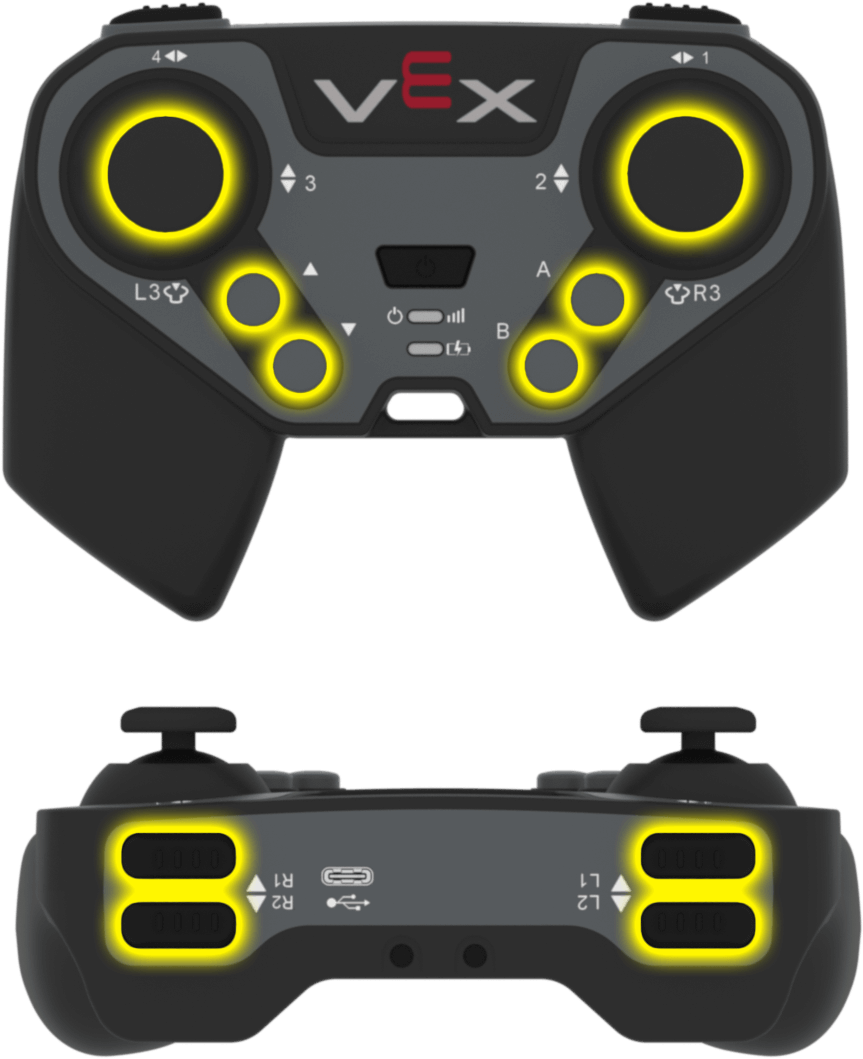
.pressing επιστρέφει εάν πατιέται ένα συγκεκριμένο κουμπί στον ελεγκτή. Αυτή η μέθοδος πρέπει να κληθεί σε ένα συγκεκριμένο αντικείμενο κουμπιού, όπως controller.buttonA.
True— Πατιέται το καθορισμένο κουμπί.False— Το καθορισμένο κουμπί δεν πατιέται.
Χρήση:
Ένα από τα διαθέσιμα αντικείμενα κουμπιών μπορεί να χρησιμοποιηθεί με αυτήν τη μέθοδο:
Κουμπί |
Εντολή |
|---|---|
|
|
|
|
|
|
|
|
|
|
|
|
|
|
|
|
|
|
|
|
Παράμετροι |
Περιγραφή |
|---|---|
Αυτή η μέθοδος δεν έχει παραμέτρους. |
# Turn right while L1 is pressed
while True:
    if controller.buttonL1.pressing():
        drivetrain.turn(RIGHT)
    else:
        drivetrain.stop()

    wait(20, MSEC)
.position#
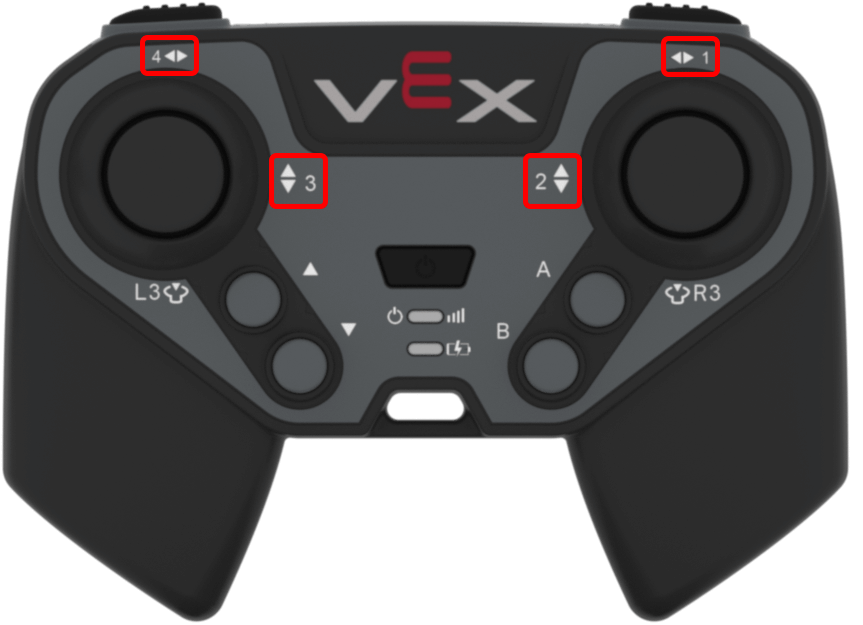
Η συνάρτηση .position επιστρέφει τη θέση ενός άξονα του joystick ως αριθμό από -100 έως 100.
Αυτή η μέθοδος πρέπει να κληθεί σε ένα συγκεκριμένο αντικείμενο άξονα, όπως controller.axis1.
Χρήση:
Ένα από τα διαθέσιμα αντικείμενα άξονα μπορεί να χρησιμοποιηθεί με αυτήν τη μέθοδο:
Αξονας |
Εντολή |
|---|---|
|
|
|
|
|
|
|
|
Παράμετροι |
Περιγραφή |
|---|---|
Αυτή η μέθοδος δεν έχει παραμέτρους. |
# Turn with the left joystick
remote_control_code_enabled = False

while True:
    if controller.axis4.position() > 10:
        drivetrain.turn(RIGHT)
    elif controller.axis4.position() < -10:
        drivetrain.turn(LEFT)
    else:
        drivetrain.stop()

    wait(20, MSEC)
Επανακλήσεις#
.pressed#
.pressed εκτελεί μια λειτουργία όταν πατηθεί το καθορισμένο κουμπί. Μόλις χρησιμοποιηθεί, η λειτουργία θα εκτελείται αυτόματα κάθε φορά που πατιέται το συγκεκριμένο κουμπί.
Χρήση:
Ένα από τα διαθέσιμα αντικείμενα κουμπιών μπορεί να χρησιμοποιηθεί με αυτήν τη μέθοδο:
Κουμπί |
Εντολή |
|---|---|
|
|
|
|
|
|
|
|
|
|
|
|
|
|
|
|
|
|
|
|
Παράμετρος |
Περιγραφή |
|---|---|
|
Μια προηγουμένως καθορισμένη συνάρτηση που θα εκτελείται κάθε φορά που πατιέται το καθορισμένο κουμπί. |
|
Προαιρετικό. Μια πλειάδα που περιέχει ορίσματα για να μεταβιβαστούν στη συνάρτηση επανάκλησης. Δείτε Χρήση συμβάντων με παραμέτρους για περισσότερες πληροφορίες. |
# Drive forward when R1 is pressed
def drive_forward():
    drivetrain.drive_for(FORWARD, 200, MM)

controller.buttonR1.pressed(drive_forward)
.released#
.released εκτελεί μια συνάρτηση όταν απελευθερωθεί το καθορισμένο κουμπί. Μόλις χρησιμοποιηθεί, η συνάρτηση θα εκτελείται αυτόματα κάθε φορά που απελευθερώνεται το συγκεκριμένο κουμπί.
Χρήση:
Ένα από τα διαθέσιμα αντικείμενα κουμπιών μπορεί να χρησιμοποιηθεί με αυτήν τη μέθοδο:
Κουμπί |
Εντολή |
|---|---|
|
|
|
|
|
|
|
|
|
|
|
|
|
|
|
|
|
|
|
|
Παράμετρος |
Περιγραφή |
|---|---|
|
Μια προηγουμένως καθορισμένη συνάρτηση που θα εκτελείται κάθε φορά που απελευθερώνεται το καθορισμένο κουμπί. |
|
Προαιρετικό. Μια πλειάδα που περιέχει ορίσματα για να μεταβιβαστούν στη συνάρτηση επανάκλησης. Δείτε Χρήση συμβάντων με παραμέτρους για περισσότερες πληροφορίες. |
# Stop driving when R1 is released
def stop_driving():
    drivetrain.stop()

controller.buttonR1.released(stop_driving)
.changed#
.changed εκτελεί μια συνάρτηση όταν η θέση του joystick αλλάζει κατά μήκος του καθορισμένου άξονα. Μόλις χρησιμοποιηθεί, η συνάρτηση θα εκτελείται αυτόματα κάθε φορά που αλλάζει η θέση του joystick κατά μήκος αυτού του άξονα.
Χρήση:
Ένα από τα διαθέσιμα αντικείμενα άξονα μπορεί να χρησιμοποιηθεί με αυτήν τη μέθοδο:
Αξονας |
Εντολή |
|---|---|
|
|
|
|
|
|
|
|
Παράμετρος |
Περιγραφή |
|---|---|
|
Μια προηγουμένως καθορισμένη συνάρτηση που θα εκτελείται κάθε φορά που αλλάζει η θέση του joystick κατά μήκος του καθορισμένου άξονα. |
|
Προαιρετικό. Μια πλειάδα που περιέχει ορίσματα για να μεταβιβαστούν στη συνάρτηση επανάκλησης. Δείτε Χρήση συμβάντων με παραμέτρους για περισσότερες πληροφορίες. |
# Play a sound when the left joystick moves
def beep():
    brain.play_sound(SoundType.TADA)

controller.axis3.changed(beep)
Κατασκευαστές#
Controller#
Controller δημιουργεί ένα αντικείμενο Ελεγκτή. Η χειροκίνητη δημιουργία ενός αντικειμένου Ελεγκτή απαιτείται μόνο κατά τη διαμόρφωση ενός ελεγκτή εκτός του VEXcode.
Usage:
Controller()
Παράμετροι |
Περιγραφή |
|---|---|
Αυτός ο κατασκευαστής δεν έχει παραμέτρους. |
# Create a Controller object
my_controller = Controller()