
Οθόνη#
Εισαγωγή#
Οι μέθοδοι Οθόνης ελέγχουν τον τρόπο με τον οποίο ο εγκέφαλος EXP εμφανίζει κείμενο, αριθμούς και γραφικά στην οθόνη του.
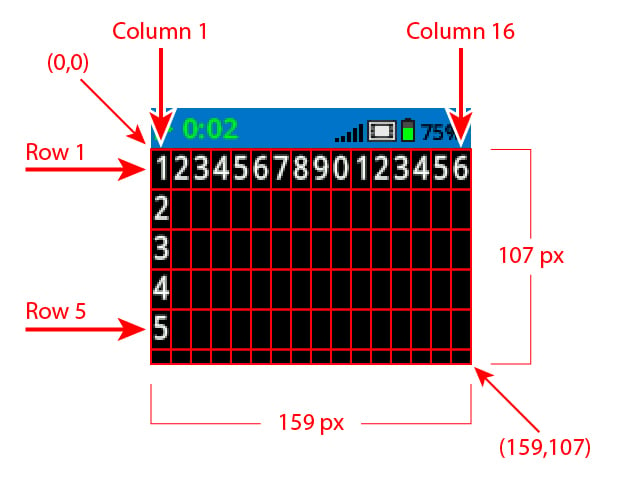
Από προεπιλογή, η γραμματοσειρά για εκτύπωση στο Brain είναι monospaced small η οποία έχει 7 γραμμές και 20 στήλες.
Για το σχέδιο, η ανάλυση του Brain είναι 159 x 107 pixel.
Παρακάτω είναι μια λίστα με τις διαθέσιμες μεθόδους:
Εκτύπωση δρομέα – Εμφάνιση κειμένου και διαχείριση του δρομέα εκτύπωσης.
print– Εκτυπώνει κείμενο, αριθμούς ή τιμές μεταβλητών στην τρέχουσα θέση του κέρσορα.print_at– Εκτυπώνει κείμενο, αριθμούς ή τιμές μεταβλητών σε συγκεκριμένες συντεταγμένες x και y.set_cursor– Μετακινεί τον κέρσορα σε μια συγκεκριμένη γραμμή και στήλη.set_origin– Ορίζει την αρχή που χρησιμοποιείται για εκτύπωση και σχεδίαση με βάση συντεταγμένες.next_row– Μετακινεί τον κέρσορα στην επόμενη γραμμή.clear_row– Διαγράφει μια γραμμή κειμένου.row– Επιστρέφει τη γραμμή όπου θα εκτυπωθεί το κείμενο.column– Επιστρέφει τη στήλη όπου θα εκτυπωθεί το κείμενο.get_string_width– Επιστρέφει το πλάτος μιας συμβολοσειράς σε pixel χρησιμοποιώντας την τρέχουσα γραμματοσειρά.get_string_height– Επιστρέφει το ύψος μιας συμβολοσειράς σε pixel χρησιμοποιώντας την τρέχουσα γραμματοσειρά.
Μεταλλαγμένοι – Αλλάξτε τις ρυθμίσεις της οθόνης, τα χρώματα και τη συμπεριφορά σχεδίασης.
clear_screen– Διαγράφει όλα τα σχέδια και το κείμενο από την οθόνη Brain.set_font– Ορίζει τον τύπο γραμματοσειράς που χρησιμοποιείται για την εκτύπωση κειμένου στην οθόνη του εγκεφάλου.set_pen_width– Ορίζει το πάχος των γραμμών που σχεδιάζονται και των περιγραμμάτων των σχημάτων.set_pen_color– Ορίζει το χρώμα του κειμένου, των pixel, των γραμμών και των περιγραμμάτων των σχημάτων.set_fill_color– Ορίζει το χρώμα γεμίσματος για τα σχεδιασμένα σχήματα και τα φόντα τυπωμένου κειμένου.
Σχεδίαση – Δημιουργήστε σχήματα, γραμμές και γραφικά στην οθόνη Brain.
draw_pixel– Σχεδιάζει ένα pixel σε μια συντεταγμένη.draw_line– Σχεδιάζει μια γραμμή μεταξύ δύο σημείων.draw_rectangle– Σχεδιάζει ένα ορθογώνιο χρησιμοποιώντας τα τρέχοντα χρώματα πένας και γεμίσματος.draw_circle– Σχεδιάζει έναν κύκλο χρησιμοποιώντας τα τρέχοντα χρώματα πένας και γεμίσματος.draw_image_from_file– Σχεδιάζει μια εικόνα από την κάρτα SD.render– Αλλάζει το σχέδιο σε διπλή προσωρινή αποθήκευση και αποδίδει την οθόνη του Εγκεφάλου.set_clip_region– Ορίζει την περιοχή αποκοπής για τη σχεδίαση του παρεχόμενου ορθογωνίου.
Εκτύπωση δρομέα#
print#
print εκτυπώνει κείμενο, αριθμούς ή τιμές μεταβλητών στην οθόνη Brain στην τρέχουσα θέση του κέρσορα και γραμματοσειρά.
Χρήση:
brain.screen.print(text, sep, precision)
Παράμετροι |
Περιγραφή |
|---|---|
|
Το κείμενο, ο αριθμός ή η τιμή μεταβλητής που θα εκτυπωθεί. |
|
Προαιρετικό. Μια συμβολοσειρά για εισαγωγή μεταξύ τιμών. Αυτή πρέπει να γραφτεί ως όρισμα λέξης-κλειδιού (sep=). Η προεπιλογή είναι |
|
Προαιρετικό. Ο αριθμός των δεκαδικών ψηφίων που θα εμφανίζονται κατά την εκτύπωση απλών αριθμών. Αυτό πρέπει να γραφτεί ως όρισμα λέξης-κλειδιού ( |
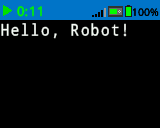
brain.screen.print("Hello, Robot!")
# Print the number 1 on the Brain's screen at current
# cursor position.
brain.screen.print(1)

# Print the numbers 1, 2, 3 and 4 on the Brain's screen at
# current cursor position separated by a '-'.
brain.screen.print(1, 2, 3, 4, sep='-')
print_at#
Η συνάρτηση print_at εκτυπώνει κείμενο, αριθμούς ή τιμές μεταβλητών στην οθόνη Brain σε συγκεκριμένες συντεταγμένες x και y.
Χρήση:
brain.screen.print_at(text, x, y, sep, precision, opaque)
Παράμετροι |
Περιγραφή |
|---|---|
|
Το κείμενο, ο αριθμός ή η τιμή μεταβλητής που θα εκτυπωθεί. |
|
Η συντεταγμένη x που θα εκτυπωθεί ως όρισμα λέξης-κλειδιού ( |
|
Η συντεταγμένη y που θα εκτυπωθεί ως όρισμα λέξης-κλειδιού ( |
|
Προαιρετικό. Μια συμβολοσειρά για εισαγωγή μεταξύ τιμών. Αυτή πρέπει να γραφτεί ως όρισμα λέξης-κλειδιού (sep=). Η προεπιλογή είναι |
|
Προαιρετικό. Ο αριθμός των δεκαδικών ψηφίων που θα εμφανίζονται κατά την εκτύπωση απλών αριθμών. Αυτό πρέπει να γραφτεί ως όρισμα λέξης-κλειδιού ( |
|
Προαιρετικό. |
# Print the number 1 on the Brain's screen at position (100, 40).
brain.screen.print_at(1, x=100, y=40)
set_cursor#
set_cursor μετακινεί τον κέρσορα σε μια συγκεκριμένη γραμμή και στήλη στην οθόνη Brain. Η επόμενη κλήση print θα ξεκινήσει την εκτύπωση σε αυτήν τη θέση. Η απόσταση μεταξύ των γραμμών και των στηλών θα λάβει υπόψη την επιλεγμένη γραμματοσειρά. Η προεπιλεγμένη θέση του κέρσορα είναι Γραμμή 1, Στήλη 1.
Χρήση:
brain.screen.set_cursor(row, column)
Παράμετροι |
Περιγραφή |
|---|---|
|
Η γραμμή στην οποία θα μετακινηθεί ο κέρσορας. |
|
Η στήλη στην οποία θα μετακινηθεί ο κέρσορας. |
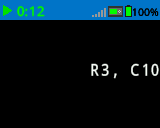
# Display text starting at Row 3 Column 10.
brain.screen.set_cursor(3, 10)
brain.screen.print("R3, C10")
set_origin#
set_origin ορίζει την αρχή που χρησιμοποιείται για το σχέδιο και την εκτύπωση με βάση τις συντεταγμένες στην οθόνη Brain. Από προεπιλογή, η αρχή είναι η επάνω αριστερή γωνία της οθόνης.
Χρήση:
brain.screen.set_origin(x, y)
Παράμετροι |
Περιγραφή |
|---|---|
|
Η θέση x της αρχής των αξόνων σε σχέση με την επάνω αριστερή γωνία, από 0 έως 159. |
|
Η θέση y της αρχής των αξόνων σε σχέση με την επάνω αριστερή γωνία, από 0 έως 107. |
next_row#
next_row μετακινεί τον κέρσορα στη στήλη 1 στην επόμενη γραμμή της οθόνης Brain.
Χρήση:
brain.screen.next_row()
Παράμετροι |
Περιγραφή |
|---|---|
Αυτή η μέθοδος δεν έχει παραμέτρους. |
# Display two lines of text.
brain.screen.print("Line 1")
brain.screen.next_row()
brain.screen.print("Line 2")
clear_row#
clear_row καθαρίζει μία μόνο γραμμή κειμένου στην οθόνη Brain.
Χρήση:
brain.screen.clear_row(row)
Παράμετροι |
Περιγραφή |
|---|---|
|
Προαιρετικό. Η γραμμή που θα διαγραφεί. Η προεπιλογή είναι η τρέχουσα γραμμή του δρομέα. |
|
Προαιρετικό. Ένας έγκυρος Τύπος Χρώματος, μια δεκαεξαδική τιμή ή μια συμβολοσειρά ιστού.
|
# Clear Brain's screen to black.
brain.screen.clear_row()

# Clear Brain's screen to blue using predefined color.
brain.screen.clear_row(2, Color.BLUE)
row#
row επιστρέφει τη γραμμή όπου το κείμενο θα εκτυπωθεί ως ακέραιος αριθμός.
Χρήση:
brain.screen.row()
Παράμετροι |
Περιγραφή |
|---|---|
Αυτή η μέθοδος δεν έχει παραμέτρους. |
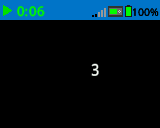
# Display the cursor's current row.
brain.screen.set_cursor(3, 10)
brain.screen.print(brain.screen.row())
column#
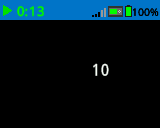
Η στήλη column επιστρέφει τη στήλη όπου το κείμενο θα εκτυπωθεί ως ακέραιος αριθμός.
Χρήση:
brain.screen.column()
Παράμετροι |
Περιγραφή |
|---|---|
Αυτή η μέθοδος δεν έχει παραμέτρους. |
# Display the cursor's current column.
brain.screen.set_cursor(3, 10)
brain.screen.print(brain.screen.column())
get_string_width#
get_string_width επιστρέφει το πλάτος μιας συμβολοσειράς σε pixel ως ακέραιο αριθμό, χρησιμοποιώντας την τρέχουσα font.
Χρήση:
brain.screen.get_string_width(string)
Παράμετροι |
Περιγραφή |
|---|---|
|
Η χορδή που θα μετρηθεί. |
get_string_height#
get_string_height επιστρέφει το ύψος μιας συμβολοσειράς σε pixel ως ακέραιο αριθμό, χρησιμοποιώντας την τρέχουσα font.
Χρήση:
brain.screen.get_string_height(string)
Παράμετροι |
Περιγραφή |
|---|---|
|
Η χορδή που θα μετρηθεί. |
Μεταλλάκτες#
clear_screen#
clear_screen διαγράφει όλα τα σχέδια και το κείμενο από την οθόνη του Εγκεφάλου.
Χρήση:
brain.screen.clear_screen(color)
Παράμετροι |
Περιγραφή |
|---|---|
|
Προαιρετικό. Ένας έγκυρος Τύπος Χρώματος, μια δεκαεξαδική τιμή ή μια συμβολοσειρά ιστού.
|
# Print VEXcode on the Brain's screen.
brain.screen.print("VEXcode")

# Clear screen to black.
brain.screen.clear_screen()

# Print VEXcode on the Brain's screen.
brain.screen.print("VEXcode")

# Clear screen to blue using predefined color.
brain.screen.clear_screen(Color.BLUE)
set_font#
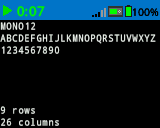
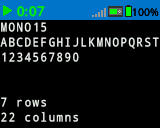
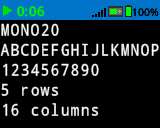
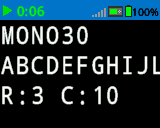
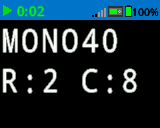
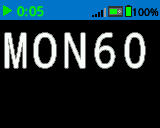
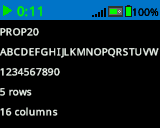
set_font ορίζει τη γραμματοσειρά που χρησιμοποιείται για την εμφάνιση κειμένου στην οθόνη Brain. Αυτή η γραμματοσειρά θα εφαρμοστεί σε όλο το κείμενο που θα εκτυπωθεί μετά την εκτέλεση αυτής της μεθόδου.
Χρήση:
brain.screen.set_font(fontname)
Παράμετροι |
Περιγραφή |
|---|---|
|
Το μέγεθος γραμματοσειράς (παραδείγματα παρακάτω):
|
|
|
|
|---|---|---|
|
|
|
|
|
|
|
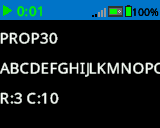
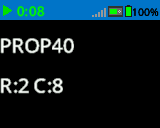
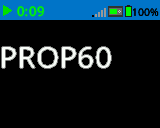
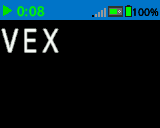
# Set the font type to MONO40.
brain.screen.set_font(FontType.MONO40)
brain.screen.print("VEX")
set_pen_width#
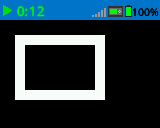
set_pen_width ορίζει το πάχος των γραμμών που σχεδιάζονται και των περιγραμμάτων των σχημάτων.
Χρήση:
brain.screen.set_pen_width(width)
Παράμετροι |
Περιγραφή |
|---|---|
|
Το πλάτος της πένας, σε pixel, κυμαίνεται από 0 έως 32. |
# Draw a rectangle with a pen width of 10.
brain.screen.set_pen_width(10)
brain.screen.draw_rectangle(20, 20, 75, 50)
set_pen_color#
set_pen_color ορίζει το χρώμα του κειμένου, των pixel, των γραμμών και των περιγραμμάτων των σχημάτων.
Χρήση:
brain.screen.set_pen_color(color)
Παράμετροι |
Περιγραφή |
|---|---|
|
Το χρώμα της πένας και της γραμματοσειράς που θα χρησιμοποιηθεί. Αυτό μπορεί να είναι ένας έγκυρος Τύπος χρώματος, μια δεκαεξαδική τιμή ή μια συμβολοσειρά ιστού.
|
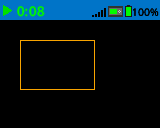
# Draw a rectangle with orange borders.
brain.screen.set_pen_color(Color.ORANGE)
brain.screen.draw_rectangle(20, 20, 75, 50)
# Set pen color red using a hex value.
brain.screen.set_pen_color(0xFF0000)

# Set pen color blue using predefined color.
brain.screen.set_pen_color(Color.BLUE)

# Set pen color green using web string.
brain.screen.set_pen_color("#00FF00")
set_fill_color#
set_fill_color ορίζει το χρώμα γεμίσματος που χρησιμοποιείται για τη σχεδίαση ορθογωνίων και κύκλων.
Χρήση:
brain.screen.set_fill_color(color)
Παράμετροι |
Περιγραφή |
|---|---|
|
Το χρώμα γεμίσματος που θα χρησιμοποιηθεί. Αυτό μπορεί να είναι ένας έγκυρος Τύπος χρώματος, μια δεκαεξαδική τιμή ή μια συμβολοσειρά ιστού.
|
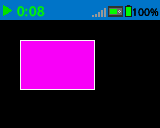
# Draw a purple rectangle.
brain.screen.set_fill_color(Color.PURPLE)
brain.screen.draw_rectangle(20, 20, 75, 50)
# Set fill color red using a hex value.
brain.screen.set_fill_color(0xFF0000)

# Set fill color blue using predefined color.
brain.screen.set_fill_color(Color.BLUE)

# Set fill color green using web string.
brain.screen.set_fill_color("#00FF00")
Ισοπαλία#
draw_pixel#
draw_pixel σχεδιάζει ένα pixel στην επιλεγμένη συντεταγμένη x και y χρησιμοποιώντας το τρέχον χρώμα πένας.
Χρήση:
brain.screen.draw_pixel(x, y)
Παράμετροι |
Περιγραφή |
|---|---|
|
Η συντεταγμένη x για τη σχεδίαση του εικονοστοιχείου, από 0 έως 159, με αναφορά στην αρχή της οθόνης. |
|
Η συντεταγμένη y για τη σχεδίαση του pixel, από 0 έως 107, με αναφορά στην αρχή της οθόνης. |
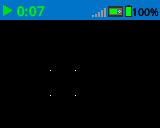
# Draw the pixels marking the corners of a square.
brain.screen.draw_pixel(50, 50)
brain.screen.draw_pixel(50, 75)
brain.screen.draw_pixel(75, 50)
brain.screen.draw_pixel(75, 75)
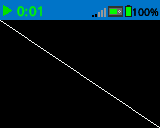
draw_line#
draw_line σχεδιάζει μια γραμμή από την πρώτη συντεταγμένη οθόνης (x1, y1) έως τη δεύτερη συντεταγμένη οθόνης (x2, y2) χρησιμοποιώντας τα τρέχοντα πλάτος πένας και χρώμα πένας.
Χρήση:
brain.screen.draw_line(x1, y1, x2, y2)
Παράμετροι |
Περιγραφή |
|---|---|
|
Η συντεταγμένη x σε pixel της αρχής της γραμμής, από 0 έως 159, που αναφέρεται στην αρχή της οθόνης. |
|
Η συντεταγμένη y σε pixel της αρχής της γραμμής, από 0 έως 107, που αναφέρεται στην αρχή της οθόνης. |
|
Η συντεταγμένη x σε pixel του τέλους της γραμμής, από 0 έως 159, που αναφέρεται στην αρχή της οθόνης. |
|
Η συντεταγμένη y σε pixel του τέλους της γραμμής, από 0 έως 107, που αναφέρεται στην αρχή της οθόνης. |
# Draw a line from the top left to bottom right of the screen.
brain.screen.draw_line(0, 0, 159, 107)
draw_rectangle#
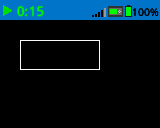
draw_rectangle σχεδιάζει ένα ορθογώνιο χρησιμοποιώντας τις τρέχουσες παραμέτρους πλάτος πένας, χρώμα πένας και χρώμα γεμίσματος, εκτός εάν χρησιμοποιείται η προαιρετική παράμετρος color.
Χρήση:
brain.screen.draw_rectangle(x, y, width, height, color)
Παράμετροι |
Περιγραφή |
|---|---|
|
Η συντεταγμένη x σε pixel της επάνω αριστερής γωνίας του ορθογωνίου, από 0 έως 159, που αναφέρεται στην αρχή της οθόνης. |
|
Η συντεταγμένη y σε pixel της επάνω αριστερής γωνίας του ορθογωνίου, από 0 έως 107, που αναφέρεται στην αρχή της οθόνης. |
|
Το πλάτος του ορθογωνίου. |
|
Το ύψος του ορθογωνίου. |
|
Προαιρετικό. Ένας έγκυρος Τύπος Χρώματος, μια δεκαεξαδική τιμή ή μια συμβολοσειρά ιστού.
|
# Draw a rectangle on the screen.
brain.screen.draw_rectangle(20, 20, 80, 30)
# Draw a green rectangle on the screen that is filled using blue.
brain.screen.set_pen_color(Color.GREEN)
brain.screen.set_fill_color(Color.BLUE)
brain.screen.draw_rectangle(10, 10, 20, 20)

# Draw a green rectangle on the screen that is filled using red.
brain.screen.set_pen_color(Color.GREEN)
brain.screen.draw_rectangle(50, 50, 20, 20, Color.RED)
draw_circle#
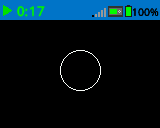
draw_circle σχεδιάζει έναν κύκλο χρησιμοποιώντας τις τρέχουσες παραμέτρους πλάτος πένας, χρώμα πένας και χρώμα γεμίσματος, εκτός εάν χρησιμοποιείται η προαιρετική παράμετρος color.
Χρήση:
brain.screen.draw_circle(x, y, radius, color)
Παράμετροι |
Περιγραφή |
|---|---|
|
Η συντεταγμένη x σε pixel του κέντρου του κύκλου, από 0 έως 159, που αναφέρεται στην αρχή της οθόνης. |
|
Η συντεταγμένη y σε pixel του κέντρου του κύκλου, από 0 έως 107, που αναφέρεται στην αρχή της οθόνης. |
|
Η ακτίνα του κύκλου. |
|
Προαιρετικό. Ένας έγκυρος Τύπος Χρώματος, μια δεκαεξαδική τιμή ή μια συμβολοσειρά ιστού.
|
# Draw a circle on the screen.
brain.screen.draw_circle(80, 50, 20)
# Draw a green circle on the Brain's screen that is filled using blue.
brain.screen.set_pen_color(Color.GREEN)
brain.screen.set_fill_color(Color.BLUE)
brain.screen.draw_circle(50, 50, 10)

# Draw a green circle on the Brain's screen that is filled using red.
brain.screen.set_pen_color(Color.GREEN)
brain.screen.draw_circle(100, 50, 10, Color.RED)
draw_image_from_file#
draw_image_from_file σχεδιάζει μια εικόνα από την κάρτα SD. Το όνομα αρχείου που δίνετε κατά την κλήση της μεθόδου πρέπει να βρίσκεται στην κάρτα SD.
Χρήση:
brain.screen.draw_image_from_file(filename, x, y)
Παράμετροι |
Περιγραφή |
|---|---|
|
Το όνομα αρχείου της εικόνας. |
|
Η συντεταγμένη x για την επάνω αριστερή γωνία της εικόνας στην οθόνη. |
|
Η συντεταγμένη y για την επάνω αριστερή γωνία της εικόνας στην οθόνη. |
# Draw the vex.bmp image on the Brain's screen at coordinate 0, 0.
brain.screen.draw_image_from_file('vex.bmp', 0, 0)
render#
Η συνάρτηση render αλλάζει το drawing σε double buffered και αποδίδει την οθόνη του Brain. Μόλις κληθεί, δεν θα εμφανιστεί περαιτέρω drawing στην οθόνη του Brain μέχρι την επόμενη φορά που θα κληθεί η συνάρτηση render.
Trueεάν η προσωρινή μνήμη αποδόθηκε με επιτυχία στην οθόνη.Falseεάν η προσωρινή μνήμη δεν αποδόθηκε με επιτυχία στην οθόνη.
Χρήση:
brain.screen.render()
Παράμετροι |
Περιγραφή |
|---|---|
Αυτή η μέθοδος δεν έχει παραμέτρους. |
set_clip_region#
set_clip_region ορίζει μια ορθογώνια περιοχή στην οθόνη όπου θα περιορίζονται όλα τα σχέδια και το κείμενο. Οποιοδήποτε περιεχόμενο εκτός αυτής της περιοχής δεν θα εμφανίζεται.
Χρήση:
brain.screen.set_clip_region(x, y, width, height)
Παράμετροι |
Περιγραφή |
|---|---|
|
Η θέση x της επάνω αριστερής γωνίας του ορθογωνίου, που αναφέρεται στην αρχή της οθόνης. |
|
Η θέση y της επάνω αριστερής γωνίας του ορθογωνίου, που αναφέρεται στην αρχή της οθόνης. |
|
Το πλάτος του ορθογωνίου. |
|
Το ύψος του ορθογωνίου. |