
センサー#
導入#
VEX AIRドローンには、回転運動を測定し、動きの変化を検出する慣性センサーと、距離を検出するレンジセンサーが搭載されています。また、バッテリー残量も監視できます。これらのセンサーにより、ドローンは機体の向き、進行方向、加速度、および物体からの距離を追跡できます。
以下に、利用可能なメソッドの一覧を示します。
慣性センサー - ドローンの回転運動を追跡します。
get_rotation– ドローンが開始してからどれだけ回転したかを返します。get_heading– 現在の方位角 (0 ~ 359.99°) を返します。get_yaw– ヨー角(-180~180°)を返します。get_roll– ロール角度 (-180~180°) を返します。get_pitch– ピッチ角 (-180~180°) を返します。reset_rotation– 回転値を 0 にリセットします。reset_heading– 現在の見出しを0に設定します。set_heading– 見出しを特定の値に設定します。get_acceleration– 特定の方向の加速度を返します。get_turn_rate– 1秒あたりの回転速度を度単位で返します。
範囲 — ドローンの距離センサーから距離を検出します。
get_distance— 選択したレンジセンサーと最も近い検出オブジェクト間の距離を返します。
バッテリー - ドローンのバッテリー残量を表示します。
get_battery_level– ドローンのバッテリーレベルをパーセントで返します。
慣性#
get_rotation#
get_rotation は、ドローンが起動してから回転した角度を返します。すべての回転数を合計し、合計値を度数で返します。正の値は時計回り、負の値は反時計回りです。
Usage:
drone.inertial.get_rotation()
パラメータ |
説明 |
|---|---|
このメソッドにはパラメータがありません。 |
# Display the rotation after turning
drone.take_off(climb_to=500)
drone.turn_for(LEFT, 450, 50)
print(drone.inertial.get_rotation(), end="")
drone.land()
get_heading#
get_heading は、ドローンの進行方向の角度を 0 ~ 359.99 度の範囲の浮動小数点数として返します。
Usage:
drone.inertial.get_heading()
パラメータ |
説明 |
|---|---|
このメソッドにはパラメータがありません。 |
# Display the drone's heading after turning
drone.take_off(climb_to=500)
drone.set_turn_velocity(100)
drone.turn(RIGHT)
wait(5, SECONDS)
controller.screen.print("Heading: ")
controller.screen.print(drone.inertial.get_heading())
drone.land()
get_yaw#
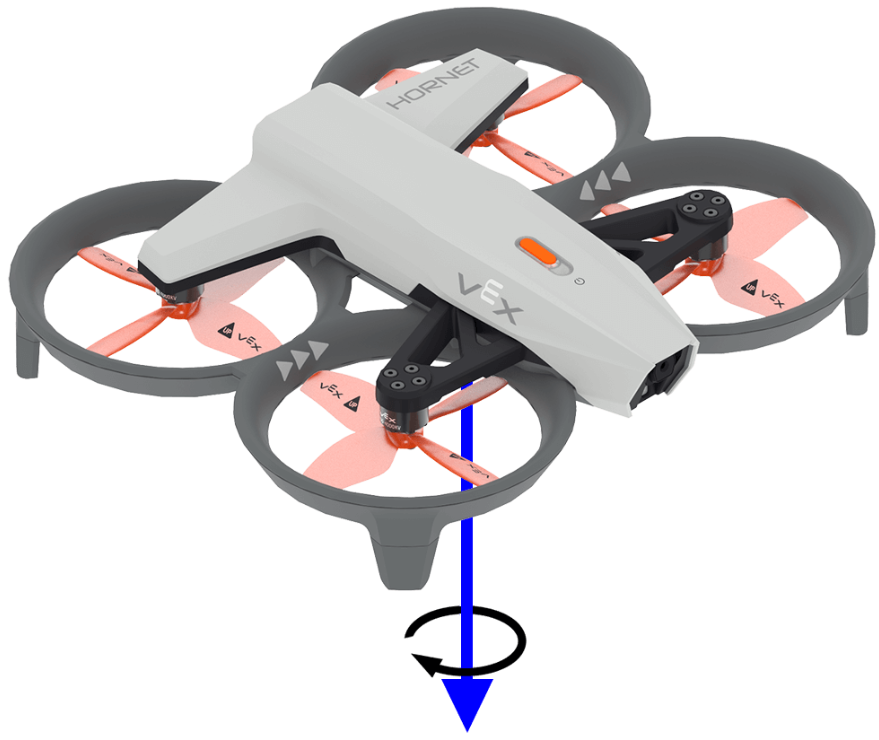
get_yaw は、ドローンのヨー角を -180.0 度から 180.0 度の範囲で float 型として返します。
下の図は、矢印を使ってヨー角の正の回転方向を示しています。
Usage:
drone.inertial.get_yaw
パラメータ |
説明 |
|---|---|
このメソッドにはパラメータがありません。 |
# Display the yaw angle as you rotate the drone by hand
while True:
    controller.screen.clear_screen()
    controller.screen.set_cursor(1, 1)
    controller.screen.print("Yaw: ")
    controller.screen.print(drone.inertial.get_yaw())
    wait(0.2, SECONDS)
get_roll#
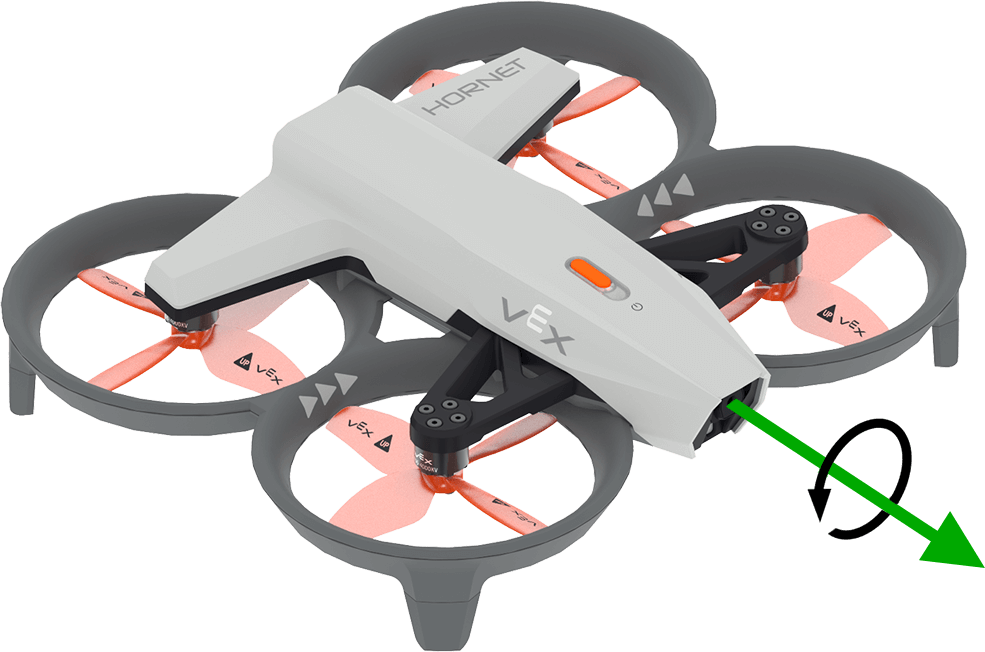
get_roll は、ドローンのロール角度を -180.0 度から 180.0 度の範囲で float 型として返します。
下の図では、矢印を使ってロールの正の回転方向を示しています。
Usage:
drone.inertial.get_roll()
パラメータ |
説明 |
|---|---|
このメソッドにはパラメータがありません。 |
# Display the roll angle as you rotate the drone by hand
while True:
    controller.screen.clear_screen()
    controller.screen.set_cursor(1, 1)
    controller.screen.print("Roll: ")
    controller.screen.print(drone.inertial.get_roll())
    wait(0.2, SECONDS)
get_pitch#
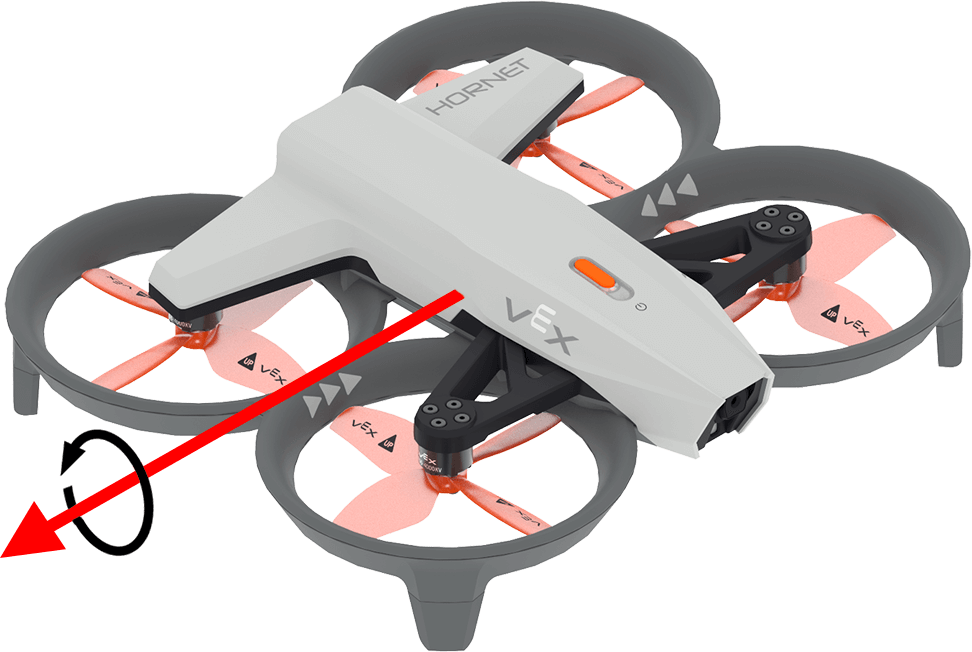
get_pitch は、ドローンのピッチ角を -180.0 度から 180.0 度の範囲で float 型として返します。
下の図では、矢印を使ってピッチの正の回転方向を示しています。
Usage:
drone.inertial.get_pitch()
パラメータ |
説明 |
|---|---|
このメソッドにはパラメータがありません。 |
# Display the pitch angle as you rotate the drone by hand
while True:
    controller.screen.clear_screen()
    controller.screen.set_cursor(1, 1)
    controller.screen.print("Pitch: ")
    controller.screen.print(drone.inertial.get_pitch())
    wait(0.2, SECONDS)
reset_rotation#
reset_rotation は、ドローンの回転値を 0 度にリセットします。
Usage:
drone.inertial.reset_rotation()
パラメータ |
説明 |
|---|---|
このメソッドにはパラメータがありません。 |
# Display the new rotation after resetting
drone.take_off(climb_to=500)
drone.turn(RIGHT)
while not drone.inertial.get_rotation() > 360:
    wait(5, MSEC)
drone.hover()
drone.inertial.reset_rotation()
wait(1, SECONDS)
print(drone.inertial.get_rotation(), end="")
drone.land()
reset_heading#
reset_heading はドローンの進行方向を0度にリセットします。
使用法:
drone.inertial.reset_heading()
パラメータ |
説明 |
|---|---|
このメソッドにはパラメータがありません。 |
# Turn to a heading, reset the heading, and turn to the same heading.
drone.take_off(climb_to=500)
drone.turn_to(heading=180, velocity=50)
wait(3,SECONDS)
drone.inertial.reset_heading()
drone.turn_to(heading=180, velocity=50)
wait(3,SECONDS)
drone.land()
set_heading#
set_heading は、ドローンの進行方向を指定された度数に設定します。
使用法:
drone.inertial.set_heading(heading)
パラメータ |
説明 |
|---|---|
|
新しい方位角に使用する値(0~359.99度の範囲)。 |
# Turn to a heading, set the heading, and turn to the same heading.
drone.take_off(climb_to=500)
drone.turn_to(heading=180, velocity=50)
wait(3,SECONDS)
drone.inertial.set_heading(90)
drone.turn_to(heading=180, velocity=50)
wait(3,SECONDS)
drone.land()
get_acceleration#
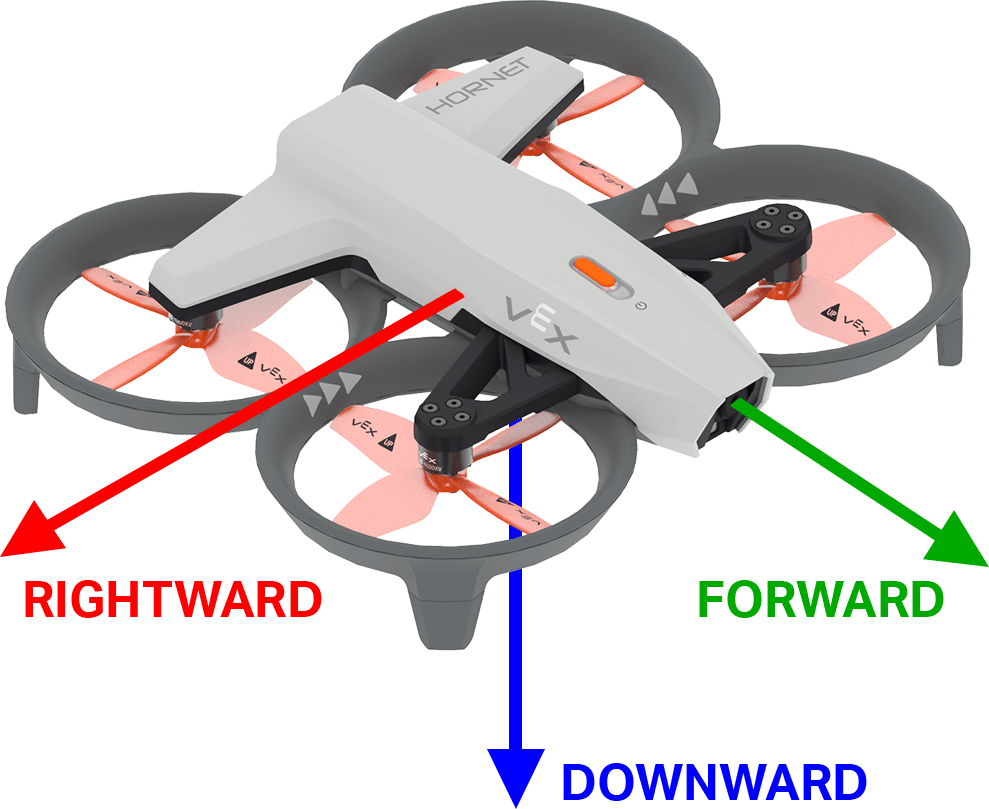
get_acceleration は、指定された方向におけるドローンの加速度を返します。返される値は、速度の変化率を表し、単位は g (1g ≈ 9.81 m/s²) で、-4.00 から 4.00 の範囲の浮動小数点数です。
下の図は、矢印を用いて、前方および右方向への加速度が正の方向であり、下方への加速度が負の方向であることを示しています。
使用法:
drone.inertial.get_acceleration(type)
パラメータ |
説明 |
|---|---|
|
報告する加速度の方向:
|
# Display the acceleration as the drone takes off
drone.take_off(500, wait=False)
while True:
    controller.screen.clear_screen()
    controller.screen.set_cursor(1, 1)
    controller.screen.print(drone.inertial.get_acceleration(DOWNWARD))
    wait(5, MSEC)
get_turn_rate#
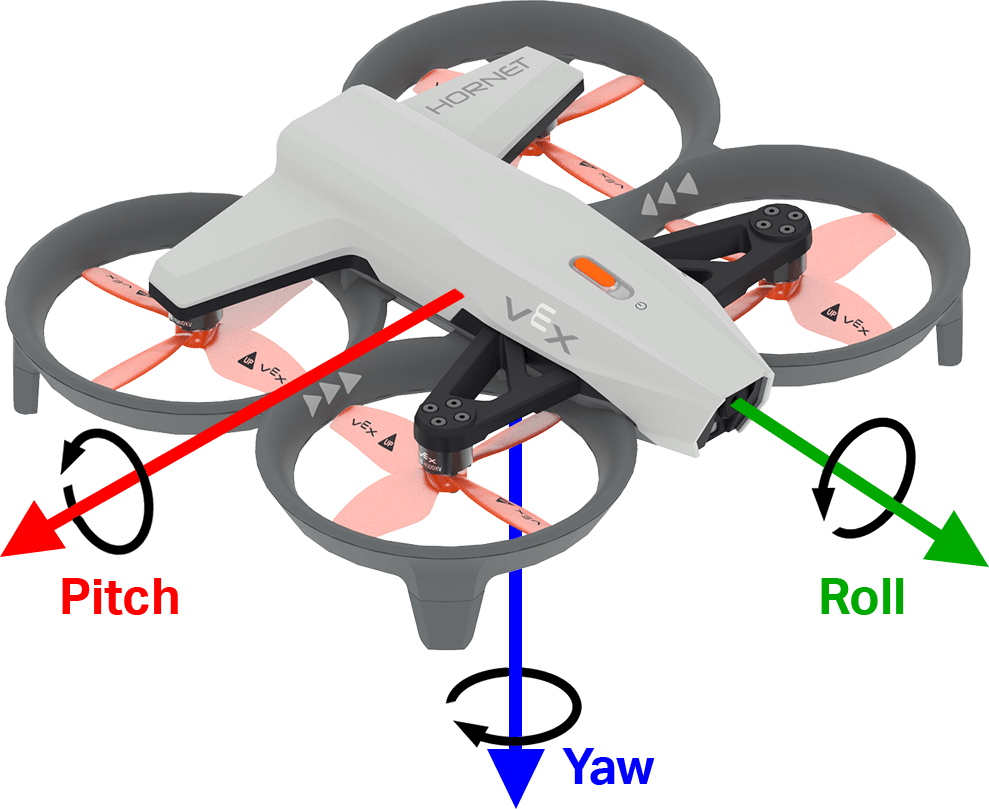
get_turn_rate get_turn_rate は、ドローンが指定された軸に沿って回転する速度を返します。これは、-1000.00 から 1000.00 dps の範囲の浮動小数点数として、度/秒 \(dps\) の値が返されます。
下の図は、矢印を用いてロール、ピッチ、ヨーの正の回転方向を示しています。
Usage:
drone.inertial.get_turn_rate(axis)
パラメータ |
説明 |
|---|---|
|
報告する向き:
|
# Display the drone turn rate as it is rotated by hand.
while True:
    controller.screen.clear_screen()
    controller.screen.set_cursor(7, 1)
    controller.screen.print(drone.inertial.get_turn_rate(ROLL))
範囲#
get_distance#
get_distance は、選択されたレンジセンサーと最も近い検出されたオブジェクト間の距離を返します。
Usage:
drone.range.get_distance(range, units)
パラメータ |
説明 |
|---|---|
|
The Range Sensor to use: |
|
オプション。距離の単位:
|
# Fly forward until close to an object
drone.take_off(climb_to=500)
drone.move_at(direction=0, velocity=50)
while not drone.range.get_distance(FORWARD_RANGE, MM) < 750:
    wait(0.1, SECONDS)
drone.land()
バッテリー#
get_battery_level#
get_battery_level は、ドローンのバッテリー充電レベルをパーセンテージで返します。これは0から100までの数値を返します。
Usage:
drone.get_battery_level()
パラメータ |
説明 |
|---|---|
このメソッドにはパラメータがありません。 |
# Display the drone's battery level
if drone.get_battery_level() < 25:
    controller.screen.print("Charge the drone Battery!")
else:
    controller.screen.print("Ready to fly!")