
AI 비전#
소개#
VEX AIM 코딩 로봇의 AI 비전 센서는 사물, 색상 및 AprilTag ID를 감지하고 추적합니다. 이를 통해 로봇은 주변 환경을 분석하고, 물체를 추적하며, 감지된 시각 데이터를 기반으로 반응할 수 있습니다.
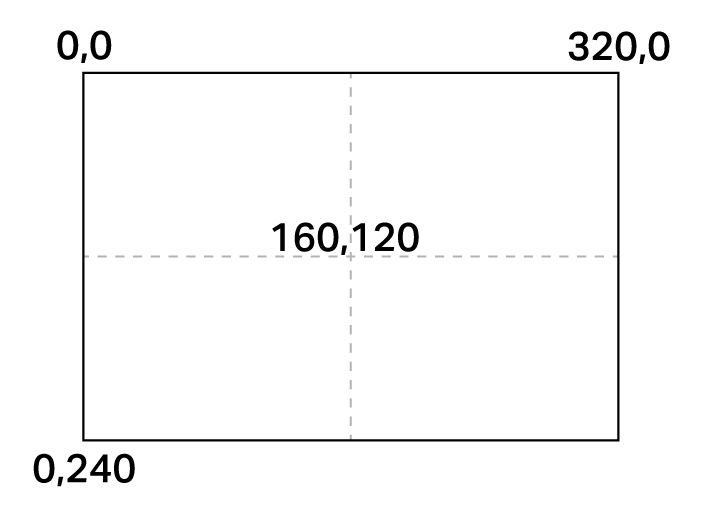
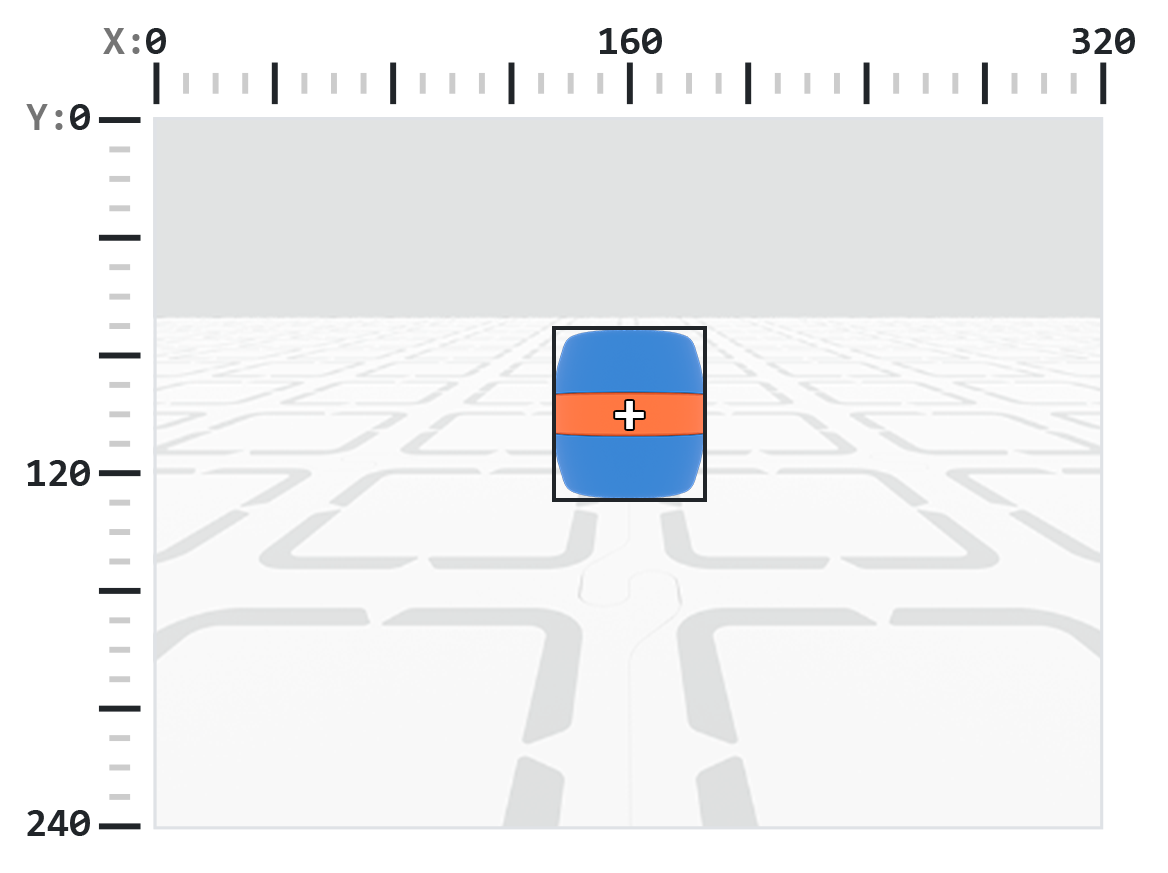
AI 비전 센서의 해상도는 320×240픽셀입니다. 원점(0, 0)은 좌측 상단 모서리에 위치하며, 센서의 중심은 아래 그림과 같이 (160, 120)에 있습니다.
다음은 모든 메서드와 속성의 목록입니다.
작업 — AI 비전 카메라 피드를 표시하거나 숨깁니다.
show_aivision— 로봇 화면에 AI 비전 피드를 표시합니다.hide_aivision— 화면에서 AI Vision 피드를 숨깁니다.tag_detection— AprilTag ID 감지를 켜거나 끕니다.
게터 — 로봇이 물체를 잡고 있는지 감지합니다.
get_data— 특정 시그니처에 대해 감지된 객체의 튜플을 반환합니다.has_sports_ball— 로봇이 스포츠 공을 가지고 있는지 여부를 반환합니다.has_any_barrel— 로봇에 배럴 유형이 있는지 여부를 반환합니다.has_blue_barrel— 로봇에 파란색 배럴이 있는지 여부를 반환합니다.has_orange_barrel— 로봇에 주황색 배럴이 있는지 여부를 반환합니다.
속성 — get_data에서 반환된 객체 데이터.
exists— 현재 감지에 객체가 존재하는지 여부를 부울로 나타냅니다.width— 감지된 객체의 너비.height— 감지된 객체의 높이.centerX— 객체 중심의 X 위치.centerY— 객체 중심의 Y 위치.bearing— 로봇 전면에 대한 수평 각도.rotation— 객체의 방향.originX— 객체의 왼쪽 상단 모서리의 X 위치.originY— 객체의 왼쪽 상단 모서리의 Y 위치.id— 객체의 분류 또는 태그 ID.score— AI 분류에 대한 신뢰도 점수.type— 객체의 유형(AI, 태그, 색상 또는 코드)을 반환합니다.
생성자 — 색상 시그니처와 코드를 정의합니다.
행위#
show_aivision#
show_aivision 은 AI 비전 센서의 실시간 데이터 피드를 로봇 화면에 표시합니다. 실시간 데이터 피드는 화면의 다른 이미지나 텍스트를 가립니다.
참고: 피드를 숨기기 위해 hide_aivision를 사용하지 않는 한 화면에는 다른 이미지나 텍스트가 표시되지 않습니다.
Usage:
robot.screen.show_aivision()
매개변수 |
설명 |
|---|---|
이 메서드에는 매개변수가 없습니다. |
# Watch the AI Vision Sensor detect AI Classifications
# and AprilTag IDs as you move the robot
robot.screen.show_aivision()
hide_aivision#
hide_aivision 로봇 화면에서 AI 비전 센서의 실시간 데이터 피드를 제거합니다.
Usage:
robot.screen.hide_aivision()
매개변수 |
설명 |
|---|---|
이 메서드에는 매개변수가 없습니다. |
# View the AI Vision Sensor's feed for five seconds
robot.screen.show_aivision()
wait(5, SECONDS)
robot.screen.hide_aivision()
tag_detection#
tag_detection AprilTag ID 감지를 활성화 또는 비활성화하며, 상태는 부울 값입니다.
이 센서는 Circle21h7 제품군의 AprilTag ID 0~36을 감지할 수 있습니다.
Usage:
robot.vision.tag_detection(state)
매개변수 |
설명 |
|---|---|
|
값은 다음과 같습니다. |
robot.screen.set_font(PROP30)

# Cut off AprilTag ID detection after 5 seconds
while True:
    if timer.time(SECONDS) > 5:
        robot.vision.tag_detection(False)

    robot.screen.clear_screen()
    robot.screen.set_cursor(3, 1)
    apriltags = robot.vision.get_data(ALL_TAGS)

    if apriltags[0].exists:
        robot.screen.print("AprilTag ID detected!")
    else:
        robot.screen.print("Nothing detected!")

    wait(0.1, SECONDS)
게터스#
get_data#
get_data AI 비전 센서 프레임에서 데이터를 단일 서명(사전 훈련된 객체, AprilTag ID 또는 구성된 색상 서명 또는 색상 코드와 같이 센서가 인식할 수 있는 것에 대한 저장된 설명)으로 필터링하고 튜플을 반환합니다.
색상 서명 및 색상 코드는 이 방법을 사용하기 전에 AI 비전 유틸리티에서 먼저 구성해야 합니다.
튜플은 인덱스 0부터 시작하여 너비가 큰 순서부터 작은 순서로 정렬된 객체를 저장합니다. 각 객체의 속성은 인덱스를 사용하여 접근할 수 있습니다. 일치하는 객체가 감지되지 않으면 빈 튜플이 반환됩니다.
Usage:
robot.vision.get_data(signature, count)
매개변수 |
설명 |
|---|---|
|
지정된 서명에 해당하는 데이터만 포함하도록 데이터셋을 필터링합니다. 사용 가능한 서명은 다음과 같습니다:
|
|
선택 사항입니다. 반환할 수 있는 객체의 최대 개수를 1에서 24 사이로 설정합니다(기본값: 8). |
참고: AprilTag ID 5~37은 AIM Printables에서 인쇄된 AprilTag ID를 사용하여 얻을 수 있습니다.
# Move forward if a sports ball is detected
while True:
    ball = robot.vision.get_data(SPORTS_BALL)
    if ball[0].exists:
        robot.move_for(10, 0)
    wait(50, MSEC)
Note: The returned tuple can be sorted by any property, not just width, using Python’s sorted function. For example, sorting by AprilTag ID:
# Print each detected AprilTag ID in ascending order by ID
while True:
    apriltags = sorted(robot.vision.get_data(ALL_TAGS), key=id)
    for tag in apriltags:
        print(tag.id)
    wait(1, SECONDS)
또는 높이 순으로 정렬할 수도 있습니다.
# Print each detected AprilTag ID in ascending order by height
while True:
    apriltags_by_height = sorted(robot.vision.get_data(ALL_TAGS), key=lambda tag: tag.height)
    for tag in apriltags_by_height:
        print(tag.height)
    wait(1, SECONDS)
데이터 보기#
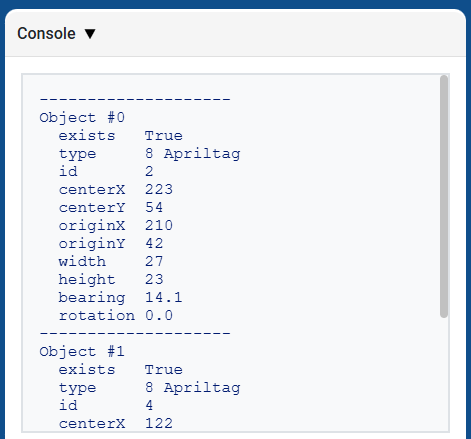
get_data 가 반환하는 튜플을 출력하면 감지된 모든 객체의 모든 속성 목록이 표시됩니다.
# Display properties of all detected AprilTag IDs
while True:
    vision_data = robot.vision.get_data(ALL_TAGS)

    if vision_data[0].exists:
        break

    wait(0.25, SECONDS)

print(vision_data)
AI 분류#
AIM AI 비전 센서는 다음과 같은 AI 분류를 감지할 수 있습니다.
신분증 번호 |
AI 분류 |
서명 |
|---|---|---|
0 |
공 |
|
1 |
블루 배럴 |
|
2 |
오렌지 배럴 |
|
3 |
AIM 로봇 |
|
색상 특징#
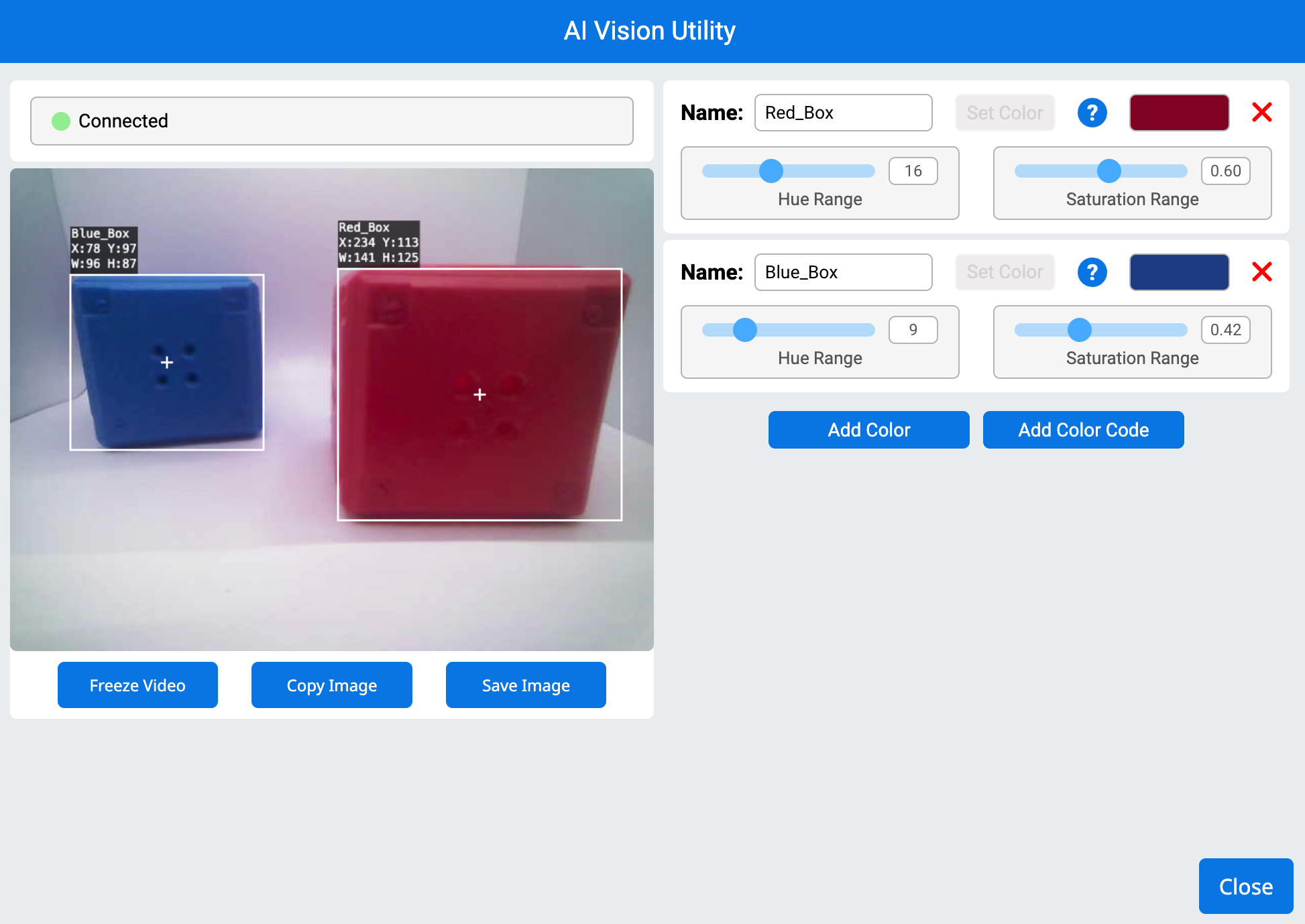
컬러 시그니처는 AI 비전 센서가 인식할 수 있는 고유한 색상입니다. 이러한 시그니처를 통해 센서는 색상을 기반으로 객체를 감지하고 추적할 수 있습니다. 컬러 시그니처가 구성되면 센서는 시야 내에서 해당 특정 색상의 객체를 식별할 수 있습니다. 컬러 시그니처는 get_data와 함께 사용하여 실시간으로 색상이 있는 객체를 처리하고 감지합니다.
# Display if any objects match the Red_Box signature
while True:
    robot.screen.set_cursor(1, 1)
    robot.screen.clear_row(1)
    # Change to any configured Color Signature
    ai_objects = robot.vision.get_data(Red_Box)
    if ai_objects[0].exists:
        robot.screen.print("Color signature detected!")
색상 코드#
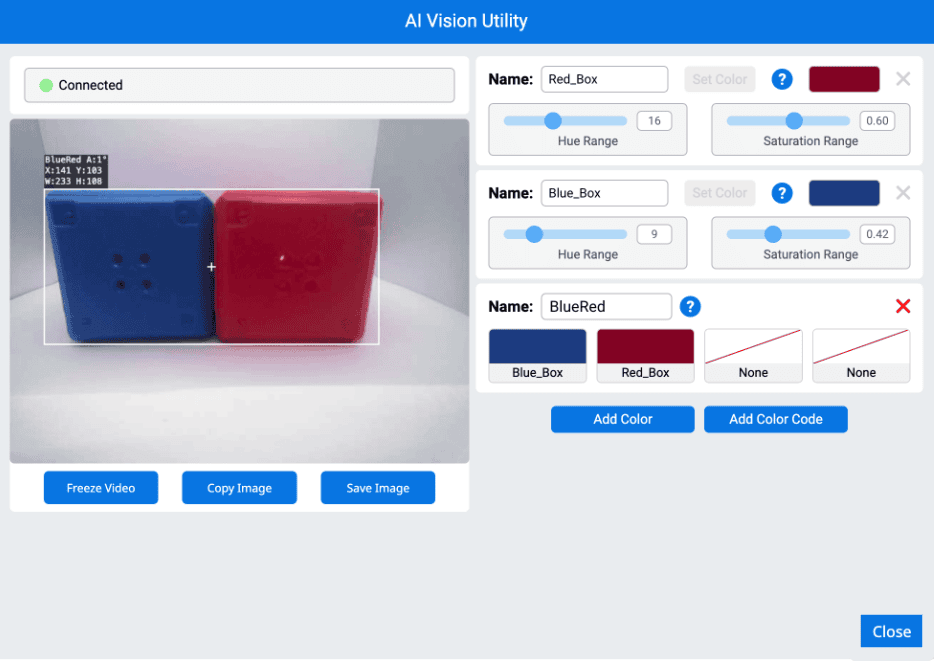
컬러 코드는 특정 순서로 배열된 2~4개의 색상 특징으로 구성된 구조화된 패턴입니다. 이러한 코드를 통해 AI 비전 센서는 미리 정의된 색상 패턴을 인식할 수 있습니다. 컬러 코드는 복잡한 물체를 식별하거나 자율 주행을 위한 고유한 마커를 생성하는 데 유용합니다.
# Display if any objects match the BlueRed code
while True:
    robot.screen.set_cursor(1, 1)
    robot.screen.clear_row(1)
    # Change to any configured Color Code
    ai_objects = robot.vision.get_data(BlueRed)
    if ai_objects[0].exists:
        robot.screen.print("Color code detected!")
has_sports_ball#
has_sports_ball 은 로봇이 현재 스포츠 공을 가지고 있는지 여부를 나타내는 부울 값을 반환합니다.
True— 로봇은 스포츠 공을 가지고 있습니다.False— 로봇은 스포츠 공을 가지고 있지 않습니다.
Usage:
robot.has_sports_ball()
매개변수 |
설명 |
|---|---|
이 메서드에는 매개변수가 없습니다. |
# Kick when the robot has a sports ball
while True:
    if robot.has_sports_ball():
        robot.kicker.kick(MEDIUM)

    wait(50, MSEC)
has_any_barrel#
has_any_barrel 로봇이 현재 어떤 종류의 배럴을 가지고 있는지 여부를 나타내는 부울 값을 반환합니다.
True— 로봇은 배럴을 가지고 있습니다.False— 로봇은 배럴을 가지고 있지 않습니다.
Usage:
robot.has_any_barrel()
매개변수 |
설명 |
|---|---|
이 메서드에는 매개변수가 없습니다. |
# Push a barrel away when detected
while True:
    if robot.has_any_barrel():
        robot.kicker.place()

    wait(50, MSEC)
has_blue_barrel#
has_blue_barrel 은 로봇이 현재 파란색 배럴을 가지고 있는지 여부를 나타내는 부울 값을 반환합니다.
True— 로봇은 파란색 통을 가지고 있습니다.False— 로봇은 파란색 배럴을 가지고 있지 않습니다.
Usage:
robot.has_blue_barrel()
매개변수 |
설명 |
|---|---|
이 메서드에는 매개변수가 없습니다. |
# Push a blue barrel away when detected
while True:
    if robot.has_blue_barrel():
        robot.kicker.place()

    wait(50, MSEC)
has_orange_barrel#
has_orange_barrel 은 로봇이 현재 주황색 배럴을 가지고 있는지 여부를 나타내는 부울 값을 반환합니다.
True— 로봇은 주황색 통을 가지고 있습니다.False— 로봇은 주황색 배럴을 가지고 있지 않습니다.
Usage:
robot.has_orange_barrel()
매개변수 |
설명 |
|---|---|
이 메서드에는 매개변수가 없습니다. |
# Push an orange barrel away when detected
while True:
    if robot.has_orange_barrel():
        robot.kicker.place()

    wait(50, MSEC)
속성#
robot.vision.get_data 메서드를 사용한 후 튜플에 저장된 각 객체에는 12개의 속성이 포함됩니다.
All property values except .id, .score, and .type describe the detected object’s position, size, orientation, or bearing at the moment robot.vision.get_data was used. These values are measured in pixels or degrees, based on the sensor’s 320 by 240 pixel resolution.
.exists#
.exists 튜플에 해당 인덱스가 존재하는지 여부를 나타내는 부울 값을 반환합니다.
True— 인덱스가 존재합니다.False— 인덱스가 존재하지 않습니다.
# Check if at least two objects are detected
while True:
    robot.screen.clear_screen()
    robot.screen.set_cursor(1, 1)
    ai_objects = robot.vision.get_data(ALL_CARGO)

    if ai_objects[0].exists:
        if ai_objects[1].exists:
            robot.screen.print("At least 2")
        else:
            robot.screen.print("Less than 2")
    wait(0.1, SECONDS)
.width#
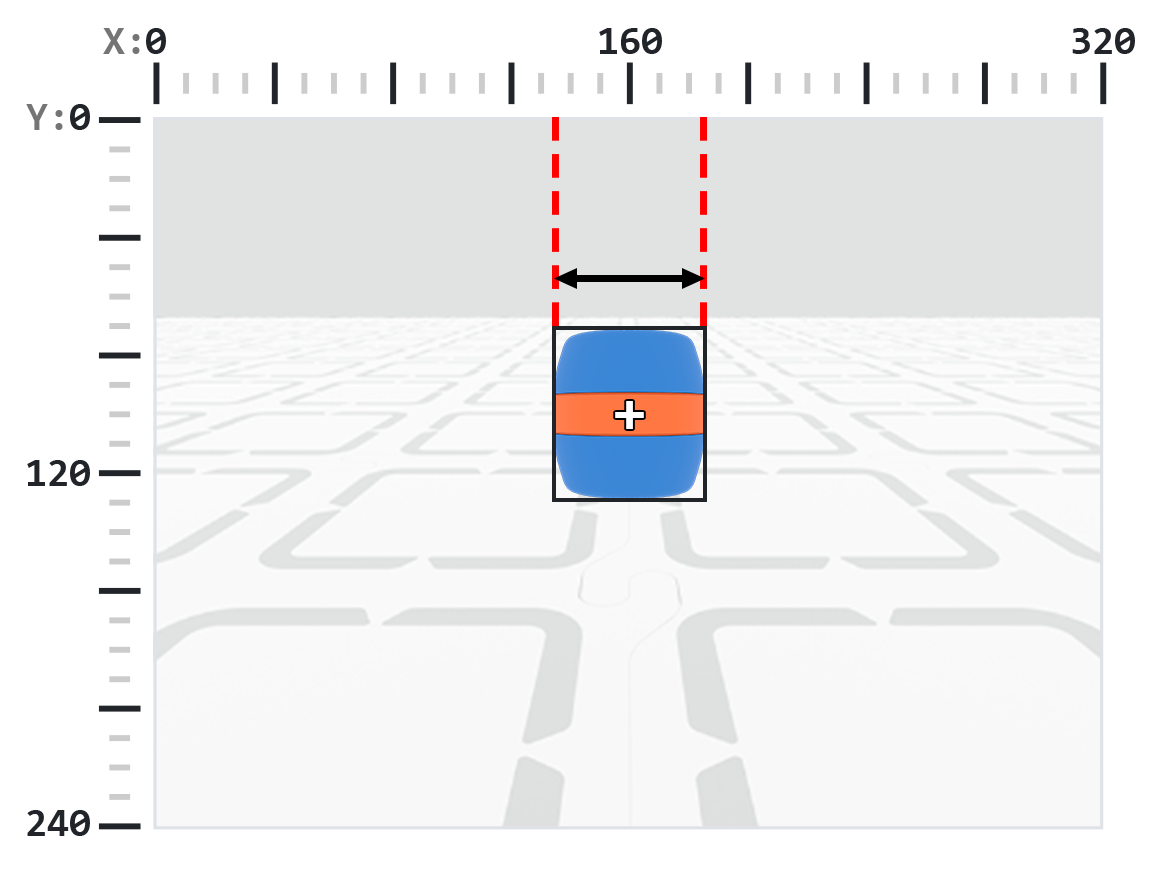
.width 감지된 객체의 너비를 픽셀 단위로 반환하며, 이는 1에서 320 사이의 정수입니다.
참고: 픽셀 값은 센서의 좌표계를 기준으로 합니다. 참조를 위해 소개의 다이어그램을 참조하세요.
# Move towards a Blue Barrel until its width is
# larger than 100 pixels
while True:
    barrel = robot.vision.get_data(BLUE_BARREL)

    if barrel[0].exists:
        if barrel[0].width < 100:
            robot.move_at(0)
    else:
        robot.stop_all_movement()

    wait(50, MSEC)
.height#
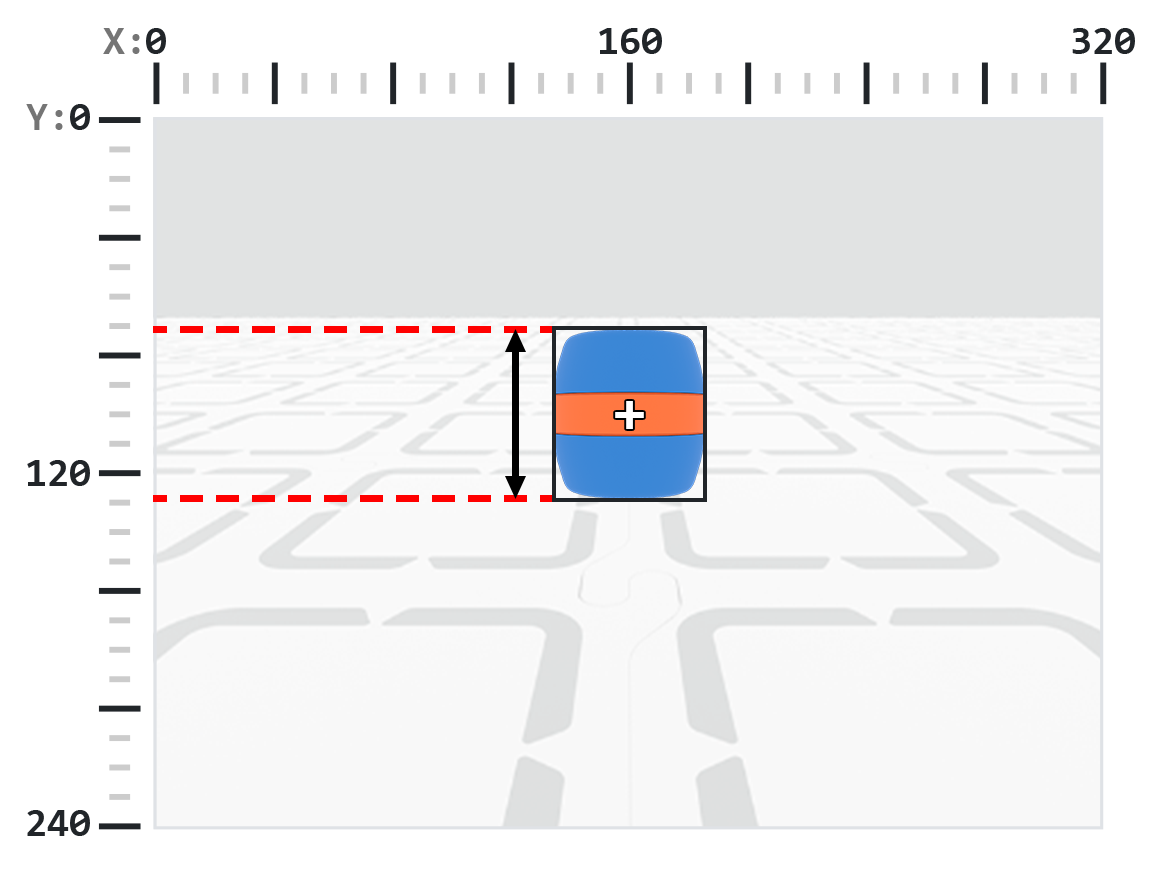
.height 감지된 객체의 높이를 픽셀 단위로 반환하며, 이는 1에서 240 사이의 정수입니다.
참고: 픽셀 값은 센서의 좌표계를 기준으로 합니다. 참조를 위해 소개의 다이어그램을 참조하세요.
# Move towards a Blue Barrel until its height is
# larger than 100 pixels
while True:
    barrel = robot.vision.get_data(BLUE_BARREL)

    if barrel[0].exists:
        if barrel[0].height < 100:
            robot.move_at(0)
    else:
        robot.stop_all_movement()

    wait(50, MSEC)
.centerX#
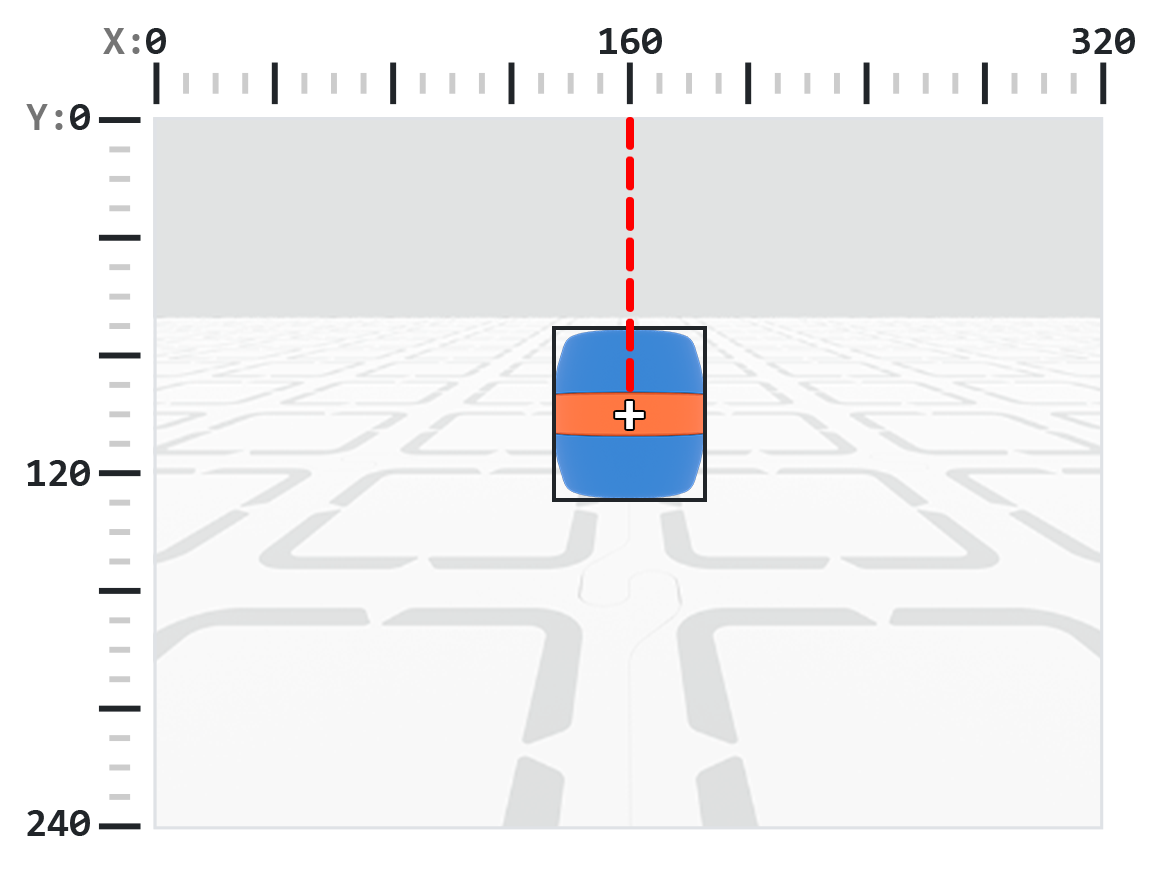
.centerX 감지된 객체 중심의 x 좌표를 픽셀 단위로 반환하며, 이 값은 0에서 320 사이의 정수입니다.
참고: 픽셀 값은 센서의 좌표계를 기준으로 합니다. 참조를 위해 소개의 다이어그램을 참조하세요.
# Turn slowly until a Blue Barrel is centered in
# front of the robot
robot.set_turn_velocity(30)
robot.turn(RIGHT)

while True:
    barrel = robot.vision.get_data(BLUE_BARREL)

    if barrel[0].exists:
        if 140 < barrel[0].centerX < 180:
            robot.stop_all_movement()

    wait(10,MSEC)
.centerY#
.centerY 감지된 객체 중심의 y 좌표를 픽셀 단위로 반환하며, 이 값은 0에서 240 사이의 정수입니다.
참고: 픽셀 값은 센서의 좌표계를 기준으로 합니다. 참조를 위해 소개의 다이어그램을 참조하세요.
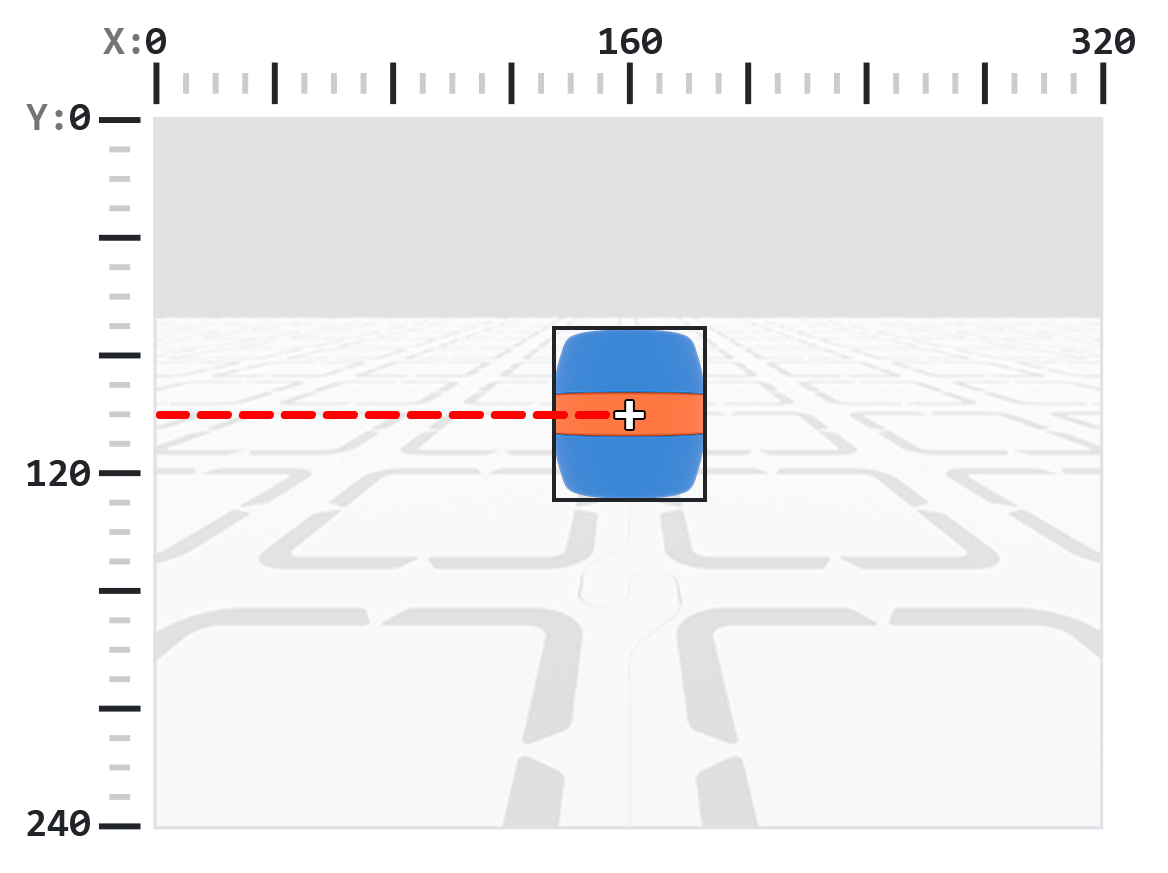
# Move towards a Blue Barrel until its
# center y-coordinate is more than 140 pixels
while True:
    barrel = robot.vision.get_data(BLUE_BARREL)

    if barrel[0].exists:
        if barrel[0].centerY < 140:
            robot.move_at(0)
    else:
        robot.stop_all_movement()

    wait(50, MSEC)
.bearing#
.bearing AI 비전 센서의 시야 중심에서 객체가 왼쪽 또는 오른쪽으로 얼마나 떨어져 있는지를 각도로 나타내는 십진수(float)를 반환합니다. 값이 0이면 객체가 중앙에 있고, 양수 값은 객체가 오른쪽에 있고, 음수 값은 객체가 왼쪽에 있음을 의미합니다.
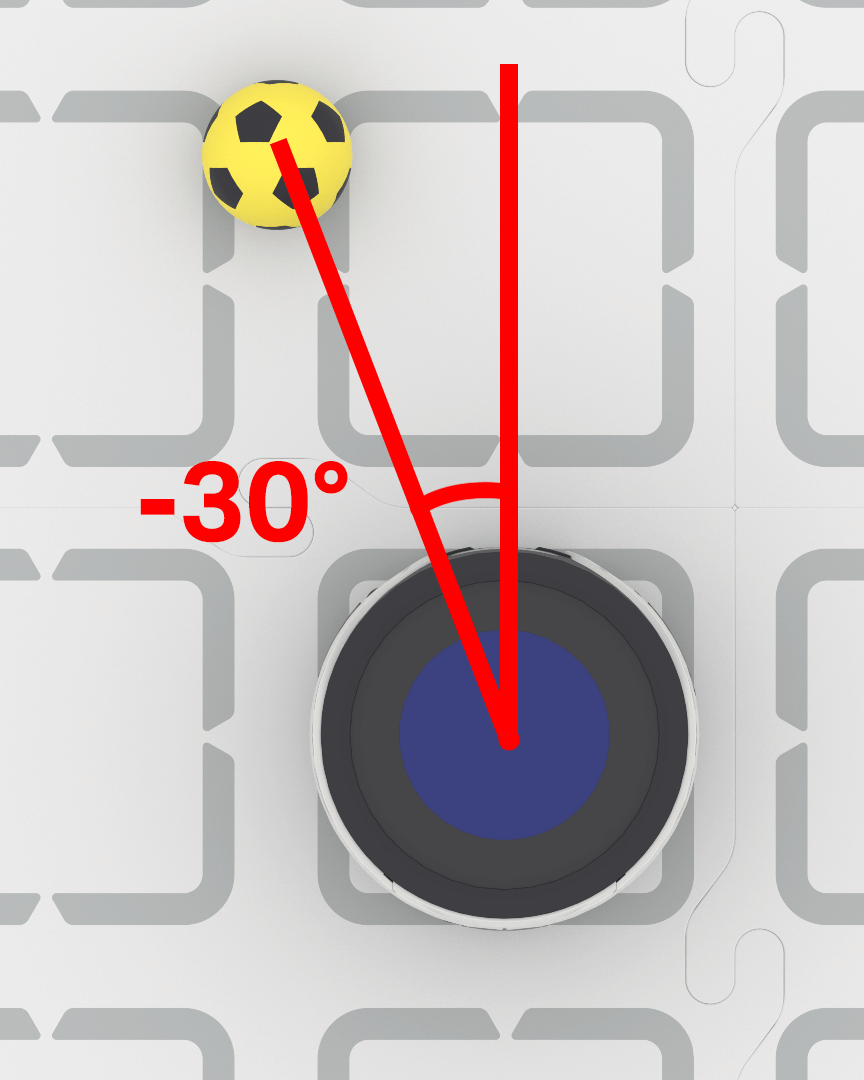
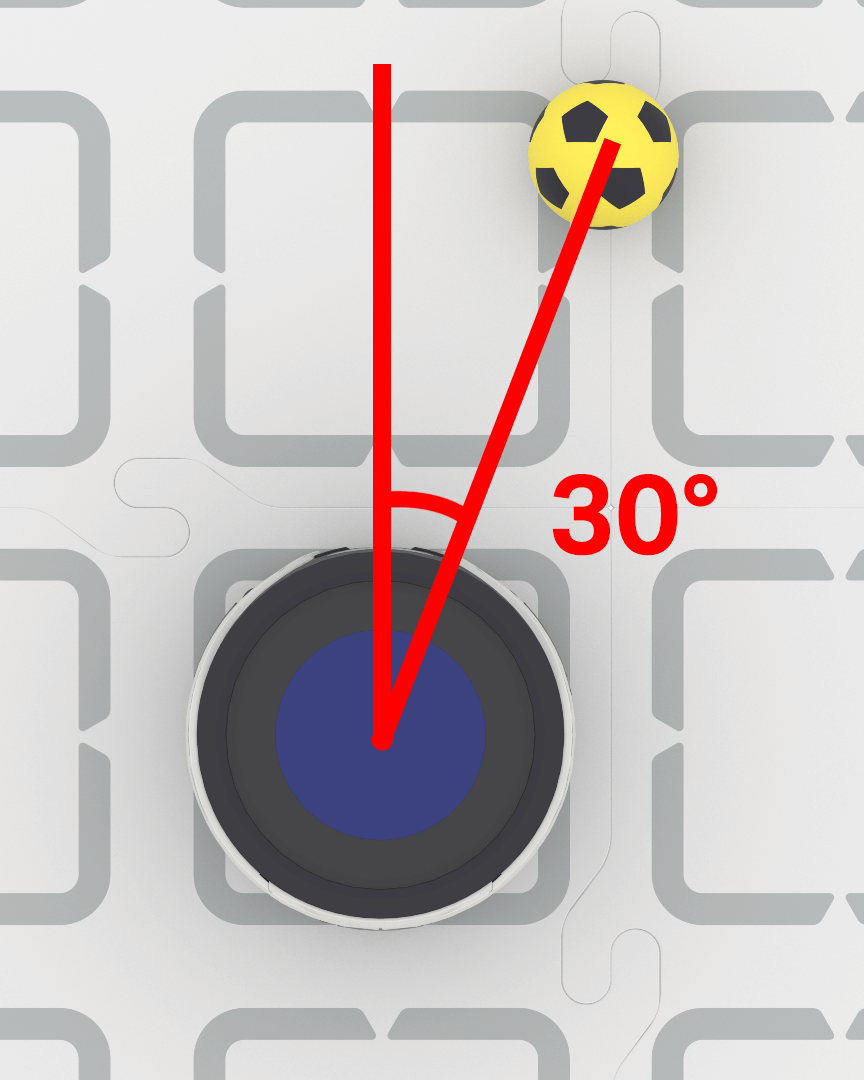
# Turn to keep the Blue Barrel directly in front
robot.set_turn_velocity(40)
while True:
    vision_data = robot.vision.get_data(BLUE_BARREL)

    if vision_data[0].exists:

        if vision_data[0].bearing > 5:
            robot.turn(RIGHT)
        elif vision_data[0].bearing < -5:
            robot.turn(LEFT)
        else:
            robot.stop_all_movement()

    else:
        robot.stop_all_movement()

    wait(0.1, SECONDS)
.rotation#
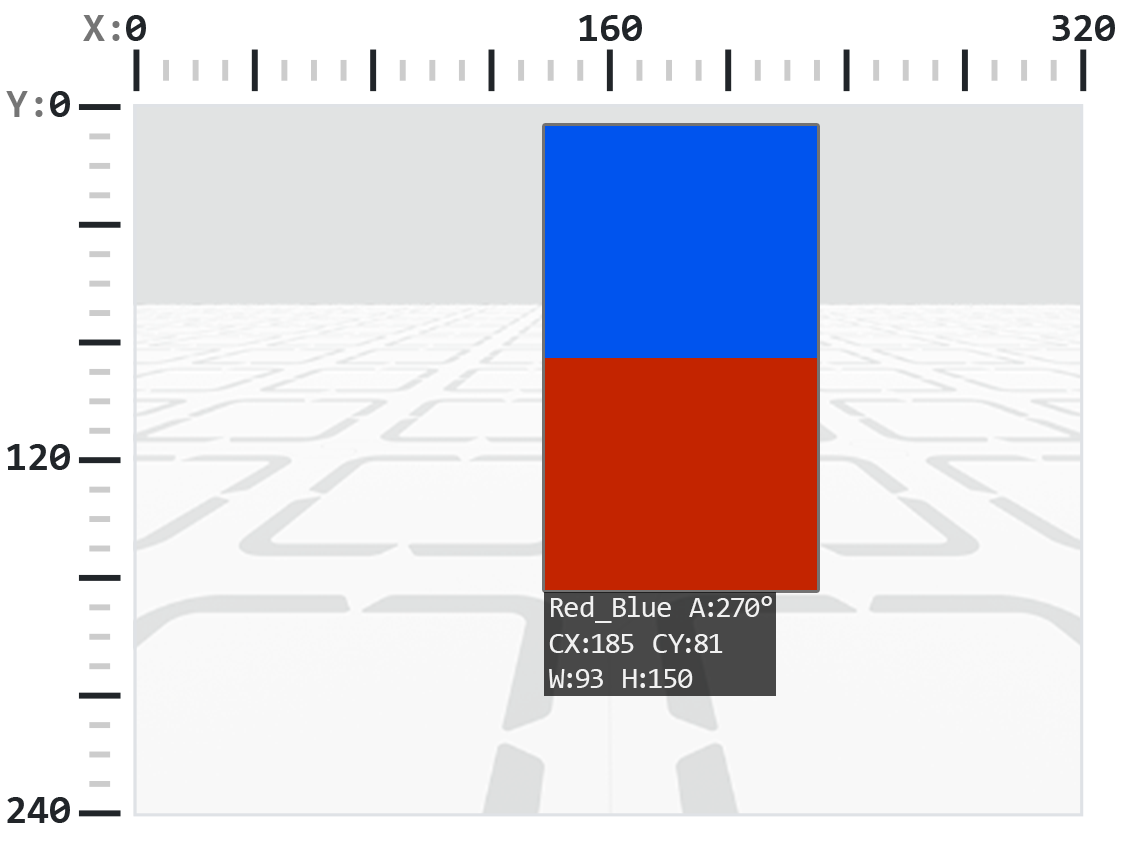
.rotation 은 AI 비전 센서의 시야면에서 객체의 방향을 0도에서 359도 사이의 각도로 반환합니다. 색상 코드는 색상이 수평선으로 배열될 때(예: 빨간색-파란색) 0°입니다. 색상이 회전되면 각도가 변경됩니다(예: 파란색-빨간색 배열은 180°).
아래 예시에서는 색상 코드가 왼쪽에 빨간색, 오른쪽에 파란색으로 설정되어 있습니다.
이 이미지에서 빨간색 위에 파란색을 얹는 것은 원래 색상 코드를 오른쪽으로 270도 회전하는 것과 같습니다.
# Slide left or right depending on how a Color Code (BlueRed)
# is rotated on the vertical plane
while True:
    # Original Color Code is Red to the left, Blue to the right
    code = robot.vision.get_data(BlueRed)

    if code[0].exists:
        # Check if Color Code is now Red on top of Blue
        if 50 < code[0].rotation < 100 :
            robot.move_at(90)

        # Check if Color Code is now Blue on top of Red
        elif 270 < code[0].rotation < 330 :
            robot.move_at(270)

        else:
            robot.stop_all_movement()
    else:
        robot.stop_all_movement()

    wait(50, MSEC)
.originX#
.originX 감지된 객체의 경계 상자의 왼쪽 상단 모서리의 x 좌표를 픽셀 단위로 반환하며, 이는 0에서 320 사이의 정수입니다.
참고: 픽셀 값은 센서의 좌표계를 기준으로 합니다. 참조를 위해 소개의 다이어그램을 참조하세요.
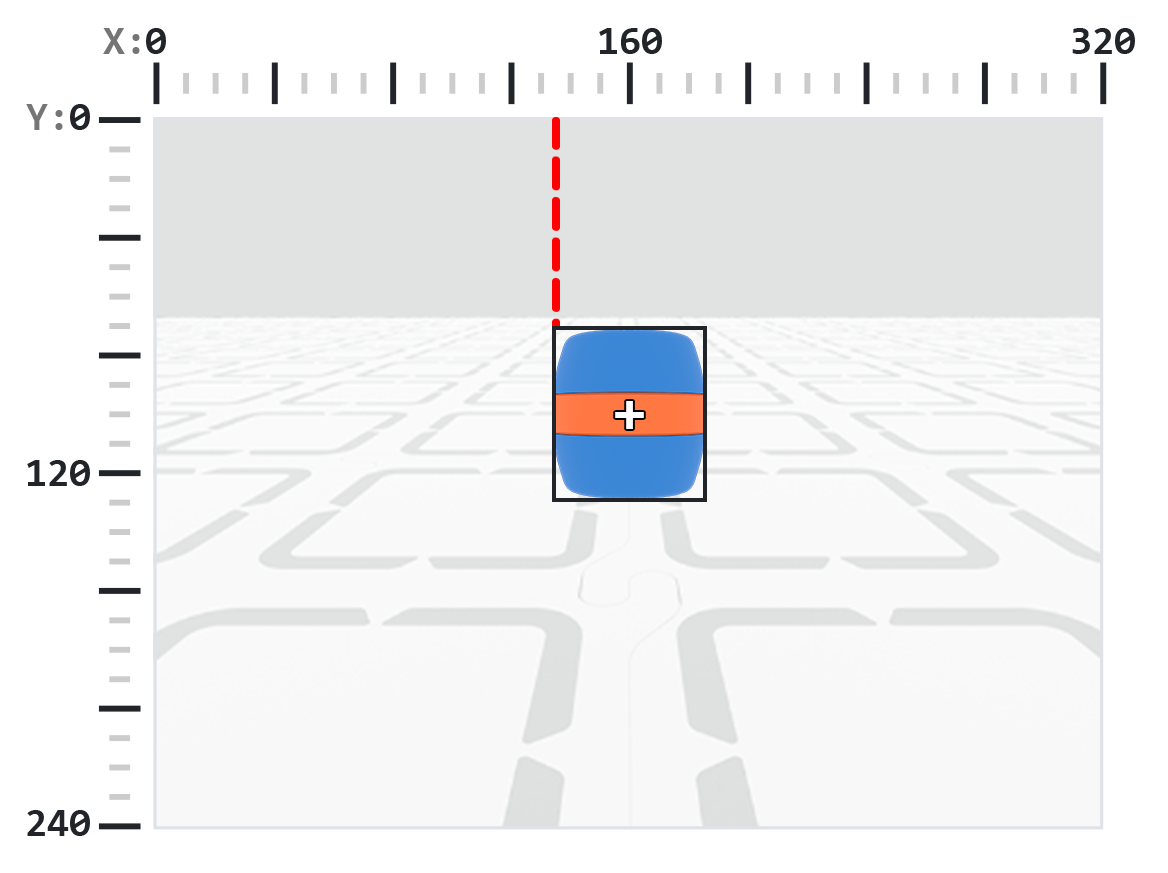
# Display if an Orange Barrel is to the
# left or the right
while True:
    robot.screen.clear_screen()
    robot.screen.set_cursor(1,1)

    orange_barrel = robot.vision.get_data(ORANGE_BARREL)

    if orange_barrel[0].exists:
        if orange_barrel[0].originX < 160:
            robot.screen.print("To the left!")
        else:
            robot.screen.print("To the right!")

    wait(50, MSEC)
.originY#
.originY 감지된 객체의 경계 상자의 왼쪽 상단 모서리의 y 좌표를 픽셀 단위로 반환하며, 이는 0에서 240 사이의 정수입니다.
참고: 픽셀 값은 센서의 좌표계를 기준으로 합니다. 참조를 위해 소개의 다이어그램을 참조하세요.
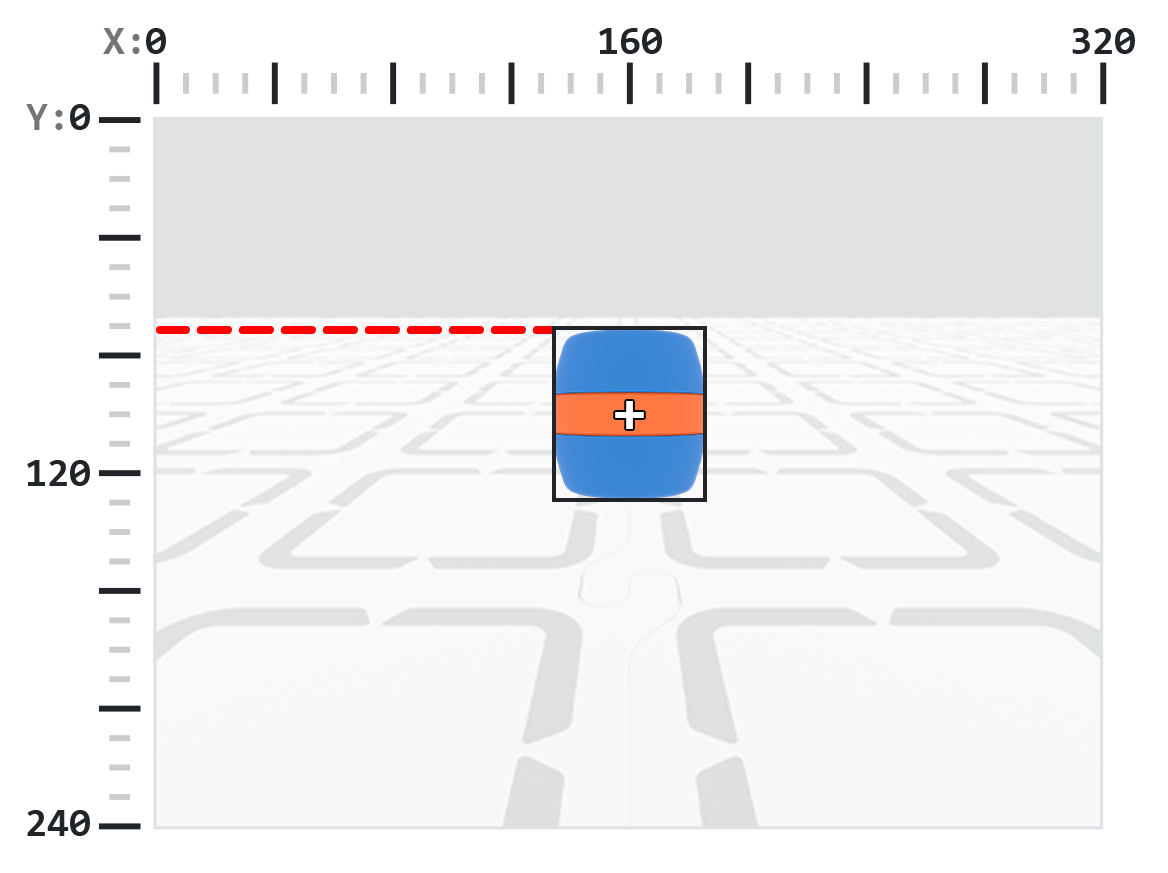
# Display if an Orange Barrel is close or far
# from the robot
while True:
    robot.screen.clear_screen()
    robot.screen.set_cursor(1, 1)

    orange_barrel = robot.vision.get_data(ORANGE_BARREL)

    if orange_barrel[0].exists:
        if orange_barrel[0].originY < 80:
            robot.screen.print("Far")
        else:
            robot.screen.print("Close")

    wait(50, MSEC)
.id#
.id 감지된 AI 분류 또는 AprilTag ID를 정수로 반환합니다.
AprilTag ID의 경우 .id 속성은 0~37 범위의 감지된 AprilTag ID 번호를 나타냅니다. AI 분류의 경우 .id 속성은 AI 분류 섹션에 있는 미리 정의된 ID에 해당합니다.
# Move forward when AprilTag ID 1 is detected
while True:
    apriltags = robot.vision.get_data(ALL_TAGS)

    if apriltags[0].exists:
        if apriltags[0].id == 1:
            robot.move_at(0)
    else:
        robot.stop_all_movement()

    wait(50, MSEC)
.score#
.score 감지된 AI 분류의 신뢰도 점수를 1에서 100 사이의 정수로 반환합니다.
점수가 낮을수록 센서가 감지한 물체에 대해 확신도가 낮다는 의미이고, 점수가 높을수록 센서가 더 확신한다는 의미입니다.
# Look confident if an Orange Barrel is detected
while True:
    barrel = robot.vision.get_data(ORANGE_BARREL)

    if barrel[0].exists:
        if barrel[0].score > 95:
            robot.screen.show_emoji(CONFIDENT)
        else:
            robot.screen.hide_emoji()

    wait(50, MSEC)
.type#
.type 감지된 객체의 유형을 나타내는 정수를 반환합니다. 이 값은 유형 번호 또는 해당 명명된 상수와 비교할 수 있습니다.
객체 유형 |
포함된 개체 |
|---|---|
|
— 스포츠 공 |
|
— AprilTag ID |
|
— 색상 특징 |
|
— 색상 코드 |
# Display if an AprilTag ID or AI Classification
# is detected
while True:
    robot.screen.clear_screen()
    robot.screen.set_cursor(1, 1)
    vision_data = robot.vision.get_data(ALL_VISION)
    if vision_data[0].exists:
        if vision_data[0].type == AiVision.AI_OBJECT:
            robot.screen.print("AI Object!")
        elif vision_data[0].type == AiVision.TAG_OBJECT:
            robot.screen.print("AprilTag ID!")
    wait(0.1, SECONDS)
# Display a list of all detected objects
while True:
    robot.screen.clear_screen()
    robot.screen.set_cursor(1, 1)
    vision_data = robot.vision.get_data(ALL_VISION)

    if vision_data[0].exists:
        for obj in vision_data:
            if obj.type == AiVision.AI_OBJECT:
                robot.screen.print("- AI Object")
            elif obj.type == AiVision.TAG_OBJECT:
                robot.screen.print("- AprilTag ID")
            robot.screen.next_row()

    wait(0.1, SECONDS)
건설업자#
Creating a Color Signature#
A new Color Signature is created using the Colordesc constructor and then registered with the AI Vision Sensor using the color_description method. A Colordesc object defines 1 of up to 7 detectable color signatures for the sensor, but it must be explicitly set using color_description to take effect.
Colordesc 사용법:
Colordesc(index, red, green, blue, hangle, hdsat)
매개변수 |
설명 |
|---|---|
|
색상 시그니처 인덱스를 나타내는 1부터 7까지의 정수입니다. 두 개의 색상 시그니처가 동일한 인덱스를 사용하는 경우 두 번째 시그니처가 첫 번째 시그니처를 덮어씁니다. |
|
색상의 빨간색 구성 요소에 대한 0에서 255 사이의 정수입니다. |
|
색상의 녹색 구성 요소에 대한 0에서 255 사이의 정수입니다. |
|
색상의 파란색 구성 요소에 대한 0에서 255 사이의 정수입니다. |
|
색조 범위를 도 단위로 나타내는 1부터 40까지의 부동 소수점 값입니다. |
|
포화도 범위를 나타내는 0.10에서 1.00 사이의 부동 소수점 값입니다. |
color_description 사용법:
robot.vision.color_description(object)
매개변수 |
설명 |
|---|---|
|
감지 가능한 색상 시그니처로 설정할 |
# Detect a red object
red_box = Colordesc(1, 207, 19, 25, 10.00, 0.20)
robot.vision.color_description(red_box)

while True:
    robot.screen.clear_screen()
    robot.screen.set_cursor(1, 1)

    red_boxes = robot.vision.get_data(red_box)

    if red_boxes[0].exists:
        robot.screen.print("Red detected!")
    else:
        robot.screen.print("No red detected.")

    wait(0.2, SECONDS)
Creating a Color Code#
새로운 색상 코드는 Codedesc 생성자를 사용하여 생성된 다음 code_description 메서드를 사용하여 활성화됩니다. 색상 코드는 2~4개의 기존 Colordesc 객체를 AI 비전 센서가 시퀀스로 감지할 수 있는 단일 식별자로 그룹화하지만, 적용하려면 code_description 사용하여 명시적으로 설정해야 합니다.
Codedesc 사용법:
Codedesc(index, c1, c2, c3, c4, c5)
매개변수 |
설명 |
|---|---|
|
색상 코드의 인덱스는 1부터 8까지입니다. 참고: 동일한 인덱스를 가진 |
|
코드의 첫 번째 |
|
코드의 두 번째 |
|
선택 사항입니다. 세 번째 |
|
선택 사항입니다. 네 번째 |
코드 설명 사용법:
robot.vision.code_description(object)
매개변수 |
설명 |
|---|---|
|
감지 가능한 색상 코드로 등록할 |
# Create Color Signatures
red_box = Colordesc(1, 207, 19, 25, 10.00, 0.20)
purple_box = Colordesc(2, 98, 18, 227, 10.00, 0.20)

robot.vision.color_description(red_box)
robot.vision.color_description(purple_box)

# Detect a red_purple Color Code
red_purple = Codedesc(1, red_box, purple_box)
robot.vision.code_description(red_purple)

while True:
    robot.screen.clear_screen()
    robot.screen.set_cursor(1, 1)

    code_objects = robot.vision.get_data(red_purple)

    if code_objects[0].exists:
        robot.screen.print("Code detected!")
    else:
        robot.screen.print("No code detected.")

    wait(0.2, SECONDS)