
Όραμα Τεχνητής Νοημοσύνης#
Εισαγωγή#
Ο αισθητήρας όρασης τεχνητής νοημοσύνης του ρομπότ κωδικοποίησης VEX AIM ανιχνεύει και παρακολουθεί αντικείμενα, χρώματα και αναγνωριστικά AprilTag. Αυτό επιτρέπει στο ρομπότ να αναλύει το περιβάλλον του, να ακολουθεί αντικείμενα και να αντιδρά με βάση τα ανιχνευμένα οπτικά δεδομένα.
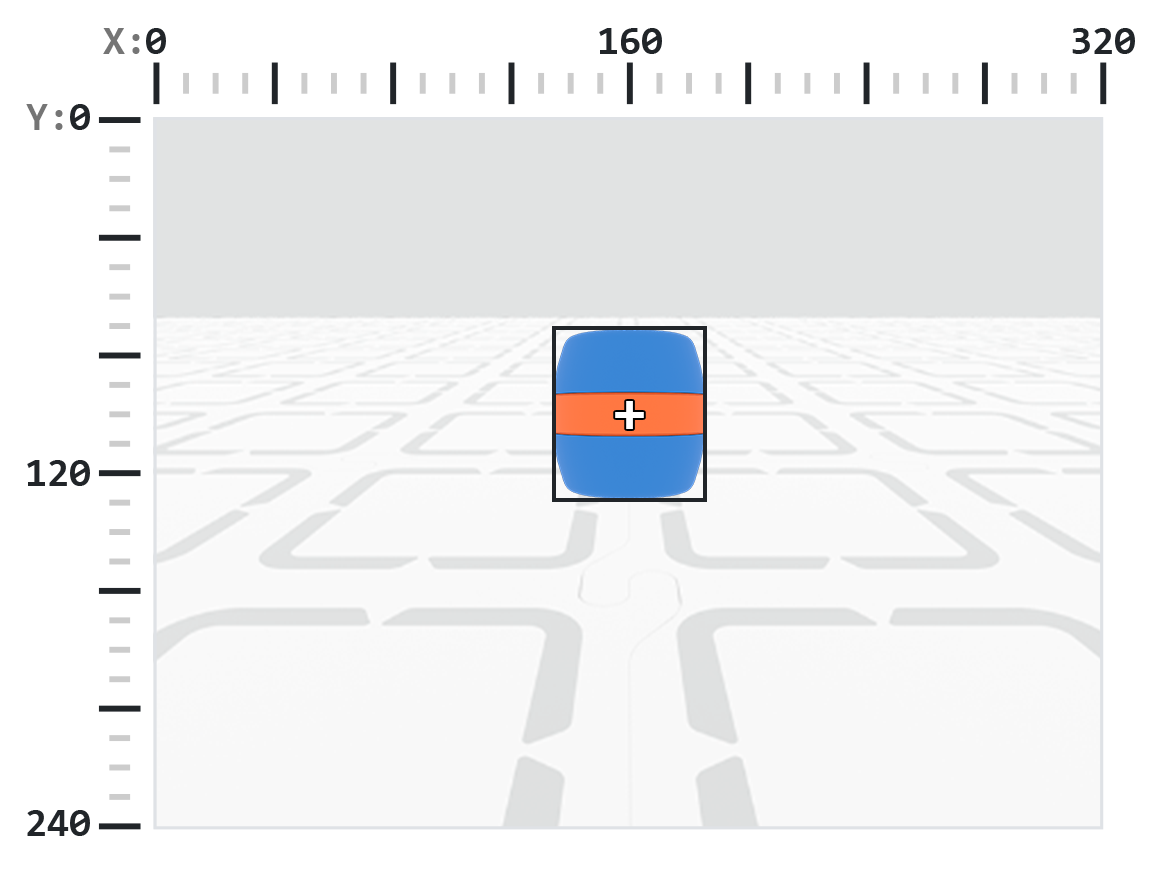
Ο αισθητήρας όρασης AI έχει ανάλυση 320×240 pixel. Η αρχή των αξόνων (0, 0) βρίσκεται στην επάνω αριστερή γωνία, τοποθετώντας το κέντρο του αισθητήρα στο (160, 120), όπως φαίνεται στο παρακάτω διάγραμμα:
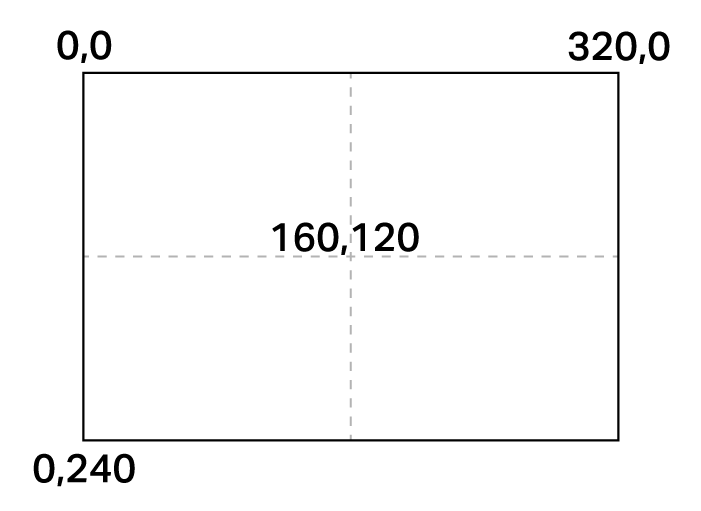
Παρακάτω είναι μια λίστα με όλες τις μεθόδους και τις ιδιότητες:
Ενέργειες — Εμφάνιση ή απόκρυψη της ροής κάμερας AI Vision.
show_aivision— Εμφανίζει την τροφοδοσία AI Vision στην οθόνη του ρομπότ.hide_aivision— Αποκρύπτει την τροφοδοσία AI Vision από την οθόνη.tag_detection— Ενεργοποιεί ή απενεργοποιεί την ανίχνευση AprilTag ID.
Λήψη αντικειμένου — Εντοπισμός αν το ρομπότ κρατάει κάποιο αντικείμενο.
get_data— Επιστρέφει μια πλειάδα ανιχνευμένων αντικειμένων για μια συγκεκριμένη υπογραφή.has_sports_ball— Επιστρέφει εάν το ρομπότ έχει αθλητική μπάλα.has_any_barrel— Επιστρέφει εάν το ρομπότ έχει οποιονδήποτε τύπο βαρελιού.has_blue_barrel— Επιστρέφει εάν το ρομπότ έχει μπλε βαρέλι.has_orange_barrel— Επιστρέφει εάν το ρομπότ έχει πορτοκαλί βαρέλι.
Ιδιότητες — Δεδομένα αντικειμένου που επιστρέφονται από get_data.
exists— Εάν το αντικείμενο υπάρχει στην τρέχουσα ανίχνευση ως Boolean τιμή.width— Πλάτος του ανιχνευμένου αντικειμένου.height— Ύψος του ανιχνευμένου αντικειμένου.centerX— X θέση του κέντρου του αντικειμένου.centerY— Θέση Y του κέντρου του αντικειμένου.bearing— Οριζόντια γωνία σε σχέση με το μπροστινό μέρος του ρομπότ.rotation— Προσανατολισμός του αντικειμένου.originX— Η θέση X της επάνω αριστερής γωνίας του αντικειμένου.originY— Θέση Y της επάνω αριστερής γωνίας του αντικειμένου.id— Ταξινόμηση ή αναγνωριστικό ετικέτας του αντικειμένου.score— Βαθμολογία εμπιστοσύνης για ταξινομήσεις τεχνητής νοημοσύνης.type— Επιστρέφει τον τύπο του αντικειμένου (AI, Ετικέτα, Χρώμα ή Κώδικας).
Κατασκευαστές — Ορίστε υπογραφές και κωδικούς χρωμάτων.
Δημιουργία Χρωματικής Υπογραφής — Δημιουργεί μια νέα Χρωματική Υπογραφή με βάση το RGB και τα εύρη απόχρωσης/κορεσμού.
Δημιουργία Κωδικού Χρώματος — Συνδυάζει πολλαπλές Υπογραφές Χρώματος σε έναν μόνο Κωδικό Χρώματος.
Ενέργειες#
show_aivision#
show_aivision εμφανίζει την ζωντανή ροή δεδομένων του αισθητήρα AI Vision Sensor στην οθόνη του ρομπότ. Η ζωντανή ροή δεδομένων θα καλύπτει οποιεσδήποτε άλλες εικόνες ή κείμενο στην οθόνη.
Σημείωση: Η οθόνη δεν θα εμφανίζει άλλες εικόνες ή κείμενο, εκτός εάν χρησιμοποιηθεί η εντολή hide_aivision για την απόκρυψη της ροής.
Usage:
robot.screen.show_aivision()
Παράμετροι |
Περιγραφή |
|---|---|
Αυτή η μέθοδος δεν έχει παραμέτρους. |
# Watch the AI Vision Sensor detect AI Classifications
# and AprilTag IDs as you move the robot
robot.screen.show_aivision()
hide_aivision#
hide_aivision αφαιρεί την ζωντανή ροή δεδομένων του αισθητήρα AI Vision Sensor από την οθόνη του ρομπότ.
Usage:
robot.screen.hide_aivision()
Παράμετροι |
Περιγραφή |
|---|---|
Αυτή η μέθοδος δεν έχει παραμέτρους. |
# View the AI Vision Sensor's feed for five seconds
robot.screen.show_aivision()
wait(5, SECONDS)
robot.screen.hide_aivision()
tag_detection#
tag_detection ενεργοποιεί ή απενεργοποιεί την ανίχνευση AprilTag ID, όπου η κατάσταση είναι μια λογική τιμή.
Ο αισθητήρας μπορεί να ανιχνεύσει τα AprilTag IDs από 0 έως 36 από την οικογένεια Circle21h7.
Usage:
robot.vision.tag_detection(state)
Παράμετροι |
Περιγραφή |
|---|---|
|
Οι τιμές είναι: |
robot.screen.set_font(PROP30)

# Cut off AprilTag ID detection after 5 seconds
while True:
    if timer.time(SECONDS) > 5:
        robot.vision.tag_detection(False)

    robot.screen.clear_screen()
    robot.screen.set_cursor(3, 1)
    apriltags = robot.vision.get_data(ALL_TAGS)

    if apriltags[0].exists:
        robot.screen.print("AprilTag ID detected!")
    else:
        robot.screen.print("Nothing detected!")

    wait(0.1, SECONDS)
Αποκτητές#
get_data#
get_data φιλτράρει δεδομένα από το πλαίσιο του αισθητήρα AI Vision Sensor σε μια μοναδική υπογραφή — μια αποθηκευμένη περιγραφή κάποιου πράγματος που μπορεί να αναγνωρίσει ο αισθητήρας, όπως ένα προ-εκπαιδευμένο αντικείμενο, ένα AprilTag ID ή μια διαμορφωμένη Χρωματική Υπογραφή ή Κωδικό Χρώματος — και επιστρέφει ένα tuple.
Οι Υπογραφές Χρώματος και Κωδικοί Χρώματος πρέπει πρώτα να διαμορφωθούν στο AI Vision Utility προτού μπορέσουν να χρησιμοποιηθούν με αυτήν τη μέθοδο.
Η πλειάδα αποθηκεύει αντικείμενα ταξινομημένα από το μεγαλύτερο στο μικρότερο κατά πλάτος, ξεκινώντας από τον δείκτη 0. Η πρόσβαση στις ιδιότητες κάθε αντικειμένου είναι δυνατή χρησιμοποιώντας τον δείκτη του. Επιστρέφεται μια κενή πλειάδα εάν δεν εντοπιστούν αντικείμενα που να ταιριάζουν.
Usage:
robot.vision.get_data(signature, count)
Παράμετροι |
Περιγραφή |
|---|---|
|
Φιλτράρει το σύνολο δεδομένων ώστε να περιλαμβάνει μόνο δεδομένα της δεδομένης υπογραφής. Οι διαθέσιμες υπογραφές είναι:
|
|
Προαιρετικό. Ορίζει τον μέγιστο αριθμό αντικειμένων που μπορούν να επιστραφούν από 1 έως 24 (προεπιλογή: 8). |
Σημείωση: Τα AprilTag IDs 5 έως 37 μπορούν να ληφθούν χρησιμοποιώντας τα εκτυπωμένα AprilTag IDs από το AIM Printables.
# Move forward if a sports ball is detected
while True:
    ball = robot.vision.get_data(SPORTS_BALL)
    if ball[0].exists:
        robot.move_for(10, 0)
    wait(50, MSEC)
Σημείωση: Η επιστρεφόμενη πλειάδα μπορεί να ταξινομηθεί με βάση οποιαδήποτε ιδιότητα, όχι μόνο με βάση το πλάτος, χρησιμοποιώντας τη συνάρτηση sorted της Python. Για παράδειγμα, ταξινόμηση με βάση το AprilTag ID:
# Print each detected AprilTag ID in ascending order by ID
while True:
    apriltags = sorted(robot.vision.get_data(ALL_TAGS), key=id)
    for tag in apriltags:
        print(tag.id)
    wait(1, SECONDS)
Ή ταξινόμηση κατά ύψος:
# Print each detected AprilTag ID in ascending order by height
while True:
    apriltags_by_height = sorted(robot.vision.get_data(ALL_TAGS), key=lambda tag: tag.height)
    for tag in apriltags_by_height:
        print(tag.height)
    wait(1, SECONDS)
Προβολή δεδομένων#
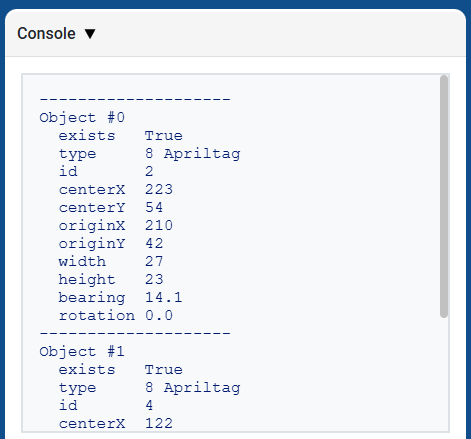
Η εκτύπωση της πλειάδας που επιστρέφεται από την εντολή get_data εμφανίζει μια λίστα με όλες τις ιδιότητες όλων των ανιχνευμένων αντικειμένων:
# Display properties of all detected AprilTag IDs
while True:
    vision_data = robot.vision.get_data(ALL_TAGS)

    if vision_data[0].exists:
        break

    wait(0.25, SECONDS)

print(vision_data)
Ταξινομήσεις Τεχνητής Νοημοσύνης#
Ο αισθητήρας όρασης AIM AI μπορεί να ανιχνεύσει αυτές τις ταξινομήσεις AI:
Αριθμός Ταυτότητας |
Ταξινόμηση Τεχνητής Νοημοσύνης |
Υπογραφή |
|---|---|---|
0 |
Μπάλα |
|
1 |
Μπλε βαρέλι |
|
2 |
Πορτοκαλί βαρέλι |
|
3 |
Ρομπότ AIM |
|
Χρωματικές υπογραφές#
Μια χρωματική υπογραφή είναι ένα μοναδικό χρώμα που μπορεί να αναγνωρίσει ο αισθητήρας όρασης AI. Αυτές οι υπογραφές επιτρέπουν στον αισθητήρα να ανιχνεύει και να παρακολουθεί αντικείμενα με βάση το χρώμα τους. Μόλις διαμορφωθεί μια χρωματική υπογραφή, ο αισθητήρας μπορεί να αναγνωρίσει αντικείμενα με αυτό το συγκεκριμένο χρώμα στο οπτικό του πεδίο. Οι χρωματικές υπογραφές χρησιμοποιούνται με get_data για την επεξεργασία και την ανίχνευση χρωματιστών αντικειμένων σε πραγματικό χρόνο.
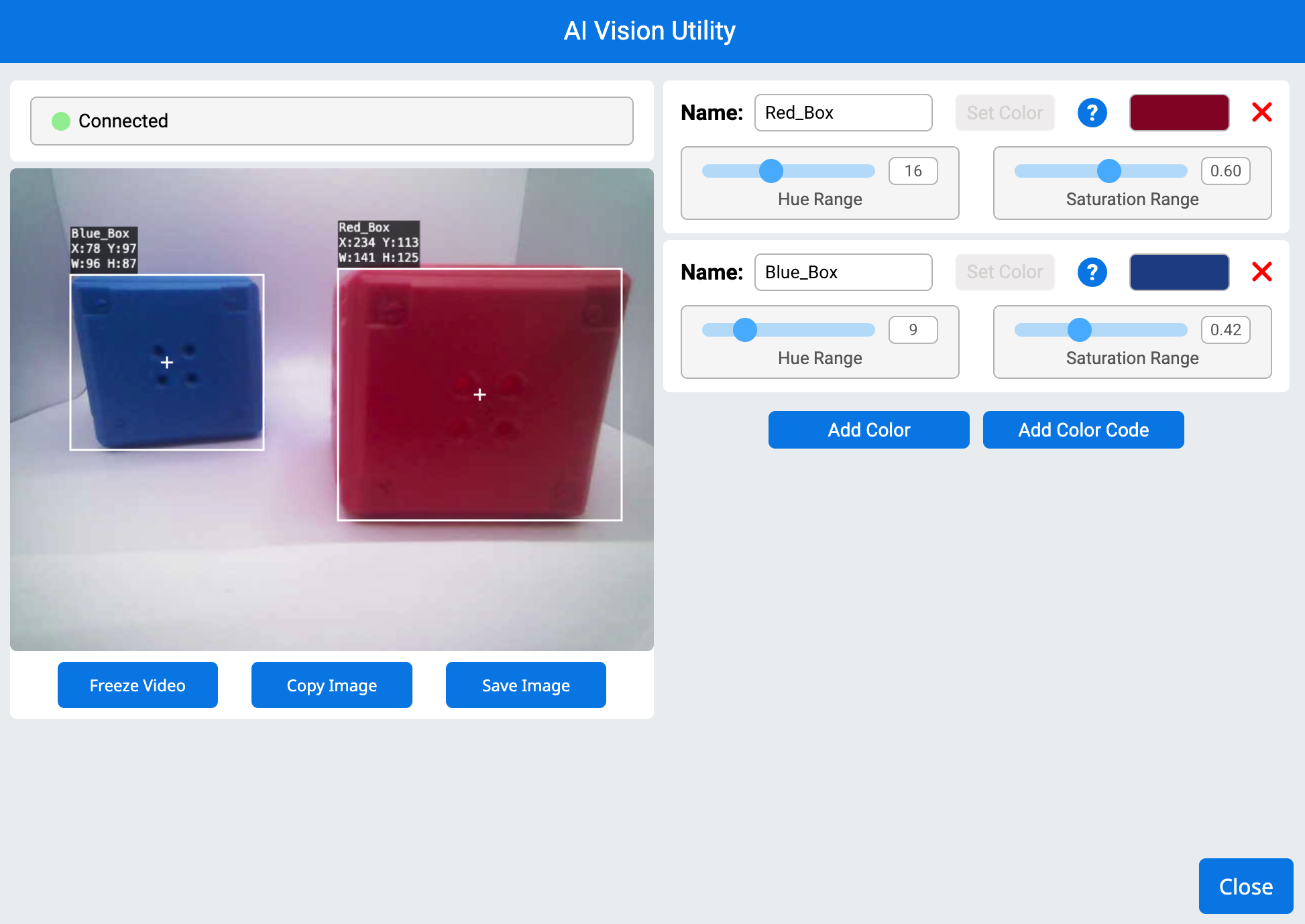
# Display if any objects match the Red_Box signature
while True:
    robot.screen.set_cursor(1, 1)
    robot.screen.clear_row(1)
    # Change to any configured Color Signature
    ai_objects = robot.vision.get_data(Red_Box)
    if ai_objects[0].exists:
        robot.screen.print("Color signature detected!")
Κωδικοί Χρώματος#
Ένας χρωματικός κώδικας είναι ένα δομημένο μοτίβο που αποτελείται από 2 έως 4 χρωματικές υπογραφές διατεταγμένες σε μια συγκεκριμένη σειρά. Αυτοί οι κωδικοί επιτρέπουν στον αισθητήρα AI Vision Sensor να αναγνωρίζει προκαθορισμένα μοτίβα χρωμάτων. Οι χρωματικοί κωδικοί είναι χρήσιμοι για την αναγνώριση σύνθετων αντικειμένων ή τη δημιουργία μοναδικών δεικτών για αυτόνομη πλοήγηση.
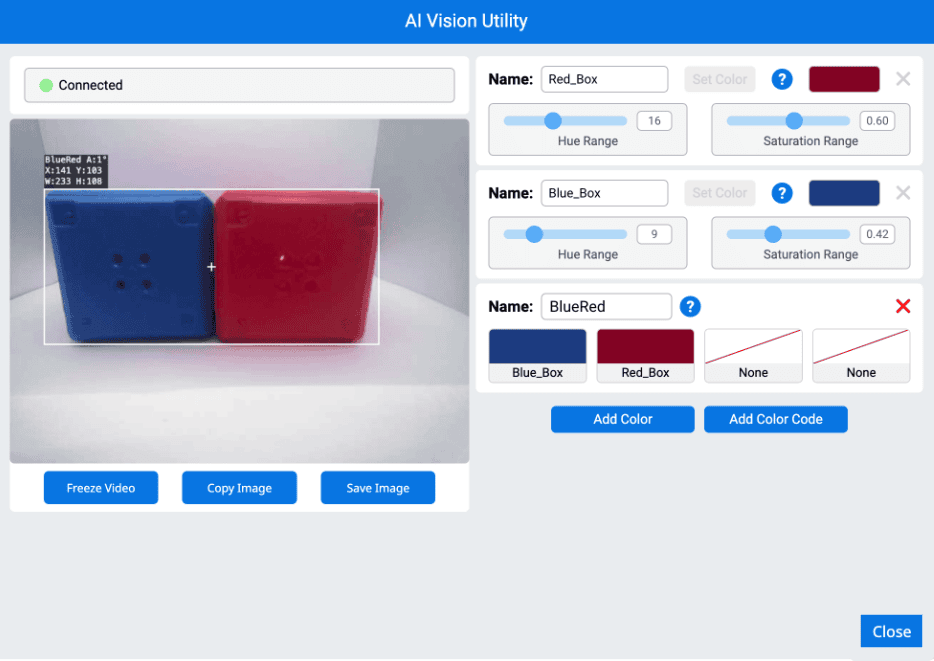
# Display if any objects match the BlueRed code
while True:
    robot.screen.set_cursor(1, 1)
    robot.screen.clear_row(1)
    # Change to any configured Color Code
    ai_objects = robot.vision.get_data(BlueRed)
    if ai_objects[0].exists:
        robot.screen.print("Color code detected!")
has_sports_ball#
has_sports_ball επιστρέφει μια Boolean τιμή που υποδεικνύει εάν το ρομπότ έχει αυτήν τη στιγμή μια αθλητική μπάλα.
True— Το ρομπότ έχει μια αθλητική μπάλα.False— Το ρομπότ δεν έχει αθλητική μπάλα.
Usage:
robot.has_sports_ball()
Παράμετροι |
Περιγραφή |
|---|---|
Αυτή η μέθοδος δεν έχει παραμέτρους. |
# Kick when the robot has a sports ball
while True:
    if robot.has_sports_ball():
        robot.kicker.kick(MEDIUM)

    wait(50, MSEC)
has_any_barrel#
has_any_barrel επιστρέφει μια λογική τιμή που υποδεικνύει εάν το ρομπότ διαθέτει αυτήν τη στιγμή οποιονδήποτε τύπο βαρελιού.
True— Το ρομπότ έχει ένα βαρέλι.False— Το ρομπότ δεν έχει βαρέλι.
Usage:
robot.has_any_barrel()
Παράμετροι |
Περιγραφή |
|---|---|
Αυτή η μέθοδος δεν έχει παραμέτρους. |
# Push a barrel away when detected
while True:
    if robot.has_any_barrel():
        robot.kicker.place()

    wait(50, MSEC)
has_blue_barrel#
has_blue_barrel επιστρέφει μια Boolean τιμή που υποδεικνύει εάν το ρομπότ έχει αυτήν τη στιγμή ένα μπλε βαρέλι.
True— Το ρομπότ έχει ένα μπλε βαρέλι.False— Το ρομπότ δεν έχει μπλε βαρέλι.
Usage:
robot.has_blue_barrel()
Παράμετροι |
Περιγραφή |
|---|---|
Αυτή η μέθοδος δεν έχει παραμέτρους. |
# Push a blue barrel away when detected
while True:
    if robot.has_blue_barrel():
        robot.kicker.place()

    wait(50, MSEC)
has_orange_barrel#
has_orange_barrel επιστρέφει μια Boolean τιμή που υποδεικνύει εάν το ρομπότ έχει αυτήν τη στιγμή ένα πορτοκαλί βαρέλι.
True— Το ρομπότ έχει ένα πορτοκαλί βαρέλι.False— Το ρομπότ δεν έχει πορτοκαλί βαρέλι.
Usage:
robot.has_orange_barrel()
Παράμετροι |
Περιγραφή |
|---|---|
Αυτή η μέθοδος δεν έχει παραμέτρους. |
# Push an orange barrel away when detected
while True:
    if robot.has_orange_barrel():
        robot.kicker.place()

    wait(50, MSEC)
Σκηνικά θέατρου#
Υπάρχουν δώδεκα ιδιότητες που περιλαμβάνονται σε κάθε αντικείμενο που αποθηκεύεται σε μια πλειάδα μετά τη χρήση της μεθόδου robot.vision.get_data.
Όλες οι τιμές ιδιοτήτων εκτός από .id, .score, και .type περιγράφουν τη θέση, το μέγεθος, τον προσανατολισμό ή την κατεύθυνση του ανιχνευμένου αντικειμένου τη στιγμή που χρησιμοποιήθηκε robot.vision.get_data . Αυτές οι τιμές μετριούνται σε pixel ή μοίρες, με βάση την ανάλυση 320 επί 240 pixel του αισθητήρα.
.exists#
.exists επιστρέφει μια Boolean τιμή που υποδεικνύει εάν ο δείκτης υπάρχει στην πλειάδα ή όχι.
True— Ο δείκτης υπάρχει.False— Ο δείκτης δεν υπάρχει.
# Check if at least two objects are detected
while True:
    robot.screen.clear_screen()
    robot.screen.set_cursor(1, 1)
    ai_objects = robot.vision.get_data(ALL_CARGO)

    if ai_objects[0].exists:
        if ai_objects[1].exists:
            robot.screen.print("At least 2")
        else:
            robot.screen.print("Less than 2")
    wait(0.1, SECONDS)
.width#
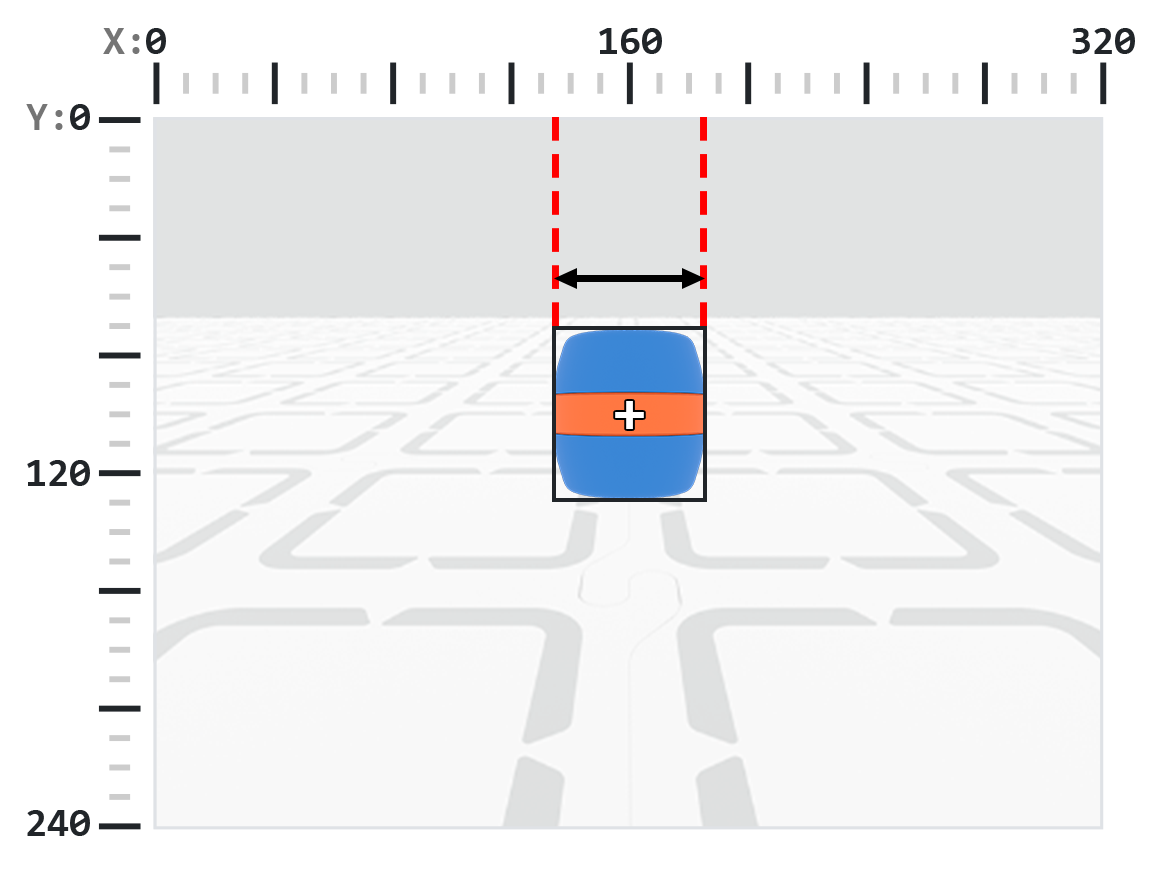
Η συνάρτηση .width επιστρέφει το πλάτος του ανιχνευμένου αντικειμένου σε pixel, το οποίο είναι ένας ακέραιος αριθμός μεταξύ 1 και 320.
Σημείωση: Οι τιμές των pixel είναι σχετικές με το σύστημα συντεταγμένων του αισθητήρα. Δείτε το διάγραμμα στην Εισαγωγή για αναφορά.
# Move towards a Blue Barrel until its width is
# larger than 100 pixels
while True:
    barrel = robot.vision.get_data(BLUE_BARREL)

    if barrel[0].exists:
        if barrel[0].width < 100:
            robot.move_at(0)
    else:
        robot.stop_all_movement()

    wait(50, MSEC)
.height#
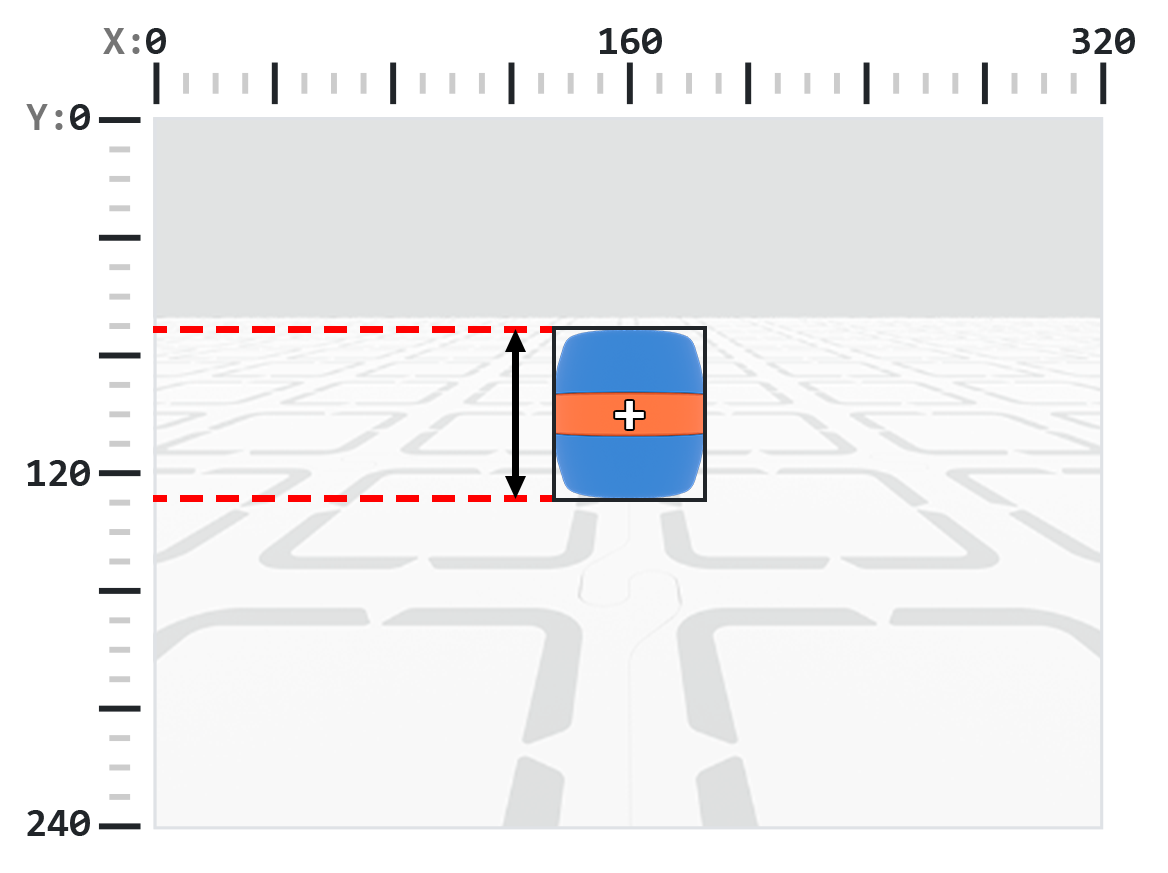
Η συνάρτηση .height επιστρέφει το ύψος του ανιχνευμένου αντικειμένου σε pixel, το οποίο είναι ένας ακέραιος αριθμός μεταξύ 1 και 240.
Σημείωση: Οι τιμές των pixel είναι σχετικές με το σύστημα συντεταγμένων του αισθητήρα. Δείτε το διάγραμμα στην Εισαγωγή για αναφορά.
# Move towards a Blue Barrel until its height is
# larger than 100 pixels
while True:
    barrel = robot.vision.get_data(BLUE_BARREL)

    if barrel[0].exists:
        if barrel[0].height < 100:
            robot.move_at(0)
    else:
        robot.stop_all_movement()

    wait(50, MSEC)
.centerX#
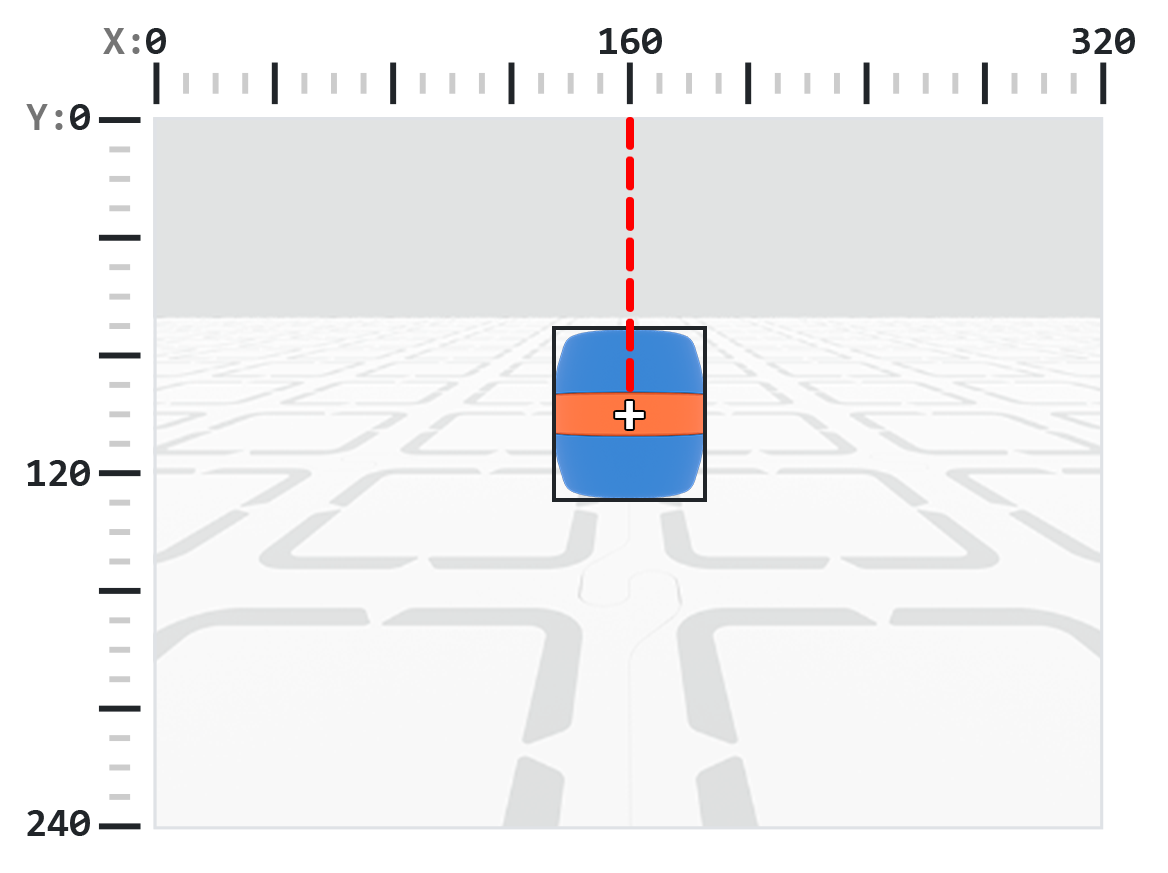
.centerX επιστρέφει τη συντεταγμένη x του κέντρου του ανιχνευμένου αντικειμένου σε pixel, η οποία είναι ένας ακέραιος αριθμός μεταξύ 0 και 320.
Σημείωση: Οι τιμές των pixel είναι σχετικές με το σύστημα συντεταγμένων του αισθητήρα. Δείτε το διάγραμμα στην Εισαγωγή για αναφορά.
# Turn slowly until a Blue Barrel is centered in
# front of the robot
robot.set_turn_velocity(30)
robot.turn(RIGHT)

while True:
    barrel = robot.vision.get_data(BLUE_BARREL)

    if barrel[0].exists:
        if 140 < barrel[0].centerX < 180:
            robot.stop_all_movement()

    wait(10,MSEC)
.centerY#
.centerY επιστρέφει τη συντεταγμένη y του κέντρου του ανιχνευμένου αντικειμένου σε pixel, η οποία είναι ένας ακέραιος αριθμός μεταξύ 0 και 240.
Σημείωση: Οι τιμές των pixel είναι σχετικές με το σύστημα συντεταγμένων του αισθητήρα. Δείτε το διάγραμμα στην Εισαγωγή για αναφορά.
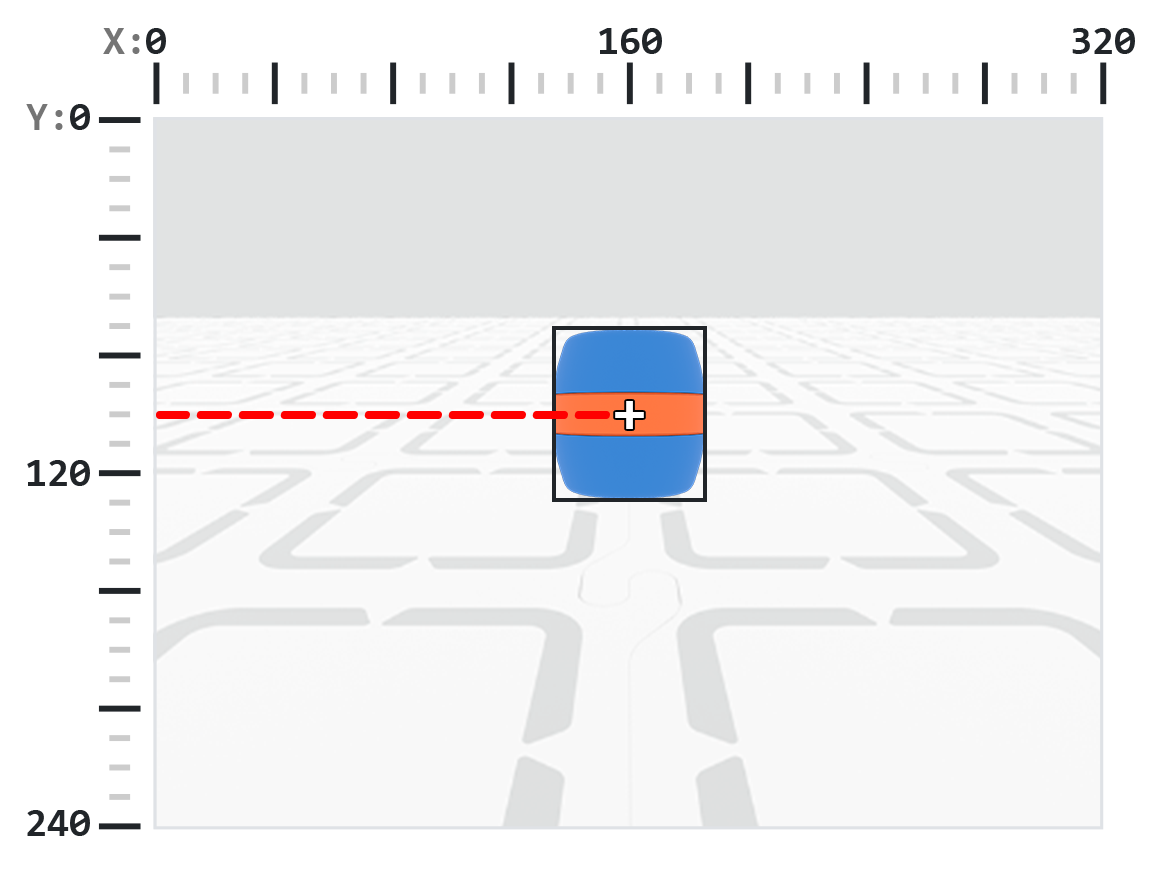
# Move towards a Blue Barrel until its
# center y-coordinate is more than 140 pixels
while True:
    barrel = robot.vision.get_data(BLUE_BARREL)

    if barrel[0].exists:
        if barrel[0].centerY < 140:
            robot.move_at(0)
    else:
        robot.stop_all_movement()

    wait(50, MSEC)
.bearing#
Η συνάρτηση .bearing επιστρέφει ένα δεκαδικό (float) που αντιπροσωπεύει την απόσταση ενός αντικειμένου αριστερά ή δεξιά από το κέντρο της προβολής του αισθητήρα AI Vision Sensor σε μοίρες. Η τιμή 0 σημαίνει ότι είναι στο κέντρο, οι θετικές τιμές σημαίνουν ότι το αντικείμενο είναι δεξιά και οι αρνητικές τιμές σημαίνουν ότι το αντικείμενο είναι αριστερά.
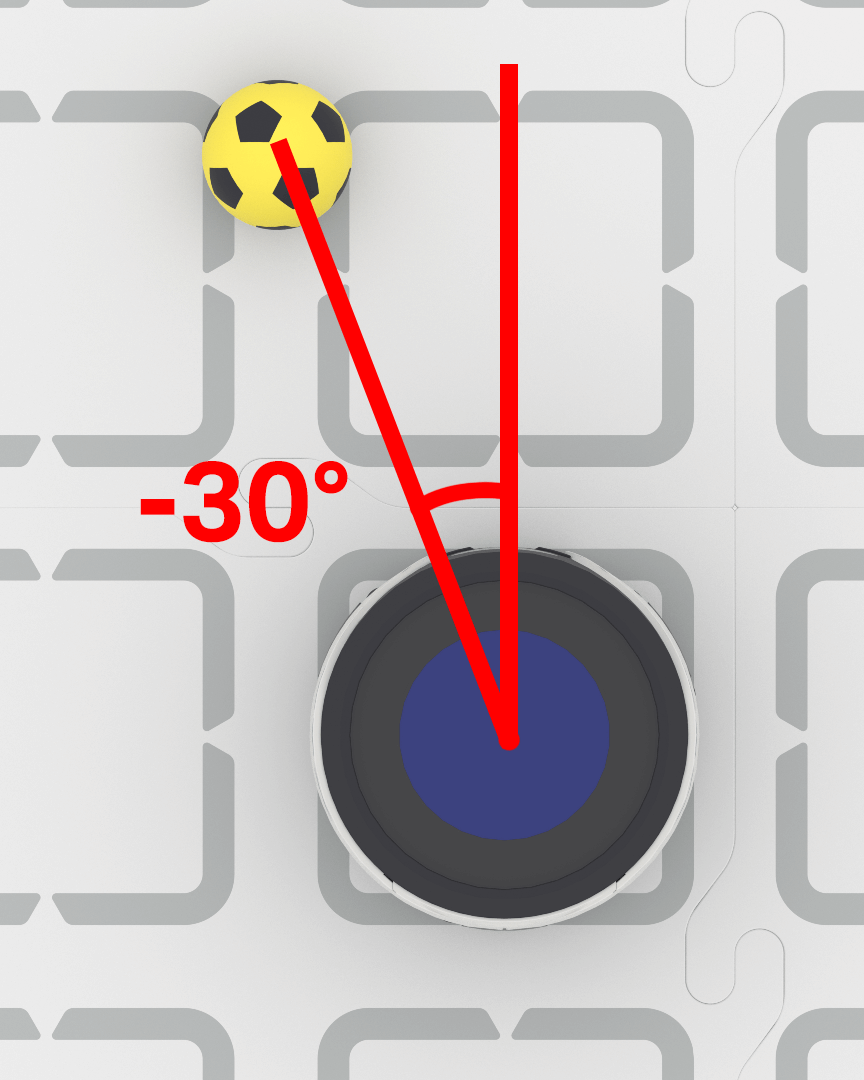
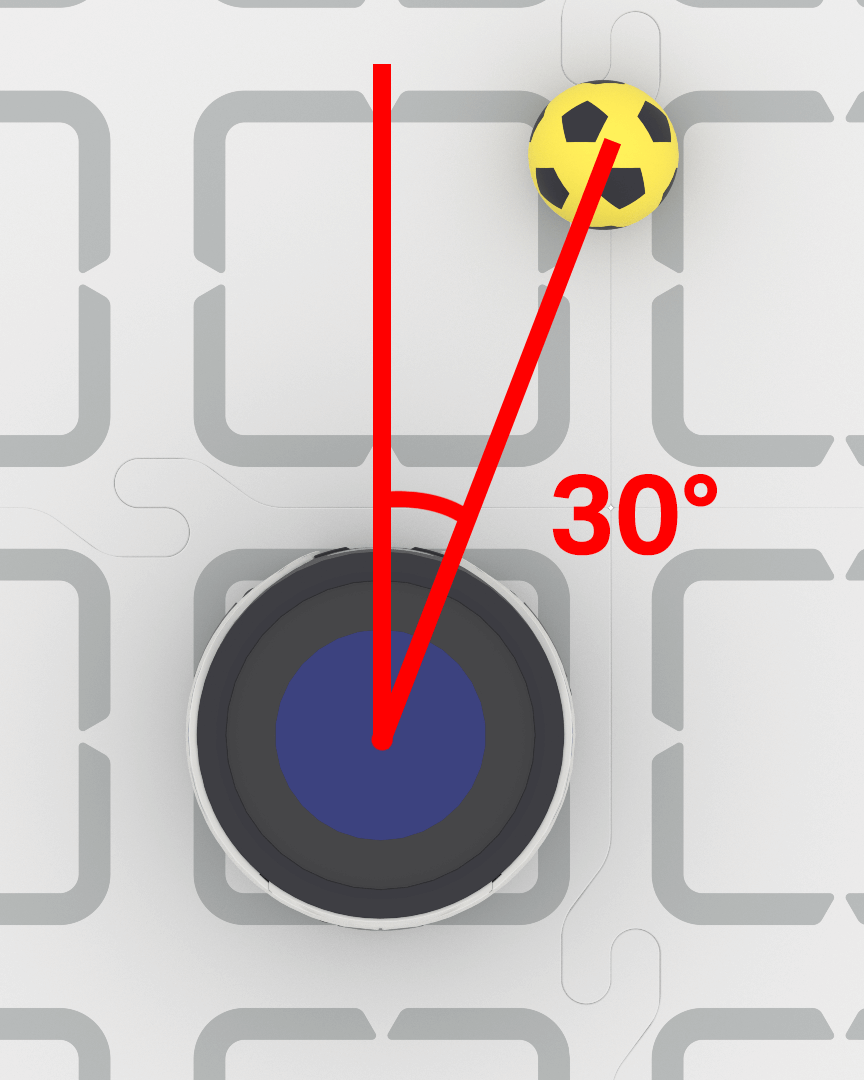
# Turn to keep the Blue Barrel directly in front
robot.set_turn_velocity(40)
while True:
    vision_data = robot.vision.get_data(BLUE_BARREL)

    if vision_data[0].exists:

        if vision_data[0].bearing > 5:
            robot.turn(RIGHT)
        elif vision_data[0].bearing < -5:
            robot.turn(LEFT)
        else:
            robot.stop_all_movement()

    else:
        robot.stop_all_movement()

    wait(0.1, SECONDS)
.rotation#
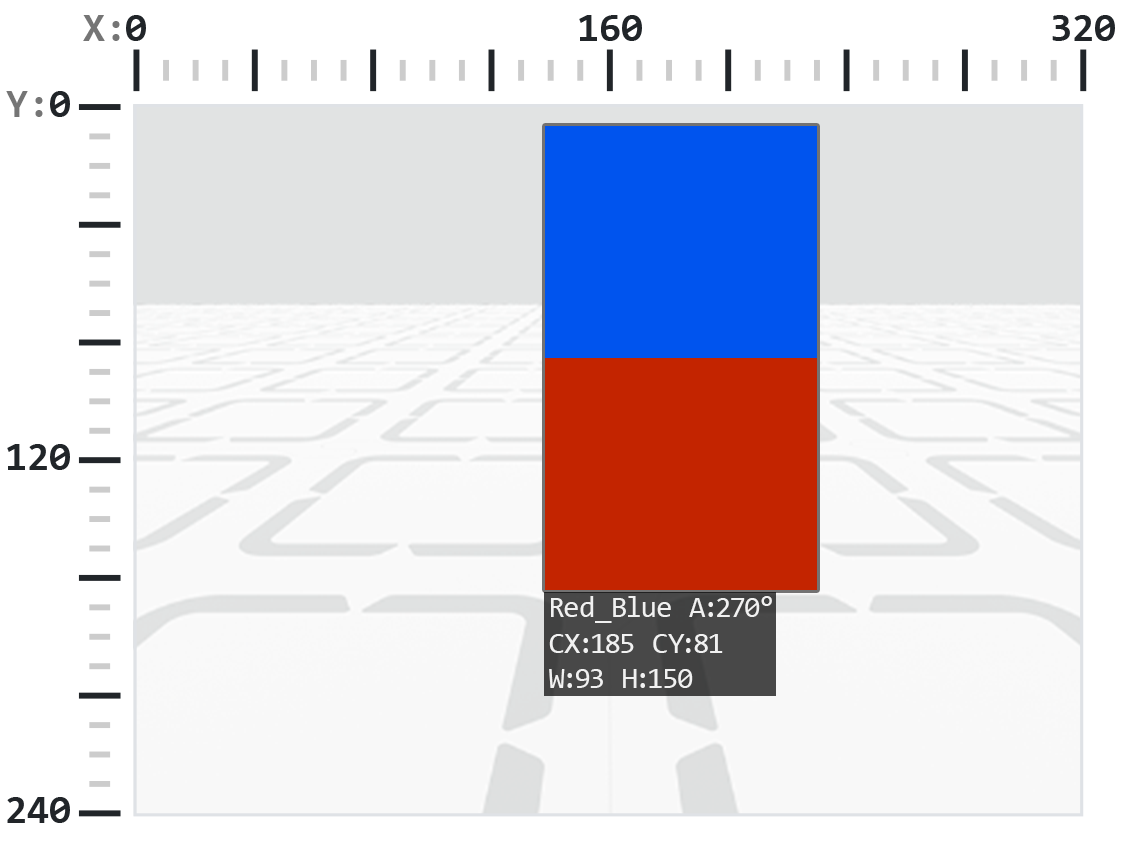
.rotation επιστρέφει τον προσανατολισμό του αντικειμένου στο επίπεδο προβολής του αισθητήρα AI Vision Sensor, μετρούμενο σε μοίρες από 0 έως 359. Ένας Χρωματικός Κώδικας είναι 0° όταν τα χρώματά του είναι διατεταγμένα σε οριζόντια γραμμή (π.χ., Κόκκινο-Μπλε). Εάν τα χρώματα περιστραφούν, η γωνία αλλάζει (π.χ., η διάταξη Μπλε-Κόκκινο επιστρέφει 180°).
Για το παρακάτω παράδειγμα, ο Χρωματικός Κώδικας έχει διαμορφωθεί με κόκκινο στα αριστερά και μπλε στα δεξιά.
Σε αυτήν την εικόνα, η τοποθέτηση μπλε πάνω από κόκκινο ισοδυναμεί με την περιστροφή του αρχικού Χρωματικού Κώδικα κατά 270 μοίρες προς τα δεξιά.
# Slide left or right depending on how a Color Code (BlueRed)
# is rotated on the vertical plane
while True:
    # Original Color Code is Red to the left, Blue to the right
    code = robot.vision.get_data(BlueRed)

    if code[0].exists:
        # Check if Color Code is now Red on top of Blue
        if 50 < code[0].rotation < 100 :
            robot.move_at(90)

        # Check if Color Code is now Blue on top of Red
        elif 270 < code[0].rotation < 330 :
            robot.move_at(270)

        else:
            robot.stop_all_movement()
    else:
        robot.stop_all_movement()

    wait(50, MSEC)
.originX#
.originX επιστρέφει τη συντεταγμένη x της επάνω αριστερής γωνίας του πλαισίου οριοθέτησης του ανιχνευμένου αντικειμένου σε pixel, η οποία είναι ένας ακέραιος αριθμός μεταξύ 0 και 320.
Σημείωση: Οι τιμές των pixel είναι σχετικές με το σύστημα συντεταγμένων του αισθητήρα. Δείτε το διάγραμμα στην Εισαγωγή για αναφορά.
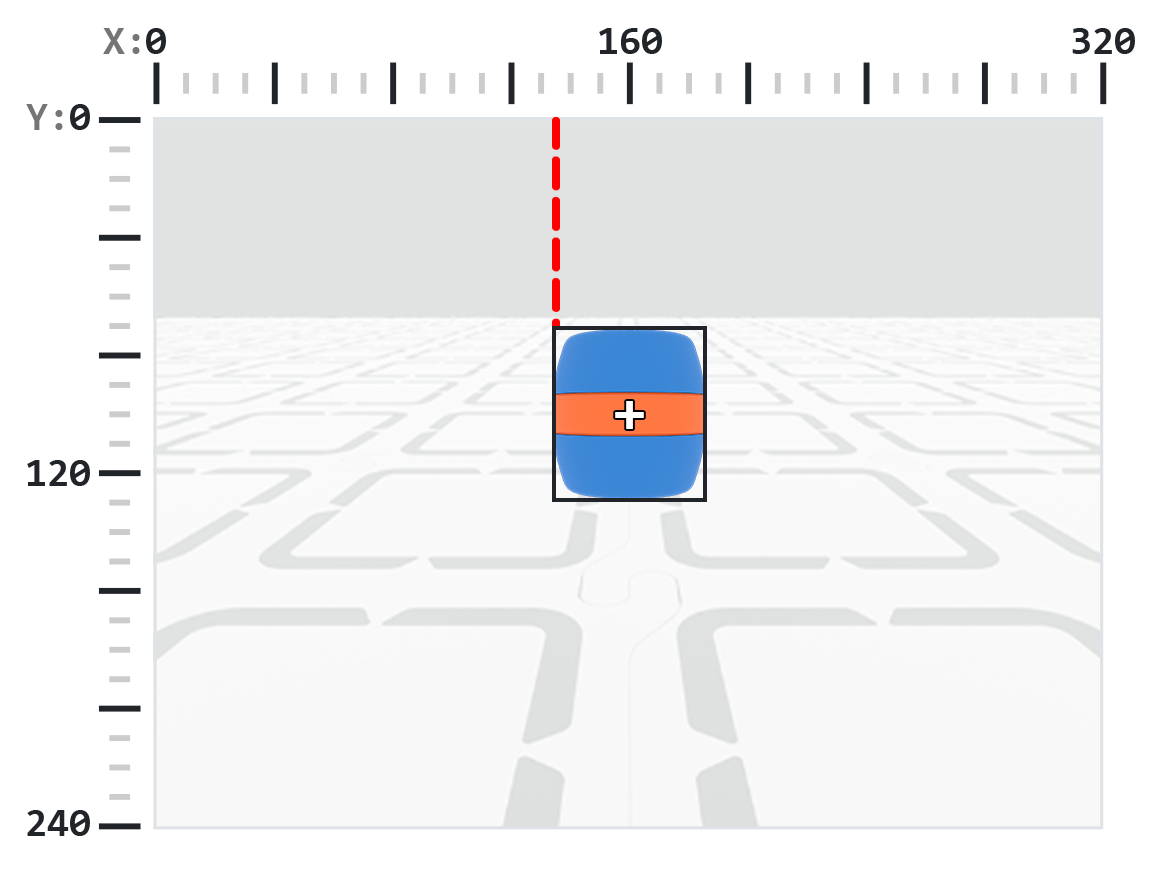
# Display if an Orange Barrel is to the
# left or the right
while True:
    robot.screen.clear_screen()
    robot.screen.set_cursor(1,1)

    orange_barrel = robot.vision.get_data(ORANGE_BARREL)

    if orange_barrel[0].exists:
        if orange_barrel[0].originX < 160:
            robot.screen.print("To the left!")
        else:
            robot.screen.print("To the right!")

    wait(50, MSEC)
.originY#
Η συνάρτηση .originY επιστρέφει τη συντεταγμένη y της επάνω αριστερής γωνίας του πλαισίου οριοθέτησης του ανιχνευμένου αντικειμένου σε pixel, η οποία είναι ένας ακέραιος αριθμός μεταξύ 0 και 240.
Σημείωση: Οι τιμές των pixel είναι σχετικές με το σύστημα συντεταγμένων του αισθητήρα. Δείτε το διάγραμμα στην Εισαγωγή για αναφορά.
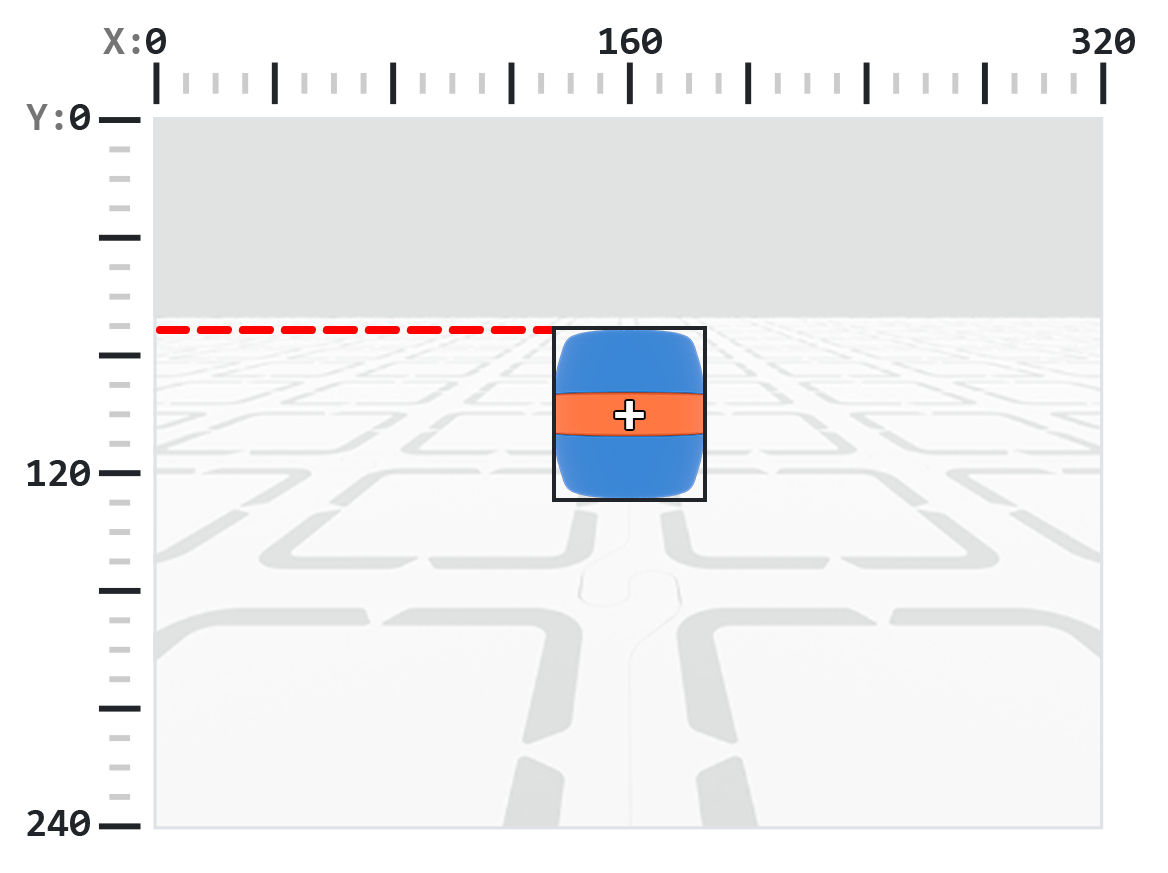
# Display if an Orange Barrel is close or far
# from the robot
while True:
    robot.screen.clear_screen()
    robot.screen.set_cursor(1, 1)

    orange_barrel = robot.vision.get_data(ORANGE_BARREL)

    if orange_barrel[0].exists:
        if orange_barrel[0].originY < 80:
            robot.screen.print("Far")
        else:
            robot.screen.print("Close")

    wait(50, MSEC)
.id#
.id επιστρέφει το ID της ανιχνευμένης ταξινόμησης AI ή του ID AprilTag ως ακέραιο αριθμό.
Για ένα AprilTag ID, η ιδιότητα .id αντιπροσωπεύει τον ανιχνευμένο αριθμό AprilTag ID στην περιοχή από 0 έως 37. Για μια Ταξινόμηση AI, η ιδιότητα .id αντιστοιχεί στο προκαθορισμένο ID στην ενότητα Ταξινομήσεις AI.
# Move forward when AprilTag ID 1 is detected
while True:
    apriltags = robot.vision.get_data(ALL_TAGS)

    if apriltags[0].exists:
        if apriltags[0].id == 1:
            robot.move_at(0)
    else:
        robot.stop_all_movement()

    wait(50, MSEC)
.score#
Η συνάρτηση .score επιστρέφει τη βαθμολογία εμπιστοσύνης της ανιχνευμένης ταξινόμησης AI ως ακέραιο αριθμό μεταξύ 1 και 100.
Μια χαμηλότερη βαθμολογία σημαίνει ότι ο αισθητήρας είναι λιγότερο σίγουρος για το ανιχνευμένο αντικείμενο, ενώ μια υψηλότερη βαθμολογία σημαίνει ότι ο αισθητήρας είναι πιο σίγουρος.
# Look confident if an Orange Barrel is detected
while True:
    barrel = robot.vision.get_data(ORANGE_BARREL)

    if barrel[0].exists:
        if barrel[0].score > 95:
            robot.screen.show_emoji(CONFIDENT)
        else:
            robot.screen.hide_emoji()

    wait(50, MSEC)
.type#
Η συνάρτηση .type επιστρέφει έναν ακέραιο αριθμό που υποδεικνύει τον τύπο του αντικειμένου που εντοπίστηκε. Μπορείτε να συγκρίνετε αυτήν την τιμή χρησιμοποιώντας είτε τον αριθμό τύπου είτε την αντίστοιχη ονομασμένη σταθερά:
Τύπος αντικειμένου |
Συμπεριλαμβανόμενα αντικείμενα |
|---|---|
|
— Αθλητικές μπάλες |
|
— Αναγνωριστικά ετικέτας AprilTag |
|
— Χρωματικές υπογραφές |
|
— Χρωματικοί κωδικοί |
# Display if an AprilTag ID or AI Classification
# is detected
while True:
    robot.screen.clear_screen()
    robot.screen.set_cursor(1, 1)
    vision_data = robot.vision.get_data(ALL_VISION)
    if vision_data[0].exists:
        if vision_data[0].type == AiVision.AI_OBJECT:
            robot.screen.print("AI Object!")
        elif vision_data[0].type == AiVision.TAG_OBJECT:
            robot.screen.print("AprilTag ID!")
    wait(0.1, SECONDS)
# Display a list of all detected objects
while True:
    robot.screen.clear_screen()
    robot.screen.set_cursor(1, 1)
    vision_data = robot.vision.get_data(ALL_VISION)

    if vision_data[0].exists:
        for obj in vision_data:
            if obj.type == AiVision.AI_OBJECT:
                robot.screen.print("- AI Object")
            elif obj.type == AiVision.TAG_OBJECT:
                robot.screen.print("- AprilTag ID")
            robot.screen.next_row()

    wait(0.1, SECONDS)
Κατασκευαστές#
Creating a Color Signature#
Μια νέα Χρωματική Υπογραφή δημιουργείται χρησιμοποιώντας τον κατασκευαστή Colordesc και στη συνέχεια καταχωρείται στον Αισθητήρα Όρασης AI χρησιμοποιώντας τη μέθοδο color_description Ένα αντικείμενο Colordesc ορίζει 1 από έως και 7 ανιχνεύσιμες χρωματικές υπογραφές για τον αισθητήρα, αλλά πρέπει να οριστεί ρητά χρησιμοποιώντας color_description για να τεθεί σε ισχύ.
Χρήση Χρωματικής Περιγραφής:
Colordesc(index, red, green, blue, hangle, hdsat)
Παράμετρος |
Περιγραφή |
|---|---|
|
Ένας ακέραιος αριθμός από το 1 έως το 7 που αντιπροσωπεύει τον δείκτη Χρωματικής Υπογραφής. Εάν δύο Χρωματικές Υπογραφές χρησιμοποιούν τον ίδιο δείκτη, ο δεύτερος θα αντικαταστήσει τον πρώτο. |
|
Ένας ακέραιος αριθμός από 0 έως 255 για το κόκκινο στοιχείο του χρώματος. |
|
Ένας ακέραιος αριθμός από 0 έως 255 για το πράσινο στοιχείο του χρώματος. |
|
Ένας ακέραιος αριθμός από 0 έως 255 για το μπλε στοιχείο του χρώματος. |
|
Μια κινητή τιμή από το 1 έως το 40 που αντιπροσωπεύει το εύρος απόχρωσης σε μοίρες. |
|
Μια κινητή τιμή από 0,10 έως 1,00 που αντιπροσωπεύει το εύρος κορεσμού. |
χρήση_περιγραφής_χρήσης:
robot.vision.color_description(object)
Παράμετρος |
Περιγραφή |
|---|---|
|
Το αντικείμενο |
# Detect a red object
red_box = Colordesc(1, 207, 19, 25, 10.00, 0.20)
robot.vision.color_description(red_box)

while True:
    robot.screen.clear_screen()
    robot.screen.set_cursor(1, 1)

    red_boxes = robot.vision.get_data(red_box)

    if red_boxes[0].exists:
        robot.screen.print("Red detected!")
    else:
        robot.screen.print("No red detected.")

    wait(0.2, SECONDS)
Creating a Color Code#
Ένας νέος Κώδικας Χρώματος δημιουργείται χρησιμοποιώντας τον κατασκευαστή Codedesc και στη συνέχεια ενεργοποιείται χρησιμοποιώντας τη μέθοδο code_description Ένας Κώδικας Χρώματος ομαδοποιεί 2 έως 4 υπάρχοντα αντικείμενα Colordesc σε ένα μόνο αναγνωριστικό που ο Αισθητήρας Όρασης AI μπορεί να ανιχνεύσει ως ακολουθία, αλλά πρέπει να οριστεί ρητά χρησιμοποιώντας code_description για να τεθεί σε ισχύ.
Χρήση περιγραφής κώδικα:
Codedesc(index, c1, c2, c3, c4, c5)
Παράμετρος |
Περιγραφή |
|---|---|
|
Ο δείκτης του Χρωματικού Κώδικα, από 1 έως 8. Σημείωση: Εάν δημιουργήσετε δύο αντικείμενα |
|
Το πρώτο αντικείμενο |
|
Το δεύτερο αντικείμενο |
|
Προαιρετικό. Ένα τρίτο αντικείμενο |
|
Προαιρετικό. Ένα τέταρτο αντικείμενο |
περιγραφή_κωδικού Χρήση:
robot.vision.code_description(object)
Παράμετρος |
Περιγραφή |
|---|---|
|
Ένα αντικείμενο |
# Create Color Signatures
red_box = Colordesc(1, 207, 19, 25, 10.00, 0.20)
purple_box = Colordesc(2, 98, 18, 227, 10.00, 0.20)

robot.vision.color_description(red_box)
robot.vision.color_description(purple_box)

# Detect a red_purple Color Code
red_purple = Codedesc(1, red_box, purple_box)
robot.vision.code_description(red_purple)

while True:
    robot.screen.clear_screen()
    robot.screen.set_cursor(1, 1)

    code_objects = robot.vision.get_data(red_purple)

    if code_objects[0].exists:
        robot.screen.print("Code detected!")
    else:
        robot.screen.print("No code detected.")

    wait(0.2, SECONDS)