
Sensor de color#
Introducción#
La categoría Sensor de color incluye bloques que proporcionan información cromática de un sensor de color VEX IQ. Estos bloques permiten que tu robot detecte la presencia de un objeto, reconozca colores específicos y devuelva datos visuales como el brillo y el tono.
También puedes usar bloques para configurar el brillo de la luz interna del sensor. Estas herramientas son ideales para programas que necesitan reaccionar en tiempo real a objetos de color, condiciones de iluminación o información del sensor.
A continuación se muestra una lista de todos los bloques:
establecer luz de color — Establece el brillo de la luz del sensor de color.
¿Se encontró un objeto de color? — Informa si se detecta algún objeto.
¿Detecta color? — Informa si se detecta un color específico.
Color nombre del color — Informa el nombre del color detectado.
Brillo del color — Informa el brillo detectado como un porcentaje.
Tono de color — Informa el ángulo de tono del color detectado.
Conjunto de luces de color#
El bloque establecer luz de color ajusta el brillo de la luz del sensor de color. Esta luz ayuda al sensor a detectar objetos y colores con mayor claridad.
Un porcentaje mayor hace que la luz sea más brillante. Un porcentaje menor hace que la luz sea más tenue.
Si la luz del sensor de color está apagada, al ajustar la potencia de la luz por encima del 0% se encenderá la luz.
Si la luz del sensor de color está encendida, al ajustar la potencia de la luz al 0%, esta se apagará.
ajustar luz de [Color1 v] a (50) %
Parámetros |
Descripción |
|---|---|
sensor de color |
En la ventana Dispositivos se configura el nivel de brillo de la luz del sensor de color. |
brillo |
El brillo de la luz del sensor de color, desde 0% hasta 100%, se representa como un número entero. |
Ejemplo
cuando inicie
[Light up the Color Sensor dimmer.]
ajustar luz de [Color1 v] a (25) %
esperar (2) segundos
[Light up the Color Sensor brighter.]
ajustar luz de [Color1 v] a (100) %
¿El color encontró un objeto?#
El bloque booleano ¿El color ha detectado un objeto? indica si el sensor de color ha detectado algún objeto.
Verdadero — El sensor de color ha detectado un objeto.
Falso — El sensor de color no ha detectado ningún objeto.
<¿[Color1 v] encontró un objeto?>
Parámetros |
Descripción |
|---|---|
sensor de color |
Qué sensor de color usar, configurado en la ventana Dispositivos. |
Ejemplo
cuando inicie
[Print a different message when an object is in front of the Color Sensor.]
por siempre
mover cursor a fila (1) columna (1) en pantalla
si <¿[Color1 v] encontró un objeto?> entonces
imprimir [Object detected] en consola ▶
si no
imprimir [Nothing detected] en consola ▶
fin
limpiar fila (1) en pantalla
¿El color detecta el color?#
El bloque booleano ¿El color detecta color? indica si el sensor de color ha detectado un color específico.
Verdadero — El sensor de color ha detectado el color especificado.
Falso — El sensor de color no ha detectado el color especificado.
<¿[Color1 v] detecta [rojo v]?>
Parámetros |
Descripción |
|---|---|
sensor de color |
Qué sensor de color usar, configurado en la ventana Dispositivos. |
color |
Qué color comprobar:
|
Ejemplo
cuando inicie
[Turn until the Color Sensor detects green.]
girar [derecha v]
esperar hasta <¿[Color1 v] detecta [verde v]?>
detener conducción
Nombre del color#
El bloque de informe Color color name informa el nombre del color detectado por el sensor de color como una cadena de texto.
Los colores posibles son:
rojo
verde
azul
blanco
amarillo
naranja
púrpura
rojo violeta
violeta
azul violeta
azul verdoso
amarillo verdoso
amarillo anaranjado
rojo anaranjado
Nota: Este bloque se puede insertar en el bloque establecer color del LED táctil para que el LED táctil coincida con el color detectado.
(nombre de color de [Color1 v])
Parámetros |
Descripción |
|---|---|
sensor de color |
Qué sensor de color usar, configurado en la ventana Dispositivos. |
Ejemplo
cuando inicie
[Stop and print when the Color Sensor detects green.]
girar [derecha v]
esperar hasta <¿[Color1 v] detecta [verde v]?>
detener conducción
imprimir (nombre de color de [Color1 v]) en consola ◀ y mover cursor a la siguiente fila
Brillo del color#
El bloque de informe Brillo del color indica el nivel de brillo del color detectado, expresado como un porcentaje del 0% al 100%.
Un porcentaje más alto significa que el sensor de color detecta más luz. Un porcentaje más bajo significa que el sensor de color detecta menos luz.
(brillo de [Color1 v] en %)
Parámetros |
Descripción |
|---|---|
sensor de color |
Qué sensor de color usar, configurado en la ventana Dispositivos. |
Ejemplo
cuando inicie
[Stop and print the brightness when the Color Sensor detects green.]
girar [derecha v]
esperar hasta <¿[Color1 v] detecta [verde v]?>
detener conducción
imprimir (brillo de [Color1 v] en %) en consola ◀ y mover cursor a la siguiente fila
Tonalidad del color#
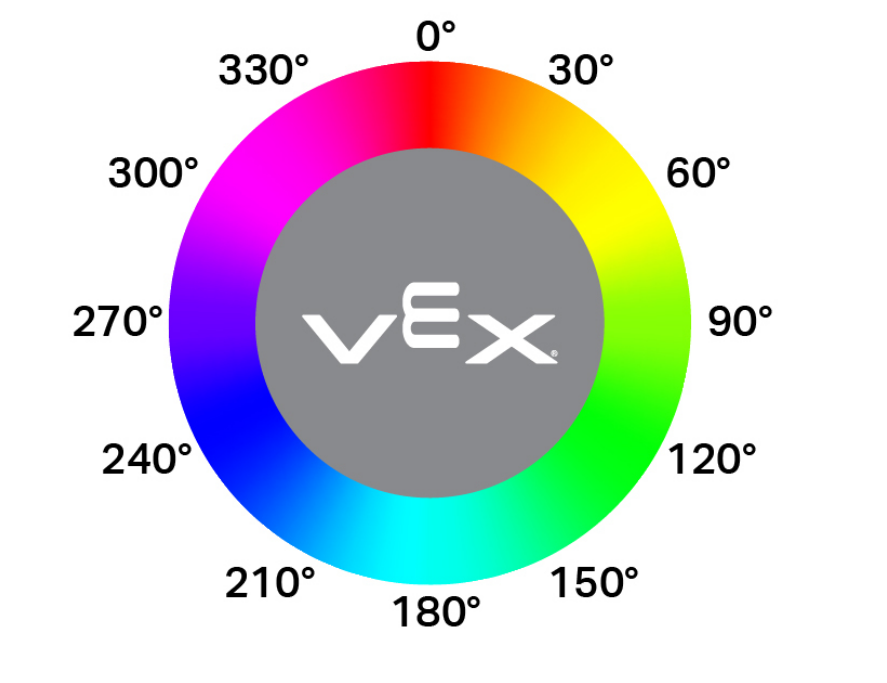
El bloque de informe Tono de color informa el tono detectado por el sensor de color como un número de 0 a 359 grados.
El matiz es una forma de describir el color utilizando números alrededor de una rueda de colores, como se muestra a continuación:
(tono de [Color1 v] en grados)
Parámetros |
Descripción |
|---|---|
sensor de color |
Qué sensor de color usar, configurado en la ventana Dispositivos. |
Ejemplo
cuando inicie
[Print when the Color Sensor detects pink.]
por siempre
limpiar todas las filas en consola
mover cursor a fila (1) columna (1) en pantalla
si <<(tono de [Color1 v] en grados) [math_greater_than v] [290]> [y v] <(tono de [Color1 v] en grados) [math_less_than v] [350]>> entonces
imprimir [Pink!] en consola ▶
esperar (0.1) segundos
si no
imprimir [Not pink.] en consola ▶
esperar (0.1) segundos