
Οθόνη#
Εισαγωγή#
Οι μέθοδοι οθόνης ελέγχουν τον τρόπο με τον οποίο το ρομπότ κωδικοποίησης VEX AIM εμφανίζει κείμενο, αριθμούς και γραφικά στην οθόνη του και τον τρόπο με τον οποίο ανταποκρίνεται στα πατήματα της οθόνης.
Παρακάτω είναι μια λίστα με όλες τις μεθόδους:
Αφή – Εντοπισμός και απόκριση σε πατήματα οθόνης.
pressing– Επιστρέφει εάν η οθόνη πατιέται τη δεδομένη στιγμή.x_position– Επιστρέφει τη συντεταγμένη x του τελευταίου πατήματος οθόνης.y_position– Επιστρέφει τη συντεταγμένη y του τελευταίου πατήματος οθόνης.
Εκτύπωση δρομέα – Εμφάνιση κειμένου χρησιμοποιώντας σύστημα γραμμών/στηλών.
print– Εκτυπώνει κείμενο, αριθμούς ή τιμές μεταβλητών στην τρέχουσα θέση του κέρσορα.set_cursor– Μετακινεί τον κέρσορα σε μια συγκεκριμένη γραμμή και στήλη.next_row– Μετακινεί τον κέρσορα στη στήλη 1 της επόμενης γραμμής.clear_row– Διαγράφει μια γραμμή κειμένου.get_row– Επιστρέφει την τρέχουσα γραμμή του δρομέα.get_column– Επιστρέφει την τρέχουσα στήλη του δρομέα.
Εκτύπωση XY – Εμφάνιση κειμένου σε συγκεκριμένη συντεταγμένη οθόνης.
print_at– Εκτυπώνει κείμενο, αριθμούς ή τιμές μεταβλητών σε μια συγκεκριμένη συντεταγμένη x και y.set_origin– Ορίζει την αρχή που χρησιμοποιείται για εκτύπωση και σχεδίαση με βάση συντεταγμένες.
Μεταλλαγμένοι – Καθαρίστε την οθόνη ή ενημερώστε τις οπτικές ρυθμίσεις.
clear_screen– Καθαρίζει την οθόνη από όλα τα σχέδια και το κείμενο.set_font– Ορίζει τη γραμματοσειρά για το εκτυπωμένο κείμενο.set_pen_width– Ορίζει το πάχος των γραμμών που σχεδιάζονται και των περιγραμμάτων των σχημάτων.set_pen_color– Ορίζει το χρώμα του κειμένου, των pixel, των γραμμών και των περιγραμμάτων των σχημάτων.set_fill_color– Ορίζει το χρώμα γεμίσματος για τα σχεδιασμένα σχήματα και τα φόντα εκτυπωμένου κειμένου.
Σχεδίαση – Προσθήκη γραφικών και εικόνων στην οθόνη.
draw_pixel– Σχεδιάζει ένα pixel σε μια συγκεκριμένη θέση x και y.draw_line– Σχεδιάζει μια γραμμή μεταξύ δύο σημείων.draw_rectangle– Σχεδιάζει ένα ορθογώνιο.draw_circle– Σχεδιάζει έναν κύκλο.show_file– Εμφανίζει μια εικόνα που έχει μεταφορτωθεί.set_clip_region– Περιορίζει το πού μπορούν να εμφανίζονται σχέδια και κείμενο.
Επανακλήσεις – Εκτέλεση συναρτήσεων όταν πατηθεί ή απελευθερωθεί η οθόνη.
Επαφή#
pressing#
Το πάτημα του pressing επιστρέφει μια λογική τιμή που υποδεικνύει εάν η οθόνη του ρομπότ πατιέται αυτήν τη στιγμή.
True– Πατιέται η οθόνη.False– Δεν πατιέται η οθόνη.
Usage:
robot.screen.pressing()
Παράμετροι |
Περιγραφή |
|---|---|
Αυτή η μέθοδος δεν έχει παραμέτρους. |
# Turn LEDs white only while the screen is pressed.
while True:
    if robot.screen.pressing():
        robot.led.on(ALL_LEDS, WHITE)
    else:
        robot.led.off(ALL_LEDS)

    wait(50, MSEC)
# Display different messages after the screen is pressed
while not robot.screen.pressing():
    wait(5, MSEC)
robot.screen.print("First message!")
robot.screen.next_row()
# Lift finger to press the screen again
while robot.screen.pressing():
    wait(5, MSEC)
while not robot.screen.pressing():
    wait(5, MSEC)
robot.screen.print("Second message!")
robot.screen.next_row()
x_position#
x_position επιστρέφει τη συντεταγμένη x του τελευταίου πατήματος οθόνης ως ακέραιο αριθμό από 0 (αριστερά) έως 240 (δεξιά).
Usage:robot.screen.x_position()
Παράμετροι |
Περιγραφή |
|---|---|
Αυτή η μέθοδος δεν έχει παραμέτρους. |
# Display the x-coordinate of where
# the screen is pressed
while True:
    if robot.screen.pressing():
        robot.screen.clear_screen()
        robot.screen.print(robot.screen.x_position())
    wait (50, MSEC)
y_position#
y_position επιστρέφει τη συντεταγμένη y του τελευταίου πατήματος οθόνης ως ακέραιο αριθμό από 0 (επάνω) έως 240 (κάτω).
Usage:robot.screen.y_position()
Παράμετροι |
Περιγραφή |
|---|---|
Αυτή η μέθοδος δεν έχει παραμέτρους. |
# Display the y-coordinate of where
# the screen is pressed
while True:
    if robot.screen.pressing():
        robot.screen.clear_screen()
        robot.screen.print(robot.screen.y_position())
    wait (50, MSEC)
Εκτύπωση δρομέα#
print#
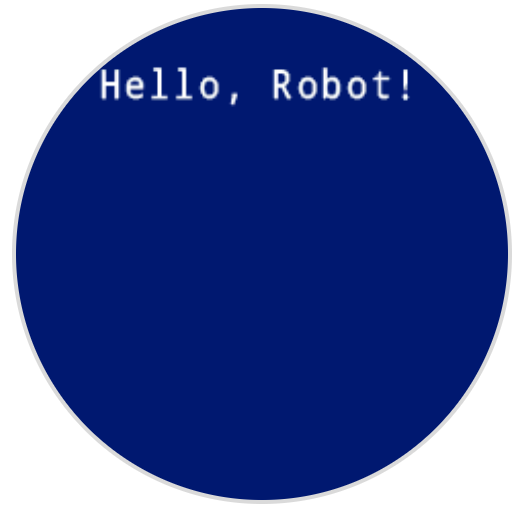
print εκτυπώνει κείμενο, αριθμούς ή τιμές μεταβλητών στην οθόνη του ρομπότ στην τρέχουσα θέση κέρσορα και γραμματοσειρά.
Usage:robot.screen.print(text)
Παράμετροι |
Περιγραφή |
|---|---|
|
Το κείμενο, ο αριθμός ή η τιμή μεταβλητής που θα εμφανίζεται στην οθόνη. |
# Display a message at the starting cursor position
robot.screen.print("Hello, Robot!")
set_cursor#
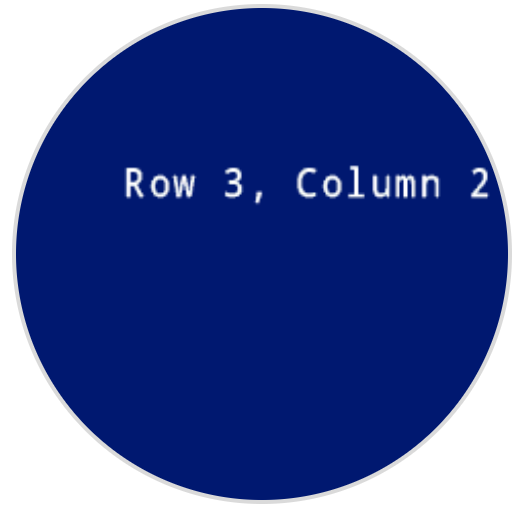
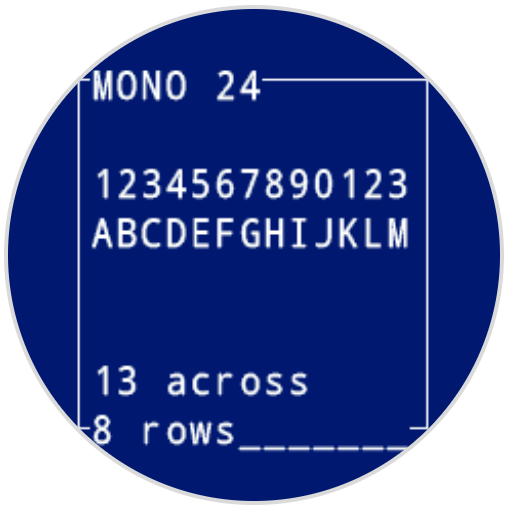
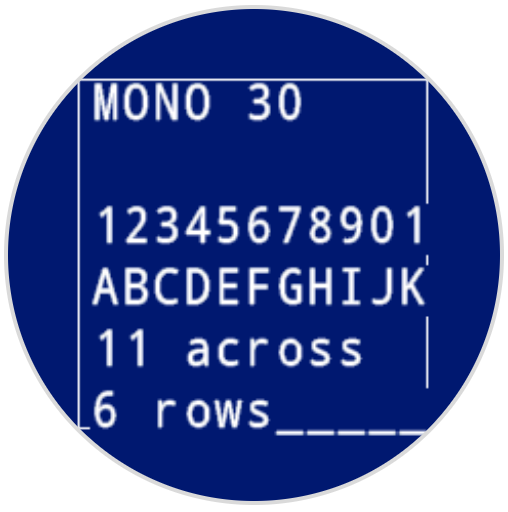
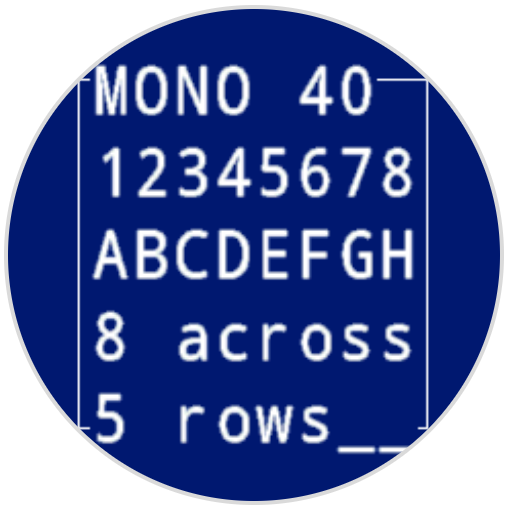
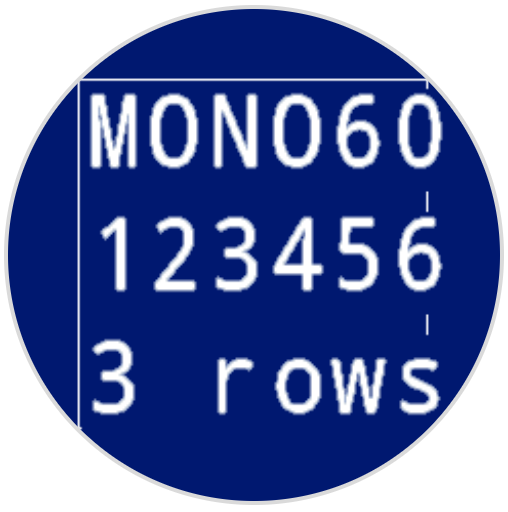
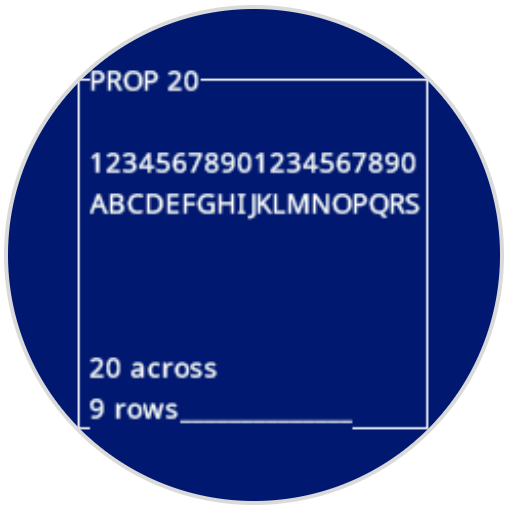
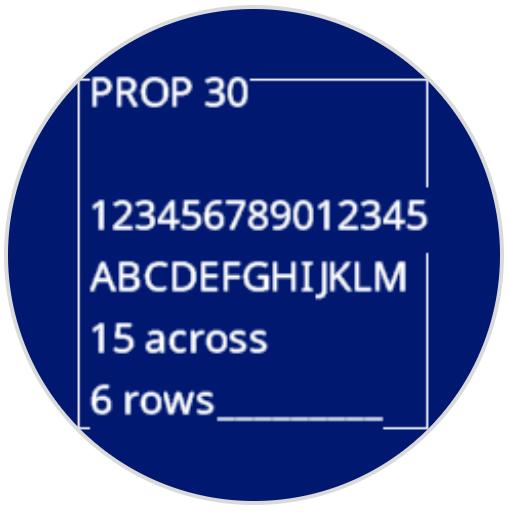
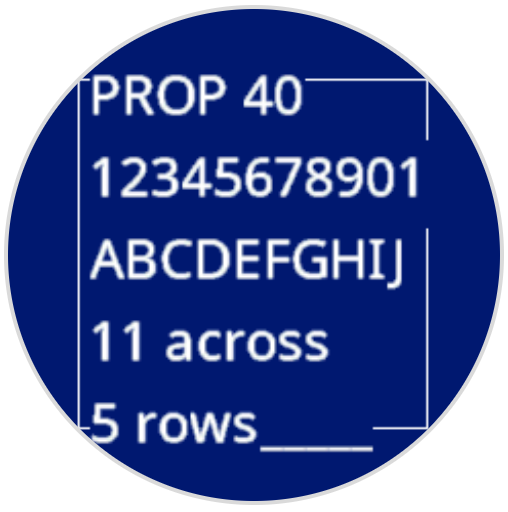
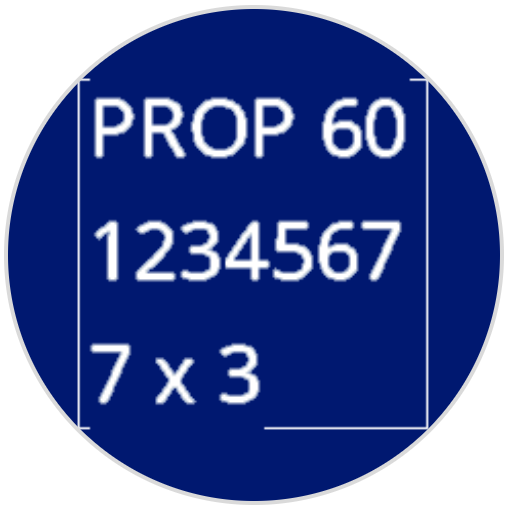
set_cursor μετακινεί τον κέρσορα κειμένου σε μια συγκεκριμένη γραμμή και στήλη στην οθόνη του ρομπότ. Η επόμενη κλήση print θα ξεκινήσει την εκτύπωση σε αυτήν τη θέση. Ο αριθμός των γραμμών και των στηλών που ταιριάζουν εξαρτάται από την επιλεγμένη γραμματοσειρά. Με την προεπιλεγμένη γραμματοσειρά monospaced medium, η οθόνη μπορεί να εμφανίσει ευκρινώς έως και 8 γραμμές και 13 στήλες. Το κείμενο που τοποθετείται πέρα από αυτό το εύρος ενδέχεται να είναι κομμένο ή πιο δύσκολο να διαβαστεί.
Οι γραμματοσειρές μονόχωρου χώρου έχουν χαρακτήρες που έχουν όλοι το ίδιο πλάτος, καθιστώντας την τοποθέτηση κειμένου συνεπή. Αντίθετα, οι αναλογικές γραμματοσειρές ποικίλλουν σε πλάτος χαρακτήρων, επομένως ορισμένα γράμματα καταλαμβάνουν περισσότερο χώρο από άλλα. Ωστόσο, ανεξάρτητα από τον τύπο που χρησιμοποιείται, η συνάρτηση set_cursor τοποθετεί τον κέρσορα με βάση το μέγεθος της γραμμής και της στήλης, όχι το στυλ γραμματοσειράς. Το μέγεθος της γραμματοσειράς μπορεί να ρυθμιστεί χρησιμοποιώντας την συνάρτηση set_font.
Usage:robot.screen.set_cursor(row, column)
Παράμετροι |
Περιγραφή |
|---|---|
|
Η γραμμή στην οποία θα μετακινηθεί ο κέρσορας. |
|
Η στήλη στην οποία θα μετακινηθεί ο κέρσορας. |
# Display text starting at Row 3 Column 2
robot.screen.set_cursor(3, 2)
robot.screen.print("Row 3, Column 2")
next_row#
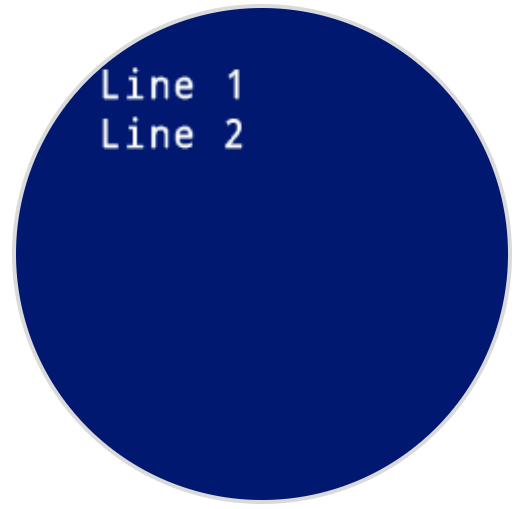
next_row μετακινεί τον κέρσορα στη στήλη 1 στην επόμενη γραμμή στην οθόνη του ρομπότ.
Usage:robot.screen.next_row()
Παράμετροι |
Περιγραφή |
|---|---|
Αυτή η μέθοδος δεν έχει παραμέτρους. |
# Display two lines of text
robot.screen.print("Line 1")
robot.screen.next_row()
robot.screen.print("Line 2")
clear_row#
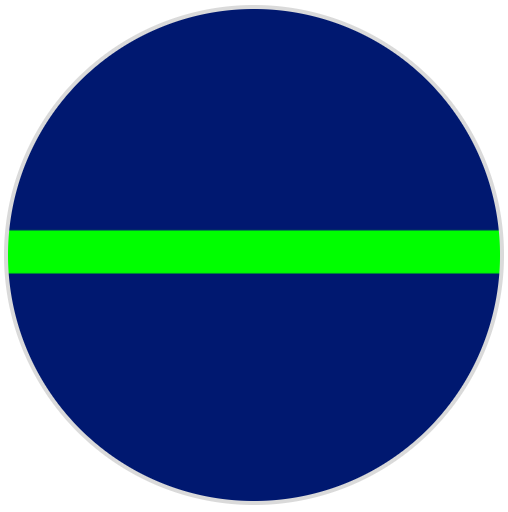
clear_row καθαρίζει μία μόνο γραμμή κειμένου στην οθόνη του ρομπότ.
Usage:robot.screen.clear_row(row, color)
Παράμετρος |
Περιγραφή |
|---|---|
|
Προαιρετικό. Η γραμμή που θα διαγραφεί ως ακέραιος αριθμός. Η προεπιλογή είναι η τρέχουσα γραμμή του δρομέα. |
|
Προαιρετικό. Το χρώμα που θα εφαρμοστεί στην καθαρισμένη σειρά. Οι επιλογές περιλαμβάνουν:
|
# Display text on two rows
robot.screen.print("This text stays")
robot.screen.next_row()
robot.screen.print("This text disappears")

# Wait 3 seconds before clearing only the second row
wait(3, SECONDS)
robot.screen.clear_row()
# Turn the 5th row green
robot.screen.clear_row(5, GREEN)
get_row#
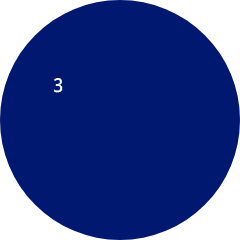
get_row επιστρέφει την τρέχουσα γραμμή όπου το κείμενο θα εκτυπωθεί ως ακέραιος αριθμός.
Usage:robot.screen.get_row()
Παράμετροι |
Περιγραφή |
|---|---|
Αυτή η μέθοδος δεν έχει παραμέτρους. |
# Set cursor to (3,2) and print row number
robot.screen.set_cursor(3, 2)
robot.screen.print(robot.screen.get_row())
get_column#
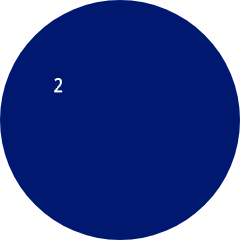
Η συνάρτηση get_column επιστρέφει την τρέχουσα στήλη όπου το κείμενο θα εκτυπωθεί ως ακέραιος αριθμός.
Usage:robot.screen.get_column()
Παράμετροι |
Περιγραφή |
|---|---|
Αυτή η μέθοδος δεν έχει παραμέτρους. |
# Set cursor to (3,2) and print column number
robot.screen.set_cursor(3, 2)
robot.screen.print(robot.screen.get_column())
Εκτύπωση XY#
print_at#
Η συνάρτηση print_at εκτυπώνει κείμενο, αριθμούς ή τιμές μεταβλητών στην οθόνη του ρομπότ σε μια συγκεκριμένη συντεταγμένη x και y σε pixel, χρησιμοποιώντας τις τρέχουσες συντεταγμένες font και origin. Η συνάρτηση x ορίζει την απόσταση από την αριστερή πλευρά που ξεκινά το κείμενο και η συνάρτηση y ορίζει την τοποθεσία του κάτω μέρους των γραμμάτων. Αυτή η μέθοδος αγνοεί την τρέχουσα θέση του κέρσορα.
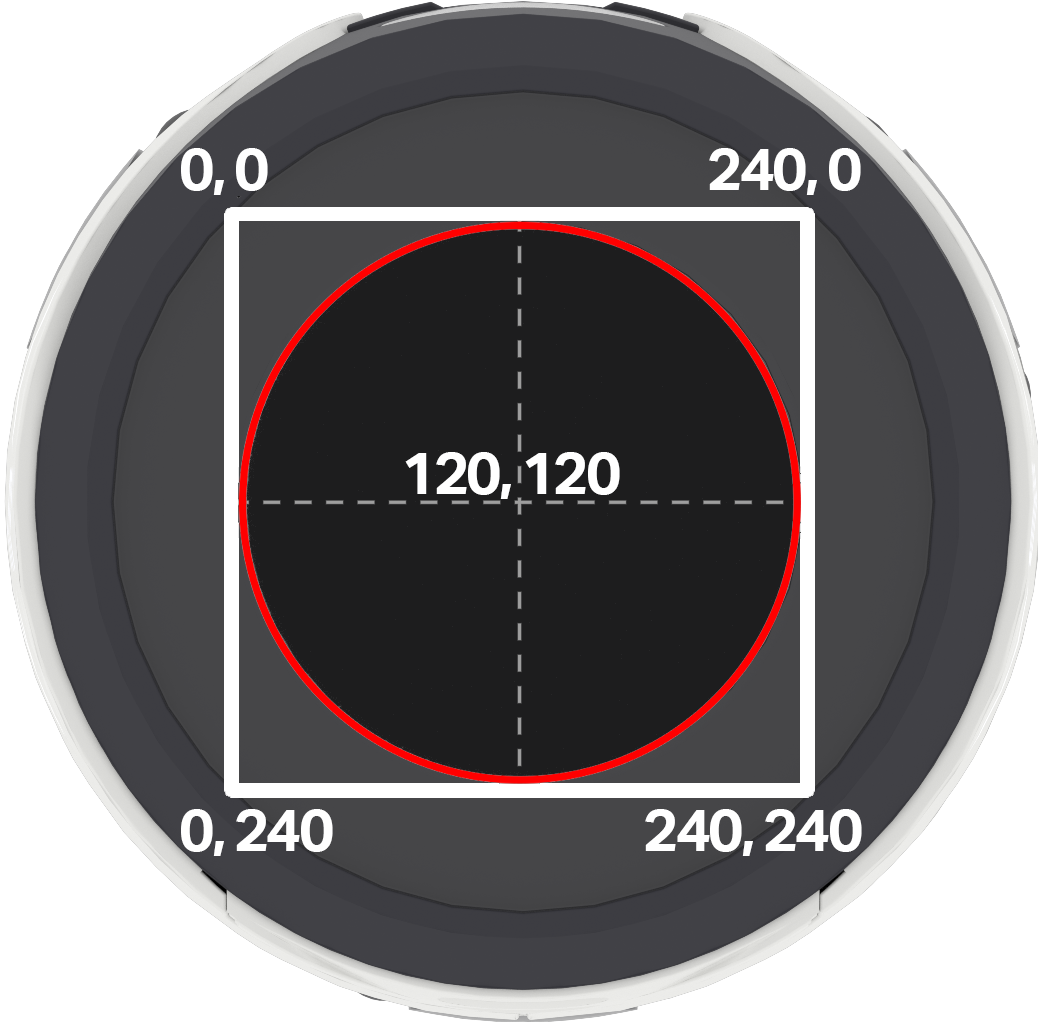
Σημείωση: Ο κόκκινος κύκλος δείχνει ποιες συντεταγμένες θα είναι ορατές στην κυκλική οθόνη του ρομπότ AIM. Οι συντεταγμένες που βρίσκονται εκτός του κόκκινου κύκλου υπάρχουν εντός του εύρους 0–240, αλλά δεν θα εμφανίζονται στην οθόνη.
Usage:
robot.screen.print_at(text, x, y)
Παράμετρος |
Περιγραφή |
|---|---|
|
Το κείμενο, ο αριθμός ή η τιμή μεταβλητής που θα εκτυπωθεί στην οθόνη. |
|
Η οριζόντια θέση του κειμένου, ως ακέραιος αριθμός από 0 έως 240 pixel. Το 0 είναι αριστερά και το 240 δεξιά. |
|
Η κατακόρυφη θέση του κειμένου, ως ακέραιος αριθμός από 0 έως 240 pixel. Το 0 είναι το πάνω μέρος και το 240 το κάτω. |
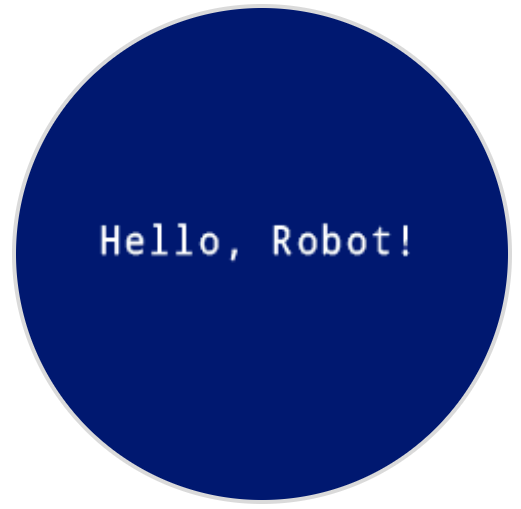
# Display a message in the middle of the screen
robot.screen.print_at("Hello, Robot!", x=40, y=120)
set_origin#
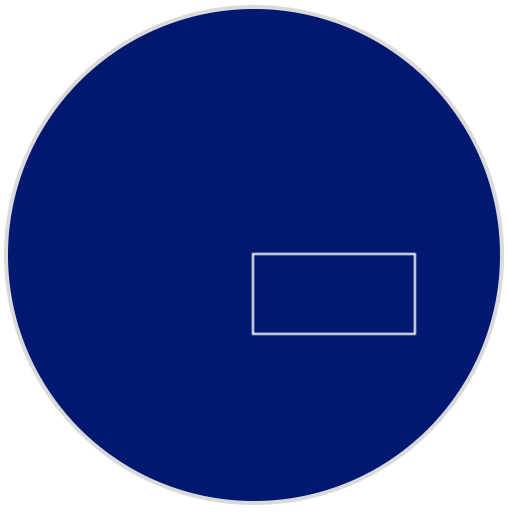
set_origin ορίζει την αρχή που χρησιμοποιείται για το σχέδιο και την εκτύπωση με βάση τις συντεταγμένες στην οθόνη του ρομπότ. Από προεπιλογή, η αρχή είναι η επάνω αριστερή γωνία της οθόνης.
Usage:
robot.screen.set_origin(x, y)
Παράμετρος |
Περιγραφή |
|---|---|
|
Η νέα συντεταγμένη x που θα οριστεί ως αρχή, δίνεται ως ακέραιος αριθμός από 0 έως 240. |
|
Η νέα συντεταγμένη y που θα οριστεί ως αρχή, δίνεται ως ακέραιος αριθμός από 0 έως 240. |
# Set the origin to the center of the screen
robot.screen.set_origin(120, 120)

# Draw a rectangle at the new origin
robot.screen.draw_rectangle(0, 0, 80, 40)
Μεταλλάκτες#
clear_screen#
clear_screen διαγράφει όλα τα σχέδια και το κείμενο από την οθόνη του ρομπότ. Από προεπιλογή, επαναφέρει επίσης τη θέση του κέρσορα στη γραμμή 1, στήλη 1.
Usage:
robot.screen.clear_screen(color)
Παράμετρος |
Περιγραφή |
|---|---|
|
Προαιρετικό. Ορίζει το χρώμα της οθόνης. Οι επιλογές περιλαμβάνουν:
|
# Draw a circle, and clear it after 2 seconds
robot.screen.draw_circle(120, 120, 60)
wait(2, SECONDS)
robot.screen.clear_screen()
# Set the background color of the screen to red
robot.screen.clear_screen(RED)

set_font#
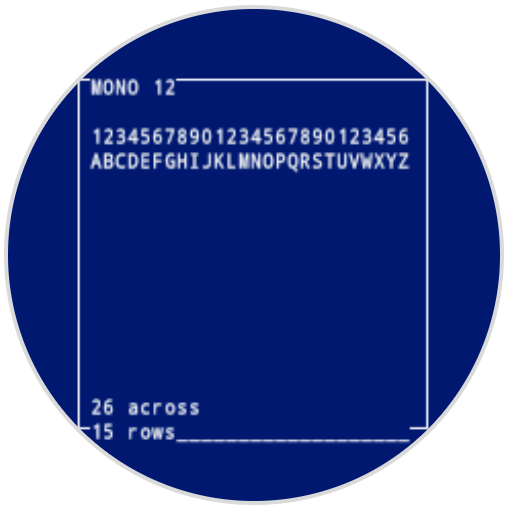
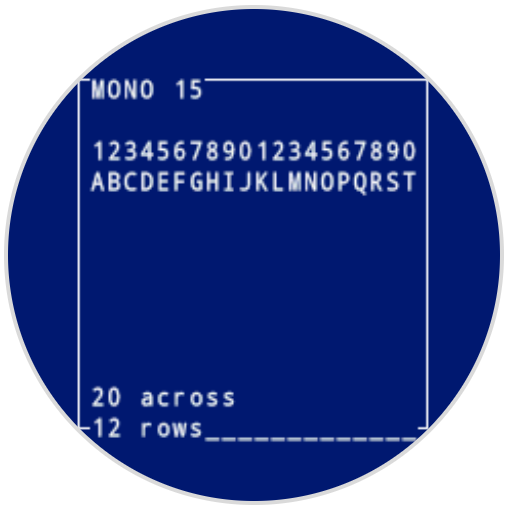
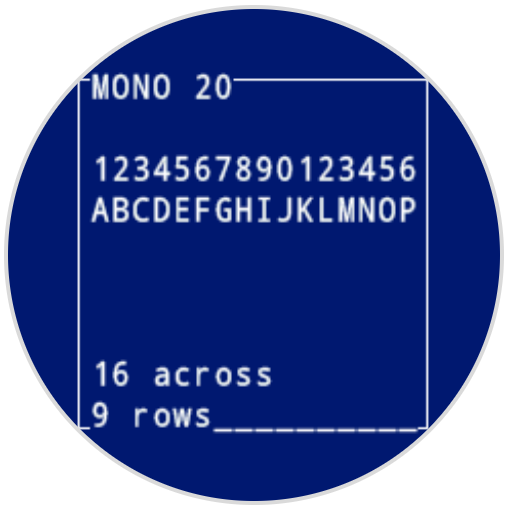
set_font ορίζει τη γραμματοσειρά που χρησιμοποιείται για την εμφάνιση κειμένου στην οθόνη του ρομπότ. Αυτή η γραμματοσειρά θα εφαρμοστεί σε όλο το κείμενο που εκτυπώνεται με print ή print_at. Η προεπιλεγμένη γραμματοσειρά στην αρχή ενός έργου είναι MONO24.
Usage:
robot.screen.set_font(fontname)
Παράμετρος |
Περιγραφή |
|---|---|
|
Ορίζει τη γραμματοσειρά σε μία από τις ακόλουθες τιμές:
|
|
|
|
|---|---|---|
|
|
|
|
|
|
|
|
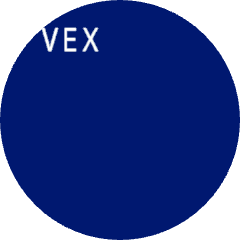
# Display text using a larger font
robot.screen.set_font(MONO40)
robot.screen.print("VEX")
set_pen_width#
set_pen_width ορίζει το πάχος των γραμμών που σχεδιάζονται και των περιγραμμάτων των σχημάτων.
Usage:
robot.screen.set_pen_width(width)
Παράμετρος |
Περιγραφή |
|---|---|
|
Το πλάτος της πένας, σε pixel, κυμαίνεται από 0 έως 32. |
# Draw a rectangle with a pen width of 10
robot.screen.set_pen_width(10)
robot.screen.draw_rectangle(50, 50, 130, 60)

set_pen_color#
set_pen_color ορίζει το χρώμα του κειμένου, των pixel, των γραμμών και των περιγραμμάτων των σχημάτων.
Usage:
robot.screen.set_pen_color(color)
Παράμετρος |
Περιγραφή |
|---|---|
|
Προαιρετικό. Το χρώμα της πένας και της γραμματοσειράς που θα χρησιμοποιηθεί. Οι επιλογές περιλαμβάνουν:
|
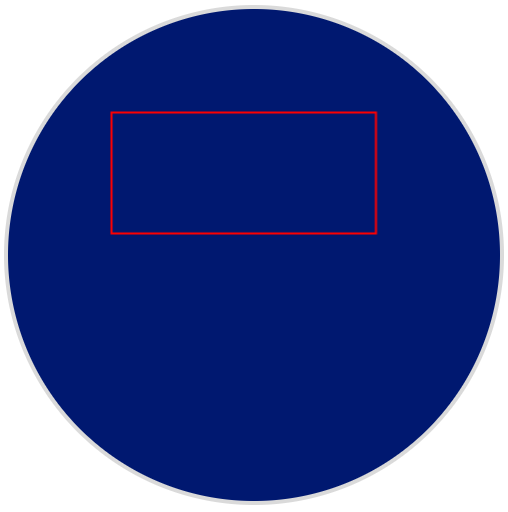
# Draw a rectangle with a red pen
robot.screen.set_pen_color(RED)
robot.screen.draw_rectangle(50, 50, 130, 60)
set_fill_color#
set_fill_color ορίζει το χρώμα γεμίσματος που χρησιμοποιείται όταν σχεδιάζονται σχήματα και όταν το εκτυπωμένο κείμενο χρησιμοποιεί φόντο.
Usage:robot.screen.set_fill_color(color)
Παράμετρος |
Περιγραφή |
|---|---|
|
Προαιρετικό. Το χρώμα γεμίσματος που θα χρησιμοποιηθεί. Οι επιλογές περιλαμβάνουν:
|
# Draw two orange rectangles
robot.screen.set_fill_color(ORANGE)
robot.screen.draw_rectangle(50, 50, 100, 60)
robot.screen.draw_rectangle(50, 130, 100, 60)

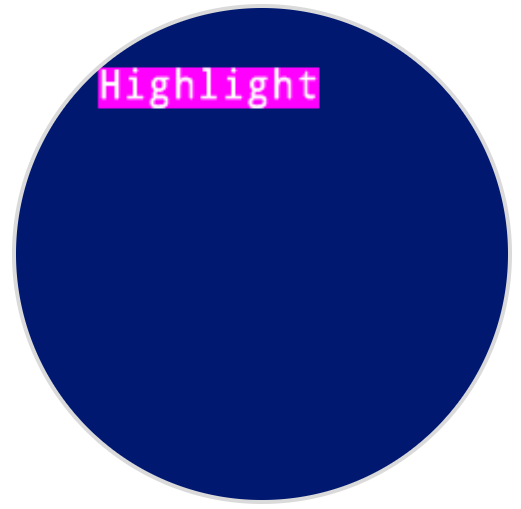
# Display text with a purple background
robot.screen.set_fill_color(PURPLE)
robot.screen.print("Highlight")
Ισοπαλία#
draw_pixel#
draw_pixel σχεδιάζει ένα pixel στην επιλεγμένη συντεταγμένη x και y χρησιμοποιώντας το τρέχον χρώμα πένας.
Usage:
robot.screen.draw_pixel(x, y)
Παράμετρος |
Περιγραφή |
|---|---|
|
Η συντεταγμένη x όπου θα σχεδιαστεί το εικονοστοιχείο, η οποία δίνεται ως ακέραιος αριθμός από 0 έως 240. |
|
Η συντεταγμένη y όπου θα σχεδιαστεί το εικονοστοιχείο, η οποία δίνεται ως ακέραιος αριθμός από 0 έως 240. |
# Draw a pixel at the center of the screen
robot.screen.draw_pixel(120, 120)

draw_line#
draw_line σχεδιάζει μια γραμμή από την πρώτη συντεταγμένη οθόνης (x1, y1) έως τη δεύτερη συντεταγμένη οθόνης (x2, y2) χρησιμοποιώντας τα τρέχοντα πλάτος πένας και χρώμα πένας.
Οι συντεταγμένες x και y χρησιμοποιούν την προεπιλεγμένη αρχή (0, 0), εκτός εάν έχει οριστεί διαφορετική αρχή χρησιμοποιώντας το set_origin.
Usage:
robot.screen.draw_line(x1, y1, x2, y2)
Παράμετρος |
Περιγραφή |
|---|---|
|
Η αρχική συντεταγμένη x της γραμμής, που δίνεται ως ακέραιος αριθμός από 0 έως 240. |
|
Η αρχική συντεταγμένη y της γραμμής, που δίνεται ως ακέραιος αριθμός από 0 έως 240. |
|
Η τελική συντεταγμένη x της γραμμής, που δίνεται ως ακέραιος αριθμός από 0 έως 240. |
|
Η τελική συντεταγμένη y της γραμμής, η οποία δίνεται ως ακέραιος αριθμός από 0 έως 240. |
# Draw a line from the top left to bottom right of the screen
robot.screen.draw_line(0, 0, 240, 240)

draw_rectangle#
draw_rectangle σχεδιάζει ένα ορθογώνιο με την επάνω αριστερή γωνία του στην επιλεγμένη συντεταγμένη (x, y) και ένα μέγεθος που καθορίζεται από το δεδομένο πλάτος και ύψος, όλα μετρημένα σε pixel. Το περίγραμμα του ορθογωνίου σχεδιάζεται χρησιμοποιώντας το τρέχον πλάτος πένας και το χρώμα πένας. Το εσωτερικό γεμίζεται με το τρέχον χρώμα γεμίσματος, εκτός εάν χρησιμοποιείται η προαιρετική παράμετρος color.
Οι συντεταγμένες x και y χρησιμοποιούν την προεπιλεγμένη αρχή (0, 0), εκτός εάν έχει οριστεί διαφορετική αρχή χρησιμοποιώντας το set_origin.
Usage:robot.screen.draw_rectangle(x, y, width, height, color)
Παράμετρος |
Περιγραφή |
|---|---|
|
Η συντεταγμένη x της επάνω αριστερής γωνίας του ορθογωνίου, που δίνεται ως ακέραιος αριθμός από 0 έως 240. |
|
Η συντεταγμένη y της επάνω αριστερής γωνίας του ορθογωνίου, που δίνεται ως ακέραιος αριθμός από 0 έως 240. |
|
Το πλάτος του ορθογωνίου, που δίνεται ως ακέραιος αριθμός από 0 έως 240. |
|
Το ύψος του ορθογωνίου, που δίνεται ως ακέραιος αριθμός από 0 έως 240. |
|
Προαιρετικό. Το χρώμα γεμίσματος του ορθογωνίου. Οι επιλογές περιλαμβάνουν:
|
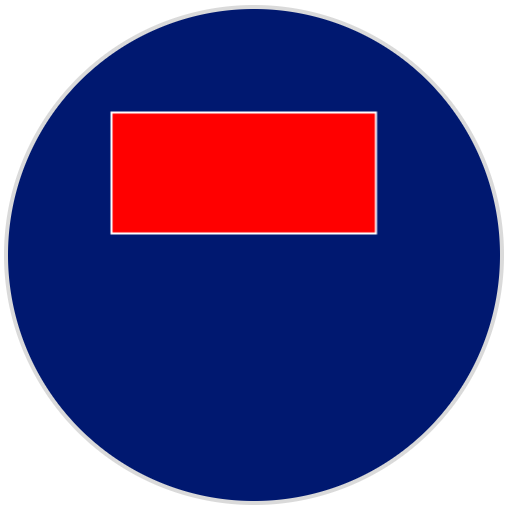
# Draw a red rectangle on the screen
robot.screen.draw_rectangle(50, 50, 130, 60, RED)
draw_circle#
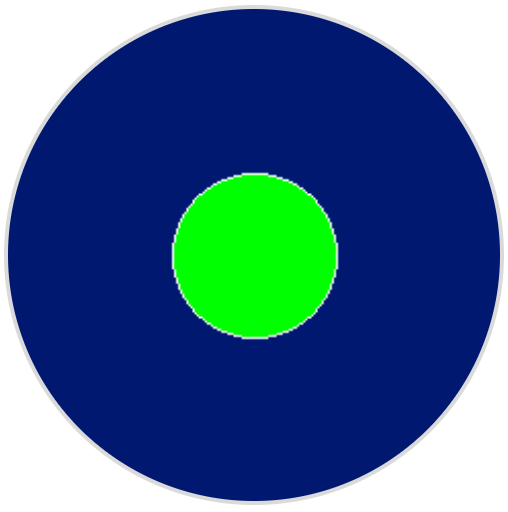
draw_circle σχεδιάζει έναν κύκλο με κέντρο την επιλεγμένη συντεταγμένη (x, y) και μέγεθος που καθορίζεται από τη δεδομένη ακτίνα, όλα μετρημένα σε pixel. Το περίγραμμα του κύκλου σχεδιάζεται χρησιμοποιώντας το τρέχον πλάτος πένας και το χρώμα πένας. Το εσωτερικό γεμίζεται με το τρέχον χρώμα γεμίσματος, εκτός εάν χρησιμοποιείται η προαιρετική παράμετρος color.
Οι συντεταγμένες x και y χρησιμοποιούν την προεπιλεγμένη αρχή (0, 0), εκτός εάν έχει οριστεί διαφορετική αρχή χρησιμοποιώντας το set_origin.
Usage:robot.screen.draw_circle(x, y, radius, color)
Παράμετρος |
Περιγραφή |
|---|---|
|
Η συντεταγμένη x του κέντρου του κύκλου, που δίνεται ως ακέραιος αριθμός από 0 έως 240. |
|
Η συντεταγμένη y του κέντρου του κύκλου, που δίνεται ως ακέραιος αριθμός από 0 έως 240. |
|
Η ακτίνα του κύκλου, που δίνεται ως ακέραιος αριθμός από 0 έως 240 pixel. |
|
Προαιρετικό. Το χρώμα γεμίσματος του κύκλου. Οι επιλογές περιλαμβάνουν:
|
# Draw a green circle on the screen
robot.screen.draw_circle(120, 120, 40, GREEN)
show_file#
show_file εμφανίζει μια προσαρμοσμένη εικόνα που έχει μεταφορτωθεί στην οθόνη του ρομπότ, με τη θέση της να έχει οριστεί χρησιμοποιώντας τις παραμέτρους x, yκαι center με βάση το σημείο αναφοράς της εικόνας.
Usage:
robot.screen.show_file(file, x, y, center)
Παράμετρος |
Περιγραφή |
|---|---|
|
Η προσαρμοσμένη εικόνα που θα χρησιμοποιηθεί, από |
|
Η οριζόντια μετατόπιση για την εικόνα, που δίνεται ως ακέραιος αριθμός σε pixel. Οι θετικές τιμές την μετακινούν προς τα δεξιά, ενώ οι αρνητικές τιμές την μετακινούν προς τα αριστερά. |
|
Η κατακόρυφη μετατόπιση για την εικόνα, που δίνεται ως ακέραιος αριθμός σε pixel. Οι θετικές τιμές την μετακινούν προς τα κάτω, ενώ οι αρνητικές τιμές την μετακινούν προς τα πάνω. |
|
Προαιρετικό. Εάν |
# Display uploaded Image 1 in the top left corner
robot.screen.show_file(IMAGE1, 0, 0)
# Show the same image on both sides of the screen
# Image size is 120 x 120
robot.screen.show_file(IMAGE1, 65, 0, center=True)
robot.screen.show_file(IMAGE1, -65, 0, center=True)
set_clip_region#
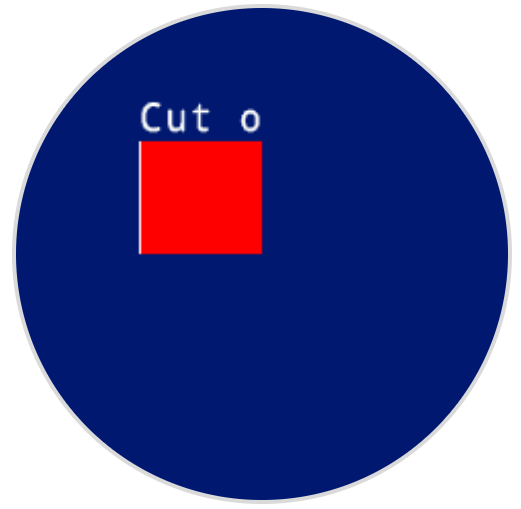
set_clip_region ορίζει μια ορθογώνια περιοχή στην οθόνη όπου θα περιορίζονται όλα τα σχέδια και το κείμενο. Οποιοδήποτε περιεχόμενο εκτός αυτής της περιοχής δεν θα εμφανίζεται.
Usage:
robot.screen.set_clip_region(x, y, width, height)
Παράμετρος |
Περιγραφή |
|---|---|
|
Η συντεταγμένη x της επάνω αριστερής γωνίας της περιοχής αποκοπής, που δίνεται ως δεκαδικός αριθμός ( |
|
Η συντεταγμένη y της επάνω αριστερής γωνίας της περιοχής αποκοπής, που δίνεται ως δεκαδικός αριθμός ( |
|
Το πλάτος της περιοχής αποκοπής σε pixel, που δίνεται ως δεκαδικός αριθμός ( |
|
Το ύψος της περιοχής αποκοπής σε pixel, που δίνεται ως δεκαδικός αριθμός ( |
# Restrict text and drawings to a specific region
robot.screen.set_clip_region(0, 0, 120, 120)
robot.screen.draw_rectangle(60, 60, 100, 100, RED)
robot.screen.print_at("Cut off!", x=60, y=60)
Επανακλήσεις#
pressed#
Αν πατηθεί pressed καταχωρεί μια μέθοδο που θα κληθεί όταν πατηθεί η οθόνη του ρομπότ.
Usage:robot.screen.pressed(callback, arg)
Παράμετροι |
Περιγραφή |
|---|---|
|
Μια συνάρτηση που έχει οριστεί προηγουμένως για εκτέλεση όταν πατηθεί η οθόνη του ελεγκτή. |
|
Προαιρετικό. Μια πλειάδα που περιέχει ορίσματα για να μεταβιβαστούν στη συνάρτηση επανάκλησης. Δείτε Χρήση Συναρτήσεων με Παραμέτρους για περισσότερες πληροφορίες. |
# Set the LEDs to green when the screen is pressed.
def screen_touched():
    robot.led.on(ALL_LEDS, GREEN)

robot.screen.pressed(screen_touched)
released#
Η συνάρτηση released καταχωρεί μια μέθοδο που θα κληθεί όταν απελευθερωθεί η οθόνη του ρομπότ.
Usage:robot.screen.released(callback, arg)
Παράμετροι |
Περιγραφή |
|---|---|
|
Μια συνάρτηση που έχει οριστεί προηγουμένως για εκτέλεση όταν πατηθεί η οθόνη του ελεγκτή. |
|
Προαιρετικό. Μια πλειάδα που περιέχει ορίσματα για να μεταβιβαστούν στη συνάρτηση επανάκλησης. Δείτε Χρήση Συναρτήσεων με Παραμέτρους για περισσότερες πληροφορίες. |
# Set the LEDs to blue when the screen is released.
def screen_released():
    robot.led.on(ALL_LEDS, BLUE)

robot.screen.released(screen_released)