
Αισθητήρας απόστασης#
Εισαγωγή#
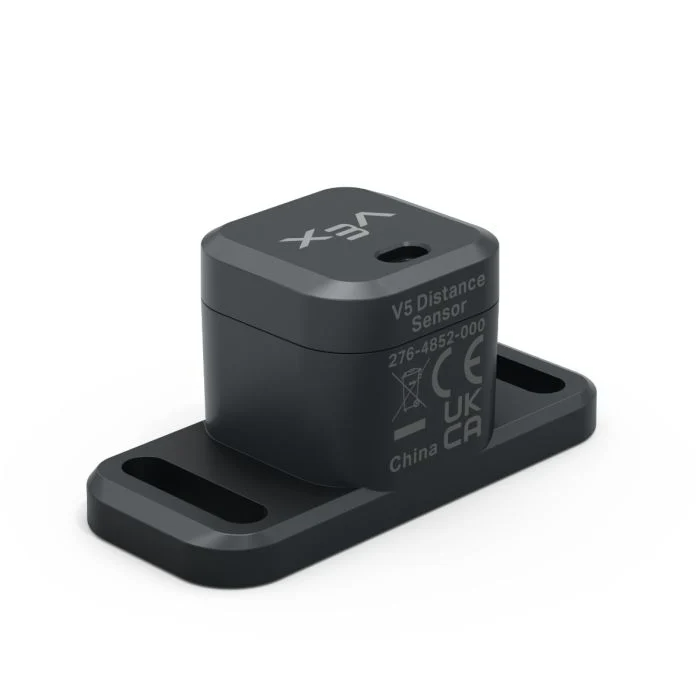
Ο Αισθητήρας Απόστασης μπορεί να ανιχνεύσει εάν ένα αντικείμενο βρίσκεται μπροστά από τον αισθητήρα και να επιστρέψει την απόσταση που βρίσκεται αυτό το αντικείμενο. Μπορεί επίσης να επιστρέψει τη σχετική ταχύτητα του ανιχνευμένου αντικειμένου και να εκτιμήσει εάν το αντικείμενο είναι μικρό, μεσαίο ή μεγάλο.
Ο αισθητήρας απόστασης λειτουργεί σε εύρος από 20 mm έως 2000 mm.
Κάτω από 200 mm, η ακρίβεια είναι περίπου ±15 mm. Πάνω από 200 mm, η ακρίβεια βελτιώνεται σε περίπου 5%.
Ο αισθητήρας απόστασης χρησιμοποιεί λέιζερ Κλάσης 1. Η ανίχνευση κατευθύνεται κατευθείαν μπροστά και είναι ασφαλής για την τάξη.
Αυτή η σελίδα χρησιμοποιεί distance_sensor ως παράδειγμα ονόματος αισθητήρα απόστασης. Αντικαταστήστε το με το δικό σας διαμορφωμένο όνομα, όπως απαιτείται.
Παρακάτω είναι μια λίστα με τις διαθέσιμες μεθόδους:
object_distance— Επιστρέφει την απόσταση μεταξύ του αισθητήρα απόστασης και του πλησιέστερου αντικειμένου που ανιχνεύθηκε.object_velocity— Επιστρέφει την ταχύτητα με την οποία το ανιχνευμένο αντικείμενο κινείται προς ή μακριά από τον αισθητήρα απόστασης.object_size— Επιστρέφει το εκτιμώμενο μέγεθος του ανιχνευμένου αντικειμένου.is_object_detected— Επιστρέφει εάν ο αισθητήρας απόστασης ανιχνεύει αυτήν τη στιγμή ένα αντικείμενο.changed— Καταγράφει μια συνάρτηση που θα εκτελείται κάθε φορά που αλλάζει η τιμή του αισθητήρα απόστασης.
Κατασκευαστής — Μη αυτόματη αρχικοποίηση ενός αισθητήρα απόστασης.
Distance— Δημιουργεί έναν αισθητήρα απόστασης.
απόσταση_αντικειμένου#
object_distance επιστρέφει την απόσταση μεταξύ του αισθητήρα απόστασης και του πλησιέστερου αντικειμένου που ανιχνεύθηκε ως δεκαδικό ψηφίο (float).
Usage:
distance_sensor.object_distance(units)
Παράμετροι |
Περιγραφή |
|---|---|
|
Προαιρετικά. Η μονάδα απόστασης: |
# Drive forward until the object is within 50 mm away
drivetrain.drive(FORWARD)
while not distance_sensor.object_distance(MM) < 50:
  pass
drivetrain.stop()
ταχύτητα_αντικειμένου#
object_velocity επιστρέφει τη σχετική ταχύτητα του ανιχνευμένου αντικειμένου ως δεκαδικό ψηφίο (float) σε m/s (μέτρα ανά δευτερόλεπτο).
Η ταχύτητα δείχνει πόσο γρήγορα κινείται το αντικείμενο προς ή μακριά από τον αισθητήρα απόστασης. Μια τιμή κοντά στο 0 σημαίνει ότι το αντικείμενο δεν κινείται πολύ σε σχέση με τον αισθητήρα.
Usage:
distance_sensor.object_velocity()
Παράμετροι |
Περιγραφή |
|---|---|
Αυτή η μέθοδος δεν έχει παραμέτρους. |
μέγεθος_αντικειμένου#
object_size επιστρέφει το εκτιμώμενο μέγεθος του αντικειμένου που ανιχνεύεται από τον αισθητήρα απόστασης.
Ο αισθητήρας απόστασης εκτιμά το μέγεθος του αντικειμένου με βάση το πόσο μεγάλο μέρος της ορατότητας του αισθητήρα καταλαμβάνεται από το ανιχνευόμενο αντικείμενο.
ObjectSizeType(0, “NONE”)— Δεν ανιχνεύεται κανένα αντικείμενο.ObjectSizeType(1, “SMALL”)— Εντοπίστηκε ένα μικρό αντικείμενο.ObjectSizeType(2, “MEDIUM”)— Εντοπίστηκε ένα μεσαίο αντικείμενο.ObjectSizeType(3, “LARGE”)— Εντοπίστηκε ένα μεγάλο αντικείμενο.
Usage:
distance_sensor.object_size()
Παράμετροι |
Περιγραφή |
|---|---|
Αυτή η μέθοδος δεν έχει παραμέτρους. |
ανιχνεύτηκε_αντικείμενο#
is_object_detected επιστρέφει εάν ο αισθητήρας απόστασης ανιχνεύει αυτήν τη στιγμή ένα αντικείμενο.
True— Ο αισθητήρας απόστασης ανιχνεύει ένα αντικείμενο.False— Ο αισθητήρας απόστασης δεν ανιχνεύει αντικείμενο.
Usage:
distance_sensor.is_object_detected()
Παράμετροι |
Περιγραφή |
|---|---|
Αυτή η μέθοδος δεν έχει παραμέτρους. |
# Drive forward until the object is within 50 mm away
while True:
  drivetrain.drive(FORWARD)
  if distance_sensor.is_object_detected():
    if distance_sensor.object_distance(MM) < 50:
      drivetrain.stop()
      break
άλλαξε#
Η τιμή changed καταχωρεί μια συνάρτηση που θα καλείται κάθε φορά που αλλάζει η τιμή του αισθητήρα απόστασης.
Usage:
distance_sensor.changed(callback, arg)
Παράμετροι |
Περιγραφή |
|---|---|
|
Μια προηγουμένως ορισμένη συνάρτηση που εκτελείται όταν αλλάζει η τιμή του αισθητήρα απόστασης. |
|
Προαιρετικό. Μια πλειάδα που περιέχει ορίσματα για να μεταβιβαστούν στη συνάρτηση επανάκλησης. Δείτε Χρήση Συναρτήσεων με Παραμέτρους για περισσότερες πληροφορίες. |
def my_function():
  brain.screen.print("Distance changed")

# Call my_function whenever distance_sensor's value changes
distance_sensor.changed(my_function)
Κατασκευαστής#
Οι κατασκευαστές χρησιμοποιούνται για τη χειροκίνητη δημιουργία αντικειμένων Distance , όπως κατά τη διαμόρφωση ενός Αισθητήρα Απόστασης εκτός του VEXcode.
Distance#
Distance δημιουργεί ένα αντικείμενο Αισθητήρα Απόστασης.
Usage:
Distance(smartport)
Παράμετρος |
Περιγραφή |
|---|---|
|
Η Έξυπνη Θύρα στην οποία είναι συνδεδεμένος ο Αισθητήρας Απόστασης, γράφεται ως |
# Create a Distance Sensor in Port 10
distance_sensor = Distance(Ports.PORT10)