
Κονσόλα#
Εισαγωγή#
Το VEXcode VR περιλαμβάνει μια καρτέλα Monitor (Παρακολούθηση) που μπορεί να εμφανίσει την έξοδο της κονσόλας, να παρακολουθεί μεταβλητές και να παρακολουθεί τιμές αισθητήρων ενώ εκτελείται ένα έργο.
Οι μέθοδοι κονσόλας μπορούν να εμφανίσουν κείμενο, αριθμούς και τιμές μεταβλητών. Μπορούν επίσης να μετακινήσουν τον κέρσορα της κονσόλας σε μια νέα γραμμή, να καθαρίσουν την κονσόλα και να ορίσουν το χρώμα του κειμένου που θα εκτυπώνεται μετά την αλλαγή του χρώματος.
Παρακάτω είναι μια λίστα με όλες τις μεθόδους:
Εκτύπωση — Έξοδος κειμένου ή εκκαθάριση της Κονσόλας.
print— Εμφανίζει κείμενο, αριθμούς ή τιμές μεταβλητών στην Κονσόλα.new_line— Μετακινεί τον κέρσορα της κονσόλας στην αρχή της επόμενης γραμμής.set_print_color— Ορίζει το χρώμα που χρησιμοποιείται για το κείμενο που εκτυπώνεται στην Κονσόλα.clear— Διαγράφει όλες τις γραμμές στην Κονσόλα.
Παρακολούθηση — Παρακολουθήστε την τιμή ενός αισθητήρα ή μιας μεταβλητής κατά τη διάρκεια ενός έργου στην καρτέλα Παρακολούθηση του VEXcode.
monitor_variable— Προσθέτει μία ή περισσότερες προκαθορισμένες μεταβλητές στην καρτέλα Monitor.monitor_sensor— Προσθέτει μία ή περισσότερες τιμές αισθητήρα στην καρτέλα Monitor.
Αποτύπωμα#
print#
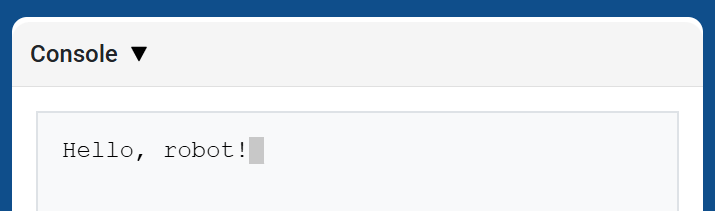
print εμφανίζει κείμενο, αριθμούς ή τιμές μεταβλητών στην Κονσόλα χρησιμοποιώντας την τρέχουσα θέση του κέρσορα.
Χρησιμοποιήστε προσαρμοσμένη μορφοποίηση συμβολοσειράς όταν θέλετε ένα εκτυπωμένο μήνυμα να περιλαμβάνει τιμές από το έργο σας, όπως μια βαθμολογία, ένα χρονόμετρο ή μια ένδειξη αισθητήρα. Ανατρέξτε στη σελίδα Μορφοποίηση συμβολοσειράς για περισσότερες πληροφορίες.
Χρησιμοποιήστε την συνάρτηση new_line όταν θέλετε η επόμενη εκτυπωμένη τιμή να ξεκινά σε νέα γραμμή.
Usage:
brain.print(value, precision)
Παράμετροι |
Περιγραφή |
|---|---|
|
Το κείμενο, ο αριθμός ή η τιμή μεταβλητής που θα εμφανίζεται στην Κονσόλα. |
|
Προαιρετικό. Ο αριθμός των δεκαδικών ψηφίων που θα εμφανίζονται κατά την εκτύπωση ενός αριθμού. Η προεπιλογή είναι |
def main():
    # Display a message in the Console
    brain.print("Hello, robot!")

# VR threads — Do not delete
vr_thread(main)
def main():
    # Print a number with 5 decimal places
    brain.print(math.pi, precision=5)

# VR threads — Do not delete
vr_thread(main)
new_line#
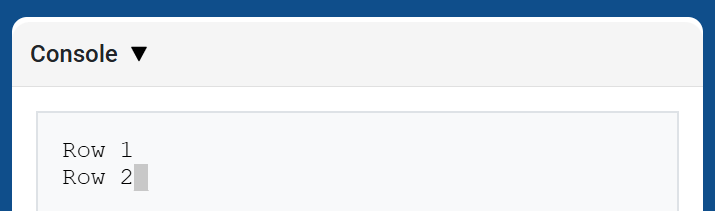
new_line μετακινεί τον κέρσορα στη στήλη 1 στην επόμενη γραμμή της Κονσόλας. Η επόμενη τιμή που θα εκτυπωθεί θα εμφανιστεί σε αυτήν τη γραμμή.
Χρησιμοποιήστε αυτήν τη μέθοδο όταν θέλετε η επόμενη εκτυπωμένη τιμή να ξεκινά σε μια νέα γραμμή.
Usage:
brain.new_line()
Παράμετροι |
Περιγραφή |
|---|---|
Αυτή η μέθοδος δεν έχει παραμέτρους. |
def main():
    # Print on two lines
    brain.print("Row 1")
    brain.new_line()
    brain.print("Row 2")

# VR threads — Do not delete
vr_thread(main)
set_print_color#
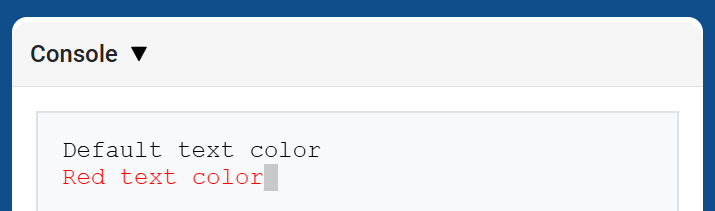
set_print_color ορίζει το χρώμα που χρησιμοποιείται για το κείμενο που εκτυπώνεται στην Κονσόλα μετά τη χρήση αυτής της μεθόδου. Στην αρχή ενός έργου, το χρώμα κειμένου της Κονσόλας ορίζεται σε BLACK.
Usage:
brain.set_print_color(color)
Παράμετροι |
Περιγραφή |
|---|---|
|
Το χρώμα που θα χρησιμοποιηθεί για το κείμενο που εκτυπώνεται στην Κονσόλα:
|
def main():
    # Print text in different colors
    brain.print("Default text color")
    brain.new_line()
    brain.set_print_color(RED)
    brain.print("Red text color")

# VR threads — Do not delete
vr_thread(main)
clear#
clear καθαρίζει όλες τις γραμμές από την Κονσόλα.
Usage:
brain.clear()
Παράμετροι |
Περιγραφή |
|---|---|
Αυτή η μέθοδος δεν έχει παραμέτρους. |
def main():
    # Display text, then clear it after two seconds
    brain.print("This will disappear...")
    wait(2, SECONDS)
    brain.clear()

# VR threads — Do not delete
vr_thread(main)
Ελεγκτής εκπομπών#
monitor_variable#
monitor_variable προσθέτει μία ή περισσότερες προκαθορισμένες μεταβλητές στην καρτέλα Monitor στο VEXcode. Αυτό σας επιτρέπει να παρακολουθείτε την αλλαγή της τιμής μιας μεταβλητής ενώ εκτελείται ένα έργο.
Οι μεταβλητές πρέπει να είναι global για να είναι επιτυχής η παρακολούθηση των μεταβλητών monitor_variable Δώστε το όνομα κάθε μεταβλητής ως συμβολοσειρά.
Usage:
monitor_variable(“variable”)
monitor_variable(“variable1”, “variable2”)
Παράμετροι |
Περιγραφή |
|---|---|
|
Το όνομα μιας προκαθορισμένης καθολικής μεταβλητής προς παρακολούθηση, που δίνεται ως συμβολοσειρά. Για να παρακολουθείτε περισσότερες από μία μεταβλητές, διαχωρίστε κάθε όνομα μεταβλητής με κόμμα. |
def main():
    # Monitor the amount of loops
    global loops
    monitor_variable("loops")

    # Drive in a square 3 times
    for loops in range(12):
        drivetrain.turn_for(RIGHT, 90, DEGREES)
        drivetrain.drive_for(FORWARD, 150, MM)

# VR threads — Do not delete
vr_thread(main)
actions = 0

def main():
    # Monitor the amount of loops and actions
    global loops, actions
    monitor_variable("loops", "actions")

    # Drive in a square 3 times
    for loops in range(12):
        drivetrain.turn_for(RIGHT, 90, DEGREES)
        drivetrain.drive_for(FORWARD, 150, MM)
        actions = actions + 2

# VR threads — Do not delete
vr_thread(main)
monitor_sensor#
monitor_sensor προσθέτει μία ή περισσότερες τιμές αισθητήρων στην καρτέλα Monitor στο VEXcode. Αυτό σας επιτρέπει να παρακολουθείτε τις τιμές αισθητήρων να αλλάζουν ενώ εκτελείται ένα έργο.
Εάν ένας αισθητήρας μπορεί να επιστρέψει δεδομένα σε διαφορετικές μονάδες, η καρτέλα Παρακολούθηση θα εμφανίσει τα δεδομένα που επιστρέφονται σε κάθε διαθέσιμη μονάδα. Παρέχετε κάθε τιμή αισθητήρα ως συμβολοσειρά.
Usage:
monitor_sensor(“sensor”)
monitor_sensor(“sensor1”, “sensor2”)
Παράμετροι |
Περιγραφή |
|---|---|
|
Η τιμή του αισθητήρα που θα παρακολουθείται, δίνεται ως συμβολοσειρά. Για να παρακολουθείτε περισσότερες από μία τιμές αισθητήρα, διαχωρίστε κάθε τιμή αισθητήρα με κόμμα. Αυτή μπορεί να είναι οποιαδήποτε μέθοδος αισθητήρα που επιστρέφει μια τιμή, όπως |
def main():
    # Monitor the distance in MM and inches
    monitor_sensor("front_distance.get_distance")
    drivetrain.drive_for(FORWARD, 400, MM)

# VR threads — Do not delete
vr_thread(main)
def main():
    # Monitor the rotation in the Monitor tab
    monitor_sensor("drivetrain.rotation", "drivetrain.heading")
    drivetrain.turn_for(RIGHT, 450, DEGREES)

# VR threads — Do not delete
vr_thread(main)