
コンソール#
導入#
VEXcode VRには、プロジェクトの実行中にコンソール出力の表示、変数の監視、センサー値の監視ができるモニタータブが含まれています。
コンソールメソッドは、テキスト、数値、変数値を表示できます。また、コンソールカーソルを新しい行に移動したり、コンソールをクリアしたり、色を変更した後に表示されるテキストの色を設定したりすることもできます。
以下にすべてのメソッドの一覧を示します。
印刷 — テキストを出力するか、コンソールをクリアします。
print— コンソールにテキスト、数値、または変数値を表示します。new_line— コンソールカーソルを次の行の先頭に移動します。set_print_color— コンソールに表示されるテキストの色を設定します。clear— コンソール内のすべての行をクリアします。
モニター — VEXcodeのモニタータブで、プロジェクト中にセンサーまたは変数の値を監視します。
monitor_variable— 1 つ以上の定義済み変数をモニター タブに追加します。monitor_sensor— モニター タブに 1 つ以上のセンサー値を追加します。
印刷#
print#
print は、現在のカーソル位置を使用して、コンソールにテキスト、数値、または変数値を表示します。
印刷メッセージに、スコア、タイマー、センサーの読み取り値など、プロジェクトの値を含める場合は、カスタム文字列フォーマットを使用します。詳細については、文字列フォーマットページを参照してください。
次の印刷値を新しい行から開始したい場合は、new_line を使用します。
Usage:
brain.print(value, precision)
パラメータ |
説明 |
|---|---|
|
コンソールに表示するテキスト、数値、または変数値。 |
|
オプション。数値を印刷する際に表示する小数点以下の桁数を指定します。デフォルトは |
def main():
    # Display a message in the Console
    brain.print("Hello, robot!")

# VR threads — Do not delete
vr_thread(main)
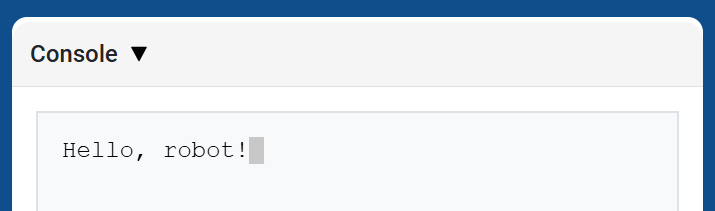
def main():
    # Print a number with 5 decimal places
    brain.print(math.pi, precision=5)

# VR threads — Do not delete
vr_thread(main)
new_line#
new_line コンソールの次の行の 1 列目にカーソルを移動します。次に表示される値はその行に表示されます。
次の印刷値を新しい行から開始したい場合は、この方法を使用してください。
Usage:
brain.new_line()
パラメータ |
説明 |
|---|---|
このメソッドにはパラメータがありません。 |
def main():
    # Print on two lines
    brain.print("Row 1")
    brain.new_line()
    brain.print("Row 2")

# VR threads — Do not delete
vr_thread(main)
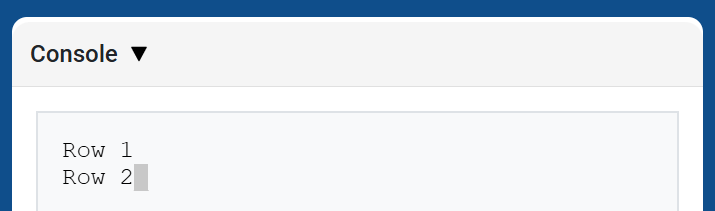
set_print_color#
set_print_color このメソッドが使用された後にコンソールに表示されるテキストの色を設定します。プロジェクトの開始時には、コンソールのテキストの色は BLACKに設定されます。
Usage:
brain.set_print_color(color)
パラメータ |
説明 |
|---|---|
|
コンソールに表示されるテキストの色:
|
def main():
    # Print text in different colors
    brain.print("Default text color")
    brain.new_line()
    brain.set_print_color(RED)
    brain.print("Red text color")

# VR threads — Do not delete
vr_thread(main)
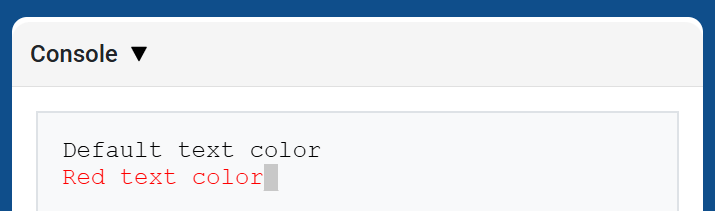
clear#
clear コンソールからすべての行をクリアします。
Usage:
brain.clear()
パラメータ |
説明 |
|---|---|
このメソッドにはパラメータがありません。 |
def main():
    # Display text, then clear it after two seconds
    brain.print("This will disappear...")
    wait(2, SECONDS)
    brain.clear()

# VR threads — Do not delete
vr_thread(main)
モニター#
monitor_variable#
monitor_variable 、VEXcode のモニター タブに 1 つ以上の定義済み変数を追加します。これにより、プロジェクトの実行中に変数の値の変化を監視できます。
monitor_variable 正常に監視するには、変数は global である必要があります。各変数名は文字列として指定してください。
Usage:
monitor_variable(“variable”)
monitor_variable(“variable1”, “variable2”)
パラメータ |
説明 |
|---|---|
|
監視対象となる定義済みグローバル変数の名前を文字列で指定します。複数の変数を監視する場合は、各変数名をカンマで区切ってください。 |
def main():
    # Monitor the amount of loops
    global loops
    monitor_variable("loops")

    # Drive in a square 3 times
    for loops in range(12):
        drivetrain.turn_for(RIGHT, 90, DEGREES)
        drivetrain.drive_for(FORWARD, 150, MM)

# VR threads — Do not delete
vr_thread(main)
actions = 0

def main():
    # Monitor the amount of loops and actions
    global loops, actions
    monitor_variable("loops", "actions")

    # Drive in a square 3 times
    for loops in range(12):
        drivetrain.turn_for(RIGHT, 90, DEGREES)
        drivetrain.drive_for(FORWARD, 150, MM)
        actions = actions + 2

# VR threads — Do not delete
vr_thread(main)
monitor_sensor#
monitor_sensor は、VEXcode のモニター タブに 1 つ以上のセンサー値を追加します。これにより、プロジェクトの実行中にセンサー値の変化を監視できます。
センサーが異なる単位でデータを返すことができる場合、「モニター」タブには、返されたデータが利用可能な各単位で表示されます。各センサーの値は文字列として指定してください。
Usage:
monitor_sensor(“sensor”)
monitor_sensor(“sensor1”, “sensor2”)
パラメータ |
説明 |
|---|---|
|
監視するセンサー値を文字列として指定します。複数のセンサー値を監視する場合は、各センサー値をカンマで区切ります。これは、 |
def main():
    # Monitor the distance in MM and inches
    monitor_sensor("front_distance.get_distance")
    drivetrain.drive_for(FORWARD, 400, MM)

# VR threads — Do not delete
vr_thread(main)
def main():
    # Monitor the rotation in the Monitor tab
    monitor_sensor("drivetrain.rotation", "drivetrain.heading")
    drivetrain.turn_for(RIGHT, 450, DEGREES)

# VR threads — Do not delete
vr_thread(main)