
安慰#
介紹#
VEXcode VR 包含一個監視器選項卡,可在專案運行時顯示控制台輸出、監視變數和監視感測器值。
控制台方法可以顯示文字、數字和變數值。它們還可以將控制台遊標移動到新的一行、清除控制台以及設定更改顏色後列印文字的顏色。
以下是所有方法的清單:
列印 — 輸出文字或清除控制台。
print— 在控制台中顯示文字、數字或變數值。new_line— 將控制台遊標移到下一行的開頭。set_print_color— 設定控制台中列印文字的顏色。clear— 清除控制台中的所有行。
監控 — 在 VEXcode 的「監控」標籤中,監控專案期間感測器或變數的值。
monitor_variable— 在「監視器」標籤中新增一個或多個預定義變數。monitor_sensor— 在「監視器」標籤中新增一個或多個感測器值。
列印#
print#
print 使用目前遊標位置在控制台中顯示文字、數字或變數值。
如果您希望列印訊息中包含項目中的值(例如分數、計時器或感測器讀數),請使用自訂字串格式。有關更多信息,請參閱字串格式頁面。
當您希望下一個列印值從新的一行開始時,請使用 new_line。
Usage:
brain.print(value, precision)
參數 |
描述 |
|---|---|
|
若要在控制台中顯示的文字、數字或變數值。 |
|
可選。列印數字時顯示的小數位數。預設值為 |
def main():
    # Display a message in the Console
    brain.print("Hello, robot!")

# VR threads — Do not delete
vr_thread(main)
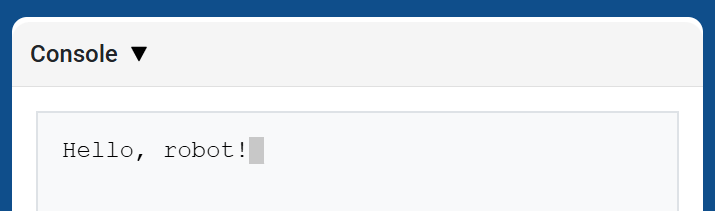
def main():
    # Print a number with 5 decimal places
    brain.print(math.pi, precision=5)

# VR threads — Do not delete
vr_thread(main)
new_line#
new_line 將遊標移到控制台中下一行的第 1 列。下一個列印的值將顯示在該行。
當您希望下一個列印值從新的一行開始時,請使用此方法。
Usage:
brain.new_line()
參數 |
描述 |
|---|---|
此方法沒有參數。 |
def main():
    # Print on two lines
    brain.print("Row 1")
    brain.new_line()
    brain.print("Row 2")

# VR threads — Do not delete
vr_thread(main)
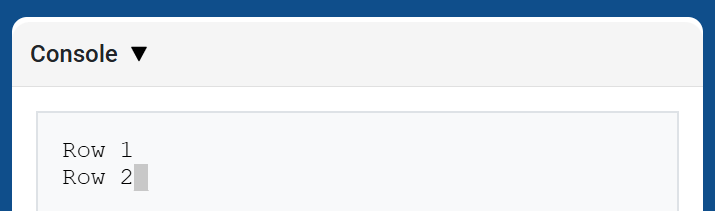
set_print_color#
set_print_color 設定使用此方法後控制台中列印的文字顏色。在專案開始時,控制台文字顏色設定為 BLACK。
Usage:
brain.set_print_color(color)
參數 |
描述 |
|---|---|
|
控制台列印文字的顏色:
|
def main():
    # Print text in different colors
    brain.print("Default text color")
    brain.new_line()
    brain.set_print_color(RED)
    brain.print("Red text color")

# VR threads — Do not delete
vr_thread(main)
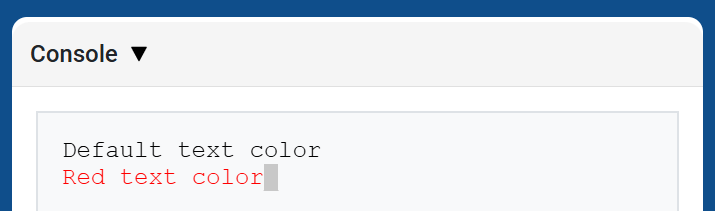
clear#
clear 清除控制台中的所有行。
Usage:
brain.clear()
參數 |
描述 |
|---|---|
此方法沒有參數。 |
def main():
    # Display text, then clear it after two seconds
    brain.print("This will disappear...")
    wait(2, SECONDS)
    brain.clear()

# VR threads — Do not delete
vr_thread(main)
監視器#
monitor_variable#
monitor_variable 將一個或多個預定義變數新增至 VEXcode 的「監視器」標籤。這樣,您就可以在專案運行時監視變數值的變化。
Variables must be global for monitor_variable to monitor them successfully. Provide each variable name as a string.
Usage:
monitor_variable(“variable”)
monitor_variable(“variable1”, “variable2”)
參數 |
描述 |
|---|---|
|
要監控的預定義全域變數的名稱,以字串形式給出。若要監控多個變量,請用逗號分隔每個變數名稱。 |
def main():
    # Monitor the amount of loops
    global loops
    monitor_variable("loops")

    # Drive in a square 3 times
    for loops in range(12):
        drivetrain.turn_for(RIGHT, 90, DEGREES)
        drivetrain.drive_for(FORWARD, 150, MM)

# VR threads — Do not delete
vr_thread(main)
actions = 0

def main():
    # Monitor the amount of loops and actions
    global loops, actions
    monitor_variable("loops", "actions")

    # Drive in a square 3 times
    for loops in range(12):
        drivetrain.turn_for(RIGHT, 90, DEGREES)
        drivetrain.drive_for(FORWARD, 150, MM)
        actions = actions + 2

# VR threads — Do not delete
vr_thread(main)
monitor_sensor#
monitor_sensor 將一個或多個感測器值新增至 VEXcode 的「監視器」標籤。這樣,您就可以在專案運行時觀察感測器值的變化。
如果感測器可以以不同的單位返回數據,「監控」標籤將顯示以每種可用單位返回的數據。請以字串形式提供每個感測器值。
Usage:
monitor_sensor(“sensor”)
monitor_sensor(“sensor1”, “sensor2”)
參數 |
描述 |
|---|---|
|
要監測的感測器值,以字串形式給出。若要監測多個感測器值,請用逗號分隔每個感測器值。這可以是任何傳回值的感測器方法,例如 |
def main():
    # Monitor the distance in MM and inches
    monitor_sensor("front_distance.get_distance")
    drivetrain.drive_for(FORWARD, 400, MM)

# VR threads — Do not delete
vr_thread(main)
def main():
    # Monitor the rotation in the Monitor tab
    monitor_sensor("drivetrain.rotation", "drivetrain.heading")
    drivetrain.turn_for(RIGHT, 450, DEGREES)

# VR threads — Do not delete
vr_thread(main)