
콘솔#
소개#
VEXcode VR에는 프로젝트 실행 중에 콘솔 출력, 변수 및 센서 값을 표시할 수 있는 모니터 탭이 포함되어 있습니다.
콘솔 메서드는 텍스트, 숫자 및 변수 값을 표시할 수 있습니다. 또한 콘솔 커서를 새 행으로 이동하거나, 콘솔을 지우거나, 색상 변경 후 출력될 텍스트 색상을 설정할 수도 있습니다.
다음은 모든 방법 목록입니다.
Print — 텍스트를 출력하거나 콘솔을 지웁니다.
print— 콘솔에 텍스트, 숫자 또는 변수 값을 표시합니다.new_line— 콘솔 커서를 다음 행의 시작 부분으로 이동합니다.set_print_color— 콘솔에 인쇄되는 텍스트에 사용되는 색상을 설정합니다.clear— 콘솔의 모든 행을 지웁니다.
모니터 — VEXcode의 모니터 탭에서 프로젝트 진행 중 센서 또는 변수의 값을 모니터링합니다.
monitor_variable— 모니터 탭에 하나 이상의 미리 정의된 변수를 추가합니다.monitor_sensor— 모니터 탭에 하나 이상의 센서 값을 추가합니다.
인쇄#
print#
print 은 현재 커서 위치를 사용하여 콘솔에 텍스트, 숫자 또는 변수 값을 표시합니다.
출력 메시지에 점수, 타이머 또는 센서 판독값과 같은 프로젝트의 값을 포함하려면 사용자 지정 문자열 서식을 사용하십시오. 자세한 내용은 문자열 서식 페이지를 참조하십시오.
다음 출력값이 새 행에서 시작되도록 하려면 new_line를 사용하십시오.
Usage:
brain.print(value, precision)
매개변수 |
설명 |
|---|---|
|
콘솔에 표시할 텍스트, 숫자 또는 변수 값입니다. |
|
선택 사항입니다. 숫자를 출력할 때 표시할 소수점 자릿수입니다. 기본값은 |
def main():
    # Display a message in the Console
    brain.print("Hello, robot!")

# VR threads — Do not delete
vr_thread(main)
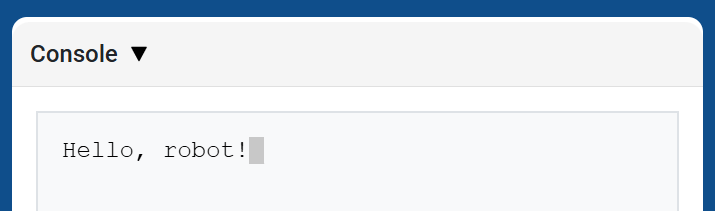
def main():
    # Print a number with 5 decimal places
    brain.print(math.pi, precision=5)

# VR threads — Do not delete
vr_thread(main)
new_line#
new_line 은 콘솔에서 커서를 다음 행의 첫 번째 열로 이동합니다. 다음에 출력될 값은 해당 행에 나타납니다.
다음 출력값이 새 행에서 시작되도록 하려면 이 방법을 사용하십시오.
Usage:
brain.new_line()
매개변수 |
설명 |
|---|---|
이 메서드에는 매개변수가 없습니다. |
def main():
    # Print on two lines
    brain.print("Row 1")
    brain.new_line()
    brain.print("Row 2")

# VR threads — Do not delete
vr_thread(main)
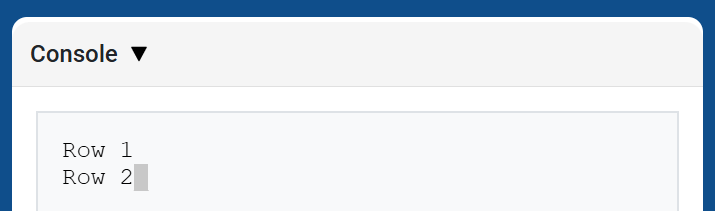
set_print_color#
set_print_color 이 메서드가 사용된 후 콘솔에 출력되는 텍스트의 색상을 설정합니다. 프로젝트 시작 시 콘솔 텍스트 색상은 BLACK 으로 설정됩니다.
Usage:
brain.set_print_color(color)
매개변수 |
설명 |
|---|---|
|
콘솔에 출력될 텍스트에 사용할 색상:
|
def main():
    # Print text in different colors
    brain.print("Default text color")
    brain.new_line()
    brain.set_print_color(RED)
    brain.print("Red text color")

# VR threads — Do not delete
vr_thread(main)
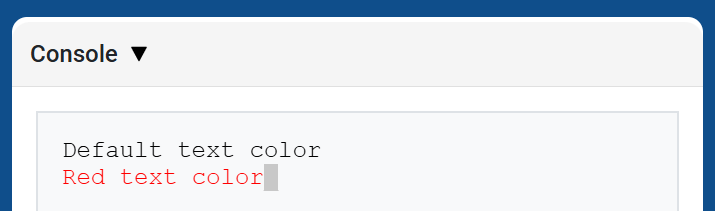
clear#
clear 콘솔에서 모든 행을 지웁니다.
Usage:
brain.clear()
매개변수 |
설명 |
|---|---|
이 메서드에는 매개변수가 없습니다. |
def main():
    # Display text, then clear it after two seconds
    brain.print("This will disappear...")
    wait(2, SECONDS)
    brain.clear()

# VR threads — Do not delete
vr_thread(main)
감시 장치#
monitor_variable#
monitor_variable VEXcode의 모니터 탭에 하나 이상의 미리 정의된 변수를 추가합니다. 이를 통해 프로젝트 실행 중에 변수 값의 변화를 모니터링할 수 있습니다.
Variables must be global for monitor_variable to monitor them successfully. Provide each variable name as a string.
Usage:
monitor_variable(“variable”)
monitor_variable(“variable1”, “variable2”)
매개변수 |
설명 |
|---|---|
|
모니터링할 미리 정의된 전역 변수의 이름을 문자열로 지정합니다. 둘 이상의 변수를 모니터링하려면 각 변수 이름을 쉼표로 구분하십시오. |
def main():
    # Monitor the amount of loops
    global loops
    monitor_variable("loops")

    # Drive in a square 3 times
    for loops in range(12):
        drivetrain.turn_for(RIGHT, 90, DEGREES)
        drivetrain.drive_for(FORWARD, 150, MM)

# VR threads — Do not delete
vr_thread(main)
actions = 0

def main():
    # Monitor the amount of loops and actions
    global loops, actions
    monitor_variable("loops", "actions")

    # Drive in a square 3 times
    for loops in range(12):
        drivetrain.turn_for(RIGHT, 90, DEGREES)
        drivetrain.drive_for(FORWARD, 150, MM)
        actions = actions + 2

# VR threads — Do not delete
vr_thread(main)
monitor_sensor#
monitor_sensor 명령어를 사용하면 VEXcode의 모니터 탭에 하나 이상의 센서 값을 추가할 수 있습니다. 이를 통해 프로젝트 실행 중에 센서 값의 변화를 확인할 수 있습니다.
센서가 여러 단위로 데이터를 반환할 수 있는 경우, 모니터 탭에 반환된 데이터가 사용 가능한 각 단위로 표시됩니다. 각 센서 값은 문자열로 제공하십시오.
Usage:
monitor_sensor(“sensor”)
monitor_sensor(“sensor1”, “sensor2”)
매개변수 |
설명 |
|---|---|
|
모니터링할 센서 값을 문자열로 지정합니다. 두 개 이상의 센서 값을 모니터링하려면 각 센서 값을 쉼표로 구분합니다. 이 값 |
def main():
    # Monitor the distance in MM and inches
    monitor_sensor("front_distance.get_distance")
    drivetrain.drive_for(FORWARD, 400, MM)

# VR threads — Do not delete
vr_thread(main)
def main():
    # Monitor the rotation in the Monitor tab
    monitor_sensor("drivetrain.rotation", "drivetrain.heading")
    drivetrain.turn_for(RIGHT, 450, DEGREES)

# VR threads — Do not delete
vr_thread(main)