
Παρουσιαστικό#
Στυλό#
pen.move#
Η μέθοδος pen.move(action) χρησιμοποιείται για να ορίσετε τη θέση της πένας VR.
Αυτή είναι μια μέθοδος μη αναμονής και επιτρέπει σε οποιεσδήποτε επόμενες μεθόδους να εκτελούνται χωρίς καθυστέρηση.
Παράμετροι |
Περιγραφή |
|---|---|
|
Η καθορισμένη θέση της πένας VR είναι |
Επιστροφές: Καμία.
UP- το στυλό δεν θα σχεδιάσει γραμμή στην παιδική χαρά.DOWN- το στυλό θα σχεδιάσει μια χρωματιστή γραμμή στην παιδική χαρά.
def main():
    # Position the VR Pen down.
    pen.move(DOWN)
    # Move forward for 400 mm to draw a line.
    drivetrain.drive_for(FORWARD, 400, MM)
pen.set_pen_color#
Η μέθοδος pen.set_pen_color(color) χρησιμοποιείται για να ορίσετε το χρώμα της πένας VR.
Αυτή είναι μια μέθοδος μη αναμονής και επιτρέπει σε οποιεσδήποτε επόμενες μεθόδους να εκτελούνται χωρίς καθυστέρηση.
Παράμετροι |
Περιγραφή |
|---|---|
|
Το χρώμα του στυλό VR: |
Επιστροφές: Καμία.
def main():
    # Move the VR Pen down.
    pen.move(DOWN)
    # Set the VR Pen color to blue.
    pen.set_pen_color(BLUE)
    # Drive forward for 400 mm to draw a line.
    drivetrain.drive_for(FORWARD, 400, MM)
pen.set_pen_width#
Η μέθοδος pen.set_pen_width(width) χρησιμοποιείται για να ορίσει το πλάτος της πένας VR.
Αυτή είναι μια μέθοδος μη αναμονής και επιτρέπει σε οποιεσδήποτε επόμενες μεθόδους να εκτελούνται χωρίς καθυστέρηση.
Παράμετροι |
Περιγραφή |
|---|---|
|
Το πλάτος της πένας VR: |
Επιστροφές: Καμία.
Το προεπιλεγμένο πλάτος πένας VR είναι THIN.
def main():
    # Move the VR Pen down.
    pen.move(DOWN)
    # Set the VR Pen's width to medium.
    pen.set_pen_width(MEDIUM)
    # Drive forward for 400 mm to draw a line.
    drivetrain.drive_for(FORWARD, 400, MM)
pen.set_pen_color_rgb#
Η μέθοδος pen.set_pen_color_rgb(red, green, blue, opacity) χρησιμοποιείται για να ορίσετε την τιμή RGB για το χρώμα της πένας VR.
Αυτή είναι μια μέθοδος μη αναμονής και επιτρέπει σε οποιεσδήποτε επόμενες μεθόδους να εκτελούνται χωρίς καθυστέρηση.
Παράμετροι |
Περιγραφή |
|---|---|
|
Η ένταση του κόκκινου χρώματος στην τιμή RGB, που κυμαίνεται από 0 έως 255. |
|
Η ένταση του πράσινου χρώματος στην τιμή RGB, που κυμαίνεται από 0 έως 255. |
|
Η ένταση του μπλε χρώματος στην τιμή RGB, που κυμαίνεται από 0 έως 255. |
|
Η διαφάνεια του χρώματος της πένας VR, που κυμαίνεται από 0 έως 100 τοις εκατό. |
Επιστροφές: Καμία.
def main():
    # Move the VR Pen down.
    pen.move(DOWN)
    # Set the color to orange at full opacity.
    pen.set_pen_color_rgb(225, 112, 52, 100)
    # Drive forward for 400 MM to draw a line.
    drivetrain.drive_for(FORWARD, 400, MM)
pen.fill#
Η μέθοδος pen.fill(red, green, blue, opacity) γεμίζει το σχήμα οποιουδήποτε αντικειμένου πάνω στο οποίο βρίσκεται η πένα VR, για παράδειγμα:
|
|
|
|---|---|---|
Γραμμές πλέγματος |
Τετράγωνο πλέγματος |
Σε παιδικές χαρές χωρίς πλέγμα, γεμίζει ολόκληρο το δάπεδο της παιδικής χαράς. |
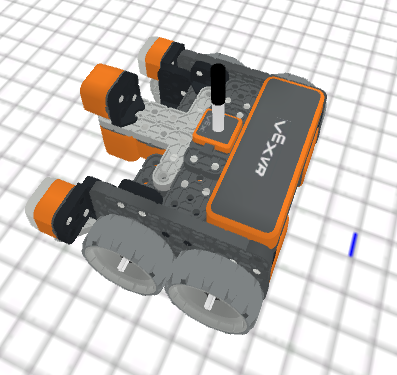
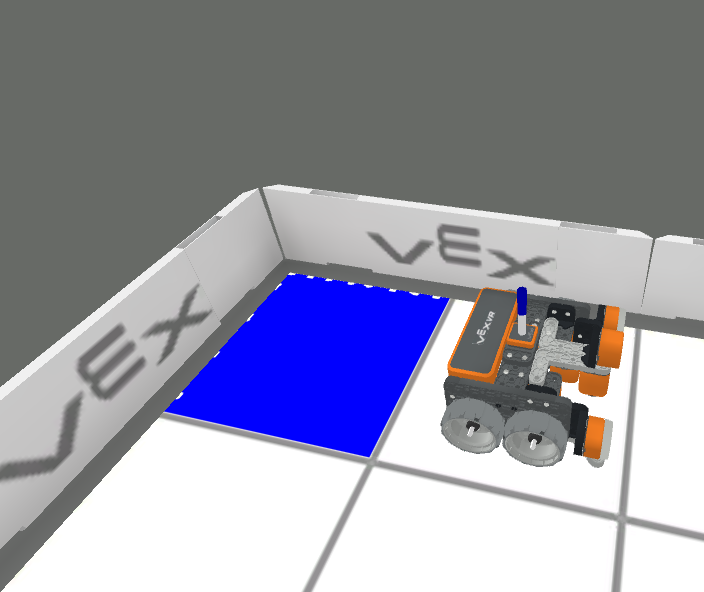
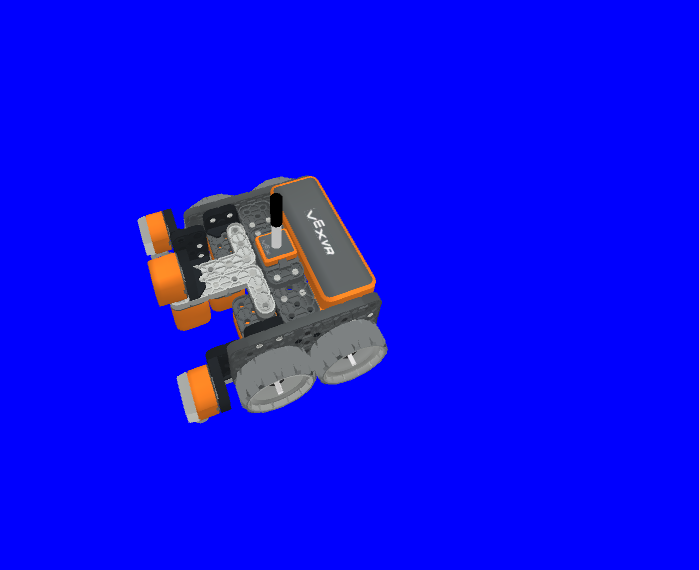
Αυτή είναι μια μέθοδος μη αναμονής και επιτρέπει σε οποιεσδήποτε επόμενες μεθόδους να εκτελούνται χωρίς καθυστέρηση.
Παράμετροι |
Περιγραφή |
|---|---|
|
Η ένταση του κόκκινου χρώματος στην τιμή RGB, που κυμαίνεται από 0 έως 255. |
|
Η ένταση του πράσινου χρώματος στην τιμή RGB, που κυμαίνεται από 0 έως 255. |
|
Η ένταση του μπλε χρώματος στην τιμή RGB, που κυμαίνεται από 0 έως 255. |
|
Η διαφάνεια του χρώματος της πένας VR, που κυμαίνεται από 0 έως 100 τοις εκατό. |
Επιστροφές: Καμία.
def main():
    # Fill the playground's floor with blue at full opacity.
    pen.fill(43, 162, 202, 100)
Αποτύπωμα#
brain.print#
Η μέθοδος brain.print(value, precision = 0) χρησιμοποιείται για την εκτύπωση λέξεων, αριθμών και τιμών που αναφέρονται στην Κονσόλα Εκτύπωσης.
Αυτή είναι μια μέθοδος μη αναμονής και επιτρέπει σε οποιεσδήποτε επόμενες μεθόδους να εκτελούνται χωρίς καθυστέρηση.
Παράμετροι |
Περιγραφή |
|---|---|
|
Οποιεσδήποτε λέξεις, αριθμοί ή αισθητήρες που αναφέρουν μια τιμή. Οι λέξεις πρέπει να βρίσκονται σε εισαγωγικά: |
|
Προαιρετικό. Η ποσότητα των δεκαδικών που αναφέρονται από μια τιμή από έναν αισθητήρα ή μια μεταβλητή, από |
Επιστροφές: Καμία.
def main():
    # Print the Drivetrain's current heading in degrees with 2 decimal points.
    brain.print("Drivetrain's heading:",
        drivetrain.heading(DEGREES), precision = 2)
brain.clear#
Η μέθοδος brain.clear() χρησιμοποιείται για την εκκαθάριση όλων των γραμμών στην Κονσόλα Εκτύπωσης και επαναφέρει τον κέρσορα στην πρώτη γραμμή.
Αυτή είναι μια μέθοδος μη αναμονής και επιτρέπει σε οποιεσδήποτε επόμενες μεθόδους να εκτελούνται χωρίς καθυστέρηση.
Επιστροφές: Καμία.
def main():
    # Print "Project has started."
    brain.print("Project has started.")
    # Wait 3 seconds.
    wait(3, SECONDS)
    # Clear the print console.
    brain.clear()
brain.new_line#
Η μέθοδος brain.new_line() χρησιμοποιείται για να ορίσει τον κέρσορα σε μια νέα γραμμή στην Κονσόλα Εκτύπωσης.
Αυτή είναι μια μέθοδος μη αναμονής και επιτρέπει σε οποιεσδήποτε επόμενες μεθόδους να εκτελούνται χωρίς καθυστέρηση.
Επιστροφές: Καμία.
def main():
    # Print "Project has started."
    brain.print("Project has started.")
    # Move the cursor to a new line.
    brain.new_line()
brain.set_print_color#
Η μέθοδος brain.set_print_color(color) χρησιμοποιείται για να ορίσει το χρώμα του κειμένου που εκτυπώνεται στην Κονσόλα Εκτύπωσης.
Αυτή είναι μια μέθοδος μη αναμονής και επιτρέπει σε οποιεσδήποτε επόμενες μεθόδους να εκτελούνται χωρίς καθυστέρηση.
Παράμετροι |
Περιγραφή |
|---|---|
|
Το χρώμα του κειμένου που θα εκτυπωθεί: |
Επιστροφές: Καμία.
def main():
    # Set the print text color to red.
    brain.set_print_color(RED)
    # Print a message.
    brain.print("This is red!")
μεταβλητή_παρακολούθησης#
Η μέθοδος monitor_variable(“variable”, …) χρησιμοποιείται για την προσθήκη μεταβλητών στην Κονσόλα Παρακολούθησης, έτσι ώστε η τιμή των μεταβλητών να είναι ορατή και να παρακολουθείται.
Αυτή είναι μια μέθοδος μη αναμονής και επιτρέπει σε οποιεσδήποτε επόμενες μεθόδους να εκτελούνται χωρίς καθυστέρηση.
Παράμετροι |
Περιγραφή |
|---|---|
|
Οποιαδήποτε προηγουμένως ορισμένη καθολική μεταβλητή. |
Επιστροφές: Καμία.
# Create global variable.
disk_count = 1

def main():
    # Add disk_count to the Monitor Console.
    monitor_variable("disk_count")
αισθητήρας_παρακολούθησης#
Η μέθοδος monitor_sensor(“sensor”, …) χρησιμοποιείται για την προσθήκη αισθητήρων στην κονσόλα της οθόνης, έτσι ώστε να είναι δυνατή η παρακολούθηση των τιμών των αισθητήρων.
Αυτή είναι μια μέθοδος μη αναμονής και επιτρέπει σε οποιεσδήποτε επόμενες μεθόδους να εκτελούνται χωρίς καθυστέρηση.
Παράμετροι |
Περιγραφή |
|---|---|
|
Οποιοδήποτε υποστηριζόμενο αναγνωριστικό αισθητήρα. |
Επιστροφές: Καμία.
Υποστηριζόμενα αναγνωριστικά αισθητήρων:
brain.timer.timedrivetrain.is_donedrivetrain.is_movingdrivetrain.headingdrivetrain.rotationdrivetrain.velocity_rpmdrivetrain.velocity_percentarm_motor.is_donearm_motor.is_spinningarm_motor.position_degreesarm_motor.position_turnsarm_motor.velocity_rpmarm_motor.velocity_percentarm_motor_group.is_donearm_motor_group.is_spinningarm_motor_group.position_degreesarm_motor_group.position_turnsarm_motor_group.velocity_rpmarm_motor_group.velocity_percentintake_motor.is_doneintake_motor.is_spinningintake_motor.position_degreesintake_motor.position_turnsintake_motor.velocity_rpmintake_motor.velocity_percentintake_motor_group.is_doneintake_motor_group.is_spinningintake_motor_group.position_degreesintake_motor_group.position_turnsintake_motor_group.velocity_rpmintake_motor_group.velocity_percentcatapult_motor.is_donecatapult_motor.is_spinningcatapult_motor.position_degreescatapult_motor.position_turnscatapult_motor.velocity_rpmcatapult_motor.velocity_percentcatapult_tension_motor.is_donecatapult_tension_motor.is_spinningcatapult_tension_motor.position_degreescatapult_tension_motor.position_turnscatapult_tension_motor.velocity_rpmcatapult_tension_motor.velocity_percentintake_bumper.pressingbumper.pressingfront_distance.is_object_detectedfront_distance.object_distance_mmfront_distance.object_distance_inchesfront_optical.is_near_objectfront_optical.colorfront_optical.brightnessfront_optical.huecolor.is_near_objectcolor.colorcolor.brightnesscolor.hue
def main():
    # Add the VR Robot's positional coordinates to the monitor console.
    monitor_sensor("location.position")