
센서#
소개#
VEX AIR 드론에는 회전 운동을 측정하고 움직임 변화를 감지하는 관성 센서와 거리를 감지하는 거리 센서가 탑재되어 있습니다. 또한 배터리 잔량도 확인할 수 있습니다. 이러한 센서들을 통해 드론은 방향, 진행 방향, 가속도, 그리고 물체와의 거리를 추적할 수 있습니다.
아래는 사용 가능한 모든 방법의 목록입니다.
관성 센서 - 드론의 회전 운동을 추적합니다.
get_rotation– 드론이 시작된 이후 얼마나 회전했는지 반환합니다.get_heading– 현재 헤딩(0~359.99°)을 반환합니다.get_yaw– 요각(–180~180°)을 반환합니다.get_roll– 롤 각도(–180~180°)를 반환합니다.get_pitch– 피치 각도(–180~180°)를 반환합니다.reset_rotation– 회전 값을 0으로 재설정합니다.reset_heading– 현재 헤딩을 0으로 설정합니다.set_heading– 제목을 특정 값으로 설정합니다.get_acceleration– 특정 방향의 가속도를 반환합니다.get_turn_rate– 초당 도 단위로 회전율을 반환합니다.
범위 — 드론의 거리 센서를 통해 거리를 감지합니다.
get_distance— 선택된 범위 센서와 가장 가까운 감지된 객체 사이의 거리를 반환합니다.
배터리 - 드론의 배터리 잔량을 백분율로 표시합니다.
get_battery_level– 드론의 배터리 잔량을 백분율로 반환합니다.
관성#
get_rotation#
get_rotation 드론이 시작 이후 회전한 각도를 반환합니다. 모든 회전을 합산하여 총 각도를 도 단위로 반환하며, 양수는 시계 방향 회전, 음수는 반시계 방향 회전입니다.
Usage:
drone.inertial.get_rotation()
매개변수 |
설명 |
|---|---|
이 메서드에는 매개변수가 없습니다. |
# Display the rotation after turning
drone.take_off(climb_to=500)
drone.turn_for(LEFT, 450, 50)
print(drone.inertial.get_rotation(), end="")
drone.land()
get_heading#
get_heading 은 드론의 진행 방향 각도를 0~359.99도 범위의 부동 소수점 값으로 반환합니다.
Usage:
drone.inertial.get_heading()
매개변수 |
설명 |
|---|---|
이 메서드에는 매개변수가 없습니다. |
# Display the drone's heading after turning
drone.take_off(climb_to=500)
drone.set_turn_velocity(100)
drone.turn(RIGHT)
wait(5, SECONDS)
controller.screen.print("Heading: ")
controller.screen.print(drone.inertial.get_heading())
drone.land()
get_yaw#
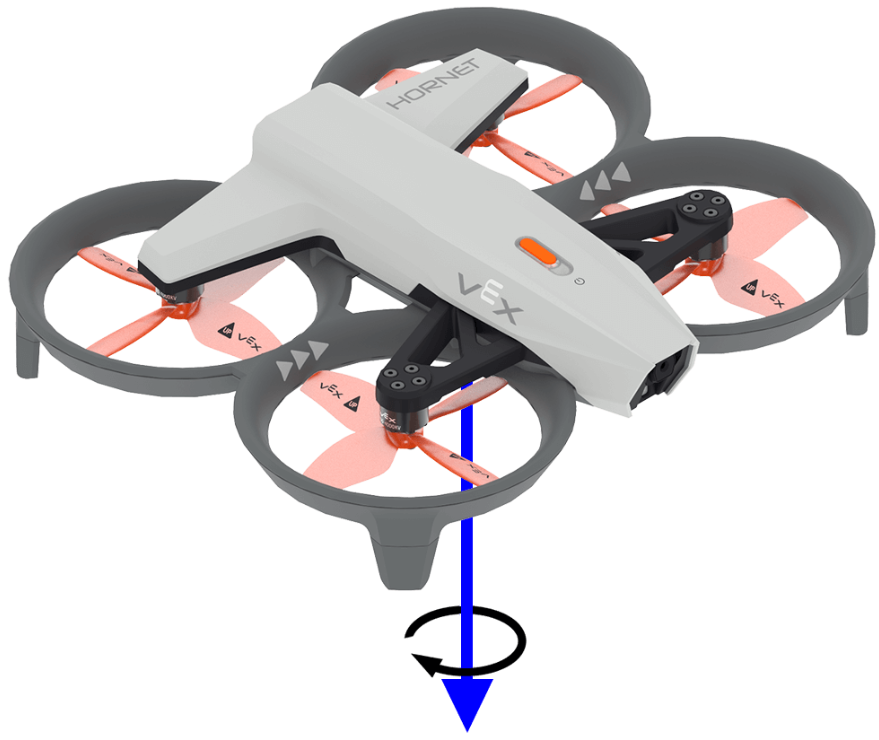
get_yaw 드론의 요각을 -180.0도에서 180.0도 사이의 부동 소수점 값으로 반환합니다.
아래 이미지는 화살표를 사용하여 요(yaw) 회전의 양의 방향을 나타냅니다.
Usage:
drone.inertial.get_yaw
매개변수 |
설명 |
|---|---|
이 메서드에는 매개변수가 없습니다. |
# Display the yaw angle as you rotate the drone by hand
while True:
    controller.screen.clear_screen()
    controller.screen.set_cursor(1, 1)
    controller.screen.print("Yaw: ")
    controller.screen.print(drone.inertial.get_yaw())
    wait(0.2, SECONDS)
get_roll#
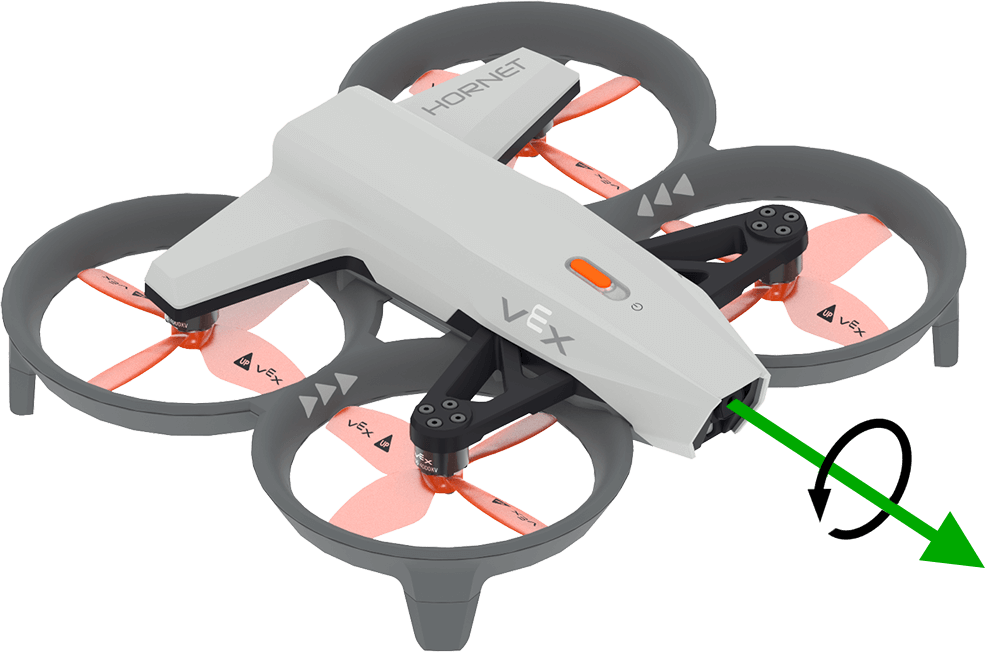
get_roll 은 드론의 롤 각도를 -180.0도에서 180.0도 사이의 부동 소수점 값으로 반환합니다.
아래 이미지는 화살표를 사용하여 롤의 양의 회전 방향을 나타냅니다.
Usage:
drone.inertial.get_roll()
매개변수 |
설명 |
|---|---|
이 메서드에는 매개변수가 없습니다. |
# Display the roll angle as you rotate the drone by hand
while True:
    controller.screen.clear_screen()
    controller.screen.set_cursor(1, 1)
    controller.screen.print("Roll: ")
    controller.screen.print(drone.inertial.get_roll())
    wait(0.2, SECONDS)
get_pitch#
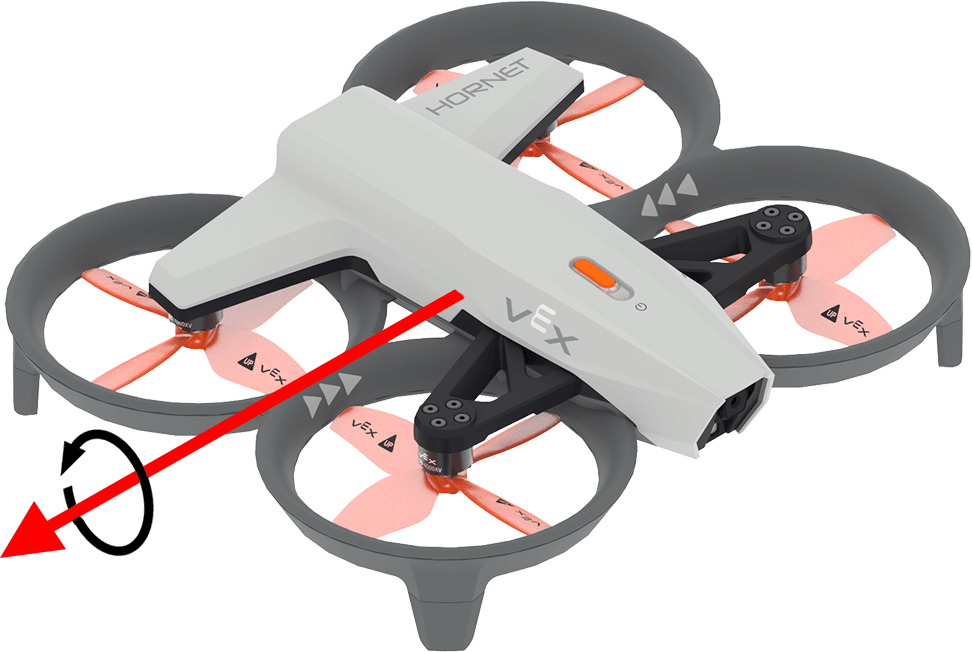
get_pitch 은 드론의 피치 각도를 -180.0도에서 180.0도 사이의 부동 소수점 값으로 반환합니다.
아래 이미지는 화살표를 사용하여 피치에 대한 양의 회전 방향을 보여줍니다.
Usage:
drone.inertial.get_pitch()
매개변수 |
설명 |
|---|---|
이 메서드에는 매개변수가 없습니다. |
# Display the pitch angle as you rotate the drone by hand
while True:
    controller.screen.clear_screen()
    controller.screen.set_cursor(1, 1)
    controller.screen.print("Pitch: ")
    controller.screen.print(drone.inertial.get_pitch())
    wait(0.2, SECONDS)
reset_rotation#
reset_rotation 은 드론의 회전 값을 0도로 재설정합니다.
Usage:
drone.inertial.reset_rotation()
매개변수 |
설명 |
|---|---|
이 메서드에는 매개변수가 없습니다. |
# Display the new rotation after resetting
drone.take_off(climb_to=500)
drone.turn(RIGHT)
while not drone.inertial.get_rotation() > 360:
    wait(5, MSEC)
drone.hover()
drone.inertial.reset_rotation()
wait(1, SECONDS)
print(drone.inertial.get_rotation(), end="")
drone.land()
reset_heading#
reset_heading 은 드론의 진행 방향을 0도로 재설정합니다.
용법:
drone.inertial.reset_heading()
매개변수 |
설명 |
|---|---|
이 메서드에는 매개변수가 없습니다. |
# Turn to a heading, reset the heading, and turn to the same heading.
drone.take_off(climb_to=500)
drone.turn_to(heading=180, velocity=50)
wait(3,SECONDS)
drone.inertial.reset_heading()
drone.turn_to(heading=180, velocity=50)
wait(3,SECONDS)
drone.land()
set_heading#
set_heading 은 드론의 진행 방향을 지정된 각도로 설정합니다.
용법:
drone.inertial.set_heading(heading)
매개변수 |
설명 |
|---|---|
|
새로운 방위각에 사용할 값은 0도에서 359.99도 사이입니다. |
# Turn to a heading, set the heading, and turn to the same heading.
drone.take_off(climb_to=500)
drone.turn_to(heading=180, velocity=50)
wait(3,SECONDS)
drone.inertial.set_heading(90)
drone.turn_to(heading=180, velocity=50)
wait(3,SECONDS)
drone.land()
get_acceleration#
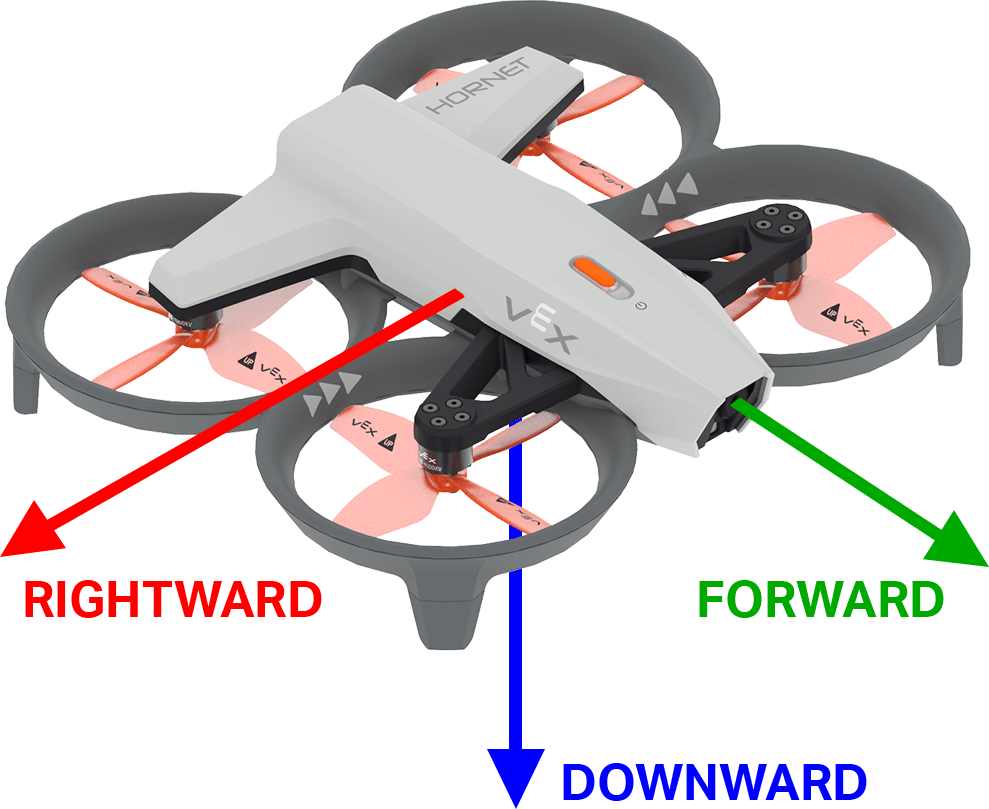
get_acceleration 지정된 방향으로 드론의 가속도를 반환합니다. 반환 값은 속도 변화율을 나타내며, 단위는 g(1g ≈ 9.81 m/s²)이고, -4.00에서 4.00 사이의 실수 값입니다.
아래 그림은 화살표를 사용하여 앞쪽과 오른쪽 방향의 양의 가속도와 아래쪽 방향의 음의 가속도의 방향을 보여줍니다.
용법:
drone.inertial.get_acceleration(type)
매개변수 |
설명 |
|---|---|
|
보고할 가속도 방향:
|
# Display the acceleration as the drone takes off
drone.take_off(500, wait=False)
while True:
    controller.screen.clear_screen()
    controller.screen.set_cursor(1, 1)
    controller.screen.print(drone.inertial.get_acceleration(DOWNWARD))
    wait(5, MSEC)
get_turn_rate#
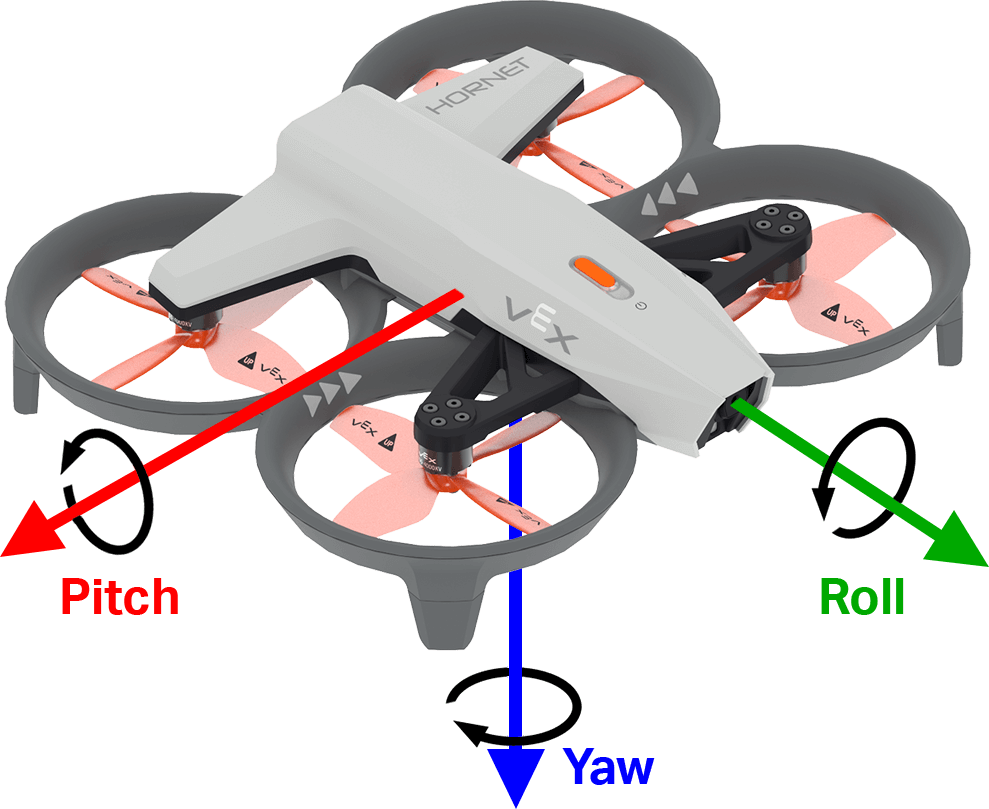
get_turn_rate get_turn_rate 드론이 지정된 축을 따라 회전하는 속도를 반환합니다. 이 함수는 초당 도\(dps\) 단위의 부동 소수점 값을 반환하며, 값은 -1000.00에서 1000.00 dps 사이입니다.
아래 이미지는 화살표를 사용하여 롤, 피치 및 요에 대한 양의 회전 방향을 보여줍니다.
Usage:
drone.inertial.get_turn_rate(axis)
매개변수 |
설명 |
|---|---|
|
보고할 방향:
|
# Display the drone turn rate as it is rotated by hand.
while True:
    controller.screen.clear_screen()
    controller.screen.set_cursor(7, 1)
    controller.screen.print(drone.inertial.get_turn_rate(ROLL))
범위#
get_distance#
get_distance 은 선택된 거리 센서와 가장 가까운 감지된 객체 사이의 거리를 반환합니다.
Usage:
drone.range.get_distance(range, units)
매개변수 |
설명 |
|---|---|
|
사용할 거리 센서: |
|
선택 사항입니다. 거리 단위:
|
# Fly forward until close to an object
drone.take_off(climb_to=500)
drone.move_at(direction=0, velocity=50)
while not drone.range.get_distance(FORWARD_RANGE, MM) < 750:
    wait(0.1, SECONDS)
drone.land()
배터리#
get_battery_level#
get_battery_level get_battery_level 드론의 배터리 충전량을 백분율로 반환합니다. 이 함수는 0에서 100 사이의 값을 반환합니다.
Usage:
drone.get_battery_level()
매개변수 |
설명 |
|---|---|
이 메서드에는 매개변수가 없습니다. |
# Display the drone's battery level
if drone.get_battery_level() < 25:
    controller.screen.print("Charge the drone Battery!")
else:
    controller.screen.print("Ready to fly!")