
เซ็นเซอร์#
การแนะนำ#
โดรน VEX AIR มีเซ็นเซอร์วัดความเฉื่อย (Inertial Sensor) สำหรับวัดการเคลื่อนที่แบบหมุนและตรวจจับการเปลี่ยนแปลงของการเคลื่อนไหว รวมถึงเซ็นเซอร์วัดระยะทาง (Range Sensor) สำหรับตรวจจับระยะห่าง นอกจากนี้ โดรน VEX AIR ยังสามารถตรวจสอบระดับแบตเตอรี่ได้อีกด้วย เซ็นเซอร์เหล่านี้ช่วยให้โดรนสามารถติดตามทิศทาง การบังคับทิศทาง การเร่งความเร็ว และระยะห่างจากวัตถุต่างๆ ได้
ด้านล่างนี้คือรายการวิธีการทั้งหมดที่มีให้เลือกใช้:
เซ็นเซอร์ความเฉื่อย - ติดตามการเคลื่อนที่แบบหมุนของโดรน
get_rotation– คืนค่าจำนวนรอบที่โดรนหมุนไปนับตั้งแต่เริ่มต้นget_heading– ส่งคืนทิศทางปัจจุบัน (0 ถึง 359.99°)get_yaw– ส่งคืนมุม yaw (-180 ถึง 180°)get_roll– ส่งคืนมุมม้วน (-180 ถึง 180°)get_pitch– ส่งคืนมุมพิทช์ (-180 ถึง 180°)reset_rotation– รีเซ็ตค่าการหมุนเป็น 0reset_heading– ตั้งค่าทิศทางปัจจุบันเป็น 0set_heading– ตั้งค่าหัวเรื่องเป็นค่าเฉพาะget_acceleration– ส่งคืนค่าความเร่งในทิศทางที่กำหนดget_turn_rate– ส่งคืนอัตราการหมุนเป็นองศาต่อวินาที
ระยะการวัด — ตรวจจับระยะห่างจากเซ็นเซอร์วัดระยะของโดรน
get_distance— ส่งคืนระยะห่างระหว่างเซ็นเซอร์ระยะที่เลือกกับวัตถุที่ตรวจพบใกล้ที่สุด
แบตเตอรี่ - แสดงเปอร์เซ็นต์แบตเตอรี่ของโดรน
get_battery_level– ส่งคืนระดับแบตเตอรี่ของโดรนเป็นเปอร์เซ็นต์
เฉื่อย#
get_rotation#
get_rotation จะส่งคืนค่าจำนวนองศาที่โดรนหมุนไปนับตั้งแต่เริ่มต้น โดยจะรวมจำนวนการหมุนทั้งหมดและส่งคืนค่ารวมเป็นองศา: ค่าบวกสำหรับการหมุนตามเข็มนาฬิกา ค่าลบสำหรับการหมุนทวนเข็มนาฬิกา
Usage:
drone.inertial.get_rotation()
พารามิเตอร์ |
คำอธิบาย |
|---|---|
เมธอดนี้ไม่มีพารามิเตอร์ |
# Display the rotation after turning
drone.take_off(climb_to=500)
drone.turn_for(LEFT, 450, 50)
print(drone.inertial.get_rotation(), end="")
drone.land()
get_heading#
get_heading จะส่งคืนค่ามุมทิศทางของโดรนเป็นค่าทศนิยมในช่วง 0 ถึง 359.99 องศา
Usage:
drone.inertial.get_heading()
พารามิเตอร์ |
คำอธิบาย |
|---|---|
เมธอดนี้ไม่มีพารามิเตอร์ |
# Display the drone's heading after turning
drone.take_off(climb_to=500)
drone.set_turn_velocity(100)
drone.turn(RIGHT)
wait(5, SECONDS)
controller.screen.print("Heading: ")
controller.screen.print(drone.inertial.get_heading())
drone.land()
get_yaw#
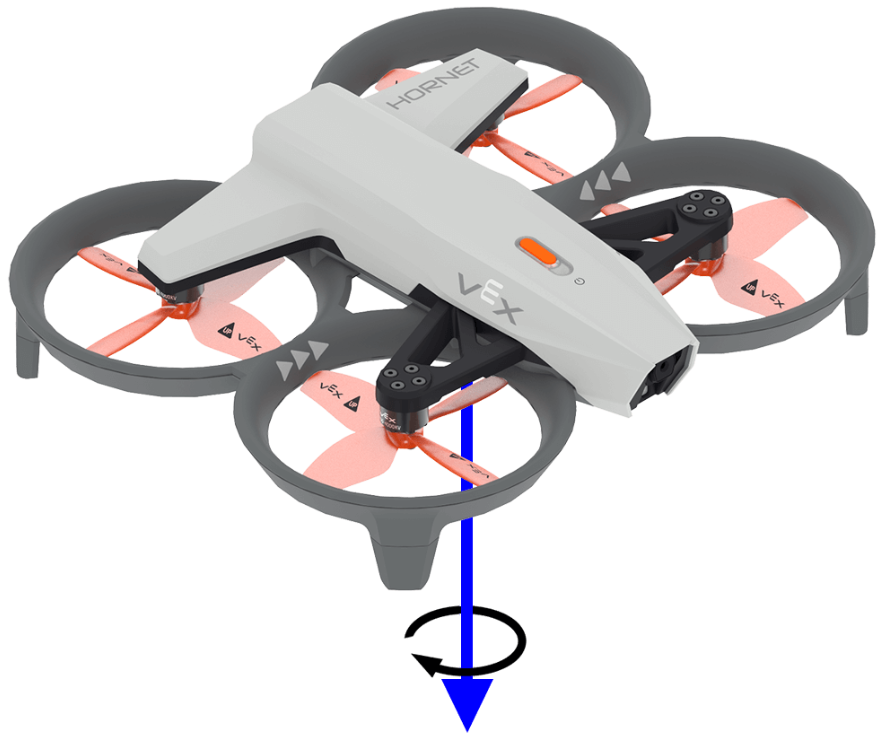
get_yaw ส่งคืนค่ามุม yaw ของโดรนในช่วง –180.0 ถึง 180.0 องศาในรูปแบบ float
ภาพด้านล่างใช้ลูกศรเพื่อแสดงทิศทางการหมุนบวกสำหรับมุมหันเห (yaw)
Usage:
drone.inertial.get_yaw
พารามิเตอร์ |
คำอธิบาย |
|---|---|
เมธอดนี้ไม่มีพารามิเตอร์ |
# Display the yaw angle as you rotate the drone by hand
while True:
    controller.screen.clear_screen()
    controller.screen.set_cursor(1, 1)
    controller.screen.print("Yaw: ")
    controller.screen.print(drone.inertial.get_yaw())
    wait(0.2, SECONDS)
get_roll#
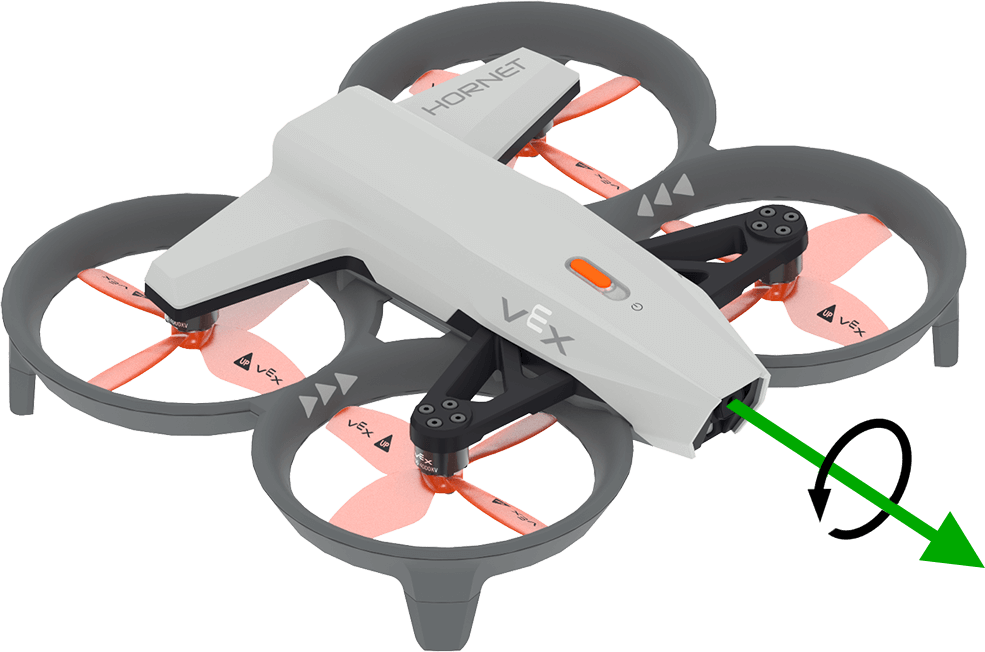
get_roll จะส่งคืนค่ามุมการหมุนของโดรนในช่วง –180.0 ถึง 180.0 องศาในรูปแบบทศนิยม
ภาพด้านล่างใช้ลูกศรเพื่อแสดงทิศทางการหมุนบวกสำหรับการหมุนรอบแกน (roll)
Usage:
drone.inertial.get_roll()
พารามิเตอร์ |
คำอธิบาย |
|---|---|
เมธอดนี้ไม่มีพารามิเตอร์ |
# Display the roll angle as you rotate the drone by hand
while True:
    controller.screen.clear_screen()
    controller.screen.set_cursor(1, 1)
    controller.screen.print("Roll: ")
    controller.screen.print(drone.inertial.get_roll())
    wait(0.2, SECONDS)
get_pitch#
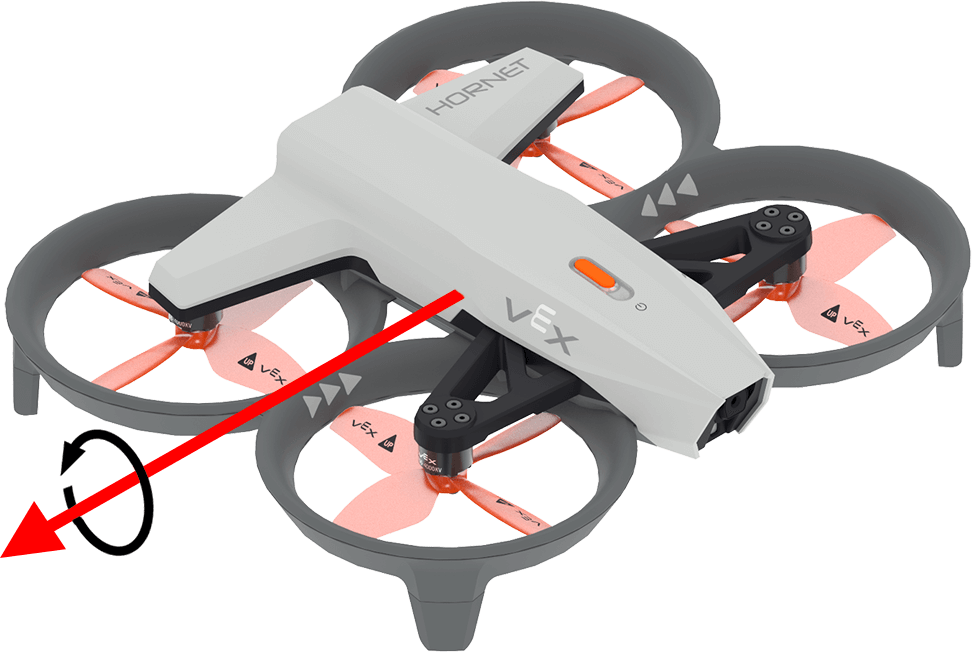
get_pitch ส่งคืนค่ามุมเงยของโดรนในช่วง –180.0 ถึง 180.0 องศาในรูปแบบทศนิยม
ภาพด้านล่างใช้ลูกศรเพื่อแสดงทิศทางการหมุนบวกของระดับเสียง
Usage:
drone.inertial.get_pitch()
พารามิเตอร์ |
คำอธิบาย |
|---|---|
เมธอดนี้ไม่มีพารามิเตอร์ |
# Display the pitch angle as you rotate the drone by hand
while True:
    controller.screen.clear_screen()
    controller.screen.set_cursor(1, 1)
    controller.screen.print("Pitch: ")
    controller.screen.print(drone.inertial.get_pitch())
    wait(0.2, SECONDS)
reset_rotation#
reset_rotation จะรีเซ็ตค่าการหมุนของโดรนเป็น 0 องศา
Usage:
drone.inertial.reset_rotation()
พารามิเตอร์ |
คำอธิบาย |
|---|---|
เมธอดนี้ไม่มีพารามิเตอร์ |
# Display the new rotation after resetting
drone.take_off(climb_to=500)
drone.turn(RIGHT)
while not drone.inertial.get_rotation() > 360:
    wait(5, MSEC)
drone.hover()
drone.inertial.reset_rotation()
wait(1, SECONDS)
print(drone.inertial.get_rotation(), end="")
drone.land()
reset_heading#
reset_heading จะรีเซ็ตทิศทางการบินของโดรนเป็น 0 องศา
วิธีใช้:
drone.inertial.reset_heading()
พารามิเตอร์ |
คำอธิบาย |
|---|---|
เมธอดนี้ไม่มีพารามิเตอร์ |
# Turn to a heading, reset the heading, and turn to the same heading.
drone.take_off(climb_to=500)
drone.turn_to(heading=180, velocity=50)
wait(3,SECONDS)
drone.inertial.reset_heading()
drone.turn_to(heading=180, velocity=50)
wait(3,SECONDS)
drone.land()
set_heading#
set_heading กำหนดทิศทางการบินของโดรนเป็นค่าที่ระบุในหน่วยองศา
วิธีใช้:
drone.inertial.set_heading(heading)
พารามิเตอร์ |
คำอธิบาย |
|---|---|
|
ค่าที่จะใช้สำหรับหัวข้อใหม่ในช่วง 0 ถึง 359.99 องศา |
# Turn to a heading, set the heading, and turn to the same heading.
drone.take_off(climb_to=500)
drone.turn_to(heading=180, velocity=50)
wait(3,SECONDS)
drone.inertial.set_heading(90)
drone.turn_to(heading=180, velocity=50)
wait(3,SECONDS)
drone.land()
get_acceleration#
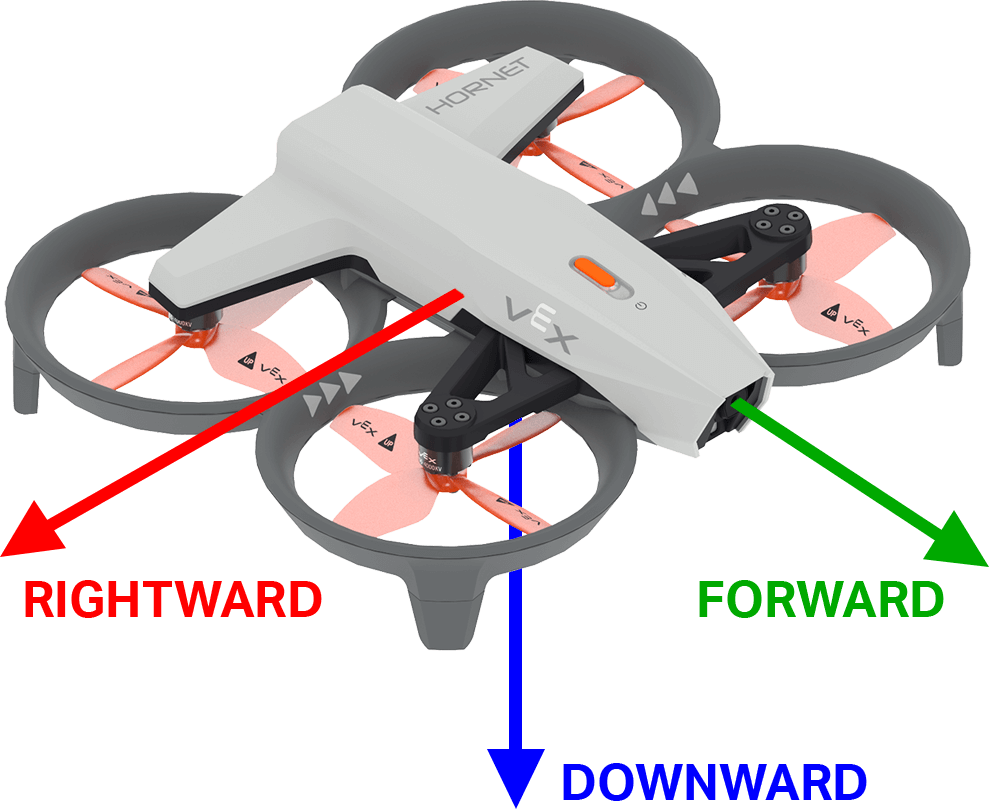
get_acceleration ส่งคืนค่าความเร่งของโดรนในทิศทางที่ระบุ ค่าที่ส่งคืนแสดงถึงอัตราการเปลี่ยนแปลงของความเร็ว โดยวัดเป็นหน่วย g (โดยที่ 1g ≈ 9.81 m/s²) เป็นค่าทศนิยมที่มีค่าตั้งแต่ -4.00 ถึง 4.00
ภาพด้านล่างใช้ลูกศรเพื่อแสดงทิศทางของการเร่งความเร็วที่เป็นบวกสำหรับการเคลื่อนที่ไปข้างหน้าและไปทางขวา และการเร่งความเร็วที่เป็นลบสำหรับการเคลื่อนที่ลงด้านล่าง
วิธีใช้:
drone.inertial.get_acceleration(type)
พารามิเตอร์ |
คำอธิบาย |
|---|---|
|
ทิศทางการเร่งความเร็วที่ต้องรายงาน:
|
# Display the acceleration as the drone takes off
drone.take_off(500, wait=False)
while True:
    controller.screen.clear_screen()
    controller.screen.set_cursor(1, 1)
    controller.screen.print(drone.inertial.get_acceleration(DOWNWARD))
    wait(5, MSEC)
get_turn_rate#
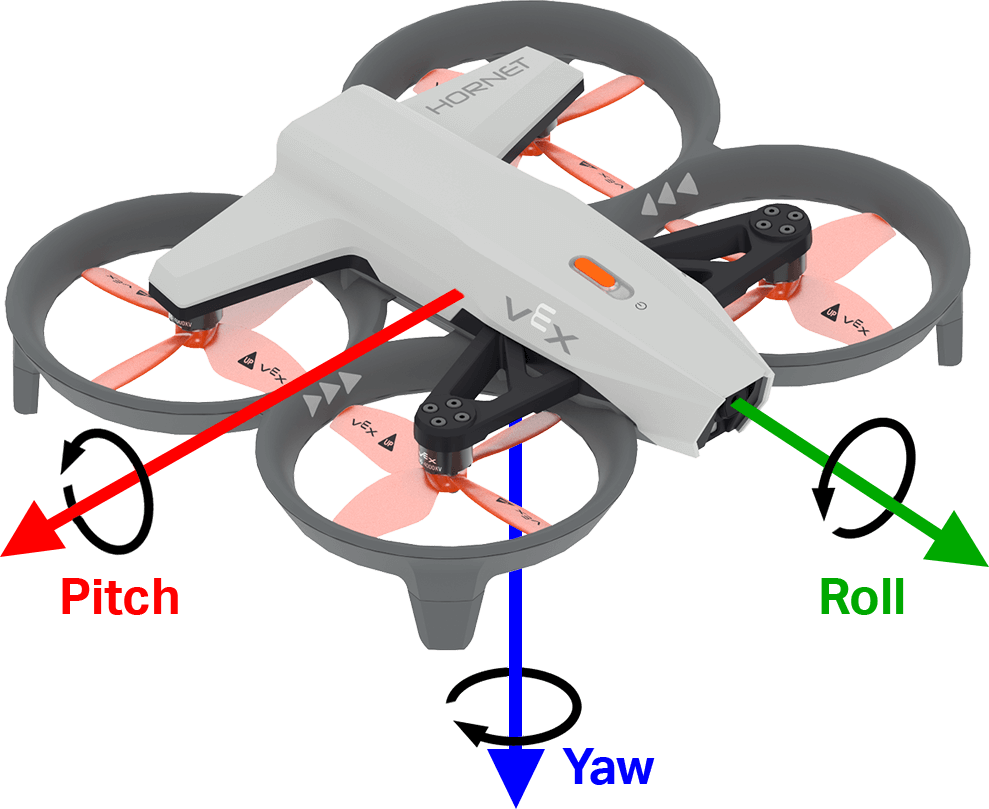
get_turn_rate ส่งคืนอัตราการหมุนของโดรนตามแกนที่ระบุ โดยจะส่งคืนค่าเป็นองศาต่อวินาที \(dps\) ในรูปแบบทศนิยมตั้งแต่ –1000.00 ถึง 1000.00 dps
ภาพด้านล่างใช้ลูกศรแสดงทิศทางการหมุนบวกสำหรับมุมม้วน มุมเงย และมุมหัน
Usage:
drone.inertial.get_turn_rate(axis)
พารามิเตอร์ |
คำอธิบาย |
|---|---|
|
รายงานทิศทางใด:
|
# Display the drone turn rate as it is rotated by hand.
while True:
    controller.screen.clear_screen()
    controller.screen.set_cursor(7, 1)
    controller.screen.print(drone.inertial.get_turn_rate(ROLL))
พิสัย#
get_distance#
get_distance ส่งคืนระยะห่างระหว่างเซ็นเซอร์วัดระยะที่เลือกกับวัตถุที่ตรวจพบใกล้ที่สุด
Usage:
drone.range.get_distance(range, units)
พารามิเตอร์ |
คำอธิบาย |
|---|---|
|
เซ็นเซอร์วัดระยะที่ใช้: |
|
เลือกได้ หน่วยวัดระยะทาง:
|
# Fly forward until close to an object
drone.take_off(climb_to=500)
drone.move_at(direction=0, velocity=50)
while not drone.range.get_distance(FORWARD_RANGE, MM) < 750:
    wait(0.1, SECONDS)
drone.land()
แบตเตอรี่#
get_battery_level#
get_battery_level จะแสดงระดับการชาร์จแบตเตอรี่ของโดรนเป็นเปอร์เซ็นต์ โดยจะส่งคืนค่าตั้งแต่ 0 ถึง 100
Usage:
drone.get_battery_level()
พารามิเตอร์ |
คำอธิบาย |
|---|---|
เมธอดนี้ไม่มีพารามิเตอร์ |
# Display the drone's battery level
if drone.get_battery_level() < 25:
    controller.screen.print("Charge the drone Battery!")
else:
    controller.screen.print("Ready to fly!")