
机器人专用模块#
介绍#
英雄机器人 Axel 包含两种电机选项、人工智能视觉传感器、光学传感器、旋转传感器和游戏定位系统 (GPS) 传感器。
所有标准 VEXcode VR 模块均可在 V5 24-25 高风险 游乐场中使用。
以下是所有可用的机器人专用模块列表:
驱动系统——控制机器人的移动和转向。
操作
设置
价值观
驱动完成 — 报告机器人是否已完成移动。
drive is moving — 报告机器人是否正在移动。
驱动航向 — 报告机器人的当前航向,范围从 0 到 359.99 度。
驱动旋转 — 报告机器人的当前旋转方向。
驱动速度 — 报告机器人的行驶速度。
运动控制——移动并跟踪机器人的电机。
操作
spin motor – 使电机正转或反转永不停息。
spin motor for – 使电机旋转指定的角度或圈数。
旋转电机到位置 – 将电机旋转到指定位置。
停止电机 – 停止电机旋转。
设置
价值观
人工智能视觉——使用人工智能视觉传感器捕捉和分析物体。
感知——利用机器人的各种传感器。
光学的
光学检测到物体 – 报告传感器是否在范围内检测到物体。
光学检测颜色 – 报告光学传感器是否检测到指定的颜色。
光学亮度 – 报告光学传感器检测到的亮度。
光学色调 – 报告光学传感器检测到的色调。
当光学传感器检测到或丢失物体时 – 当光学传感器检测到或丢失物体时,运行附加的模块堆栈。
旋转
全球定位系统
本页示例使用 Playground 的默认起始位置。
传动系统#
动力系统控制着VR机器人的行驶和转向。动力系统可以前进或后退、左转或右转、转向特定航向并跟踪其旋转。
行动#
驾驶#
驱动 模块使机器人能够无限向前或向后移动。机器人将持续移动,直到收到其他指令,例如转向或停止。
驱动 [向前 v]
参数 |
描述 |
|---|---|
方向 |
机器人移动方向:前进或后退。 |
例子
当开始 :: hat events
[Drive forward, then stop.]
驱动 [向前 v]
等待 (2) 秒
驱动停止
驱动#
驱动堆栈模块控制机器人前进或后退一段特定距离。程序会等待机器人完成移动后,才会运行堆栈中的下一个模块。
驱动 [向前 v] (200) [毫米 v] ▶
参数 |
描述 |
|---|---|
方向 |
机器人移动方向:前进或后退。 |
距离 |
机器人行驶的距离。可以是整数,也可以是小数。 |
单元 |
距离单位:mm(毫米)或英寸 |
不要等待 |
选择箭头(▶)展开代码块,显示“不要等待”,这样堆栈中的下一个代码块就会立即运行。 |
例子
当开始 :: hat events
[Drive forward.]
驱动 [向前 v] (500) [毫米 v] ▶
转动#
转向 积木块会让机器人无限向左或向右转向。机器人会一直转向,直到收到其他动作指令,例如行驶或停止。
[右 v] 转
参数 |
描述 |
|---|---|
方向 |
机器人转向的方向:向左或向右。 |
例子
当开始 :: hat events
[Turn right, then stop.]
[右 v] 转
等待 (2) 秒
驱动停止
转向#
“转向”堆栈模块会使机器人向左或向右旋转指定的角度。旋转角度是相对于机器人的当前位置而言的。程序会等待机器人完成旋转后,才会运行堆栈中的下一个模块。
[右 v] 转 (90) 度 ▶
参数 |
描述 |
|---|---|
方向 |
机器人转向的方向:向左或向右。 |
角度 |
机器人旋转的角度数。可以是整数,也可以是小数。 |
不要等待 |
选择箭头(▶)展开代码块,显示“不要等待”,这样堆栈中的下一个代码块就会立即运行。 |
例子
当开始 :: hat events
[Turn left, then turn around to the right.]
[左 v] 转 (90) 度 ▶
[右 v] 转 (180) 度 ▶
转向标题#
航向角是指机器人面向的方向,以度为单位。转向航向角 代码块可以将机器人转向 -359 度到 359 度之间的特定航向角。机器人会选择到达目标航向角的最短路径。
起始航向为0度。
该项目将等待机器人完成转向后,才会运行堆栈中的下一个模块。
归位至 (90) 度 ▶
参数 |
描述 |
|---|---|
标题 |
机器人应面向的航向,范围从 -359 度到 359 度。 |
不要等待 |
选择箭头(▶)展开代码块,显示“不要等待”,这样堆栈中的下一个代码块就会立即运行。 |
例子
当开始 :: hat events
[Turn to face the cardinal directions.]
归位至 (90) 度 ▶
等待 (2) 秒
归位至 (180) 度 ▶
等待 (2) 秒
归位至 (270) 度 ▶
等待 (2) 秒
归位至 (0) 度 ▶
等待 (2) 秒
转向旋转#
旋转到旋转堆栈块使机器人旋转到特定方向。
旋转角度是指机器人转动的幅度,以度为单位。在项目开始时,旋转角度值设置为 0 度。也可以使用 set drive rotation 代码块来设置旋转角度。
旋转角度是绝对值。这意味着转弯方向取决于机器人当前的旋转角度。向右转弯会增加旋转角度,向左转弯会减少旋转角度。
例如,如果机器人从0度开始,你将其旋转720度,它会向右转两次。如果你再将其旋转360度,它会向左转一次,因为360小于720。
该项目将等待机器人完成转向后,才会运行堆栈中的下一个模块。
转向至 (90) 度 ▶
参数 |
描述 |
|---|---|
旋转 |
机器人将要旋转的角度值,以度为单位。可以是整数或小数。 |
不要等待 |
选择箭头(▶)展开代码块,显示“不要等待”,这样堆栈中的下一个代码块就会立即运行。 |
例子
当开始 :: hat events
[Turn left, then spin in a circle clockwise and face right.]
转向至 (-90) 度 ▶
等待 (2) 秒
转向至 (450) 度 ▶
停止驾驶#
停止驱动堆栈块会停止机器人的运动。
驱动停止
参数 |
描述 |
|---|---|
此代码块没有参数。 |
例子
当开始 :: hat events
[Drive forward, then stop.]
驱动 [向前 v]
等待 [4] 秒
驱动停止
设置#
设定驱动速度#
设置驱动速度 代码块告诉机器人以多快的速度行驶。百分比越高,机器人行驶速度越快;百分比越低,机器人行驶速度越慢。
每个项目开始时,机器人默认以 50% 的速度行驶。
**注意:**速度越高,机器人行驶速度越快,但精度可能越低;速度越低,机器人行驶速度越慢,但精度可能越高。
设定驱动速度为 (50) [% v]
参数 |
描述 |
|---|---|
速度 |
行驶速度,范围从 0% 到 100%。 |
单元 |
速度单位:% |
例子
当开始 :: hat events
[Drive forward at the default velocity.]
驱动 [向前 v] (100) [毫米 v] ▶
等待 (1) 秒
[Move slower.]
设定驱动速度为 (20) [% v]
驱动 [向前 v] (100) [毫米 v] ▶
等待 (1) 秒
[Move faster.]
设定驱动速度为 (100) [% v]
驱动 [向前 v] (100) [毫米 v] ▶
等待 (1) 秒
设定转弯速度#
设置转弯速度 代码块告诉机器人转弯的速度。百分比越高,机器人转弯越快;百分比越低,机器人转弯越慢。
每个项目开始时,机器人默认以 50% 的速度旋转。
**注意:**速度越高,机器人转弯越快,但精度可能越低;速度越低,机器人转弯越慢,但精度可能越高。
设定转向速度为 (50) [% v]
参数 |
描述 |
|---|---|
速度 |
转弯速度从 0% 到 100%。 |
单元 |
速度单位:% |
例子
当开始 :: hat events
[Turn at default velocity.]
[右 v] 转 (100) 度 ▶
等待 (1) 秒
[Turn slower.]
设定转向速度为 (20)%
[右 v] 转 (100) 度 ▶
等待 (1) 秒
[Turn faster.]
设定转向速度为 (100)%
[右 v] 转 (100) 度 ▶
等待 (1) 秒
设置驱动航向#
航向角是指机器人朝向的方向,以度为单位。设置驱动航向堆栈块会将机器人的当前航向角更改为新的航向角值。
例如,如果机器人转向右侧,将航向设置为 0 度,则该右侧位置将成为新的 0 度航向。然后,机器人可以根据新的航向转向其他位置。
设定底盘归位至 (0) 度
参数 |
描述 |
|---|---|
标题 |
要设置的机器人航向值(以度为单位)。 |
例子
当开始 :: hat events
[Turn to the left.]
设定底盘归位至 (90) 度
归位至 (0) 度 ▶
设置驱动旋转#
旋转角度是指机器人转动的程度,以度为单位。在项目开始时,旋转角度值设置为 0 度。设置驱动旋转角度 代码块会将机器人的当前旋转角度更改为新值。
例如,如果机器人向右转了两圈,它的旋转角度将为 720 度。将旋转角度设置为 0 度会将旋转角度从 720 度重置为 0 度。然后,机器人可以根据这个新的旋转角度进行旋转。
设定底盘转向至 (0) 度
参数 |
描述 |
|---|---|
旋转 |
机器人旋转角度的设定值,单位为度。可以是整数或小数。 |
例子
当开始 :: hat events
[Spin counterclockwise two times.]
设定底盘转向至 (720) 度
转向至 (0) 度 ▶
设置驱动超时#
设置驱动超时 代码块用于设置机器人尝试完成一次动作的秒数。如果机器人无法在规定时间内完成,它将停止尝试并执行代码块中的下一个。这样可以防止机器人卡在某个动作上。
设定驱动超时为 (1) 秒
参数 |
描述 |
|---|---|
时间 |
机器人尝试完成一次动作的秒数。该值可以是整数或小数。 |
例子
当开始 :: hat events
[Drive forward for 1 second, then turn.]
设定驱动超时为 (1) 秒
驱动 [向前 v] (25) [英寸 v] ▶
[右 v] 转 (90) 度 ▶
价值观#
驾驶已完成#
“驱动完成”布尔模块用于报告机器人是否已停止移动。这可用于根据机器人的移动状态来控制其他行为的执行时间。
正确 — 机器人已停止移动。
错误 — 机器人仍在移动。
该模块与具有 and don’t wait 参数的传动系统模块配合使用。
<驱动已结束?>
参数 |
描述 |
|---|---|
此代码块没有参数。 |
例子
当开始 :: hat events
[Start spinning when the drive is complete.]
驱动 [向前 v] (200) [毫米 v] ◀ 并且不等待
等到 <驱动已结束?>
[右 v] 转 (360) 度 ▶
车辆正在行驶#
“驱动正在移动”布尔模块用于报告机器人是否正在移动。这可用于根据机器人的移动状态来控制其他行为的执行时间。
正确 — 机器人正在移动。
错误 — 机器人没有移动。
该模块与具有 and don’t wait 参数的传动系统模块配合使用。
<驱动在继续?>
参数 |
描述 |
|---|---|
此代码块没有参数。 |
例子
当开始 :: hat events
[Print that the robot is moving while it is still driving.]
驱动 [向前 v] (200) [毫米 v] ◀ 并且不等待
当 <驱动在继续?>
打印 [Still Moving...] ▶
等待 (0.1) 秒
清屏
结束
打印 [Done!] ▶
行驶方向#
航向角是指机器人朝向的方向,以度为单位。驱动航向报告模块会报告 0 到 359.99 度的航向角。
机器人的初始航向角为0度。
(底盘归位角度值)
参数 |
描述 |
|---|---|
此代码块没有参数。 |
例子
当开始 :: hat events
[Display the heading after turning.]
[右 v] 转 (450) 度 ▶
在屏幕上打印 (底盘归位角度值)◀ 并设定光标至下一行
驱动旋转#
旋转角度是指机器人转动的程度,以度为单位。项目开始时,旋转角度值设置为 0 度。“驱动旋转”报告模块会报告机器人当前的旋转角度。
向右转会增加旋转角度,向左转会减少旋转角度。例如,向右转两圈,旋转角度将达到 720 度。
(底盘转向角度值)
参数 |
描述 |
|---|---|
此代码块没有参数。 |
例子
当开始 :: hat events
[Display the rotation after turning.]
[右 v] 转 (450) 度 ▶
在屏幕上打印 (底盘转向角度值)◀ 并设定光标至下一行
驱动速度#
驱动速度报告模块会报告机器人的行驶速度。
(驱动速度为 [% v])
参数 |
描述 |
|---|---|
单元 |
速度单位:% |
例子
当开始 :: hat events
[Display the velocity after driving.]
驱动 [向前 v] (200) [毫米 v] ▶
在屏幕上打印 (驱动速度为 [% v])◀ 并设定光标至下一行
运动#
Axel 利用机械臂电机升降机械臂,以便将环放置在桩子附近。推杆电机驱动推杆沿机械臂向下移动,将环从机械臂上推到桩子上。
每个电机都有自己的方向选项。方向名称描述了该电机在轴上的运动方式。
行动#
旋转马达#
旋转电机 模块可以使电机沿两个方向之一持续旋转。电机将持续旋转,直到收到其他指令,例如改变旋转方向或停止。
[ArmMotor v] [向上 v] 转
参数 |
描述 |
|---|---|
发动机 |
要旋转的电机:臂电机或推电机。 |
方向 |
电机旋转方向:
|
例子
当开始
[Lift the Arm before moving to a Mobile Goal.]
[ArmMotor v] [向上 v] 转
等待 (1) 秒
[ArmMotor v] 停止
用于旋转马达#
“旋转电机”堆叠模块会使电机旋转一段特定距离。旋转距离是相对于电机当前位置的。程序会等待电机旋转完毕后,才会运行堆叠中的下一个模块。
[ArmMotor v] [向上 v] 转 (90) [度 v] ▶
参数 |
描述 |
|---|---|
发动机 |
要旋转的电机:臂电机或推电机。 |
方向 |
电机旋转方向:
|
距离 |
电机旋转的距离。角度使用整数。圈数可以使用整数或小数。 |
单元 |
距离单位:度或圈。 |
不要等待 |
选择箭头(▶)展开代码块,显示“不要等待”,这样堆栈中的下一个代码块就会立即运行。 |
例子
当开始
[Lift the Arm.]
[ArmMotor v] [向上 v] 转 [200] [度 v] ▶
旋转电机定位#
旋转电机定位 堆栈模块使电机旋转到特定位置。
电机的位置是指它旋转的距离,以度或圈数来衡量。一圈等于360度。在项目开始时,电机位置设置为0度。也可以使用set motor position代码块来设置电机位置。
位置值是绝对值。这意味着旋转方向取决于电机的当前位置。
例如,如果电机从0度开始旋转到720度,它将正转两圈。如果它接着旋转到360度,它将反转一圈,因为360小于720。
[ArmMotor v] 转至 (90) [度 v] ▶
参数 |
描述 |
|---|---|
发动机 |
要旋转的电机:臂电机或推电机。 |
位置 |
电机旋转到的位置值。角度使用整数。圈数可以使用整数或小数。 |
单元 |
位置单位:度或圈。 |
不要等待 |
选择箭头(▶)展开代码块,显示“不要等待”,这样堆栈中的下一个代码块就会立即运行。 |
例子
当开始
[Lift the Arm.]
[ArmMotor v] 转至 [350] [度 v] ▶
停止电机#
停止电机 堆栈块停止选定的电机。
[ArmMotor v] 停止
参数 |
描述 |
|---|---|
发动机 |
要停止的电机:臂电机或推电机。 |
例子
当开始
[ArmMotor v] [向上 v] 转
等待 (1) 秒
[ArmMotor v] 停止
设置#
设定电机速度#
“设置电机转速”模块用于控制电机的转速。百分比越高,电机转速越快;百分比越低,电机转速越慢。
每个项目开始时,每个电机默认以 50% 的速度旋转。
**注意:**更高的速度会使电机转速更快,但精度可能会降低。更低的速度会使电机转速更慢,但精度可能会更高。
设定 [ArmMotor v] 转速为 [50] [% v]
参数 |
描述 |
|---|---|
发动机 |
用于设置以下电机速度的电机:机械臂电机或推杆电机。 |
速度 |
电机旋转的速度。百分比使用0%到100%之间的整数。 |
单元 |
速度单位:%。 |
例子
当开始
设定 [ArmMotor v] 转速为 [100] [% v]
[ArmMotor v] [向上 v] 转 [200] [度 v] ▶
设置电机超时#
设置电机超时 代码块用于设置电机尝试完成一次运动的超时时间。如果电机无法在规定时间内完成,它将停止尝试并执行代码块堆栈中的下一个代码块。这样可以防止电机卡在某个运动中。
设定 [ArmMotor v] 超时为 [1] 秒
参数 |
描述 |
|---|---|
发动机 |
设置电机超时时间为:ArmMotor 或 PusherMotor。 |
时间 |
电机尝试完成一次运动的秒数。该值可以是整数或小数。 |
例子
当开始
设定 [ArmMotor v] 超时为 [1] 秒
[ArmMotor v] [向上 v] 转 [5] [转 v] ▶
位置#
电机位置#
电机的位置是指它旋转的距离,以度或圈数来衡量。一圈等于360度。电机位置报告模块会报告电机的当前位置。
项目开始时,电机位置设置为 0 度。如果电机正向旋转一周,则位置为 360 度或 1 圈。如果电机反向旋转,则位置为负值。
([ArmMotor v] 位置 [度 v])
参数 |
描述 |
|---|---|
发动机 |
用于报告以下部件位置的电机:机械臂电机 或 推杆电机。 |
单元 |
报告电机位置的单位:度或圈。 |
设置电机位置#
电机的位置是指它旋转的距离,以度或圈数来衡量。一圈等于360度。设置电机位置堆栈块会将电机的当前位置更改为新值。
例如,如果电机旋转了 180 度,将其位置设置为 0 度会将该位置从 180 度重置为 0 度。然后,电机可以根据这个新值旋转到其他位置。
设定 [ArmMotor v] 转位至 (0) [度 v]
参数 |
描述 |
|---|---|
发动机 |
用于设置以下部件位置的电机:机械臂电机 或 推杆电机。 |
位置 |
要设置的电机位置值。角度使用整数。圈数可以使用整数或小数。 |
单元 |
位置单位:度或圈。 |
价值观#
电机已完成#
“电机已完成”布尔模块用于报告电机是否已停止运转。这可用于根据电机的运转状态来控制其他行为的执行时间。
正确 — 电机已停止运转。
错误 — 电机仍在运转。
该模块与以下具有and don’t wait参数的运动模块配合使用:spin motor for 和 spin motor to position。
<[ArmMotor v] 已结束?>
参数 |
描述 |
|---|---|
发动机 |
报告其是否已完成运动的电机:ArmMotor 或 PusherMotor。 |
电机正在旋转#
“电机是否旋转”布尔模块用于报告电机是否正在旋转。这可以根据电机的运动状态来控制其他行为的执行时间。
正确——电机正在旋转。
错误 — 电机没有转动。
该模块与以下具有and don’t wait参数的运动模块配合使用:spin motor for 和 spin motor to position。
<[ArmMotor v] 正在转?>
参数 |
描述 |
|---|---|
发动机 |
要报告电机是否正在旋转的参数:ArmMotor 或 PusherMotor。 |
电机速度#
电机速度报告模块以百分比形式报告电机的旋转速度,范围从 -100% 到 100%。
([ArmMotor v] 速度 [% v] 值 :: custom-motion)
参数 |
描述 |
|---|---|
发动机 |
要报告以下电机的速度:臂电机或推杆电机。 |
单元 |
电机速度的报告单位:%。 |
人工智能视觉#
行动#
获取对象数据#
获取对象数据 模块将来自 AI 视觉传感器帧的数据过滤为单个签名——传感器可以识别的事物的保存描述,例如场上的游戏元素。
数据集按宽度从大到小的顺序存储对象,索引从 0 开始。可以使用 AI Vision 对象属性 代码块访问每个对象的属性。如果没有检测到匹配的对象,则返回空数据集。
从 [AIVision v] 获取 [AI Classifications v] 数据
范围 |
描述 |
|---|---|
签名 |
筛选数据集,仅包含给定签名的数据。可用签名有:
|
例子
当开始
[Spin the Arm Motor up so that the AI Vision Sensor is not blocked.]
[ArmMotor v] [向上 v] 转 [270] [度 v] ▶
从 [AIVision v] 获取 [AI Classifications v] 数据
[Check if any AI Classifications were detected in the last snapshot.]
如果 <[AIVision v] 对象存在?> 那么
[Only if an AI Classification is detected, then print data from the largest AI Classification.]
打印 [Largest object's width:] ▶
打印 ([AIVision v] 对象 [宽 v]) ◀ 并设定光标至下一行
结束
设置#
设置对象项#
设置对象项 块设置要使用数据集中的哪个项。
设定 [AIVision v] 对象标号为 [1]
参数 |
描述 |
|---|---|
物品 |
要使用的数据集中的项目编号。 |
例子
当开始
[Spin the Arm Motor up so that the AI Vision Sensor is not blocked.]
[ArmMotor v] [向上 v] 转 [270] [度 v] ▶
从 [AIVision v] 获取 [AI Classifications v] 数据
[Check if any AI Classifications were detected in the last snapshot.]
如果 <[AIVision v] 对象存在?> 那么
[If any AI Classification is detected, check if any of them are a Mobile Goal.]
如果 <[AIVision v] 对象是 [MobileGoal v]?> 那么
打印 [Mobile Goal is detected.] ▶
否则
打印 [Mobile Goal is not detected.] ▶
结束
结束
价值观#
对象存在#
对象存在 代码块返回一个布尔值,指示是否在数据集中检测到任何对象。
正确——数据集中包含检测到的对象。
错误——该数据集不包含任何检测到的对象。
<[AIVision v] 对象存在?>
参数 |
描述 |
|---|---|
此代码块没有参数。 |
例子
当开始
[Spin the Arm Motor up so that the AI Vision Sensor is not blocked.]
[ArmMotor v] [向上 v] 转 [270] [度 v] ▶
从 [AIVision v] 获取 [AI Classifications v] 数据
[Check if any AI Classifications were detected in the last snapshot.]
如果 <[AIVision v] 对象存在?> 那么
打印 ([AIVision v] 对象数目) ◀ 并设定光标至下一行
结束
对象是#
AI Vision 对象是 块返回一个布尔值,指示检测到的对象是否与特定分类匹配。
正确——数据集中的项就是特定的对象。
错误——数据集中的项不是特定对象。
<[AIVision v] 对象是 [MobileGoal v]?>
范围 |
描述 |
|---|---|
目的 |
要将该物品与哪个对象进行比较:
|
例子
当开始
[Spin the Arm Motor up so that the AI Vision Sensor is not blocked.]
[ArmMotor v] [向上 v] 转 [270] [度 v] ▶
从 [AIVision v] 获取 [AI Classifications v] 数据
[Check if any AI Classifications were detected in the last snapshot.]
如果 <[AIVision v] 对象存在?> 那么
[If any AI Classification is detected, check if any of them are a Mobile Goal.]
如果 <[AIVision v] 对象是 [MobileGoal v]?> 那么
打印 [Mobile Goal is detected.] ▶
否则
打印 [Mobile Goal is not detected.] ▶
结束
结束
对象计数#
对象计数 模块返回数据集中检测到的对象数量,以整数形式表示。
([AIVision] 对象数目)
参数 |
描述 |
|---|---|
此代码块没有参数。 |
例子
当开始
[Spin the Arm Motor up so that the AI Vision Sensor is not blocked.]
[ArmMotor v] [向上 v] 转 [270] [度 v] ▶
从 [AIVision v] 获取 [AI Classifications v] 数据
[Check if any AI Classifications were detected in the last snapshot.]
如果 <[AIVision v] 对象存在?> 那么
打印 ([AIVision v] 对象数目) ◀ 并设定光标至下一行
结束
对象属性#
使用 get object data 块后,存储的每个对象都包含六个属性(如下所示)。
([AIVision v] 对象 [宽 v])
所有属性值均描述了在调用“获取对象数据”模块时,AI视觉传感器视野中检测到的对象的位置和大小。这些值以像素为单位,基于传感器320×240像素的分辨率。
范围 |
描述 |
|---|---|
财产 |
要使用检测到的对象的哪个属性: |
宽度#
width 属性以像素为单位报告检测到的对象宽度,数值为 1 到 320 之间的整数。
([AIVision v] 对象 [宽 v])
例子
当开始
[Spin the Arm Motor up so that the AI Vision Sensor is not blocked.]
[ArmMotor v] [向上 v] 转 [270] [度 v] ▶
从 [AIVision v] 获取 [AI Classifications v] 数据
[Check if any AI Classifications were detected in the last snapshot.]
如果 <[AIVision v] 对象存在?> 那么
[Only if an AI Classification is detected, then print data from the largest AI Classification.]
打印 [Largest object's width:] ▶
打印 ([AIVision v] 对象 [宽 v]) ◀ 并设定光标至下一行
结束
高度#
height 属性以像素为单位报告检测到的对象的高度,数值为 1 到 240 之间的整数。
([AIVision v] 对象 [高 v])
centerX#
centerX 属性以像素为单位报告检测到的对象中心的 x 坐标,数值为 0 到 320 之间的整数。
([AIVision v] 对象 [中心X坐标 v])
中心Y#
centerY 属性以像素为单位报告检测到的对象中心的 y 坐标,数值为 0 到 240 之间的整数。
([AIVision v] 对象 [中心Y坐标 v])
originX#
originX 属性以像素为单位报告检测到的对象边界框左上角的 x 坐标,数值为 0 到 320 之间的整数。
([AIVision v] 对象 [原点X v])
originY#
originY 属性以像素为单位报告检测到的对象边界框左上角的 y 坐标,数值为 0 到 240 之间的整数。
([AIVision v] 对象 [原点Y v])
传感#
光学的#
光学仪器发现了一个物体#
光学传感器检测到物体布尔模块报告光学传感器是否在范围内检测到物体。
正确 — 光学传感器检测到了物体。
错误 — 光学传感器未检测到物体。
<[FrontOptical v] 发现对象?>
参数 |
描述 |
|---|---|
此代码块没有参数。 |
光学检测颜色#
光学检测颜色布尔模块根据检测到的色调值报告光学传感器是否检测到指定的颜色。
正确 – 传感器检测到了指定的颜色。
错误 – 传感器未检测到指定颜色。
注意: 光学传感器正在查找与指定颜色匹配的色调范围。有关检测特定色调范围的信息,请参阅光学色调模块。
<[FrontOptical v] 测得 [红色 v]?>
参数 |
描述 |
|---|---|
颜色 |
要查找的颜色:
|
光学亮度#
光学亮度报告模块以百分比(0% 到 100%)报告有多少光反射回光学传感器。
百分比越高,意味着反射回光学传感器的光线越多;百分比越低,意味着反射回的光线越少。
([FrontOptical v] 亮度百分比)
参数 |
描述 |
|---|---|
此代码块没有参数。 |
光学色调#
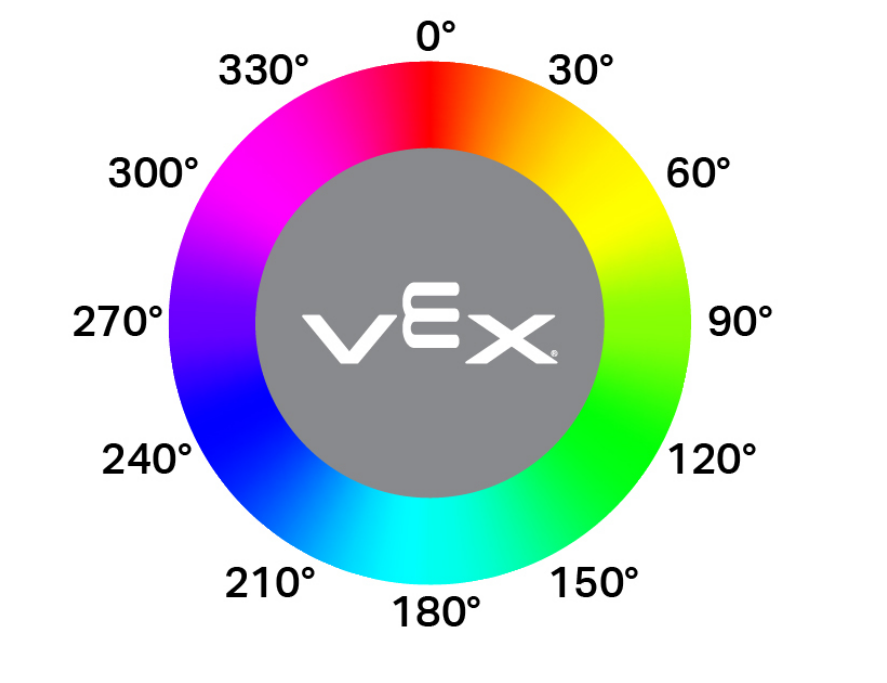
光学色调报告模块将光学传感器检测到的色调报告为 0 到 359 度之间的数字。
色相是用色轮上的数字来描述颜色的一种方法。
([FrontOptical v] 色度值)
参数 |
描述 |
|---|---|
此代码块没有参数。 |
光学#
当光学传感器检测到或丢失物体时,when Optical 模块会运行所连接的模块堆栈。
当 [FrontOptical v] [测得 v] 一个对象 :: hat events
参数 |
描述 |
|---|---|
状态 |
当附加的积木栈运行时:detects 会在检测到未检测到的对象时运行,而 loses 会在检测到的对象不再被检测到时运行。 |
旋转#
设置旋转传感器位置#
设置旋转传感器位置 模块将旋转传感器的当前位置设置为以度为单位的值。
设定 [PusherRotation v] 位置为 [0] 度
参数 |
描述 |
|---|---|
位置 |
旋转传感器的设置位置。 |
示例
当开始
[Make lower Pusher position the new 0 degrees rotation position.]
[PusherMotor v] [更低 v] 转 [270] [度 v] ▶
设定 [PusherRotation v] 位置为 [0] 度
旋转传感器角度#
旋转传感器角度模块返回传感器的当前角度,范围为 0 到 359.99 度。
([PusherRotation v] 角度值)
参数 |
描述 |
|---|---|
此代码块没有参数。 |
示例
当开始
[Make lower Pusher position the new 0 degrees rotation position.]
[PusherMotor v] [更低 v] 转 [270] [度 v] ▶
打印 ([PusherRotation v] 角度值) ▶
旋转传感器位置#
旋转传感器位置模块返回以度或圈数表示的总旋转位置。
([PusherRotation v] 位置 [度 v] :: custom-sensing)
参数 |
描述 |
|---|---|
单位 |
旋转单位:度或圈。 |
示例
当开始
[Make lower Pusher position the new 0 degrees rotation position.]
[PusherMotor v] [更低 v] 转 [270] [度 v] ▶
打印 ([PusherRotation v] 位置 [度 v] :: custom-sensing) ▶
全球定位系统#
GPS定位#
GPS 位置 模块使用 GPS(游戏定位系统™)传感器返回机器人转弯参考点相对于场地中心的偏移位置。
([GPS v] 在 [X v] 上 [毫米 v] 值)
参数 |
描述 |
|---|---|
轴 |
要报告哪个坐标轴:
|
单位 |
表示位置的单位:毫米 或 英寸 |
GPS航向#
GPS航向模块根据GPS(游戏定位系统™)传感器从VEX GPS场码读取的0.00到359.99度的读数,返回机器人当前面向的航向。
([GPS v] 归位角度值)
参数 |
描述 |
|---|---|
此代码块没有参数。 |