
Uso de bucles#
Este tutorial te guía en el uso del bloque repeat para que tu robot dibuje un cuadrado en VEXcode IQ (2.ª generación). Al finalizar, tendrás un proyecto que repite los mismos dos bloques cuatro veces para completar el cuadrado.
Si quieres que tu robot repita la misma acción varias veces, como moverse en un cuadrado, puedes duplicar los mismos bloques una y otra vez hasta que se muevan siguiendo el patrón de un cuadrado. Sin embargo, una forma más sencilla es usar el bloque repetir dentro de la categoría Lógica - Control.
Coloque un bloque accionamiento para y un bloque giro para debajo del bloque cuando se inicia.
cuando inicie
conducir [adelante v] por (200) [mm v] ▶
girar [derecha v] por (90) grados ▶
Adjunte un bloque repetir debajo del bloque cuando se inicie.
cuando inicie
repetir (10)
fin
conducir [adelante v] por (200) [mm v] ▶
girar [derecha v] por (90) grados ▶
Arrastra los bloques drive for y turn for dentro del bloque repeat.
cuando inicie
repetir (10)
conducir [adelante v] por (200) [mm v] ▶
girar [derecha v] por (90) grados ▶
fin
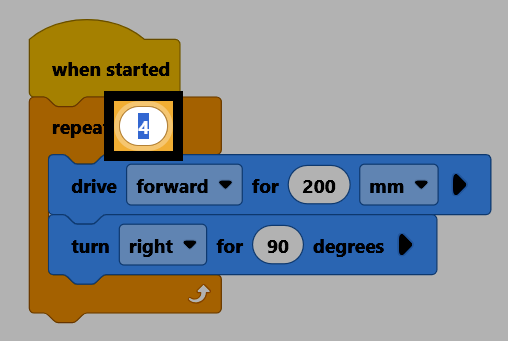
Seleccione el número de repetición y cámbielo a 4, de modo que los bloques interiores se repitan una vez por cada lado del cuadrado.
Asegúrese de que su robot esté conectado a VEXcode, luego seleccione Descargar para descargar el proyecto al Brain.
Seleccione Ejecutar para ejecutar el proyecto. El robot se desplazará en un cuadrado.
También puedes repetir una secuencia de acciones indefinidamente, utilizando el bloque para siempre en lugar de repetir.
por siempre
fin
Para salir de un bucle, utilice el bloque break dentro del bucle, para que el código salga del bloque de bucle inmediatamente.
interrumpir