
運動#
介紹#
VEX AIR 無人機配備四個螺旋槳,使其能夠向任何方向移動並獨立旋轉。運動控制功能提供了移動、轉向、速度調節和位置追蹤等方法。
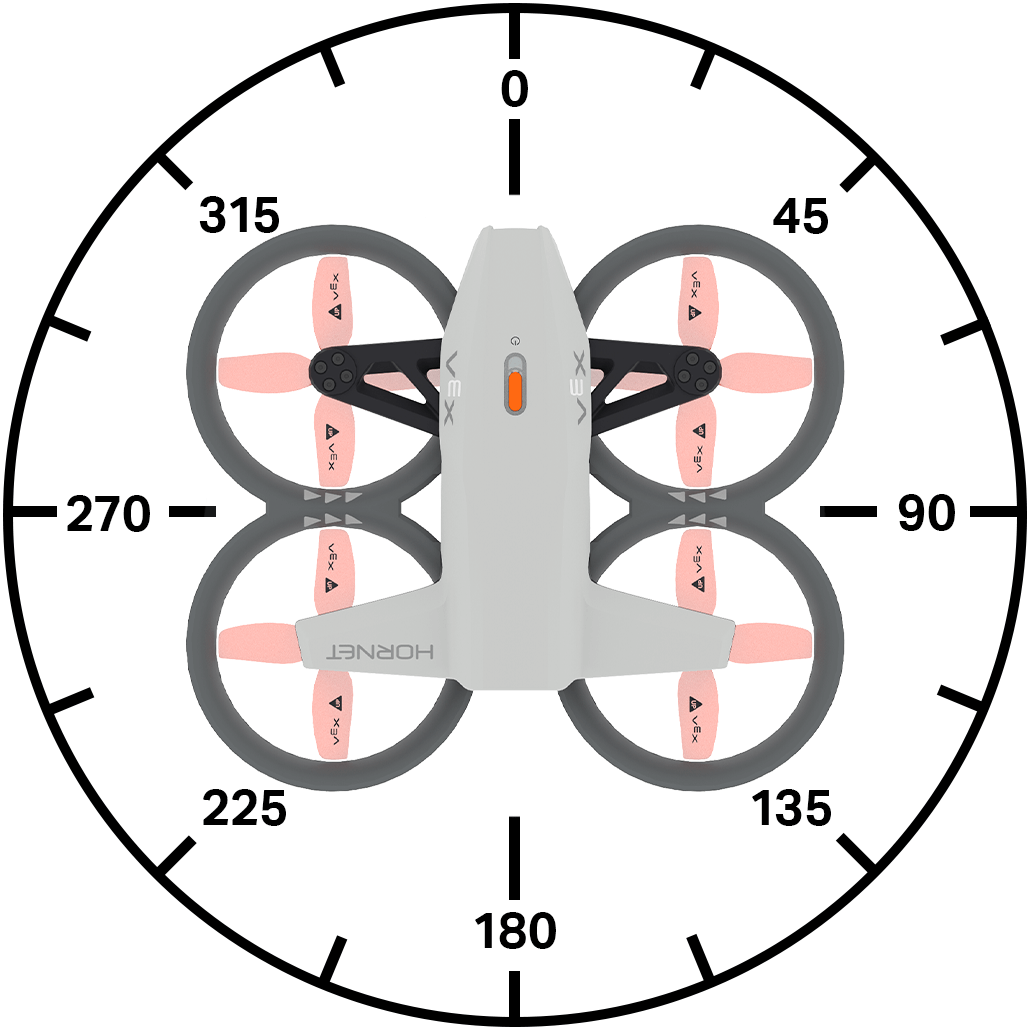
以下是所有可用方法的清單:
行動
take_off– 將無人機提升到指定高度。land– 無人機降落。hover- 將無人機保持在目前位置。climb– 使無人機沿著指定的垂直方向移動。climb_for– 使無人機沿著指定的垂直方向移動指定的距離。climb_to– 將無人機移到指定的高度。move_at– 使無人機以指定的航向和速度移動。move_for– 使無人機依指定航向移動指定距離。move_to– 將無人機移到指定位置,同時保持相同的航向。turn– 讓無人機向左或向右轉。turn_for– 將無人機旋轉設定的角度數。turn_to– 將無人機轉向特定航向。move_with_vectors– 使用向量為基礎的 x、y、z 和旋轉值來移動無人機。
修改器
set_steering_mode– 設定無人機轉向的 POV。set_movement_mode– 設定無人機的移動方式。set_climb_velocity– 設定預設爬升速度。set_move_velocity– 設定預設移動速度。set_turn_velocity- 設定預設轉彎速度。set_max_z_height- 設定無人機飛行高度的限制。set_xyz_position– 設定無人機的目前位置。
吸氣劑
get_max_z_height– 返回無人機可以達到的最大高度。get_flight_state– 返回無人機的目前狀態。get_x_position– 傳回無人機的 x 座標。get_y_position– 傳回無人機的 y 座標。get_z_position– 傳回無人機的 z 座標。get_safe_mode– 返回無人機的螺旋槳鎖定狀態。is_climb_active– 返回無人機目前是否正在爬升。is_move_active– 返回無人機目前是否正在移動。is_turn_active– 返回無人機目前是否正在轉彎。is_hovering- 返回無人機目前是否懸停。is_taking_off– 返回無人機目前是否正在起飛。is_landing– 返回無人機目前是否正在降落。is_landed- 返回無人機目前是否已著陸。
行動#
take_off#
take_off 啟動螺旋槳,將無人機升空。必須先執行此操作才能進行其他操作。
用法:
drone.take_off(climb_to, units, wait)
參數 |
描述 |
|---|---|
|
無人機將飛到的z軸位置(高度)。 |
|
單位:
|
|
可選 |
# Fly for 1 second
drone.take_off(climb_to=500)
wait(1, SECONDS)
drone.land()
land#
land 將無人機降至地面。螺旋槳將持續運轉,直至工程停止。
用法:
drone.land(wait)
參數 |
描述 |
|---|---|
|
可選 |
# Land after 1 second
drone.take_off(climb_to=500)
wait(1, SECONDS)
drone.land()
hover#
hover 停止無人機向任何方向移動,並保持其在空中的當前位置。
用法:
drone.hover()
參數 |
描述 |
|---|---|
此方法沒有參數。 |
# Hold current position for 3 seconds after moving forward
drone.take_off(climb_to=500)
drone.move_at(direction=0, velocity=50)
wait(1, SECONDS)
drone.hover()
wait(3, SECONDS)
drone.land()
climb#
climb 使無人機沿著指定的垂直方向移動。
用法: drone.climb(direction, velocity)
參數 |
描述 |
|---|---|
|
無人機的飛行方向: |
|
無人機爬升的速度百分比。 |
# Climb upwards for 2 seconds
drone.take_off(climb_to=500)
wait(2, SECONDS)
drone.climb(direction=UP)
wait(2, SECONDS)
drone.land()
climb_for#
climb_for 使無人機沿著指定的垂直方向移動指定的距離。
用法:
drone.climb_for(direction, distance, units, velocity, wait)
參數 |
描述 |
|---|---|
|
無人機的飛行方向: |
|
無人機的飛行距離。 |
|
可選。表示距離的單位:
|
|
可選。無人機爬升的速度(以百分比表示)。如果未指定速度,則預設速度為 50%。 |
|
可選 |
# Lower drone before landing
drone.take_off(climb_to=700)
wait(2, SECONDS)
drone.climb_for(direction=DOWN, distance=300)
wait(2, SECONDS)
drone.land()
climb_to#
climb_to 將無人機移到指定的 z 位置。
用法:
drone.climb_to(z, units, velocity, wait)
參數 |
描述 |
|---|---|
|
無人機將爬升至的 z 位置(整數或小數)。 |
|
可選。表示距離的單位:
|
|
可選。無人機爬升的速度百分比。 |
|
可選 |
# Reach 500 mm after takeoff
drone.take_off(climb_to=300)
wait(1, SECONDS)
drone.climb_to(z=500)
wait(1, SECONDS)
drone.land()
move_at#
move_at 使無人機以指定的角度和速度移動。
用法:
drone.move_at(angle, velocity)
參數 |
描述 |
|---|---|
|
無人機移動的角度,以整數或小數表示,範圍從 0 到 359 度。 |
|
無人機移動的速度(以百分比表示)。 |
# Move left for 2 seconds
drone.take_off(climb_to=500)
drone.move_at(angle=270)
wait(2, SECONDS)
drone.land()
move_for#
move_for 使用目前 set_move_velocity 使無人機沿著特定方向移動特定距離。
用法:
drone.move_for(angle, distance, units, velocity, wait)
參數 |
描述 |
|---|---|
|
無人機移動的角度,以整數或十進制數表示 (float),範圍從 0 到 359 度。 |
|
無人機移動的距離,以整數或小數表示。 |
|
可選。表示距離的單位:
|
|
可選。無人機移動的速度(百分比)。 |
|
可選 |
# Move forward for 200 mm
drone.take_off(climb_to=500)
wait(1, SECONDS)
drone.move_for(direction=0, distance=200, velocity=50, units=MM)
wait(1, SECONDS)
drone.land()
move_to#
move_to 將無人機移到空中的指定位置,同時保持相同的航向。
用法:
drone.move_to(x, y, z, units, move_velocity, climb_velocity, wait)
參數 |
描述 |
|---|---|
|
無人機將移動到的 x 座標。 |
|
無人機將移動到的 y 座標。 |
|
無人機將移動到的 z 座標。 |
|
可選。表示距離的單位:
|
|
可選。無人機移動的速度(百分比)。 |
|
可選。無人機爬升的速度百分比。 |
|
可選 |
# Move diagonally to (300, 300, 800)
drone.take_off(climb_to=300)
wait(2, SECONDS)
drone.move_to(x=300, y=300, z=800)
wait(2, SECONDS)
drone.land()
turn#
turn 使用目前 set_turn_velocity 將無人機轉向特定方向。
用法:
drone.turn(direction, velocity)
參數 |
描述 |
|---|---|
|
無人機的轉向方向: |
|
可選。無人機轉彎的速度(百分比)。 |
# Turn to the right for 2 seconds
drone.take_off(climb_to=500)
wait(1, SECONDS)
drone.turn(RIGHT, 50)
wait(2, SECONDS)
drone.land()
turn_for#
turn_for 使用目前的 set_turn_velocity 使無人機相對於其目前朝向方向向指定方向旋轉一段距離。
用法:
drone.turn_for(direction, angle, velocity, wait)
參數 |
描述 |
|---|---|
|
無人機的轉向方向: |
|
無人機轉彎的角度,以整數或十進制數表示 (float),範圍從 0 到 359 度。 |
|
可選。無人機轉彎的速度(百分比)。 |
|
可選 |
# Turn around, then land
drone.take_off(climb_to=500)
wait(1, SECONDS)
drone.turn_for(RIGHT, 180)
wait(1, SECONDS)
drone.land()
turn_to#
turn_to 使用目前 set_turn_velocity 將無人機轉向特定航向。
用法:
drone.turn_to(heading, velocity, wait)
參數 |
描述 |
|---|---|
|
無人機將轉向的方向,範圍為 0 到 360 度。 |
|
可選。無人機轉彎的速度(百分比)。 |
|
可選 |
# Turn to face each of the cardinal headings
drone.take_off(climb_to=500)
drone.turn_to(heading=90, velocity=50)
wait(3, SECONDS)
drone.turn_to(heading=180, velocity=50)
wait(3, SECONDS)
drone.turn_to(heading=270, velocity=50)
wait(3, SECONDS)
drone.turn_to(heading=0, velocity=50)
wait(3, SECONDS)
drone.land()
move_with_vectors#
move_with_vectors 使用基於向量的運動移動無人機,結合沿著 x 軸(水平)和 y 軸(垂直)的運動,同時旋轉無人機。
注意:此方法直接設定移動和轉向速度值,因此不使用 set_move_velocity 或 set_turn_velocity。
用法:
drone.move_with_vectors(forward, rightward, upward, rotation)
參數 |
描述 |
|---|---|
|
無人機沿 Y 軸的速度(前後移動)。接受 -100 到 100 之間的百分比值,負值表示向後移動,正值表示向前移動。 |
|
無人機沿著 X 軸(左右移動)的速度。接受 -100 到 100 之間的百分比值,負值向左移動,正值向右移動。 |
|
無人機沿著 Z 軸(上下移動)的速度。接受 -100 到 100 之間的百分比值,負值表示向下移動,正值表示向上移動。 |
|
無人機的旋轉速度。接受 -100 到 100 之間的百分比值,其中負值表示逆時針旋轉,正值表示順時針旋轉。 |
# Move with controller
drone.take_off(climb_to=500)
while True:
    drone.move_with_vectors(
        forward=controller.axis4.position(),
        rightward=controller.axis3.position(),
        upward=controller.axis1.position(),
        rotation=controller.axis2.position()
    )
    wait(5, MSEC)
修改器#
set_steering_mode#
set_steering_mode 設定無人機轉向時所使用的視角。
用法:
drone.set_steering_mode(style)
參數 |
描述 |
|---|---|
|
設置用於控制無人機的視角 (POV)。 0 |
# Steer based on the drone's starting orientation
# until button 7 is pressed
drone.take_off(climb_to=500)
drone.set_steering_mode(HEADLESS)
while not controller.button7.pressing():
    drone.move_with_vectors(
        forward=controller.axis4.position(),
        rightward=controller.axis3.position(),
        upward=controller.axis1.position(),
        rotation=controller.axis2.position()
    )
    wait(5, MSEC)
drone.land()
set_movement_mode#
set_movement_mode 設定無人機的移動方式。
這種運動方式用於使用控制器駕駛無人機時。
用法:
drone.set_movement_mode(style)
參數 |
描述 |
|---|---|
|
设置用于操控无人机的速度。
|
# Control the drone with the balanced movement style
drone.take_off(climb_to=500)
drone.set_movement_mode(BALANCED)
while not controller.button5.pressing():
    drone.move_with_vectors(
        forward=controller.axis4.position(),
        rightward=controller.axis3.position(),
        upward=controller.axis1.position(),
        rotation=controller.axis2.position()
    )
    wait(5, MSEC)
drone.land()
set_climb_velocity#
set_climb_velocity 設定預設爬升速度,以百分比表示。這將影響後續所有與爬升相關的方法。預設爬升速度為 50%。
用法:
drone.set_climb_velocity(velocity)
參數 |
描述 |
|---|---|
|
無人機爬升的速度百分比。 |
# Raise the drone quickly before landing
drone.take_off(climb_to=300)
wait(1, SECONDS)
drone.set_climb_velocity(100)
drone.climb_for(direction=UP, distance=500)
wait(1, SECONDS)
drone.land()
set_move_velocity#
set_move_velocity 設定預設移動速度,以百分比表示。這將影響後續所有與移動相關的方法。預設移動速度為 50%。
用法:
drone.set_move_velocity(velocity)
參數 |
描述 |
|---|---|
|
無人機移動的速度(以百分比表示)。 |
# Move forward quickly, then reverse slowly
drone.take_off(climb_to=500)
drone.set_move_velocity(100)
drone.move_for(direction=0, distance=500)
wait(3, SECONDS)
drone.set_move_velocity(20)
drone.move_for(direction=180, distance=500)
wait(5, SECONDS)
drone.land()
set_turn_velocity#
set_turn_velocity 設定預設轉彎速度,以百分比表示。這將影響後續所有與轉彎相關的方法。預設轉彎速度為 50%。
用法:
drone.set_turn_velocity(velocity)
參數 |
描述 |
|---|---|
|
無人機轉彎的速度(以百分比表示)。 |
# Turn clockwise quickly, then counterclockwise slowly
drone.take_off(climb_to=500)
drone.set_turn_velocity(100)
drone.turn_for(RIGHT, 360)
wait(3, SECONDS)
drone.set_turn_velocity(20)
drone.turn_for(LEFT, 360)
wait(5, SECONDS)
drone.land()
set_max_z_height#
set_max_z_height 設定無人機飛行高度的限制。
用法:
drone.set_max_z_height(z_height, units)
參數 |
描述 |
|---|---|
|
無人機不會飛過的最大 z 軸值(整數或小數),範圍為 1000 至 5000 毫米或 40 至 196 英吋。 |
|
可選。距離單位為:
|
# Fly with controller under 1000 mm
drone.set_max_z_height(1000, MM)
drone.take_off(climb_to=500)
while not controller.button7.pressing():
    drone.move_with_vectors(
        forward=controller.axis4.position(),
        rightward=controller.axis3.position(),
        upward=controller.axis1.position(),
        rotation=controller.axis2.position()
    )
drone.land()
set_xyz_position#
set_xyz_position 將無人機的目前 x、y 或 z 座標設為指定值。
用法:
drone.set_xyz_position(x, y, z, units)
注意:所有參數都是可選的,但至少要指定一個(x y或 z)。
參數 |
描述 |
|---|---|
|
可選。要設定的無人機 x 座標,單位為 |
|
可選。要設定的無人機 y 座標,單位為 |
|
可選。要設定的無人機 z 座標,單位為 |
|
可選。表示距離的單位:
|
# Set a new z position, then fly to z position -300
drone.take_off(climb_to=800)
drone.set_xyz_position(z=0)
wait(1, SECONDS)
drone.climb(DOWN, 50)
while not drone.get_z_position() < -300:
    wait(5, MSEC)
drone.hover()
wait(1, SECONDS)
drone.land()
吸氣劑#
get_max_z_height#
get_max_z_height 返回無人機可以達到的最大高度,以整數形式表示。
用法:
drone.get_max_z_height(units)
參數 |
描述 |
|---|---|
|
可選。計量單位:
|
# Display the new z height limit
controller.screen.print(drone.get_max_z_height(MM))
controller.screen.next_row()
drone.take_off(climb_to=500)
drone.set_max_z_height(1000)
controller.screen.print(drone.get_max_z_height(MM))
wait(1, SECONDS)
drone.land()
get_flight_state#
get_flight_state 返回無人機的目前飛行狀態,類型為 DroneFlightStateType:
MOTOR_OFF- 沒有其他飛行狀態為真。CALIBRATION- 無人機正在校準其感測器。MOTOR_START- 無人機正在啟動其馬達。FLIGHT_READY- 無人機已準備好飛行。FLIGHT- 無人機正在飛行中。
用法:
drone.get_flight_state()
參數 |
描述 |
|---|---|
此方法沒有參數。 |
# Report the flight status as the drone takes off
controller.screen.print("Preparing for flight!")
controller.screen.next_row()
drone.take_off(climb_to=800, wait=False)
while not drone.get_flight_state() == MOTOR_START:
    wait(5, MSEC)
controller.screen.print("Motors starting...")
controller.screen.next_row()
while not drone.get_flight_state() == FLIGHT:
    wait(5, MSEC)
controller.screen.print("Take off!")
get_x_position#
get_x_position 傳回無人機的 x 座標,以十進位 (float)。
用法:
drone.get_x_position(units)
參數 |
描述 |
|---|---|
|
可選。表示位置的單位:
|
# Move to (200, 0, 500)
drone.take_off(climb_to=500)
wait(1, SECONDS)
drone.move_at(direction=90, velocity=50)
while not drone.get_x_position() > 200:
    wait(5, MSEC)
drone.hover()
wait(1, SECONDS)
drone.land()
get_y_position#
get_y_position 傳回無人機的 y 座標,以十進位 (float)。
用法:
drone.get_y_position(units)
參數 |
描述 |
|---|---|
|
可選。表示位置的單位:
|
# Move to (0, 200, 500)
drone.take_off(climb_to=500)
wait(1, SECONDS)
drone.move_at(direction=0, velocity=50)
while not drone.get_y_position() > 200:
    wait(5, MSEC)
drone.hover()
wait(1, SECONDS)
drone.land()
get_z_position#
get_y_position 傳回無人機的 z 座標,以十進位 (float)。
用法:
drone.get_z_position(units)
參數 |
描述 |
|---|---|
|
可選。表示位置的單位:
|
# Move to (0, 0, 800)
drone.take_off(climb_to=500)
wait(1, SECONDS)
drone.climb(UP, 50)
while not drone.get_z_position() > 800:
    wait(5, MSEC)
drone.hover()
wait(1, SECONDS)
drone.land()
get_safe_mode#
get_safe_mode 傳回一個 Boolean ,指示無人機上的螺旋槳鎖定是否已啟用。
True– 螺旋槳鎖定已啟用。False– 螺旋槳鎖定未啟用。
用法:
drone.get_safe_mode()
參數 |
描述 |
|---|---|
此方法沒有參數。 |
# Change the sound by enabling the Propeller Lock
while True:
    if drone.get_safe_mode():
        controller.sound.play(FAULT)
        while controller.sound.is_active():
            wait(50, MSEC)
    else:
        controller.sound.play(SUCCESS)
        while controller.sound.is_active():
            wait(50, MSEC)
    wait(5, MSEC)
is_climb_active#
is_climb_active 回傳一個布林值 Boolean ,指示無人機是否正在爬升。
True– 無人機目前正在爬升。False– 無人機沒有爬升。
用法:
drone.is_climb_active()
參數 |
描述 |
|---|---|
此方法沒有參數。 |
# After the drone starts to climb, play a sound and land
drone.take_off(climb_to=500)
drone.climb(UP, 50)
wait(3, SECONDS)
if drone.is_climb_active():
    controller.sound.play(SUCCESS)
    drone.land()
is_move_active#
is_move_active 回傳一個 Boolean 指示無人機目前是否正在使用移動方法。
True– 無人機目前正在使用移動方法。False– 無人機目前未使用移動方法。
用法:
drone.is_move_active()
參數 |
描述 |
|---|---|
此方法沒有參數。 |
# After the drone starts to move, play a sound and land
drone.take_off(climb_to=500)
drone.move_at(direction=0, velocity=50)
wait(2, SECONDS)
if drone.is_move_active():
    controller.sound.play(SUCCESS)
    drone.land()
is_turn_active#
is_turn_active 回傳一個 Boolean 指示無人機是否在轉彎。
True– 無人機目前正在轉彎。False無人機沒有轉彎。
用法:
drone.is_turn_active()
參數 |
描述 |
|---|---|
此方法沒有參數。 |
# After the drone starts to turn, play a sound and land
drone.take_off(climb_to=500)
drone.turn(RIGHT)
wait(2, SECONDS)
if drone.is_turn_active():
    controller.sound.play(LOOPING)
    while controller.sound.is_active():
        wait(50, MSEC)
    drone.land()
is_hovering#
is_hovering 返回一個布林值 Boolean ,指示無人機是否保持其位置(懸停)。
True– 無人機目前保持位置(懸停)。False– 無人機目前正在改變位置。
用法:
drone.is_hovering()
參數 |
描述 |
|---|---|
此方法沒有參數。 |
# Play a sound after the drone has finished taking off
drone.take_off(climb_to=700)
while not drone.is_hovering():
    wait(5, MSEC)
controller.sound.play(PAUSE)
wait(2, SECONDS)
drone.land()
is_taking_off#
is_taking_off 返回一個 Boolean 指示無人機是否正在起飛。
True– 無人機目前正在起飛過程中。False– 無人機尚未起飛。
用法:
drone.is_taking_off()
參數 |
描述 |
|---|---|
此方法沒有參數。 |
# Play sounds while the drone is taking off
drone.take_off(700, wait=False)
wait(1, SECONDS)
while drone.is_taking_off():
    controller.sound.play(LOOPING)
    wait(5, MSEC)
is_landing#
is_landing 回傳一個布林值 Boolean ,表示無人機是否正在降落。
True– 無人機目前正在著陸過程中。False– 無人機未處於著陸過程中。
用法:
drone.is_landing()
參數 |
描述 |
|---|---|
此方法沒有參數。 |
# Play sounds while the drone is landing
drone.take_off(climb_to=500)
wait(1, SECONDS)
drone.land(wait=False)
wait(1, SECONDS)
while drone.is_landing():
    controller.sound.play(LOOPING)
    wait(5, MSEC)
is_landed#
is_landed 返回一個布林值 Boolean 指示無人機目前是否已著陸。
True– 無人機已降落。False– 無人機未著陸。
用法:
drone.is_landed()
參數 |
描述 |
|---|---|
此方法沒有參數。 |
# Celebrate a successful landing
drone.take_off(climb_to=500)
wait(1, SECONDS)
drone.land()
wait(1, SECONDS)
if drone.is_landed():
    controller.sound.play(SUCCESS)