
感應器#
介紹#
VEX AIR 無人機內建慣性感測器,用於測量旋轉運動和偵測運動變化,以及測距感測器,用於測量距離。 VEX AIR 無人機還可以追蹤電池電量。這些感測器使無人機能夠追蹤其方向、航向、加速度以及與物體的距離。
以下是所有可用方法的清單:
慣性 - 追蹤無人機的旋轉運動。
get_rotation– 返回無人機自啟動以來旋轉了多少圈。get_heading– 返回目前航向(0 到 359.99°)。get_yaw– 返回偏航角(-180 到 180°)。get_roll– 返回滾動角度(-180 到 180°)。get_pitch– 返回俯仰角(-180 到 180°)。reset_rotation– 將旋轉值重設為 0。reset_heading– 將目前航向設定為 0。set_heading– 將標題設為特定值。get_acceleration– 傳回特定方向的加速度。get_turn_rate– 傳回每秒轉角速度(度)。
測距範圍 — 透過無人機的測距感測器偵測距離。
get_distance— 傳回所選測距感測器與最近偵測到的物件之間的距離。
電池 - 返回無人機的電池百分比。
get_battery_level– 返回無人機的電池電量百分比。
慣性#
get_rotation#
get_rotation 傳回無人機自起飛以來旋轉的角度。它將所有旋轉角度相加,並以角度為單位返回總角度:順時針旋轉為正,逆時針旋轉為負。
用法:
drone.inertial.get_rotation()
參數 |
描述 |
|---|---|
此方法沒有參數。 |
# Display the rotation after turning
drone.take_off(climb_to=500)
drone.turn_for(LEFT, 450, 50)
print(drone.inertial.get_rotation(), end="")
drone.land()
get_heading#
get_heading 返回無人機的航向角,數值範圍為 0 到 359.99 度(浮點數)。
用法:
drone.inertial.get_heading()
參數 |
描述 |
|---|---|
此方法沒有參數。 |
# Display the drone's heading after turning
drone.take_off(climb_to=500)
drone.set_turn_velocity(100)
drone.turn(RIGHT)
wait(5, SECONDS)
controller.screen.print("Heading: ")
controller.screen.print(drone.inertial.get_heading())
drone.land()
get_yaw#
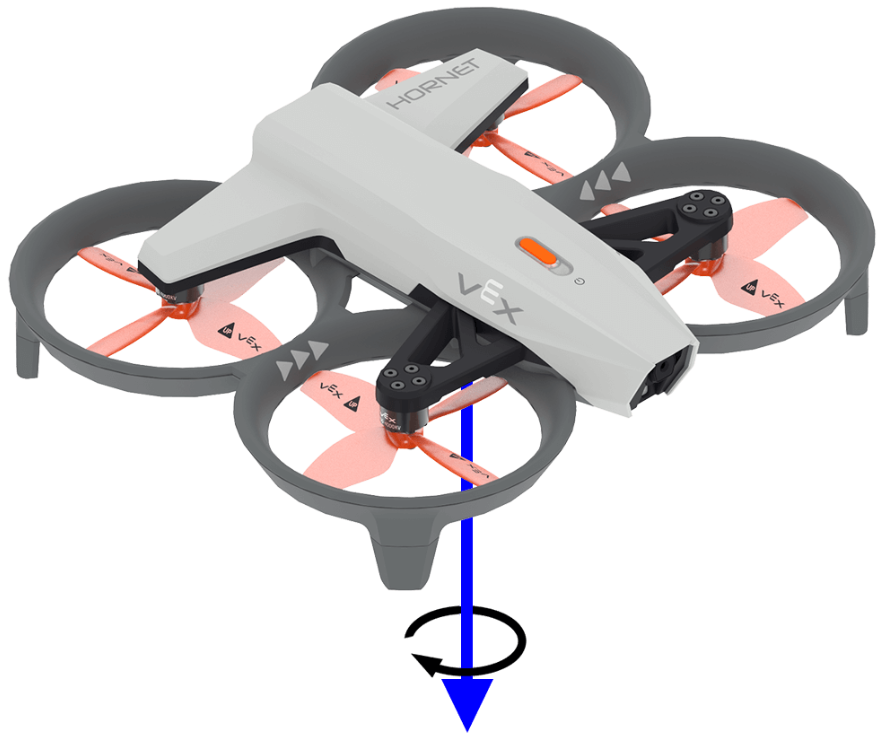
get_yaw 返回無人機的偏航角,範圍為 -180.0 到 180.0 度,以浮點數表示。
下圖使用箭頭表示偏航的正旋轉方向。
用法:
drone.inertial.get_yaw
參數 |
描述 |
|---|---|
此方法沒有參數。 |
# Display the yaw angle as you rotate the drone by hand
while True:
    controller.screen.clear_screen()
    controller.screen.set_cursor(1, 1)
    controller.screen.print("Yaw: ")
    controller.screen.print(drone.inertial.get_yaw())
    wait(0.2, SECONDS)
get_roll#
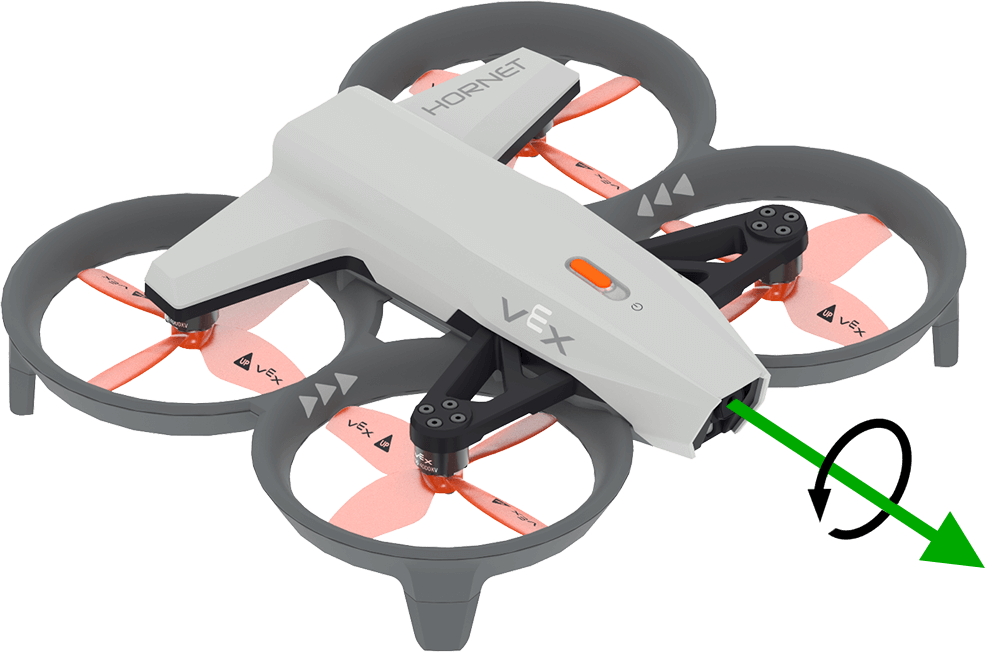
get_roll 返回無人機的橫滾角,範圍為 -180.0 到 180.0 度,以浮點數表示。
下圖以箭頭表示滾動的正向旋轉方向。
用法:
drone.inertial.get_roll()
參數 |
描述 |
|---|---|
此方法沒有參數。 |
# Display the roll angle as you rotate the drone by hand
while True:
    controller.screen.clear_screen()
    controller.screen.set_cursor(1, 1)
    controller.screen.print("Roll: ")
    controller.screen.print(drone.inertial.get_roll())
    wait(0.2, SECONDS)
get_pitch#
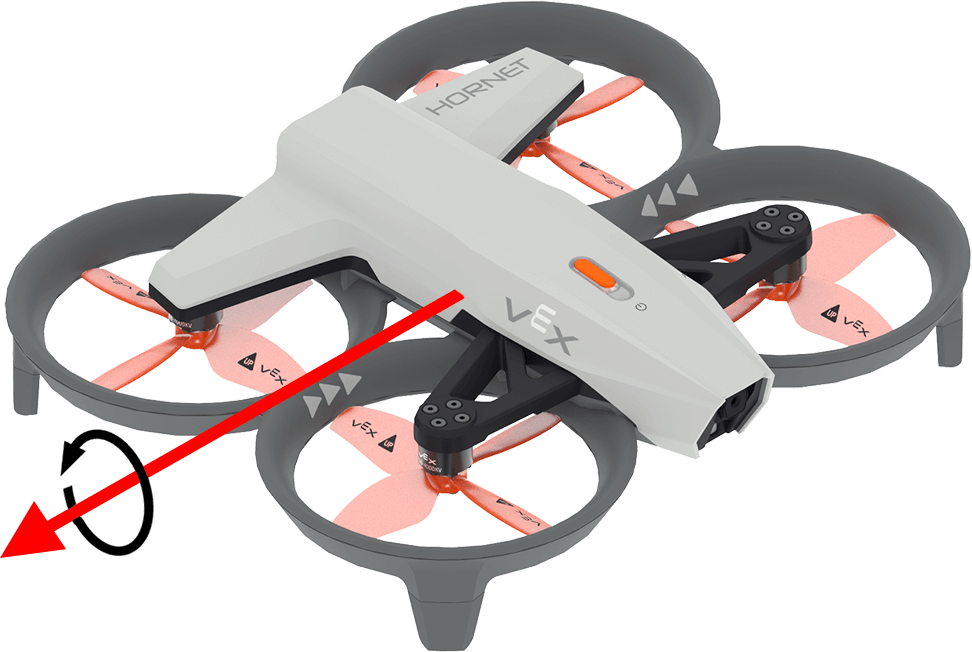
get_pitch 返回無人機的俯仰角,範圍為 -180.0 到 180.0 度,以浮點數表示。
下圖使用箭頭表示俯仰的正向旋轉方向。
用法:
drone.inertial.get_pitch()
參數 |
描述 |
|---|---|
此方法沒有參數。 |
# Display the pitch angle as you rotate the drone by hand
while True:
    controller.screen.clear_screen()
    controller.screen.set_cursor(1, 1)
    controller.screen.print("Pitch: ")
    controller.screen.print(drone.inertial.get_pitch())
    wait(0.2, SECONDS)
reset_rotation#
reset_rotation 將無人機的旋轉值重設為 0 度。
用法:
drone.inertial.reset_rotation()
參數 |
描述 |
|---|---|
此方法沒有參數。 |
# Display the new rotation after resetting
drone.take_off(climb_to=500)
drone.turn(RIGHT)
while not drone.inertial.get_rotation() > 360:
    wait(5, MSEC)
drone.hover()
drone.inertial.reset_rotation()
wait(1, SECONDS)
print(drone.inertial.get_rotation(), end="")
drone.land()
reset_heading#
reset_heading 將無人機的航向重設為 0 度。
用法:
drone.inertial.reset_heading()
參數 |
描述 |
|---|---|
此方法沒有參數。 |
# Turn to a heading, reset the heading, and turn to the same heading.
drone.take_off(climb_to=500)
drone.turn_to(heading=180, velocity=50)
wait(3,SECONDS)
drone.inertial.reset_heading()
drone.turn_to(heading=180, velocity=50)
wait(3,SECONDS)
drone.land()
set_heading#
set_heading 將無人機的航向設定為指定的度數。
用法:
drone.inertial.set_heading(heading)
參數 |
描述 |
|---|---|
|
新航向使用的值在 0 到 359.99 度範圍內。 |
# Turn to a heading, set the heading, and turn to the same heading.
drone.take_off(climb_to=500)
drone.turn_to(heading=180, velocity=50)
wait(3,SECONDS)
drone.inertial.set_heading(90)
drone.turn_to(heading=180, velocity=50)
wait(3,SECONDS)
drone.land()
get_acceleration#
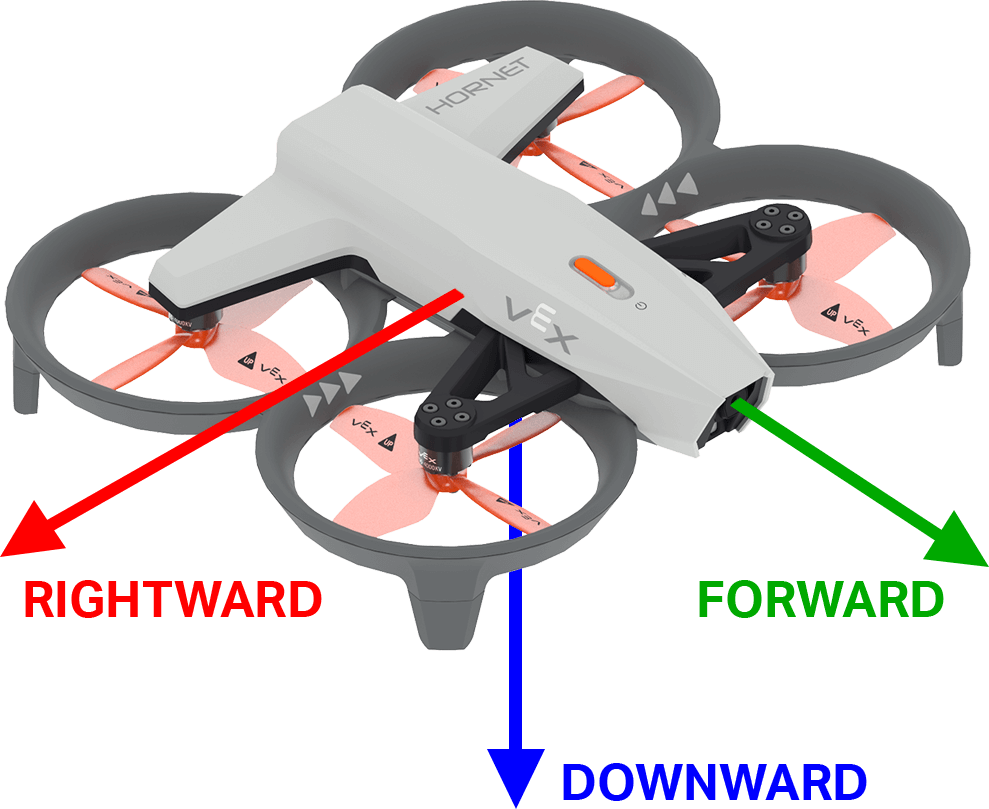
get_acceleration 返回無人機在指定方向上的加速度。傳回值表示速度的變化率,單位為 g(其中 1g ≈ 9.81 m/s²),數值為 -4.00 到 4.00 之間的浮點數。
下圖以箭頭表示向前和向右的正加速度方向,向下的負加速度方向。
用法:
drone.inertial.get_acceleration(type)
參數 |
描述 |
|---|---|
|
報告加速度方向:
|
# Display the acceleration as the drone takes off
drone.take_off(500, wait=False)
while True:
    controller.screen.clear_screen()
    controller.screen.set_cursor(1, 1)
    controller.screen.print(drone.inertial.get_acceleration(DOWNWARD))
    wait(5, MSEC)
get_turn_rate#
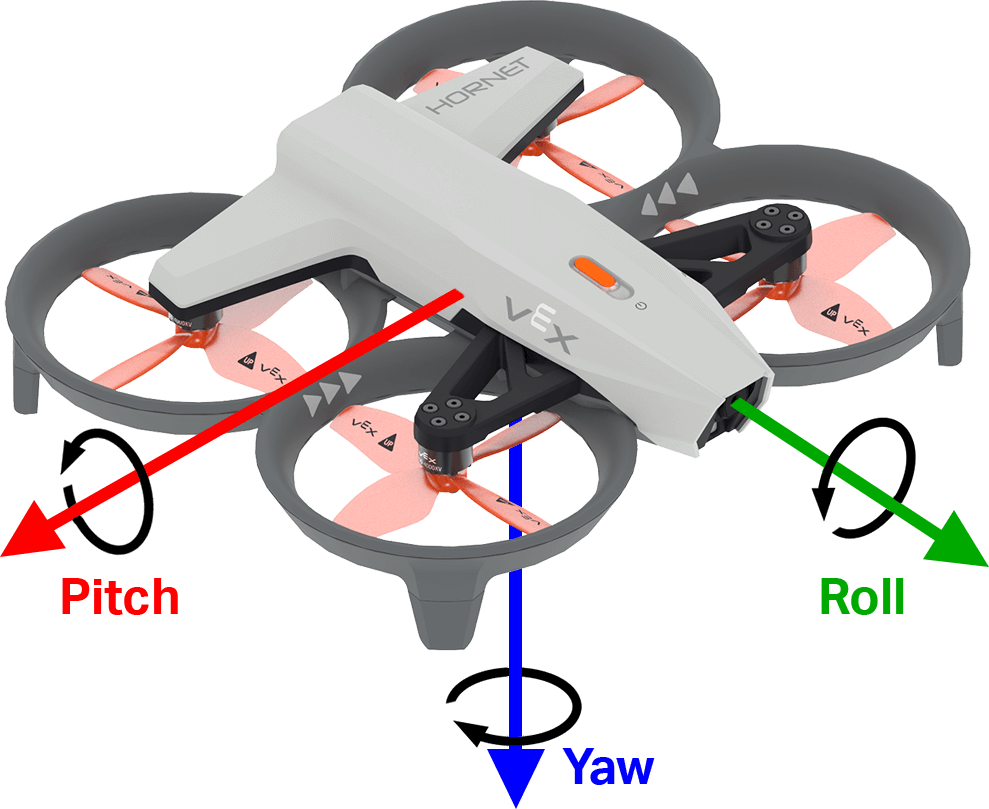
get_turn_rate 返回無人機沿著指定軸旋轉的速率。該值以每秒度數 \(dps\) 為單位傳回,數值為 -1000.00 到 1000.00 dps 之間的浮點數。
下圖使用箭頭顯示滾動、俯仰和偏航的正旋轉方向。
用法:
drone.inertial.get_turn_rate(axis)
參數 |
描述 |
|---|---|
|
應報告哪個方向:
|
# Display the drone turn rate as it is rotated by hand.
while True:
    controller.screen.clear_screen()
    controller.screen.set_cursor(7, 1)
    controller.screen.print(drone.inertial.get_turn_rate(ROLL))
範圍#
get_distance#
get_distance 返回所選測距感測器與最近偵測到的物體之間的距離。
用法:
drone.range.get_distance(range, units)
參數 |
描述 |
|---|---|
|
要使用的测距传感器: |
|
可選。距離單位:
|
# Fly forward until close to an object
drone.take_off(climb_to=500)
drone.move_at(direction=0, velocity=50)
while not drone.range.get_distance(FORWARD_RANGE, MM) < 750:
    wait(0.1, SECONDS)
drone.land()
電池#
get_battery_level#
get_battery_level 返回無人機的電池電量百分比。傳回值介於 0 到 100 之間。
用法:
drone.get_battery_level()
參數 |
描述 |
|---|---|
此方法沒有參數。 |
# Display the drone's battery level
if drone.get_battery_level() < 25:
    controller.screen.print("Charge the drone Battery!")
else:
    controller.screen.print("Ready to fly!")