
機器人專用 Python#
介紹#
英雄機器人 Disco 包括電機組、線路追蹤器、光學感測器和遊戲定位系統 (GPS) 感測器。
所有標準的 VEXcode VR 方法都可以在 V5 22-23 Spin Up Playground 中使用。
以下是所有可用的機器人專用方法清單:
驅動系統-控制機器人的移動和轉向。
操作
drive— 使機器人無限向前或向後移動。drive_for— 使機器人向前或向後移動指定的距離。turn— 讓機器人永遠向左或向右轉。turn_for— 使機器人向左或向右旋轉指定的度數。turn_to_heading— 將機器人轉向 -359 到 359 度之間的特定航向。turn_to_rotation— 將機器人旋轉到指定的方向。stop— 停止機器人的移動。
變異因子
set_heading— 將機器人的目前航向改為新的航向。set_rotation— 將機器人的目前旋轉改為新的旋轉。set_timeout— 設定機器人嘗試完成一次動作的時間。set_drive_velocity— 告訴機器人以多快的速度行駛。set_turn_velocity— 告訴機器人轉彎的速度。
Getters
運動控制-移動並追蹤機器人的馬達組。
操作
spin— 使馬達組永遠正轉或反轉。spin_for— 使馬達組旋轉特定距離。spin_to_position— 將馬達組旋轉到特定位置。stop— 停止馬達組旋轉。
變異因子
set_position— 將馬達組的目前位置改為新值。set_velocity— 告訴馬達組旋轉的速度。set_timeout— 設定馬達組嘗試完成動作的時間。
Getters
is_done— 返回馬達組是否已完成移動,以布林值表示。is_spinning— 傳回馬達組是否正在旋轉,以布林值表示。position— 返回馬達組的目前位置。velocity— 傳回馬達組的旋轉速度。
控制台 – 將資訊列印到控制台並監控數值。
列印
brain.screen.print— 在控制台中顯示文字、數字或變數值。brain.screen.next_row— 將控制台遊標移到下一行的開頭。brain.screen.clear_screen— 清除控制台中的所有行。
監視器
monitor_variable— 在「監視器」標籤中新增一個或多個預定義變數。monitor_sensor— 在「監視器」標籤中新增一個或多個感測器值。
感知-利用機器人的各種感測器。
光學的
is_near_object– 返迴光學感測器是否偵測到範圍內的物體。color– 返迴光學感測器偵測到的顏色。brightness– 傳回物體反射的光量。hue– 返迴光學感測器偵測到的色調。object_detected– 註冊一個當光學感測器偵測到物體時要呼叫的函數。object_lost– 註冊一個當光學感測器遺失物體時要呼叫的函數。
全球定位系統
x_position– 返回場地中 GPS 感測器的目前 x 座標。y_position– 返回場地中 GPS 感測器的目前 y 座標。heading– 根據 GPS 感測器的讀數(0 到 359 度)返回機器人目前面向的航向。
線路追蹤器
reflectivity– 傳回從表面反射的光量。
本頁範例使用 Playground 的預設起始位置。
傳動系統#
動力系統控制VR機器人的駕駛和轉向。動力系統可以前進或後退、左轉或右轉、轉向特定航向並追蹤其旋轉。
行動#
駕駛#
drive 使機器人無限前進或後退。機器人將持續移動,直到收到其他指令,例如轉向或停止。
Usage:
drivetrain.drive(direction)
參數 |
描述 |
|---|---|
|
機器人移動方向: |
def main():
    # Drive forward then stop
    drivetrain.drive(FORWARD)
    wait(2, SECONDS)
    drivetrain.stop()

# VR threads — Do not delete
vr_thread(main)
驅動#
drive_for 使機器人前進或後退指定距離。程式會等待機器人完成移動後才執行下一行程式碼。
Usage:
drivetrain.drive_for(direction, distance, units, wait)
參數 |
描述 |
|---|---|
|
機器人移動方向: |
|
機器人行駛的距離。這可以是整數 |
|
可選。距離單位: |
|
可選 |
def main():
    # Drive forward and backward
    drivetrain.drive_for(FORWARD, 200, MM)
    drivetrain.drive_for(REVERSE, 200, MM)

# VR threads — Do not delete
vr_thread(main)
轉動#
turn 表示機器人將持續旋轉,直到收到其他指令,例如行駛或停止。
Usage:
drivetrain.turn(direction)
參數 |
描述 |
|---|---|
|
機器人轉向的方向: |
def main():
    # Turn right and left, then stop
    drivetrain.turn(RIGHT)
    wait(2, SECONDS)
    drivetrain.turn(LEFT)
    wait(2, SECONDS)
    drivetrain.stop()

# VR threads — Do not delete
vr_thread(main)
轉彎#
turn_for 參數使機器人向左或向右旋轉指定角度。旋轉角度是相對於機器人目前位置的。程式會等待機器人完成旋轉後才執行下一行程式碼。
Usage:
drivetrain.turn_for(direction, angle, units, wait)
參數 |
描述 |
|---|---|
|
機器人轉向的方向: |
|
The number of degrees the robot turns. This can be an |
|
可選。旋轉單位: |
|
可選 |
def main():
    # Turn the robot right and left
    drivetrain.turn_for(RIGHT, 90, DEGREES)
    wait(1, SECONDS)
    drivetrain.turn_for(LEFT, 90, DEGREES)

# VR threads — Do not delete
vr_thread(main)
轉向航向#
航向角是指機器人朝向的方向,以度為單位。 `turn_to_heading 將機器人轉向 -359 度到 359 度之間的特定航向角。機器人將沿著最短路徑轉向以達到目標航向角。
機器人的初始航向角為0度。
程式會等到機器人完成轉向後才執行下一行程式碼。
Usage:
drivetrain.turn_to_heading(angle, units, wait)
參數 |
描述 |
|---|---|
|
機器人應面向的方向,以度為單位。可以是 |
|
可選。旋轉單位: |
|
可選 |
def main():
    # Turn to face the cardinal directions
    drivetrain.turn_to_heading(90, DEGREES)
    wait(1, SECONDS)
    drivetrain.turn_to_heading(180, DEGREES)
    wait(1, SECONDS)
    drivetrain.turn_to_heading(270, DEGREES)
    wait(1, SECONDS)
    drivetrain.turn_to_heading(0, DEGREES)

# VR threads — Do not delete
vr_thread(main)
轉向旋轉#
turn_to_rotation 將機器人旋轉到指定角度。
旋轉角度是指機器人轉動的程度,以度為單位。在專案開始時,旋轉角度值設定為 0 度。也可以使用 set_rotation 方法設定旋轉角度。
旋轉角度是絕對值。這意味著轉彎方向取決於機器人目前的旋轉角度。向右轉會增加旋轉角度,向左轉彎會減少旋轉角度。
例如,如果機器人從0度開始,你將其旋轉720度,它會向右轉兩次。如果你再將其旋轉360度,它會向左轉一次,因為360小於720。
程式會等到機器人完成轉向後才執行下一行程式碼。
Usage:
drivetrain.turn_to_rotation(angle, units, wait)
參數 |
描述 |
|---|---|
|
機器人將旋轉到的旋轉值,以度為單位。這可以是整數 |
|
可選。旋轉單位: |
|
可選 |
def main():
    # Turn left, then spin in a circle
    # clockwise and face right
    drivetrain.turn_to_rotation(-90, DEGREES)
    wait(1, SECONDS)
    drivetrain.turn_to_rotation(450, DEGREES)

# VR threads — Do not delete
vr_thread(main)
停止#
stop 停止機器人的移動。
Usage:
drivetrain.stop()
參數 |
描述 |
|---|---|
此方法沒有參數。 |
def main():
    # Drive forward then stop
    drivetrain.drive(FORWARD)
    wait(2, SECONDS)
    drivetrain.stop()

# VR threads — Do not delete
vr_thread(main)
變異體#
設定標題#
航向角是指機器人面向的方向,以度為單位。 0 set_heading 將機器人的目前航向角變更為新的航向角值。
例如,如果機器人轉向右側,將航向設定為 0 度,則該右側位置將成為新的 0 度航向。然後,機器人可以根據新的航向轉向其他位置。
Usage:
drivetrain.set_heading(heading, units)
參數 |
描述 |
|---|---|
|
The heading value, in degrees, to set for the robot. This can be an |
|
可選。航向單位: |
def main():
    # Face the new 0 degrees
    drivetrain.set_heading(90, DEGREES)
    drivetrain.turn_to_heading(0, DEGREES)

# VR threads — Do not delete
vr_thread(main)
設定旋轉#
旋轉角度是指機器人轉動的程度,以度為單位。專案開始時,旋轉角度值設定為 0 度。 `set_rotation 會將機器人的目前旋轉角度變更為新值。
例如,如果機器人向右轉了兩圈,它的旋轉角度將為 720 度。將旋轉角度設為 0 度會將旋轉角度從 720 度重設為 0 度。然後,機器人可以根據這個新的旋轉角度進行旋轉。
Usage:
drivetrain.set_rotation(rotation, units)
參數 |
描述 |
|---|---|
|
要設定的機器人旋轉值,以度為單位。這可以是整數 |
|
可選。旋轉單位: |
def main():
    # Spin counterclockwise two times
    drivetrain.set_rotation(720, DEGREES)
    drivetrain.turn_to_rotation(0, DEGREES)

# VR threads — Do not delete
vr_thread(main)
設定超時#
set_timeout 設定機器人嘗試完成一個動作的超時時間。如果機器人無法在規定時間內完成,它將停止嘗試並執行下一行程式碼。這可以防止機器人卡在某個動作上。
Usage:
drivetrain.set_timeout(value, units)
參數 |
描述 |
|---|---|
|
The amount of time the robot can try to finish a movement. This can be a positive |
|
時間單位: |
def main():
    # Turn right after driving forward
    drivetrain.set_timeout(1, SECONDS)
    drivetrain.drive_for(FORWARD, 25, INCHES)
    drivetrain.turn_for(RIGHT, 90)

# VR threads — Do not delete
vr_thread(main)
設定驅動速度#
set_drive_velocity 告訴機器人行駛速度。百分比越高,機器人行駛速度越快;百分比越低,機器人行駛速度越慢。
每個專案開始時,機器人預設以 50% 的速度行駛。
注意:速度越高,機器人行駛速度越快,但精度可能越低;速度越低,機器人行駛速度越慢,但精度可能越高。
Usage:
drivetrain.set_drive_velocity(velocity, units)
參數 |
描述 |
|---|---|
|
行駛速度,範圍從 0% 到 100%。可以是整數 |
|
可選。速度單位: |
def main():
    # Drive forward at different velocities
    # Default velocity
    drivetrain.drive_for(FORWARD, 150, MM)
    wait(1, SECONDS)
    # Drive slower
    drivetrain.set_drive_velocity(20, PERCENT)
    drivetrain.drive_for(FORWARD, 150, MM)
    wait(1, SECONDS)
    # Drive faster
    drivetrain.set_drive_velocity(100, PERCENT)
    drivetrain.drive_for(FORWARD, 150, MM)

# VR threads — Do not delete
vr_thread(main)
設定轉彎速度#
set_turn_velocity 告訴機器人轉彎的速度。百分比越高,機器人轉彎越快;百分比越低,機器人轉彎越慢。
每個專案開始時,機器人預設以 50% 的速度旋轉。
注意:速度越高,機器人轉彎越快,但精度可能越低;速度越低,機器人轉彎越慢,但精度可能越高。
Usage:
drivetrain.set_turn_velocity(velocity, units)
參數 |
描述 |
|---|---|
|
轉彎速度,範圍從 0% 到 100%。可以是整數 |
|
可選。速度單位: |
def main():
    # Turn at different velocities
    # Default velocity
    drivetrain.turn_for(RIGHT, 120, DEGREES)
    wait(1, SECONDS)
    # Turn slower
    drivetrain.set_turn_velocity(20, PERCENT)
    drivetrain.turn_for(RIGHT, 120, DEGREES)
    wait(1, SECONDS)
    # Turn faster
    drivetrain.set_turn_velocity(100, PERCENT)
    drivetrain.turn_for(RIGHT, 120, DEGREES)

# VR threads — Do not delete
vr_thread(main)
獲取器#
標題#
A heading is the direction the robot is facing, measured in degrees. heading returns the robot’s current heading from 0 to 359.99 degrees.
機器人的初始航向角為0度。
Usage:
drivetrain.heading(units)
參數 |
描述 |
|---|---|
|
可選。航向單位: |
def main():
    # Display the heading after turning
    drivetrain.turn_for(RIGHT, 450, DEGREES)
    brain.screen.print("Heading: ")
    brain.screen.print(drivetrain.heading(DEGREES))

# VR threads — Do not delete
vr_thread(main)
旋轉#
Rotation is how much the robot has turned, measured in degrees. At the beginning of a project, the rotation value is set to 0 degrees. rotation returns the robot’s current rotation.
向右轉會增加旋轉角度,向左轉會減少旋轉角度。例如,向右轉兩圈將得到 720 度的旋轉角度。
Usage:
drivetrain.rotation(units)
參數 |
描述 |
|---|---|
|
可選。旋轉單位: |
def main():
    # Display the rotation after turning
    drivetrain.turn_for(RIGHT, 450, DEGREES)
    brain.screen.print("Rotation: ")
    brain.screen.print(drivetrain.rotation(DEGREES))

# VR threads — Do not delete
vr_thread(main)
已完成#
is_done 傳回機器人是否已完成移動,回傳值為布林值。這可用於根據機器人的移動狀態控制其他行為的執行時間。
True— 機器人已停止移動。False— 機器人仍在移動。
此方法與以下具有 wait 參數的傳動系統方法搭配使用:drive_for, turn_for, turn_to_heading, 和 turn_to_rotation。
Usage:
drivetrain.is_done()
參數 |
描述 |
|---|---|
此方法沒有參數。 |
正在移動#
is_moving 返回機器人是否正在移動,返回值為布林值。這可用於根據機器人的移動狀態控制其他行為的執行時間。
True— 機器人正在移動。False— 機器人沒有移動。
Usage:
drivetrain.is_moving()
參數 |
描述 |
|---|---|
此方法沒有參數。 |
速度#
velocity 返回機器人行駛的速度,以 -100% 到 100% 的百分比表示。
Usage:
drivetrain.velocity(units)
參數 |
描述 |
|---|---|
|
可選。速度單位: |
例子
def main():
    # Display the velocity after driving
    drivetrain.drive_for(FORWARD, 150, MM)
    brain.screen.print("Velocity: ")
    brain.screen.print(drivetrain.velocity(PERCENT))
運動#
迪斯可利用進料馬達組帶動進料輪旋轉,以便收集和計分圓盤。這些進料輪在接觸到場輥時也能帶動場輥旋轉。
方向說明解釋了每個方向如何移動發現者上的進氣馬達組。
行動#
旋轉#
spin 表示馬達組正轉或反轉永不停歇。馬達組將持續旋轉,直到收到其他指令,例如改變旋轉方向或停止。
Usage:
intake_motor_group.spin(direction)
參數 |
描述 |
|---|---|
|
The direction the motor group spins:
|
def main():
    # Spin the intake forward then stop
    intake_motor_group.spin(FORWARD)
    wait(0.5, SECONDS)
    intake_motor_group.stop()

# VR threads — Do not delete
vr_thread(main)
spin_for#
spin_for 會使馬達組旋轉指定距離。旋轉距離是相對於馬達組的當前位置而言的。程式會等待馬達組旋轉完畢後再執行下一行程式碼。
Usage:
intake_motor_group.spin_for(direction, distance, units, wait)
參數 |
描述 |
|---|---|
|
The direction the motor group spins:
|
|
馬達組旋轉的距離。 0 度 |
|
可選。距離單位: |
|
Optional.
|
def main():
    # Spin the intake forward then stop
    intake_motor_group.spin_for(FORWARD, 360, DEGREES)

# VR threads — Do not delete
vr_thread(main)
自旋至位置#
spin_to_position 將馬達組旋轉到特定位置。
電機組的位置是指其旋轉的距離,以 DEGREES 或 TURNS來衡量。一圈等於 360 度。在專案開始時,電機組的位置設定為 0 度。也可以使用 set_position 方法設定馬達組的位置。
位置值是絕對值。這意味著旋轉方向取決於馬達組的當前位置。
例如,如果馬達組從 0 度開始旋轉到 720 度,它將正轉兩圈。如果之後它旋轉到 360 度,它將反轉一圈,因為 360 小於 720。
Usage:
intake_motor_group.spin_to_position(angle, units, wait)
參數 |
描述 |
|---|---|
|
馬達組將旋轉到的位置值。 0 度 |
|
可選。位置單位: |
|
Optional.
|
def main():
    # Spin the intake forward then stop
    intake_motor_group.spin_to_position(55, DEGREES)

# VR threads — Do not delete
vr_thread(main)
停止#
stop 停止馬達組旋轉。
Usage:
intake_motor_group.stop()
參數 |
描述 |
|---|---|
此方法沒有參數。 |
def main():
    # Spin the intake forward then stop
    intake_motor_group.spin(FORWARD)
    wait(0.5, SECONDS)
    intake_motor_group.stop()

# VR threads — Do not delete
vr_thread(main)
變異體#
設定位置#
電機組的位置是指它旋轉的距離,以 DEGREES 或 TURNS測量。 set_position 用於將馬達組的目前位置變更為新值。
例如,如果一個馬達組旋轉了 180 度,將其位置設為 0 度會將該位置從 180 度重設為 0 度。然後,該馬達組可以根據這個新值旋轉到對應的位置。
Usage:
intake_motor_group.set_position(position, units)
參數 |
描述 |
|---|---|
|
馬達組的位置值設定。 0 度 |
|
可選。位置單位: |
def main():
    # Spin the intake forward then stop
    intake_motor_group.set_position(90, DEGREES)
    intake_motor_group.spin_to_position(0, DEGREES)

# VR threads — Do not delete
vr_thread(main)
設定速度#
set_velocity 告訴馬達組的旋轉速度。百分比越高,馬達組旋轉速度越快;百分比越低,馬達組旋轉速度越慢。
每個項目開始時,每個馬達組預設以 50% 的速度旋轉。
注意:更高的速度會使馬達組旋轉得更快,但精度可能會降低。更低的速度會使馬達組旋轉得更慢,但精度可能會更高。
Usage:
intake_motor_group.set_velocity(velocity, units)
參數 |
描述 |
|---|---|
|
旋轉速度,範圍從 0% 到 100%。可以是整數 |
|
速度單位: |
def main():
    # Spin the intake forward then stop
    intake_motor_group.set_velocity(75, PERCENT)
    intake_motor_group.spin_to_position(180, DEGREES)

# VR threads — Do not delete
vr_thread(main)
設定超時#
set_timeout 設定馬達組嘗試完成動作的逾時時間。如果馬達組無法在規定時間內完成動作,它將停止嘗試並執行下一行程式碼。這可以防止馬達組卡在某個動作上。
Usage:
intake_motor_group.set_timeout(value, units)
參數 |
描述 |
|---|---|
|
The amount of time the motor group can try to finish a movement. This can be a positive |
|
時間單位: |
def main():
    # Spin the intake forward then stop
    intake_motor_group.set_timeout(2, SECONDS)
    intake_motor_group.spin_to_position(270, DEGREES)

# VR threads — Do not delete
vr_thread(main)
獲取器#
已完成#
is_done 傳回布林值,表示運動組是否已完成運動。這可用於根據運動組的運動狀態來控制其他行為的執行時間。
True— 電機組運動完畢。False— 運動組仍在運動。
此方法與以下具有 wait 參數的 Motion 方法搭配使用:spin_for 和 spin_to_position。
Usage:
intake_motor_group.is_done()
參數 |
描述 |
|---|---|
此方法沒有參數。 |
正在旋轉#
is_spinning 傳回馬達組是否正在旋轉,回傳值為布林值。這可用於根據電機組的運動狀態控制其他行為的執行時間。
True— 馬達組正在旋轉。False— 馬達組不旋轉。
此方法與以下具有 wait 參數的 Motion 方法搭配使用:spin_for 和 spin_to_position。
Usage:
intake_motor_group.is_spinning()
參數 |
描述 |
|---|---|
此方法沒有參數。 |
位置#
A motor group’s position is how far it has spun, measured in DEGREES or TURNS. One turn is equal to 360 degrees. position returns the motor group’s current position.
專案開始時,馬達組位置設定為 0 度。如果馬達組向前旋轉一整圈,則位置為 360 度或 1 圈。如果馬達組向反方向旋轉,則位置為負值。
Usage:
intake_motor_group.position(units)
參數 |
描述 |
|---|---|
|
將馬達組位置恢復到: |
速度#
速度velocity 旋轉速度。
正值表示馬達組正向旋轉,負值表示馬達組反向旋轉。
Usage:
intake_motor_group.velocity(units)
參數 |
描述 |
|---|---|
|
要回傳的速度單位: |
安慰#
項目運行時,控制台會顯示文字、數字和變數值。控制台方法還可以將遊標移至新行、清除控制台以及在「監視器」標籤中新增變數或感測器值。
列印#
腦螢幕列印#
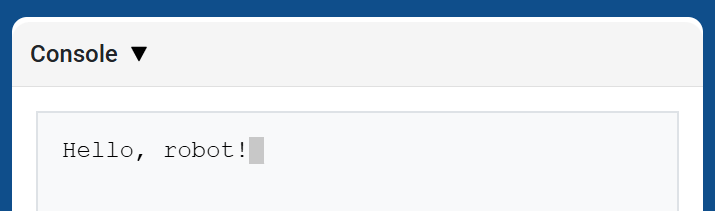
brain.screen.print 使用目前遊標位置在控制台中顯示文字、數字或變數值。
當您希望下一個列印值從新行開始時,請使用 brain.screen.next_row。
Usage:
brain.screen.print(value)
參數 |
描述 |
|---|---|
|
若要在控制台中顯示的文字、數字或變數值。 |
def main():
    # Display a message in the Console
    brain.screen.print("Hello, robot!")

# VR threads — Do not delete
vr_thread(main)
brain.screen.下一行#
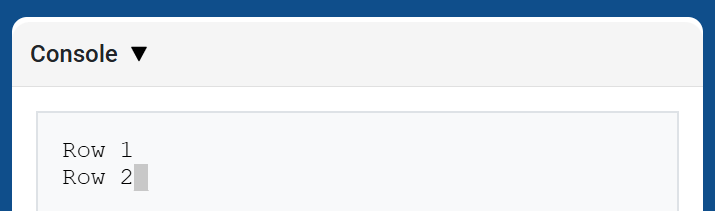
brain.screen.next_row 將遊標移到控制台下一行的第 1 列。下一個列印的值將顯示在該行。
Usage:
brain.screen.next_row()
參數 |
描述 |
|---|---|
此方法沒有參數。 |
def main():
    # Print on two rows
    brain.screen.print("Row 1")
    brain.screen.next_row()
    brain.screen.print("Row 2")

# VR threads — Do not delete
vr_thread(main)
brain.screen.clear_screen#
brain.screen.clear_screen 清除控制台中的所有行並將遊標移回第 1 行。
Usage:
brain.screen.clear_screen()
參數 |
描述 |
|---|---|
此方法沒有參數。 |
def main():
    # Display text, then clear it after two seconds
    brain.screen.print("This will disappear...")
    wait(2, SECONDS)
    brain.screen.clear_screen()

# VR threads — Do not delete
vr_thread(main)
監視器#
監控變數#
monitor_variable 將一個或多個預定義變數新增至 VEXcode 的「監視器」標籤。這樣,您就可以在專案運行時監視變數值的變化。
要成功監控 monitor_variable 變數必須是全域變數。請以字串形式提供每個變數名。
Usage:
monitor_variable(“variable”)
monitor_variable(“variable1”, “variable2”)
參數 |
描述 |
|---|---|
|
要監控的預定義全域變數的名稱,以字串形式給出。若要監控多個變量,請用逗號分隔每個變數名稱。 |
def main():
    # Monitor the amount of loops
    global loops
    monitor_variable("loops")

    # Drive in a square 3 times
    for loops in range(12):
        drivetrain.turn_for(RIGHT, 90, DEGREES)
        drivetrain.drive_for(FORWARD, 150, MM)

# VR threads — Do not delete
vr_thread(main)
監控感測器#
monitor_sensor 將一個或多個感測器值新增至 VEXcode 的「監視器」標籤。這樣,您就可以在專案運行時觀察感測器值的變化。
請以字串形式提供每個感測器的值。
Usage:
monitor_sensor(“sensor”)
monitor_sensor(“sensor1”, “sensor2”)
參數 |
描述 |
|---|---|
|
The sensor value to monitor, given as a string. To monitor more than one sensor value, separate each sensor value with a comma. Supported sensor identifiers include:
|
def main():
    # Monitor the robot's heading
    monitor_sensor("drivetrain.heading")
    drivetrain.turn_for(RIGHT, 450, DEGREES)

# VR threads — Do not delete
vr_thread(main)
感測#
光學的#
靠近對象#
is_near_object 傳回一個布林值,指示光學感測器是否偵測到範圍內的物體。
True– 光學感測器偵測到物體。False– 光學感測器未偵測到物體。
Usage:
roller_optical.is_near_object()
參數 |
描述 |
|---|---|
此方法沒有參數。 |
顏色#
color 傳回一個基於偵測到的色調值的 ` Color 類別的實例。這些實例可以與預先定義的 Color 物件進行比較,以建立條件語句。
可選顏色有:
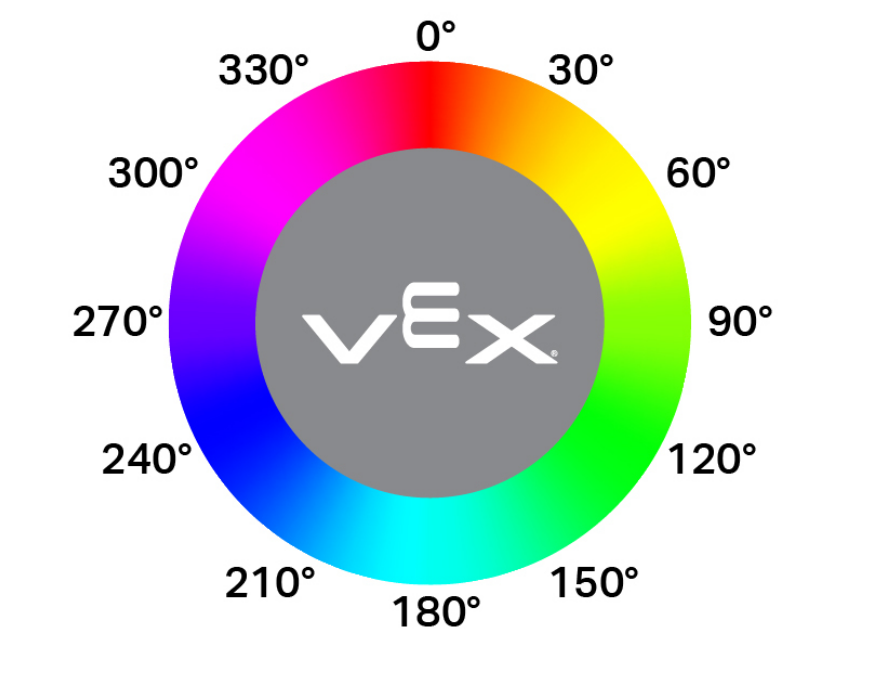
NONERED- 色調值介於 340° 至 20° 之間GREEN- 色調值介於 80° 至 140° 之間BLUE- 色調值介於 200° 至 240° 之間YELLOW- 色調值介於 40° 至 60° 之間ORANGE- 色調值介於 20° 至 40° 之間PURPLE- 色調值介於 240° 至 280° 之間CYAN- 色調值介於 140° 至 200° 之間
注意: 光學感測器正在尋找與指定顏色相符的色調範圍。有關檢測特定色調範圍的信息,請參閱 hue。
Usage:
roller_optical.color()
參數 |
描述 |
|---|---|
此方法沒有參數。 |
亮度#
brightness 傳回物體反射的光量,以百分比表示(float)。
百分比越高,表示反射迴光學感測器的光線越多;百分比越低,表示反射回的光線越少。
Usage:
roller_optical.brightness()
參數 |
描述 |
|---|---|
此方法沒有參數。 |
色調#
hue 傳回偵測到的顏色的色調值,以 0 到 359 之間的十進位數 (float) 表示。
色相是用色輪上的數字來描述顏色的一種方法。
Usage:
roller_optical.hue()
參數 |
描述 |
|---|---|
此方法沒有參數。 |
偵測到目標#
object_detected 註冊一個函數,當光學感測器偵測到新物體時,該函數將會被呼叫。
Usage:
roller_optical.object_detected(callback, arg)
參數 |
描述 |
|---|---|
|
先前定義的 函數,當光學感測器偵測到新物體時執行。 |
|
遺失對象#
object_lost 註冊一個函數,當光學感測器遺失偵測到的物件時,該函數將會被呼叫。
Usage:
roller_optical.object_lost(callback, arg)
參數 |
描述 |
|---|---|
|
先前定義的 函數,當光學感測器遺失偵測到的物件時執行。 |
|
全球定位系統#
x_position#
x_position 返回場上 GPS(遊戲定位系統™)感測器的目前 x 座標。
Usage:
gps.x_position(units)
參數 |
描述 |
|---|---|
單位 |
偏移值的單位: |
y 位置#
y_position 返回場上 GPS(遊戲定位系統™)感測器的目前 y 座標。
Usage:
gps.y_position(units)
參數 |
描述 |
|---|---|
單位 |
偏移值的單位: |
標題#
heading 返回機器人目前面向的航向,該航向基於 GPS(遊戲定位系統™)感測器的讀數,範圍為 0 到 359 度。
Usage:
gps.heading()
參數 |
描述 |
|---|---|
此方法沒有參數。 |
線路追蹤器#
反射率#
reflectivity 傳回一個整數,表示從表面反射的光量(以百分比表示)。
0%反射率意味著物體非常暗。
100%反射率意味著物體非常明亮。
用法:
此方法可以使用以下三個可用的 line_tracker 物件之一:
線路追蹤器 |
命令 |
|---|---|
|
|
|
|
|
|
範圍 |
描述 |
|---|---|
單位 |
可選。反射率的單位:
|