
സെൻസറുകൾ#
ആമുഖം#
ഭ്രമണ ചലനം അളക്കുന്നതിനും ചലനത്തിലെ മാറ്റങ്ങൾ കണ്ടെത്തുന്നതിനുമുള്ള ഒരു ഇനേർഷ്യൽ സെൻസറും ദൂരം കണ്ടെത്തുന്നതിനുള്ള ഒരു റേഞ്ച് സെൻസറും VEX AIR ഡ്രോണിൽ ഉൾപ്പെടുന്നു. VEX AIR ഡ്രോണിന് അതിന്റെ ബാറ്ററി ലെവലുകൾ ട്രാക്ക് ചെയ്യാനും കഴിയും. ഈ സെൻസറുകൾ ഡ്രോണിന് അതിന്റെ ഓറിയന്റേഷൻ, ഹെഡ്ഡിംഗ്, ആക്സിലറേഷൻ, വസ്തുക്കളിൽ നിന്നുള്ള ദൂരം എന്നിവ ട്രാക്ക് ചെയ്യാൻ അനുവദിക്കുന്നു.
ലഭ്യമായ എല്ലാ രീതികളുടെയും ഒരു ലിസ്റ്റ് താഴെ കൊടുക്കുന്നു:
ഇനേർഷ്യൽ - ഡ്രോണിന്റെ ഭ്രമണ ചലനം ട്രാക്ക് ചെയ്യുക.
get_rotation– ഡ്രോൺ ആരംഭിച്ചതിനുശേഷം അത് എത്രത്തോളം തിരിഞ്ഞുവെന്ന് നൽകുന്നു.get_heading– നിലവിലെ തലക്കെട്ട് (0 മുതൽ 359.99° വരെ) നൽകുന്നു.get_yaw– യാവ് ആംഗിൾ (–180 മുതൽ 180° വരെ) തിരികെ നൽകുന്നു.get_roll– റോൾ ആംഗിൾ (–180 മുതൽ 180° വരെ) തിരികെ നൽകുന്നു.get_pitch– പിച്ച് ആംഗിൾ (–180 മുതൽ 180° വരെ) നൽകുന്നു.reset_rotation– റൊട്ടേഷൻ മൂല്യം 0 ആയി പുനഃസജ്ജമാക്കുന്നു.reset_heading– നിലവിലെ തലക്കെട്ട് 0 ആയി സജ്ജമാക്കുന്നു.set_heading– തലക്കെട്ട് ഒരു പ്രത്യേക മൂല്യത്തിലേക്ക് സജ്ജമാക്കുന്നു.get_acceleration– ഒരു പ്രത്യേക ദിശയിൽ ത്വരണം നൽകുന്നു.get_turn_rate– സെക്കൻഡിൽ ഡിഗ്രിയിൽ ടേണിംഗ് നിരക്ക് നൽകുന്നു.
റേഞ്ച് — ഡ്രോണിന്റെ റേഞ്ച് സെൻസറുകളിൽ നിന്നുള്ള ദൂരം കണ്ടെത്തുക.
get_distance— തിരഞ്ഞെടുത്ത റേഞ്ച് സെൻസറിനും ഏറ്റവും അടുത്തുള്ള കണ്ടെത്തിയ വസ്തുവിനും ഇടയിലുള്ള ദൂരം നൽകുന്നു.
ബാറ്ററി - ഡ്രോണിന്റെ ബാറ്ററി ശതമാനം തിരികെ നൽകുക.
get_battery_level– ഡ്രോണിന്റെ ബാറ്ററി ലെവൽ ശതമാനത്തിൽ നൽകുന്നു.
നിഷ്ക്രിയത്വം#
get_rotation#
get_rotation ഡ്രോൺ ആരംഭിച്ചതിനുശേഷം എത്ര ഡിഗ്രി തിരിഞ്ഞുവെന്ന് നൽകുന്നു. ഇത് എല്ലാ തിരിവുകളും കൂട്ടി ആകെ ഡിഗ്രിയിൽ നൽകുന്നു: ഘടികാരദിശയിൽ പോസിറ്റീവ്, എതിർ ഘടികാരദിശയിൽ നെഗറ്റീവ്.
Usage:
drone.inertial.get_rotation()
പാരാമീറ്ററുകൾ |
വിവരണം |
|---|---|
ഈ രീതിക്ക് പാരാമീറ്ററുകൾ ഇല്ല. |
# Display the rotation after turning
drone.take_off(climb_to=500)
drone.turn_for(LEFT, 450, 50)
print(drone.inertial.get_rotation(), end="")
drone.land()
get_heading#
get_heading ഡ്രോണിന്റെ ഹെഡിംഗ് ആംഗിൾ 0 മുതൽ 359.99 ഡിഗ്രി വരെയുള്ള ശ്രേണിയിൽ ഫ്ലോട്ട് ആയി തിരികെ നൽകുന്നു.
Usage:
drone.inertial.get_heading()
പാരാമീറ്ററുകൾ |
വിവരണം |
|---|---|
ഈ രീതിക്ക് പാരാമീറ്ററുകൾ ഇല്ല. |
# Display the drone's heading after turning
drone.take_off(climb_to=500)
drone.set_turn_velocity(100)
drone.turn(RIGHT)
wait(5, SECONDS)
controller.screen.print("Heading: ")
controller.screen.print(drone.inertial.get_heading())
drone.land()
get_yaw#
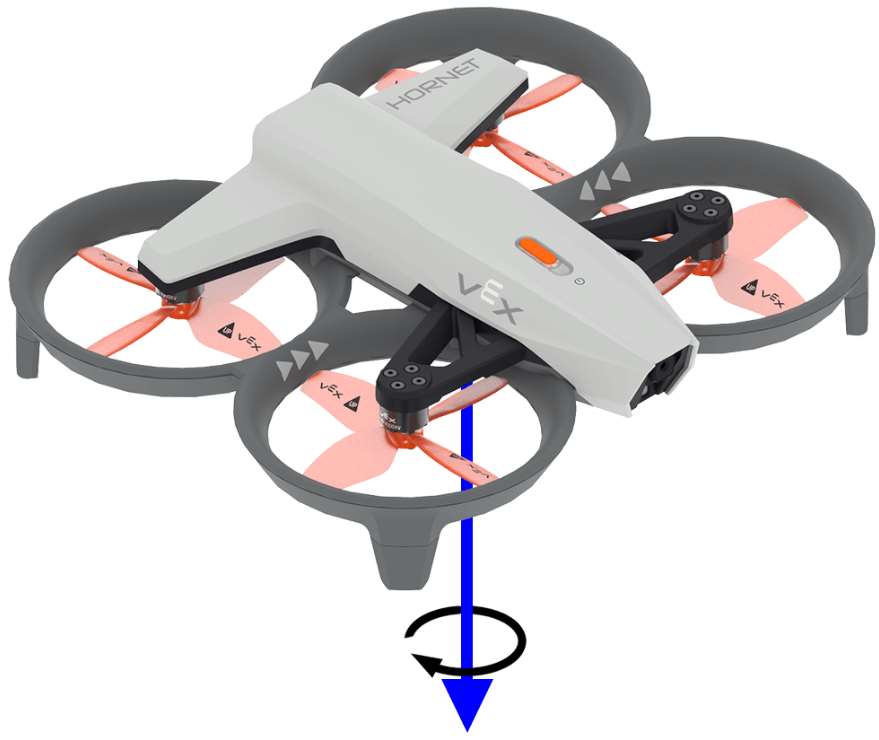
get_yaw ഡ്രോണിന്റെ യാവ് ആംഗിൾ –180.0 മുതൽ 180.0 ഡിഗ്രി വരെയുള്ള ശ്രേണിയിൽ ഫ്ലോട്ട് ആയി തിരികെ നൽകുന്നു.
താഴെയുള്ള ചിത്രത്തിൽ യാവിന്റെ പോസിറ്റീവ് റൊട്ടേഷന്റെ ദിശ കാണിക്കാൻ ഒരു അമ്പടയാളം ഉപയോഗിക്കുന്നു.
Usage:
drone.inertial.get_yaw
പാരാമീറ്ററുകൾ |
വിവരണം |
|---|---|
ഈ രീതിക്ക് പാരാമീറ്ററുകൾ ഇല്ല. |
# Display the yaw angle as you rotate the drone by hand
while True:
    controller.screen.clear_screen()
    controller.screen.set_cursor(1, 1)
    controller.screen.print("Yaw: ")
    controller.screen.print(drone.inertial.get_yaw())
    wait(0.2, SECONDS)
get_roll#
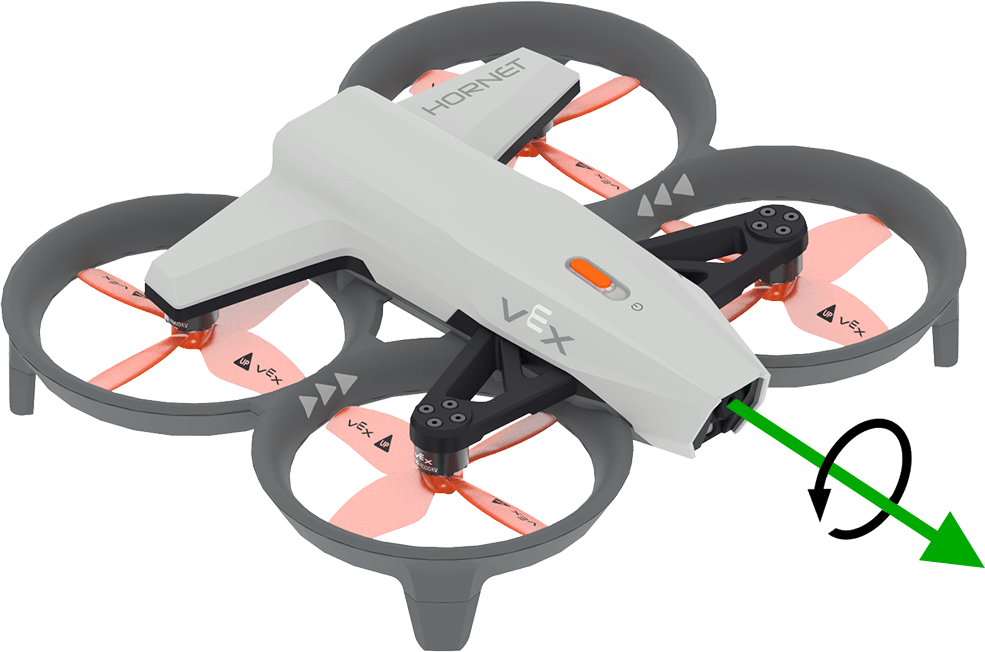
get_roll ഫ്ലോട്ട് ആയി –180.0 മുതൽ 180.0 ഡിഗ്രി വരെയുള്ള ശ്രേണിയിൽ ഡ്രോണിന്റെ റോൾ ആംഗിൾ നൽകുന്നു.
താഴെയുള്ള ചിത്രത്തിൽ റോളിന്റെ പോസിറ്റീവ് റൊട്ടേഷന്റെ ദിശ കാണിക്കാൻ ഒരു അമ്പടയാളം ഉപയോഗിക്കുന്നു.
Usage:
drone.inertial.get_roll()
പാരാമീറ്ററുകൾ |
വിവരണം |
|---|---|
ഈ രീതിക്ക് പാരാമീറ്ററുകൾ ഇല്ല. |
# Display the roll angle as you rotate the drone by hand
while True:
    controller.screen.clear_screen()
    controller.screen.set_cursor(1, 1)
    controller.screen.print("Roll: ")
    controller.screen.print(drone.inertial.get_roll())
    wait(0.2, SECONDS)
get_pitch#
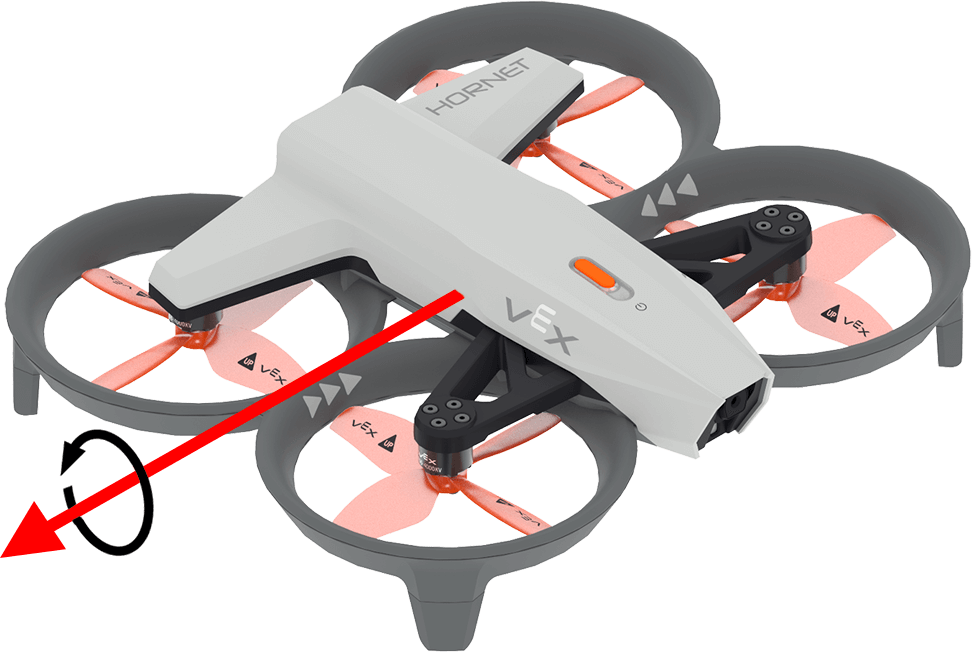
get_pitch ഫ്ലോട്ട് ആയി ഡ്രോണിന്റെ പിച്ച് ആംഗിൾ –180.0 മുതൽ 180.0 ഡിഗ്രി വരെ നൽകുന്നു.
താഴെയുള്ള ചിത്രത്തിൽ പിച്ചിന്റെ പോസിറ്റീവ് റൊട്ടേഷന്റെ ദിശ കാണിക്കാൻ ഒരു അമ്പടയാളം ഉപയോഗിക്കുന്നു.
Usage:
drone.inertial.get_pitch()
പാരാമീറ്ററുകൾ |
വിവരണം |
|---|---|
ഈ രീതിക്ക് പാരാമീറ്ററുകൾ ഇല്ല. |
# Display the pitch angle as you rotate the drone by hand
while True:
    controller.screen.clear_screen()
    controller.screen.set_cursor(1, 1)
    controller.screen.print("Pitch: ")
    controller.screen.print(drone.inertial.get_pitch())
    wait(0.2, SECONDS)
reset_rotation#
reset_rotation ഡ്രോണിന്റെ ഭ്രമണ മൂല്യം 0 ഡിഗ്രിയിലേക്ക് പുനഃസജ്ജമാക്കുന്നു.
Usage:
drone.inertial.reset_rotation()
പാരാമീറ്ററുകൾ |
വിവരണം |
|---|---|
ഈ രീതിക്ക് പാരാമീറ്ററുകൾ ഇല്ല. |
# Display the new rotation after resetting
drone.take_off(climb_to=500)
drone.turn(RIGHT)
while not drone.inertial.get_rotation() > 360:
    wait(5, MSEC)
drone.hover()
drone.inertial.reset_rotation()
wait(1, SECONDS)
print(drone.inertial.get_rotation(), end="")
drone.land()
reset_heading#
reset_heading ഡ്രോണിന്റെ ഗതി 0 ഡിഗ്രിയിലേക്ക് പുനഃസജ്ജമാക്കുന്നു.
ഉപയോഗം:
drone.inertial.reset_heading()
പാരാമീറ്ററുകൾ |
വിവരണം |
|---|---|
ഈ രീതിക്ക് പാരാമീറ്ററുകൾ ഇല്ല. |
# Turn to a heading, reset the heading, and turn to the same heading.
drone.take_off(climb_to=500)
drone.turn_to(heading=180, velocity=50)
wait(3,SECONDS)
drone.inertial.reset_heading()
drone.turn_to(heading=180, velocity=50)
wait(3,SECONDS)
drone.land()
set_heading#
set_heading ഡ്രോണിന്റെ ഹെഡ്ഡിംഗ് ഡിഗ്രികളിൽ ഒരു നിശ്ചിത മൂല്യത്തിലേക്ക് സജ്ജമാക്കുന്നു.
ഉപയോഗം:
drone.inertial.set_heading(heading)
പാരാമീറ്ററുകൾ |
വിവരണം |
|---|---|
|
0 മുതൽ 359.99 ഡിഗ്രി വരെയുള്ള ശ്രേണിയിലുള്ള പുതിയ തലക്കെട്ടിനായി ഉപയോഗിക്കേണ്ട മൂല്യം. |
# Turn to a heading, set the heading, and turn to the same heading.
drone.take_off(climb_to=500)
drone.turn_to(heading=180, velocity=50)
wait(3,SECONDS)
drone.inertial.set_heading(90)
drone.turn_to(heading=180, velocity=50)
wait(3,SECONDS)
drone.land()
get_acceleration#
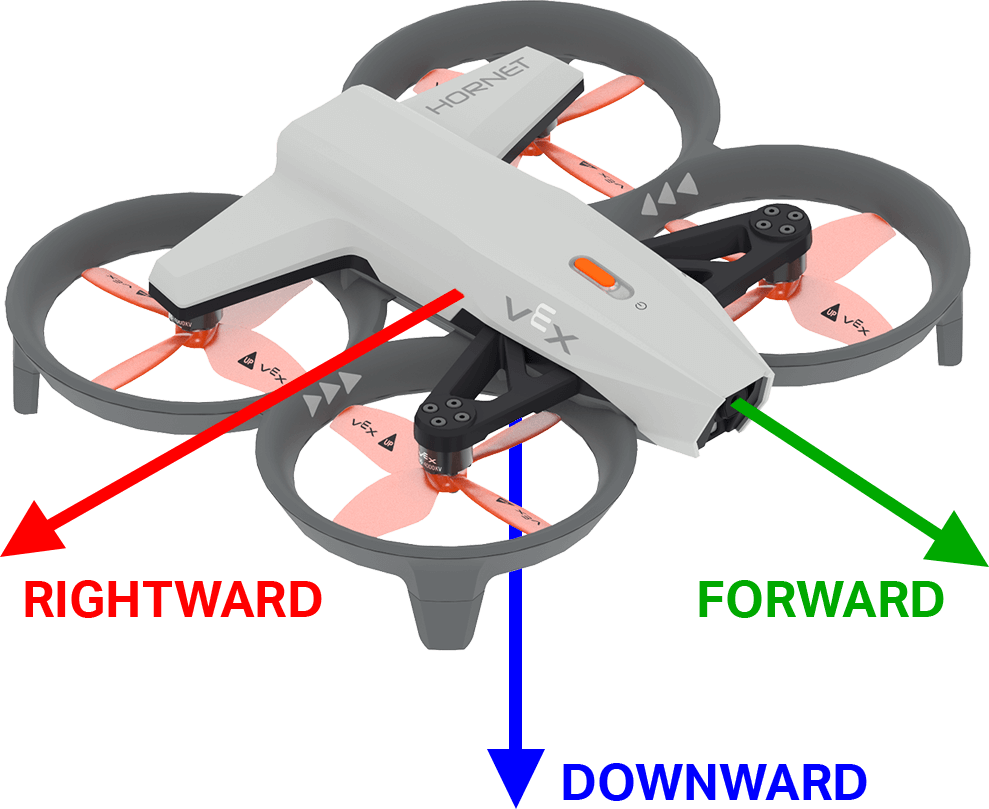
get_acceleration ഡ്രോണിന്റെ ത്വരണം ഒരു നിശ്ചിത ദിശയിലേക്ക് തിരികെ നൽകുന്നു. തിരികെ നൽകുന്ന മൂല്യം g യുടെ യൂണിറ്റുകളിൽ അളക്കുന്ന പ്രവേഗത്തിലെ മാറ്റത്തിന്റെ നിരക്കിനെ പ്രതിനിധീകരിക്കുന്നു (ഇവിടെ 1g ≈ 9.81 m/s²), -4.00 മുതൽ 4.00 വരെയുള്ള ഫ്ലോട്ടായി.
താഴെയുള്ള ചിത്രത്തിൽ മുന്നോട്ടും വലത്തോട്ടും പോസിറ്റീവ് ആക്സിലറേഷന്റെ ദിശയും താഴോട്ടുള്ളതിന് നെഗറ്റീവ് ആക്സിലറേഷന്റെ ദിശയും കാണിക്കാൻ അമ്പടയാളങ്ങൾ ഉപയോഗിക്കുന്നു.
ഉപയോഗം:
drone.inertial.get_acceleration(type)
പാരാമീറ്ററുകൾ |
വിവരണം |
|---|---|
|
റിപ്പോർട്ട് ചെയ്യേണ്ട ത്വരണത്തിന്റെ ദിശ:
|
# Display the acceleration as the drone takes off
drone.take_off(500, wait=False)
while True:
    controller.screen.clear_screen()
    controller.screen.set_cursor(1, 1)
    controller.screen.print(drone.inertial.get_acceleration(DOWNWARD))
    wait(5, MSEC)
get_turn_rate#
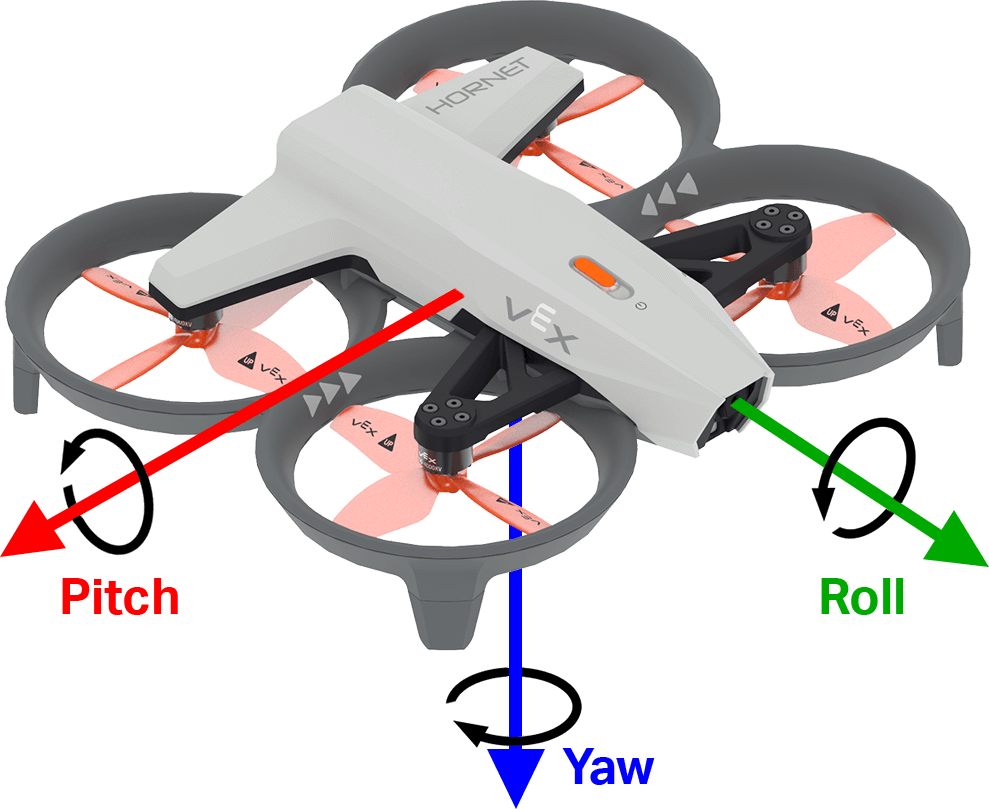
get_turn_rate എന്നത് ഡ്രോൺ നിർദ്ദിഷ്ട അച്ചുതണ്ടിൽ കറങ്ങുന്ന നിരക്ക് നൽകുന്നു. ഇത് –1000.00 മുതൽ 1000.00 dps വരെയുള്ള ഫ്ലോട്ടായി ഡിഗ്രി പെർ സെക്കൻഡിൽ \(dps\) ഒരു മൂല്യം നൽകുന്നു.
താഴെയുള്ള ചിത്രത്തിൽ റോൾ, പിച്ച്, യാവ് എന്നിവയ്ക്കുള്ള പോസിറ്റീവ് റൊട്ടേഷന്റെ ദിശ കാണിക്കാൻ അമ്പടയാളങ്ങൾ ഉപയോഗിക്കുന്നു.
Usage:
drone.inertial.get_turn_rate(axis)
പാരാമീറ്ററുകൾ |
വിവരണം |
|---|---|
|
ഏത് ഓറിയന്റേഷനാണ് റിപ്പോർട്ട് ചെയ്യേണ്ടത്:
|
# Display the drone turn rate as it is rotated by hand.
while True:
    controller.screen.clear_screen()
    controller.screen.set_cursor(7, 1)
    controller.screen.print(drone.inertial.get_turn_rate(ROLL))
ശ്രേണി#
get_distance#
get_distance തിരഞ്ഞെടുത്ത റേഞ്ച് സെൻസറിനും ഏറ്റവും അടുത്തുള്ള കണ്ടെത്തിയ വസ്തുവിനും ഇടയിലുള്ള ദൂരം നൽകുന്നു.
Usage:
drone.range.get_distance(range, units)
പാരാമീറ്ററുകൾ |
വിവരണം |
|---|---|
|
ഉപയോഗിക്കേണ്ട റേഞ്ച് സെൻസർ: |
|
ഓപ്ഷണൽ. ദൂര യൂണിറ്റ്:
|
# Fly forward until close to an object
drone.take_off(climb_to=500)
drone.move_at(direction=0, velocity=50)
while not drone.range.get_distance(FORWARD_RANGE, MM) < 750:
    wait(0.1, SECONDS)
drone.land()
ബാറ്ററി#
get_battery_level#
get_battery_level ഡ്രോണിന്റെ ബാറ്ററി ചാർജ് ലെവൽ ഒരു ശതമാനമായി നൽകുന്നു. ഇത് 0 മുതൽ 100 വരെയുള്ള ഒരു സംഖ്യ നൽകുന്നു.
Usage:
drone.get_battery_level()
പാരാമീറ്ററുകൾ |
വിവരണം |
|---|---|
ഈ രീതിക്ക് പാരാമീറ്ററുകൾ ഇല്ല. |
# Display the drone's battery level
if drone.get_battery_level() < 25:
    controller.screen.print("Charge the drone Battery!")
else:
    controller.screen.print("Ready to fly!")