
ചലനം#
ആമുഖം#
VEX AIR ഡ്രോണിൽ നാല് പ്രൊപ്പല്ലറുകൾ ഉണ്ട്, ഇത് ഏത് ദിശയിലേക്കും നീങ്ങാനും സ്വതന്ത്രമായി കറങ്ങാനും അനുവദിക്കുന്നു. ചലനം, തിരിയൽ, വേഗത ക്രമീകരണം, സ്ഥാനം ട്രാക്കുചെയ്യൽ എന്നിവയ്ക്കുള്ള രീതികൾ ചലനം നൽകുന്നു.
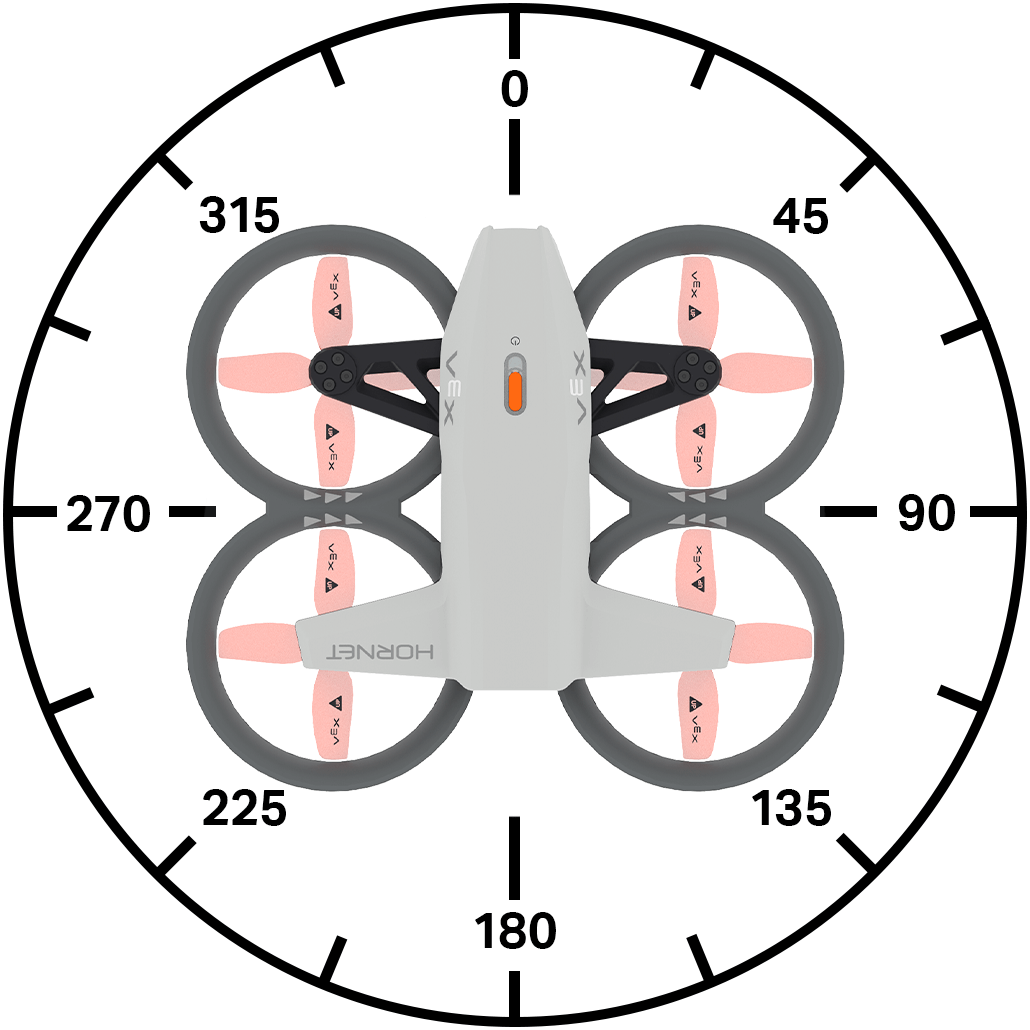
ലഭ്യമായ എല്ലാ രീതികളുടെയും ഒരു ലിസ്റ്റ് താഴെ കൊടുക്കുന്നു:
പ്രവർത്തനങ്ങൾ
take_off– ഡ്രോൺ ഒരു നിശ്ചിത ഉയരത്തിലേക്ക് ഉയർത്തുന്നു.land– ഡ്രോൺ ലാൻഡ് ചെയ്യുന്നു.hover- ഡ്രോൺ അതിന്റെ സ്ഥാനത്ത് നിലനിർത്തുന്നു.climb– ഡ്രോണിനെ ഒരു നിശ്ചിത ലംബ ദിശയിലേക്ക് നീക്കുന്നു.climb_for– ഒരു നിശ്ചിത ദൂരത്തേക്ക് ഡ്രോണിനെ ഒരു നിശ്ചിത ലംബ ദിശയിലേക്ക് നീക്കുന്നു.climb_to– ഡ്രോണിനെ ഒരു നിശ്ചിത ഉയരത്തിലേക്ക് നീക്കുന്നു.move_at– ഒരു നിശ്ചിത തലക്കെട്ടിലും വേഗതയിലും ഡ്രോണിനെ നീക്കുന്നു.move_for– ഒരു നിശ്ചിത ദൂരത്തേക്ക് ഒരു നിശ്ചിത തലക്കെട്ടിൽ ഡ്രോൺ നീക്കുന്നു.move_to– ഒരേ തലക്കെട്ട് നിലനിർത്തിക്കൊണ്ട് ഡ്രോണിനെ ഒരു നിർദ്ദിഷ്ട സ്ഥാനത്തേക്ക് നീക്കുന്നു.turn– ഡ്രോൺ ഇടത്തോട്ടോ വലത്തോട്ടോ തിരിക്കുന്നു.turn_for– ഡ്രോണിനെ ഒരു നിശ്ചിത എണ്ണം ഡിഗ്രി തിരിക്കുന്നു.turn_to– ഒരു പ്രത്യേക തലക്കെട്ടിന് അഭിമുഖമായി ഡ്രോൺ തിരിക്കുന്നു.move_with_vectors– വെക്റ്റർ അടിസ്ഥാനമാക്കിയുള്ള x, y, z, ഭ്രമണ മൂല്യങ്ങൾ ഉപയോഗിച്ച് ഡ്രോൺ നീക്കുന്നു.
മ്യൂട്ടേറ്ററുകൾ
set_steering_mode– ഡ്രോൺ സ്റ്റിയറിംഗ് ചെയ്യുന്നതിനുള്ള POV സജ്ജമാക്കുന്നു.set_movement_mode– ഡ്രോണിന്റെ ചലന ശൈലി സജ്ജമാക്കുന്നു.set_climb_velocity– ഡിഫോൾട്ട് ക്ലൈംബിംഗ് പ്രവേഗം സജ്ജമാക്കുന്നു.set_move_velocity– ഡിഫോൾട്ട് ചലന പ്രവേഗം സജ്ജമാക്കുന്നു.set_turn_velocity- ഡിഫോൾട്ട് ടേണിംഗ് പ്രവേഗം സജ്ജമാക്കുന്നു.set_max_z_height- ഡ്രോൺ എത്ര ഉയരത്തിൽ പറക്കുമെന്ന് ഒരു പരിധി നിശ്ചയിക്കുന്നു.set_xyz_position– ഡ്രോണിന്റെ നിലവിലെ സ്ഥാനം സജ്ജമാക്കുന്നു.
നേടുന്നവർ
get_max_z_height– ഡ്രോണിന് എത്താൻ കഴിയുന്ന പരമാവധി ഉയരം നൽകുന്നു.get_flight_state– ഡ്രോണിന്റെ നിലവിലെ അവസ്ഥ നൽകുന്നു.get_x_position– ഡ്രോണിന്റെ x-കോർഡിനേറ്റ് തിരികെ നൽകുന്നു.get_y_position– ഡ്രോണിന്റെ y-കോർഡിനേറ്റ് തിരികെ നൽകുന്നു.get_z_position– ഡ്രോണിന്റെ z-കോർഡിനേറ്റ് തിരികെ നൽകുന്നു.get_safe_mode– ഡ്രോണിന്റെ പ്രൊപ്പല്ലർ ലോക്ക് അവസ്ഥ തിരികെ നൽകുന്നു.is_climb_active– ഡ്രോൺ നിലവിൽ കയറുന്നുണ്ടോ എന്ന് നൽകുന്നു.is_move_active– ഡ്രോൺ നിലവിൽ നീങ്ങുന്നുണ്ടോ എന്ന് നൽകുന്നു.is_turn_active– ഡ്രോൺ നിലവിൽ തിരിയുന്നുണ്ടോ എന്ന് നൽകുന്നു.is_hovering- ഡ്രോൺ നിലവിൽ ഹോവർ ചെയ്യുന്നുണ്ടോ എന്ന് നൽകുന്നു.is_taking_off– ഡ്രോൺ നിലവിൽ പറന്നുയരുന്നുണ്ടോ എന്ന് നൽകുന്നു.is_landing– ഡ്രോൺ നിലവിൽ ലാൻഡ് ചെയ്യുന്നുണ്ടോ എന്ന് നൽകുന്നു.is_landed- ഡ്രോൺ നിലവിൽ ലാൻഡ് ചെയ്തിട്ടുണ്ടോ എന്ന് നൽകുന്നു.
പ്രവർത്തനങ്ങൾ#
take_off#
take_off പ്രൊപ്പല്ലറുകൾ സ്റ്റാർട്ട് ചെയ്യുകയും ഡ്രോൺ വായുവിലേക്ക് ഉയർത്തുകയും ചെയ്യുന്നു. മറ്റ് ചലനങ്ങൾ നടത്തുന്നതിന് മുമ്പ് ഈ രീതി ഉപയോഗിക്കണം.
ഉപയോഗം:
drone.take_off(climb_to, units, wait)
പാരാമീറ്ററുകൾ |
വിവരണം |
|---|---|
|
ഡ്രോൺ പറക്കുന്ന z സ്ഥാനം (ഉയരം). |
|
ഉപയോഗിക്കേണ്ട യൂണിറ്റ്:
|
|
ഓപ്ഷണൽ. |
# Fly for 1 second
drone.take_off(climb_to=500)
wait(1, SECONDS)
drone.land()
land#
land ഡ്രോൺ നിലത്തേക്ക് താഴ്ത്തുന്നു. പദ്ധതി നിർത്തുന്നത് വരെ പ്രൊപ്പല്ലറുകൾ പ്രവർത്തിക്കുന്നത് തുടരും.
ഉപയോഗം:
drone.land(wait)
പാരാമീറ്ററുകൾ |
വിവരണം |
|---|---|
|
ഓപ്ഷണൽ. |
# Land after 1 second
drone.take_off(climb_to=500)
wait(1, SECONDS)
drone.land()
hover#
hover ഡ്രോൺ ഏത് ദിശയിലേക്കും നീങ്ങുന്നത് തടയുകയും വായുവിൽ അതിന്റെ നിലവിലെ സ്ഥാനം നിലനിർത്തുകയും ചെയ്യുന്നു.
Usage:
drone.hover()
പാരാമീറ്ററുകൾ |
വിവരണം |
|---|---|
ഈ രീതിക്ക് പാരാമീറ്ററുകൾ ഇല്ല. |
# Hold current position for 3 seconds after moving forward
drone.take_off(climb_to=500)
drone.move_at(direction=0, velocity=50)
wait(1, SECONDS)
drone.hover()
wait(3, SECONDS)
drone.land()
climb#
climb ഡ്രോണിനെ ഒരു നിശ്ചിത ലംബ ദിശയിലേക്ക് നീക്കുന്നു.
Usage:
drone.climb(direction, velocity)
പാരാമീറ്ററുകൾ |
വിവരണം |
|---|---|
|
ഡ്രോൺ പറക്കുന്ന ദിശ: |
|
ഡ്രോൺ ഉയരുന്ന വേഗത ഒരു ശതമാനമായി. |
# Climb upwards for 2 seconds
drone.take_off(climb_to=500)
wait(2, SECONDS)
drone.climb(direction=UP)
wait(2, SECONDS)
drone.land()
climb_for#
climb_for ഡ്രോണിനെ ഒരു നിശ്ചിത ദൂരത്തേക്ക് ഒരു നിശ്ചിത ലംബ ദിശയിലേക്ക് നീക്കുന്നു.
ഉപയോഗം:
drone.climb_for(direction, distance, units, velocity, wait)
പാരാമീറ്ററുകൾ |
വിവരണം |
|---|---|
|
ഡ്രോൺ പറക്കുന്ന ദിശ: |
|
ഡ്രോൺ പറക്കുന്ന ദൂരം. |
|
ഓപ്ഷണൽ. ദൂരത്തെ പ്രതിനിധീകരിക്കുന്ന യൂണിറ്റ്:
|
|
ഓപ്ഷണൽ. ഡ്രോൺ ഒരു ശതമാനമായി ഉയരുന്ന വേഗത. വേഗത വ്യക്തമാക്കിയിട്ടില്ലെങ്കിൽ, സ്ഥിരസ്ഥിതി വേഗത 50% ആണ്. |
|
ഓപ്ഷണൽ. |
# Lower drone before landing
drone.take_off(climb_to=700)
wait(2, SECONDS)
drone.climb_for(direction=DOWN, distance=300)
wait(2, SECONDS)
drone.land()
climb_to#
climb_to ഡ്രോണിനെ ഒരു നിർദ്ദിഷ്ട z സ്ഥാനത്തേക്ക് നീക്കുന്നു.
ഉപയോഗം:
drone.climb_to(z, units, velocity, wait)
പാരാമീറ്ററുകൾ |
വിവരണം |
|---|---|
|
ഒരു പൂർണ്ണസംഖ്യയോ ദശാംശമോ ആയി z സ്ഥാനത്തേക്ക് ഡ്രോൺ കയറും. |
|
ഓപ്ഷണൽ. ദൂരത്തെ പ്രതിനിധീകരിക്കുന്ന യൂണിറ്റ്:
|
|
ഓപ്ഷണൽ. ഡ്രോൺ ഉയരുന്ന വേഗത ശതമാനത്തിൽ. |
|
ഓപ്ഷണൽ. |
# Reach 500 mm after takeoff
drone.take_off(climb_to=300)
wait(1, SECONDS)
drone.climb_to(z=500)
wait(1, SECONDS)
drone.land()
move_at#
move_at ഡ്രോണിനെ ഒരു നിശ്ചിത കോണിലും വേഗതയിലും ചലിപ്പിക്കുന്നു.
ഉപയോഗം:
drone.move_at(angle, velocity)
പാരാമീറ്ററുകൾ |
വിവരണം |
|---|---|
|
ഡ്രോൺ ചലിക്കുന്ന കോൺ, ഒരു പൂർണ്ണസംഖ്യയായോ ദശാംശമായോ, 0 മുതൽ 359 ഡിഗ്രി വരെയാണ്. |
|
ഡ്രോൺ ചലിക്കുന്ന വേഗത ഒരു ശതമാനമായി കണക്കാക്കുന്നു. |
# Move left for 2 seconds
drone.take_off(climb_to=500)
drone.move_at(angle=270)
wait(2, SECONDS)
drone.land()
move_for#
move_for കറന്റ് set_move_velocity ഉപയോഗിച്ച് ഒരു പ്രത്യേക ദൂരത്തേക്ക് ഡ്രോണിനെ നീക്കുന്നു.
ഉപയോഗം:
drone.move_for(angle, distance, units, velocity, wait)
പാരാമീറ്ററുകൾ |
വിവരണം |
|---|---|
|
ഡ്രോൺ ചലിക്കുന്ന കോൺ, ഒരു പൂർണ്ണസംഖ്യ അല്ലെങ്കിൽ ദശാംശ (ഫ്ലോട്ട്) ആയി, 0 മുതൽ 359 ഡിഗ്രി വരെയാണ്. |
|
ഒരു പൂർണ്ണസംഖ്യയായോ ദശാംശമായോ, ഡ്രോൺ നീങ്ങുന്ന ദൂരം. |
|
ഓപ്ഷണൽ. ദൂരത്തെ പ്രതിനിധീകരിക്കുന്ന യൂണിറ്റ്:
|
|
ഓപ്ഷണൽ. ഡ്രോൺ ചലിക്കുന്ന വേഗത ശതമാനത്തിൽ. |
|
ഓപ്ഷണൽ. |
# Move forward for 200 mm
drone.take_off(climb_to=500)
wait(1, SECONDS)
drone.move_for(direction=0, distance=200, velocity=50, units=MM)
wait(1, SECONDS)
drone.land()
move_to#
move_to ഡ്രോണിനെ വായുവിൽ ഒരു നിശ്ചിത സ്ഥാനത്തേക്ക് നീക്കി അതേ തലക്കെട്ട് നിലനിർത്തുന്നു.
ഉപയോഗം:
drone.move_to(x, y, z, units, move_velocity, climb_velocity, wait)
പാരാമീറ്ററുകൾ |
വിവരണം |
|---|---|
|
ഡ്രോൺ നീങ്ങുന്ന x കോർഡിനേറ്റ്. |
|
ഡ്രോൺ നീങ്ങുന്ന y കോർഡിനേറ്റ്. |
|
ഡ്രോൺ നീങ്ങുന്ന z കോർഡിനേറ്റ്. |
|
ഓപ്ഷണൽ. ദൂരത്തെ പ്രതിനിധീകരിക്കുന്ന യൂണിറ്റ്:
|
|
ഓപ്ഷണൽ. ഡ്രോൺ ചലിക്കുന്ന വേഗത ശതമാനത്തിൽ. |
|
ഓപ്ഷണൽ. ഡ്രോൺ ഉയരുന്ന വേഗത ശതമാനത്തിൽ. |
|
ഓപ്ഷണൽ. |
# Move diagonally to (300, 300, 800)
drone.take_off(climb_to=300)
wait(2, SECONDS)
drone.move_to(x=300, y=300, z=800)
wait(2, SECONDS)
drone.land()
turn#
turn കറന്റ് ഉപയോഗിച്ച് ഡ്രോണിനെ ഒരു പ്രത്യേക ദിശയിലേക്ക് തിരിക്കുന്നു set_turn_velocity.
ഉപയോഗം:
drone.turn(direction, velocity)
പാരാമീറ്ററുകൾ |
വിവരണം |
|---|---|
|
ഡ്രോൺ തിരിയുന്ന ദിശ: |
|
ഓപ്ഷണൽ. ഡ്രോൺ കറങ്ങുന്ന വേഗത ശതമാനത്തിൽ. |
# Turn to the right for 2 seconds
drone.take_off(climb_to=500)
wait(1, SECONDS)
drone.turn(RIGHT, 50)
wait(2, SECONDS)
drone.land()
turn_for#
turn_for ഡ്രോണിനെ അതിന്റെ നിലവിലെ അഭിമുഖമായ ദിശയുമായി താരതമ്യപ്പെടുത്തുമ്പോൾ ഒരു നിശ്ചിത ദൂരത്തേക്ക് കറന്റ് ഉപയോഗിച്ച് ഒരു നിശ്ചിത ദിശയിലേക്ക് തിരിക്കുന്നു set_turn_velocity.
ഉപയോഗം:
drone.turn_for(direction, angle, velocity, wait)
പാരാമീറ്ററുകൾ |
വിവരണം |
|---|---|
|
ഡ്രോൺ തിരിയുന്ന ദിശ: |
|
ഡ്രോൺ തിരിയുന്ന കോൺ, ഒരു പൂർണ്ണസംഖ്യ അല്ലെങ്കിൽ ദശാംശം (ഫ്ലോട്ട്) ആയി, 0 മുതൽ 359 ഡിഗ്രി വരെയാണ്. |
|
ഓപ്ഷണൽ. ഡ്രോൺ കറങ്ങുന്ന വേഗത ശതമാനത്തിൽ. |
|
ഓപ്ഷണൽ. |
# Turn around, then land
drone.take_off(climb_to=500)
wait(1, SECONDS)
drone.turn_for(RIGHT, 180)
wait(1, SECONDS)
drone.land()
turn_to#
turn_to നിലവിലെ set_turn_velocity ഉപയോഗിച്ച് ഡ്രോണിനെ ഒരു പ്രത്യേക തലക്കെട്ടിന് അഭിമുഖമായി തിരിക്കുന്നു.
ഉപയോഗം:
drone.turn_to(heading, velocity, wait)
പാരാമീറ്ററുകൾ |
വിവരണം |
|---|---|
|
ഡ്രോൺ 0 മുതൽ 360 ഡിഗ്രി വരെ അഭിമുഖമായി തിരിക്കുന്ന തലക്കെട്ട്. |
|
ഓപ്ഷണൽ. ഡ്രോൺ കറങ്ങുന്ന വേഗത ശതമാനത്തിൽ. |
|
ഓപ്ഷണൽ. |
# Turn to face each of the cardinal headings
drone.take_off(climb_to=500)
drone.turn_to(heading=90, velocity=50)
wait(3, SECONDS)
drone.turn_to(heading=180, velocity=50)
wait(3, SECONDS)
drone.turn_to(heading=270, velocity=50)
wait(3, SECONDS)
drone.turn_to(heading=0, velocity=50)
wait(3, SECONDS)
drone.land()
move_with_vectors#
move_with_vectors വെക്റ്റർ അധിഷ്ഠിത ചലനം ഉപയോഗിച്ച് ഡ്രോണിനെ ചലിപ്പിക്കുന്നു, ഡ്രോൺ തിരിക്കുമ്പോൾ തന്നെ x-അക്ഷത്തിലും (തിരശ്ചീനമായും) y-അക്ഷത്തിലും (ലംബമായും) ചലനം സംയോജിപ്പിക്കുന്നു.
കുറിപ്പ്: ഈ രീതി ചലനത്തിന്റെയും തിരിവിന്റെയും പ്രവേഗ മൂല്യങ്ങൾ നേരിട്ട് സജ്ജമാക്കുന്നു, അതിനാൽ ഇത് set_move_velocity അല്ലെങ്കിൽ set_turn_velocity ഉപയോഗിക്കുന്നില്ല.
ഉപയോഗം:
drone.move_with_vectors(forward, rightward, upward, rotation)
പാരാമീറ്ററുകൾ |
വിവരണം |
|---|---|
|
Y-അക്ഷത്തിൽ ഡ്രോണിന്റെ വേഗത (മുന്നോട്ടും പിന്നോട്ടും ചലനം). -100 മുതൽ 100 വരെയുള്ള ഒരു മൂല്യത്തെ ശതമാനമായി സ്വീകരിക്കുന്നു, അവിടെ നെഗറ്റീവ് മൂല്യങ്ങൾ പിന്നോട്ടും പോസിറ്റീവ് മൂല്യങ്ങൾ മുന്നോട്ടും നീങ്ങുന്നു. |
|
X-അക്ഷത്തിൽ ഡ്രോണിന്റെ വേഗത (വശങ്ങളിൽ നിന്ന് വശങ്ങളിലേക്കുള്ള ചലനം). -100 മുതൽ 100 വരെയുള്ള ഒരു മൂല്യത്തെ ശതമാനമായി സ്വീകരിക്കുന്നു, അവിടെ നെഗറ്റീവ് മൂല്യങ്ങൾ ഇടത്തോട്ടും പോസിറ്റീവ് മൂല്യങ്ങൾ വലത്തോട്ടും നീങ്ങുന്നു. |
|
Z-അക്ഷത്തിൽ ഡ്രോണിന്റെ വേഗത (മുകളിലേക്കും താഴേക്കും ചലനം). -100 മുതൽ 100 വരെയുള്ള ഒരു മൂല്യത്തെ ശതമാനമായി സ്വീകരിക്കുന്നു, അവിടെ നെഗറ്റീവ് മൂല്യങ്ങൾ താഴേക്കും പോസിറ്റീവ് മൂല്യങ്ങൾ മുകളിലേക്കും നീങ്ങുന്നു. |
|
ഡ്രോണിന്റെ ഭ്രമണ പ്രവേഗം. -100 മുതൽ 100 വരെയുള്ള ഒരു മൂല്യം ശതമാനമായി സ്വീകരിക്കുന്നു, അവിടെ നെഗറ്റീവ് മൂല്യങ്ങൾ എതിർ ഘടികാരദിശയിലും പോസിറ്റീവ് മൂല്യങ്ങൾ ഘടികാരദിശയിലും കറങ്ങുന്നു. |
# Move with controller
drone.take_off(climb_to=500)
while True:
    drone.move_with_vectors(
        forward=controller.axis4.position(),
        rightward=controller.axis3.position(),
        upward=controller.axis1.position(),
        rotation=controller.axis2.position()
    )
    wait(5, MSEC)
മ്യൂട്ടേറ്ററുകൾ#
set_steering_mode#
set_steering_mode ഡ്രോൺ സ്റ്റിയറിംഗ് ചെയ്യുമ്പോൾ ഉപയോഗിക്കുന്ന വ്യൂപോയിന്റ് സജ്ജമാക്കുന്നു.
ഉപയോഗം:
drone.set_steering_mode(style)
പാരാമീറ്ററുകൾ |
വിവരണം |
|---|---|
|
ഡ്രോൺ നിയന്ത്രിക്കാൻ ഉപയോഗിക്കുന്ന POV സജ്ജമാക്കുന്നു. |
# Steer based on the drone's starting orientation
# until button 7 is pressed
drone.take_off(climb_to=500)
drone.set_steering_mode(HEADLESS)
while not controller.button7.pressing():
    drone.move_with_vectors(
        forward=controller.axis4.position(),
        rightward=controller.axis3.position(),
        upward=controller.axis1.position(),
        rotation=controller.axis2.position()
    )
    wait(5, MSEC)
drone.land()
set_movement_mode#
set_movement_mode ഡ്രോണിന്റെ ചലന ശൈലി സജ്ജമാക്കുന്നു.
ഒരു കൺട്രോളർ ഉപയോഗിച്ച് ഡ്രോൺ പറത്തുമ്പോൾ ഈ ചലന ശൈലി ഉപയോഗിക്കുന്നു.
ഉപയോഗം:
drone.set_movement_mode(style)
പാരാമീറ്ററുകൾ |
വിവരണം |
|---|---|
|
ഡ്രോൺ നിയന്ത്രിക്കാൻ ഉപയോഗിക്കുന്ന വേഗത സജ്ജമാക്കുന്നു.
|
# Control the drone with the balanced movement style
drone.take_off(climb_to=500)
drone.set_movement_mode(BALANCED)
while not controller.button5.pressing():
    drone.move_with_vectors(
        forward=controller.axis4.position(),
        rightward=controller.axis3.position(),
        upward=controller.axis1.position(),
        rotation=controller.axis2.position()
    )
    wait(5, MSEC)
drone.land()
set_climb_velocity#
set_climb_velocity എന്നത് ഡിഫോൾട്ട് ക്ലൈംബിംഗ് പ്രവേഗത്തെ ഒരു ശതമാനമായി സജ്ജമാക്കുന്നു. ക്ലൈംബിംഗുമായി ബന്ധപ്പെട്ട ഇനിപ്പറയുന്ന രീതികളെ ഇത് ബാധിക്കും. ഡിഫോൾട്ട് ക്ലൈംബിംഗ് പ്രവേഗം 50% ആണ്.
ഉപയോഗം:
drone.set_climb_velocity(velocity)
പാരാമീറ്ററുകൾ |
വിവരണം |
|---|---|
|
ഡ്രോൺ ഉയരുന്ന വേഗത ഒരു ശതമാനമായി. |
# Raise the drone quickly before landing
drone.take_off(climb_to=300)
wait(1, SECONDS)
drone.set_climb_velocity(100)
drone.climb_for(direction=UP, distance=500)
wait(1, SECONDS)
drone.land()
set_move_velocity#
set_move_velocity സ്ഥിരസ്ഥിതി ചലന പ്രവേഗത്തെ ഒരു ശതമാനമായി സജ്ജമാക്കുന്നു. ഇത് ചലനവുമായി ബന്ധപ്പെട്ട ഇനിപ്പറയുന്ന രീതികളെ ബാധിക്കും. സ്ഥിരസ്ഥിതി ചലന പ്രവേഗം 50% ആണ്.
ഉപയോഗം:
drone.set_move_velocity(velocity)
പാരാമീറ്ററുകൾ |
വിവരണം |
|---|---|
|
ഡ്രോൺ ചലിക്കുന്ന വേഗത ഒരു ശതമാനമായി കണക്കാക്കുന്നു. |
# Move forward quickly, then reverse slowly
drone.take_off(climb_to=500)
drone.set_move_velocity(100)
drone.move_for(direction=0, distance=500)
wait(3, SECONDS)
drone.set_move_velocity(20)
drone.move_for(direction=180, distance=500)
wait(5, SECONDS)
drone.land()
set_turn_velocity#
set_turn_velocity ഡിഫോൾട്ട് ടേണിംഗ് പ്രവേഗത്തെ ഒരു ശതമാനമായി സജ്ജമാക്കുന്നു. ടേണിംഗുമായി ബന്ധപ്പെട്ട ഇനിപ്പറയുന്ന രീതികളെ ഇത് ബാധിക്കും. ഡിഫോൾട്ട് ടേൺ പ്രവേഗം 50% ആണ്.
ഉപയോഗം:
drone.set_turn_velocity(velocity)
പാരാമീറ്ററുകൾ |
വിവരണം |
|---|---|
|
ഡ്രോൺ ഒരു ശതമാനമായി തിരിയുന്ന വേഗത. |
# Turn clockwise quickly, then counterclockwise slowly
drone.take_off(climb_to=500)
drone.set_turn_velocity(100)
drone.turn_for(RIGHT, 360)
wait(3, SECONDS)
drone.set_turn_velocity(20)
drone.turn_for(LEFT, 360)
wait(5, SECONDS)
drone.land()
set_max_z_height#
set_max_z_height ഡ്രോൺ എത്ര ഉയരത്തിൽ പറക്കുമെന്ന് ഒരു പരിധി നിശ്ചയിക്കുന്നു.
ഉപയോഗം:
drone.set_max_z_height(z_height, units)
പാരാമീറ്ററുകൾ |
വിവരണം |
|---|---|
|
ഡ്രോൺ മുകളിലേക്ക് പറക്കാൻ പാടില്ലാത്ത പരമാവധി z അക്ഷ മൂല്യം, ഒരു പൂർണ്ണസംഖ്യയായോ ദശാംശമായോ, 1000 മുതൽ 5000 മില്ലിമീറ്റർ വരെ അല്ലെങ്കിൽ 40 മുതൽ 196 ഇഞ്ച് വരെ ആയിരിക്കും. |
|
ഓപ്ഷണൽ. ദൂരത്തിന്റെ യൂണിറ്റുകൾ ഇവയാണ്:
|
# Fly with controller under 1000 mm
drone.set_max_z_height(1000, MM)
drone.take_off(climb_to=500)
while not controller.button7.pressing():
    drone.move_with_vectors(
        forward=controller.axis4.position(),
        rightward=controller.axis3.position(),
        upward=controller.axis1.position(),
        rotation=controller.axis2.position()
    )
drone.land()
set_xyz_position#
set_xyz_position ഡ്രോണിന്റെ നിലവിലെ x, y, അല്ലെങ്കിൽ z കോർഡിനേറ്റിനെ ഒരു നിശ്ചിത മൂല്യത്തിലേക്ക് സജ്ജമാക്കുന്നു.
ഉപയോഗം:
drone.set_xyz_position(x, y, z, units)
കുറിപ്പ്: എല്ലാ പാരാമീറ്ററുകളും ഓപ്ഷണലാണ്, എന്നാൽ കുറഞ്ഞത് ഒരു (x, y, അല്ലെങ്കിൽ z) വ്യക്തമാക്കിയിരിക്കണം.
പാരാമീറ്ററുകൾ |
വിവരണം |
|---|---|
|
ഓപ്ഷണൽ. ഡ്രോണിനായി |
|
ഓപ്ഷണൽ. ഡ്രോണിനായി |
|
ഓപ്ഷണൽ. ഡ്രോണിനായി |
|
ഓപ്ഷണൽ. ദൂരത്തെ പ്രതിനിധീകരിക്കുന്ന യൂണിറ്റ്:
|
# Set a new z position, then fly to z position -300
drone.take_off(climb_to=800)
drone.set_xyz_position(z=0)
wait(1, SECONDS)
drone.climb(DOWN, 50)
while not drone.get_z_position() < -300:
    wait(5, MSEC)
drone.hover()
wait(1, SECONDS)
drone.land()
ഗെറ്ററുകൾ#
get_max_z_height#
get_max_z_height എന്നത് ഡ്രോണിന് ഒരു പൂർണ്ണസംഖ്യയായി എത്താൻ കഴിയുന്ന പരമാവധി ഉയരം നൽകുന്നു.
ഉപയോഗം:
drone.get_max_z_height(units)
പാരാമീറ്ററുകൾ |
വിവരണം |
|---|---|
|
ഓപ്ഷണൽ. അളവിന്റെ യൂണിറ്റ്:
|
# Display the new z height limit
controller.screen.print(drone.get_max_z_height(MM))
controller.screen.next_row()
drone.take_off(climb_to=500)
drone.set_max_z_height(1000)
controller.screen.print(drone.get_max_z_height(MM))
wait(1, SECONDS)
drone.land()
get_flight_state#
get_flight_state ഡ്രോണിന്റെ നിലവിലെ പറക്കൽ അവസ്ഥയെ DroneFlightStateType ആയി നൽകുന്നു:
MOTOR_OFF- മറ്റൊരു ഫ്ലൈറ്റ് അവസ്ഥയും ശരിയല്ല.CALIBRATION- ഡ്രോൺ അതിന്റെ സെൻസറുകൾ കാലിബ്രേറ്റ് ചെയ്യുന്നു.MOTOR_START- ഡ്രോൺ അതിന്റെ മോട്ടോറുകൾ സ്റ്റാർട്ട് ചെയ്യുന്നു.FLIGHT_READY- ഡ്രോൺ പറക്കാൻ തയ്യാറാണ്.FLIGHT- ഡ്രോൺ പറന്നുയരുന്നു.
Usage:
drone.get_flight_state()
പാരാമീറ്ററുകൾ |
വിവരണം |
|---|---|
ഈ രീതിക്ക് പാരാമീറ്ററുകൾ ഇല്ല. |
# Report the flight status as the drone takes off
controller.screen.print("Preparing for flight!")
controller.screen.next_row()
drone.take_off(climb_to=800, wait=False)
while not drone.get_flight_state() == MOTOR_START:
    wait(5, MSEC)
controller.screen.print("Motors starting...")
controller.screen.next_row()
while not drone.get_flight_state() == FLIGHT:
    wait(5, MSEC)
controller.screen.print("Take off!")
get_x_position#
get_x_position ഡ്രോണിന്റെ x കോർഡിനേറ്റിനെ ഒരു ദശാംശമായി (float) നൽകുന്നു.
Usage:
drone.get_x_position(units)
പാരാമീറ്ററുകൾ |
വിവരണം |
|---|---|
|
ഓപ്ഷണൽ. സ്ഥാനത്തെ പ്രതിനിധീകരിക്കുന്ന യൂണിറ്റ്:
|
# Move to (200, 0, 500)
drone.take_off(climb_to=500)
wait(1, SECONDS)
drone.move_at(direction=90, velocity=50)
while not drone.get_x_position() > 200:
    wait(5, MSEC)
drone.hover()
wait(1, SECONDS)
drone.land()
get_y_position#
get_y_position ഡ്രോണിന്റെ y കോർഡിനേറ്റിനെ ഒരു ദശാംശമായി നൽകുന്നു (float).
ഉപയോഗം:
drone.get_y_position(units)
പാരാമീറ്ററുകൾ |
വിവരണം |
|---|---|
|
ഓപ്ഷണൽ. സ്ഥാനത്തെ പ്രതിനിധീകരിക്കുന്ന യൂണിറ്റ്:
|
# Move to (0, 200, 500)
drone.take_off(climb_to=500)
wait(1, SECONDS)
drone.move_at(direction=0, velocity=50)
while not drone.get_y_position() > 200:
    wait(5, MSEC)
drone.hover()
wait(1, SECONDS)
drone.land()
get_z_position#
get_y_position ഡ്രോണിന്റെ z കോർഡിനേറ്റിനെ ഒരു ദശാംശമായി (float) നൽകുന്നു.
ഉപയോഗം:
drone.get_z_position(units)
പാരാമീറ്ററുകൾ |
വിവരണം |
|---|---|
|
ഓപ്ഷണൽ. സ്ഥാനത്തെ പ്രതിനിധീകരിക്കുന്ന യൂണിറ്റ്:
|
# Move to (0, 0, 800)
drone.take_off(climb_to=500)
wait(1, SECONDS)
drone.climb(UP, 50)
while not drone.get_z_position() > 800:
    wait(5, MSEC)
drone.hover()
wait(1, SECONDS)
drone.land()
get_safe_mode#
ഡ്രോണിൽ പ്രൊപ്പല്ലർ ലോക്ക് പ്രവർത്തനക്ഷമമാക്കിയിട്ടുണ്ടോ എന്ന് സൂചിപ്പിക്കുന്ന ഒരു Boolean get_safe_mode നൽകുന്നു.
True– പ്രൊപ്പല്ലർ ലോക്ക് പ്രവർത്തനക്ഷമമാക്കി.False– പ്രൊപ്പല്ലർ ലോക്ക് പ്രവർത്തനക്ഷമമാക്കിയിട്ടില്ല.
ഉപയോഗം:
drone.get_safe_mode()
പാരാമീറ്ററുകൾ |
വിവരണം |
|---|---|
ഈ രീതിക്ക് പാരാമീറ്ററുകൾ ഇല്ല. |
# Change the sound by enabling the Propeller Lock
while True:
    if drone.get_safe_mode():
        controller.sound.play(FAULT)
        while controller.sound.is_active():
            wait(50, MSEC)
    else:
        controller.sound.play(SUCCESS)
        while controller.sound.is_active():
            wait(50, MSEC)
    wait(5, MSEC)
is_climb_active#
is_climb_active എന്നത് ഡ്രോൺ കയറുന്നുണ്ടോ എന്ന് സൂചിപ്പിക്കുന്ന ഒരു Boolean നൽകുന്നു.
True– ഡ്രോൺ നിലവിൽ പറന്നുയരുകയാണ്.False– ഡ്രോൺ പറന്നുയരുന്നില്ല.
ഉപയോഗം:
drone.is_climb_active()
പാരാമീറ്ററുകൾ |
വിവരണം |
|---|---|
ഈ രീതിക്ക് പാരാമീറ്ററുകൾ ഇല്ല. |
# After the drone starts to climb, play a sound and land
drone.take_off(climb_to=500)
drone.climb(UP, 50)
wait(3, SECONDS)
if drone.is_climb_active():
    controller.sound.play(SUCCESS)
    drone.land()
is_move_active#
is_move_active എന്നത് ഡ്രോൺ നിലവിൽ ഒരു മൂവ് രീതി ഉപയോഗിക്കുന്നുണ്ടോ എന്ന് സൂചിപ്പിക്കുന്ന ഒരു Boolean നൽകുന്നു.
True– ഡ്രോൺ നിലവിൽ ഒരു മൂവ് രീതിയാണ് ഉപയോഗിക്കുന്നത്.False– ഡ്രോൺ നിലവിൽ ഒരു മൂവ് രീതി ഉപയോഗിക്കുന്നില്ല.
ഉപയോഗം:
drone.is_move_active()
പാരാമീറ്ററുകൾ |
വിവരണം |
|---|---|
ഈ രീതിക്ക് പാരാമീറ്ററുകൾ ഇല്ല. |
# After the drone starts to move, play a sound and land
drone.take_off(climb_to=500)
drone.move_at(direction=0, velocity=50)
wait(2, SECONDS)
if drone.is_move_active():
    controller.sound.play(SUCCESS)
    drone.land()
is_turn_active#
is_turn_active എന്നത് ഡ്രോൺ തിരിയുന്നുണ്ടോ എന്ന് സൂചിപ്പിക്കുന്ന ഒരു Boolean നൽകുന്നു.
True– ഡ്രോൺ നിലവിൽ കറങ്ങിക്കൊണ്ടിരിക്കുന്നു.False– ഡ്രോൺ തിരിയുന്നില്ല.
ഉപയോഗം:
drone.is_turn_active()
പാരാമീറ്ററുകൾ |
വിവരണം |
|---|---|
ഈ രീതിക്ക് പാരാമീറ്ററുകൾ ഇല്ല. |
# After the drone starts to turn, play a sound and land
drone.take_off(climb_to=500)
drone.turn(RIGHT)
wait(2, SECONDS)
if drone.is_turn_active():
    controller.sound.play(LOOPING)
    while controller.sound.is_active():
        wait(50, MSEC)
    drone.land()
is_hovering#
is_hovering ഡ്രോൺ അതിന്റെ സ്ഥാനം നിലനിർത്തുന്നുണ്ടോ (ഹോവറിംഗ്) എന്ന് സൂചിപ്പിക്കുന്ന ഒരു Boolean നൽകുന്നു.
True– ഡ്രോൺ നിലവിൽ അതിന്റെ സ്ഥാനം നിലനിർത്തുന്നു (ഹോവറിംഗ്).False– ഡ്രോൺ നിലവിൽ അതിന്റെ സ്ഥാനം മാറ്റുകയാണ്.
ഉപയോഗം:
drone.is_hovering()
പാരാമീറ്ററുകൾ |
വിവരണം |
|---|---|
ഈ രീതിക്ക് പാരാമീറ്ററുകൾ ഇല്ല. |
# Play a sound after the drone has finished taking off
drone.take_off(climb_to=700)
while not drone.is_hovering():
    wait(5, MSEC)
controller.sound.play(PAUSE)
wait(2, SECONDS)
drone.land()
is_taking_off#
is_taking_off എന്നത് ഡ്രോൺ പറന്നുയരുന്ന പ്രക്രിയയിലാണോ എന്ന് സൂചിപ്പിക്കുന്ന ഒരു Boolean നൽകുന്നു.
True– ഡ്രോൺ നിലവിൽ പറന്നുയരാനുള്ള തയ്യാറെടുപ്പിലാണ്.False– ഡ്രോൺ പറന്നുയരുന്ന പ്രക്രിയയിലല്ല.
ഉപയോഗം:
drone.is_taking_off()
പാരാമീറ്ററുകൾ |
വിവരണം |
|---|---|
ഈ രീതിക്ക് പാരാമീറ്ററുകൾ ഇല്ല. |
# Play sounds while the drone is taking off
drone.take_off(700, wait=False)
wait(1, SECONDS)
while drone.is_taking_off():
    controller.sound.play(LOOPING)
    wait(5, MSEC)
is_landing#
is_landing എന്നത് ഡ്രോൺ ലാൻഡിംഗ് പ്രക്രിയയിലാണോ എന്ന് സൂചിപ്പിക്കുന്ന ഒരു Boolean നൽകുന്നു.
True– ഡ്രോൺ നിലവിൽ ലാൻഡിംഗ് പ്രക്രിയയിലാണ്.False– ഡ്രോൺ ലാൻഡിംഗ് പ്രക്രിയയിലല്ല.
ഉപയോഗം:
drone.is_landing()
പാരാമീറ്ററുകൾ |
വിവരണം |
|---|---|
ഈ രീതിക്ക് പാരാമീറ്ററുകൾ ഇല്ല. |
# Play sounds while the drone is landing
drone.take_off(climb_to=500)
wait(1, SECONDS)
drone.land(wait=False)
wait(1, SECONDS)
while drone.is_landing():
    controller.sound.play(LOOPING)
    wait(5, MSEC)
is_landed#
is_landed എന്നത് ഡ്രോൺ നിലവിൽ ലാൻഡ് ചെയ്തിട്ടുണ്ടോ എന്ന് സൂചിപ്പിക്കുന്ന ഒരു Boolean നൽകുന്നു.
True– ഡ്രോൺ ലാൻഡ് ചെയ്തു.False– ഡ്രോൺ ലാൻഡ് ചെയ്തിട്ടില്ല.
ഉപയോഗം:
drone.is_landed()
പാരാമീറ്ററുകൾ |
വിവരണം |
|---|---|
ഈ രീതിക്ക് പാരാമീറ്ററുകൾ ഇല്ല. |
# Celebrate a successful landing
drone.take_off(climb_to=500)
wait(1, SECONDS)
drone.land()
wait(1, SECONDS)
if drone.is_landed():
    controller.sound.play(SUCCESS)