
コントロール#
導入#
Pythonによる制御では、ロボットに待機するタイミング、動作を繰り返すタイミング、意思決定の方法、プロジェクトを終了するタイミングなどを指示できます。
以下は、メソッドや主要なPythonキーワードを含む、利用可能なコントロールの一覧です。
wait— 指定された時間だけプロジェクトを一時停止します。for— シーケンス内の各項目に対してコードを繰り返します。if— 条件が真の場合にコードを実行します。if/else— 条件に応じて異なるコードを実行します。if/elif/else— 複数の条件を順番にチェックします。while— 条件が真である間、コードを繰り返します。break— ループを即座に終了します。stop_program— 実行中のプログラムを終了します。pass— アクションが必要ない場合に使用されるプレースホルダー。
待って#
wait は、次のコード行に進む前に、指定された時間だけ一時停止します。
Usage:wait(time, units)
パラメータ |
説明 |
|---|---|
|
待機時間。正の整数または小数で指定します。 |
|
待ち時間を表す単位: |
# Turn right for one second, then stop
drivetrain.turn(RIGHT)
wait(1, SECONDS)
drivetrain.stop()
のために#
for repeats a set of actions a specific number of times. for can be used to loop through items in lists, tuples, dictionaries, sets, strings, or for a specified amount of loops with range.
使用例:
for value in expression_list:
    pass
コンポーネント |
説明 |
|---|---|
|
イテレーションにおける現在の要素を格納する一時変数。 |
|
ループ処理される要素の集合(例:リスト、文字列、範囲)。 |
# Move in a square path
for index in range(4):
    drivetrain.drive_for(FORWARD, 100, MM)
    drivetrain.turn_for(RIGHT, 90)
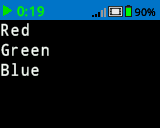
# Print each item in the list
colors = ["Red", "Green", "Blue"]

for color in colors:
    brain.screen.print(color)
    brain.screen.next_row()
もし#
if runs the indented block of code if the condition is True.
使用法:
if condition:
    pass
コンポーネント |
説明 |
|---|---|
|
ステートメント 実行時にチェックされる式または変数。これが |
# Turn right when a button is pressed
while True:
    if brain.buttonCheck.pressing():
        drivetrain.turn_for(RIGHT, 90)
    wait(0.1, SECONDS)
if/else#
if かつ else 条件が True または Falseであるかどうかに基づいて、どのインデントされたコードブロックが実行されるかを決定します。
使用法:
if condition:
    pass
else:
    pass
コンポーネント |
説明 |
|---|---|
|
ステートメントの実行時にチェックされる式または変数。これが |
# Turn right when a button is pressed, and remain still
# when the button is not pressed
while True:
    if brain.buttonCheck.pressing():
        drivetrain.turn(RIGHT)
    else:
        drivetrain.stop()
    wait(0.1, SECONDS)
if/elif/else#
if/elif/else 構造は、条件に基づいてどのインデントされたコードブロックを実行するかを選択します。
ifruns its block if the condition isTrue.elif、以前の条件がすべてFalseの場合にのみ追加の条件をチェックします。複数のelifステートメントを使用できます。else、前の条件のいずれも真でない場合にのみブロックを実行しますTrue。
使用法:
if condition:
    pass
elif condition:
    pass
else:
    pass
コンポーネント |
説明 |
|---|---|
|
ステートメントの実行時にチェックされる式または変数。最初に |
# Turn depending on what button is pressed
while True:
    if brain.buttonRight.pressing():
        drivetrain.turn(RIGHT)
    elif brain.buttonLeft.pressing():
        drivetrain.turn(LEFT)
    else:
        drivetrain.stop()
    wait(0.1, SECONDS)
その間#
while 、条件が Trueである限りコードを繰り返し実行します。また、条件として True 使用することで「永久」のように使用したり、条件に not を追加することで「待機」のように使用することもできます。以下の例を参照してください。
使用法:
while condition:
    pass
コンポーネント |
説明 |
|---|---|
|
各反復処理の前にチェックされる式または変数。0 が |
# Keep the screen green while the robot is moving
drivetrain.drive_for(FORWARD, 200, MM, wait=False)
while drivetrain.is_moving():
    brain.screen.clear_screen(Color.GREEN)
    wait(50, MSEC)

brain.screen.clear_screen(Color.BLACK)
while True:
    # Move in a square path forever
    drivetrain.drive_for(FORWARD, 150, MM)
    drivetrain.turn_for(RIGHT, 90)
# Wait until a button is pressed to stop driving
drivetrain.drive(FORWARD)
while not brain.buttonCheck.pressing():
    wait(50, MSEC)
drivetrain.stop()
壊す#
break はループを即座に終了します。2 break 無限ループになる可能性のあるループを終了させるために使用できます。
# Stop turning after a button is pressed
while True:
    drivetrain.turn(RIGHT)
    if brain.buttonCheck.pressing():
        break
drivetrain.stop()
brain.play_sound(SoundType.POWER_DOWN)
プログラムを停止する#
program_stop は実行中のプロジェクトを終了します。
Usage:brain.program_stop()
パラメータ |
説明 |
|---|---|
このメソッドにはパラメータがありません。 |
# Stop the project after a button is pressed
while True:
    drivetrain.turn(RIGHT)
    if brain.buttonCheck.pressing():
        brain.program_stop()
    brain.play_sound(SoundType.POWER_DOWN)
合格#
pass は将来のコードのためのプレースホルダーであり、空のループ、条件分岐、関数におけるエラーを回避するために使用できます。
if condition:
    pass
def function():
    pass