
控制#
介紹#
Python 中的控制功能可以讓你告訴機器人何時等待、何時重複操作、如何做出決定以及何時結束專案。
以下是可用控制項列表,包括方法和核心 Python 關鍵字:
wait— 將項目暫停指定時間。for— 對序列中的每個項目重複程式碼。if— 若條件為真,則執行程式碼。if/else— 根據條件執行不同的程式碼。if/elif/else— 依序檢查多個條件。while— 當條件為真時重複執行程式碼。break— 立即退出迴圈。stop_program— 結束正在執行的程式。pass— 不需要操作時使用的佔位符。
等待#
wait 暫停特定時間後再執行下一行程式碼。
Usage:wait(time, units)
參數 |
描述 |
|---|---|
|
等待時間,以正整數或小數表示。 |
|
表示等待時間的單位: |
# Turn right for one second, then stop
drivetrain.turn(RIGHT)
wait(1, SECONDS)
drivetrain.stop()
為了#
for repeats a set of actions a specific number of times. for can be used to loop through items in lists, tuples, dictionaries, sets, strings, or for a specified amount of loops with range.
使用次數:
for value in expression_list:
    pass
成分 |
描述 |
|---|---|
|
一個臨時變量,用於儲存迭代中的當前元素。 |
|
循環遍歷的元素集合(例如,列表、字串、範圍)。 |
# Move in a square path
for index in range(4):
    drivetrain.drive_for(FORWARD, 100, MM)
    drivetrain.turn_for(RIGHT, 90)
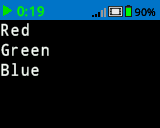
# Print each item in the list
colors = ["Red", "Green", "Blue"]

for color in colors:
    brain.screen.print(color)
    brain.screen.next_row()
如果#
if 運行縮排的程式碼區塊,如果條件為 True。
用法:
if condition:
    pass
成分 |
描述 |
|---|---|
|
語句運行時會檢查的表達式或變數。如果其值為 |
# Turn right when a button is pressed
while True:
    if brain.buttonCheck.pressing():
        drivetrain.turn_for(RIGHT, 90)
    wait(0.1, SECONDS)
如果/否則#
if 且 else 根據條件是 True 還是 False來決定運行哪個縮排的程式碼區塊。
用法:
if condition:
    pass
else:
    pass
成分 |
描述 |
|---|---|
|
語句運行時會檢查的表達式或變數。如果其值為 |
# Turn right when a button is pressed, and remain still
# when the button is not pressed
while True:
    if brain.buttonCheck.pressing():
        drivetrain.turn(RIGHT)
    else:
        drivetrain.stop()
    wait(0.1, SECONDS)
如果/否則#
if/elif/else 結構依條件選擇執行哪個縮排的程式碼區塊:
if運行其程式碼區塊,如果條件為True。elif僅當所有先前的條件均為False時才檢查其他條件。可以使用多個elif語句。else僅當前面的條件都不為True時才執行其程式碼區塊。
用法:
if condition:
    pass
elif condition:
    pass
else:
    pass
成分 |
描述 |
|---|---|
|
語句運行時會檢查一個表達式或變數。第一個為真 |
# Turn depending on what button is pressed
while True:
    if brain.buttonRight.pressing():
        drivetrain.turn(RIGHT)
    elif brain.buttonLeft.pressing():
        drivetrain.turn(LEFT)
    else:
        drivetrain.stop()
    wait(0.1, SECONDS)
儘管#
while 迴圈執行程式碼,只要條件為 True即可。它也可以像「永遠」一樣使用,條件為 True ;或像「等待直到」一樣使用,條件為 not ,如下例所示。
用法:
while condition:
    pass
成分 |
描述 |
|---|---|
|
每次迭代前都要檢查的表達式或變數。如果其值為 |
# Keep the screen green while the robot is moving
drivetrain.drive_for(FORWARD, 200, MM, wait=False)
while drivetrain.is_moving():
    brain.screen.clear_screen(Color.GREEN)
    wait(50, MSEC)

brain.screen.clear_screen(Color.BLACK)
while True:
    # Move in a square path forever
    drivetrain.drive_for(FORWARD, 150, MM)
    drivetrain.turn_for(RIGHT, 90)
# Wait until a button is pressed to stop driving
drivetrain.drive(FORWARD)
while not brain.buttonCheck.pressing():
    wait(50, MSEC)
drivetrain.stop()
休息#
break 會立即退出迴圈。 2 break 可以用來退出原本會無限循環的循環。
# Stop turning after a button is pressed
while True:
    drivetrain.turn(RIGHT)
    if brain.buttonCheck.pressing():
        break
drivetrain.stop()
brain.play_sound(SoundType.POWER_DOWN)
停止程式#
program_stop 結束正在執行的項目。
Usage:brain.program_stop()
參數 |
描述 |
|---|---|
此方法沒有參數。 |
# Stop the project after a button is pressed
while True:
    drivetrain.turn(RIGHT)
    if brain.buttonCheck.pressing():
        brain.program_stop()
    brain.play_sound(SoundType.POWER_DOWN)
經過#
pass 是未來程式碼的佔位符,可用來避免空迴圈、條件語句和函數中的錯誤。
if condition:
    pass
def function():
    pass