
螢幕#
介紹#
螢幕方法控制 EXP Brain 如何在其螢幕上顯示文字、數字和圖形。
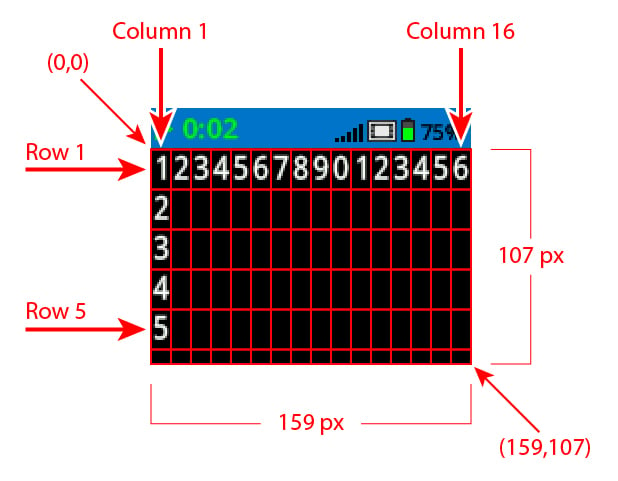
預設情況下,印到大腦的字體是等寬小號,它有7行20列。
大腦的繪圖解析度為 159 x 107 像素。
以下是可用方法清單:
遊標列印 – 顯示文字並管理列印遊標。
print– 在目前遊標位置列印文字、數字或變數值。print_at– 在指定的 x 和 y 座標處列印文字、數字或變數值。set_cursor– 將遊標移到指定的行和列。set_origin– 設定用於基於座標的列印和繪圖的原點。next_row– 將遊標移到下一行。clear_row– 清除一行文字。row– 傳回要列印文字的行。column– 傳回要列印文字的列。get_string_width– 使用目前字體傳回字串的像素寬度。get_string_height– 使用目前字體傳回字串的像素高度。
修改器 – 變更螢幕設定、顏色和繪圖行為。
clear_screen– 清除大腦螢幕上的所有圖形和文字。set_font– 設定大腦螢幕上列印文字所使用的字體類型。set_pen_width– 設定繪製的線條和形狀輪廓的粗細。set_pen_color– 設定文字、像素、線條和形狀輪廓的顏色。set_fill_color– 設定繪製形狀和列印文字背景的填滿顏色。
繪圖 – 在大腦螢幕上建立形狀、線條和圖形。
draw_pixel– 在座標處繪製一個像素。draw_line– 在兩點之間繪製一條線。draw_rectangle– 使用目前畫筆和填滿色彩繪製矩形。draw_circle– 使用目前畫筆和填滿色彩繪製一個圓形。draw_image_from_file– 從 SD 卡繪製影像。render– 將繪圖切換到雙緩衝,並渲染大腦螢幕。set_clip_region– 設定繪製所提供矩形的裁切區域。
遊標列印#
print#
print 在 Brain 畫面上以目前遊標位置和字型列印文字、數字或變數值。
用法:
brain.screen.print(text, sep, precision)
參數 |
描述 |
|---|---|
|
要列印的文字、數字或變數值。 |
|
可選。要在值之間插入的字串。必須將其寫成關鍵字參數(sep=)。預設值為 |
|
可選。列印簡單數字時顯示的小數位數。必須以關鍵字參數的形式指定( |
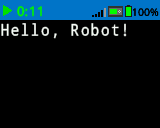
brain.screen.print("Hello, Robot!")
# Print the number 1 on the Brain's screen at current
# cursor position.
brain.screen.print(1)

# Print the numbers 1, 2, 3 and 4 on the Brain's screen at
# current cursor position separated by a '-'.
brain.screen.print(1, 2, 3, 4, sep='-')
print_at#
print_at 在 Brain 螢幕上的特定 x 和 y 座標處列印文字、數字或變數值。
用法:
brain.screen.print_at(text, x, y, sep, precision, opaque)
參數 |
描述 |
|---|---|
|
要列印的文字、數字或變數值。 |
|
要列印的 x 座標作為關鍵字參數( |
|
要列印的 y 座標作為關鍵字參數( |
|
可選。要在值之間插入的字串。必須將其寫成關鍵字參數(sep=)。預設值為 |
|
可選。列印簡單數字時顯示的小數位數。必須以關鍵字參數的形式指定( |
|
可選 |
# Print the number 1 on the Brain's screen at position (100, 40).
brain.screen.print_at(1, x=100, y=40)
set_cursor#
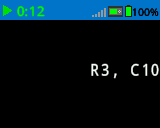
set_cursor moves the cursor to a specific row and column on the Brain screen. The next print call will start printing at that location. The row and column spacing will take into account the selected font. The default cursor position is Row 1, Column 1.
用法:
brain.screen.set_cursor(row, column)
參數 |
描述 |
|---|---|
|
要將遊標移到的行。 |
|
要將遊標移到的列。 |
# Display text starting at Row 3 Column 10.
brain.screen.set_cursor(3, 10)
brain.screen.print("R3, C10")
set_origin#
set_origin 設定 Brain 螢幕上用於繪圖和基於座標的列印的原點。預設情況下,原點位於螢幕左上角。
用法:
brain.screen.set_origin(x, y)
參數 |
描述 |
|---|---|
|
原點相對於左上角的 x 座標,範圍從 0 到 159。 |
|
原點相對於左上角的 y 座標,範圍從 0 到 107。 |
next_row#
next_row 將遊標移到 Brain 畫面下一行的第 1 列。
用法:
brain.screen.next_row()
參數 |
描述 |
|---|---|
此方法沒有參數。 |
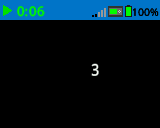
# Display two lines of text.
brain.screen.print("Line 1")
brain.screen.next_row()
brain.screen.print("Line 2")
clear_row#
clear_row 清除大腦螢幕上的一行文字。
用法:
brain.screen.clear_row(row)
參數 |
描述 |
|---|---|
|
可選。要清除的行。預設值為目前遊標所在行。 |
|
Optional. A valid ColorType, a hex value, or a web string.
|
# Clear Brain's screen to black.
brain.screen.clear_row()

# Clear Brain's screen to blue using predefined color.
brain.screen.clear_row(2, Color.BLUE)
row#
row 條傳回將以整數形式列印文字的行。
用法:
brain.screen.row()
參數 |
描述 |
|---|---|
此方法沒有參數。 |
# Display the cursor's current row.
brain.screen.set_cursor(3, 10)
brain.screen.print(brain.screen.row())
column#
column 傳回文字將以整數形式列印的列。
用法:
brain.screen.column()
參數 |
描述 |
|---|---|
此方法沒有參數。 |
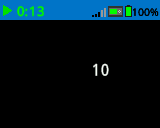
# Display the cursor's current column.
brain.screen.set_cursor(3, 10)
brain.screen.print(brain.screen.column())
get_string_width#
get_string_width 傳回字串的寬度(以像素為單位),以整數形式表示,使用目前的 font。
用法:
brain.screen.get_string_width(string)
參數 |
描述 |
|---|---|
|
待測量的繩子。 |
get_string_height#
get_string_height 傳回字串的高度(以像素為單位),使用目前的 font。
用法:
brain.screen.get_string_height(string)
參數 |
描述 |
|---|---|
|
待測量的繩子。 |
變異體#
clear_screen#
clear_screen 清除大腦螢幕上的所有圖形和文字。
用法:
brain.screen.clear_screen(color)
參數 |
描述 |
|---|---|
|
Optional. A valid ColorType, a hex value, or a web string.
|
# Print VEXcode on the Brain's screen.
brain.screen.print("VEXcode")

# Clear screen to black.
brain.screen.clear_screen()

# Print VEXcode on the Brain's screen.
brain.screen.print("VEXcode")

# Clear screen to blue using predefined color.
brain.screen.clear_screen(Color.BLUE)
set_font#
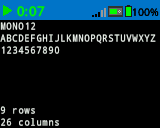
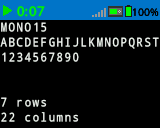
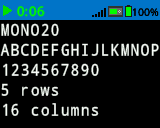
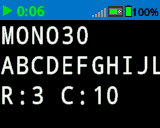
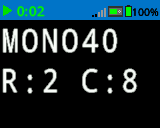
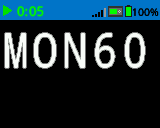
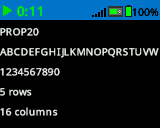
set_font 設定用於在大腦螢幕上顯示文字的字體。此字體將套用於此方法運行後列印的所有文字。
用法:
brain.screen.set_font(fontname)
參數 |
描述 |
|---|---|
|
The font size (examples below):
|
|
|
|
|---|---|---|
|
|
|
|
|
|
|
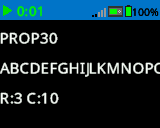
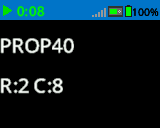
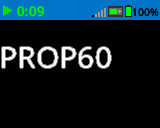
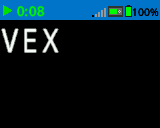
# Set the font type to MONO40.
brain.screen.set_font(FontType.MONO40)
brain.screen.print("VEX")
set_pen_width#
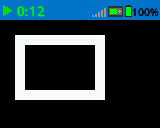
set_pen_width 設定繪製線條和形狀輪廓的粗細。
用法:
brain.screen.set_pen_width(width)
參數 |
描述 |
|---|---|
|
筆的寬度,以像素為單位,範圍從 0 到 32。 |
# Draw a rectangle with a pen width of 10.
brain.screen.set_pen_width(10)
brain.screen.draw_rectangle(20, 20, 75, 50)
set_pen_color#
set_pen_color 設定文字、像素、線條和形狀輪廓的顏色。
用法:
brain.screen.set_pen_color(color)
參數 |
描述 |
|---|---|
|
The pen and font color to use. This can be a valid ColorType, a hex value, or a web string.
|
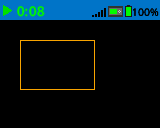
# Draw a rectangle with orange borders.
brain.screen.set_pen_color(Color.ORANGE)
brain.screen.draw_rectangle(20, 20, 75, 50)
# Set pen color red using a hex value.
brain.screen.set_pen_color(0xFF0000)

# Set pen color blue using predefined color.
brain.screen.set_pen_color(Color.BLUE)

# Set pen color green using web string.
brain.screen.set_pen_color("#00FF00")
set_fill_color#
set_fill_color 設定用於繪製矩形和圓形的填滿顏色。
用法:
brain.screen.set_fill_color(color)
參數 |
描述 |
|---|---|
|
The fill color to use. This can be a valid ColorType, a hex value, or a web string.
|
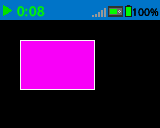
# Draw a purple rectangle.
brain.screen.set_fill_color(Color.PURPLE)
brain.screen.draw_rectangle(20, 20, 75, 50)
# Set fill color red using a hex value.
brain.screen.set_fill_color(0xFF0000)

# Set fill color blue using predefined color.
brain.screen.set_fill_color(Color.BLUE)

# Set fill color green using web string.
brain.screen.set_fill_color("#00FF00")
畫#
draw_pixel#
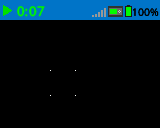
draw_pixel 使用目前 筆顏色 在選取的 x 和 y 座標處繪製一個像素。
用法:
brain.screen.draw_pixel(x, y)
參數 |
描述 |
|---|---|
|
繪製像素的 x 座標,範圍從 0 到 159,以螢幕原點為參考。 |
|
繪製像素的 y 座標,範圍從 0 到 107,以螢幕原點為參考。 |
# Draw the pixels marking the corners of a square.
brain.screen.draw_pixel(50, 50)
brain.screen.draw_pixel(50, 75)
brain.screen.draw_pixel(75, 50)
brain.screen.draw_pixel(75, 75)
draw_line#
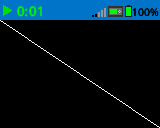
draw_line 使用目前的 筆寬 和 筆顏色 從第一個螢幕座標 (x1, y1) 到第二個螢幕座標 (x2, y2) 繪製一條線。
用法:
brain.screen.draw_line(x1, y1, x2, y2)
參數 |
描述 |
|---|---|
|
行首的 x 座標(以像素為單位),範圍從 0 到 159,參考螢幕原點。 |
|
行首的 y 座標(以像素為單位),範圍從 0 到 107,參考螢幕原點。 |
|
行尾的 x 座標(以像素為單位),範圍從 0 到 159,參考螢幕原點。 |
|
行尾的 y 座標(以像素為單位),範圍從 0 到 107,參考螢幕原點。 |
# Draw a line from the top left to bottom right of the screen.
brain.screen.draw_line(0, 0, 159, 107)
draw_rectangle#
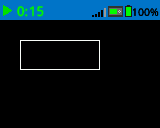
draw_rectangle 使用目前的 筆寬、筆顏色 和 填滿顏色 繪製矩形,除非使用了可選的 color 參數。
用法:
brain.screen.draw_rectangle(x, y, width, height, color)
參數 |
描述 |
|---|---|
|
矩形左上角的 x 座標(以像素為單位),範圍從 0 到 159,參考螢幕原點。 |
|
矩形左上角的 y 座標(以像素為單位),範圍從 0 到 107,參考螢幕原點。 |
|
矩形的寬度。 |
|
矩形的高度。 |
|
Optional. A valid ColorType, a hex value, or a web string.
|
# Draw a rectangle on the screen.
brain.screen.draw_rectangle(20, 20, 80, 30)
# Draw a green rectangle on the screen that is filled using blue.
brain.screen.set_pen_color(Color.GREEN)
brain.screen.set_fill_color(Color.BLUE)
brain.screen.draw_rectangle(10, 10, 20, 20)

# Draw a green rectangle on the screen that is filled using red.
brain.screen.set_pen_color(Color.GREEN)
brain.screen.draw_rectangle(50, 50, 20, 20, Color.RED)
draw_circle#
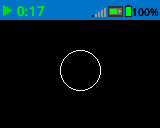
draw_circle 使用目前的 筆寬、筆顏色 和 填滿顏色 繪製一個圓,除非使用了可選的 color 參數。
用法:
brain.screen.draw_circle(x, y, radius, color)
參數 |
描述 |
|---|---|
|
圓心的 x 座標(以像素為單位),範圍從 0 到 159,參考螢幕原點。 |
|
圓心的 y 座標(以像素為單位),範圍從 0 到 107,參考螢幕原點。 |
|
圓的半徑。 |
|
Optional. A valid ColorType, a hex value, or a web string.
|
# Draw a circle on the screen.
brain.screen.draw_circle(80, 50, 20)
# Draw a green circle on the Brain's screen that is filled using blue.
brain.screen.set_pen_color(Color.GREEN)
brain.screen.set_fill_color(Color.BLUE)
brain.screen.draw_circle(50, 50, 10)

# Draw a green circle on the Brain's screen that is filled using red.
brain.screen.set_pen_color(Color.GREEN)
brain.screen.draw_circle(100, 50, 10, Color.RED)
draw_image_from_file#
draw_image_from_file 從 SD 卡繪製影像。呼叫此方法時指定的檔案名稱必須位於 SD 卡上。
用法:
brain.screen.draw_image_from_file(filename, x, y)
參數 |
描述 |
|---|---|
|
圖片的檔名。 |
|
螢幕上圖像左上角的 x 座標。 |
|
螢幕上圖像左上角的 y 座標。 |
# Draw the vex.bmp image on the Brain's screen at coordinate 0, 0.
brain.screen.draw_image_from_file('vex.bmp', 0, 0)
render#
render 將繪製方式切換到雙緩衝,並渲染大腦螢幕。呼叫此函數後,在下次呼叫 render 之前,大腦畫面上不會顯示任何新的繪製內容。
True。False如果緩衝區未成功渲染到螢幕上。
用法:
brain.screen.render()
參數 |
描述 |
|---|---|
此方法沒有參數。 |
set_clip_region#
set_clip_region 定義了螢幕上的一個矩形區域,所有圖形和文字都將限制在該區域內。該區域以外的任何內容都不會顯示。
用法:
brain.screen.set_clip_region(x, y, width, height)
參數 |
描述 |
|---|---|
|
矩形左上角的 x 座標,以螢幕原點為參考。 |
|
矩形左上角的 y 座標,以螢幕原點為參考。 |
|
矩形的寬度。 |
|
矩形的高度。 |