按钮#

Introduction#

The button class is derived from the controller base class and provides access to the EXP Controller’s buttons, allowing your robot to monitor presses to the controller’s buttons.

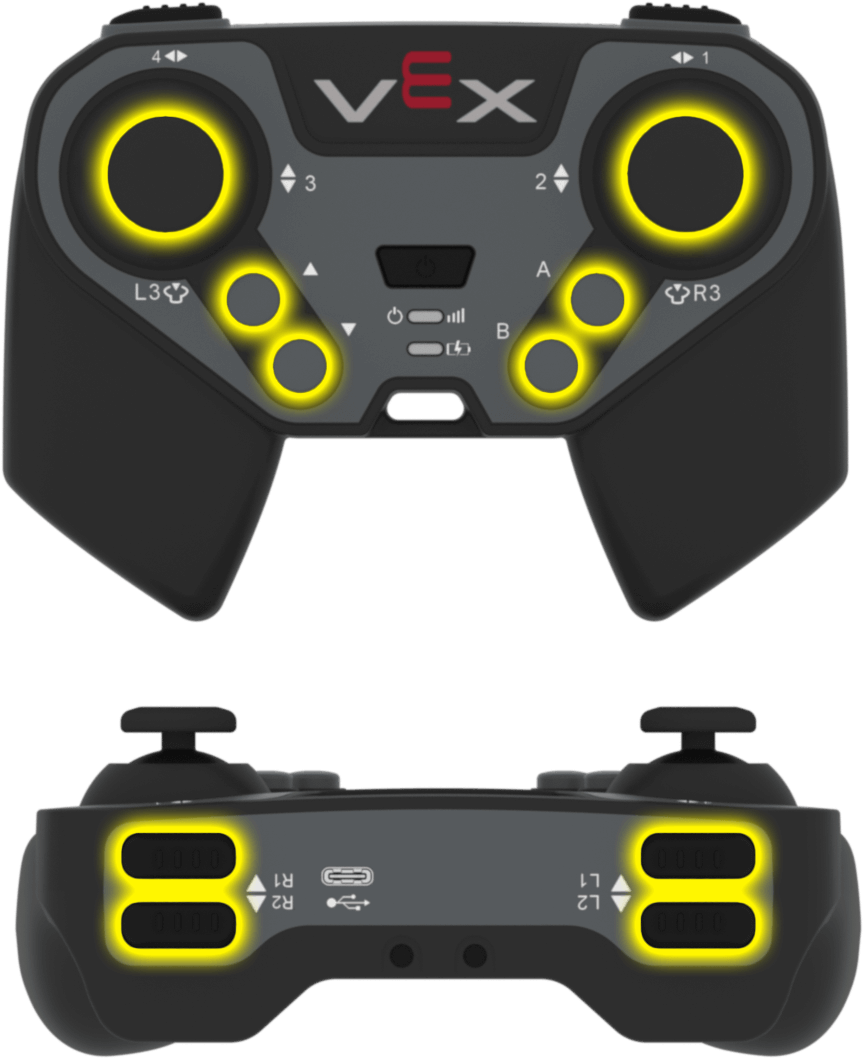
A VEX EXP Controller buttons highlighted yellow.

Access#

The controller class provides twelve button objects. Each object is an instance of the button class and can be accessed through a controller instance.

Object

Example Usage

描述

ButtonA

Controller.ButtonA.pressing()

A button

ButtonB

Controller.ButtonB.pressing()

B button

ButtonDown

Controller.ButtonDown.pressing()

Down button

ButtonL1

Controller.ButtonL1.pressing()

L1 button

ButtonL2

Controller.ButtonL2.pressing()

L2 button

ButtonL3

Controller.ButtonL3.pressing()

L3 button

ButtonR1

Controller.ButtonR1.pressing()

R1 button

ButtonR2

Controller.ButtonR2.pressing()

R2 button

ButtonR3

Controller.ButtonR3.pressing()

R3 button

ButtonUp

Controller.ButtonUp.pressing()

Up button

Notes#

  • The button object is provided by the controller. It is not constructed directly.

Member Functions#

The Button class includes the following member functions:

  • pressing — Returns whether or not the specified button is being pressed.

  • pressed — Registers a function to be called when the specified button is pressed.

  • released — Registers a function to be called when the specified button is released.

Before calling any button member functions, a controller instance must be created, as shown below:

// Create an EXP controller instance
controller Controller = controller();

pressing#

Returns whether a specific controller button is currently being pressed.

Available Functions
bool pressing() const;

Parameters

This function does not accept any parameters.

Return Values

Returns an integer indicating whether the specified button is being pressed:

  • 1 — The button is being pressed.
  • 0 — The button is not being pressed.
Examples

This function can be called on any controller button object, for example:

  • Controller.ButtonA
  • Controller.ButtonB
  • Controller.ButtonDown
  • Controller.ButtonL1
  • Controller.ButtonL2
  • Controller.ButtonL3
  • Controller.ButtonR1
  • Controller.ButtonR2
  • Controller.ButtonR3
  • Controller.ButtonUp
// Turn right while L1 is pressed
while (true) {
    if (Controller.ButtonL1.pressing()) {
        Drivetrain.turn(right);
    } else {
        Drivetrain.stop();
    }
    wait(5, msec);
}

pressed#

Registers a callback function that runs when a specific controller button is pressed.

Available Functions
void pressed( 
  void (* callback)(void) ) const;

Parameters

范围

Type

描述

callback

void (*)(void)

A function that is called when the specified button is pressed.

Return Values

This function does not return a value.

Examples

This function can be called on any controller button object, for example:

  • Controller.ButtonA
  • Controller.ButtonB
  • Controller.ButtonDown
  • Controller.ButtonL1
  • Controller.ButtonL2
  • Controller.ButtonL3
  • Controller.ButtonR1
  • Controller.ButtonR2
  • Controller.ButtonR3
  • Controller.ButtonUp

Define the callback function (outside of int main())

// Drive forward when A is pressed
void driveForward() {
    Drivetrain.driveFor(forward, 100, mm);
}

Register the callback inside int main()

int main() {
  /* vexcodeInit() is only required when using VEXcode.
  Remove vexcodeInit() if compiling in VS Code. */
  vexcodeInit();

  // Call driveForward when the A button is pressed
  Controller.ButtonA.pressed(driveForward);
}

released#

Registers a callback function that runs when a specific controller button is released.

Available Functions
void released( 
  void (* callback)(void) ) const;

Parameters

范围

Type

描述

callback

void (*)(void)

A function that is called when the specified button is released.

Return Values

This function does not return a value.

Examples

This function can be called on any controller button object, for example:

  • Controller.ButtonA
  • Controller.ButtonB
  • Controller.ButtonDown
  • Controller.ButtonL1
  • Controller.ButtonL2
  • Controller.ButtonL3
  • Controller.ButtonR1
  • Controller.ButtonR2
  • Controller.ButtonR3
  • Controller.ButtonUp

Define the callback function (outside of int main())

// Drive backward when A is released
void backUp() {
    Drivetrain.driveFor(reverse, 100, mm);
}

Register the callback inside int main()

int main() {
  /* vexcodeInit() is only required when using VEXcode.
  Remove vexcodeInit() if compiling in VS Code. */
  vexcodeInit();

  // Call backUp when the A button is released
  Controller.ButtonA.released(backUp);
}