
轴#
介绍#
The axis class is a derived class of the controller class. It provides access to controller joystick axis values and joystick axis change callbacks.
An axis object is accessed through a controller object. It is not constructed directly.
使用权#
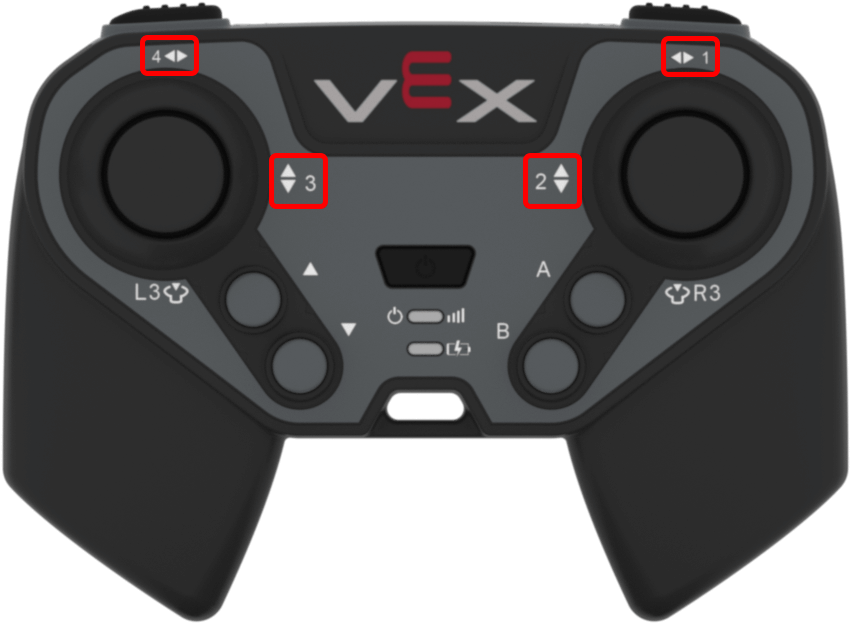
The controller class provides the following axis objects. Each object is an instance of the axis class.
轴对象 |
用法示例 |
描述 |
|---|---|---|
|
|
右摇杆水平轴。 |
|
|
右摇杆垂直轴。 |
|
|
左摇杆垂直轴。 |
|
|
左摇杆水平轴。 |
笔记#
Before using an
axismember function, create acontrollerobject.positionreturns a value from-100to100.
// Create a controller object
controller Controller = controller();
成员功能#
The axis class includes the following member functions:
获取器 — 读取操纵杆轴位置。
position— Returns the position of the joystick axis.
回调函数——当摇杆沿某个轴的位置发生变化时,运行一个函数。
changed— Runs a function when the joystick’s position changes along that axis.
Getter#
position#
position returns the position of the joystick axis as a value from -100 to 100.
可用功能
int32_t position(percentUnits units = percentUnits::pct) const;
范围 |
类型 |
描述 |
|---|---|---|
|
|
Optional. The unit used for the returned axis value. The default is |
返回值
Returns an int32_t value from -100 to 100.
100— The joystick axis is fully moved in the positive direction.0— The joystick axis is centered.-100— The joystick axis is fully moved in the negative direction.
例子
// Turn with the left joystick
while (true) {
  if (Controller.Axis4.position() > 10) {
    Drivetrain.turn(right);
  }
  else if (Controller.Axis4.position() < -10) {
    Drivetrain.turn(left);
  }
  else {
    Drivetrain.stop();
  }

  wait(20, msec);
}
打回来#
changed#
changed runs a function when the joystick’s position changes along that axis.
可用功能
void changed(void (* callback)(void)) const;
范围 |
类型 |
描述 |
|---|---|---|
|
|
每次操纵杆沿该轴位置发生变化时运行的函数。 |
返回值
此函数不返回值。
例子
Define the callback function outside of main.
// Rumble when the left joystick moves
void controllerRumble() {
  Controller.rumble(".");
}
Register the callback inside main.
int main() {
  vexcodeInit();

  // Run controllerRumble when the joystick's position changes along Axis4
  Controller.Axis4.changed(controllerRumble);
}