
Python ειδικά για ρομπότ#
Εισαγωγή#
Το ρομπότ VR Rover περιλαμβάνει σύστημα μετάδοσης κίνησης, αισθητήρα απόστασης και λειτουργίες μοναδικές για την παιδική χαρά Rover Rescue.
Όλες οι τυπικές μέθοδοι VR VEXcode είναι διαθέσιμες για χρήση στο Rover Rescue Playground. Παρακάτω είναι μια λίστα με όλες τις διαθέσιμες μεθόδους ειδικά για το Playground:
Σύστημα μετάδοσης κίνησης - Μετακίνηση και παρακολούθηση του VR Rover.
Ενέργειες
drive- Μετακινεί το VR Rover προς τα εμπρός ή προς τα πίσω για πάντα.drive_for- Μετακινεί το VR Rover προς τα εμπρός ή προς τα πίσω για μια συγκεκριμένη απόσταση.turn- Στρέφει το VR Rover αριστερά ή δεξιά για πάντα.turn_for- Στρέφει το VR Rover αριστερά ή δεξιά για έναν συγκεκριμένο αριθμό μοιρών.turn_to_heading- Στρέφει το VR Rover ώστε να βλέπει προς μια συγκεκριμένη κατεύθυνση από -359 σε 359 μοίρες.drive_to- Οδηγεί το VR Rover κατευθείαν προς το επιλεγμένο αντικείμενο.turn_to- Στρέφει το VR Rover ώστε να είναι στραμμένο προς το επιλεγμένο αντικείμενο.go_to- Στρέφει και οδηγεί το VR Rover στο επιλεγμένο αντικείμενο.stop- Σταματά την κίνηση του VR Rover.
Μεταλλαγμένοι
set_heading– Αλλάζει την τρέχουσα κατεύθυνση του VR Rover σε νέα.set_timeout- Ορίζει τον χρόνο που θα προσπαθήσει το VR Rover να ολοκληρώσει μια κίνηση.set_drive_velocity– Υποδεικνύει στο VR Rover πόσο γρήγορα πρέπει να οδηγήσει.set_turn_velocity– Υποδεικνύει στο VR Rover πόσο γρήγορα πρέπει να στρίψει.
Αποκτητές
Κονσόλα – Εκτύπωση στην Κονσόλα και παρακολούθηση τιμών.
Αποτύπωμα
brain.print— Εμφανίζει κείμενο, αριθμούς ή τιμές μεταβλητών στην Κονσόλα.brain.new_line— Μετακινεί τον κέρσορα της κονσόλας στην αρχή της επόμενης γραμμής.brain.set_print_color— Ορίζει το χρώμα που χρησιμοποιείται για το κείμενο που εκτυπώνεται στην Κονσόλα.brain.clear— Διαγράφει όλες τις γραμμές από την Κονσόλα.
Ελεγκτής εκπομπών
monitor_variable— Προσθέτει μία ή περισσότερες προκαθορισμένες μεταβλητές στην καρτέλα Monitor.monitor_sensor— Προσθέτει μία ή περισσότερες τιμές αισθητήρα στην καρτέλα Monitor.
Ανίχνευση - Εντοπισμός κοντινών αντικειμένων με τον αισθητήρα απόστασης του ρόβερ.
Απόσταση
found_object- Επιστρέφει εάν ο αισθητήρας απόστασης ανιχνεύει ένα αντικείμενο.get_distance- Επιστρέφει την απόσταση από το πλησιέστερο ανιχνευμένο αντικείμενο.
Ενέργειες - Αλληλεπιδράστε με τους πόρους, τους εχθρούς και τα ενσωματωμένα συστήματα τεχνητής νοημοσύνης του ρόβερ.
Ενέργειες
pickup- Συλλέγει ορυκτά.drop- Σταγόνες ορυκτών.use- Χρησιμοποιεί μέταλλα για την αποκατάσταση της ενέργειας.absorb_radiation- Απορροφά ακτινοβολία από έναν εχθρό.standby- Θέτει το VR Rover σε λειτουργία αναμονής μέχρι να επιτευχθεί ένα όριο φόρτισης μπαταρίας.
Αποκτητές
angle- Επιστρέφει την κατεύθυνση ενός αντικειμένου σε μοίρες.get_distance- Επιστρέφει την απόσταση από ένα αντικείμενο σε χιλιοστά ή ίντσες.location- Επιστρέφει τη συντεταγμένη X ή Y ενός αντικειμένου σε χιλιοστά ή ίντσες.battery- Επιστρέφει το επίπεδο μπαταρίας του VR Rover.minerals_stored- Επιστρέφει τον αριθμό των ορυκτών που μεταφέρει το VR Rover.storage_capacity- Επιστρέφει τη χωρητικότητα του VR Rover.level- Επιστρέφει το τρέχον επίπεδο του VR Rover.exp- Επιστρέφει τους τρέχοντες πόντους εμπειρίας του VR Rover.enemy_level- Επιστρέφει το επίπεδο του πλησιέστερου εχθρού που εντοπίστηκε.enemy_radiation- Επιστρέφει την ακτινοβολία του πλησιέστερου εχθρού που εντοπίστηκε.detects- Επιστρέφει εάν το VR Rover ανιχνεύει ορυκτά ή εχθρούς στην ακτίνα ανίχνευσής του.sees- Επιστρέφει εάν το VR Rover βλέπει ένα αντικείμενο στην εμβέλεια ορατότητάς του.under_attack- Επιστρέφει εάν το VR Rover δέχεται επίθεση.
Επανακλήσεις
on_under_attack- Εκτελεί μια επανάκληση όταν το VR Rover δέχεται επίθεση.on_level_up- Εκτελεί μια επανάκληση όταν το VR Rover ανέβει επίπεδο.
Τα παραδείγματα σε αυτήν τη σελίδα χρησιμοποιούν την προεπιλεγμένη θέση έναρξης της Παιδικής Χαράς.
Σύστημα μετάδοσης κίνησης#
Το σύστημα μετάδοσης κίνησης ελέγχει τον τρόπο με τον οποίο κινείται και στρίβει το VR Rover. Το σύστημα μετάδοσης κίνησης μπορεί να κινείται προς τα εμπρός ή προς τα πίσω, να στρίβει αριστερά ή δεξιά, να στρίβει προς κατεύθυνση και να κατευθύνεται προς ορυκτά, εχθρούς ή τη βάση.
Ενέργειες#
οδηγώ#
drive κινεί το VR Rover προς τα εμπρός ή προς τα πίσω για πάντα. Το VR Rover θα συνεχίσει να κινείται μέχρι να του δοθεί κάποια άλλη ενέργεια, όπως στροφή ή στάση.
Usage:
drivetrain.drive(direction)
Παράμετροι |
Περιγραφή |
|---|---|
|
Η κατεύθυνση κίνησης του VR Rover: |
def main():
    drivetrain.drive(FORWARD)
    wait(2, SECONDS)
    drivetrain.stop()

# VR threads — Do not delete
vr_thread(main)
μονάδα_δίσκου#
Η συνάρτηση drive_for μετακινεί το VR Rover προς τα εμπρός ή προς τα πίσω για μια συγκεκριμένη απόσταση. Το έργο θα περιμένει μέχρι να ολοκληρωθεί η κίνηση του VR Rover πριν εκτελεστεί η επόμενη γραμμή κώδικα.
Usage:
drivetrain.drive_for(direction, distance, units, wait=True)
Παράμετροι |
Περιγραφή |
|---|---|
|
Η κατεύθυνση κίνησης του VR Rover: |
|
Η απόσταση που διανύει το VR Rover. Αυτή μπορεί να είναι ένας ακέραιος αριθμός |
|
Η μονάδα απόστασης: |
|
Προαιρετικό. |
def main():
    drivetrain.drive_for(FORWARD, 200, MM)

# VR threads — Do not delete
vr_thread(main)
σειρά#
turn γυρίζει το VR Rover αριστερά ή δεξιά για πάντα. Το VR Rover θα συνεχίσει να περιστρέφεται μέχρι να του δοθεί κάποια άλλη ενέργεια, όπως οδήγηση ή στάση.
Usage:
drivetrain.turn(direction)
Παράμετροι |
Περιγραφή |
|---|---|
|
Η κατεύθυνση στροφής του VR Rover: |
def main():
    drivetrain.turn(RIGHT)
    wait(2, SECONDS)
    drivetrain.stop()

# VR threads — Do not delete
vr_thread(main)
στροφή_για#
turn_for στρέφει το VR Rover αριστερά ή δεξιά για έναν συγκεκριμένο αριθμό μοιρών. Η στροφή είναι σχετική με την τρέχουσα θέση του VR Rover. Το έργο θα περιμένει μέχρι το VR Rover να ολοκληρώσει την στροφή πριν εκτελεστεί η επόμενη γραμμή κώδικα.
Usage:
drivetrain.turn_for(direction, angle, units, wait=True)
Παράμετροι |
Περιγραφή |
|---|---|
|
Η κατεύθυνση στροφής του VR Rover: |
|
Ο αριθμός των μοιρών στις οποίες περιστρέφεται το VR Rover. Αυτός μπορεί να είναι ένας ακέραιος αριθμός |
|
Η μονάδα περιστροφής: |
|
Προαιρετικό. |
def main():
    drivetrain.turn_for(RIGHT, 90, DEGREES)

# VR threads — Do not delete
vr_thread(main)
στροφή_προς_την_κατεύθυνση#
Μια κατεύθυνση είναι η κατεύθυνση προς την οποία είναι στραμμένο το VR Rover, μετρούμενη σε μοίρες. turn_to_heading γυρίζει το VR Rover ώστε να είναι στραμμένο προς μια συγκεκριμένη κατεύθυνση από -359 έως 359 μοίρες. Το VR Rover θα στρίψει προς τη συντομότερη κατεύθυνση για να φτάσει στην κατεύθυνση-στόχο.
Η αρχική κατεύθυνση του VR Rover είναι 0 μοίρες.
Το έργο θα περιμένει μέχρι να ολοκληρώσει την περιστροφή του VR Rover προτού εκτελεστεί η επόμενη γραμμή κώδικα.
Usage:
drivetrain.turn_to_heading(heading, units, wait=True)
Παράμετροι |
Περιγραφή |
|---|---|
|
Η κατεύθυνση προς την οποία πρέπει να είναι στραμμένο το VR Rover, σε μοίρες. Αυτή μπορεί να είναι ένας ακέραιος αριθμός |
|
Η μονάδα επικεφαλίδας: |
|
Προαιρετικό. |
def main():
    drivetrain.turn_to_heading(90, DEGREES)

# VR threads — Do not delete
vr_thread(main)
drive_to#
drive_to οδηγεί το VR Rover κατευθείαν προς το επιλεγμένο αντικείμενο.
Usage:
drivetrain.drive_to(object, wait=True)
Παράμετροι |
Περιγραφή |
|---|---|
|
Σε ποιο αντικείμενο θα κατευθύνεται το VR Rover:
|
|
Προαιρετικό. |
Εάν δεν εντοπιστεί ορυκτό ή εχθρός στην οπτική εμβέλεια του VR Rover όταν καλείται η εντολή drive_to , το VR Rover δεν θα οδηγήσει. Η βάση μπορεί πάντα να στοχεύσει.
Εάν το VR Rover ανιχνεύσει πολλά ορυκτά ή πολλαπλούς εχθρούς, θα κινηθεί προς την πιο κοντινή επιλογή.
def main():
    drivetrain.drive_to(MINERALS)

# VR threads — Do not delete
vr_thread(main)
στροφή_προς#
turn_to γυρίζει το VR Rover ώστε να είναι στραμμένο προς το επιλεγμένο αντικείμενο.
Usage:
drivetrain.turn_to(object, wait=True)
Παράμετροι |
Περιγραφή |
|---|---|
|
Ποιο αντικείμενο θα στραφεί το VR Rover:
|
|
Προαιρετικό.
|
Εάν δεν εντοπιστεί ορυκτό ή εχθρός στην οπτική εμβέλεια του VR Rover όταν καλείται η εντολή turn_to , το VR Rover δεν θα στρίψει. Η βάση μπορεί πάντα να στοχεύεται.
Εάν το VR Rover ανιχνεύσει πολλά ορυκτά ή πολλαπλούς εχθρούς, θα στραφεί προς την επιλογή πλησιέστερου πλάνου.
def main():
    drivetrain.turn_to(MINERALS)

# VR threads — Do not delete
vr_thread(main)
μετάβαση_σε#
go_to γυρίζει και οδηγεί το VR Rover στο επιλεγμένο αντικείμενο.
Usage:
drivetrain.go_to(object, wait=True)
Παράμετροι |
Περιγραφή |
|---|---|
|
Σε ποιο αντικείμενο θα στραφεί και θα κατευθυνθεί το VR Rover:
|
|
Προαιρετικό. |
Εάν δεν εντοπιστεί ορυκτό ή εχθρός στην οπτική εμβέλεια του VR Rover όταν καλείται η εντολή go_to , το VR Rover δεν θα κινηθεί. Η βάση μπορεί πάντα να στοχεύεται.
Εάν το VR Rover ανιχνεύσει πολλά ορυκτά ή πολλαπλούς εχθρούς, θα μετακινηθεί στην επιλογή πλησιέστερου πλάνου.
def main():
    drivetrain.go_to(MINERALS)

# VR threads — Do not delete
vr_thread(main)
στάση#
Η στάση stop σταματά την κίνηση του VR Rover.
Usage:
drivetrain.stop()
Παράμετροι |
Περιγραφή |
|---|---|
Αυτή η μέθοδος δεν έχει παραμέτρους. |
def main():
    drivetrain.drive(FORWARD)
    wait(2, SECONDS)
    drivetrain.stop()

# VR threads — Do not delete
vr_thread(main)
Μεταλλάκτες#
set_heading#
Μια κατεύθυνση είναι η κατεύθυνση προς την οποία είναι στραμμένο το VR Rover, μετρούμενη σε μοίρες. set_heading αλλάζει την τρέχουσα κατεύθυνση του VR Rover σε μια νέα τιμή κατεύθυνσης.
Για παράδειγμα, εάν το VR Rover έχει στρίψει προς τα δεξιά, η ρύθμιση της κατεύθυνσης σε 0 μοίρες καθιστά αυτήν τη θέση προς τα δεξιά τις νέες 0 μοίρες. Στη συνέχεια, το VR Rover μπορεί να στρίψει σε άλλες θέσεις με βάση αυτήν τη νέα κατεύθυνση.
Usage:
drivetrain.set_heading(heading, units)
Παράμετροι |
Περιγραφή |
|---|---|
|
Η τιμή κατεύθυνσης, σε μοίρες, που θα οριστεί για το VR Rover. Αυτή μπορεί να είναι ένας ακέραιος αριθμός |
|
Η μονάδα επικεφαλίδας: |
def main():
    drivetrain.set_heading(0, DEGREES)

# VR threads — Do not delete
vr_thread(main)
set_timeout#
set_timeout ορίζει τον χρόνο που θα προσπαθήσει το VR Rover να ολοκληρώσει μια κίνηση. Εάν το VR Rover δεν μπορεί να ολοκληρώσει σε αυτόν τον χρόνο, θα σταματήσει την προσπάθεια και θα προχωρήσει στην επόμενη γραμμή κώδικα. Αυτό εμποδίζει το VR Rover να κολλήσει σε μια κίνηση.
Usage:
drivetrain.set_timeout(value, units)
Παράμετροι |
Περιγραφή |
|---|---|
|
Ο χρόνος που μπορεί να προσπαθήσει το VR Rover για να ολοκληρώσει μια κίνηση. Αυτός μπορεί να είναι ένας θετικός ακέραιος αριθμός |
|
Η μονάδα χρόνου: |
def main():
    drivetrain.set_timeout(1, SECONDS)

# VR threads — Do not delete
vr_thread(main)
set_drive_velocity#
set_drive_velocity υποδεικνύει στο VR Rover πόσο γρήγορα πρέπει να οδηγήσει. Ένα υψηλότερο ποσοστό κάνει το VR Rover να κινείται πιο γρήγορα και ένα χαμηλότερο ποσοστό κάνει το VR Rover να κινείται πιο αργά.
Κάθε έργο ξεκινά με το VR Rover να κινείται με ταχύτητα 50% από προεπιλογή.
Σημείωση: Μια υψηλότερη ταχύτητα κάνει το VR Rover να κινείται πιο γρήγορα, αλλά μπορεί να είναι λιγότερο ακριβές. Μια χαμηλότερη ταχύτητα κάνει το VR Rover να κινείται πιο αργά, αλλά μπορεί να είναι πιο ακριβές.
Usage:
drivetrain.set_drive_velocity(velocity, units)
Παράμετροι |
Περιγραφή |
|---|---|
|
Η ταχύτητα με την οποία θα οδηγηθεί το μηχάνημα κυμαίνεται από 0% έως 100%. Αυτή μπορεί να είναι ένας ακέραιος αριθμός |
|
Η μονάδα ταχύτητας: |
def main():
    drivetrain.set_drive_velocity(50, PERCENT)

# VR threads — Do not delete
vr_thread(main)
ορισμός_ταχύτητας_στροφής#
set_turn_velocity λέει στο VR Rover πόσο γρήγορα να στρίψει. Ένα υψηλότερο ποσοστό κάνει το VR Rover να στρίβει πιο γρήγορα και ένα χαμηλότερο ποσοστό κάνει το VR Rover να στρίβει πιο αργά.
Κάθε έργο ξεκινά με το VR Rover να περιστρέφεται με ταχύτητα 50% από προεπιλογή.
Σημείωση: Μια υψηλότερη ταχύτητα κάνει το VR Rover να περιστρέφεται πιο γρήγορα, αλλά μπορεί να είναι λιγότερο ακριβές. Μια χαμηλότερη ταχύτητα κάνει το VR Rover να περιστρέφεται πιο αργά, αλλά μπορεί να είναι πιο ακριβές.
Usage:
drivetrain.set_turn_velocity(velocity, units)
Παράμετροι |
Περιγραφή |
|---|---|
|
Η ταχύτητα με την οποία θα περιστραφεί η περιστροφή κυμαίνεται από 0% έως 100%. Αυτή μπορεί να είναι ένας ακέραιος αριθμός |
|
Η μονάδα ταχύτητας: |
def main():
    drivetrain.set_turn_velocity(50, PERCENT)

# VR threads — Do not delete
vr_thread(main)
Αποκτητές#
επικεφαλίδα#
Η κατεύθυνση είναι η κατεύθυνση προς την οποία είναι στραμμένο το VR Rover, μετρούμενη σε μοίρες. Η κατεύθυνση heading επιστρέφει την τρέχουσα κατεύθυνση του VR Rover από 0 σε 359,99 μοίρες.
Η αρχική κατεύθυνση του VR Rover είναι 0 μοίρες.
Usage:
drivetrain.heading(units)
Παράμετροι |
Περιγραφή |
|---|---|
|
Η μονάδα επικεφαλίδας: |
def main():
    brain.screen.print(drivetrain.heading(DEGREES))

# VR threads — Do not delete
vr_thread(main)
είναι_ολοκληρωμένο#
Η συνάρτηση is_done επιστρέφει εάν το VR Rover έχει ολοκληρώσει την κίνησή του, ως δυαδική τιμή. Αυτή μπορεί να χρησιμοποιηθεί για τον έλεγχο του χρονισμού άλλων συμπεριφορών με βάση την κίνηση του VR Rover.
True— Το VR Rover ολοκλήρωσε την κίνηση.False— Το VR Rover εξακολουθεί να κινείται.
Αυτή η μέθοδος λειτουργεί σε συνδυασμό με μεθόδους Drivetrain που έχουν την παράμετρο wait , όπως drive_for, turn_for, turn_to_heading, drive_to, turn_to και go_to.
Usage:
drivetrain.is_done()
Παράμετροι |
Περιγραφή |
|---|---|
Αυτή η μέθοδος δεν έχει παραμέτρους. |
def main():
    drivetrain.drive_for(FORWARD, 200, MM, wait=False)
    wait(0.1, SECONDS)
    if drivetrain.is_done():
        brain.screen.print("Drive complete")

# VR threads — Do not delete
vr_thread(main)
is_moving#
Η συνάρτηση is_moving επιστρέφει εάν το VR Rover κινείται, ως δυαδική τιμή. Αυτή μπορεί να χρησιμοποιηθεί για τον έλεγχο του χρονισμού άλλων συμπεριφορών με βάση την κίνηση του VR Rover.
True— Το VR Rover κινείται.False— Το VR Rover δεν κινείται.
Usage:
drivetrain.is_moving()
Παράμετροι |
Περιγραφή |
|---|---|
Αυτή η μέθοδος δεν έχει παραμέτρους. |
def main():
    drivetrain.drive_for(FORWARD, 200, MM, wait=False)
    wait(0.1, SECONDS)
    if drivetrain.is_moving():
        brain.screen.print("Still moving")

# VR threads — Do not delete
vr_thread(main)
Κονσόλα#
Η Κονσόλα εμφανίζει κείμενο, αριθμούς και τιμές μεταβλητών ενώ εκτελείται ένα έργο. Οι μέθοδοι κονσόλας μπορούν επίσης να μετακινήσουν τον κέρσορα σε μια νέα γραμμή, να ορίσουν το χρώμα του κειμένου που εκτυπώνεται μετά την αλλαγή του χρώματος, να διαγράψουν την Κονσόλα και να προσθέσουν μεταβλητές ή τιμές αισθητήρα στην καρτέλα Παρακολούθηση.
Αποτύπωμα#
εγκέφαλος.εκτύπωση#
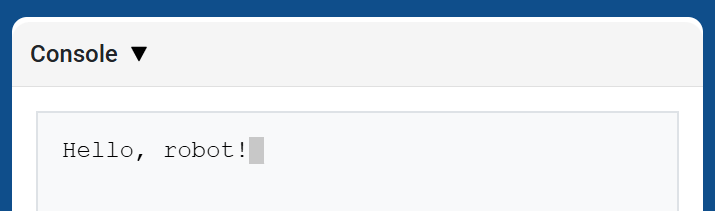
brain.print εμφανίζει κείμενο, αριθμούς ή τιμές μεταβλητών στην Κονσόλα χρησιμοποιώντας την τρέχουσα θέση του κέρσορα.
Χρησιμοποιήστε την συνάρτηση brain.new_line όταν θέλετε η επόμενη εκτυπωμένη τιμή να ξεκινά σε νέα γραμμή.
Usage:
brain.print(value)
Παράμετροι |
Περιγραφή |
|---|---|
|
Το κείμενο, ο αριθμός ή η τιμή μεταβλητής που θα εμφανίζεται στην Κονσόλα. |
def main():
    # Display a message in the Console
    brain.print("Hello, rover!")

# VR threads — Do not delete
vr_thread(main)
brain.new_line#
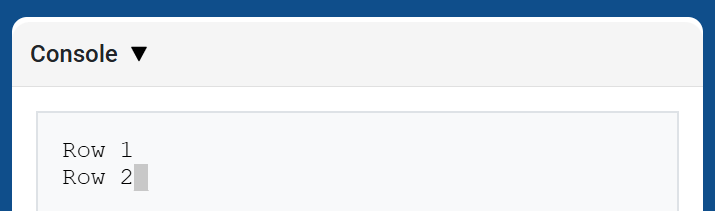
brain.new_line μετακινεί τον κέρσορα στη στήλη 1 στην επόμενη γραμμή της Κονσόλας. Η επόμενη τιμή που θα εκτυπωθεί θα εμφανιστεί σε αυτήν τη γραμμή.
Usage:
brain.new_line()
Παράμετροι |
Περιγραφή |
|---|---|
Αυτή η μέθοδος δεν έχει παραμέτρους. |
def main():
    # Print on two rows
    brain.print("Row 1")
    brain.new_line()
    brain.print("Row 2")

# VR threads — Do not delete
vr_thread(main)
brain.set_print_color#
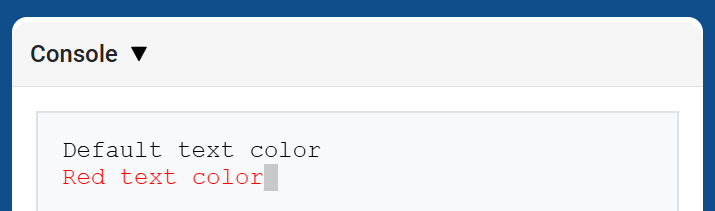
brain.set_print_color ορίζει το χρώμα που χρησιμοποιείται για το κείμενο που εκτυπώνεται στην Κονσόλα μετά τη χρήση αυτής της μεθόδου. Στην αρχή ενός έργου, το χρώμα κειμένου της Κονσόλας ορίζεται σε BLACK.
Usage:
brain.set_print_color(color)
Παράμετροι |
Περιγραφή |
|---|---|
|
Το χρώμα που θα χρησιμοποιηθεί για το κείμενο που εκτυπώνεται στην Κονσόλα:
|
def main():
    # Print text in different colors
    brain.print("Default text color")
    brain.new_line()
    brain.set_print_color(RED)
    brain.print("Red text color")

# VR threads — Do not delete
vr_thread(main)
εγκέφαλος.καθαρός#
brain.clear διαγράφει όλες τις γραμμές από την Κονσόλα και μετακινεί τον κέρσορα πίσω στη Γραμμή 1.
Usage:
brain.clear()
Παράμετροι |
Περιγραφή |
|---|---|
Αυτή η μέθοδος δεν έχει παραμέτρους. |
def main():
    # Display text, then clear it after two seconds
    brain.print("This will disappear...")
    wait(2, SECONDS)
    brain.clear()

# VR threads — Do not delete
vr_thread(main)
Ελεγκτής εκπομπών#
μεταβλητή_παρακολούθησης#
monitor_variable προσθέτει μία ή περισσότερες προκαθορισμένες μεταβλητές στην καρτέλα Monitor στο VEXcode. Αυτό σας επιτρέπει να παρακολουθείτε την αλλαγή της τιμής μιας μεταβλητής ενώ εκτελείται ένα έργο.
Οι μεταβλητές πρέπει να είναι καθολικές για να είναι δυνατή η επιτυχής παρακολούθησή τους από την παράμετρο monitor_variable Δώστε το όνομα κάθε μεταβλητής ως συμβολοσειρά.
Usage:
monitor_variable(“variable”)
monitor_variable(“variable1”, “variable2”)
Παράμετροι |
Περιγραφή |
|---|---|
|
Το όνομα μιας προκαθορισμένης καθολικής μεταβλητής προς παρακολούθηση, που δίνεται ως συμβολοσειρά. Για να παρακολουθείτε περισσότερες από μία μεταβλητές, διαχωρίστε κάθε όνομα μεταβλητής με κόμμα. |
def main():
    # Monitor the amount of loops
    global loops
    monitor_variable("loops")

    # Drive forward 3 times
    for loops in range(3):
        drivetrain.drive_for(FORWARD, 200, MM)

# VR threads — Do not delete
vr_thread(main)
αισθητήρας_παρακολούθησης#
monitor_sensor προσθέτει μία ή περισσότερες τιμές αισθητήρων στην καρτέλα Monitor στο VEXcode. Αυτό σας επιτρέπει να παρακολουθείτε τις τιμές αισθητήρων να αλλάζουν ενώ εκτελείται ένα έργο.
Παρέχετε κάθε τιμή αισθητήρα ως συμβολοσειρά.
Usage:
monitor_sensor(“sensor”)
monitor_sensor(“sensor1”, “sensor2”)
Παράμετροι |
Περιγραφή |
|---|---|
|
Η τιμή αισθητήρα που θα παρακολουθείται, δίνεται ως συμβολοσειρά. Για να παρακολουθείτε περισσότερες από μία τιμές αισθητήρα, διαχωρίστε κάθε τιμή αισθητήρα με κόμμα. Τα υποστηριζόμενα αναγνωριστικά αισθητήρων περιλαμβάνουν:
|
def main():
    # Monitor the rover's battery
    monitor_sensor("rover.battery")
    drivetrain.drive_for(FORWARD, 200, MM)

# VR threads — Do not delete
vr_thread(main)
Εξεύρεση της φόρας#
Απόσταση#
βρέθηκε_αντικείμενο#
Η συνάρτηση found_object επιστρέφει εάν ο αισθητήρας απόστασης ανιχνεύει ένα αντικείμενο.
Usage:
distance.found_object()
Παράμετροι |
Περιγραφή |
|---|---|
Αυτή η μέθοδος δεν έχει παραμέτρους. |
def main():
    if distance.found_object():
        brain.screen.print("Object detected")

# VR threads — Do not delete
vr_thread(main)
get_distance#
get_distance επιστρέφει την απόσταση από το πλησιέστερο ανιχνευμένο αντικείμενο από τον αισθητήρα απόστασης.
Usage:
distance.get_distance(units)
Παράμετροι |
Περιγραφή |
|---|---|
|
Η μονάδα απόστασης: |
def main():
    brain.screen.print(distance.get_distance(MM))

# VR threads — Do not delete
vr_thread(main)
Ενέργειες#
Ενέργειες#
βελτίωση#
pickup μαζεύει ορυκτά.
Usage:
rover.pickup(object)
Παράμετροι |
Περιγραφή |
|---|---|
|
Το αντικείμενο που μπορεί να εντοπίσει το VR Rover:
|
def main():
    rover.pickup(MINERALS)

# VR threads — Do not delete
vr_thread(main)
πτώση#
drop σταγόνα μετέφερε μέταλλα.
Usage:
rover.drop(object)
Παράμετροι |
Περιγραφή |
|---|---|
|
Το αντικείμενο που μπορεί να ρίξει το VR Rover:
|
def main():
    rover.drop(MINERALS)

# VR threads — Do not delete
vr_thread(main)
χρήση#
use χρησιμοποιεί ορυκτά για την αποκατάσταση ενέργειας. Τα ορυκτά πρέπει να βρίσκονται στο έδαφος για να χρησιμοποιηθούν.
Usage:
rover.use(object)
Παράμετροι |
Περιγραφή |
|---|---|
|
Το αντικείμενο που μπορεί να χρησιμοποιήσει το VR Rover:
|
def main():
    rover.use(MINERALS)

# VR threads — Do not delete
vr_thread(main)
απορρόφηση_ακτινοβολίας#
absorb_radiation απορροφά ακτινοβολία από έναν εχθρό.
Usage:
rover.absorb_radiation(object)
Παράμετροι |
Περιγραφή |
|---|---|
|
Το αντικείμενο από το οποίο το VR Rover μπορεί να απορροφήσει ακτινοβολία από:
|
def main():
    rover.absorb_radiation(ENEMY)

# VR threads — Do not delete
vr_thread(main)
αναμονή#
standby θέτει το VR Rover σε λειτουργία αναμονής μέχρι να επιτευχθεί το καθορισμένο όριο μπαταρίας.
Usage:
rover.standby(percent)
Παράμετροι |
Περιγραφή |
|---|---|
|
Το όριο μπαταρίας που προκαλεί την έξοδο του VR Rover από την κατάσταση αναμονής, από |
Εάν το επιλεγμένο όριο είναι ίσο ή υψηλότερο από το τρέχον επίπεδο μπαταρίας, το VR Rover δεν θα εισέλθει σε λειτουργία αναμονής.
def main():
    rover.standby(50)

# VR threads — Do not delete
vr_thread(main)
Αποκτητές#
γωνία#
Η γωνία angle επιστρέφει την κατεύθυνση σε μοίρες προς το επιλεγμένο αντικείμενο.
Usage:
rover.angle(object)
Παράμετροι |
Περιγραφή |
|---|---|
|
Το αντικείμενο που πρέπει να αναφέρει την κατεύθυνση:
|
Για ορυκτά και εχθρούς, το αντικείμενο πρέπει να βρίσκεται εντός 1000 mm και εντός του οπτικού πεδίου του VR Rover. Η βάση μπορεί πάντα να αναφερθεί.
def main():
    brain.screen.print(rover.angle(MINERALS))

# VR threads — Do not delete
vr_thread(main)
get_distance#
get_distance επιστρέφει την απόσταση από το VR Rover μέχρι το επιλεγμένο αντικείμενο.
Usage:
rover.get_distance(object, units=MM)
Παράμετροι |
Περιγραφή |
|---|---|
|
Το αντικείμενο προς αναφορά απόστασης:
|
|
Προαιρετικά. Η μονάδα που χρησιμοποιείται για την αναφορά της απόστασης: |
Για ορυκτά και εχθρούς, το αντικείμενο πρέπει να βρίσκεται εντός 1000 mm και εντός του οπτικού πεδίου του VR Rover. Η βάση μπορεί πάντα να αναφερθεί.
Για εμπόδια και κινδύνους, η μέθοδος αναφέρει την απόσταση του ορατού αντικειμένου. Εάν δεν υπάρχει κανένα αντικείμενο στο οπτικό πεδίο, επιστρέφει 1000 mm ή 39.37 ίντσες.
def main():
    brain.screen.print(rover.get_distance(MINERALS, MM))

# VR threads — Do not delete
vr_thread(main)
τοποθεσία#
location επιστρέφει τη θέση συντεταγμένων X ή Y του επιλεγμένου αντικειμένου.
Usage:
rover.location(object, axis, units)
Παράμετροι |
Περιγραφή |
|---|---|
|
Το αντικείμενο για την αναφορά της θέσης:
|
|
Ποια συντεταγμένη θα επιστραφεί:
|
|
Η μονάδα που χρησιμοποιείται για την αναφορά της τοποθεσίας: |
Για ορυκτά και εχθρούς, το αντικείμενο πρέπει να βρίσκεται εντός 1000 mm και εντός του οπτικού πεδίου του VR Rover. Η βάση μπορεί πάντα να αναφερθεί.
def main():
    brain.screen.print(rover.location(MINERALS, X, MM))

# VR threads — Do not delete
vr_thread(main)
μπαταρία#
battery επιστρέφει το τρέχον επίπεδο μπαταρίας του VR Rover.
Usage:
rover.battery()
Παράμετροι |
Περιγραφή |
|---|---|
Αυτή η μέθοδος δεν έχει παραμέτρους. |
def main():
    brain.screen.print(rover.battery())

# VR threads — Do not delete
vr_thread(main)
ορυκτά_αποθηκευμένα#
minerals_stored επιστρέφει την τρέχουσα ποσότητα ορυκτών που έχει αποθηκευμένο το VR Rover.
Usage:
rover.minerals_stored()
Παράμετροι |
Περιγραφή |
|---|---|
Αυτή η μέθοδος δεν έχει παραμέτρους. |
def main():
    brain.screen.print(rover.minerals_stored())

# VR threads — Do not delete
vr_thread(main)
χωρητικότητα_αποθήκευσης#
storage_capacity επιστρέφει τη χωρητικότητα μεταφοράς του VR Rover.
Usage:
rover.storage_capacity()
Παράμετροι |
Περιγραφή |
|---|---|
Αυτή η μέθοδος δεν έχει παραμέτρους. |
def main():
    brain.screen.print(rover.storage_capacity())

# VR threads — Do not delete
vr_thread(main)
επίπεδο#
Το επίπεδο level επιστρέφει το τρέχον επίπεδο του VR Rover.
Usage:
rover.level()
Παράμετροι |
Περιγραφή |
|---|---|
Αυτή η μέθοδος δεν έχει παραμέτρους. |
def main():
    brain.screen.print(rover.level())

# VR threads — Do not delete
vr_thread(main)
εμπειρία#
Η συνάρτηση exp επιστρέφει τον αριθμό των Πόντων Εμπειρίας που έχει το VR Rover στο τρέχον επίπεδο.
Usage:
rover.exp()
Παράμετροι |
Περιγραφή |
|---|---|
Αυτή η μέθοδος δεν έχει παραμέτρους. |
def main():
    brain.screen.print(rover.exp())

# VR threads — Do not delete
vr_thread(main)
επίπεδο_εχθρού#
enemy_level επιστρέφει το επίπεδο του πλησιέστερου εχθρού που ανιχνεύεται από το VR Rover.
Usage:
rover.enemy_level()
Παράμετροι |
Περιγραφή |
|---|---|
Αυτή η μέθοδος δεν έχει παραμέτρους. |
Όταν δεν ανιχνεύεται εχθρός εντός της ακτίνας ανίχνευσης του ρόβερ, αυτή η μέθοδος επιστρέφει 0.
def main():
    brain.screen.print(rover.enemy_level())

# VR threads — Do not delete
vr_thread(main)
εχθρική_ακτινοβολία#
enemy_radiation επιστρέφει την ακτινοβολία του πλησιέστερου εχθρού που ανιχνεύεται από το VR Rover.
Usage:
rover.enemy_radiation()
Παράμετροι |
Περιγραφή |
|---|---|
Αυτή η μέθοδος δεν έχει παραμέτρους. |
Όταν δεν ανιχνεύεται εχθρός εντός της ακτίνας ανίχνευσης του ρόβερ, αυτή η μέθοδος επιστρέφει 0.
def main():
    brain.screen.print(rover.enemy_radiation())

# VR threads — Do not delete
vr_thread(main)
ανιχνεύει#
detects επιστρέφει εάν το VR Rover ανιχνεύει ορυκτά ή εχθρούς στην ακτίνα ανίχνευσής του.
Usage:
rover.detects(object)
Παράμετροι |
Περιγραφή |
|---|---|
|
Το αντικείμενο προς ανίχνευση:
|
Η ακτίνα ανίχνευσης του VR Rover είναι 800 mm.
def main():
    if rover.detects(MINERALS):
        brain.screen.print("Minerals detected")

# VR threads — Do not delete
vr_thread(main)
βλέπει#
sees επιστρέφει εάν το VR Rover βλέπει το επιλεγμένο αντικείμενο στην εμβέλεια ορατότητάς του.
Usage:
rover.sees(object)
Παράμετροι |
Περιγραφή |
|---|---|
|
Το αντικείμενο που πρέπει να δείτε:
|
Το VR Rover μπορεί να δει αντικείμενα σε απόσταση 1000 mm και εντός του οπτικού πεδίου 40 μοιρών.
def main():
    if rover.sees(MINERALS):
        brain.screen.print("Minerals in view")

# VR threads — Do not delete
vr_thread(main)
υπό_επίθεση#
under_attack επιστρέφει εάν το VR Rover δέχεται επίθεση από εχθρό.
Usage:
rover.under_attack()
Παράμετροι |
Περιγραφή |
|---|---|
Αυτή η μέθοδος δεν έχει παραμέτρους. |
def main():
    if rover.under_attack():
        brain.screen.print("The rover is under attack!")

# VR threads — Do not delete
vr_thread(main)
Επανακλήσεις#
σε_επίθεση_#
on_under_attack καταγράφει μια συνάρτηση επανάκλησης που εκτελείται όταν το VR Rover δέχεται ζημιά από έναν εχθρό.
Usage:
rover.on_under_attack(callback)
Παράμετροι |
Περιγραφή |
|---|---|
|
Η συνάρτηση που θα εκτελείται όταν το VR Rover δέχεται επίθεση. |
def under_attack():
    brain.screen.print("The rover is under attack!")

def main():
    rover.on_under_attack(under_attack)
    wait(0.15, SECONDS)

# VR threads — Do not delete
vr_thread(main)
σε_επίπεδο_ανώτερο#
on_level_up καταχωρεί μια συνάρτηση επανάκλησης που εκτελείται όταν το VR Rover μετακινείται από το ένα επίπεδο στο επόμενο.
Usage:
rover.on_level_up(callback)
Παράμετροι |
Περιγραφή |
|---|---|
|
Η συνάρτηση που θα εκτελεστεί όταν το VR Rover ανέβει επίπεδο. |
def level_up():
    brain.screen.print("The rover leveled up!")

def main():
    rover.on_level_up(level_up)
    wait(0.15, SECONDS)

# VR threads — Do not delete
vr_thread(main)