
തോന്നുന്നു#
പേന#
pen.move#
VR പേനയുടെ സ്ഥാനം സജ്ജീകരിക്കാൻ pen.move(action) രീതി ഉപയോഗിക്കുന്നു.
ഇതൊരു നോൺ-വെയിറ്റിംഗ് രീതിയാണ്, തുടർന്നുള്ള ഏത് രീതികളും കാലതാമസമില്ലാതെ നടപ്പിലാക്കാൻ ഇത് അനുവദിക്കുന്നു.
പാരാമീറ്ററുകൾ |
വിവരണം |
|---|---|
|
VR പേനയുടെ സെറ്റ് സ്ഥാനം |
റിട്ടേണുകൾ: ഒന്നുമില്ല.
UP- കളിസ്ഥലത്ത് പേന ഒരു രേഖ വരയ്ക്കില്ല.DOWN- പേന കളിസ്ഥലത്ത് ഒരു നിറമുള്ള വര വരയ്ക്കും.
def main():
    # Position the VR Pen down.
    pen.move(DOWN)
    # Move forward for 400 mm to draw a line.
    drivetrain.drive_for(FORWARD, 400, MM)
pen.set_pen_color#
VR പേനയുടെ നിറം സജ്ജമാക്കാൻ pen.set_pen_color(color) രീതി ഉപയോഗിക്കുന്നു.
ഇതൊരു നോൺ-വെയിറ്റിംഗ് രീതിയാണ്, തുടർന്നുള്ള ഏത് രീതികളും കാലതാമസമില്ലാതെ നടപ്പിലാക്കാൻ ഇത് അനുവദിക്കുന്നു.
പാരാമീറ്ററുകൾ |
വിവരണം |
|---|---|
|
VR പേനയുടെ നിറം: |
റിട്ടേണുകൾ: ഒന്നുമില്ല.
def main():
    # Move the VR Pen down.
    pen.move(DOWN)
    # Set the VR Pen color to blue.
    pen.set_pen_color(BLUE)
    # Drive forward for 400 mm to draw a line.
    drivetrain.drive_for(FORWARD, 400, MM)
pen.set_pen_width#
VR പേനയുടെ വീതി സജ്ജമാക്കാൻ pen.set_pen_width(width) രീതി ഉപയോഗിക്കുന്നു.
ഇതൊരു നോൺ-വെയിറ്റിംഗ് രീതിയാണ്, തുടർന്നുള്ള ഏത് രീതികളും കാലതാമസമില്ലാതെ നടപ്പിലാക്കാൻ ഇത് അനുവദിക്കുന്നു.
പാരാമീറ്ററുകൾ |
വിവരണം |
|---|---|
|
VR പേനയുടെ വീതി: |
റിട്ടേണുകൾ: ഒന്നുമില്ല.
ഡിഫോൾട്ട് VR പേനയുടെ വീതി THIN ആണ്.
def main():
    # Move the VR Pen down.
    pen.move(DOWN)
    # Set the VR Pen's width to medium.
    pen.set_pen_width(MEDIUM)
    # Drive forward for 400 mm to draw a line.
    drivetrain.drive_for(FORWARD, 400, MM)
pen.set_pen_color_rgb#
VR പേനയുടെ നിറത്തിന് RGB മൂല്യം സജ്ജമാക്കാൻ pen.set_pen_color_rgb(red, green, blue, opacity) രീതി ഉപയോഗിക്കുന്നു.
ഇതൊരു നോൺ-വെയിറ്റിംഗ് രീതിയാണ്, തുടർന്നുള്ള ഏത് രീതികളും കാലതാമസമില്ലാതെ നടപ്പിലാക്കാൻ ഇത് അനുവദിക്കുന്നു.
പാരാമീറ്ററുകൾ |
വിവരണം |
|---|---|
|
RGB മൂല്യത്തിൽ ചുവപ്പ് നിറത്തിന്റെ തീവ്രത 0 മുതൽ 255 വരെയാണ്. |
|
RGB മൂല്യത്തിൽ പച്ച നിറത്തിന്റെ തീവ്രത, 0 മുതൽ 255 വരെയാണ്. |
|
RGB മൂല്യത്തിൽ നീല നിറത്തിന്റെ തീവ്രത, 0 മുതൽ 255 വരെയാണ്. |
|
വിആർ പേനയുടെ നിറങ്ങളുടെ സുതാര്യത 0 മുതൽ 100 ശതമാനം വരെയാണ്. |
റിട്ടേണുകൾ: ഒന്നുമില്ല.
def main():
    # Move the VR Pen down.
    pen.move(DOWN)
    # Set the color to orange at full opacity.
    pen.set_pen_color_rgb(225, 112, 52, 100)
    # Drive forward for 400 MM to draw a line.
    drivetrain.drive_for(FORWARD, 400, MM)
pen.fill#
pen.fill(red, green, blue, opacity) രീതി VR പേനയുടെ മുകളിലുള്ള ആകൃതിയിൽ പൂരിപ്പിക്കുന്നു, ഉദാഹരണത്തിന്:
|
|
|
|---|---|---|
ഗ്രിഡ് ലൈനുകൾ |
ഗ്രിഡ് ചതുരം |
ഗ്രിഡ് ഇല്ലാത്ത കളിസ്ഥലങ്ങളിൽ, അത് മുഴുവൻ കളിസ്ഥല നിലയും നിറയ്ക്കും. |
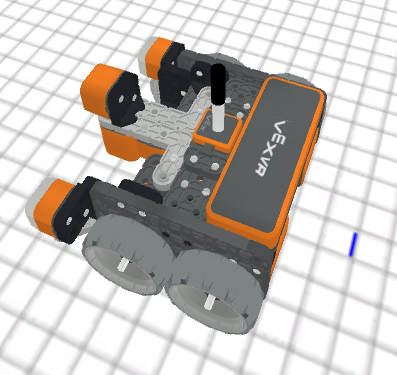
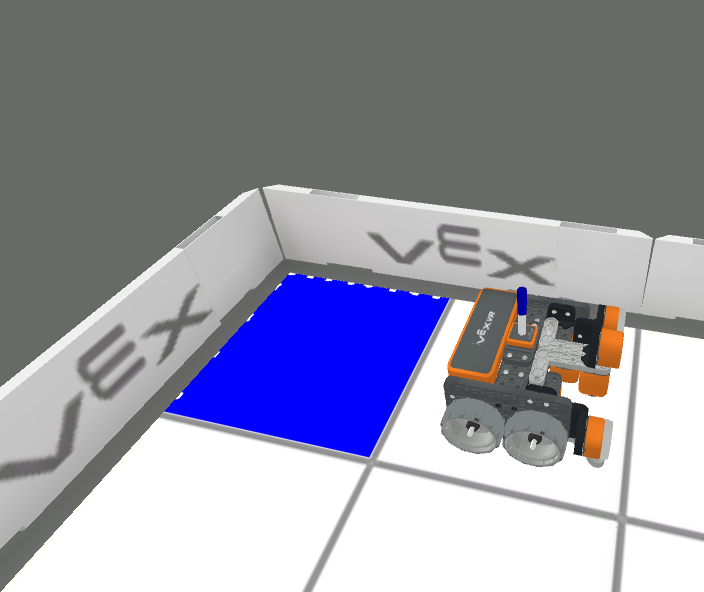
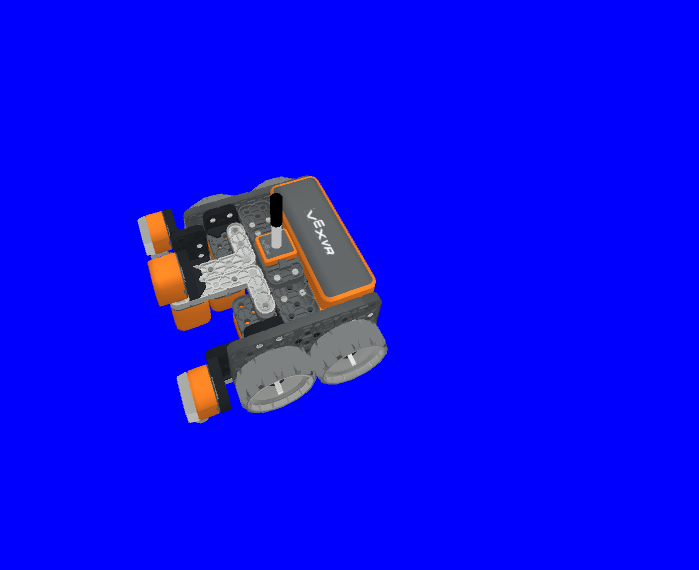
ഇതൊരു നോൺ-വെയിറ്റിംഗ് രീതിയാണ്, തുടർന്നുള്ള ഏത് രീതികളും കാലതാമസമില്ലാതെ നടപ്പിലാക്കാൻ ഇത് അനുവദിക്കുന്നു.
പാരാമീറ്ററുകൾ |
വിവരണം |
|---|---|
|
RGB മൂല്യത്തിൽ ചുവപ്പ് നിറത്തിന്റെ തീവ്രത 0 മുതൽ 255 വരെയാണ്. |
|
RGB മൂല്യത്തിൽ പച്ച നിറത്തിന്റെ തീവ്രത, 0 മുതൽ 255 വരെയാണ്. |
|
RGB മൂല്യത്തിൽ നീല നിറത്തിന്റെ തീവ്രത, 0 മുതൽ 255 വരെയാണ്. |
|
വിആർ പേനയുടെ നിറങ്ങളുടെ സുതാര്യത 0 മുതൽ 100 ശതമാനം വരെയാണ്. |
റിട്ടേണുകൾ: ഒന്നുമില്ല.
def main():
    # Fill the playground's floor with blue at full opacity.
    pen.fill(43, 162, 202, 100)
അച്ചടിക്കുക#
brain.print#
പ്രിന്റ് കൺസോളിലേക്ക് വാക്കുകൾ, അക്കങ്ങൾ, റിപ്പോർട്ട് ചെയ്ത മൂല്യങ്ങൾ എന്നിവ പ്രിന്റ് ചെയ്യാൻ brain.print(value, precision = 0) രീതി ഉപയോഗിക്കുന്നു.
ഇതൊരു നോൺ-വെയിറ്റിംഗ് രീതിയാണ്, തുടർന്നുള്ള ഏത് രീതികളും കാലതാമസമില്ലാതെ നടപ്പിലാക്കാൻ ഇത് അനുവദിക്കുന്നു.
പാരാമീറ്ററുകൾ |
വിവരണം |
|---|---|
|
ഒരു മൂല്യം റിപ്പോർട്ട് ചെയ്യുന്ന ഏതെങ്കിലും വാക്കുകൾ, അക്കങ്ങൾ അല്ലെങ്കിൽ സെൻസറുകൾ. വാക്കുകൾ ഉദ്ധരണി ചിഹ്നങ്ങളിൽ ആയിരിക്കണം: |
|
ഓപ്ഷണൽ. |
റിട്ടേണുകൾ: ഒന്നുമില്ല.
def main():
    # Print the Drivetrain's current heading in degrees with 2 decimal points.
    brain.print("Drivetrain's heading:",
        drivetrain.heading(DEGREES), precision = 2)
brain.clear#
പ്രിന്റ് കൺസോളിലെ എല്ലാ വരികളും മായ്ക്കുന്നതിനും കഴ്സർ ആദ്യ വരിയിലേക്ക് പുനഃസജ്ജമാക്കുന്നതിനും brain.clear() രീതി ഉപയോഗിക്കുന്നു.
ഇതൊരു നോൺ-വെയിറ്റിംഗ് രീതിയാണ്, തുടർന്നുള്ള ഏത് രീതികളും കാലതാമസമില്ലാതെ നടപ്പിലാക്കാൻ ഇത് അനുവദിക്കുന്നു.
റിട്ടേണുകൾ: ഒന്നുമില്ല.
def main():
    # Print "Project has started."
    brain.print("Project has started.")
    # Wait 3 seconds.
    wait(3, SECONDS)
    # Clear the print console.
    brain.clear()
brain.new_line#
പ്രിന്റ് കൺസോളിൽ കഴ്സർ ഒരു പുതിയ വരിയിലേക്ക് സജ്ജമാക്കാൻ brain.new_line() രീതി ഉപയോഗിക്കുന്നു.
ഇതൊരു നോൺ-വെയിറ്റിംഗ് രീതിയാണ്, തുടർന്നുള്ള ഏത് രീതികളും കാലതാമസമില്ലാതെ നടപ്പിലാക്കാൻ ഇത് അനുവദിക്കുന്നു.
റിട്ടേണുകൾ: ഒന്നുമില്ല.
def main():
    # Print "Project has started."
    brain.print("Project has started.")
    # Move the cursor to a new line.
    brain.new_line()
brain.set_print_color#
പ്രിന്റ് കൺസോളിൽ പ്രിന്റ് ചെയ്യുന്ന വാചകത്തിന്റെ നിറം സജ്ജമാക്കാൻ brain.set_print_color(color) രീതി ഉപയോഗിക്കുന്നു.
ഇതൊരു നോൺ-വെയിറ്റിംഗ് രീതിയാണ്, തുടർന്നുള്ള ഏത് രീതികളും കാലതാമസമില്ലാതെ നടപ്പിലാക്കാൻ ഇത് അനുവദിക്കുന്നു.
പാരാമീറ്ററുകൾ |
വിവരണം |
|---|---|
|
പ്രിന്റ് ചെയ്യേണ്ട വാചകത്തിന്റെ നിറം: |
റിട്ടേണുകൾ: ഒന്നുമില്ല.
def main():
    # Set the print text color to red.
    brain.set_print_color(RED)
    # Print a message.
    brain.print("This is red!")
മോണിറ്റർ_വേരിയബിൾ#
മോണിറ്റർ കൺസോളിലേക്ക് വേരിയബിളുകൾ ചേർക്കാൻ monitor_variable(“variable”, …) രീതി ഉപയോഗിക്കുന്നു, അതുവഴി വേരിയബിളുകളുടെ മൂല്യം കാണാനും നിരീക്ഷിക്കാനും കഴിയും.
ഇതൊരു നോൺ-വെയിറ്റിംഗ് രീതിയാണ്, തുടർന്നുള്ള ഏത് രീതികളും കാലതാമസമില്ലാതെ നടപ്പിലാക്കാൻ ഇത് അനുവദിക്കുന്നു.
പാരാമീറ്ററുകൾ |
വിവരണം |
|---|---|
|
മുമ്പ് സജ്ജീകരിച്ച ഏതെങ്കിലും ഗ്ലോബൽ വേരിയബിൾ. |
റിട്ടേണുകൾ: ഒന്നുമില്ല.
# Create global variable.
disk_count = 1

def main():
    # Add disk_count to the Monitor Console.
    monitor_variable("disk_count")
മോണിറ്റർ_സെൻസർ#
സെൻസർ മൂല്യങ്ങൾ നിരീക്ഷിക്കാൻ കഴിയുന്ന തരത്തിൽ മോണിറ്റർ കൺസോളിലേക്ക് സെൻസറുകൾ ചേർക്കാൻ monitor_sensor(“sensor”, …) രീതി ഉപയോഗിക്കുന്നു.
ഇതൊരു നോൺ-വെയിറ്റിംഗ് രീതിയാണ്, തുടർന്നുള്ള ഏത് രീതികളും കാലതാമസമില്ലാതെ നടപ്പിലാക്കാൻ ഇത് അനുവദിക്കുന്നു.
പാരാമീറ്ററുകൾ |
വിവരണം |
|---|---|
|
പിന്തുണയ്ക്കുന്ന ഏതെങ്കിലും സെൻസർ ഐഡന്റിഫയർ. |
റിട്ടേണുകൾ: ഒന്നുമില്ല.
പിന്തുണയ്ക്കുന്ന സെൻസർ ഐഡന്റിഫയറുകൾ:
brain.timer.timedrivetrain.is_donedrivetrain.is_movingdrivetrain.headingdrivetrain.rotationdrivetrain.velocity_rpmdrivetrain.velocity_percentarm_motor.is_donearm_motor.is_spinningarm_motor.position_degreesarm_motor.position_turnsarm_motor.velocity_rpmarm_motor.velocity_percentarm_motor_group.is_donearm_motor_group.is_spinningarm_motor_group.position_degreesarm_motor_group.position_turnsarm_motor_group.velocity_rpmarm_motor_group.velocity_percentintake_motor.is_doneintake_motor.is_spinningintake_motor.position_degreesintake_motor.position_turnsintake_motor.velocity_rpmintake_motor.velocity_percentintake_motor_group.is_doneintake_motor_group.is_spinningintake_motor_group.position_degreesintake_motor_group.position_turnsintake_motor_group.velocity_rpmintake_motor_group.velocity_percentcatapult_motor.is_donecatapult_motor.is_spinningcatapult_motor.position_degreescatapult_motor.position_turnscatapult_motor.velocity_rpmcatapult_motor.velocity_percentcatapult_tension_motor.is_donecatapult_tension_motor.is_spinningcatapult_tension_motor.position_degreescatapult_tension_motor.position_turnscatapult_tension_motor.velocity_rpmcatapult_tension_motor.velocity_percentintake_bumper.pressingbumper.pressingfront_distance.is_object_detectedfront_distance.object_distance_mmfront_distance.object_distance_inchesfront_optical.is_near_objectfront_optical.colorfront_optical.brightnessfront_optical.huecolor.is_near_objectcolor.colorcolor.brightnesscolor.hue
def main():
    # Add the VR Robot's positional coordinates to the monitor console.
    monitor_sensor("location.position")